


The SMB Automation Paradox: Why Smaller Teams Succeed More Often
There is a persistent assumption in the business software market that larger organizations have the resources, expertise, and leverage to extract more value from automation. The data tells a different story. According to research cited by DocuClipper, smaller businesses that adopt workflow automation report a 65% success rate, compared to 55% for large enterprises. That ten-point gap is not a statistical fluke — it reflects a structural advantage that smaller teams can exploit when they choose tools built for their actual scale.
Why do SMBs outperform enterprises on automation success? The primary drivers are speed of decision-making and organizational adaptability. A 15-person team can evaluate, purchase, and deploy a document workflow tool in a matter of weeks. An enterprise with 500+ users must navigate procurement cycles, security reviews, compliance audits, and change management programs that stretch deployment timelines to 8–16 weeks or longer — a timeline that the ZiaSign comparison notes is standard for enterprise-class tools like DocuSign CLM and Ironclad. By the time the enterprise goes live, the SMB has already iterated on its workflows and is seeing measurable returns.
This paradox is the central reason why a one-size-fits-all approach to document workflow automation fails. The tool that powers a 200-person legal department's contract lifecycle management will drown a 10-person sales team in complexity and cost. Conversely, the lightweight e-signature tool that works perfectly for a freelance consultant will lack the audit trails, conditional logic, and API integrations that a 50-person operations team needs to scale.
The core thesis of this comparison is straightforward: right-sizing the tool matters more than raw feature count. A tool that matches your team size, document volume, and compliance requirements will deliver higher success rates than a more powerful platform that exceeds your operational capacity to manage it. The sections that follow map the document workflow automation landscape by team scale, not by vendor marketing categories, so you can identify where you sit before evaluating which tool fits.
What Changes at Different Team Scales
Document workflow requirements shift dramatically as teams grow. A solo freelancer and a 200-person enterprise face fundamentally different problems, even though both need to send documents for signature and track approvals. Understanding where your team falls on this spectrum is the first step toward choosing a tool that fits — and avoiding one that does not.
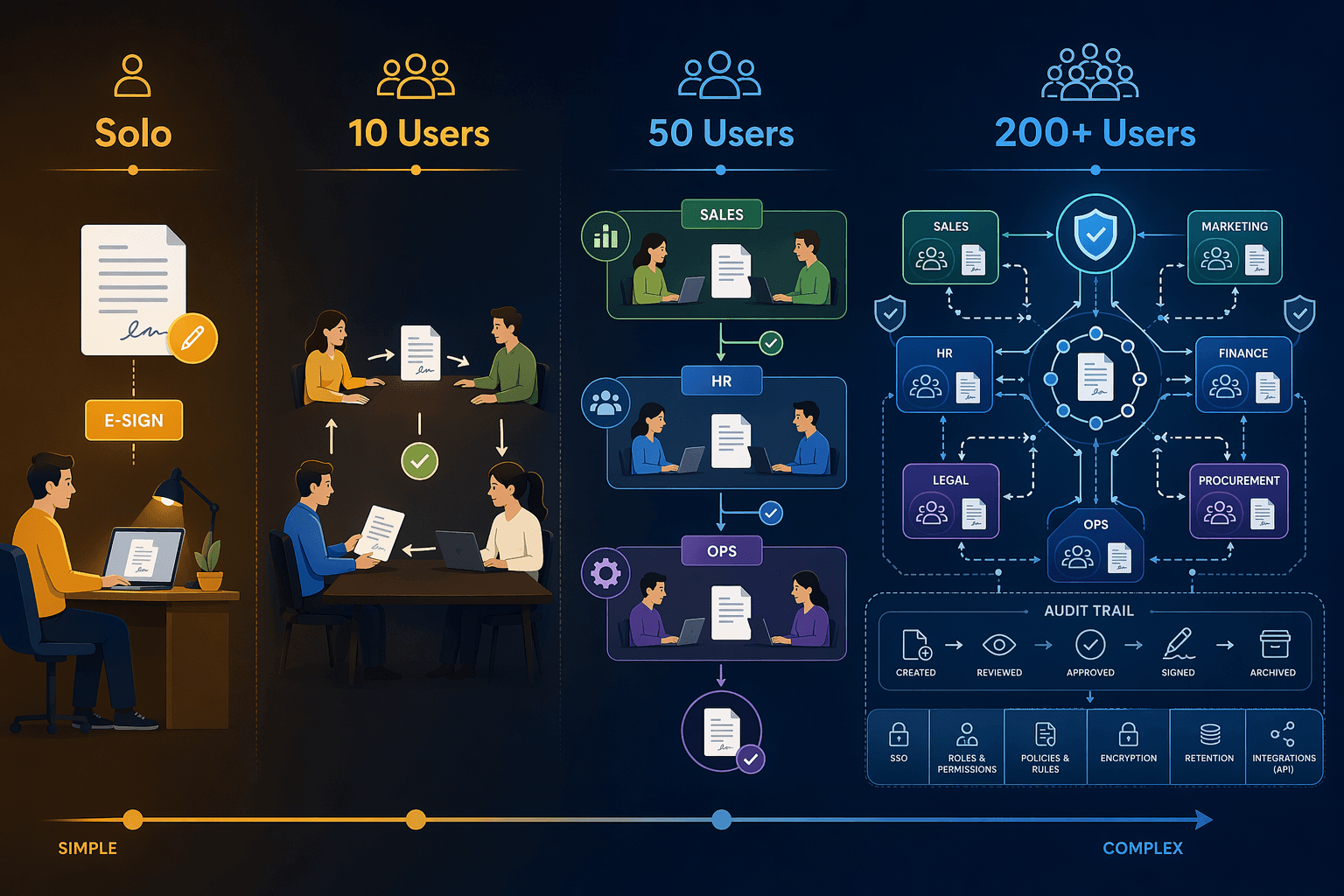
Scenario 1: Solo / Freelancer (1 user)
A solo operator sends a handful of contracts or proposals per week. The primary need is simple: send a document, get it signed, store the signed copy. There is no approval chain, no multi-department routing, and no compliance framework beyond basic record-keeping. Document volume is low — typically under 50 documents per month. Integration requirements are minimal; email-based sending and a PDF export cover most needs.
- Typical document volume: 10–50 per month
- Approval complexity: None (single-party send)
- Compliance needs: Basic record retention
- Integration requirements: Email + cloud storage
- Budget tolerance: $0–$20/month total
Scenario 2: Small Team (~10 users)
A small business with 5–15 employees typically has one or two people responsible for sending documents — often an office manager, a founder, or a sales lead. Documents need basic approval routing (manager reviews before sending), and the team benefits from reusable templates to avoid recreating common contracts. E-signature is essential, but the team does not need advanced features like conditional logic, sandbox environments, or dedicated API access. Document volume ranges from 50 to 200 per month.
- Typical document volume: 50–200 per month
- Approval complexity: Single-level review before sending
- Compliance needs: Basic audit trail, signature verification
- Integration requirements: CRM or cloud storage sync
- Budget tolerance: $15–$25/user/month
Scenario 3: Growing Mid-Market (~50 users)
At 30–80 users, document workflows become departmental. Sales sends proposals, HR sends offer letters and onboarding packets, and operations manages vendor contracts. Each department has its own templates, approval chains, and compliance requirements. Conditional logic — where the document changes based on recipient responses — becomes valuable. API access for integrating with CRM, HRIS, and accounting platforms is no longer optional; it is the difference between a tool that fits and one that creates manual data entry work. Document volume can reach 500–2,000 per month across departments.
- Typical document volume: 500–2,000 per month
- Approval complexity: Multi-level, department-specific routing
- Compliance needs: Full audit trails, role-based access, retention policies
- Integration requirements: REST API, webhooks, CRM/HRIS/ERP sync
- Budget tolerance: $20–$50/user/month
Scenario 4: Enterprise (200+ users)
Enterprises with 200+ users operate under a different set of constraints entirely. Document volume can exceed 10,000 per month. Compliance requirements include SOC 2, HIPAA, GDPR, and industry-specific regulations. Contract lifecycle management — from drafting and negotiation through approval, execution, and renewal — becomes a core business process. Dedicated IT and legal teams manage the tool. Custom branding, sandbox environments for testing, and advanced role-based access controls are non-negotiable. The onboarding process alone can take 8–16 weeks, as noted in the ZiaSign comparison for tools like DocuSign CLM and Ironclad.
- Typical document volume: 5,000–50,000+ per month
- Approval complexity: Multi-department, multi-stage with negotiation workflows
- Compliance needs: SOC 2, HIPAA, GDPR, FedRAMP, custom retention
- Integration requirements: Full CLM platform, ERP, CRM, custom APIs
- Budget tolerance: $60–$150+/user/month (custom pricing)
Document Workflow Tool Tier Map: Free/Entry-Level, Mid-Market, and Enterprise
The document workflow automation market spans a wide pricing and capability range. The table below maps representative tools to the three tiers that correspond to the team-size scenarios above. Pricing data is drawn from published sources as of mid-2026; enterprise contract pricing may differ significantly from advertised rates.
| Tier | Price Range | Representative Tools | Key Capabilities | Best For |
|---|---|---|---|---|
| Free / Entry-Level | $0–$20/user/month | ZiaSign Pro, Dropbox Sign, Jotform Sign | Unlimited e-signatures, basic templates, no-code workflow builder, email-based sending | Solo users and small teams (1–15 users) with simple document workflows |
| Mid-Market | $20–$50/user/month | PandaDoc, Formstack Sign | Conditional logic, REST API access, webhooks, full audit trails, multi-level approvals, CRM integrations | Growing teams (15–80 users) with departmental workflows and integration needs |
| Enterprise | $50+/user/month (custom) | DocuSign CLM, Ironclad, Nintex DocGen | Full contract lifecycle management, sandbox environments, advanced compliance (SOC 2, HIPAA), custom branding, dedicated support, 8–16 week onboarding | Large organizations (200+ users) with complex compliance, legal, and procurement workflows |
Several patterns emerge from this tier map. First, the entry-level tier has matured significantly. Tools like ZiaSign Pro at $15/user/month and Dropbox Sign offer unlimited e-signatures and basic templates — capabilities that would have required a mid-market tool five years ago. For teams under 15 users, these tools cover the vast majority of document workflow needs without the complexity or cost of higher tiers.
Second, the jump from entry-level to mid-market is primarily about integration and conditional logic, not e-signature volume. If your team needs documents to route differently based on contract value, recipient role, or department — or if you need documents to flow automatically from your CRM — the mid-market tier is where those capabilities become available. The ZiaSign comparison notes that tools offering REST APIs with webhooks and OAuth authentication reported up to 45% fewer manual document touches, which directly translates to time savings for mid-market teams.
Third, the enterprise tier is not simply a more expensive version of the mid-market tier. It is a fundamentally different category of software — contract lifecycle management (CLM) platforms that manage the entire contract lifecycle, not just document generation and signature. The 8–16 week onboarding cycle for DocuSign CLM and Ironclad reflects the complexity of configuring these platforms for an organization's specific legal, procurement, and compliance workflows. For teams under 50 users, this level of investment is almost always overkill.
For a broader look at general process automation tools — including Zapier, Make, and n8n — see our comparison of process automation tools for small business vs. enterprise. That article covers workflow automation platforms that connect apps and automate tasks, while this piece focuses specifically on document-centric automation tools.
Features to Pay For vs. Features to Skip at Each Tier
One of the most common mistakes teams make when selecting document workflow automation tools is paying for capabilities they will never use. The inverse is equally problematic: skipping a tool because it lacks a feature that sounds advanced but is actually essential for your scale. The following guide breaks down which features justify their cost at each tier and which are safe to deprioritize.
Free / Entry-Level Tier ($0–$20/user/month)
Worth paying for:
- Native e-signature — Tools with built-in signing reduce signer drop-off by 23–31% compared to third-party connectors, according to the ZiaSign comparison. This alone justifies the per-user cost for most small teams.
- Unlimited templates — If you send the same types of documents repeatedly (proposals, contracts, intake forms), template support saves hours per week. Most entry-level tools include this.
- No-code workflow builder — The ability to set up a basic approval flow (send → review → sign) without developer involvement is a core value driver for non-technical teams.
Safe to skip:
- Advanced CLM features — Contract lifecycle management, clause libraries, and negotiation workspaces are designed for legal departments managing thousands of contracts. A 10-person team does not need them.
- Sandbox environments — Testing environments for workflow changes are valuable for regulated enterprises but add unnecessary complexity for small teams that can test in production with a small document sample.
- Dedicated support and account management — Email support and a knowledge base are sufficient for entry-level tools. Dedicated support adds $5–$15/user/month with no tangible benefit at this scale.
Mid-Market Tier ($20–$50/user/month)
Worth paying for:
- API access and webhooks — The ability to trigger document workflows from your CRM, HRIS, or accounting platform eliminates manual data entry. The ZiaSign comparison found that tools with REST APIs and webhooks reduced manual document touches by up to 45%.
- Conditional logic — Documents that change based on recipient responses (e.g., a contract that adds an addendum for international clients) save significant time and reduce errors in multi-department workflows.
- Full audit trails — For teams in regulated industries or those handling sensitive data, complete audit trails with timestamps and IP addresses are non-negotiable for compliance.
Safe to skip:
- Full contract lifecycle management — PandaDoc and Formstack Sign offer document generation and e-signature with some CLM-adjacent features, but they are not CLM platforms. If you do not need clause-level negotiation, automated renewal tracking, and contract repository management, the mid-market tier is sufficient.
- Custom branding beyond logo and colors — Most mid-market tools offer basic branding. Full white-labeling and custom domain configuration are enterprise features that add cost without improving workflow efficiency.
Enterprise Tier ($50+/user/month)
Worth paying for:
- Compliance certifications — SOC 2 Type II, HIPAA, GDPR, and FedRAMP certifications are non-negotiable for enterprises in regulated industries. Entry-level and mid-market tools may not offer the documentation and controls required for audits.
- Role-based access controls — The ability to restrict document access, template editing, and workflow configuration by user role is essential for organizations with 200+ users across multiple departments.
- Sandbox and staging environments — Enterprises need to test workflow changes, API integrations, and template updates in an isolated environment before pushing to production. This is a standard enterprise requirement, not a luxury.
Safe to skip (if you are not enterprise-scale):
- Everything in the enterprise tier — If your team has fewer than 50 users and does not operate in a heavily regulated industry, the enterprise tier is almost certainly overbuilt for your needs. The 8–16 week onboarding cycle alone is a strong signal that these tools are designed for organizations with dedicated implementation teams.
Warning: The Hidden Costs That Blow Your Budget
List price is only the beginning. The ZiaSign 2026 comparison warns that mid-market teams should expect total annual costs to increase 20–40% above list price if automation limits or API calls are capped. This cost overrun is one of the most common sources of buyer's remorse in document workflow automation, and it disproportionately affects teams that choose a tool based on per-user pricing alone without reading the fine print on usage limits.
The most common hidden cost categories include:
- API call caps — Many mid-market tools limit the number of API calls per month. Once your integrations hit that limit, overage charges kick in. A team that automates document generation from its CRM can easily exceed a 10,000-call monthly cap without realizing it.
- Template limits — Some entry-level tools cap the number of saved templates. For teams that maintain separate templates for different contract types, client segments, or departments, hitting a 50-template limit means either deleting old templates or upgrading to a more expensive plan.
- Audit trail gating — Full audit trails with detailed activity logs are often reserved for higher-tier plans. If your compliance requirements demand complete visibility into who viewed, edited, and signed each document, the tool that seemed affordable at the entry-level tier may require a mid-market plan to unlock audit capabilities.
- Per-document e-signature fees — Some tools charge per-envelope or per-document fees on top of per-user subscriptions. For teams sending 500+ documents per month, these fees can add hundreds of dollars to the monthly bill.
- Storage overages — Document storage is often capped at a certain number of documents or total file size. Teams that retain signed contracts for compliance purposes can accumulate storage costs over time.
For a deeper analysis of how pricing scales across different automation tool categories — including per-user, per-document, and per-API-call models — see our pricing analysis for process automation tools at scale. That article breaks down the total cost of ownership for automation platforms and includes a calculator framework for estimating your actual costs.
Decision Framework: How to Choose the Right Tool for Your Team Size
Selecting a document workflow automation tool does not require a formal RFP process. A structured four-step evaluation will surface the right options for your team size and budget.
Step 1: Identify Your Team Size and Document Volume
Use the scenarios in the "What Changes at Different Team Scales" section above to place your team in the correct tier. Be honest about your current volume and your projected volume 12 months from now. A tool that fits at 200 documents per month may become a bottleneck at 500.
Step 2: List Must-Have vs. Nice-to-Have Features
Separate features into three categories: non-negotiable (e.g., native e-signature, compliance certifications), valuable but optional (e.g., conditional logic, API access), and irrelevant (e.g., CLM for a 10-person team). Use the "Features to Pay For vs. Features to Skip" section as your reference. This exercise prevents feature bloat from driving you into a higher tier than you need.
Step 3: Calculate Total Annual Cost Including Overages
For each tool on your shortlist, calculate the total annual cost using this formula:
- (Per-user monthly price × number of users × 12) + estimated annual overages (API calls, storage, per-document fees) + implementation and training costs
Apply the 20–40% overage estimate from the hidden costs section as a conservative buffer for mid-market tools. If the total cost exceeds your budget by more than 20%, consider whether a lower-tier tool with fewer features would still meet your must-have requirements.
Step 4: Test with a Free Trial or Proof-of-Concept
Most tools in the entry-level and mid-market tiers offer free trials. Use the trial to test your actual workflows — not just the vendor's demo templates. Send real documents through the approval chain, test the API integration with your CRM, and have at least two team members use the tool in their daily work before making a decision. For enterprise tools, request a proof-of-concept engagement that mirrors your production environment.
Top 3 Picks per Team Size
The following recommendations are based on the tier map, feature analysis, and cost considerations outlined above. Each pick includes explicit "not for you if" language to help you self-select out of recommendations that do not fit your specific situation.
Best for SMBs (1–15 users): ZiaSign Pro
At $15/user/month with unlimited e-signatures, templates, and a no-code workflow builder, ZiaSign Pro covers the core document workflow needs of small teams without the complexity or cost of higher-tier tools. Its native e-signature reduces signer drop-off by 23–31% compared to tools that rely on third-party signing integrations, according to the ZiaSign comparison. The tool includes basic API access for CRM integration, which is sufficient for most small business workflows.
Not for you if: You need conditional logic, multi-department approval routing, or advanced compliance certifications (SOC 2, HIPAA). For those requirements, step up to the mid-market tier.
Best for Mid-Market (15–80 users): PandaDoc
PandaDoc sits in the $20–$50/user/month range and offers the conditional logic, API access, and full audit trails that growing teams need. Its CRM integrations (Salesforce, HubSpot) and document analytics make it a strong fit for sales-driven organizations that need to track proposal engagement and approval timelines. The platform supports multi-level approval routing, which is essential for teams where documents pass through sales, legal, and finance before being sent.
Not for you if: You need full contract lifecycle management with clause-level negotiation, automated renewal tracking, and a contract repository. PandaDoc is a document automation platform, not a CLM suite. For CLM requirements, evaluate DocuSign CLM or Ironclad.
Best for Enterprise (200+ users): DocuSign CLM
DocuSign CLM is the market leader in enterprise contract lifecycle management for good reason. It offers the compliance certifications (SOC 2, HIPAA, GDPR), role-based access controls, sandbox environments, and custom branding that large organizations require. The platform's 8–16 week onboarding cycle is a signal of its complexity, but for enterprises with dedicated legal and IT teams, the investment pays off through centralized contract management, automated renewal workflows, and integration with ERP and procurement systems.
Not for you if: Your team has fewer than 50 users or you do not have a dedicated legal or IT team to manage the platform. The cost ($80–$150/user/month, custom pricing) and implementation timeline are justified only for organizations that need full CLM capabilities.



Comments
Join the discussion with an anonymous comment.