
Why Most Automation Tool Comparisons Get It Wrong
Walk into any software review site and you will find the same list: Zapier, Make, n8n, Power Automate, UiPath, Workato. The problem is not the tools themselves — it is the framing. Most comparisons treat a 5-person agency and a 500-person enterprise as if they have the same requirements. They do not.
A tool that feels perfect for a startup — cheap, simple, self-serve — can become a liability at scale. The free plan that handled 100 tasks a month now costs $500+ for the same workload. The visual builder that anyone could use now lacks the audit trails your compliance team demands. The single-user account that worked fine for the founder now needs role-based access, SSO, and unattended bot execution.
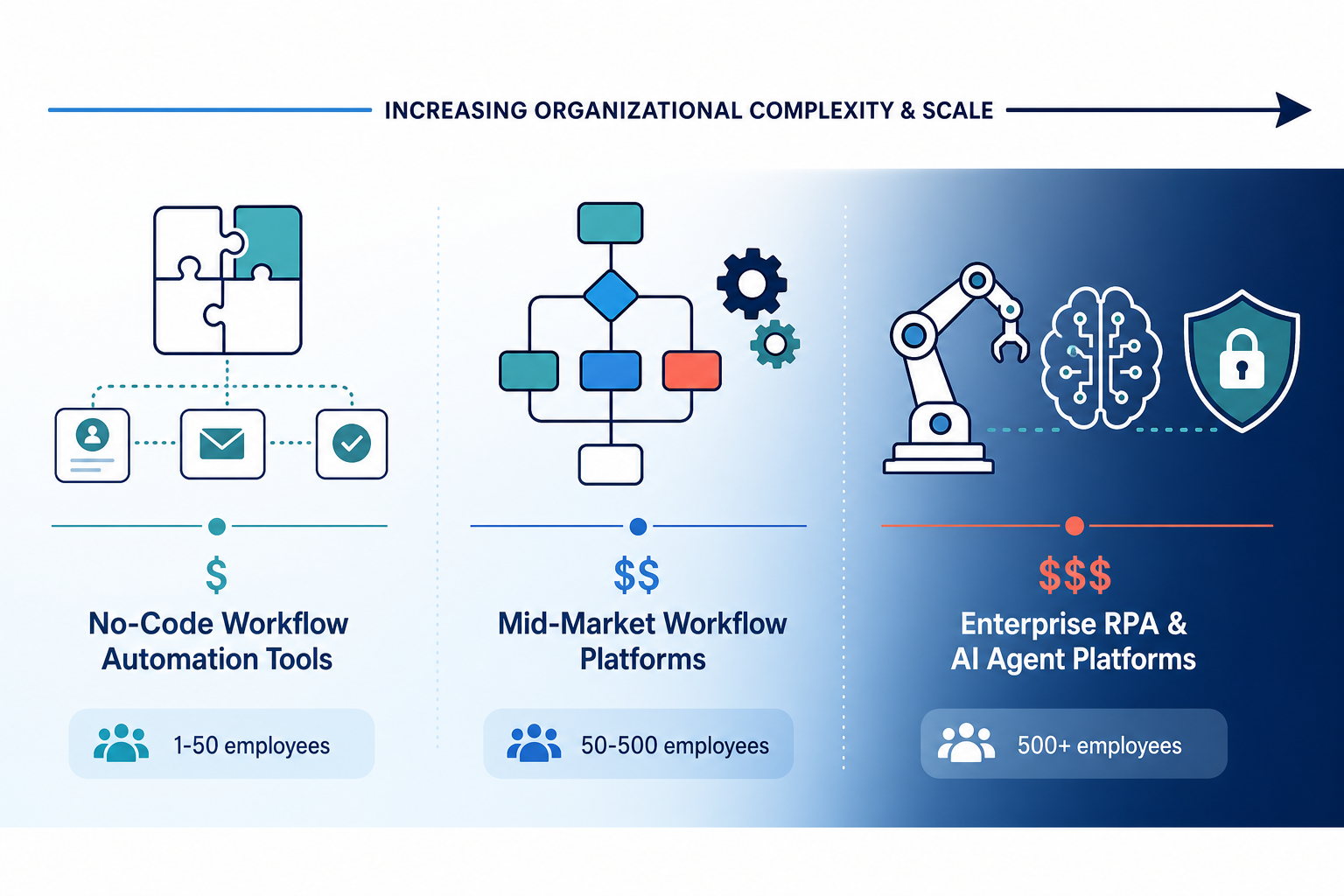
This article organizes process automation tools by the variable that matters most: organizational scale. We break the market into three tiers — small business (1–50 employees), mid-market (50–500), and enterprise (500+) — and map each tool to the tier where it actually fits. The goal is not to declare a single winner. It is to help you find the tool that will still work for you a year from now, when your task volume has doubled and your team has grown.
Small Business Tier (1–50 Employees): Simplicity and Low Entry Pricing
Small teams need automation tools that are cheap, easy to set up, and do not require a dedicated IT department. The good news: this tier has the most competition, which keeps prices low and features generous. The bad news: the same tools that make onboarding frictionless can become expensive or limiting as you grow.
The Contenders
Four tools dominate the small-business conversation, each with a different pricing philosophy:
- Zapier — The most recognizable name in no-code automation. Free plan includes 100 tasks per month. Paid plans start at $29.99/month for the Professional tier. With 7,000+ integrations, it connects almost anything. The catch: task-based pricing becomes punishing at higher volumes. A workflow consuming 100K tasks per month could cost $500+ on Zapier.
- Make — Formerly Integromat. Free plan includes 1,000 operations per month. Paid plans start at $10.59/month for 10,000 operations. Make uses operations-based pricing rather than task-based pricing, which often works out cheaper. It has 1,800+ integrations and is frequently cited as the best balance of power and value for small teams.
- Pabbly Connect — The dark horse. Standard plan costs $16/month and includes unlimited operations. That is a radically different pricing model from Zapier or Make. For a small business processing thousands of tasks per month, Pabbly can be dramatically cheaper. The trade-off: a smaller integration library and a less polished interface.
- Stepper — A newer entrant with a free tier of 200 steps per month and a Pro plan at $19/month for unlimited steps. Stepper is designed for teams that want to build automation without hitting hard caps. It is less established than the others, but its pricing model is friendly to small teams with growing needs.
What Small Businesses Should Watch For
The biggest risk in this tier is outgrowing your tool faster than expected. A Zapier free plan works fine when you are connecting your email to Slack. But when you start automating customer onboarding, invoice processing, and CRM updates, the task count climbs quickly. At that point, you face a choice: upgrade to a more expensive Zapier plan, migrate to a different platform, or accept the cost increase.
For teams that want to avoid that migration pain, Make and Pabbly offer more headroom at similar price points. Make's operations-based pricing means complex multi-step workflows do not consume multiple tasks the way they do on Zapier. Pabbly's unlimited operations model removes the volume anxiety entirely.
Mid-Market Tier (50–500 Employees): Balancing Power and Cost
Mid-market teams have outgrown the simplest tools but are not ready for enterprise pricing. They need conditional logic, error handling, and some form of governance — but they cannot justify $10,000+/year on automation alone. This tier is where the pricing models get interesting, because the wrong choice can cost thousands per month in unnecessary overhead.
The Contenders
- Make (Teams Plan) — At $34.12/month for 10,000 operations, Make scales well into mid-market territory. It supports complex branching, error handling, and sub-scenarios that small-business tools often lack. The visual builder remains intuitive enough that non-technical team members can contribute. Make is frequently cited as the best overall automation platform for power and value in this segment.
- n8n (Cloud) — Open-source with a cloud option. Starter plan at $24/month for 2,500 executions, Pro at $60/month for 10,000 executions. n8n's key advantage is flexibility: you can start on the cloud and migrate to self-hosted later without changing your workflows. It supports 400+ native integrations and has native LangChain support for AI agent workflows. The trade-off is a steeper learning curve than Make.
- Microsoft Power Automate (Premium) — $15/user/month for cloud flows and attended RPA. If your organization already uses Microsoft 365, this is the most natural fit. The deep integration with Azure, SharePoint, and Teams makes it powerful for Microsoft-centric workflows. The catch: per-user pricing adds up fast. A team of 50 users costs $750/month before any process-bot add-ons.
- Pipefy — A business process automation (BPA) platform designed for structured workflows like procurement, HR onboarding, and customer support. Small business tier runs $500–$3,000/month, mid-market $3,000–$10,000/month. Pipefy is not a general-purpose automation tool — it is best for teams that need to automate specific, repeatable business processes with approval chains and compliance tracking.
When to Leave the Small-Business Tools Behind
The transition from small-business to mid-market tools usually happens when three conditions are met: (1) your monthly task volume exceeds 10,000 operations, (2) you need conditional logic or error handling that simple triggers cannot provide, and (3) multiple team members need access with different permission levels.
At this stage, Zapier's task-based pricing becomes a real liability. A mid-market team processing 50,000 tasks per month on Zapier could pay $500+/month. The same workload on Make (operations pricing) or n8n (self-hosted at $0/month) delivers 60–100% cost savings, according to comparative analyses. That is not a marginal difference — it is the difference between automation being a line item and automation being a profit center.
For a detailed head-to-head comparison of Power Automate, Zapier, and Make, including specific use-case recommendations, see our Power Automate vs Zapier vs Make comparison.
Enterprise Tier (500+ Employees): Governance, Compliance, and Unattended Automation
At enterprise scale, the conversation shifts from "what can we automate?" to "how do we automate safely?" Audit trails, role-based access control, SSO, compliance certifications, and unattended execution become non-negotiable. The tools in this tier are not cheap, but the cost of not having them — failed audits, security breaches, compliance fines — is far higher.
The Contenders
- Workato — Enterprise integration platform as a service (iPaaS) with custom pricing typically ranging from $10,000 to $50,000+ per year. Workato provides audit trails, SSO, role-based access, and enterprise-grade governance. It is designed for complex, cross-departmental integrations that require compliance with SOC 2, HIPAA, or GDPR. The platform + usage pricing model means costs scale with volume.
- UiPath — The dominant player in robotic process automation (RPA). Pro plan starts at $420/month for one developer license and three tenants. UiPath excels at unattended automation — bots that run on schedule without human intervention. It is the right choice for automating legacy systems that lack APIs, but the licensing model (per bot, per user) can become expensive at scale.
- Automation Anywhere — Custom pricing, typically requiring a sales conversation. Automation Anywhere competes directly with UiPath on enterprise RPA, with similar capabilities around attended and unattended bots, process discovery, and analytics. It is a strong choice for organizations that need a dedicated automation center of excellence.
- Microsoft Power Automate (Process) — $150/bot/month for unattended RPA, $215/bot/month for hosted process. For organizations already invested in the Microsoft ecosystem, this is the most seamless path to enterprise automation. The Process tier adds unattended bot execution, Dataverse storage, and AI Builder credits. The limitation: it works best within Microsoft-centric environments.
The AI-Native Wildcard
A new category of AI-native platforms — Gumloop, Lindy, and Stepper — is emerging. These tools use large language models to interpret natural language instructions and execute multi-step workflows. Gumloop raised a $50M Series B led by Benchmark in 2025. Lindy offers a Pro plan at $49.99/month for 5,000 credits. These platforms are not yet enterprise-grade in the traditional sense — they lack the audit trails, SSO, and compliance certifications that large organizations require — but they are increasingly serving mid-market teams that want AI capabilities without RPA complexity.
For teams evaluating AI-native tools, the key risk is cost unpredictability. Token-based pricing can spike when workflows process large documents or complex instructions. Our AI workflow automation token cost analysis explains how to evaluate these platforms without getting caught in a cost trap.
Cross-Cutting Comparison Table: Which Tool for Which Team Size?
The table below maps each tool to its best-fit team-size tier, with starting price, pricing model, key limitations at scale, and a 'best for' recommendation. Use this as your primary decision-support artifact.
| Tool | Best-Fit Tier | Starting Price | Pricing Model | Key Limitation at Scale | Best For |
|---|---|---|---|---|---|
| Zapier | Small Business (1–50) | $29.99/month (Pro) | Per task | Task-based pricing becomes expensive above 10K tasks/month | Quick integrations between popular apps |
| Make | Small Business to Mid-Market | $10.59/month (Core) | Per operation | Complex multi-branch scenarios can consume operations fast | Best overall value for growing teams |
| Pabbly Connect | Small Business | $16/month (Standard) | Unlimited operations | Smaller integration library, less polished UI | High-volume workflows on a tight budget |
| Stepper | Small Business | $19/month (Pro) | Unlimited steps | Newer platform, smaller community | Teams that want unlimited steps without volume anxiety |
| n8n (Cloud) | Mid-Market | $24/month (Starter) | Per execution | Steeper learning curve than Make or Zapier | Teams that may want to self-host later |
| n8n (Self-Hosted) | Mid-Market to Enterprise | $0/month (unlimited) | Self-hosted (free) | Requires infrastructure and maintenance | Cost-sensitive teams with technical resources |
| Power Automate (Premium) | Mid-Market | $15/user/month | Per user | Per-user pricing adds up; best for Microsoft-centric orgs | Organizations already on Microsoft 365 |
| Power Automate (Process) | Enterprise | $150/bot/month | Per bot | Requires Microsoft ecosystem for full value | Unattended RPA in Microsoft environments |
| Pipefy | Small Business to Mid-Market | $500–$3,000/month | Per month (tiered) | Best for structured BPA, not general automation | Process-specific workflows (procurement, HR, support) |
| UiPath | Enterprise | $420/month (Pro) | Per developer + per bot | Expensive at scale; best for legacy system automation | Unattended RPA with compliance requirements |
| Workato | Enterprise | $10K–$50K+/year | Platform + usage | Custom pricing requires sales conversation | Complex enterprise integrations with governance needs |
| Automation Anywhere | Enterprise | Custom (quote required) | Per bot / per user | Requires dedicated automation team | Enterprise RPA with process discovery |
The Pricing Shock Analysis: What Happens When You Scale from 10K to 100K Tasks per Month?
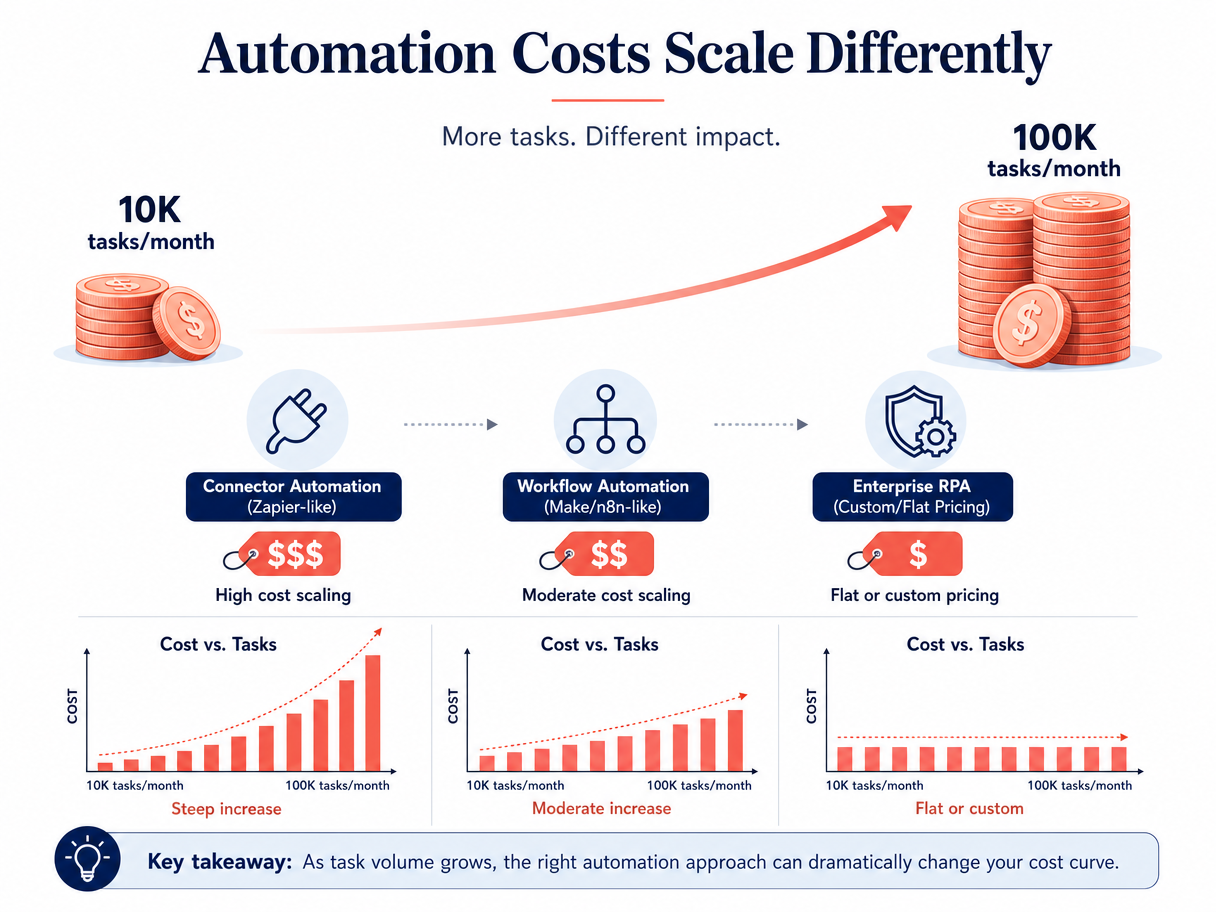
The single most important financial question in process automation is: what happens when your volume grows 10x? Most teams evaluate tools based on their starting price, not their scaling price. That is a mistake.
The table below shows the estimated monthly cost for each major tool at three volume levels: 10,000 tasks/operations per month (typical for a growing small business), 50,000 (mid-market), and 100,000 (enterprise or high-volume mid-market). These are estimates based on published pricing tiers and may vary based on specific plan features and negotiated discounts.
| Tool | 10K Tasks/Month | 50K Tasks/Month | 100K Tasks/Month | Cost Increase (10K → 100K) |
|---|---|---|---|---|
| Zapier | $29.99 (Pro) | $103.50 (Team) or custom | $500+ (Enterprise) | ~16x |
| Make | $10.59 (Core) | $34.12 (Teams) | $68.24 (2x Teams) | ~6x |
| Pabbly Connect | $16 (Standard) | $16 (Standard) | $16 (Standard) | 0x (unlimited) |
| n8n (Self-Hosted) | $0 | $0 | $0 | 0x (free) |
| n8n (Cloud) | $60 (Pro, 10K executions) | $300 (5x Pro) | $600 (10x Pro) | ~10x |
| Power Automate (Premium) | $150 (10 users) | $750 (50 users) | $1,500 (100 users) | ~10x (per user) |
| Power Automate (Process) | $150 (1 bot) | $750 (5 bots) | $1,500 (10 bots) | ~10x (per bot) |
| UiPath (Pro) | $420 (1 dev license) | $2,100 (5 dev licenses) | $4,200 (10 dev licenses) | ~10x |
| Workato | $10K–$50K+/year (~$833–$4,167/month) | Custom (likely higher) | Custom (likely much higher) | Variable |
The numbers tell a clear story. Zapier's task-based pricing creates a 16x cost increase when scaling from 10K to 100K tasks per month. Make's operations-based pricing increases about 6x over the same range. Pabbly Connect and n8n self-hosted do not increase at all — they are flat-rate or free at any volume.
This is not a theoretical exercise. A mid-market team that chooses Zapier at 10K tasks per month and grows to 100K within 18 months will see their automation bill jump from $30/month to $500+/month. The same team on Make would go from $10.59/month to about $68/month. On Pabbly or self-hosted n8n, the cost does not change at all.
For a deeper analysis of pricing models across AI and traditional automation platforms, including token-cost comparisons for AI-native tools, see our AI workflow automation pricing analysis.
Decision Framework: How to Choose Based on Your Team Size and Growth Trajectory
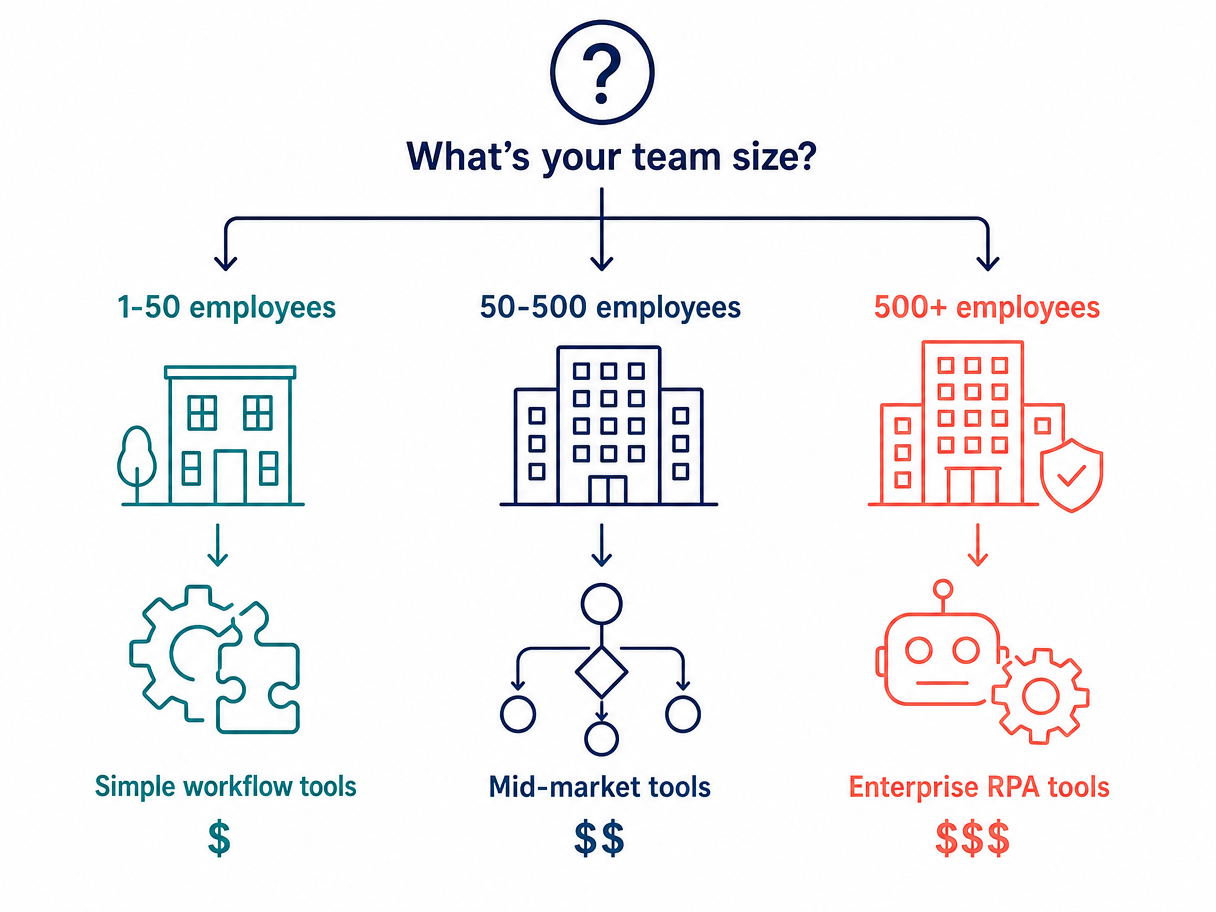
Use the following three-question framework to narrow your options. Each answer maps to a specific tier and set of tools.
Question 1: How Many Employees Will Use Automation?
- 1–10 users: You are in small-business territory. Self-serve tools with free plans (Zapier, Make, Pabbly, Stepper) are appropriate. Per-user pricing models like Power Automate ($15/user/month) are manageable at this scale.
- 10–50 users: You should evaluate per-operation or unlimited-operation pricing. Per-user models become expensive at 50 users ($750/month for Power Automate Premium). Make, Pabbly, or n8n cloud are better fits.
- 50+ users: You need role-based access and governance. Enterprise tools (Workato, UiPath, Power Automate Process) or self-hosted n8n with proper infrastructure are appropriate.
Question 2: What Is Your Monthly Task Volume Today and in 12 Months?
- Under 1,000 tasks/month: Any tool works. Use free plans to evaluate.
- 1,000–10,000 tasks/month: Make (Core at $10.59/month) or Pabbly (Standard at $16/month) offer the best value. Zapier (Pro at $29.99/month) is viable but more expensive.
- 10,000–50,000 tasks/month: Make (Teams at $34.12/month) or n8n cloud (Pro at $60/month). If you have technical resources, self-hosted n8n at $0/month is the cheapest option.
- 50,000+ tasks/month: Self-hosted n8n, Pabbly (unlimited at $16/month), or enterprise tools. Avoid task-based pricing at this volume.
Question 3: Do You Need Governance Features?
- No governance needed: Small-business tools (Zapier, Make, Pabbly, Stepper) are sufficient.
- Basic governance (user roles, shared workspaces): Make (Teams), n8n (cloud), or Power Automate (Premium) provide adequate controls.
- Advanced governance (SSO, audit logs, compliance certifications, unattended execution): Enterprise tools only — Workato, UiPath, Automation Anywhere, or Power Automate (Process).
Map your answers to the three tiers. If you are a 30-person company processing 8,000 tasks per month with no governance requirements, you are solidly in mid-market territory — Make or n8n cloud are your best bets. If you are a 200-person company processing 60,000 tasks per month with compliance requirements, you need enterprise tools despite being below the 500-employee threshold.
For a more detailed evaluation methodology covering ROI calculation, vendor risk assessment, and implementation planning, see our process automation tool buyer's guide.
Frequently Asked Questions
Can I start with a small-business tool and migrate later?
Yes, but migration is not frictionless. Zapier, Make, and n8n all support exporting workflow definitions, but the export formats are not standardized. Moving 50+ workflows from Zapier to Make requires manual reconfiguration. The best strategy is to choose a tool with a clear upgrade path — n8n's cloud-to-self-hosted migration is the smoothest, since the workflow format is identical. Make's operations-based pricing also scales more gracefully than Zapier's task-based model, reducing the pressure to migrate at all.
What is the cheapest way to handle 100K tasks per month?
Self-hosted n8n at $0/month (plus infrastructure costs) is the cheapest option, assuming you have the technical resources to maintain it. Pabbly Connect at $16/month for unlimited operations is the cheapest managed option. For comparison, the same volume on Zapier would cost $500+/month, and on Power Automate Premium with 100 users would cost $1,500/month.
Do AI-native tools (Gumloop, Lindy) replace traditional RPA?
Not yet for enterprise use cases. AI-native platforms excel at tasks that require natural language understanding — summarizing emails, extracting data from unstructured documents, generating responses. But they lack the audit trails, SSO, role-based access, and compliance certifications that enterprise RPA platforms (UiPath, Automation Anywhere, Workato) provide. For mid-market teams that want AI capabilities without RPA complexity, AI-native tools are increasingly viable, but the token-based pricing model introduces cost unpredictability that traditional platforms avoid.
How do I calculate total cost of ownership including training and maintenance?
Total cost of ownership (TCO) for process automation includes: (1) subscription or licensing fees, (2) implementation and integration costs, (3) training time for team members, (4) ongoing maintenance and workflow updates, (5) infrastructure costs for self-hosted solutions, and (6) migration costs if you outgrow the tool. A rule of thumb: add 30–50% to the subscription cost for the first year to account for setup and training. Self-hosted tools like n8n have zero subscription cost but require infrastructure and maintenance — estimate $500–$2,000/month for a dedicated server and part-time administrator.