
The Three Tiers of Voice-to-Note in 2026
If you have searched for an app that takes notes from voice recently, you have likely encountered a confusing wall of options: free tools built into your phone, dedicated apps with AI summaries, and enterprise platforms that cost hundreds of dollars a year. The market has matured to the point where it is no longer a single category. In 2026, it is three distinct tiers, and the gap between the cheapest and most expensive option is roughly 50x.
The problem is that most users overbuy. A student who needs to transcribe a lecture does not need a $348/year meeting bot with Salesforce integration. A journalist who wants to dictate interview notes does not need a platform designed for team-wide CRM logging. The tools have specialized, and the marketing has not kept up.
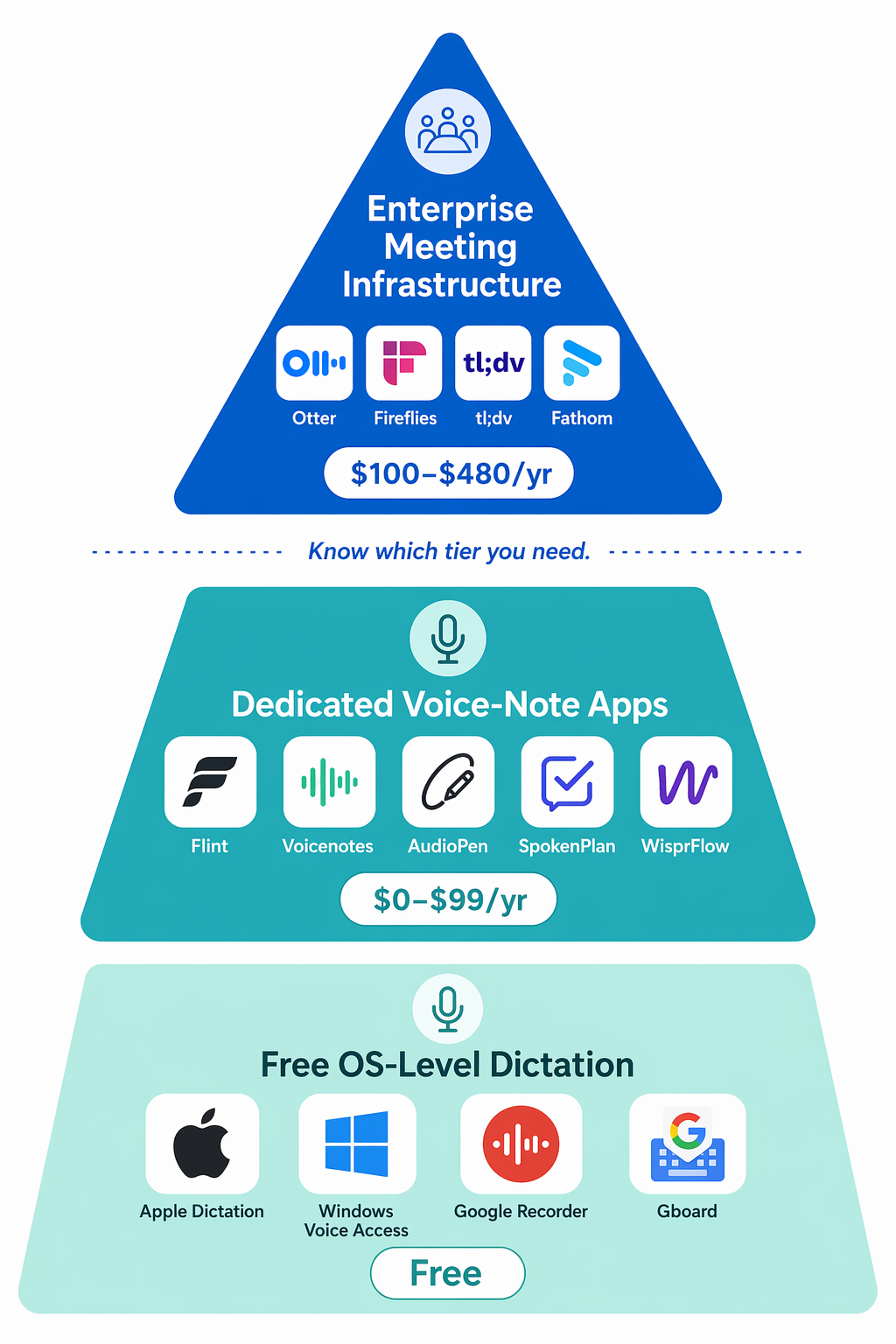
Here is how the market breaks down:
- Tier 1: Free OS-Level Dictation — Built into your device. No cost, no AI summarization, no search. Best for quick capture and short notes.
- Tier 2: Dedicated Voice-Note Apps — Standalone apps that layer AI transcription, summarization, and search on top of voice capture. Priced from free to roughly $99/year. Best for personal and professional note-taking.
- Tier 3: Enterprise Meeting Infrastructure — Platforms designed for team meetings, with speaker identification, CRM integrations, and bot-based recording. Priced from $180 to $480/year. Best for teams, not individuals.
This comparison covers 12 tools across all three tiers. The goal is not to declare a single winner — there is no such thing — but to help you identify which tier you actually need and which tool within that tier fits your specific use case, budget, and privacy requirements.
Quick-Reference Comparison Table
The table below maps all 12 tools across the dimensions that matter most for a purchasing decision: tier, pricing, platform support, primary use case, and key AI features. Use it to narrow your options before diving into the detailed sections.
| Tool | Tier | Starting Price (Annual) | Platforms | Best For | Key AI Feature |
|---|---|---|---|---|---|
| Apple Dictation | 1 | $0 | iOS, macOS | Quick capture on Apple devices | On-device dictation |
| Windows Voice Access | 1 | $0 | Windows 11 | Hands-free PC control | Voice commands + dictation |
| Google Recorder | 1 | $0 | Android (Pixel) | Lecture & meeting recording | On-device transcription, search |
| Gboard Voice Typing | 1 | $0 | Android, iOS | In-app dictation | Real-time voice typing |
| Google Docs Voice Typing | 1 | $0 | Web (Chrome) | Document dictation | Real-time transcription in Docs |
| Flint | 2 | $12 (one-time) | iOS | Personal voice notes | AI summarization, local-first |
| Voicenotes | 2 | $0 (Free) / $49.99 (Pro) | iOS, Android, Web | AI-powered note-taking | AI chat, smart search |
| AudioPen | 2 | $0 (Free) / $79 (Pro) | Web, iOS, Android | Clean note generation | AI rewrite, summarization |
| SpokenPlan | 2 | $59.99 | iOS | Task-oriented voice notes | AI task extraction |
| VoiceToNotes.ai | 2 | $0 (Free unlimited) | Web, iOS, Android | Unlimited free transcription | 99% accuracy, 50+ languages |
| WisprFlow | 2 | $0 (Free) / $99 (Pro) | macOS, Windows | Dictation for writing | Voice-to-text in any app |
| Otter.ai | 3 | $204 (Pro) | Web, iOS, Android | Team meeting notes | Speaker ID, live transcript |
| Fireflies.ai | 3 | $216 (Pro) / $348 (Business) | Web, iOS, Android | Meeting transcription & CRM | Bot-based recording, search |
| tl;dv | 3 | $216 (Pro) | Web, iOS, Android | Meeting highlights & clips | AI timestamps, clip sharing |
| Fathom | 3 | $180 (Pro) | Web, iOS, Android | Meeting notes & CRM sync | Auto-summary, action items |
| Krisp | 3 | $180 (Pro) | macOS, Windows, iOS, Android | Noise cancellation + notes | Bot-free recording, AI notes |
Tier 1: Free OS-Level Dictation
Before you spend any money, check what is already on your device. Every major operating system now includes a capable voice-to-text tool. These are not full note-taking apps — they do not organize, summarize, or search your recordings — but for quick capture, short notes, and hands-free dictation, they are often all you need.
Apple Dictation (iOS, macOS)
Built into every iPhone, iPad, and Mac. Tap the microphone icon on the keyboard and speak. Apple Dictation runs on-device for most languages, which means it works offline and does not send your audio to a server. It is excellent for short bursts — emails, notes, reminders — but it has a time limit (roughly 30-60 seconds depending on the device) and offers no transcription history or search. Once you close the keyboard, the text is just text in whatever app you were using.
Windows Voice Access (Windows 11)
Microsoft's Voice Access is more than dictation — it is a full voice control system. You can open apps, click buttons, scroll, and dictate text entirely by voice. It is the most capable free option for PC users who want hands-free operation. Like Apple Dictation, it runs on-device and works offline. The limitation is the same: no recording, no transcription history, no AI processing.
Google Recorder (Android, Pixel)
Google Recorder is the standout free option for recording longer audio. It transcribes speech in real time, on-device, and makes the transcript searchable. You can record a 45-minute lecture and later search for a specific term. It is exclusive to Pixel devices, which limits its reach, but for Pixel owners it is arguably the best free voice-to-note tool available. No AI summarization, but the combination of free, offline, and searchable transcription is hard to beat.
Gboard Voice Typing & Google Docs Voice Typing
Gboard's voice typing is the Android equivalent of Apple Dictation — a keyboard-level feature that works in any app. Google Docs Voice Typing, available in Chrome, transcribes directly into a document. Both are free, reasonably accurate, and useful for their specific contexts. Neither offers recording, history, or AI features.
| Tool | Platform | Offline? | Recording? | AI Summary? | Search? |
|---|---|---|---|---|---|
| Apple Dictation | iOS, macOS | Yes | No | No | No |
| Windows Voice Access | Windows 11 | Yes | No | No | No |
| Google Recorder | Android (Pixel) | Yes | Yes | No | Yes |
| Gboard Voice Typing | Android, iOS | Yes | No | No | No |
| Google Docs Voice Typing | Web (Chrome) | No | No | No | No |
Tier 2: Dedicated Voice-Note Apps
This is the sweet spot for most individual users. Dedicated voice-note apps take your spoken input and turn it into something more useful than raw text: a clean note, a summary, a set of action items, or a searchable archive. They range from free to roughly $99/year, and the best ones offer AI features that Tier 1 tools cannot touch.
Flint — Best Value at a One-Time $12
Flint is the most interesting tool in this category because it breaks the subscription model. The Pro version costs a one-time $12 payment with no recurring fees, no recording limits, and a local-first privacy approach — audio stays on your device. It offers AI summarization and works entirely on iOS. The trade-off is platform exclusivity (iOS only) and a smaller user base than older apps. For iPhone users who want a simple, private, and permanently affordable voice-note app, Flint is the strongest recommendation in this tier.
Voicenotes — AI-First Note-Taking
Voicenotes positions itself as an AI-powered note-taking app rather than a simple transcription tool. It offers a free tier with basic features and a Pro tier at $49.99/year that unlocks AI chat (you can ask questions about your notes), smart search, and unlimited recording. It is available on iOS, Android, and Web, making it one of the most cross-platform options in Tier 2. The AI features are genuinely useful — the ability to ask "What did I say about the Q3 budget?" and get an answer from your voice notes is a significant step up from raw transcription.
AudioPen — Clean Note Generation
AudioPen focuses on turning messy voice recordings into clean, structured notes. You speak naturally — with pauses, repetitions, and tangents — and AudioPen's AI rewrites the transcript into a coherent summary. It is available on Web, iOS, and Android. The free tier is limited; the Pro tier at $79/year unlocks longer recordings and more AI features. AudioPen is best for users who think out loud and want the AI to clean up the mess.
SpokenPlan — Task-Oriented Voice Notes
SpokenPlan is a newer iOS-only app at $59.99/year that focuses on extracting tasks and action items from voice input. If you tend to dictate "I need to email Sarah about the contract and then book the venue for Thursday," SpokenPlan will attempt to parse those into actionable items. It is a niche use case, and as a newer app with a smaller user base, it carries higher risk than more established alternatives.
VoiceToNotes.ai — Unlimited Free Transcription
VoiceToNotes.ai offers a compelling proposition: unlimited free transcription with claimed 99% accuracy and support for over 50 languages. It is available on Web, iOS, and Android. The free tier is genuinely usable, which makes it a strong option for budget-constrained users. The trade-off is that the AI features (summarization, smart search) are less polished than paid competitors, and the business model raises questions about data handling — always check the privacy policy before using a free AI service extensively.
WisprFlow — Dictation for Writers
WisprFlow is different from the other Tier 2 apps. It is not a voice-note app in the traditional sense — it is a dictation tool that lets you write by voice in any application on macOS or Windows. It is designed for writers, journalists, and anyone who produces long-form text by speaking. The free tier offers basic dictation; the Pro tier at $99/year adds AI-powered editing and formatting. WisprFlow offers encrypted, GDPR-compliant data handling for business users.
| Tool | Price (Annual) | Platform | Key Differentiator | Privacy Model |
|---|---|---|---|---|
| Flint | $12 (one-time) | iOS | One-time payment, local-first | On-device |
| Voicenotes | $0 / $49.99 | iOS, Android, Web | AI chat with notes | Cloud |
| AudioPen | $0 / $79 | Web, iOS, Android | AI rewrite & summarization | Cloud |
| SpokenPlan | $59.99 | iOS | Task extraction | Cloud |
| VoiceToNotes.ai | $0 (unlimited) | Web, iOS, Android | Free unlimited transcription | Cloud |
| WisprFlow | $0 / $99 | macOS, Windows | Dictation in any app | Encrypted / GDPR |
Tier 3: Enterprise Meeting Infrastructure
This is where the overbuying happens. Enterprise meeting tools like Otter, Fireflies, tl;dv, Fathom, and Krisp are designed for team workflows: recording meetings, identifying speakers, generating transcripts, and syncing notes to CRM systems. They are powerful, but they are also expensive ($180 to $480/year) and architecturally overbuilt for personal voice capture.
If you are an individual who wants to record your own thoughts, lectures, or interviews, you almost certainly do not need this tier. The dedicated apps in Tier 2 will serve you better at a fraction of the cost. However, if you are part of a team that needs to capture, share, and search meeting notes across an organization, these tools are purpose-built for that job.
Otter.ai — The Market Leader
Otter is the most well-known meeting transcription tool. It offers live transcription, speaker identification, and searchable transcripts. The Pro plan costs $204/year. Otter uses a bot that joins your calendar meetings to record and transcribe. It is excellent for teams but overkill for an individual who just wants to take voice notes.
Fireflies.ai — CRM-Focused
Fireflies is similar to Otter but with deeper CRM integrations (Salesforce, HubSpot). It costs $216/year for Pro and $348/year for Business. Like Otter, it uses a bot to join meetings. The CRM sync is valuable for sales teams but irrelevant for personal note-taking.
tl;dv — Meeting Highlights & Clips
tl;dv focuses on generating AI-timestamped highlights and shareable clips from meetings. The Pro plan is $216/year. It is useful for teams that want to quickly share key moments from long meetings without watching the entire recording.
Fathom — Auto-Summary & Action Items
Fathom offers automatic meeting summaries and action item extraction. The Pro plan costs $180/year. It is one of the more affordable options in Tier 3 but still priced for team use, not individual voice capture.
Krisp — Bot-Free Recording
Krisp is notable because it does not use a bot to join meetings. Instead, it records audio locally from your device's audio output. This makes it immune to the Google Meet bot-blocking change that rolled out in March 2026, which flags third-party bots as a "potential risk" by default. Krisp also offers industry-leading noise cancellation. The Pro plan is $180/year. For users who need meeting recording but want to avoid bot-based tools, Krisp is the strongest option in Tier 3.
| Tool | Price (Annual) | Bot or Bot-Free? | Best For | Key Integration |
|---|---|---|---|---|
| Otter.ai | $204 | Bot | Team meeting transcripts | Calendar, Slack |
| Fireflies.ai | $216 / $348 | Bot | CRM-connected meetings | Salesforce, HubSpot |
| tl;dv | $216 | Bot / Bot-Free (Desktop) | Meeting highlights & clips | Slack, Notion |
| Fathom | $180 | Bot | Auto-summary & action items | CRM, Slack |
| Krisp | $180 | Bot-Free | Noise cancellation + notes | Any meeting app |
Head-to-Head by Use Case
The best tool depends entirely on who you are and what you need. Here are direct recommendations for five common reader personas.
Students: Best Free Options
If you are a student on a tight budget, start with what you already have. Android users with a Pixel should use Google Recorder for lecture recording — it is free, offline, and searchable. Everyone else should try VoiceToNotes.ai for unlimited free transcription. If you can spare $12, Flint is a one-time purchase that will serve you through your entire degree without recurring fees.
Journalists & Interviewers: Best Transcription Accuracy
For interview transcription, accuracy is paramount. VoiceToNotes.ai claims 99% accuracy and supports over 50 languages, making it a strong free option. For professional use, Otter.ai's speaker identification is valuable for multi-person interviews, but at $204/year, it is an investment. Consider Voicenotes Pro ($49.99/year) as a middle ground — it offers good accuracy and AI search without the enterprise price tag.
Remote Teams: Best Meeting Tools
For teams, the choice depends on your meeting platform and integration needs. If you use Google Meet and are concerned about the March 2026 bot-blocking change, choose a bot-free tool like Krisp ($180/year) or tl;dv's desktop app. If you use Zoom and need deep CRM integration, Fireflies ($216-$348/year) is the most capable option. For general team meeting notes with good value, Fathom at $180/year is a solid choice.
Content Creators: Best AI Summarization
If you produce content by speaking — podcast scripts, video outlines, blog posts — you need a tool that turns rambling audio into clean text. AudioPen ($79/year) is purpose-built for this: it rewrites your messy transcripts into structured notes. WisprFlow ($99/year) is better if you want to dictate directly into your writing app of choice. Flint ($12 one-time) offers good summarization at a fraction of the cost, but it is iOS-only.
Privacy-Conscious Users: Best Local-First Options
Privacy varies enormously across these tools. Flint and Aiko keep audio on-device, meaning your recordings never leave your phone. Apple Dictation and Windows Voice Access also process audio locally. At the other end of the spectrum, Otter and Fireflies upload everything to cloud servers. WisprFlow offers encrypted, GDPR-compliant handling for business users, which is a middle ground. If privacy is your primary concern, choose a tool that explicitly states on-device processing and does not require an account to function.
Pricing Value Analysis: Cost Per Day Across All Tools
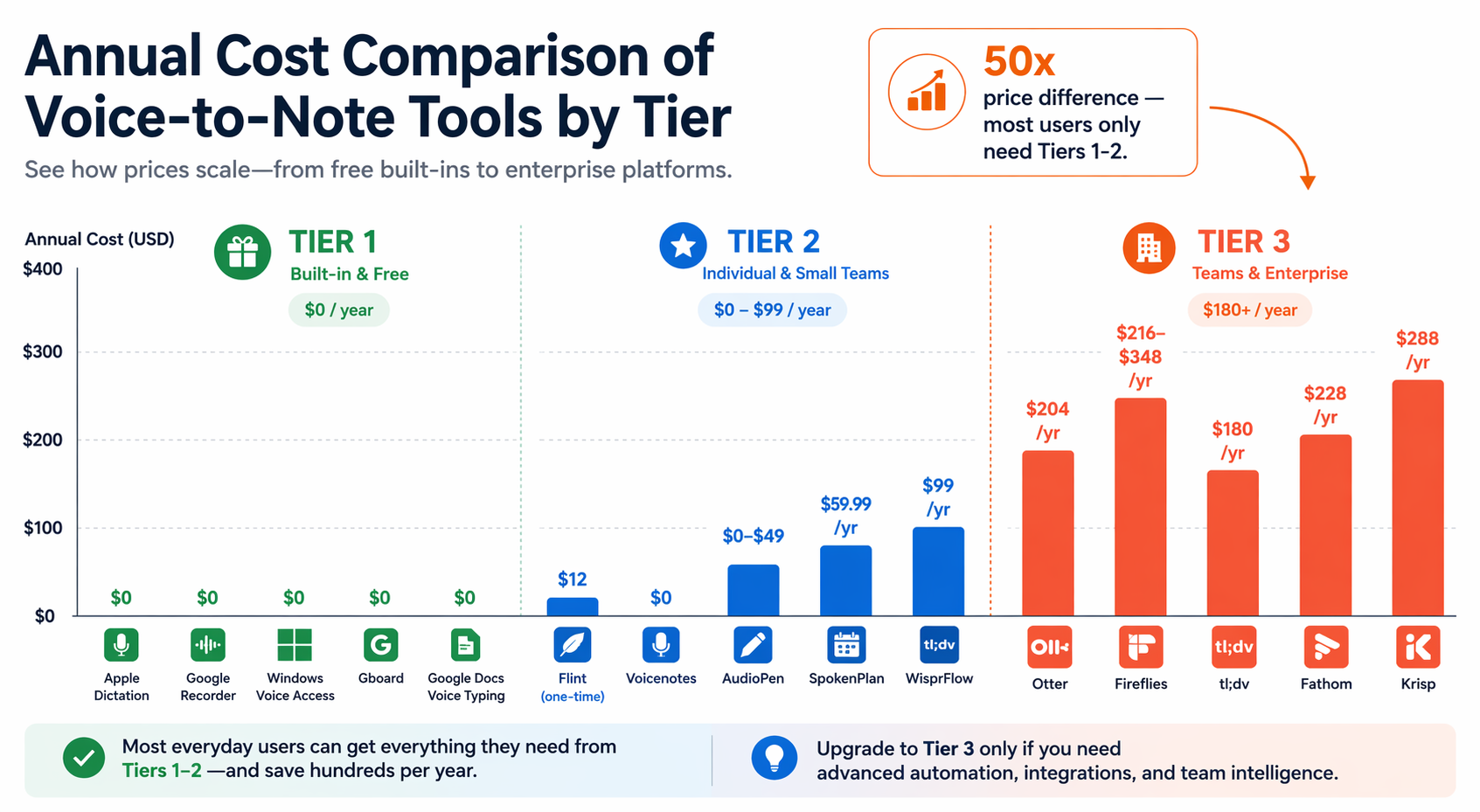
The price range across these tools is staggering: from $0 to $348 per year. The table below shows the annual cost and the effective cost per day for each paid tool, making the overbuying thesis painfully clear.
| Tool | Annual Cost | Cost Per Day | Tier |
|---|---|---|---|
| Apple Dictation | $0 | $0.00 | 1 |
| Windows Voice Access | $0 | $0.00 | 1 |
| Google Recorder | $0 | $0.00 | 1 |
| Gboard Voice Typing | $0 | $0.00 | 1 |
| Google Docs Voice Typing | $0 | $0.00 | 1 |
| Flint | $12 (one-time) | < $0.01 (over 4 years) | 2 |
| VoiceToNotes.ai | $0 | $0.00 | 2 |
| Voicenotes (Pro) | $49.99 | $0.14 | 2 |
| SpokenPlan | $59.99 | $0.16 | 2 |
| AudioPen (Pro) | $79 | $0.22 | 2 |
| WisprFlow (Pro) | $99 | $0.27 | 2 |
| Fathom (Pro) | $180 | $0.49 | 3 |
| Krisp (Pro) | $180 | $0.49 | 3 |
| Otter (Pro) | $204 | $0.56 | 3 |
| tl;dv (Pro) | $216 | $0.59 | 3 |
| Fireflies (Pro) | $216 | $0.59 | 3 |
| Fireflies (Business) | $348 | $0.95 | 3 |
Feature Comparison Matrix
For readers who need to evaluate specific capabilities, the matrix below compares all tools across eight key features. Use it to find the tool that matches your exact requirements.
| Tool | Real-Time Transcription | Offline Mode | Multilingual (50+ Languages) | AI Summarization | Speaker Identification | Integrations | Export Options |
|---|---|---|---|---|---|---|---|
| Apple Dictation | Yes | Yes | Yes (limited) | No | No | None | Text only |
| Windows Voice Access | Yes | Yes | Yes (limited) | No | No | None | Text only |
| Google Recorder | Yes | Yes | Yes | No | No | None | Transcript, Audio |
| Gboard Voice Typing | Yes | Yes | Yes | No | No | None | Text only |
| Google Docs Voice Typing | Yes | No | Yes | No | No | Google Docs | Text only |
| Flint | Yes | Yes | No | Yes | No | None | Text, Markdown |
| Voicenotes | Yes | No | Yes | Yes | No | Notion, Slack | Text, PDF |
| AudioPen | Yes | No | Yes | Yes | No | None | Text, Markdown |
| SpokenPlan | Yes | No | No | Yes (task-focused) | No | Calendar | Text |
| VoiceToNotes.ai | Yes | No | Yes (50+) | Basic | No | None | Text, Audio |
| WisprFlow | Yes | No | Yes | Yes | No | Any app (system-wide) | Text |
| Otter.ai | Yes | No | Yes | Yes | Yes | Slack, Zoom, Calendar | Transcript, Audio, PDF |
| Fireflies.ai | Yes | No | Yes | Yes | Yes | CRM, Slack, Notion | Transcript, Audio, PDF |
| tl;dv | Yes | No | Yes | Yes | Yes | Slack, Notion | Transcript, Clips, PDF |
| Fathom | Yes | No | Yes | Yes | Yes | CRM, Slack | Transcript, Summary |
| Krisp | Yes | No | Yes | Yes | Yes | Any meeting app | Transcript, Summary |
Decision Framework: How to Choose Your Tier
Use the following decision framework to identify your tier before you start evaluating individual tools. This will save you time and prevent overbuying.
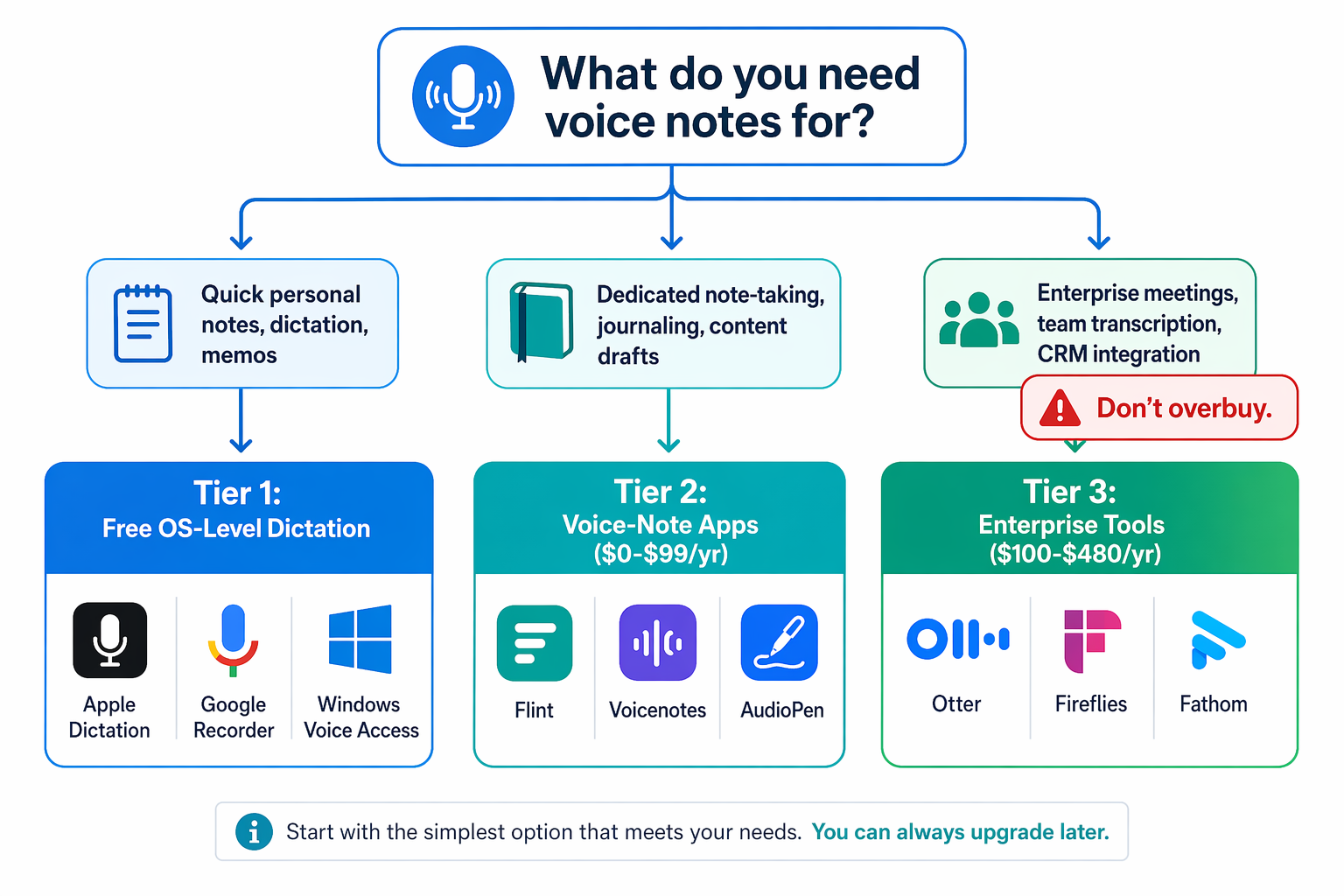
- Start here: What do you need voice notes for?
- Quick capture, short notes, hands-free dictation → You are in Tier 1. Use Apple Dictation, Windows Voice Access, Gboard, or Google Docs Voice Typing. Do not spend money.
- Lecture recording, interview transcription, personal note-taking with AI features → You are in Tier 2. Evaluate Flint (best value), Voicenotes (best AI features), AudioPen (best for messy thoughts), or VoiceToNotes.ai (best free option). Budget: $0-$99/year.
- Team meetings, CRM integration, speaker identification, shared note-taking → You are in Tier 3. Evaluate Krisp (bot-free, best for Google Meet), Fathom (best value), or Fireflies (best CRM integration). Budget: $180-$348/year per user.
- Not sure? Start with Tier 1. If you find yourself wanting to search your recordings, get AI summaries, or organize your notes, move to Tier 2. Only consider Tier 3 if you are part of a team that needs shared meeting infrastructure.
Frequently Asked Questions
Can I use these tools offline?
Only Tier 1 tools (Apple Dictation, Windows Voice Access, Google Recorder, Gboard) and Flint offer offline functionality. All other tools require an internet connection for transcription and AI processing. If you frequently work in areas with poor connectivity, prioritize offline-capable tools.
Which tool has the best transcription accuracy?
VoiceToNotes.ai claims 99% accuracy, which is competitive with the best enterprise tools. Otter and Fireflies also claim high accuracy in ideal conditions. However, accuracy varies significantly based on accent, background noise, and recording quality. No tool is 100% accurate in all conditions. For critical transcripts, always review the output.
Are bot-based tools still safe after the Google Meet change?
As of March 2026, Google Meet flags third-party bots as a "potential risk" by default. This affects bot-based tools like Otter and Fireflies when used with Google Meet. Bot-free tools like Krisp, Superpowered, Granola, and tl;dv's desktop app are not affected. If you rely on Google Meet, choose a bot-free tool or verify compatibility with your chosen tool before purchasing.
What is the best free option?
For Android users with a Pixel, Google Recorder is the best free option — it offers on-device transcription, search, and unlimited recording. For everyone else, VoiceToNotes.ai offers unlimited free transcription with good accuracy. If you only need short dictation, the built-in OS tools (Apple Dictation, Windows Voice Access, Gboard) are perfectly adequate.
Which tool is best for privacy?
Flint and Aiko keep audio on-device, making them the strongest options for privacy-conscious users. Apple Dictation and Windows Voice Access also process audio locally. WisprFlow offers encrypted, GDPR-compliant cloud processing for business users. Avoid Otter, Fireflies, and other cloud-based tools if you are recording sensitive or confidential information.