

Who This Guide Is For
If you run a small business, manage a marketing operations team, or operate as a freelancer juggling client work and admin, you have likely felt the pull of automation. The promise is seductive: emails that send themselves, leads that enrich overnight, invoices that generate on schedule. The barrier has always been the same — you need a developer to wire it all together, or you need to learn enough logic to build it yourself.
That barrier has collapsed. The 2026 crop of AI-native automation platforms lets you describe what you want in plain English and get a working multi-step workflow in return. This guide is written specifically for people who have no coding background, no dedicated IT support, and no desire to learn JSON or API syntax. You will find honest assessments of six platforms, a clear pricing comparison, and a decision matrix that maps tools to the processes you actually run.
What to Look for in a No-Code Automation Tool
Before diving into individual tool reviews, it helps to establish a shared set of criteria. Not every platform that calls itself "no-code" delivers the same experience. Based on how non-technical teams actually adopt automation, these are the five features that matter most.
Visual Drag-and-Drop Builder
A visual builder is the difference between a tool you can use on day one and a tool that collects dust. Look for a canvas where you can see the flow of data — trigger, action, condition, loop — as connected blocks. If the interface requires you to write formulas or configure raw HTTP requests, it is not built for you.
Natural Language AI Assistant
The defining innovation of 2025–2026 is the conversational AI assistant that builds workflows from a sentence. Instead of hunting through dropdowns for the right trigger, you type "When I get a new Gmail attachment, save it to Google Drive and send me a Slack message" and the tool generates the automation. Platforms like Relay.app and Gumloop have made this their core experience.
Pre-Built Templates and Starter Workflows
Even with AI assistance, starting from a blank canvas is intimidating. A strong template library — covering lead capture, invoice reminders, social media posting, and meeting note routing — lets you adapt an existing workflow rather than invent one. Zapier leads here with thousands of templates, but newer entrants like Stepper are catching up with reusable component libraries.
Transparent and Predictable Pricing
Nothing kills adoption faster than a surprise overage bill. Look for platforms that publish per-operation or per-credit pricing clearly. Free plans are essential for testing, but the jump from free to paid should be gradual, not a cliff. We have included a full pricing comparison table later in this guide.
Large App Integration Library
The tool is only as useful as the apps it connects. Zapier connects with over 7,000 apps, while Make offers roughly 3,000. Newer platforms like Lindy leverage Pipedream's integration ecosystem to offer over 2,500 connections. If your stack includes niche industry tools, verify the integration exists before committing.
Tool Reviews: The Best AI-Native Automation Platforms in 2026
Each review below focuses on how the platform serves non-technical users. Pricing and feature data was last verified in June 2026.
Zapier: The Easiest Start, the Largest Ecosystem
Zapier remains the default entry point for a reason. Its natural language Zap creation feature lets you describe a workflow in plain English and have it built automatically. The free plan includes 100 tasks per month and two-step Zaps, which is enough to test a handful of core automations. Paid plans start at $19.99 per month (billed annually) for multi-step Zaps and access to its library of over 7,000 app integrations.
Where Zapier falls short is pricing at scale. The per-task cost is higher than competitors, and the jump from the free plan to the Professional tier can feel abrupt for teams running more than a few hundred tasks per month.
Make: Visual Power with a Learning Curve
Make (formerly Integromat) offers a more powerful visual builder than Zapier, with a scenario editor that lets you see data transformations, filters, and error handling paths. The free plan includes 1,000 operations per month, and the Core plan starts at $9 to $12 per month (billed annually) for 10,000 operations — significantly cheaper per operation than Zapier.
The trade-off is the learning curve. Non-technical users typically need 10 to 20 hours of hands-on experimentation before they feel comfortable building complex scenarios independently. Make connects with roughly 3,000 apps, which is fewer than Zapier but covers the major SaaS tools.
Relay.app: Chat-Based AI Builder with a Stellar Reputation
Relay.app has built its entire experience around a conversational AI assistant. You describe the workflow in natural language, and the assistant generates it. The platform holds a 4.9 out of 5 rating on G2, which is unusually high for a relatively new entrant. The free plan includes 1 user, 200 steps, and 500 AI credits per month. The Professional plan starts at $19 per month (billed annually) for 750 steps and 2,000 AI credits.
Relay.app connects with over 200 apps, which is a smaller library than Zapier or Make. For teams whose stack lives entirely within the major SaaS ecosystem (Slack, Google Workspace, Notion, Salesforce), this is rarely a problem. For teams with niche tools, it can be a blocker.
Lindy: AI Agents for Sales and Support Operations
Lindy positions itself as an AI agent platform rather than a traditional workflow tool. Its agents can handle emails, scheduling, CRM updates, and research tasks. A standout feature is Agent Swarms, which can process up to 1,000 items simultaneously — useful for bulk lead enrichment or support ticket triage. Lindy integrates with over 2,500 apps via Pipedream.
The free plan includes 400 credits per month, which translates to roughly 40 tasks. The Pro plan costs $49.99 per month for 5,000 credits. The pricing is higher than Zapier or Make at the entry level, but the AI agent capabilities are more advanced for specific use cases like customer communication workflows.
Gumloop: AI-Native with Enterprise Credibility
Gumloop has gained traction quickly, used by teams at Shopify, Instacart, and Webflow. It recently raised a $50 million Series B led by Benchmark. The platform features a visual drag-and-drop builder and an AI assistant named "Gummie" that helps build workflows from natural language descriptions.
The free plan includes 5,000 credits per month and 1 seat. The Pro plan costs $37 per month for 20,000+ credits and unlimited seats. All major LLM models are included in the pricing, which is a significant advantage for teams building AI-powered document processing or data extraction workflows.
Stepper: Conversational Editor with Reusable Components
Stepper differentiates itself with an AI conversational editor and a library of reusable components. Instead of building every workflow from scratch, you can assemble pre-built blocks — a "Send Slack message" block, a "Create Notion page" block — into larger automations. This component-based approach reduces repetitive work once you have a few workflows running.
The free plan includes unlimited workflows, 200 steps per month, and 5,000 free credits. The Pro plan costs $19 per month for unlimited steps under a fair-use policy. Stepper is a strong option for teams that want to standardize on a set of reusable automation components across multiple processes.
Pricing Comparison Table
The table below compares free plan limits, paid plan starting prices, and key features across the six platforms. All pricing data was last verified in June 2026.
| Platform | Free Plan | Paid Plan Starts At | Key Differentiator |
|---|---|---|---|
| Zapier | 100 tasks/month, 2-step Zaps | $19.99/month (billed annually) | 7,000+ app integrations; natural language Zap creation |
| Make | 1,000 operations/month | $9–$12/month (billed annually) for 10,000 ops | Powerful visual builder; lower per-operation cost |
| Relay.app | 1 user, 200 steps, 500 AI credits/month | $19/month (billed annually) for 750 steps | 4.9 G2 rating; chat-based AI builder |
| Lindy | 400 credits/month (~40 tasks) | $49.99/month for 5,000 credits | AI agents for sales/support; Agent Swarms for bulk processing |
| Gumloop | 5,000 credits/month, 1 seat | $37/month for 20,000+ credits, unlimited seats | AI-native with Gummie assistant; all LLM models included |
| Stepper | Unlimited workflows, 200 steps/month | $19/month for unlimited steps (fair-use policy) | AI conversational editor; reusable component library |
Common Mistakes Non-Technical Users Make (And How to Avoid Them)
Adopting automation is not just about picking the right tool. The way you approach the process determines whether your workflows run reliably or collapse under edge cases. These are the most frequent pitfalls we see among non-technical teams.
- Automating a broken process first. According to McKinsey, 73% of failed automation projects happen because teams automate a broken process rather than fixing it first. Before you build a workflow, map the manual process on paper. Identify the step that consistently fails — the data entry error, the missed follow-up, the delayed approval — and fix that step before wiring it into an automation.
- Choosing a tool based on app count alone. A platform with 7,000 integrations sounds impressive, but if the 20 apps you actually use are all supported by a simpler tool, the extra integrations add complexity without value. Start with your stack, then find the tool that connects it.
- Underestimating error handling. Every automation will encounter a situation it was not designed for — a missing field, a renamed column, a timeout. Look for platforms that let you define fallback actions (send an alert, skip the record, pause the workflow) rather than silently failing.
- Ignoring data portability. If you build 50 workflows inside one platform and later want to switch, can you export your configurations? Some platforms lock you in with proprietary formats. Check whether the tool supports export before you invest heavily.
Decision Matrix: Which Tool for Which Use Case?
The table below maps common use cases to the best tool for each. Use it as a starting point, then test your top two candidates with their free plans before committing.
| Use Case | Best Tool | Why |
|---|---|---|
| Simple email-to-Slack alerts | Zapier | Quickest setup; free plan covers basic two-step alerts; largest integration library |
| Multi-step sales lead enrichment | Lindy or Gumloop | AI agents handle research and CRM updates; Agent Swarms process bulk leads |
| AI-powered document processing | Gumloop | All LLM models included; Gummie assistant handles extraction and summarization |
| Customer support triage | Lindy | AI agents classify and route tickets; 2,500+ integrations via Pipedream |
| Complex data transformation workflows | Make | Visual builder with granular control; lower per-operation cost at scale |
| Building a reusable automation library | Stepper | Component-based architecture; AI conversational editor for rapid assembly |
| Quickest path from idea to working workflow | Relay.app | Chat-based AI builder; 4.9 G2 rating; minimal learning curve |
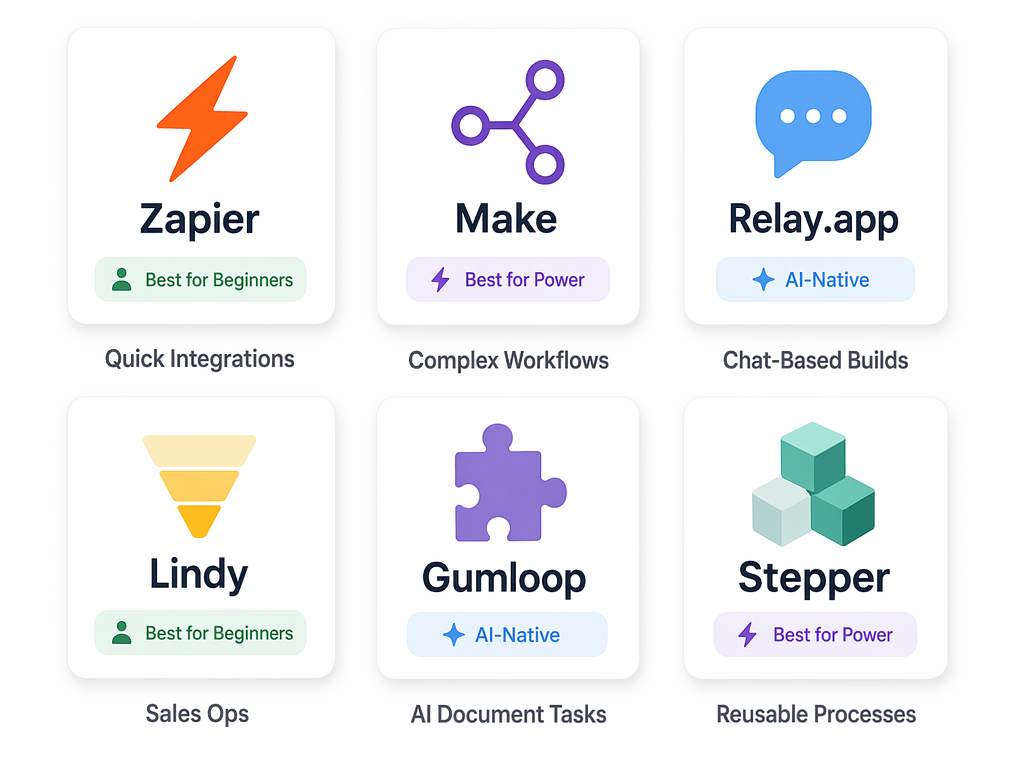
The automation landscape in 2026 is genuinely more accessible than it has ever been. The tools have done their part — conversational AI builders, visual canvases, and generous free plans have lowered the barrier. The remaining work is yours: choose one process, map it honestly, and let the tool handle the repetition.
For a deeper head-to-head comparison of specific tools, see our guide on Zapier vs Make vs n8n vs Gumloop. For a broader view of the small business automation landscape, see Best Workflow Automation Tools for Small Businesses in 2026.