

Seventy-four percent of senior leaders don’t believe their current technology will support their needs in the next 18 months. That number, from Teamwork.com’s Sprint to AI report, isn’t about a single vendor failing. It’s about the accumulated mismatch between what a team actually needs and what the best workflow management software roundups keep recommending. The roundups rarely ask if you’re a startup or a multinational.
Every month another top-10 list appears. They throw ClickUp, monday.com, Asana, Wrike, and Trello into the same column, add a couple of enterprise names, and call it a comparison. The reader is left guessing: “Am I the 10-person startup or the 500-person PMO?” The answer changes the recommendation completely, but the article does not make that distinction. So the leader picks a tool, hits a pricing trap or a capability gap six months in, and starts the search over. I’ve seen it happen repeatedly.
The Wrong Question
The workflow automation market is $26.01 billion in 2026, growing at 9.41% CAGR to $40.77 billion by 2031. That kind of market attracts a lot of products. But a market this big doesn’t mean one tool fits all — it means the opposite. The tools diverge because their buyers diverge.
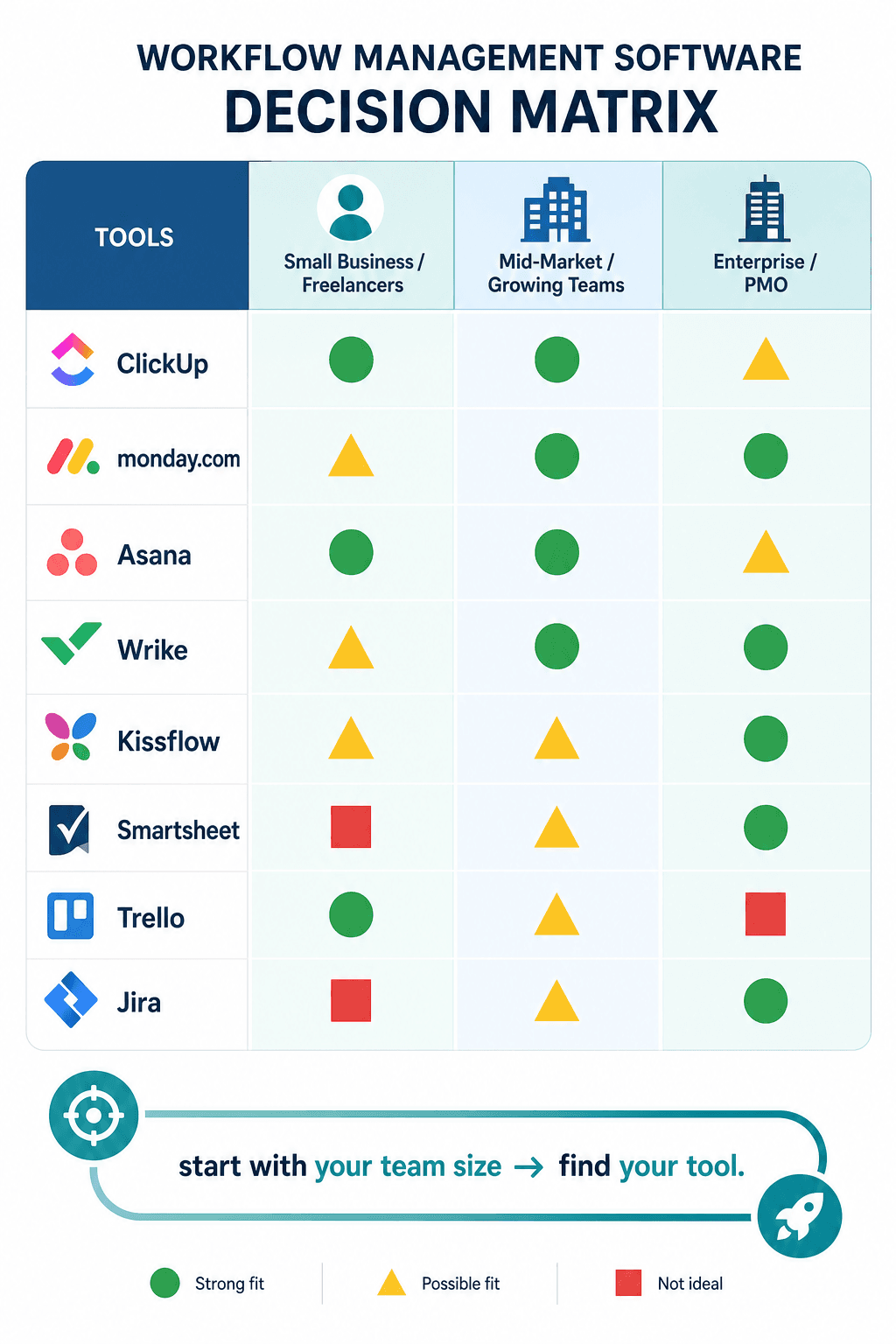
A team of 15 needs quick setup, a visible free plan, and no minimum seat requirements. A division of 150 needs deep integrations with Salesforce and HubSpot, automation that does not cap at a few hundred runs, and a learning curve that does not stall adoption. An enterprise of 2,000 needs audit trails, stage-gate governance, earned value management, and AI that logs its changes in the same audit chain as manual edits.
The same tool cannot excel at all three. The right question is not “which tool is best?” but “which tool is best for my team’s size and maturity?”
Small Business: Free Isn’t Free
If your team is under 50 people, your primary constraints are budget, speed of rollout, and the team’s tolerance for configuration. You do not have a dedicated admin, and you probably do not have a PMO. You need a tool that works after lunch, not after a two-week implementation.
ClickUp leads here, and the reason is its free plan. Forbes Advisor rates it 4.4/5 and calls it the best for most small businesses. The free tier gives unlimited users (with storage and view limits), and the paid Unlimited plan costs $7/user/month billed annually. It also integrates with over 1,000 tools through its automation builder.
There is a catch: ClickUp’s feature density is real. The same depth that makes it flexible for a technical team can overwhelm a non‑technical team that has no dedicated onboarding. “Free access does not mean free setup effort,” as one Forbes expert put it. If your team is not comfortable navigating custom views, statuses, and automation rules, factor in a week of setup and a few days of training. That setup time is a real cost, even if it isn’t in the budget line.
Trello is the opposite end of the spectrum: limited, but instantly understandable. The Standard plan at $5/user/month (billed annually) gives you unlimited boards, but the free plan caps at 10 boards. If your team runs on Kanban and does not need much structure, Trello works. If you need more than a board-per-project, you outgrow it fast.
Hive sits in between. The Starter plan at $7/user/month (billed monthly) supports both traditional and Agile workflows. It is less known than Trello or ClickUp, which means a smaller ecosystem of templates and community support. For a team that wants a middle path and does not mind a narrower set of integrations, it is a solid alternative.
What you lose if you pick wrong: ClickUp frustrates teams that cannot configure it. Trello frustrates teams that need structure beyond Kanban. Hive frustrates teams that rely on a large third‑party app ecosystem.
For a deeper look at these three side by side, see our dedicated comparison: monday.com vs ClickUp vs Notion vs Trello for small teams.
Mid‑Market: Does That Integration List Match Your Stack?
At 50 to 200 people, you have started to departmentalize. Marketing uses HubSpot, sales uses Salesforce, finance uses an ERP. You need a workflow platform that connects to those systems — not just 200 random apps, but the apps your team actually uses. I’ve seen tools boast hundreds of integrations, but when you check, the ones you actually need are either shallow or require a higher plan.
monday.com claims 200+ integrations. Asana claims 400+. Wrike claims deep integrations with Salesforce, Jira, and Adobe Creative Cloud. But the count is not the signal — the specific connectors are.
| Tool | Starting price (annual) | Min users | Key integration claim | Automation limit |
|---|---|---|---|---|
| monday.com | $9/user/month | 3 | 200+ integrations, visual boards | Some plan caps |
| Asana | $10.99/user/month | 2 | 400+ integrations, AI Studio for plain‑language automations | No hard caps on Business plan |
| Wrike | $9.80/user/month (Business) | 2 (Starter), 5 (Business) | Salesforce, Jira, Adobe connectors | Custom request forms with conditional logic |
Asana’s AI Studio is a genuine differentiator: you can describe a workflow in plain English (“when a deal reaches stage 4, notify the pipeline manager”) and it builds the automation for you. For a team that lacks dedicated automation expertise, that feature alone can cut setup time from hours to minutes. But Asana’s Starter plan starts at $10.99/user/month with a two‑user minimum — fine for a department, but if you are a 15‑person team that is heavy on automation, the per‑seat cost escalates.
monday.com wins on visual adoption. The colored boards, timelines, and Gantt views make it easy for non‑project‑managers to see the state of work. But that visual layer comes with a thinner audit trail than dedicated BPM platforms. And the three‑user minimum means a micro‑team of two pays for three seats from day one.
Wrike is the compliance pick for mid‑market: custom request forms, proof of compliance evidence, and advanced workflow automation that can enforce stage gates. At $9.80/user/month for the Business plan (billed annually), it is in the same price band as monday.com and Asana. But the feature that makes it strong for regulated teams — rigid process enforcement — can feel bureaucratic for a team that just wants to move fast.
What you lose if you pick wrong: monday.com’s thin audit trails may fail compliance review. Asana’s AI Studio is powerful but the free plan limits automation runs. Wrike’s structured forms can slow down teams that need flexibility.
Enterprise: The Governance You Don’t Need Until You Do
Above 200 users, the conversation shifts. You need portfolio‑level visibility, compliance auditing, stage‑gate governance, and — increasingly — AI that operates inside the same compliance boundary as manual processes.
Gartner forecasts that 40% of enterprise applications will include task‑specific AI agents by the end of 2026. That is a direction, not a present requirement. Today, if you are an enterprise evaluating tools, the immediate need is governance: who can approve, who can pause, who sees the audit trail.
Kissflow’s blueprint‑based AI approach is notable because AI‑driven changes write to the same audit log as manual edits. That means compliance teams can trust the system without building a separate monitoring layer. Starting at $1,500/month for 50 users (about $30/user), it is overkill for a small business but purpose‑built for teams that need governed, no‑code automation at scale.
Celoxis is the only platform in this comparison with native Earned Value Management (SPI/CPI) and stage‑gate governance. If your PMO runs on EVM metrics, Celoxis is the natural fit. It also includes real‑time portfolio dashboards and AI‑powered resource planning. But those capabilities are irrelevant for a team under 200 people — not just overkill, but a genuine distraction from simpler tools that get work done faster.
Nintex focuses on regulated document workflows — think contract approvals, compliance sign‑offs, and ITIL request fulfillment. It is strong where audit trails and process consistency matter more than speed of iteration. Jira, meanwhile, remains the de facto standard for agile teams and ITSM, especially for developers.
The Pricing Traps That Undo Any Pick
This is where most roundups go quiet. They quote the per‑user price, call it a day, and let the reader discover the hidden minimums after signing up. Here are the traps that change the real cost.
- monday.com requires a three‑user minimum on all paid plans. A two‑person team pays for three seats.
- Asana requires a two‑user minimum on the Starter plan. Solo operators cannot use the free team tier.
- Kissflow starts at $1,500/month for 50 users. Scaling down to 10 users does not reduce the fee much — the minimum is effectively about 50 seats.
- Automation limits: Most mid‑market plans cap the number of automated runs per month. Once you exceed the cap, either workflows stop or you pay per additional run.
- AI credit pricing: Asana’s AI Studio and monday.com’s AI features often use credit systems — a limited pool of AI actions per month. Heavy users can blow through credits in a week and face surprise overage charges.
- Annual vs. monthly: The difference is significant. ClickUp’s $10/month plan drops to $7/month when paid annually. The headline price at many vendor sites is the monthly rate; the actual cost for most buyers is the annual rate.
These traps matter more than any feature comparison. A tool with perfect integration support is useless if the minimum seat count forces you to pay for seats you do not use. Always run the total annual cost for your exact headcount before deciding.
If you want a structured approach to evaluating these traps for your team, our decision framework for BPM workflow software walks through each consideration step by step.
Start with Your Headcount
| Tool | Best for segment | What you lose for other segments |
|---|---|---|
| ClickUp | Small business (<50) – generous free plan, low $7/user paid | Non‑technical teams get overwhelmed; enterprise lacks native EVM and stage‑gate governance |
| Trello | Small business – instant Kanban, $5/user | No workflow automation depth; board count limits on free plan |
| Hive | Small business – flexible Agile/traditional mix | Smaller ecosystem; fewer integrations |
| monday.com | Mid‑market (50–200) – visual adoption, quick rollout | Thin audit trail; 3‑user minimum; automation caps on lower plans |
| Asana | Mid‑market – AI Studio, 400+ integrations | Per‑seat cost adds up; AI credit limits on free plan |
| Wrike | Mid‑market – compliance, structured workflows | Can feel bureaucratic; minimum 5 users on Business plan |
| Kissflow | Enterprise (200+) – governed AI workflows, $1,500/mo min | Overkill and expensive for smaller teams |
| Celoxis | Enterprise – native EVM, stage‑gate governance | Capabilities irrelevant below 200 people |
| Nintex | Enterprise – regulated document workflows | Narrow scope; not a general‑purpose workflow tool |
| Jira | Enterprise – agile/ITSM for dev teams | Less suitable for non‑technical departments |
Start with your headcount. That single number filters the list more effectively than any feature matrix. Then check the pricing traps — minimum users, automation caps, AI credits — because they will determine whether the tool fits your budget in month six, not just month one.
If your team is scaling from 10 to 100, see our guide on workflow management at every scale for growing teams. And if you are deep into enterprise evaluation, our enterprise workflow orchestration comparison covers the legacy vs. AI‑native angle in more detail.



Comments
Join the discussion with an anonymous comment.