
Why Most BPM Buying Guides Don’t Work for Smaller Teams
Open any BPM software comparison and you’ll find the same structure: a quadrant chart mapping tools by “complexity” and “scale,” a list of features that only matter if you have a dedicated process excellence team, and pricing tables that start with “contact sales.” These guides are written for enterprise buyers — the people who manage six-figure software budgets and have the headcount to run a six-month implementation.
If you run operations for a 50-person company, lead a department inside a larger organization, or are a knowledge worker tasked with automating a single messy workflow, those guides don’t help. They overwhelm you with options that are too expensive, too complex, or simply wrong for the problem you’re trying to solve.
This article takes a different approach. Instead of starting with a list of tools, we start with your process. You’ll identify the type of workflow you’re dealing with, answer five practical questions, and then land on a shortlist of tools that actually fit your team size, technical resources, and budget. The goal is to eliminate the noise of enterprise features you’ll never use and get you to a decision you can act on this quarter.
Start With Your Process Type: Simple, Multi-Party, or System-Orchestrated
Before you evaluate a single tool, you need to know what kind of process you’re automating. The BPM industry broadly recognizes three process types, and each one maps to a different tool category. Misidentifying your process type is the single fastest way to buy the wrong software.
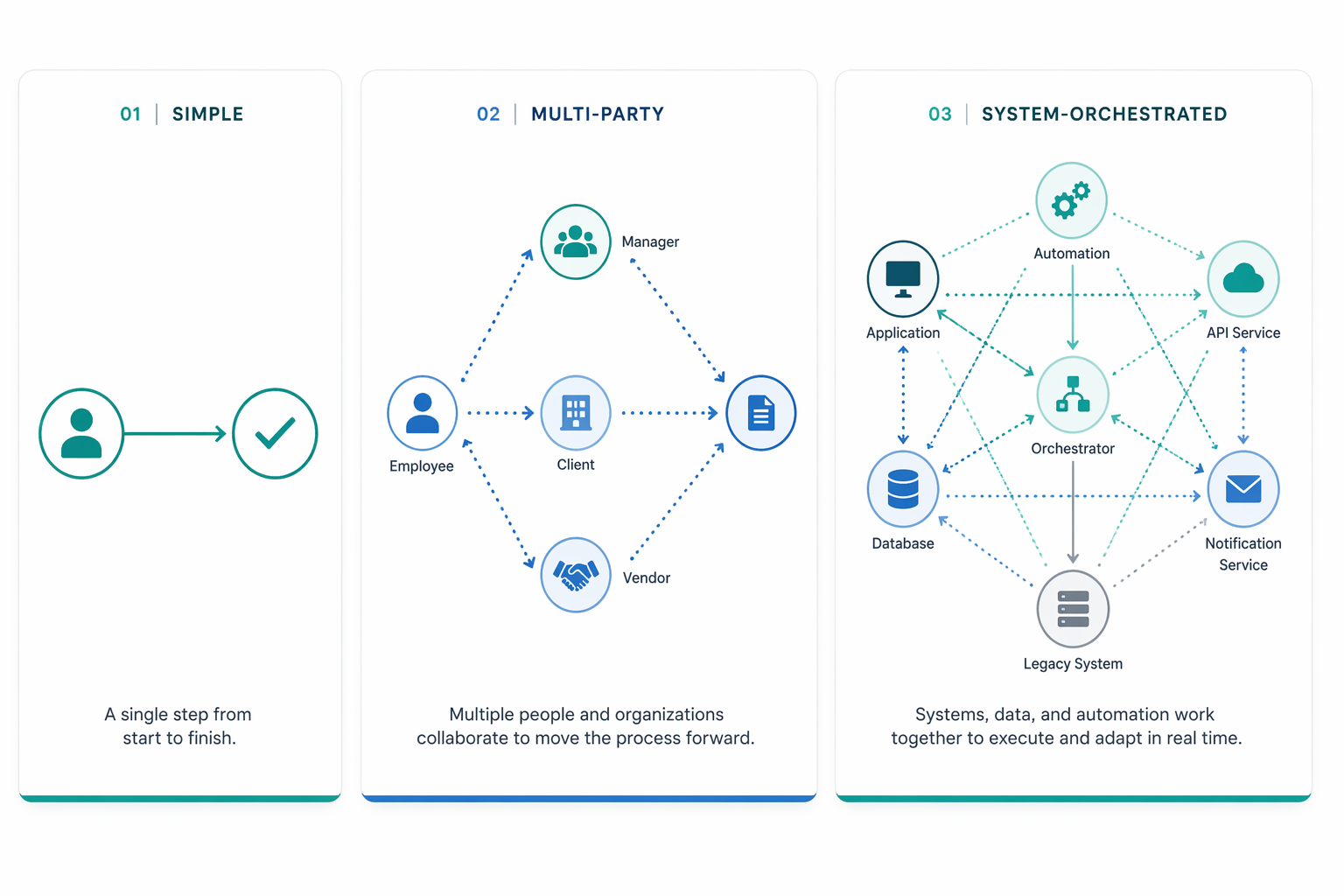
Simple Approvals and Task Workflows
These are linear, single-department processes where a piece of work moves from one person to the next in a defined sequence. Think: an employee submits a time-off request, their manager approves it, and HR records it. Or a purchase order under $5,000 that needs one sign-off.
The defining characteristics: no external participants, few conditional branches, and a small number of roles involved. For these processes, a lightweight workflow tool or even a task management platform is often sufficient. Paying for a full BPM suite here is like renting a cargo ship to cross a river.
Multi-Party Workflows
This is where most SMBs and departmental buyers actually live. A multi-party workflow involves participants outside your organization — clients submitting requests, vendors responding to RFPs, contractors uploading documents. The process might start with an external form submission, route through three internal departments for review, loop back to the external party for revisions, and end with a final approval.
The critical requirement here is frictionless external access. Can a client submit a request without creating an account? Can a vendor see the status of their submission through a branded portal? Tools that excel at internal task management often fail at this — they assume every participant has a license and a login.
System-Orchestrated Processes
These are processes where the primary actors are systems, not people. An invoice arrives via email, an automation extracts the data, pushes it into your accounting system, triggers a payment run, and logs the result — all with minimal human intervention. The SAP Signavio wiki classifies this as integration-centric BPM, where the workflow is about system-to-system communication with little human involvement.
System-orchestrated processes typically require API connectivity, robust error handling, and sometimes a developer to set up the initial integrations. If your primary need is connecting SaaS tools and automating data flows between them, you may be better served by an iPaaS tool than a traditional BPM platform.
A Decision Tree: Which Process Type Maps to Which Tool Category?
Once you’ve identified your dominant process type, the tool category largely determines itself. The decision tree below routes you to the right starting point.
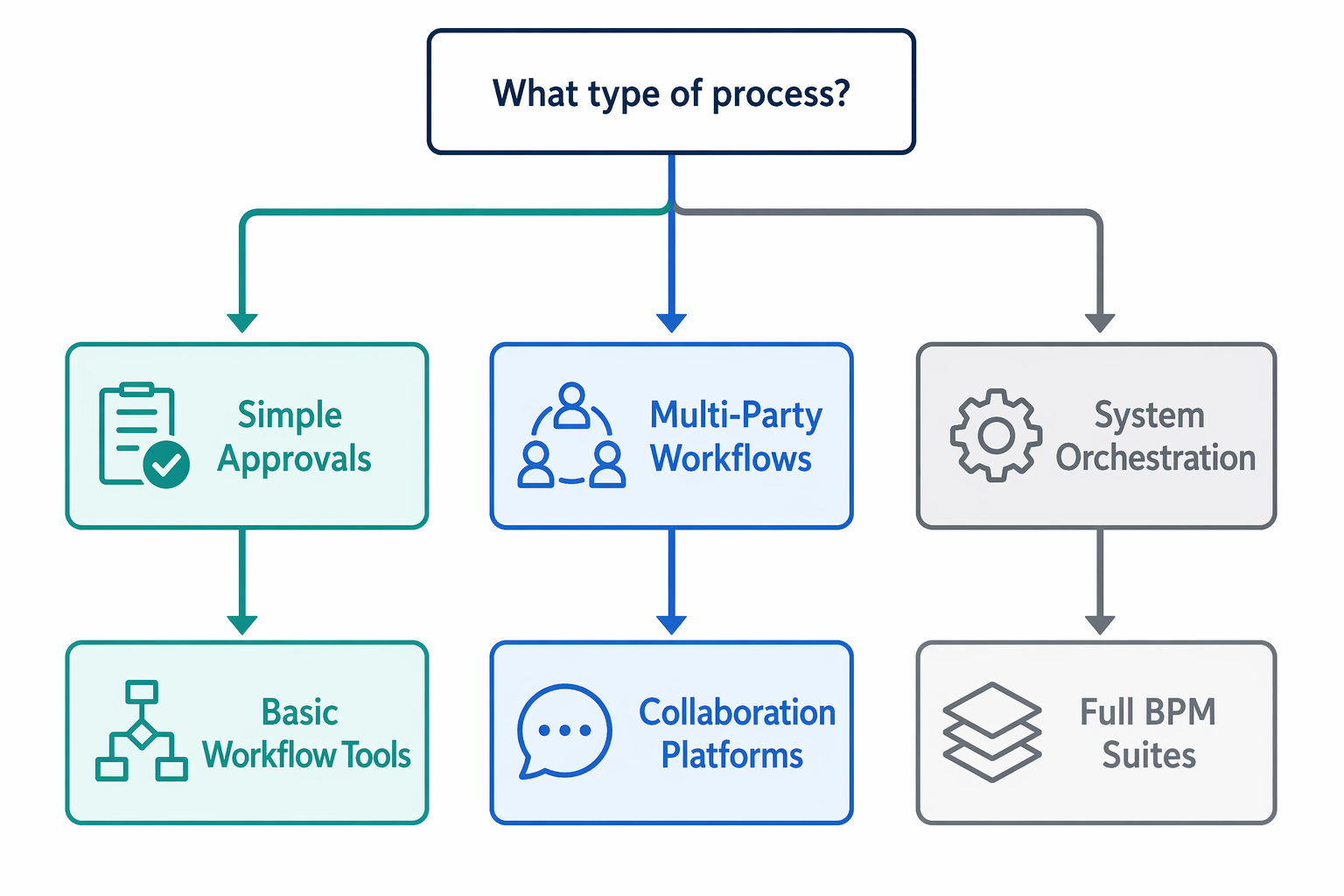
The majority of SMBs and departmental buyers land in the first two branches. If your process is a simple approval chain, start with lightweight tools like monday.com or Process Street. If you’re managing multi-party workflows with external participants, look at platforms built for that use case — Moxo or Pipefy. Only if your processes are system-orchestrated or span multiple departments with complex governance requirements should you be evaluating enterprise BPM suites like Camunda or Bizagi.
5 Questions to Answer Before You Look at Any Tool
The ClearWork article on BPM implementation failures identifies incomplete discovery as one of the most common reasons projects fail — not bad software, but a poor understanding of the process being automated. Before you open a single pricing page, answer these five questions. Write the answers down.
1. Do you know your real current-state process — including exceptions?
Most teams document the happy path: the way the process works when everything goes right. But the exceptions — the invoice that’s missing a PO number, the client who submits the wrong form, the approval that needs three rounds of revision — are where the real complexity lives. If you haven’t mapped the exception paths, you’ll build a workflow that breaks on day one.
For a deeper resource on workflow discovery, see our Process Automation Tool Buyer's Guide, which walks through three real-world workflows to determine what kind of tool you actually need.
2. Who needs to participate — internal only, or external clients and vendors?
This is the single most important question for tool selection. If every participant is an internal employee with a company email, almost any tool will work. But if you need clients, vendors, or contractors to submit requests, review documents, or check status, you need a platform that supports external access without requiring them to buy a license or create an account. Features like magic links, branded client portals, and guest access are non-negotiable for multi-party workflows.
3. What’s your team’s technical comfort level?
No-code platforms like Kissflow and Pipefy are designed for business users who can build workflows through drag-and-drop interfaces. Developer-oriented tools like Camunda require BPMN modeling skills and dedicated engineering time. Be honest about your team’s capacity. A tool that requires a developer to maintain will fail if you don’t have a developer available.
4. What’s your realistic budget per user?
BPM pricing varies dramatically. monday.com starts at $9 per seat per month for its Basic plan, but that plan lacks automation and integrations. Pipefy starts at $24 per user per month. Kissflow charges $1,500 per month for 50 users — that’s $30 per user per month. Enterprise tools like Camunda and SAP Signavio use custom pricing that often starts well above $100 per user per month. Know your per-user ceiling before you start evaluating.
5. Do you need AI assigned to specific steps, or just basic automation?
This question separates tools that have bolted on an AI chatbot from tools that let you assign AI to specific process steps — auto-classifying an incoming invoice as “approved vendor” or “new vendor,” extracting key fields from a contract, or routing an exception to the right team based on the content. If you need step-level AI, you need a platform that supports it natively, not one that offers a general-purpose assistant.
Tool Shortlist Matched to Your Answers
Based on your answers to the five questions above, the table below maps each tool to its best-fit scenario. This is not an exhaustive list — it focuses on the tools most relevant to SMBs and departmental buyers, excluding enterprise-only platforms that require custom pricing and dedicated implementation teams.
| Tool | Best-Fit Scenario | Starting Price | Key Strength | Not for You If |
|---|---|---|---|---|
| Kissflow | No-code SMB workflows with moderate complexity | $1,500/month for 50 users | Full BPM features without code; good for mid-market teams that have outgrown simple task managers | You need external client portals or your team is under 10 people (the minimum plan covers 50 users) |
| Pipefy | Mid-market no-code process building with external participants | Free plan available; paid from $24/user/month | Strong form-based workflow builder; supports guest access for external submitters | Your processes require heavy system-to-system integration or complex conditional routing |
| monday.com | Simple approvals and task workflows for small teams | $9/seat/month (Basic); $19/seat/month (Pro) | Familiar interface, fast to deploy, good for teams already using it for project management | You need multi-party workflows with external participants or complex BPM governance |
| Moxo | Multi-party orchestration with external clients and vendors | $99/month (free trial available) | Built for external collaboration; branded client portals, magic links, SLA enforcement | You need deep system integration or developer-oriented BPMN modeling |
| Process Street | Checklist-driven processes and standard operating procedures | $100/month for 5 members | Excellent for document-centric processes and compliance checklists | You need complex conditional workflows or system-to-system automation |
| Nintex | Microsoft-centric automation (SharePoint, Office 365) | Usage-based pricing | Deep integration with Microsoft ecosystem; strong document-to-process automation | You’re not a Microsoft shop or you need a lightweight standalone tool |
| Camunda | Developer-heavy enterprise automation with BPMN/DMN | Open-source community version; enterprise pricing on request | Full BPMN 2.0 compliance; best-in-class for system-orchestrated processes | You don’t have dedicated developers or you need a no-code interface |
| Bizagi | Analytics and modeling depth for process excellence teams | Modeler free; automation pricing on request | Strong BPMN modeling and process simulation capabilities | You need a quick deployment without process modeling expertise |
For a more detailed look at approval-specific workflows, see our Approval Workflow Software by Use Case guide, which covers tools optimized for simple approval chains.
Pricing Reality Check: What $10/User vs. $100/User Actually Gets You
BPM pricing is notoriously opaque. Enterprise tools like Camunda, Pega, and SAP Signavio don’t publish prices — you have to talk to sales, sit through a demo, and negotiate. But even among the tools that do publish pricing, the gap between tiers is wider than most buyers expect.
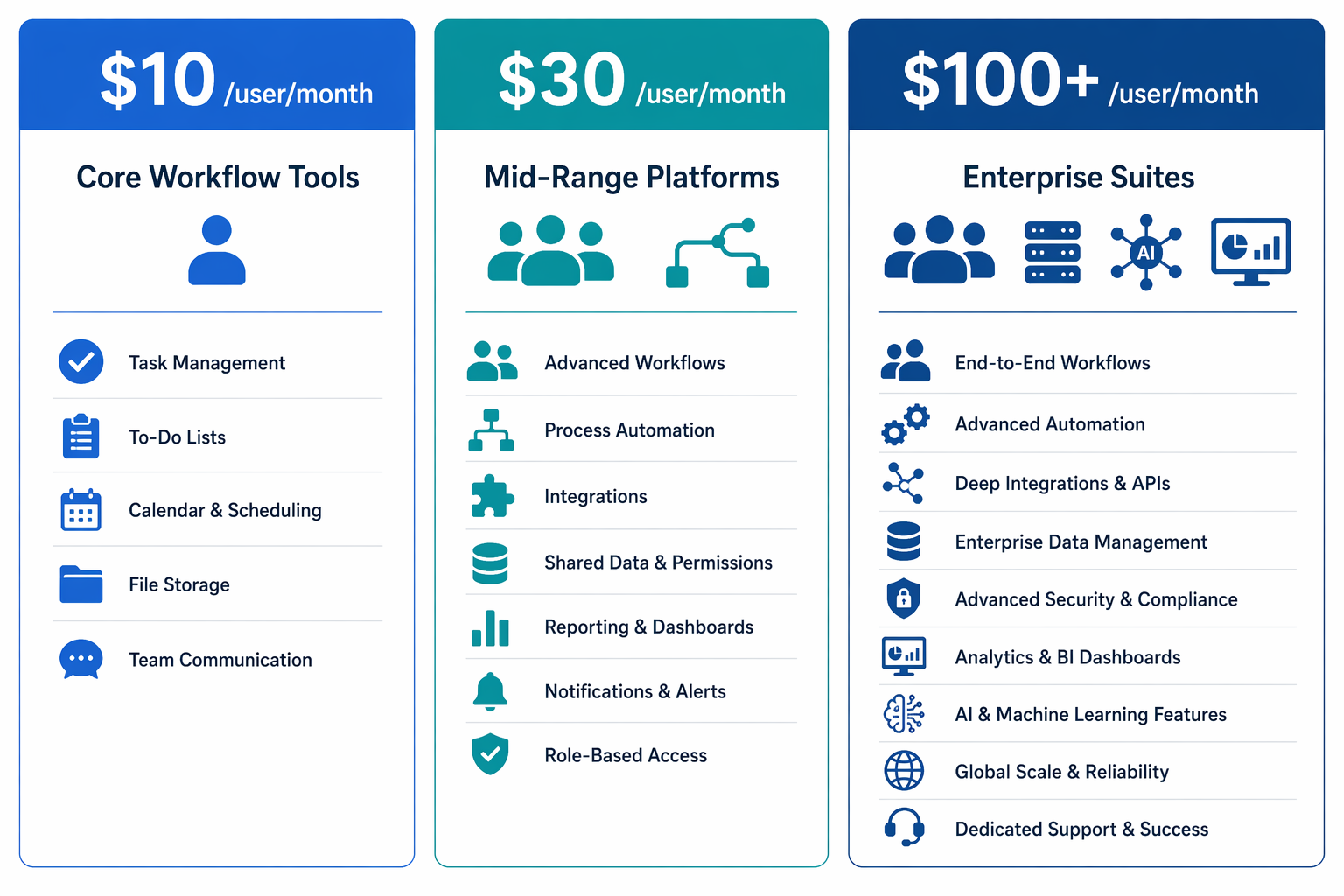
The $10/User Tier: Core Workflow Tools
At this price point, you get basic task management, simple approval routing, and maybe a few automation triggers. monday.com Basic at $9/seat/month is the archetype. You can assign tasks, set due dates, and create simple boards. What you don’t get: conditional logic, external participant access, advanced reporting, or SLA tracking. This tier works for teams that need to digitize a manual process but don’t need BPM-level governance.
The $30/User Tier: Mid-Range BPM Platforms
This is the sweet spot for most SMBs and departmental buyers. Pipefy at $24/user/month and Kissflow at roughly $30/user/month (at the 50-user tier) sit here. You get conditional workflows, form builders, basic reporting, and — critically — external participant support. These platforms can handle multi-party processes, enforce SLAs, and provide audit trails. The trade-off: they’re not as flexible as enterprise BPM suites for complex system orchestration, and their AI capabilities are still maturing.
The $100+/User Tier: Enterprise BPM Suites
At this level, you’re paying for governance, scalability, and depth. Camunda, Appian, and SAP Signavio fall here. You get BPMN 2.0 compliance, process simulation, advanced analytics, AI step assignment, and dedicated support. These tools are designed for organizations that need to manage hundreds of processes across multiple departments with strict compliance requirements. For most SMBs, this is overkill — but if you’re a regulated industry or scaling rapidly, the investment can pay off.
For a detailed breakdown of what each tool actually costs including hidden fees, see our BPM Workflow Software Pricing Guide 2026.
AI Readiness Check: Do You Need AI Agents or Just Basic Automation?
Every BPM vendor in 2026 claims to have AI. But there’s a wide gap between a vendor that has added a general-purpose AI chatbot to its interface and a platform that lets you assign AI to specific process steps.
The distinction matters because the value of AI in BPM comes from embedding it into the workflow — not from asking a chatbot a question. Consider these three scenarios:
- Auto-classification: An invoice arrives. AI reads the document, identifies the vendor, checks whether the vendor is pre-approved, and routes the invoice to the appropriate approval chain — all without a human touching it.
- Exception routing: A customer support ticket contains language that suggests a refund request. AI flags the intent, extracts the relevant order number, and routes the ticket to the refund team with a pre-populated summary.
- Document extraction: A contract is uploaded. AI extracts key fields (effective date, parties, termination clauses) and populates them into a structured record, triggering a review workflow.
If your processes involve any of these patterns, you need a platform that supports step-level AI assignment — not just a chatbot that can answer questions about your workflow. Among the tools in our shortlist, Kissflow and Pipefy have been adding AI step capabilities, while enterprise tools like Appian and Pega have more mature AI-in-process features.
Implementation Timeline Expectations and Red Flags
One of the most common BPM implementation failures is mismatched timeline expectations. The Moxo comparison notes that no-code platforms can be live in days, while enterprise suites take months and require dedicated IT. Here’s what realistic timelines look like:
- No-code tools (Kissflow, Pipefy, monday.com): 1–5 days for a simple workflow, 2–4 weeks for a multi-party process with conditional routing and external access.
- Mid-range platforms (Moxo, Nintex): 2–6 weeks, depending on integration complexity and the number of external participants.
- Enterprise BPM suites (Camunda, Appian, SAP Signavio): 3–6 months for the first process, with ongoing IT support for maintenance and scaling.
The ClearWork article recommends a practical 30-day rollout plan: pick 2–3 high-impact processes in week one, run discovery in week two, design the future state in week three, and build and launch a thin slice in week four. This approach works for any tool category — it forces you to validate the tool against real processes before committing to a full rollout.
Red Flags to Watch For
The ClearWork article identifies several common BPM implementation failure reasons. Watch for these signals during your evaluation:
- Incomplete discovery: If you haven’t mapped the exception paths, you’re not ready to buy software. The tool won’t fix a process you don’t understand.
- Over-automating a flawed process: Automating a broken process just makes the brokenness happen faster. Fix the process first, then automate.
- Weak exception handling: If the tool can’t handle the edge cases — the missing field, the out-of-sequence approval, the rejected submission — your team will end up working around the tool, defeating the purpose.
- Lack of measurable outcomes: If you can’t define what success looks like (cycle time reduction, error rate drop, audit prep time saved), you won’t know whether the implementation worked. The Moxo article cites cycle time reductions of 60–70% and error drops up to 80% as achievable benchmarks — use those as reference points.
For concrete examples of how different departments apply these principles, see our BPM Workflow Examples by Department guide, which covers real-world use cases for finance, HR, IT, and operations.