

The PKM Paradox: More Tools, More Confusion
The personal knowledge management (PKM) app market has never been more crowded. According to recent market analysis, the global KM software market is projected to reach $26.4 billion in 2026, driven by demand for digital knowledge centralization and AI-driven ecosystems. Yet despite this explosion of choice, most users still feel lost. Research cited by Kosmik indicates that 80% of global workers experience information overload daily, and 76% report daily stress from it. Knowledge workers spend up to 2.5 hours every day searching for information, with 47% spending over an hour just looking for files. The McKinsey Global Institute puts the figure at roughly 19% of the working week — nearly a full day lost every week to retrieval.
The paradox is real: more tools should mean more solutions, but instead they create more noise. The core problem isn't a lack of features — it's a lack of fit. Most users pick a tool based on a feature list or a friend's recommendation, then abandon it within weeks because the tool's structure clashes with how they naturally think and work. This article offers a different approach: a diagnostic framework that helps you identify your thinking style first, then match it to the right tool.
Why Most PKM Listicles Fail You
Open any "best PKM apps" listicle and you'll see the same pattern: a table of features, a paragraph about pricing, and a generic verdict. These comparisons treat tools as interchangeable products with different spec sheets. But a PKM app isn't a toaster — it's a thinking environment. The features that matter depend entirely on how your brain organizes information.
A feature-based comparison tells you that Obsidian has 2,600+ community plugins and Notion has 30M+ users. Those are impressive numbers, but they don't tell you whether you'll actually use the tool daily. The Tool Finder review puts it plainly: "the best PKM app is the one you'll open daily and build in consistently." Daily adoption depends on alignment with your thinking style, not on a feature count.
The Four Thinking Styles: Which One Are You?
The four thinking styles framework — Visual, Linear, Networked, and Structured — is a practical heuristic synthesized from multiple sources including Kosmik, Tool Finder, and Storyflow. It is not a validated academic model, but it serves as a reliable decision tool for matching your natural information-processing preferences to a PKM app's core design philosophy.
Read through the diagnostic questions below and note which style resonates most strongly. Most people identify with one primary style and a secondary style.
Diagnostic Questions
- Visual Thinker: Do you prefer mind maps, whiteboards, and spatial layouts over outlines? When you learn a new concept, do you draw it out? Do you feel constrained by linear text editors?
- Linear Thinker: Do you think in lists, outlines, and sequential steps? Do you prefer hierarchical structures where every item has a clear parent? Do you find nested bullet points intuitive?
- Networked Thinker: Do you see ideas as interconnected nodes rather than categories? Do you frequently jump between related topics? Do you value serendipitous discovery over rigid organization?
- Structured Thinker: Do you think in databases, tables, and metadata? Do you want every piece of information to have a defined property and relationship? Do you prefer templates and consistent schemas?
| Thinking Style | Preferred Information Structure | Common Pain Points | Natural Workflow |
|---|---|---|---|
| Visual | Spatial canvases, mind maps, boards | Text-heavy tools feel restrictive; hard to see the big picture | Drag, arrange, connect visually |
| Linear | Outlines, nested lists, sequential pages | Non-linear tools feel chaotic; need clear hierarchy | Write, indent, reorder |
| Networked | Graphs, backlinks, bidirectional connections | Rigid folders feel limiting; want emergent discovery | Link, explore, connect |
| Structured | Databases, tables, properties, templates | Free-form notes feel messy; need consistent schemas | Define, filter, relate |
Matching Your Thinking Style to the Right PKM Tool
Once you've identified your primary thinking style, the next step is matching it to tools designed for that mode of thought. Below are 2-3 best-fit tools per style, with brief rationale. These recommendations reflect the May-June 2026 snapshot of each tool's capabilities and pricing.
Visual Thinkers → Kosmik, Heptabase
Visual thinkers need a canvas, not a document. Kosmik and Heptabase are canvas-based tools that let you arrange notes, images, and web clippings spatially. Kosmik is priced at $11.99/month and offers a visual whiteboard where you can group ideas by proximity and visual relationships. Heptabase, at $8.99/month (yearly) or $11.99/month (monthly), provides a similar spatial canvas with a focus on visual note-taking and research synthesis. Both tools allow you to see the entire landscape of your knowledge at a glance — something a linear outliner can never provide.
Linear Thinkers → Logseq, Tana
If you think in outlines and nested lists, outliner-based tools are your natural habitat. Logseq is completely free and open-source, with block-level referencing that lets you link individual bullet points across pages. It also includes built-in flashcards for spaced repetition, making it a strong choice for students. Tana is a newer entrant that combines outliner structure with a super-tag system for metadata, giving linear thinkers the hierarchy they crave with added flexibility for structured data.
Networked Thinkers → Obsidian, Roam Research
Networked thinkers thrive on connections and serendipitous discovery. Obsidian is the dominant tool in this category, with over 2,600 community plugins and a local-first, plain-text Markdown foundation. It is free forever for personal use, with a $4/month sync upgrade. Obsidian's graph view visualizes connections between notes, and its plugin ecosystem lets you customize everything from daily notes to Kanban boards. For a deeper look, read our Obsidian Review 2026.
Roam Research pioneered the block-reference and daily-note workflow that many networked thinkers love. However, at $165/year and with slowed development noted in recent reviews, it is a more expensive and riskier choice than Obsidian. Roam remains a strong option for users who prefer a fully hosted, no-setup-required experience with native bidirectional linking.
Structured Thinkers → Notion, Capacities
If you think in databases, properties, and templates, you need a tool that treats information as structured data. Notion is the most popular choice here, with over 30 million users and a cloud-first workspace that combines notes, databases, wikis, and project management. Its relational database system lets you define properties, link entries across tables, and create custom views (table, board, calendar, gallery). For a detailed assessment, see our Notion for Note-Taking in 2026 profile.
Capacities is a newer alternative that offers an object-based approach — each "object" (person, project, book, etc.) has a defined type with custom properties, similar to a lightweight CRM for your knowledge. It is less flexible than Notion but more opinionated, which can be a benefit for structured thinkers who want guardrails rather than a blank canvas.
| Thinking Style | Recommended Tools | Key Strengths | Pricing (as of May 2026) |
|---|---|---|---|
| Visual | Kosmik, Heptabase | Spatial canvas, visual grouping, web clippings | Kosmik $11.99/mo; Heptabase $8.99/mo (yearly) |
| Linear | Logseq, Tana | Outliner structure, block-level references, flashcards | Logseq free; Tana freemium |
| Networked | Obsidian, Roam Research | Graph view, bidirectional links, plugin ecosystem | Obsidian free (sync $4/mo); Roam $165/yr |
| Structured | Notion, Capacities | Databases, properties, templates, relational data | Notion freemium; Capacities free with paid tiers |
Secondary Filters: Narrowing Your Shortlist
By now you should have 2-3 candidates that match your thinking style. The next step is applying practical constraints to narrow to a single choice. These secondary filters are equally important — a tool that fits your thinking style but fails on privacy or mobile quality will still lead to abandonment.
- Local vs. Cloud Storage: Do you need offline access and file ownership (Obsidian, Logseq) or do you prefer cloud sync and collaboration (Notion, Roam)? Local-first tools give you data portability; cloud tools give you real-time sync and sharing.
- Budget: Are you willing to pay $10-15/month for a premium tool, or do you need a free option? Logseq and Obsidian are free; Notion has a generous free tier; Heptabase and Kosmik require subscriptions.
- Privacy Requirements: Do you need end-to-end encryption or self-hosting? Logseq and Obsidian store data locally by default. Notion and Roam are cloud-only with standard encryption.
- Mobile App Quality: If you take notes on the go, test the mobile app before committing. Obsidian's mobile app has improved significantly with version 2.0, but Notion's mobile experience remains more polished for quick capture.
- Team Collaboration: Do you need to share notes or collaborate with others? Notion excels here with real-time collaboration and shared workspaces. Obsidian now offers real-time collaboration through its sync service, but it's less mature.
- AI Capabilities: Some tools now offer AI-powered features like auto-tagging, summarization, and smart search. For a deeper exploration of which AI features actually deliver value, see our AI in PKM Apps 2026 analysis.
| Filter | Question to Ask Yourself | Tools That Excel Here |
|---|---|---|
| Storage | Do I need offline access and file ownership? | Obsidian, Logseq (local-first) |
| Budget | Am I willing to pay $10-15/month? | Logseq (free), Obsidian (free), Notion (freemium) |
| Privacy | Do I need end-to-end encryption or self-hosting? | Logseq, Obsidian (local-first) |
| Mobile | Do I take notes primarily on mobile? | Notion, Obsidian (improved mobile 2.0) |
| Collaboration | Do I need to share notes with a team? | Notion, Obsidian (sync with collaboration) |
| AI Features | Do I want AI-powered search or auto-tagging? | Notion AI, Roam (AI features in development) |
Your Decision Flow Chart
The following flow chart visualizes the entire decision process from start to finish. Start at the top with the question "How do you think?" and follow the branch that matches your diagnostic answers. Each branch leads to 2-3 tool candidates, then passes through the secondary filters (local vs. cloud, budget, privacy, mobile, collaboration) to arrive at your final shortlist.
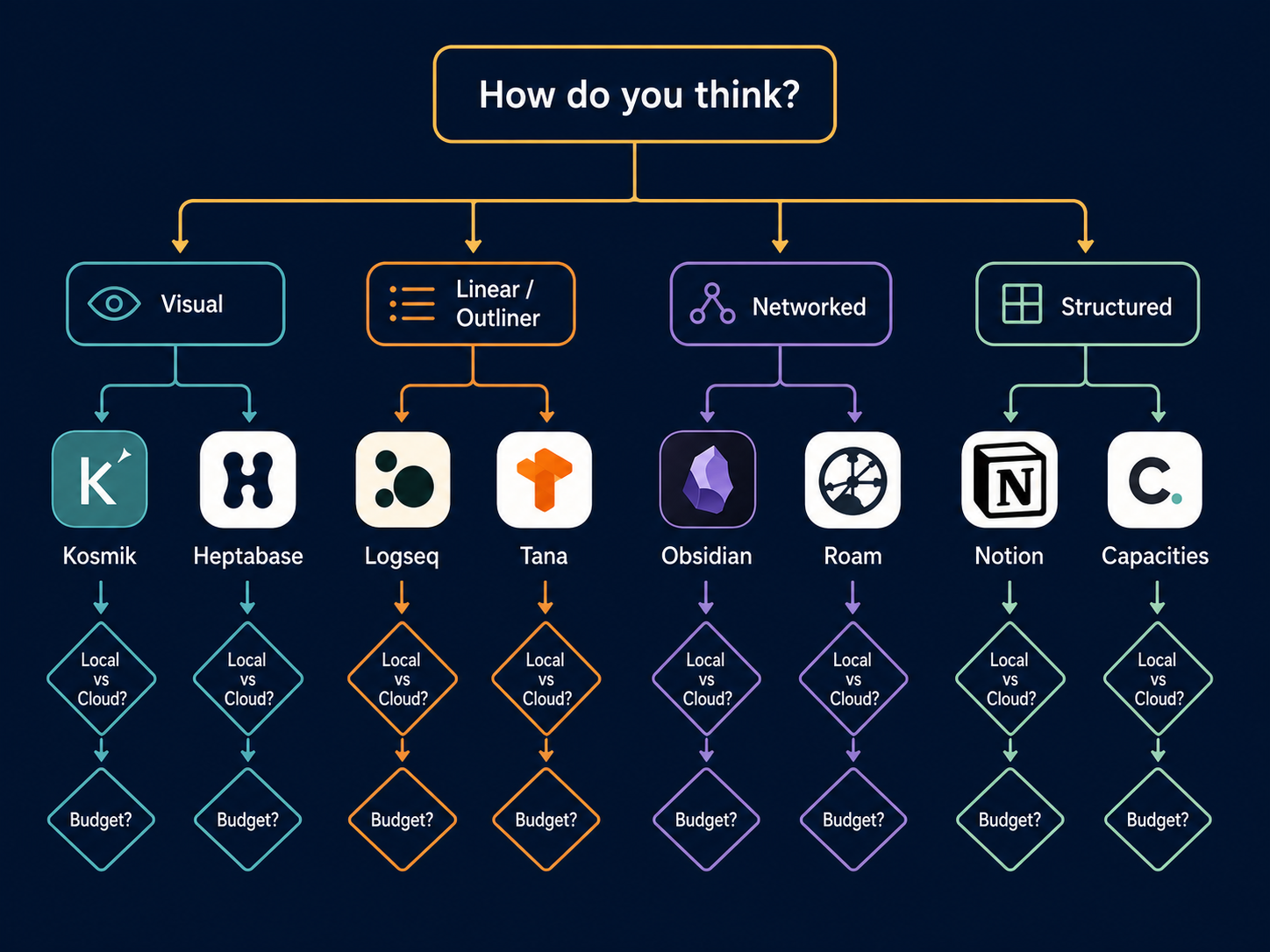
The flow chart is designed to be used as a quick reference. If you're still uncertain after following the chart, consider exploring the PKM system comparison guide to understand which methodology (PARA, Zettelkasten, BASB) aligns with your chosen tool.
The 90-Day Commitment Plan
Choosing the right tool is only half the battle. The other half is committing to it long enough to build a critical mass of notes. Tool Finder's review emphasizes that "users who commit to one tool for 90 days consistently outpace those who switch monthly by building a critical-mass knowledge base of 100+ linked notes." Here is a three-phase plan to get you through the first 90 days.
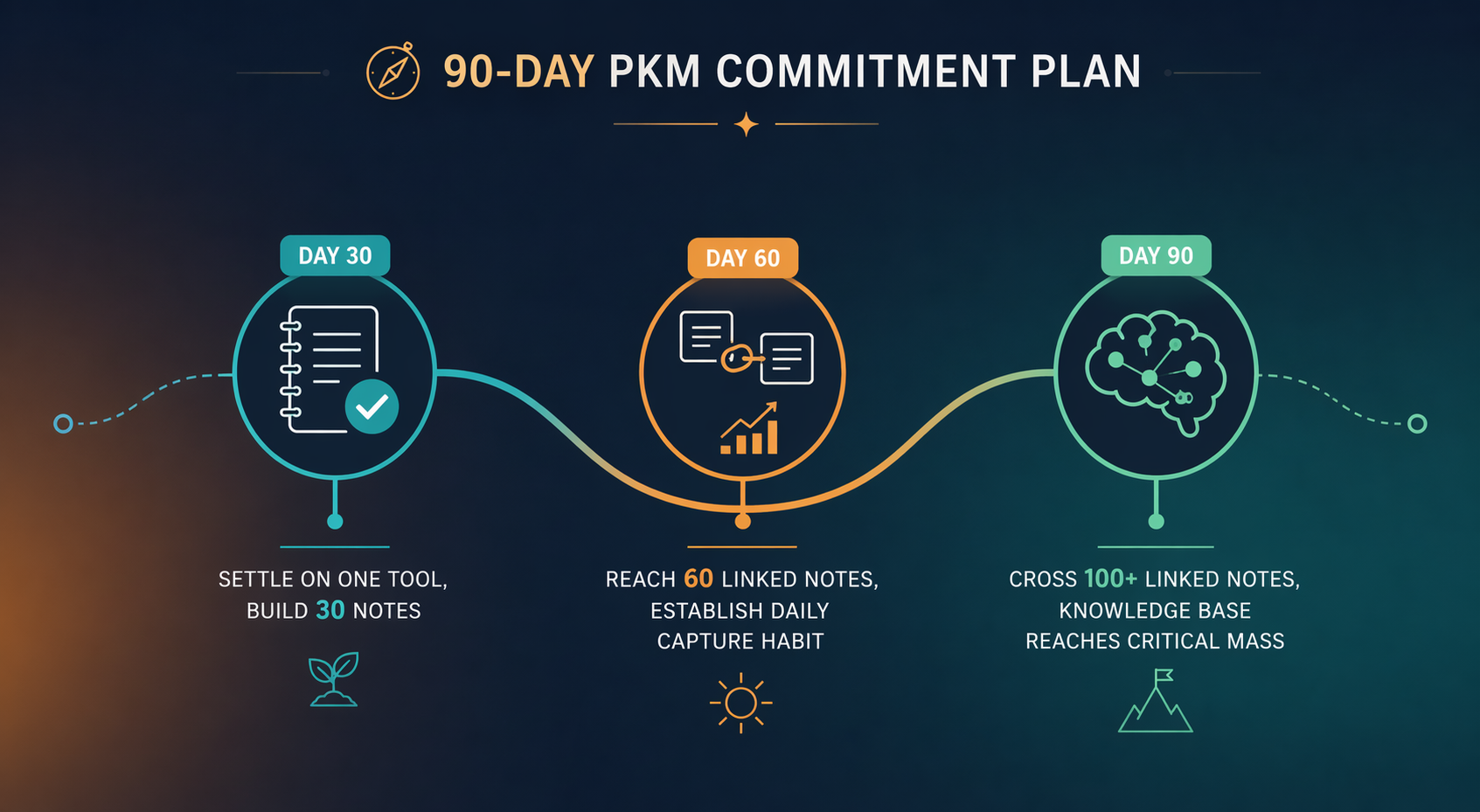
Days 1-30: Capture and Basic Organization
- Focus only on capturing notes. Don't worry about structure, tags, or linking yet.
- Create a simple inbox folder or daily note and dump everything there.
- Learn the basic mechanics of your chosen tool: how to create a note, how to format text, how to search.
- Goal: 30-50 notes captured. At this stage, quantity matters more than quality.
Days 31-60: Linking and Structuring
- Start linking related notes. Use backlinks, tags, or database relations depending on your tool.
- Create a simple folder or tag structure. Don't over-engineer — just enough to find things.
- Review your first 30 notes and merge or split them as patterns emerge.
- Goal: 50-80 notes with at least 20 linked connections between them.
Days 61-90: Review and Refine
- Conduct a weekly review of your notes. Archive or delete what's no longer relevant.
- Refine your structure based on how you actually retrieve information, not how you planned to.
- Explore advanced features: templates, automation, plugins, or AI features.
- Goal: 100+ linked notes with a retrieval system that feels natural.
Summary: Best-Fit PKM Apps at a Glance
The following table summarizes the entire decision framework in a single view. Use it as a quick reference after you've completed the diagnostic questions and applied the secondary filters.
| Thinking Style | Recommended Tools | Key Strengths | Best For |
|---|---|---|---|
| Visual | Kosmik, Heptabase | Spatial canvas, visual grouping, web clippings | Designers, researchers, visual learners |
| Linear | Logseq, Tana | Outliner structure, block-level references, flashcards | Students, writers, sequential thinkers |
| Networked | Obsidian, Roam Research | Graph view, bidirectional links, plugin ecosystem | Researchers, knowledge workers, lifelong learners |
| Structured | Notion, Capacities | Databases, properties, templates, relational data | Project managers, teams, structured note-takers |
If you're still unsure after using this framework, consider exploring the broader best note-taking software comparison for a use-case-based perspective before making your final commitment.
Comments
Join the discussion with an anonymous comment.