
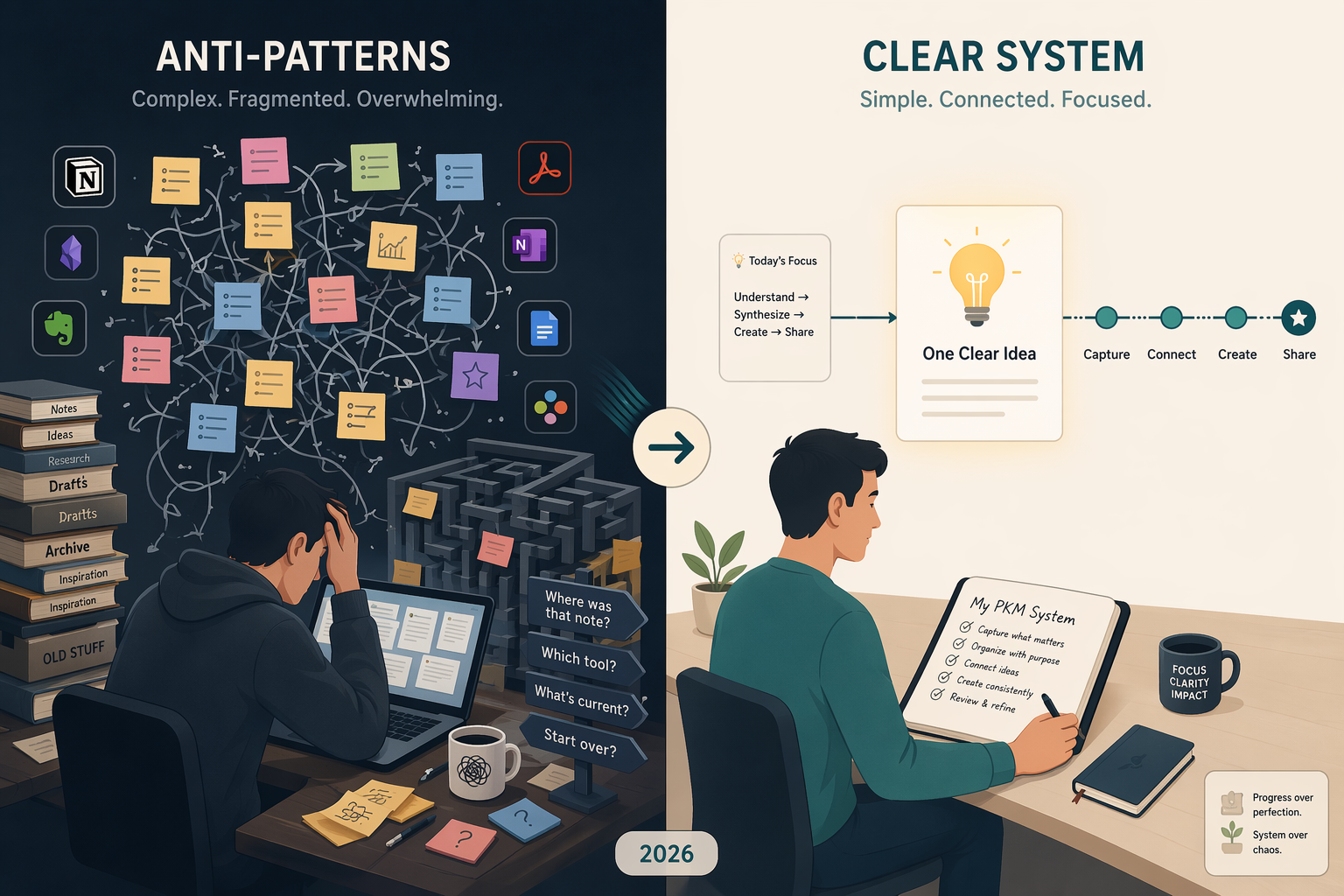
Why PKM Systems Fail — and Why It’s Not the Tool’s Fault
If you’ve tried a personal knowledge management system and felt it collapse under its own weight, you’re not alone. The reflex is to blame the app — switch from Notion to Obsidian, then to Logseq, then back again — hoping the next tool will finally make the habit stick. But the data suggests otherwise. Knowledge workers already waste an average of 9.3 hours each week searching for information, and 80% report experiencing information overload, according to a 2026 GoLinks guide citing McKinsey research. The problem isn’t that you haven’t found the right piece of software. It’s that you’ve fallen into one of several predictable anti-patterns that feel productive while you’re in them.
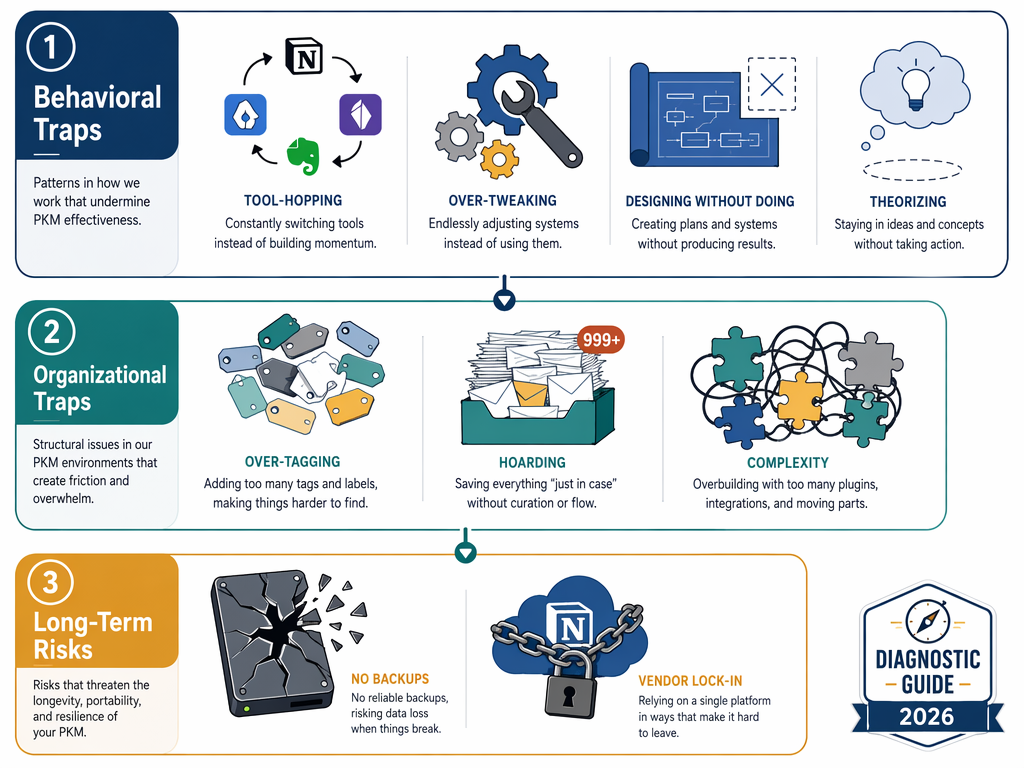
This article is a diagnostic guide, not a tool review. It catalogs 12 common PKM mistakes grouped into three categories: behavioral traps (the ones that feel like progress), organizational traps (the ones that make retrieval harder), and long-term risks (the ones you won’t notice until it’s too late). Each mistake comes with a real example, a warning sign to help you spot it in your own system, and a concrete fix. At the end, you’ll find a self-assessment checklist and a 30-day reset protocol for getting your system back on track.
Behavioral Traps: The Mistakes That Feel Productive
The most insidious PKM mistakes are the ones that give you a dopamine hit of progress while actually moving you backward. You feel like you’re building something. You’re learning, organizing, customizing. But weeks later, you have no new notes about your actual work, and your system is more fragile than when you started. These four behavioral traps are the most common entry points into PKM failure.
Mistake #1: Tool-Hopping — The 2–3 Week Tax
Tool-hopping is the single most common PKM killer. You switch apps every few months, each time convinced that the next tool’s unique feature — bidirectional links, a better graph view, AI-powered search — will finally unlock your productivity. What actually happens is that each migration costs you 2 to 3 weeks of lost momentum. Sébastien Dubois, who has documented this pattern extensively, describes a real case of someone who migrated four times in two years, spending 2 to 3 months total just moving data between systems.
The warning sign is straightforward: you spend more time evaluating new tools than you do using your current one. If your browser history shows more visits to “best PKM app 2026” articles than to your own vault, you’re in this trap.
Mistake #2: The Complexity Monster — 47 Plugins and an 800-Line Template
There’s a certain satisfaction in building the perfect system. You install plugins, write templates, tweak the CSS, and set up automations until your PKM app looks like a command center. Dubois calls this the “complexity monster” — and he’s seen cases of people running 47 plugins with 800-line templates, spending 20 hours on a dashboard, and then going two full weeks without writing a single new note.
The warning sign: you need a diagram to explain your system to someone else. If your setup is so intricate that you can’t describe it in two sentences, it’s too complex.
Mistake #3: The Theorist — 12 Notes About Note-Taking, Zero Notes About Your Work
It’s easy to confuse studying PKM with doing PKM. You read every framework guide, watch every setup video, and take notes about note-taking methods. Dubois describes this as the “theorist” trap: someone whose vault contains 12 notes about how to take notes but zero notes about their actual projects, interests, or work.
The warning sign is brutally simple: open your vault and count how many notes are about PKM itself versus how many are about your actual domain. If the ratio is skewed toward meta-content, you’re studying the map instead of walking the territory.
Mistake #4: The Designer — 20 Hours on CSS, 2 Weeks Without a New Note
This is a variant of the complexity monster, but it deserves its own category because it’s driven by aesthetics rather than functionality. You spend disproportionate time on visual customization — themes, dashboards, icons, color-coded folders — at the expense of actual knowledge work. Dubois documents a case of someone who invested 20 hours building a CSS dashboard and then went two weeks without writing a new note.
The warning sign: you open your PKM app to admire it, not to write. If the act of looking at your system gives you more satisfaction than the act of adding to it, you’ve crossed the line.
Organizational Traps: When Structure Becomes the Enemy of Retrieval
The second group of anti-patterns looks like good organization on the surface. You’re tagging diligently, filing into folders, and capturing everything you read. But these habits, taken too far, actively make it harder to find what you need. The Atlas guide to PKM, published in May 2026, frames this as an imbalance: failing systems over-invest in the “organize” job and under-invest in “retrieve” and “synthesize.”
Mistake #5: Over-Tagging — 500 Tags and Nothing Is Findable
Tags are powerful, but they suffer from a paradox: the more you use them, the less useful each individual tag becomes. When every note has five unique tags, the tag system ceases to be a navigation tool and becomes noise. The Atlas guide recommends limiting yourself to roughly 10 top-level tags. Dubois’s own system, which has scaled to roughly 8,000 notes and 64,890 internal links as of February 2025, relies on a carefully curated set of tags combined with automation — not on tagging every note with a dozen labels.
The warning sign: you spend more time deciding which tag to apply than you do writing the note. If tagging feels like a tax on every entry, your system is broken.
Mistake #6: Capture Without Distill — 5,000 Highlights You Never Re-Read
This is the hoarding trap. You capture everything — highlights from articles, bookmarks, PDF annotations, screenshots — but you never process or synthesize any of it. Dubois describes a real case of someone with 5,000 notes and 200 highlighted books who had produced zero output from all that material. The Atlas guide calls this “capture without distill” and notes that 5,000 highlights that are never re-read are not knowledge; they’re digital clutter.
The warning sign: your inbox or capture queue has hundreds of unprocessed items. If you can’t remember the last time you reviewed a captured highlight and turned it into your own words, you’re hoarding.
Mistake #7: The Folder Fetish — Manual Organization That Breaks at 1,000 Notes
Deep folder hierarchies feel satisfying to build, but they don’t scale. Dubois’s analysis of his own vault — which has grown to roughly 8,000 notes — led him to a clear conclusion: manual organization breaks down past approximately 1,000 notes. Beyond that threshold, tags and links scale far better than folders because they allow a note to exist in multiple contexts simultaneously.
The warning sign: you frequently move notes between folders because you can’t remember where you put them. If you’re spending mental energy on filing decisions, that energy is being stolen from thinking.
Mistake #8: The Octopus System — Needing a Diagram to Explain Your Workflow
Some people solve the complexity problem by distributing it across multiple tools: a PKM app for notes, a task manager for actions, a calendar for time, a whiteboard for brainstorming, a read-later app for articles, and a complex web of automations connecting them all. Dubois calls this the “octopus system” — and the defining characteristic is that you need a diagram to explain how your workflow actually works.
The warning sign: when one tool in your chain breaks or changes its API, your entire workflow stops. If your system has single points of failure, it’s not resilient — it’s fragile.
Long-Term Risks: The Mistakes You Won't Notice Until It's Too Late
The final group of anti-patterns doesn’t cause immediate problems. You can have a beautiful, well-organized, actively used PKM system and still be making these mistakes. They’re invisible — until the day they aren’t. These are the risks that compound silently over years.
Mistake #9: No Backup — 4 Years of Notes on One Laptop
It sounds obvious, but it’s one of the most common mistakes in Dubois’s catalog: someone had four years of notes stored on a single laptop with no backup. No cloud sync, no external drive, no version history. If that laptop had been lost, stolen, or damaged, four years of knowledge work would have vanished instantly.
The warning sign: you can’t immediately name where your backup is and when it was last updated. If you have to think about it, you don’t have a backup.
Mistake #10: Vendor Lock-In Blindness — Building a Fortress in Someone Else's Castle
This is the mistake you don’t notice until your tool’s company pivots, gets acquired, or triples its price. Dubois describes a real case of someone who built their entire system in a proprietary tool, only to have that company change direction and raise prices dramatically. The Atlas guide reinforces this point: you should test your tool’s export function before you need it, not when you’re in a panic to leave.
The warning sign: you don’t know what format your data exports in. If you’ve never run an export and inspected the output, you’re trusting a company you don’t control with your accumulated knowledge.
Mistake #11: The Optimist — Assuming Your System Will Scale Without Maintenance
A system that works beautifully for 100 notes can become unusable at 1,000. Dubois’s analysis confirms that manual organization breaks down past that threshold. The Atlas guide’s 30-day starter workflow is designed to get you to roughly 100 notes in a month — but it doesn’t tell you what happens when you hit 500, 1,000, or 5,000.
The warning sign: you can no longer find notes you wrote six months ago. If your vault is growing but your retrieval success rate is shrinking, your system isn’t scaling.
Mistake #12: No Output — A Vault Full of Input, Empty of Creation
This is the terminal mistake. You have a beautiful, well-organized, carefully tagged vault full of captured knowledge — but you never use any of it to create anything. The Atlas guide defines PKM as having four jobs: capture, organize, retrieve, and synthesize. Failing systems over-invest in organize and under-invest in synthesize. Dubois’s hoarder example — 5,000 notes and 200 highlighted books with no output — is the extreme case.
The warning sign: you can’t point to a single piece of work — an article, a project proposal, a presentation, a decision document — that your PKM system helped you create. If your system only consumes and never produces, it’s a collection, not a knowledge management system.
Self-Assessment Checklist: Which Mistakes Are You Making?
Go through this checklist honestly. For each question, answer yes or no. Every “yes” is a mistake you’re currently making — and the fix is linked above.
- Have you switched PKM apps more than once in the past 12 months? (Mistake #1)
- Do you have more than 10 plugins or a custom template longer than 50 lines? (Mistake #2)
- Does your vault contain more notes about PKM than about your actual work? (Mistake #3)
- Have you spent more than 2 hours on visual customization in the past month? (Mistake #4)
- Do you have more than 20 tags, or do you create new tags for individual notes? (Mistake #5)
- Is your capture queue longer than 50 items, or do you have highlights you’ve never reviewed? (Mistake #6)
- Do you have more than 3 levels of folders, or do you frequently move notes between folders? (Mistake #7)
- Do you use more than 3 tools for your core workflow, with automations connecting them? (Mistake #8)
- Can you not immediately name where your backup is and when it was last updated? (Mistake #9)
- Have you never tested your tool’s export function? (Mistake #10)
- Can you not find notes you wrote 6 months ago without searching for more than 30 seconds? (Mistake #11)
- Can you not name a single piece of work your PKM system helped you create in the past 3 months? (Mistake #12)
The Reset Protocol: How to Fix Your System in 30 Days
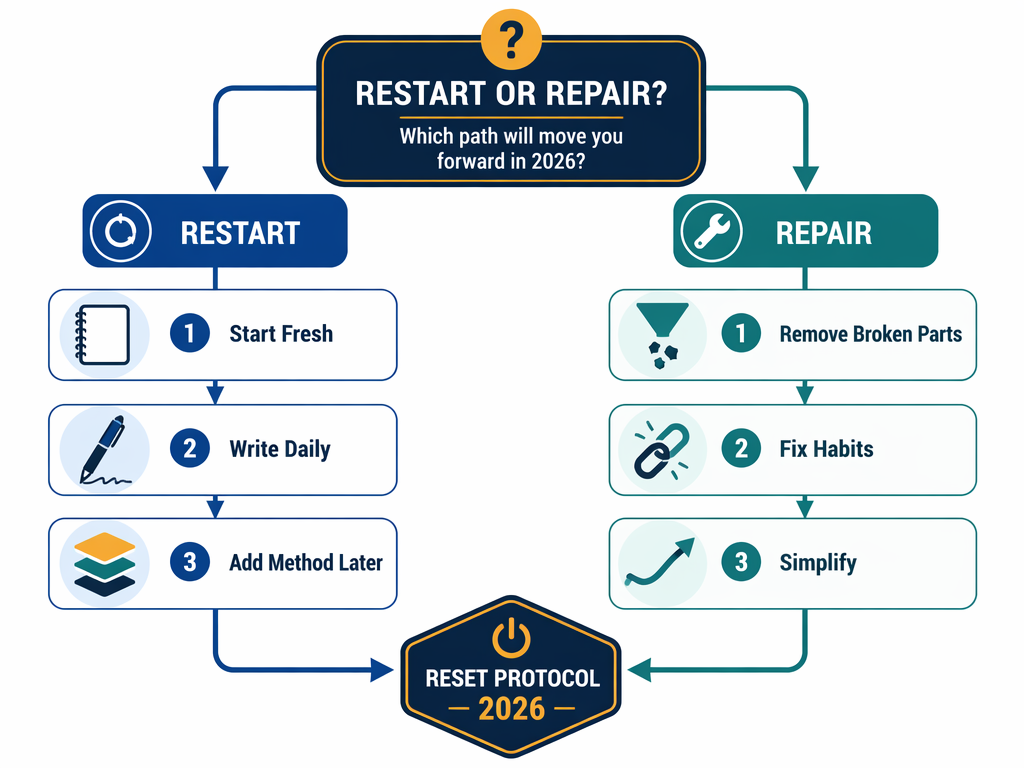
If you’ve identified multiple mistakes in your current system, you have two options: restart from scratch or repair what you have. The table below helps you decide which path is right for you.
| Factor | Restart if... | Repair if... |
|---|---|---|
| Vault size | Under 200 notes | Over 500 notes with meaningful links |
| Organizational debt | You can't find anything without search | Your folder/tag structure is mostly working |
| Emotional state | You dread opening your PKM app | You're frustrated but still using it |
| Data portability | Your current tool doesn't export to Markdown | Your data is already in open formats |
| Time available | You have a weekend to rebuild | You have 30 minutes per week |
Whichever path you choose, the following 30-day protocol will get you to a working system. The key insight, reinforced by every source in this guide, is that the writing habit must come before the method. You cannot organize your way into a knowledge management habit. You have to write first.
Week 1: Strip Down to One Tool and Plain Text
Pick one tool. Any tool. If you’re restarting, choose something that saves files as plain Markdown. If you’re repairing, disable every plugin and template that isn’t essential for writing and reading. Your goal for this week is not to build a system — it’s to remove everything that’s in the way of writing.
- Disable all but the most essential plugins (syntax highlighting and spell check are fine; dashboards and graph view customizations are not).
- Delete or archive any template longer than 10 lines.
- Flatten your folder structure to a maximum of 3 directories: Inbox, Active, and Archive.
- Remove all tags. You’ll add them back later, deliberately.
Week 2: Build the Daily Writing Habit — 3 Notes Per Day
This is the most important week of the entire protocol. Your only job is to write three notes per day. They don’t have to be long. They don’t have to be well-organized. They just have to be in your own words about something you’re actually working on or thinking about.
- One note about something you learned today (work, reading, conversation).
- One note about a problem you’re trying to solve.
- One note that connects two ideas you hadn’t connected before.
Do not organize these notes. Do not tag them. Do not file them into folders. Just write. By the end of Week 2, you’ll have roughly 21 new notes — and more importantly, you’ll have proven to yourself that you can maintain the writing habit.
Week 3: Add One Organizational Method
Now that the writing habit is established, you can add structure. The Atlas guide recommends PARA as the safest default filing method because it’s hard to mis-file across only four categories: Projects (active outcomes with deadlines), Areas (ongoing responsibilities), Resources (topics of interest), and Archives (inactive items).
- Create four folders or tags: Projects, Areas, Resources, Archives.
- File your Week 1 and Week 2 notes into these categories. Don’t overthink it — if a note could go in two places, pick one.
- Add links between related notes as you file them. This is more valuable than perfect categorization.
Week 4: Establish the Weekly Review Habit
The weekly review is the habit that prevents your system from decaying. The Atlas guide prescribes a 30-minute weekly session. During that time:
- Process your capture queue: distill 3 to 5 items into atomic notes.
- Review your Projects list: update status, add notes, close completed items.
- Scan for orphan notes: find notes with no links and decide if they need connections or deletion.
- Run a quick backup check: confirm your 3-2-1 backup is current.
After 30 days, you’ll have a system that is simple, writing-first, and maintainable. From here, you can add complexity only when you feel a specific friction — not because you think you should have a more sophisticated setup.
Comments
Join the discussion with an anonymous comment.