
A tornado emergency preparedness checklist is easy to download and surprisingly easy to abandon. The weak point is rarely the first version of the plan. It is the six months after that, when the water has not been rotated, the out-of-area contact changed numbers, the flashlight still takes batteries no one buys anymore, and the printed checklist has joined the appliance manuals.
If you want the broader preparedness framework first, start with how to build an emergency preparedness checklist you'll actually maintain. This guide narrows the problem to tornado safety and turns the checklist into a living system in Notion or Obsidian: supplies with expiry dates, people with roles, shelter locations, contacts, documents, warning-day actions, and drill logs.
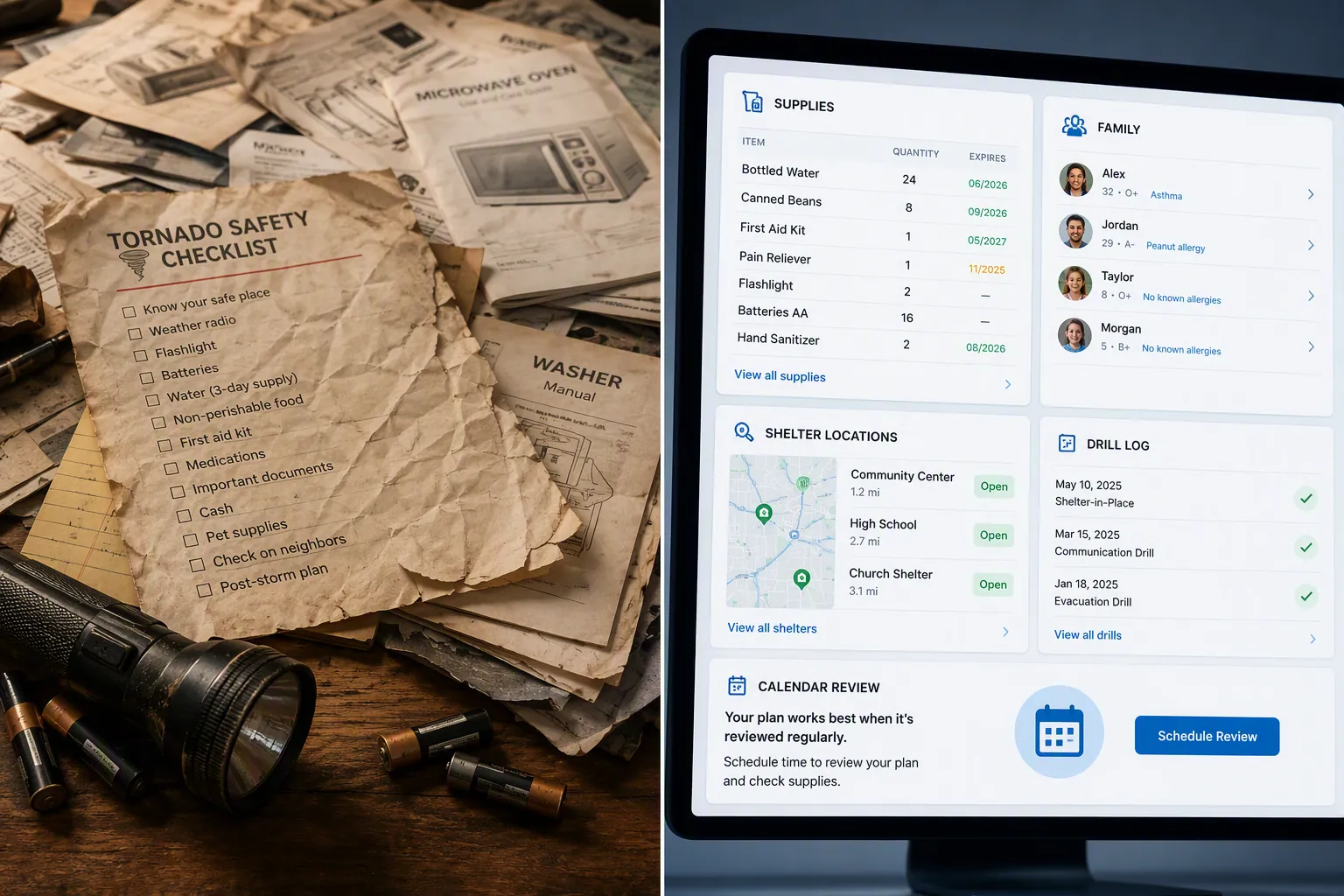
That maintenance layer matters because tornado response is not leisurely. A shelter manufacturer summarizing National Weather Service data cites an average tornado warning lead time of about 13 minutes; because that figure comes through vendor content, it should be treated as a useful planning benchmark rather than a substitute for local NWS guidance.[1] Either way, the operational conclusion is the same: during a warning, the household should not be deciding where the pet carrier is, who grabs medication, or whether the interior closet is still blocked by storage bins.
Start with the System, Not the Page
Official guidance still decides what belongs in the plan. Ready.gov says emergency kits should include one gallon of water per person per day for several days, plus food, radio, flashlight, first aid supplies, batteries, sanitation items, and copies of important documents.[2] The American Red Cross gives tornado-specific safety guidance for watches, warnings, safe shelter, and post-storm hazards.[3] The National Weather Service publishes emergency supply kit guidance that overlaps heavily with Ready.gov and Red Cross recommendations.[4]
The note-taking app does not replace those authorities. It gives their checklist an operating system. A flat list says “water.” A useful system says “12 gallons required for four people over three days,” “8 gallons currently stored,” “expires in September,” “owner: Sam,” and “review before spring storm season.”
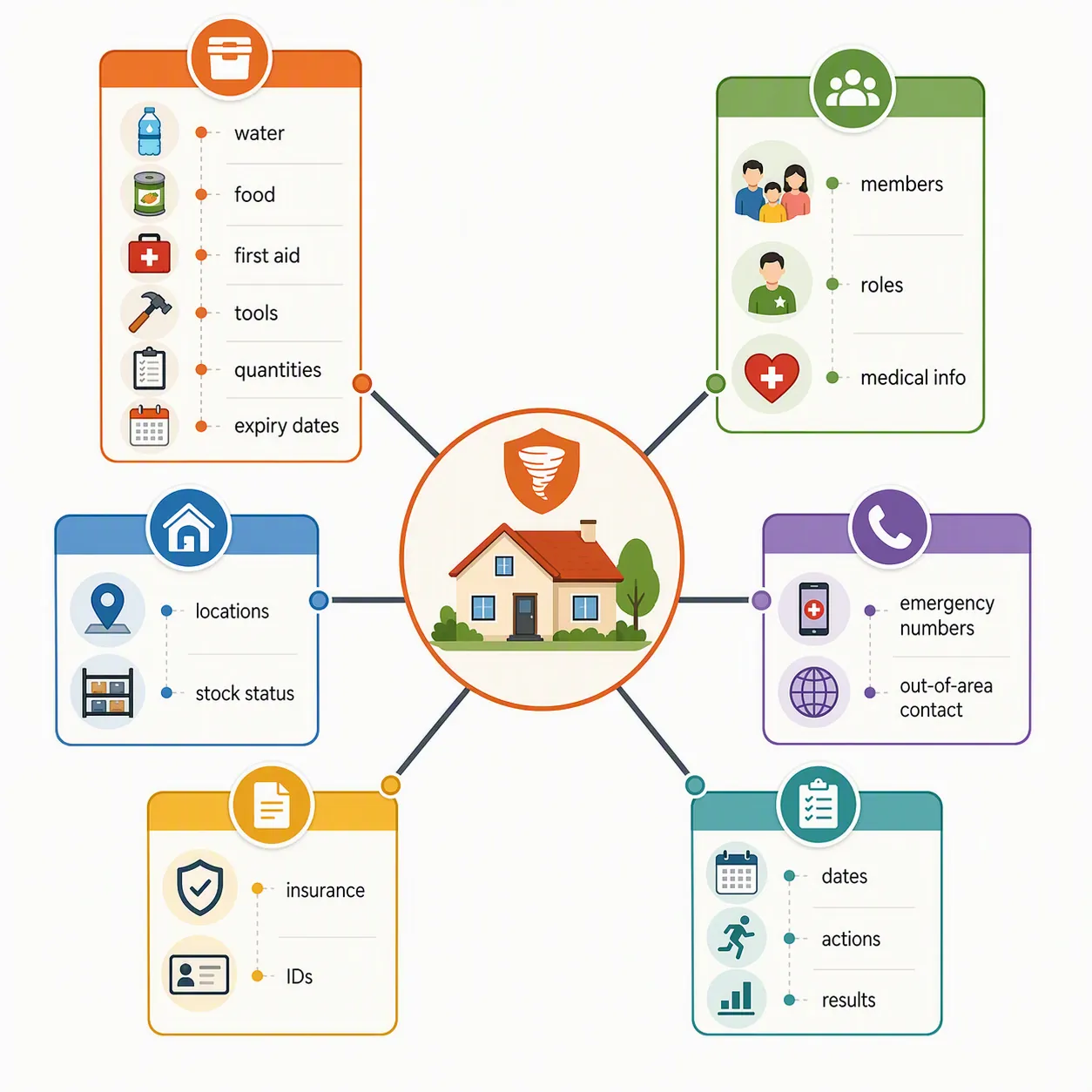
| Checklist item | System object | Fields that make it maintainable |
|---|---|---|
| Water, food, batteries, first aid, radio | Supplies | Category, quantity needed, quantity on hand, storage location, expiry or rotation date, owner, last checked |
| Family and household plan | People | Role, phone, medical notes, mobility needs, pet responsibility, warning-day task |
| Safe place to shelter | Shelters | Location, route, fallback location, capacity, stocked supplies, accessibility notes, last route test |
| Emergency contacts | Contacts | Local emergency numbers, out-of-area contact, school or workplace contacts, veterinarian, utility providers, last verified |
| Insurance, IDs, medical documents | Documents | Document type, storage location, digital copy status, owner, renewal date, offline access |
| Practice the plan | Drill log | Date, scenario, participants, time to shelter, blockers found, fixes assigned, next drill date |
| Actions during a warning | Warning-day checklist | Trigger, action, owner, location, dependency, completion signal |
This is the part a paper checklist cannot do without becoming a household chore nobody volunteered for. The database can show only the water that needs rotation, only the contacts not verified this year, or only the shelter tasks still assigned to “unowned.”
Build the Tornado Data Model
Create one home page called “Tornado Safety System.” Under it, build the objects below. Do not start by decorating a dashboard. A dashboard is only useful after the underlying records know what is missing, expired, assigned, or untested.
Supplies
The supplies database should be boring in exactly the right way. Each item gets a name, category, quantity needed, quantity on hand, storage location, expiry or rotation date, owner, and status. Ready.gov’s one-gallon-per-person-per-day water standard is a good example of why “water” is not enough: a four-person household planning for three days needs 12 gallons before any pet, medical, or climate adjustments.[2]
- Name: Bottled water, AA batteries, weather radio, pet food, first aid kit, medication copy list
- Category: water, food, power, medical, sanitation, communication, pet, child, document
- Quantity needed: calculated from people, pets, and minimum days
- Quantity on hand: the number someone physically counted
- Review date: the next date the household should inspect or rotate the item
Use status values that force a decision: Ready, Low, Expiring, Missing, Replace, Not needed. “Maybe” is how supplies stay invisible.
People and Roles
The people database turns a family plan into assignments. It should include household members, regular visitors who may be present during storms, caregivers, pets, and any person whose needs change the shelter plan. For each person, track role, phone, medical notes, mobility needs, preferred communication method, and warning-day task.
Keep medical information practical and minimal. The system needs enough to help the household act: medication location, mobility constraint, device dependency, allergy note, or caregiver contact. It does not need to become a full medical record in a workspace everyone can open.
Shelter Locations
Ready.gov’s tornado guidance tells people to go to a safe room, basement, storm cellar, or a small interior room on the lowest level of a sturdy building, away from windows.[5] Your system should convert that into actual household locations: “basement under stairs,” “interior bathroom,” “hall closet,” or “neighbor’s basement by prior agreement.”
If the home has a FEMA-rated safe room, record where it is, how it opens, what is stocked there, and who has access. If it does not, do not let the database pretend. Mark the best fallback, the route to it, and the reason it was chosen. One shelter-manufacturer source places FEMA-rated safe rooms roughly in the $3,000 to $10,000-plus range, but the practical planning step for many households is still the official fallback: identify the lowest, interior, windowless space and keep the path clear.[1][5]
- Primary shelter: the place everyone goes first
- Fallback shelter: the next-best option if the primary space is blocked or inaccessible
- Route blockers: furniture, storage bins, locked doors, pet gates, stair hazards
- Stock status: water, shoes, helmets if used by the household, flashlight, radio, first aid, pet leash or carrier
- Last route test: the last date everyone physically moved to the space
Contacts and Documents
Contacts should be split from people because they age differently. The out-of-area contact, school office, landlord, property manager, insurance agent, veterinarian, pharmacy, utility provider, and local non-emergency numbers each need a “last verified” date. A contact list rebuilt from memory during a warning is not a preparedness system; it is a stress test.
Documents should track existence and access, not just storage. For each item, record the document type, physical location, digital copy location, offline availability, renewal date if relevant, and owner. The National Weather Service includes important documents among emergency supply kit considerations, and Ready.gov also lists copies of important family documents among recommended kit contents.[4][2]
Warning-Day Actions
This is the checklist the household sees when a tornado warning is active. It should be short enough to use while moving. A polished 40-item emergency page is the wrong interface for a 13-minute planning benchmark.
- Move to the primary shelter location.
- Bring phones, shoes, flashlight, radio, and any assigned medication or medical device.
- Account for household members, pets, and regular visitors.
- Monitor official alerts from NOAA Weather Radio, local emergency management, or trusted weather sources.
- Stay sheltered until the warning has passed or officials indicate it is safe.
Keep the longer guidance elsewhere. The warning-day view should answer only three questions: where do we go, what do we grab, and who checks whom?
Drill Log
A drill log is the difference between “we talked about it” and “we learned the hallway closet is blocked.” Each entry should include date, scenario, participants, time to reach shelter if you choose to measure it, blockers found, fixes assigned, and next review date. Red Cross tornado guidance emphasizes knowing safe locations and what to do before, during, and after a tornado; the drill log is where that knowledge becomes household evidence.[3]
Build It in Notion
Notion is the easier choice if the household wants shared databases, filtered views, rollups, and a dashboard someone other than the builder can understand. Notion also has a Natural Disaster Preparedness Plan template, which can be a useful starting page, but it is general disaster planning rather than a tornado-specific maintenance system.[6]
Create a top-level page called “Tornado Safety System.” Add these databases: Supplies, People, Shelters, Contacts, Documents, Warning Actions, and Drill Log. Then relate them where the plan needs accountability.
| Notion database | Useful properties | Linked views to create |
|---|---|---|
| Supplies | Category, Quantity needed, Quantity on hand, Review date, Status, Owner, Storage location | Expiring soon, Missing or low, By storage location, Owned by me |
| People | Role, Phone, Needs, Assigned warning task, Related contacts, Related supplies | Household roster, Needs support, Tasks by person |
| Shelters | Type, Address or room, Route notes, Stock status, Last route test, Blockers | Primary shelter, Fallback shelters, Needs clearing |
| Contacts | Type, Phone, Email, Last verified, Owner, Related person or document | Verify this month, Emergency-only contacts, School/work contacts |
| Documents | Type, Physical location, Digital copy, Offline copy, Renewal date, Owner | Missing digital copy, Renew soon, Insurance and IDs |
| Drill Log | Date, Participants, Scenario, Blockers found, Fixes assigned, Next drill date | Most recent drill, Open fixes, Next drill |
The main dashboard should not show every record. Show the records that require action: supplies with review dates in the next month, contacts not verified recently, shelter blockers, documents without offline copies, and drill fixes still open. If a dashboard opens to a wall of completed tasks, it trains everyone to ignore it.
Use formulas or filtered views for simple warnings: quantity on hand is below quantity needed, review date is before today, status is Missing, last route test is blank, or next drill date has passed. Rollups are helpful when a shelter page needs to show whether its related supplies are ready without manually checking every item.
For sharing, give household members access to the warning-day view and the household roster. Keep sensitive documents and medical notes in a more restricted area if your Notion workspace includes people who do not need that information.
Build It in Obsidian
Obsidian is better when you want local-first files, durable plain text, linked notes, and a system that can live alongside scanned PDFs, maps, insurance notes, and household manuals. If you want a broader read on the app itself, see the Obsidian Review 2026. For tornado preparedness, the important part is not the plugin stack. It is consistent note structure.
Create a folder called “Tornado Safety.” Inside it, use subfolders or tags for Supplies, People, Shelters, Contacts, Documents, Drills, and Warning Actions. Each note should begin with properties so structured views or Dataview-style queries can surface what needs attention.
---
type: supply
category: water
quantity_needed: 12 gallons
quantity_on_hand: 8 gallons
storage_location: basement shelf
owner: Sam
status: low
review_date: 2026-09-01
related_shelter: basement-under-stairs
---
A supplies query should answer the same questions as the Notion dashboard: what is low, what is missing, what needs review, and where is it stored? A shelter note should link to the supplies stored there, the people assigned to it, and the most recent drill entry.
## Primary Shelter: Basement Under Stairs

- Route: kitchen hallway -> basement stairs -> under-stairs space
- Fallback: interior bathroom, first floor
- Blockers: storage bins must stay left of path
- Stocked supplies: [[Water - Basement Shelf]], [[Weather Radio]], [[First Aid Kit]]
- Last route test: [[2026-04-12 Tornado Drill]]
- Next review: 2026-09-01
Use periodic notes for the maintenance loop. A monthly note can include a “Tornado Safety Review” heading with embedded queries or links to the filtered views you already trust. A drill note should be written like an incident record, not a diary entry: what scenario, who participated, what failed, who owns the fix.
## 2026-04-12 Tornado Drill

type: drill
participants: Alex, Sam, Jordan
scenario: evening tornado warning while cooking
shelter_used: [[Basement Under Stairs]]
blockers_found:
  - pet carrier was in garage
  - flashlight batteries weak
fixes_assigned:
  - move pet carrier to hall closet: Sam
  - replace AA batteries: Alex
next_drill_date: 2026-10-12
Obsidian’s advantage is that the tornado system can sit next to the rest of the household archive without becoming trapped in a vendor template. Its disadvantage is that shared household use takes more discipline. If only one person can understand the vault, create a one-page “Open During Warning” note with plain language and links to the shelter plan, contacts, and warning-day actions.
Add the Maintenance Loop
The loop is where the system earns its keep. Ready.gov and Red Cross guidance both support maintaining and refreshing emergency supplies; the practical build is to assign review dates to anything that expires, gets consumed, moves around the house, or depends on current contact information.[2][3]
- Monthly: check the action dashboard for missing supplies, open drill fixes, and shelter blockers.
- Before local storm season: physically inspect the shelter route, confirm the warning-day view, and verify contacts.
- Every six months: rotate dated water and food, replace weak batteries, and review medication-related notes.
- After any tornado warning: record what happened, what slowed the household down, and what needs to change.
- After a move, remodel, school change, caregiver change, or new pet: update shelter locations, people, contacts, and supplies.
The six-month review is especially worth putting on the calendar. It is long enough that stored supplies can fade from attention and short enough that the household can still remember why the kit exists. If your app allows recurring reminders, attach them to the system page, not to a buried supply record.
Keep the Warning Interface Small
The maintenance dashboard and the warning dashboard should not be the same page. Maintenance can tolerate databases, filters, and review notes. A tornado warning cannot. Create one view called “Open During Warning” and make it brutally simple.
- Primary shelter and fallback shelter
- Three to five immediate actions
- Household roster and pet check
- Critical contacts
- Link to the full plan, not the full plan itself
This is also where adjacent planning connects. If weather disruptions affect work, school, or remote operations, pair this system with how to stay productive during flash floods and tornadoes. If your household also prepares for hurricanes or wildfire conditions, the same maintenance logic applies to a hurricane prep checklist tool setup or a red flag warning preparedness checklist. Do not merge every disaster into one enormous page unless the warning-day actions stay separate.
Use Tornado Risk Data as a Prompt, Not a Panic Button
National risk numbers can justify the work, but they should not turn the system into a fear scrapbook. The Insurance Information Institute, using NOAA Storm Prediction Center data, reports 1,423 tornadoes and 83 tornado-related deaths in the United States in 2023; Illinois had 136 tornadoes and Alabama had 101 in that dataset.[7] Those numbers are useful because they remind the household that tornado planning is recurring infrastructure, especially in higher-exposure regions.
Inside the app, translate that into review timing. If spring is your household’s most relevant storm season, schedule the major review before then. If your area has multiple severe-weather windows, use more than one seasonal review. The point is not to refresh the dashboard when a warning is already active; it is to make the warning-day page trustworthy before anyone needs it.
The Last Review Rhythm
A tornado safety system is successful when it surfaces what is missing before storm season, tells the household where to go during a warning, and leaves evidence that the plan was reviewed and practiced. App elegance is optional. Fast household action is not.
Set the next review now: update supplies, confirm contacts, check shelter readiness, run a drill, and record the result. That is the point where an emergency preparedness checklist for tornado safety stops being a file and starts behaving like a system.
References
- What Prepared Homeowners Do Differently Before a Tornado — Survive-A-Storm.
- Build A Kit — Ready.gov.
- Tornado Safety Tips — American Red Cross.
- Emergency Supplies Kit — National Weather Service.
- Tornadoes — Ready.gov.
- Natural Disaster Preparedness Plan Template — Notion.
- Facts + Statistics: Tornadoes and thunderstorms — Insurance Information Institute.







Comments
Join the discussion with an anonymous comment.