
 Automation Recipe
Marketing Automation Workflow Setup: A Step-by-Step Guide for Non-Technical Teams
Most marketing automation failures stem from poor planning—not bad software. This platform-agnostic guide walks small-to-mid-size marketing teams through the pre-build phases (strategic clarity, data cleanup, team alignment) and into design, testing, and measurement.
By Editorial Team
- automation
- step-by-step
- beginner
Why Most First Workflows Fail Before You Touch the Builder
A marketing manager picks a platform, watches an onboarding video, builds a workflow in an afternoon, and turns it on. A week later, nothing happened—or worse, leads that should have been nurtured went nowhere. This scene repeats often enough that researchers started counting. The EmailVendorSelection / Forrester data says 73% of marketers find automation challenging. That number is vendor-commissioned, so I take it as directional—but the pattern holds. What bothers me more is the Salesforce/MuleSoft finding: 96% of organizations say modifying and rebuilding automation is a challenge because systems and business requirements change. That is not a learning-curve problem. That is a design problem. The workflow was built rigid, and when reality shifted, it broke.
Almost half of organizations cite data quality as the reason they cannot get real value from automation tools (House of MarTech). That is the root. The tool is rarely the problem. The foundations—strategic clarity, clean data, shared definitions—are where workflows actually die. The rest of this article walks through seven phases that treat those foundations as the work, not as optional preparation.
Define One Business Problem Before Opening the Builder
The most common mistake I see is a team saying 'we need to automate our marketing' without picking a specific problem. They build a generic nurture stream that tries to cover everything and ends up covering nothing well. House of MarTech reports that more than half of organizations have no clear data strategy at all. That is the same mentality applied at scale.
Pick one urgent, measurable goal. For most B2B teams, that is lead response time. For ecommerce, post-purchase onboarding. Define what success looks like: conversion rate, time-to-contact, repeat purchase rate. Write it down. This is not a planning exercise—it is the only way to know later whether the workflow worked. If you cannot describe the problem in one sentence, you are not ready to build.
The Data Foundation — Why ‘Clean Enough’ Isn’t
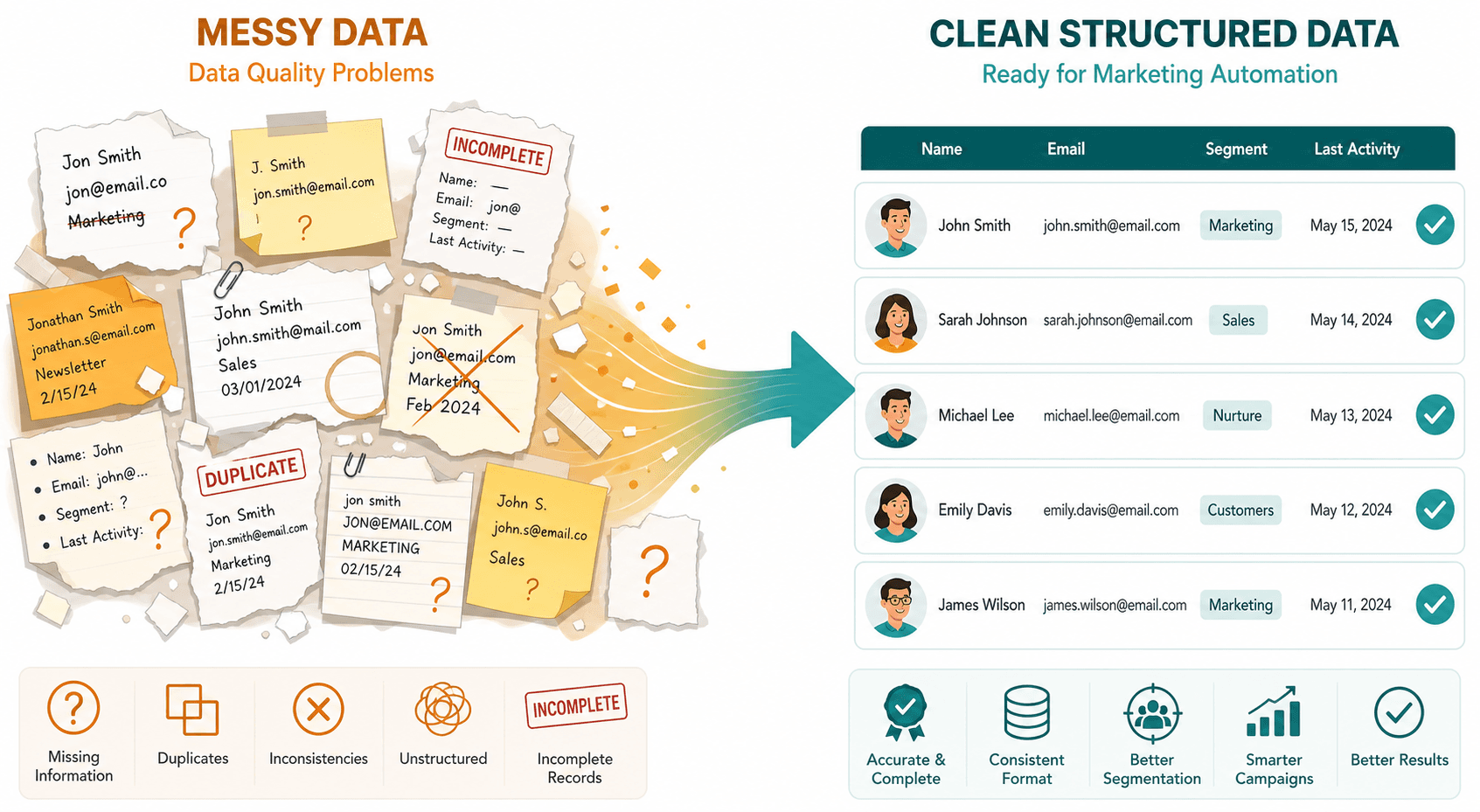
Data quality is the single biggest reason automation fails, and almost nobody wants to hear that because cleaning data is boring. The statistics bear it out: nearly half of organizations say data quality problems stop them from getting real value out of automation tools (House of MarTech). And 80% of organizations say compounding technical debt when restructuring data landscapes for automation is very or extremely likely (EmailVendorSelection / Forrester).
You need three concrete tasks, not a vague 'clean your CRM':
- Deduplicate contacts. Duplicates cause double emails, wrong segments, broken attribution. Use your platform's merge tool or a third-party dedup service.
- Enforce required fields. If a lead record can be created without a company name or industry, your segmentation will be junk. Make those fields mandatory on forms and imports.
- Standardize segmentation rules. Define what 'engaged' means (opened email in last 30 days? clicked a link? visited pricing page?). Write it down. Everyone on the team uses the same definition.
The audit-and-mapping approach from How to Audit, Map, and Automate Your Document Workflows applies here directly—the same methodology works for marketing contact data.
Marketing and Sales Must Agree on a Lead
I have watched otherwise capable teams spend three weeks building a beautiful lead qualification workflow, only to have the sales team ignore every single handoff because 'these leads aren't ready.' Zapier's cautionary tale is instructive: one company's automated notifications flooded the sales channel with 300 alerts per week, so the sales team muted the entire channel. Zero leads were acted on.
Fix this before building anything. Marketing and sales need to sit in the same room and agree on: what a qualified lead looks like (explicit criteria: company size, behavior score, budget authority), where the handoff happens (after a demo request? after a pricing page visit?), and what a good outcome is (a meeting booked, not just an MQL). Document it. If you cannot get that alignment, your automation project will make the problem worse.
Pick a Workflow That Forces You to Do the Foundation Work
After the planning phases, you need a first workflow that produces clear, measurable results. Two candidates consistently rise to the top. For B2B: lead qualification—score and route leads based on behavior and firmographics. For B2C/ecommerce: post-purchase onboarding—welcome the buyer, suggest next purchases, request reviews. The House of MarTech recommendation aligns with this: prioritize the most urgent business problem.
Note what not to pick first: cart abandonment. Despite being the most common automation in ecommerce (54.2% of workflows, per EmailVendorSelection), it is narrowly transactional and does not teach your team how to handle segmentation, scoring, or handoff. A post-purchase flow does. Choose the workflow that forces you to do the foundation work properly.
Design Around Behavior, Not the Calendar
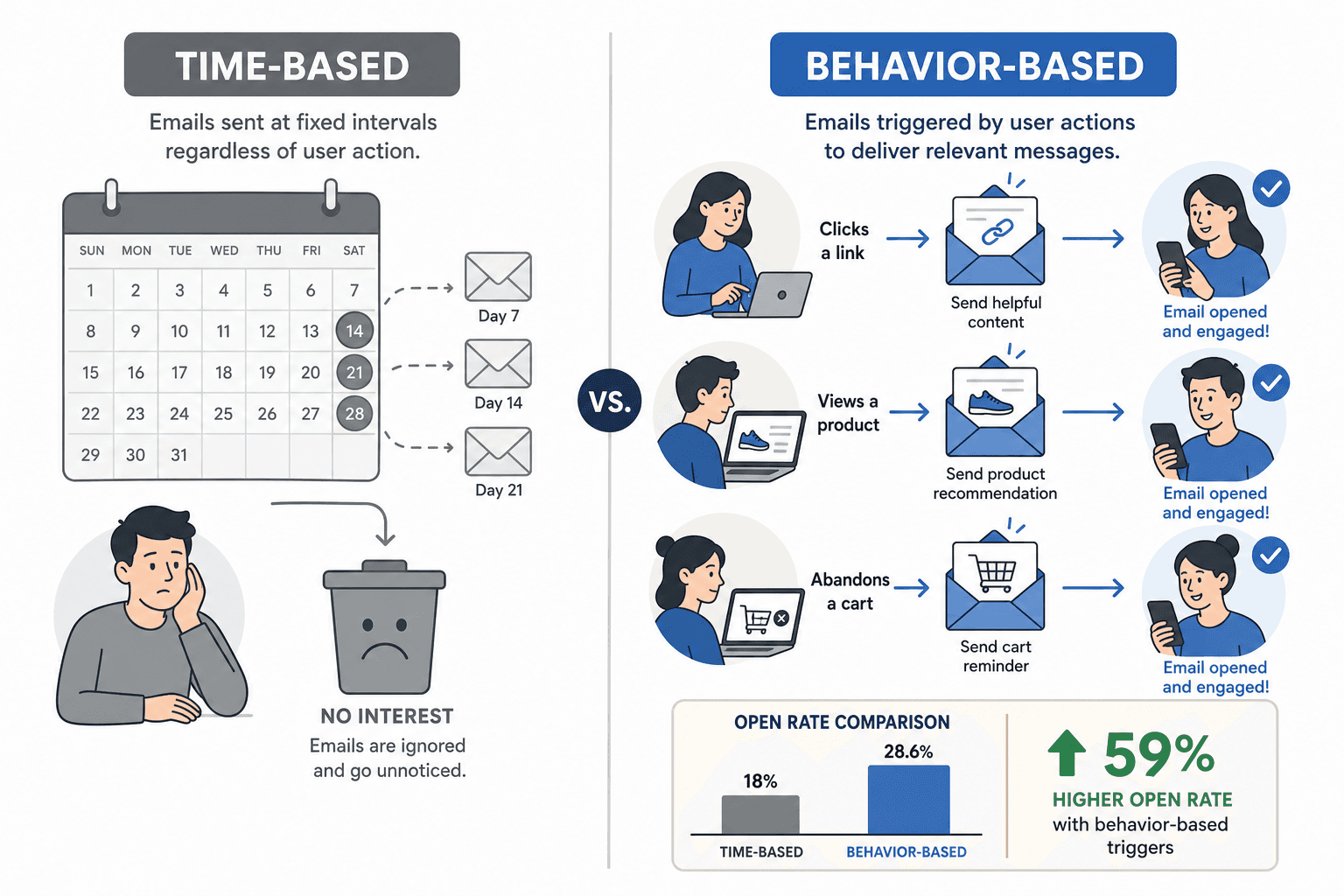
The default design for many new automation builders is time-based: 'send an email three days after signup.' That is easy to build and often ineffective. Braze data shows that triggered emails are 59% more likely to be opened than time-based emails. That is their own research, so treat it as directional, but the mechanism makes sense: a response to what the user just did feels relevant. A calendar-based email feels like noise.
A behavior trigger sounds more complex than it is. 'If a user views the pricing page but does not sign up, send a case study email after 24 hours.' That is a trigger (pricing page visit) plus a condition (no signup) plus a time control (24-hour delay). The same structure works for email opens, page visits, form submissions, and purchase events.
Build and Test — It’s Not About Learning the Tool
If you completed the previous phases, the technical build is straightforward. You are not figuring out what to do—you are translating decisions into a drag-and-drop canvas. ActiveCampaign breaks down a workflow into four components: triggers, actions, conditions, and time controls. Every platform uses some version of these.
Yet 36% of marketers say it takes them six months to implement their marketing automation platform, with most time spent learning the tool (EmailVendorSelection). That six months is not about the interface. It is about going back and forth because the logic was not defined beforehand. If you know your trigger, your conditions, and your goal, you can build a first workflow in an afternoon.
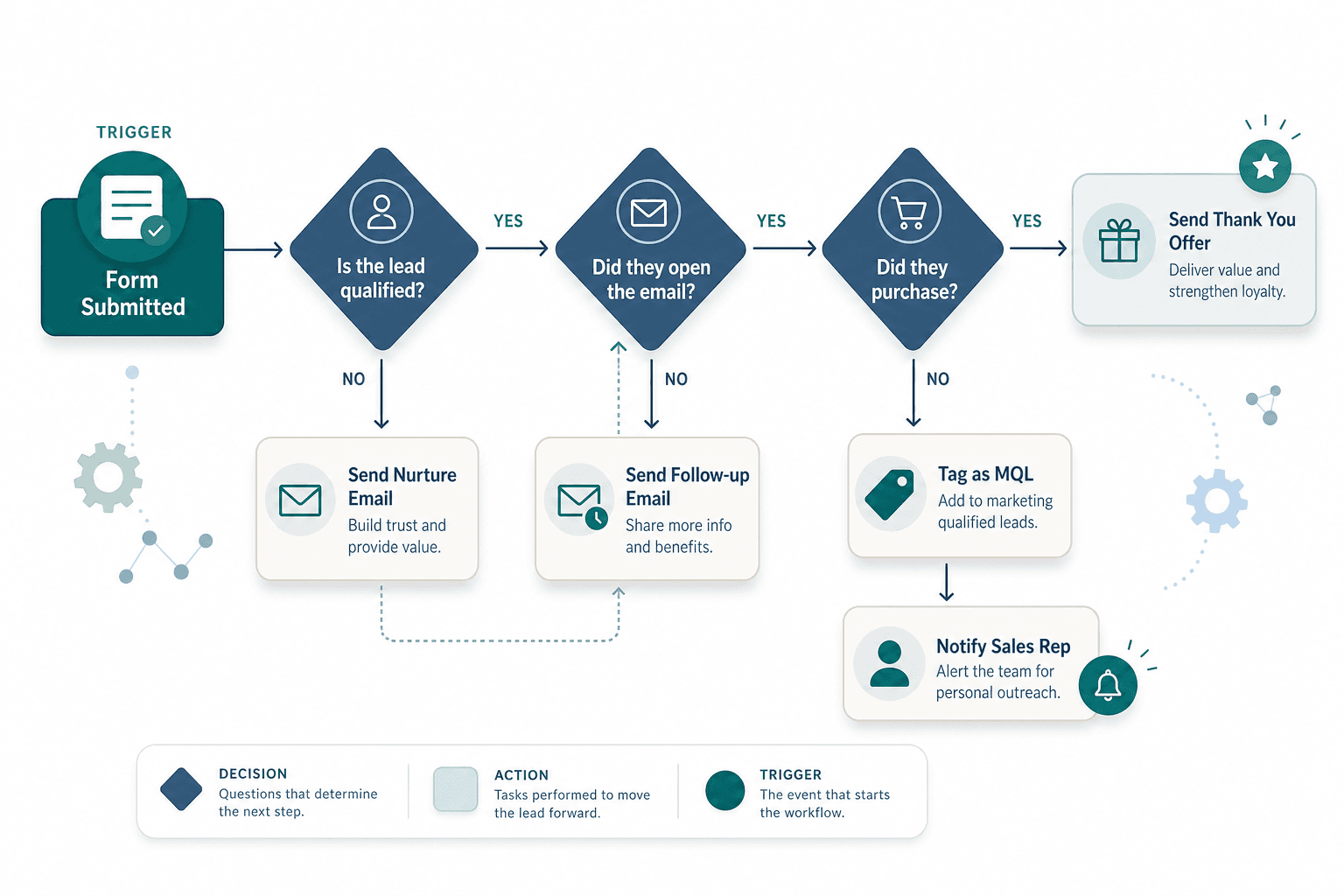
Testing is non-negotiable. Run the workflow on a small test segment—your own email, a few test contacts—before turning it on for real contacts. Check: does the trigger fire when expected? Do conditions branch correctly? Are all actions completing? A QA checklist sounds bureaucratic until the first time a workflow sends the wrong email to 10,000 people.
Measure, Iterate, and Know What Your Own Numbers Say
A workflow is never finished. After launch, the real work begins: tracking whether the thing you built actually moves the metrics you defined in Phase 1. The table below shows what well-built automation can produce, but note that every figure comes from vendor-commissioned or case-study sources. Use them as benchmarks, not guarantees.
| Metric | Pre-automation | Post-automation | Source |
|---|---|---|---|
| Lead response time | Hours or days | 75% faster | Portage Labs (HubSpot case) |
| Sales productivity | Baseline | +14.5% | Nucleus Research / Aprimo |
| Marketing overhead | Baseline | -12.2% | Nucleus Research / Aprimo |
| Campaign development time | Weeks | 50% reduction | Portage Labs (Eloqua case) |
| Conversion rate increase | Baseline | 56% saw increase | ActiveCampaign survey |
Focus on your own pre/post comparison. Measure conversion rate per workflow, time-to-conversion, and lead response time. If the workflow does not improve those numbers within a month, revisit the design—don't just let it run. For a deeper look at building the broader business case, see Business Process Automation ROI: What the Data Says.
What Actually Went Wrong: Three Real Failure Stories
These are not hypothetical. Each story from Zapier's mistakes roundup maps directly to a skipped phase.
- Automating the personal touch too early. A company automated post-webinar follow-ups with no personalization. Zero responses. Recipients recognized the automation and ignored it. This is a Phase 1 (no clear problem) and Phase 5 (no behavioral design) failure.
- Information overload. Another team sent 300 notifications per week to the sales team about every lead activity. Sales muted the channel. This is a Phase 3 (no alignment on lead definitions and handoff frequency) failure.
- Unchecked programmatic content. A company used automation to generate millions of SEO pages. Google discovered 8 million pages of thin content—only 650,000 were ever crawled. The rest was waste. This is a Phase 2 (no data quality) and Phase 6 (no testing) failure.
FAQ: Timeline, Scaling, and Tool Selection
How long does a single workflow take? The House of MarTech consulting roadmap estimates 12+ weeks for one workflow, broken as: weeks 1-2 strategic clarity, weeks 2-4 alignment, weeks 4-8 data foundation, weeks 8-10 design, weeks 10-12 build, then measure. I present that as a benchmark, not a deadline. Your timeline depends on data quality and team alignment. If you already have clean data and agreed definitions, you can compress the data and alignment phases significantly. The point is not the number of weeks; it is the sequence.
How do I scale from one workflow to many? The 96% modification challenge (Salesforce/MuleSoft) shows that brittle workflows are the enemy of scale. Build your first workflow with flexibility in mind: use shared segments, consistent naming conventions, and documented criteria. That discipline makes the second and third workflows faster. Avoid copying a workflow and tweaking it for every use case—refactor the shared logic into reusable components if your platform supports it.
Is the tool selection important? Yes, but less than you think. Any modern drag-and-drop platform (HubSpot, ActiveCampaign, Marketo, Braze) can handle the workflow described here. The choice matters more for long-term scalability, pricing, and integrations—not for getting your first workflow working. If you already have a platform, use it. If you are evaluating, prioritize tools that support behavior-based triggers and branching conditions. For inspiration on which workflows to build after the first one, 11 Marketing Automation Workflows That Generate Revenue (With Real Benchmarks) is a practical next read.
Comments
Join the discussion with an anonymous comment.