

Why Most Firms Automate the Wrong Processes First
Walk into almost any CPA firm that has adopted workflow software, and you will see the same pattern: automated task reminders, status update notifications, and due-date alerts. These are useful, but they are not the automation that prevents a bad close. The real cost of a late close is not the overtime — it is the discovery, three days before the deadline, that a key client has not submitted their bank statements, or that a reconciling item was flagged but never assigned.
The core problem is that most firms automate busy work first because it is easy to set up. A recurring task with a due date takes five minutes to configure. Building a conditional workflow that routes exceptions to the right reviewer, enforces evidence gates, and surfaces readiness status before the close window opens takes more thought. But that harder work is where the ROI lives.
The thesis of this guide is straightforward: automation is not about adding more tasks — it is about routing work, enforcing checkpoints, and surfacing exceptions early before close turns into last-minute cleanup. If your current automation setup does not tell you which clients are ready to close, what exceptions exist, and who owns each one, you have automated the wrong things.
What Counts as Real Automation vs. Task Tracking
Before ranking workflows, it is worth drawing a clear line between task tracking and true workflow automation. Many firms believe they have automated a process when they have only digitized a checklist.
| Capability | Task Tracking | Workflow Automation |
|---|---|---|
| Assignment | Manual assignment to a person | Auto-assignment based on account type, risk level, or workload |
| Dependencies | None — all tasks visible at once | Task B is locked until Task A is marked complete with evidence |
| Evidence gates | Optional file upload | Required attachment or sign-off before status advances |
| Exception routing | Flagged item sits in a list | Flagged item is routed to a specific reviewer with a deadline |
| Readiness visibility | Individual task status | Dashboard showing % of clients ready to close, with drill-down |
| Follow-up reminders | Generic due-date alert | Conditional reminder only if exception is unresolved after X hours |
If your current tool usage falls entirely in the left column, you are not getting the ROI that workflow software promises. The good news is that most modern accounting workflow platforms — including Xenett, Karbon, Financial Cents, and Jetpack Workflow — support all the capabilities in the right column. The gap is not in the software; it is in how firms configure it.
10 High-Impact Workflows Ranked by ROI
The following ranking is based on two factors: the frequency of the workflow (how many times per month it runs) and the cost of failure (what happens when it breaks down). The 2025 State of Accounting Workflow Automation Report found that 50.7% of firm owners rank recurring projects as one of the most important features in workflow software — confirming that firms intuitively know recurring, high-stakes processes deserve the most attention.
| Rank | Workflow | Primary Benefit | Automation Complexity |
|---|---|---|---|
| 1 | Close kickoff and readiness checks | Prevents late surprises by confirming client readiness before the close window opens | Medium |
| 2 | Reconciliation routing and exception handling | Ensures flagged items reach the right reviewer with a deadline | Medium-High |
| 3 | Review follow-ups with evidence gates | Prevents 'complete but wrong' tasks from slipping through | Medium |
| 4 | Client document request automation | Reduces onboarding time by up to 80% (Karbon case study) | Low |
| 5 | Recurring project template creation | Standardizes engagement setup across the firm | Low |
| 6 | Automated deadline reminders with escalation | Reduces missed deadlines without manual follow-up | Low |
| 7 | Staff workload balancing and reassignment | Prevents bottlenecks when team members are out | Medium |
| 8 | Client portal notification and status updates | Reduces inbound status-check calls | Low |
| 9 | Invoice and billing workflow | Accelerates cash collection by automating approval chains | Medium |
| 10 | Compliance deadline tracking and filing prep | Reduces risk of missed regulatory deadlines | High |
The top three workflows share a critical characteristic: they are exception-routing processes, not task-completion processes. When they fail, the failure is discovered late — often during the final review, when there is no time to fix it. That is the pattern that costs firms the most.
Deep Dive: Close Kickoff and Readiness Checks
The month-end close kickoff is the single highest-leverage automation point in an accounting firm. It is the moment when you determine whether each client is ready to begin the close process — or whether missing documents, unresolved prior-period items, or unsubmitted bank statements will force a delay.
A well-automated close kickoff does three things:
- Triggers a readiness checklist for each client automatically on a set date (e.g., the 25th of the month)
- Confirms that all required documents have been submitted — bank statements, credit card statements, loan schedules, prior-period adjustments
- Flags incomplete clients to the engagement manager before the close window opens, not after
The key architectural decision is the evidence gate. Each readiness item should require a specific piece of evidence — a file upload, a checkbox with a timestamp, or an integration confirmation from the client portal. Without evidence gates, a client can mark themselves as "ready" while still missing critical documents, and the problem surfaces only when the preparer opens the workpaper.
The readiness dashboard is the output that matters. Instead of asking "Is Client A ready?" and checking manually, your workflow tool should display a percentage score for each client and a drill-down list of missing items. The 2025 State of Accounting Workflow Automation Report found that 73.9% of firm owners prioritize access to workflow dashboards — a signal that firms recognize the value of visibility over manual tracking.
Deep Dive: Reconciliation Routing and Exception Handling
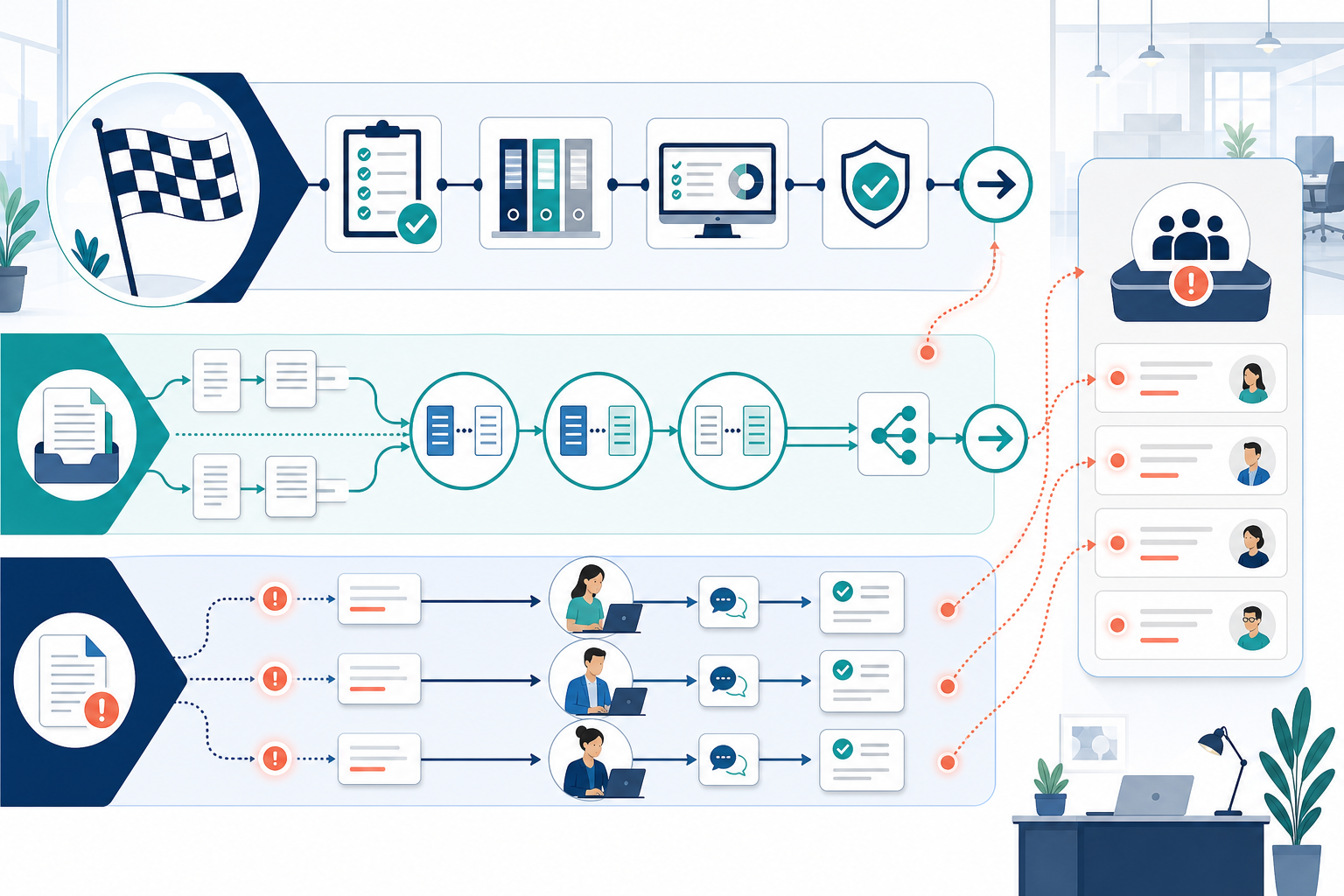
Reconciliation is the most repetitive high-stakes process in accounting. Every month, the same accounts need to be reconciled, the same types of exceptions appear, and the same reviewers need to see flagged items. Yet many firms still route reconciliations manually — assigning accounts to staff based on who is available, then waiting for exceptions to surface during review.
Automated reconciliation routing changes this by applying rules at the account level:
- High-risk accounts (cash, debt, intercompany) are auto-assigned to senior staff
- Low-risk accounts (prepaids, fixed assets) are auto-assigned to junior staff with a shorter deadline
- Accounts with prior-month exceptions are flagged and routed to the same reviewer for continuity
- New accounts are routed to a manager for initial classification before assignment
The conditional routing logic is where the real power lies. When a reconciling item exceeds a defined threshold (e.g., a variance over $5,000 or an unreconciled difference older than 30 days), the workflow should automatically escalate the item to a senior reviewer with a deadline. If the senior reviewer does not respond within 48 hours, the workflow escalates again to the partner.
This pattern — conditional routing with time-based escalation — is what separates real workflow automation from a shared spreadsheet. It ensures that exceptions do not sit in someone's queue until the day before the close deadline.
Deep Dive: Review Follow-Ups with Exception Handling
The review stage is where the phrase "a task can be 'complete' and the books still be wrong" becomes most visible. A preparer marks a reconciliation as done, but the reviewer finds a missing entry, a misclassified account, or an unexplained variance. In a manual workflow, that item goes back to the preparer with a note, and the reviewer must remember to follow up.
Automated review follow-ups solve this by treating the review as a structured workflow gate rather than a one-time check:
- When a preparer marks a task complete, the workflow automatically routes it to the assigned reviewer
- The reviewer receives a notification with the task, the evidence attached, and any prior review notes
- If the reviewer flags an exception, the task is automatically reassigned to the original preparer with a new deadline
- If the exception is not resolved within the deadline, an escalation reminder is sent to both the preparer and the reviewer
- The task cannot be marked as fully complete until the reviewer signs off with evidence (e.g., a digital approval or a final file upload)
The critical design principle here is that "done" does not mean "correct." Your workflow must distinguish between a task being submitted for review and a task being fully approved. Many tools allow you to set up a two-stage completion status — "Submitted" and "Approved" — with different permissions and notifications for each stage.
The Xenett guide on workflow automation emphasizes this point directly: "A task can be 'complete' and the books still be wrong — real visibility means knowing which clients are ready to close, what exceptions exist, and who owns each one." The review follow-up workflow is the mechanism that delivers that visibility.
Common Failure Modes and How to Avoid Them
Even with the right priorities, automation projects fail. The following failure modes appear repeatedly across firms that have implemented workflow software.
| Failure Mode | Why It Happens | How to Avoid It |
|---|---|---|
| Over-automating before the process is stable | Firms automate a broken process, then wonder why the automation does not help | Map and stabilize the manual process first. Automate only after the process has run successfully for two cycles. |
| Skipping evidence gates | Without required evidence, tasks are marked complete without actual completion | Configure every task that requires a deliverable to require a file upload or digital sign-off before status advances. |
| Ignoring exception routing | Flagged items sit in a general queue with no owner or deadline | Define exception thresholds and routing rules for each workflow. Test with real exceptions from the last close. |
| Failing to train the team | Staff revert to manual workarounds because they do not understand the new workflow | Run two parallel cycles (manual + automated) before cutting over. Assign a workflow champion for the first 90 days. |
| Building too many workflows at once | The team is overwhelmed by configuration and abandons the project | Automate the top three workflows only. Run them for two months before adding more. |
30/60/90 Day Implementation Plan
The following phased plan is adapted from the 30/60/90 day change management framework recommended in the Xenett workflow automation guide. It assumes you already have a workflow tool in place and are ready to configure the top three workflows.
| Phase | Focus | Key Activities | Success Metric |
|---|---|---|---|
| Days 1–30 | Audit and map | Audit current workflows; map close kickoff process; identify exception patterns from the last 3 closes; configure readiness checklist with evidence gates for 5 pilot clients | Pilot clients show 100% readiness checklist completion before close window opens |
| Days 31–60 | Automate top 2 workflows | Configure reconciliation routing rules for high-risk accounts; set up review follow-up workflow with two-stage completion; run parallel manual + automated for one close cycle | Exception routing time reduced by 50% for pilot accounts |
| Days 61–90 | Refine and expand | Review exception handling performance; adjust thresholds and escalation rules; train remaining staff; expand to all clients; measure ROI (hours saved, exceptions caught early) | At least 2 of 3 workflows running fully automated; team reports reduced close stress |
The 63.2% of firm owners who say automation has freed them to focus on the work that matters most (2025 State of Accounting Workflow Automation Report) did not achieve that result by automating everything at once. They achieved it by prioritizing the workflows that prevent late surprises and building from there.
Tool Capabilities Matrix for the Top 3 Workflows
The following matrix focuses on capabilities that matter for the three high-impact workflows — not on general features or pricing. Use it to evaluate whether your current tool (or a tool you are considering) supports the specific automation patterns described in this guide.
| Capability | Xenett | Karbon | Financial Cents | Jetpack Workflow |
|---|---|---|---|---|
| Task dependencies (gate before next step) | Yes | Yes | Yes | Limited |
| Evidence gates (required file/approval) | Yes | Yes | Yes | No |
| Conditional exception routing | Yes | Limited | Limited | No |
| Close readiness dashboard | Yes | Yes | Yes | No |
| Two-stage completion (Submitted / Approved) | Yes | Yes | Yes | No |
| Time-based escalation for unresolved items | Yes | Yes | Yes | Limited |
| Auto-assignment by account type or risk level | Yes | Limited | Limited | No |
For a full head-to-head comparison including pricing, platform availability, and detailed feature breakdowns, see our Best Accounting Workflow Software 2026 comparison. If you are specifically evaluating AI-driven automation features, the AI in Accounting Workflow article covers how AI is reshaping exception detection and document processing in the 2026 tool landscape.
Comments
Join the discussion with an anonymous comment.