
The usual failure is not that the prompt was too short. It is that the vault could not tell the assistant what mattered now: the active project state, the decision already made, the style preference that should not be renegotiated, the constraint that rules out the obvious suggestion, and the example of what “good” looked like last time.
That is the practical reason to care about context engineering in a note-taking workflow. A markdown vault can contain excellent notes and still be a poor briefing system. If the assistant has to ingest a pile of meetings, drafts, source clippings, and half-finished thoughts before it can help, the next session starts dirty. You are back to pasting context by hand and hoping the one important note is not buried in the middle.

The better standard is smaller and stricter. Anthropic defines context engineering around supplying “the smallest set of high-signal tokens” that maximizes the chance of the desired outcome, and recommends lightweight references such as file paths, queries, and links, with data loaded just in time using metadata such as hierarchy and timestamps as relevance signals.[1] Chroma’s context-rot study gives the less flattering half of the story: across 18 LLMs, performance degraded as input length grew even on simple tasks, and focused prompts of about 300 tokens consistently beat full prompts of about 113,000 tokens.[2]
So the goal is not to make the vault available to the model in bulk. The goal is to make the right parts cheap to find, safe to exclude, and easy to compress.
The vault has to become a retrieval system
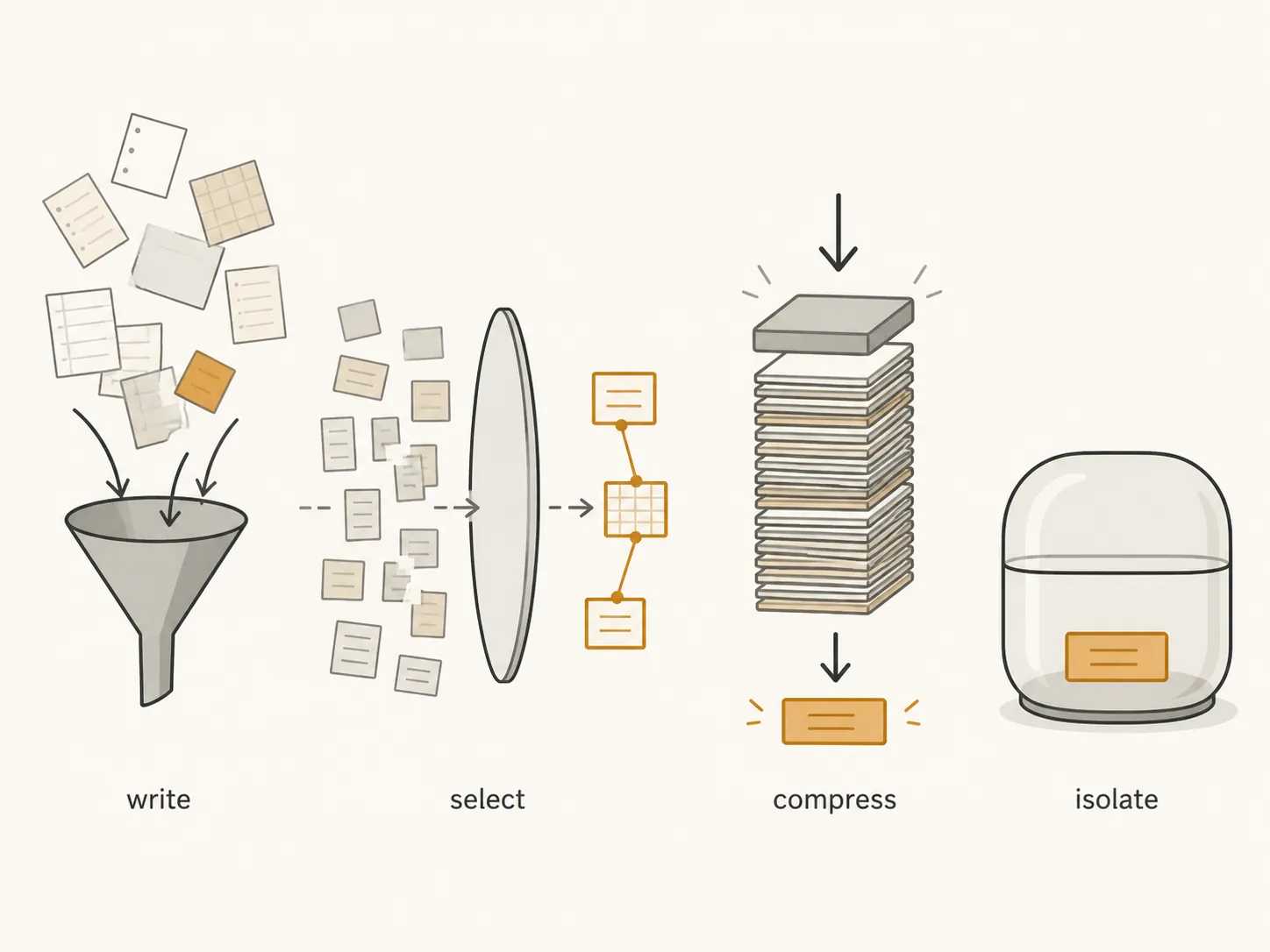
LangChain describes four context strategies for agents: write, select, compress, and isolate.[3] The mapping below is this article’s synthesis for a markdown note vault, not a claim from one source. It is useful because it turns a vague wish — “give my AI memory” — into specific vault mechanics.
| Agent context strategy | What it means in a markdown vault | Vault features that carry the load |
|---|---|---|
| Write | Capture useful context before the assistant needs it | Inbox notes, working notes, meeting notes, source notes |
| Select | Find the few notes relevant to the current session | Metadata, note types, links, tags, folder paths, MOCs |
| Compress | Reduce history without losing decisions and constraints | Project summaries, decision records, weekly reviews |
| Isolate | Keep unrelated projects, rules, or sensitive material out | Project scopes, system files, excluded folders, local-only notes |
This is why plain markdown matters here. The files should still be readable without an assistant. YAML, tags, and links are not decorations; they are selection handles. A summary is not a bloggy recap; it is compression. A project folder is not tidiness for its own sake; it is an isolation boundary.
If you are still choosing between note apps or wondering which AI features each app can touch, that is a different question. The app-by-app landscape belongs in an AI note-taking app feature map. Context-window size, cloud processing, and local model limits are also their own constraint set; the reason to keep context compact is covered more directly in the on-device AI limitations profile. This guide assumes you already have a markdown vault, or you have decided to build one.
A compact setup sequence
The full setup is short enough to build in stages. The two parts worth slowing down for are the standing briefing packet and retrieval wiring. Folder names and naming conventions matter only when they improve selection.
| Setup piece | What you create | Why it matters for AI context |
|---|---|---|
| Standing briefing packet | Five persistent system files | Gives the assistant stable context without a long pasted prompt |
| Typed notes | Project, meeting, decision, source, and working-note templates | Makes notes machine-selectable without making them unreadable |
| Retrieval wiring | Metadata, links, tags, MOCs, and scoped folders | Lets the assistant find relevant notes instead of scanning everything |
| Compression layer | Project summaries, decision logs, weekly review notes | Keeps old history usable without flooding the context window |
| Maintenance cadence | Session-close updates and a weekly anti-drift pass | Prevents current context from quietly becoming stale |
| Exclusion rules | Private folders, redaction habits, and Do Not Do constraints | Keeps secrets and irrelevant context out of assistant sessions |
For readers who have just arrived from Evernote, OneNote, Apple Notes, or another system, do the migration first and keep this article as the configuration pass afterward. The relevant pathways are the Evernote migration decision tree, the general notes-app migration guide, the OneNote Windows 10 to Obsidian guide, and the Apple Notes migration guide. Do not optimize context around a vault that is still mid-move.
Create the five files that brief the assistant before retrieval starts

Zach Chmael’s agentic-memory blueprint is useful because it names actual files instead of gesturing at “memory.” The proposed day-one set is Profile.md, Voice and Style.md, Current Projects.md, Do Not Do.md, and Weekly Memory Review, organized around context buckets such as who you are, what you build, what you know, how you work, decisions, and what good looks like.[4]
Treat those files as the vault’s standing briefing packet. They are not the whole memory. They are the compact set the assistant can read at the start of a session before it decides which project notes, decision notes, and examples to retrieve.
| File | What belongs there | What does not belong there |
|---|---|---|
| Profile.md | Role, durable responsibilities, recurring audience, operating constraints | A life story, résumé dump, or everything you have ever worked on |
| Voice and Style.md | Reusable writing preferences, formatting rules, examples of acceptable output | One-off taste notes from a single project unless they are now durable |
| Current Projects.md | Active projects, status, next decision, blockers, linked project notes | Completed projects, someday ideas, or stale priorities |
| Do Not Do.md | Hard constraints, banned moves, recurring mistakes, privacy boundaries | General advice that you are willing to ignore |
| Weekly Memory Review.md | A dated review of what changed, what should be promoted, and what should be retired | A diary of everything that happened during the week |
Profile.md: stable identity, not biography
This file should answer the questions that keep recurring across sessions: what kind of work you do, who you usually serve, what level of detail you prefer, which tools or formats are normal in your world, and which constraints should be assumed unless a project says otherwise.
# Profile

## Working role
- Independent B2B consultant focused on research-heavy advisory work.

## Default audience
- Senior operators who want concise analysis with enough evidence to act.

## Durable constraints
- Prefer markdown deliverables.
- Keep recommendations implementation-oriented.
- Distinguish evidence from inference.

## Default collaboration style
- Ask only when a missing fact would change the recommendation.
- Surface tradeoffs before proposing a plan.
The test is simple: if a sentence would help next month’s assistant avoid a wrong assumption, it belongs. If it merely makes the file feel complete, it probably does not.
Voice and Style.md: examples beat adjectives
Style files go bad when they become a pile of adjectives: clear, smart, crisp, strategic. Better: keep a small set of rules and a few linked examples. An assistant can work with “use H2/H3 headings, avoid slogan endings, cite claims near the sentence they support, do not turn every section into a framework.” It cannot reliably infer what “more premium” means.
# Voice and Style

## Default rules
- Prefer concrete actions and consequences over abstract positioning.
- Use headings only when the reader needs a pause or turn.
- Do not end every section with a slogan-style restatement.
- Separate sourced facts from analysis.

## Good examples
- [[Example - project brief rewrite]]
- [[Example - concise research memo]]

## Bad patterns to avoid
- "X is not Y, it is Z" repeated across sections.
- Generic summaries after the point has already landed.
- Unsupported precision.
Current Projects.md: the first selection index
Current Projects.md is where many vaults either become AI-ready or stay theatrical. It should not be a pretty dashboard. It should tell the assistant which project scopes exist, which one is active, where the canonical project note lives, what changed recently, and what decision is waiting.
# Current Projects

## Active

### [[Project - Acme onboarding research]]
- Status: synthesis in progress
- Next decision: choose final recommendation structure
- Last material change: 2026-08-23
- Retrieve first:
  - [[Decision - Acme segmentation model]]
  - [[Meeting - Acme stakeholder review - 2026-08-19]]
  - [[Source - Acme customer interview patterns]]
- Do not retrieve by default:
  - Raw interview transcripts unless specifically requested

### [[Project - Newsletter repositioning]]
- Status: paused
- Next decision: whether to continue after Q3 review
- Last material change: 2026-08-08
The “retrieve first” list is not busywork. It is the handoff from human memory to machine selection. If the assistant reads only the standing packet and Current Projects.md, it should know where to look next without being handed the entire vault.
Do Not Do.md: constraints with teeth
The most valuable negative context is not etiquette. It is the set of moves that repeatedly waste time or create risk: do not invent statistics, do not suggest a platform the client has ruled out, do not upload private notes to a cloud assistant, do not rewrite in a cheerier tone unless asked, do not reopen a decision marked final.
# Do Not Do

## Hard rules
- Do not include secrets, credentials, private client data, or personal identifiers in generated prompts.
- Do not treat draft notes as approved facts.
- Do not reopen decision notes with status: final unless I explicitly ask.

## Recurring mistakes to prevent
- Do not recommend a new tool when the task is to improve the current workflow.
- Do not summarize source notes without preserving uncertainty labels.
- Do not expand scope from one project to the whole vault.
Weekly Memory Review.md: the promotion gate
Weekly Memory Review.md is where temporary discoveries either become durable context or disappear. The file should not contain every task. It should answer: what changed about my projects, what changed about my preferences, which decisions are now final, which examples should be linked from Voice and Style.md, and which old context should be retired.
# Weekly Memory Review

## 2026-08-24

### Promote to system files
- Add to Do Not Do: do not use raw customer quotes in external drafts without anonymization.
- Add to Voice and Style: prefer tables only when comparison is the point.

### Current Projects changes
- Acme onboarding research moved from discovery to synthesis.
- Newsletter repositioning paused until Q3 review.

### Decisions finalized
- [[Decision - Acme segmentation model]] marked final.

### Retire or archive
- Remove old "Acme exploratory angles" note from retrieve-first list.
Eric J. Ma reports one documented practitioner result from a similar plain-text direction: knowledge-management overhead dropping from 30–40% of time to under 10% after using structured note types and an AGENTS.md file that explains the vault to coding agents.[5] That is a useful dated case, not a benchmark. The transferable part is the mechanism: the vault explains itself in plain text, and agents are told how to navigate it.
Give every useful note a type
A vault full of prose makes sense to the person who wrote it. It is much harder for an assistant to select from. Note-type templates solve that by making each note declare what it is, what project it belongs to, how current it is, and whether it is safe to use.
Start with five types: project notes, meeting notes, decision notes, source notes, and working notes. More types can come later, but these cover the most common retrieval needs: current state, conversation history, settled choices, evidence, and live thinking.
| Note type | Primary retrieval job | Key metadata |
|---|---|---|
| Project note | Tell the assistant what the project is and where to look | type, status, owner, priority, updated, scope, retrieve_first |
| Meeting note | Preserve what was said, decided, and assigned | type, project, date, participants, decisions, follow_up |
| Decision note | Stop settled choices from being relitigated | type, project, status, date, decision, rationale, reversibility |
| Source note | Separate evidence from interpretation | type, topic, source, date_accessed, reliability, claims, limits |
| Working note | Capture unfinished thinking without promoting it too early | type, project, status, created, next_action, expires |
Project note template
---
type: project
status: active
owner: me
priority: high
created: 2026-08-26
updated: 2026-08-26
scope: client-work
retrieve_first:
  - "[[Decision - example]]"
  - "[[Meeting - example - 2026-08-20]]"
exclude_by_default:
  - "raw-transcripts"
---

# Project - Name

## Outcome
What this project is trying to produce.

## Current state
The latest true state, not the origin story.

## Next decision
The next choice that changes the work.

## Constraints
Budget, time, stakeholder, tool, privacy, or format constraints.

## Retrieve first
- [[Decision - ...]]
- [[Meeting - ...]]
- [[Source - ...]]

## Open questions
-
The project note is the assistant’s launchpad. It should not contain every artifact. It should point to the artifacts that matter first.
Meeting note template
---
type: meeting
project: "[[Project - Name]]"
date: 2026-08-26
participants: []
decisions: []
follow_up: []
privacy: internal
---

# Meeting - Project - YYYY-MM-DD

## Purpose
Why this meeting happened.

## Notes
-

## Decisions
- Decision:
  - Linked decision note:

## Action items
- [ ] Owner — action — due date

## Context for AI
What an assistant should know later without rereading the whole meeting.
The small “Context for AI” section is deliberately blunt. It is not a second set of notes. It is the meeting’s compressed retrieval value.
Decision note template
---
type: decision
project: "[[Project - Name]]"
status: proposed # proposed | final | reversed
date: 2026-08-26
reversibility: medium
supersedes: []
privacy: internal
---

# Decision - Name

## Decision
State the decision in one or two sentences.

## Rationale
Why this was chosen.

## Alternatives considered
-

## Consequences
What this changes downstream.

## Do not reopen unless
Conditions that would justify revisiting the decision.
Decision notes are where many AI sessions are saved. A model that misses a final decision will happily produce a polished answer for a path you already rejected.
Source note template
---
type: source
topic: ""
source_url: ""
publisher: ""
date_published:
date_accessed: 2026-08-26
reliability: unknown
privacy: shareable
projects: []
---

# Source - Name

## Claim worth keeping
-

## Evidence
-

## Limits
-

## Useful quote
>

## Related decisions or projects
- [[Project - ...]]
- [[Decision - ...]]
For source notes, the distinction between claim, evidence, and limit is more important than the citation format. The assistant needs to know not just what a source says, but how much weight it should carry.
Working note template
---
type: working-note
project: "[[Project - Name]]"
status: draft
created: 2026-08-26
updated: 2026-08-26
expires: 2026-09-09
promote_to: ""
privacy: internal
---

# Working - Topic

## Scratch
-

## Current hypothesis
-

## Needs checking
-

## Promote if useful
Where this should go if it becomes durable context.
Working notes need an expiration or promotion path because they are the easiest notes to over-retrieve. A half-formed hypothesis from two weeks ago should not compete with a final decision unless you explicitly ask for exploratory material.
Wire retrieval with metadata, links, tags, and MOCs
The assistant should have multiple ways to reach the same relevant note. Folder location is one signal. YAML metadata is another. Links from Current Projects.md are stronger. MOCs — maps of content — give a human-readable index when the project or topic is broader than one folder.
Use each retrieval handle for a different job:
- Folders set broad isolation boundaries: Projects, Areas, Sources, System, Archive, Private.
- Metadata answers structured questions: note type, status, project, date, privacy, and whether the note is final.
- Links express judgment: this decision belongs to this project; this source supports this claim; this meeting changed this plan.
- Tags group notes across folders when the grouping is operationally useful, such as #retrieve-first, #final-decision, #needs-review, or #do-not-share.
- MOCs give the assistant and the human a curated route through a topic without pretending the route is exhaustive.
A simple folder skeleton is enough:
Vault/
  00 System/
    Profile.md
    Voice and Style.md
    Current Projects.md
    Do Not Do.md
    Weekly Memory Review.md
  10 Projects/
    Project - Name/
      Project - Name.md
      Decisions/
      Meetings/
      Working/
  20 Sources/
  30 Areas/
  40 MOCs/
  90 Archive/
  99 Private - Do Not Send/
The private folder name should be boring and explicit. If an assistant, plugin, or script has access rules, make exclusion easy to implement and easy to audit. Do not rely on remembering which notes contain secrets after the retrieval layer is already running.
Use MOCs as curated retrieval routes
A MOC is useful when a project or topic crosses folders. It should not become another junk drawer. Keep it opinionated: canonical notes, live questions, final decisions, best examples, and notes to avoid unless requested.
---
type: moc
topic: onboarding-research
updated: 2026-08-26
privacy: internal
---

# MOC - Onboarding Research

## Start here
- [[Project - Acme onboarding research]]
- [[Decision - Acme segmentation model]]

## Best evidence
- [[Source - Customer interview patterns]]
- [[Source - Support-ticket themes]]

## Useful examples
- [[Example - onboarding teardown]]

## Avoid by default
- Raw transcripts
- Early brainstorming notes before 2026-08-01
This is also where “lost in the middle” becomes a practical vault concern. The long-context literature has documented that models can perform best when relevant information appears at the beginning or end of context and worse when it is buried in the middle.[6] MOCs, retrieve-first lists, and summaries are not aesthetic organization. They are ways to keep important notes from becoming middle matter.
Make the assistant’s start-of-session path explicit
Whether you use a chat assistant, a coding agent, an Obsidian plugin, or a script that assembles context, the start path should be written down. Put it in AGENTS.md or in a system file near the five-file packet.
# AGENTS.md

## Vault orientation
At the start of a session, read these files first:
1. 00 System/Profile.md
2. 00 System/Voice and Style.md
3. 00 System/Current Projects.md
4. 00 System/Do Not Do.md
5. 00 System/Weekly Memory Review.md

## Retrieval rules
- If the user names a project, open the linked project note from Current Projects.md.
- Prefer notes listed under retrieve_first before searching broadly.
- Prefer decision notes with status: final over meeting notes or working notes.
- Do not retrieve notes from 99 Private - Do Not Send.
- Do not use notes tagged #do-not-share in generated prompts.
- If context is insufficient, ask for the missing project, decision, or source note instead of scanning the whole vault.

## Compression rules
- Summarize meeting history into decisions, constraints, and open questions.
- Preserve uncertainty labels from source notes.
- Do not erase rejected alternatives from decision notes.
That file is not magic. It is a contract. It tells the assistant how the vault expects to be read, and it gives you something concrete to fix when retrieval goes wrong.
Compress history without sanding off the important edges
Compression is where a vault earns its keep. A project can have months of meetings, sources, and working notes, but the assistant usually needs a smaller briefing: current state, final decisions, rejected alternatives, live constraints, and open questions.
# Project Brief - Name

## Current state
-

## Final decisions
- [[Decision - ...]] — one-line consequence

## Constraints
-

## Rejected paths
- Path:
  - Why rejected:
  - Reopen if:

## Evidence to use
- [[Source - ...]] — what it supports

## Open questions
-

## Last updated
2026-08-26
The “rejected paths” section is worth keeping. Many AI mistakes are not wild hallucinations; they are reasonable suggestions made without knowing what has already been tried, ruled out, or politically closed.
Do not compress raw evidence into certainty. If a source note says “small sample,” “vendor claim,” “anecdotal,” or “needs verification,” the project brief should preserve that label. Compression should reduce token load, not upgrade weak evidence into fact.
Keep project scopes isolated
Isolation is less glamorous than retrieval, but it prevents cross-contamination. The assistant working on a client recommendation does not need your personal journal, unrelated project drafts, old strategy notes from a different client, or private identifiers hidden in a source clipping.
At minimum, each active project should declare:
- The canonical project note.
- The retrieve-first notes.
- The folders or tags excluded by default.
- The privacy level of the project.
- The decision notes that outrank older meetings.
This is especially important if any assistant session uses a cloud service, a plugin, or a workflow that sends selected notes outside the local machine. Secrets and personally identifiable information do not become safer because they are embedded in markdown. If a note can be retrieved, it can become context.
The weekly anti-drift pass

The setup will work cleanly for a little while and then begin to rot. Current Projects.md will name a project that is no longer current. Voice and Style.md will omit a preference you have repeated three times. Do Not Do.md will fail to include the mistake that wasted yesterday’s session. A community discussion on designing an Obsidian vault for AI orientation makes the same maintenance point: vaults need to be designed for AI orientation as well as human navigation, and orientation files decay unless kept current.[7]
Use two maintenance habits: a session close and a weekly pass. The session close is tiny. Before ending an important AI-assisted work session, ask what should be promoted, corrected, or retired. Then update the relevant file immediately.
## Session close prompt

Review this session and identify only durable updates for my vault:
1. New or changed project state
2. Decisions made or reversed
3. Preferences I repeated that should be added to Voice and Style.md
4. Mistakes or prohibited moves to add to Do Not Do.md
5. Working notes that should be promoted, linked, archived, or deleted

Do not invent updates. If nothing durable changed, say so.
The weekly pass is slower, but still finite. Open the five standing files, Current Projects.md first. Check whether each active project has a next decision, a last-updated date, and a retrieve-first list. Scan decision notes created that week and mark whether they are proposed, final, or reversed. Promote only the preferences and constraints that are likely to matter again.
| Weekly check | Action |
|---|---|
| Current Projects.md names stale work | Move paused or completed work out of Active |
| A project has no next decision | Add one or mark the project as inactive |
| A decision is buried in a meeting note | Create or update a decision note |
| A repeated preference appears only in chat history | Promote it to Voice and Style.md |
| A recurring assistant mistake happened again | Add a concrete rule to Do Not Do.md |
| A working note has expired | Promote, archive, or delete it |
| A note contains secrets or PII | Move it to an excluded location or redact it before retrieval |
What a clean Monday session looks like
A clean session does not begin with five paragraphs of “for context.” It begins with the assistant reading the standing briefing packet, identifying the active project, opening the project note, following retrieve-first links to final decisions and current summaries, and asking only for the missing piece that would change the work.
The vault is AI-ready when four things are true: the starting context is compact and current; retrieval can pull relevant project and decision notes without dumping the whole vault; summaries compress history while preserving constraints, uncertainty, and rejected paths; and secrets or PII are deliberately excluded from anything the assistant might receive.
That is the working standard. Context engineering in a note vault is not a bigger prompt. It is a maintained retrieval system.
References
- Effective context engineering for AI agents, Anthropic, Sep 2025
- Context Rot: How Increasing Input Tokens Impacts LLM Performance, Chroma, July 2025
- Context Engineering, LangChain
- Obsidian is how you give your AI a memory, Jun 2026
- Mastering Personal Knowledge Management with Obsidian and AI, Eric J. Ma, Mar 2026
- Lost in the Middle: How Language Models Use Long Contexts, arXiv
- Design your vault for AI orientation, not just human navigation, Obsidian Forum






Comments
Join the discussion with an anonymous comment.