The first trap in comparing AI note apps is treating “AI” as one processing path. It usually is not. A handwriting search feature, a rewrite button, a semantic search index, and a meeting-summary assistant may all sit under the same product label while sending text to different places. For note-taking apps, the practical question is narrower: which feature runs locally, which feature calls a server, how much text can fit, and whether the tool still works when the network is gone.

Processing location by app and feature
Use this as a feature map, not a winner board. The same app can be local for one task and server-side for another.
| App | Feature or AI surface | Where processing appears to run | What that means in practice | Evidence caveat |
|---|---|---|---|---|
| Apple Notes | Apple Intelligence writing and summarization features available through the Apple system layer | Apple documents an on-device foundation model with a 4,096-token context window per session; device eligibility is limited to iPhone 15 Pro or later and M1+ Macs/iPads [1][2]. | Local processing can be privacy-preserving and offline-friendly for supported tasks, but the context ceiling is small for long transcripts, research notes, or dense PDFs. | The 4,096-token figure is documented through Apple developer materials and forum confirmations, but the full technical note text is difficult to verify directly because Apple’s page requires JavaScript rendering. |
| GoodNotes | Handwriting recognition and handwriting-related search | GoodNotes explicitly says its handwriting recognition runs fully on-device, with more than 95% accuracy across 12 languages; it took three years and a dedicated 10-person ML team to build [3]. | This is one of the clearest examples of useful local AI in a note app: fast, private, and not dependent on a cloud round trip for recognizing handwritten notes. | The claim is specific to handwriting features. |
| GoodNotes | Typing AI tools such as summarize, rewrite, and change tone | Not confirmed as on-device in the available GoodNotes documentation. | Do not assume that because handwriting recognition is local, every GoodNotes AI writing feature is also local. | This is a documentation gap, not proof that the typing tools definitely use cloud processing. |
| Notion | Notion AI writing, Q&A, and summarization | Cloud-based; Notion states that AI features process requests through its AI systems and model providers, and says customer data is not used to train models [4]. | No offline AI mode should be expected. The tradeoff is convenience and stronger hosted models in exchange for network dependence and server-side processing. | Cloud-only status is inferred from Notion’s documentation and absence of on-device claims, rather than a published low-level architecture spec. |
| Obsidian | No native AI; AI comes through plugins such as Copilot and Smart Connections | User-selectable. Plugins can connect to local models through Ollama or LM Studio, or to cloud APIs through user-provided keys [5][6]. | Obsidian can be made local, but it is not a polished built-in on-device AI layer. Setup, model choice, indexing, and cross-device behavior become the user’s problem. | Plugin documentation is useful, but it does not turn Obsidian itself into a native AI product. |
| Evernote | Semantic Search, AI Assistant, and AI Meeting Notes | Split architecture: Semantic Search uses internal server-side embeddings; AI Assistant sends queries to OpenAI with stated deletion after response and no training use; AI Meeting Notes uses internal transcription plus third-party summaries [7]. | Evernote’s AI label covers several systems. A search query, an assistant prompt, and a meeting-note summary do not have the same processing implications. | Evernote’s own FAQ is unusually important here because the features are architecturally different. |
| Logseq | Community and plugin-based local AI workflows | Local AI is possible through community plugins and local LLM tools such as Ollama, but Logseq does not publish a formal AI architecture spec [8]. | The privacy posture depends on the plugin, the model endpoint, and the user’s configuration. Local is possible; turnkey is not guaranteed. | Lower-confidence category because the evidence comes from community and third-party plugin materials rather than official product architecture documentation. |
The hard ceiling people miss: Apple’s 4,096-token local context
Apple’s local foundation model is worth taking seriously because the company gives a concrete limit: 4,096 tokens per session [1]. That is the kind of number that matters more than a privacy adjective. A feature can be local, fast, and better protected from cloud exposure while still being unable to ingest a long meeting transcript or a pile of lecture notes in one pass.
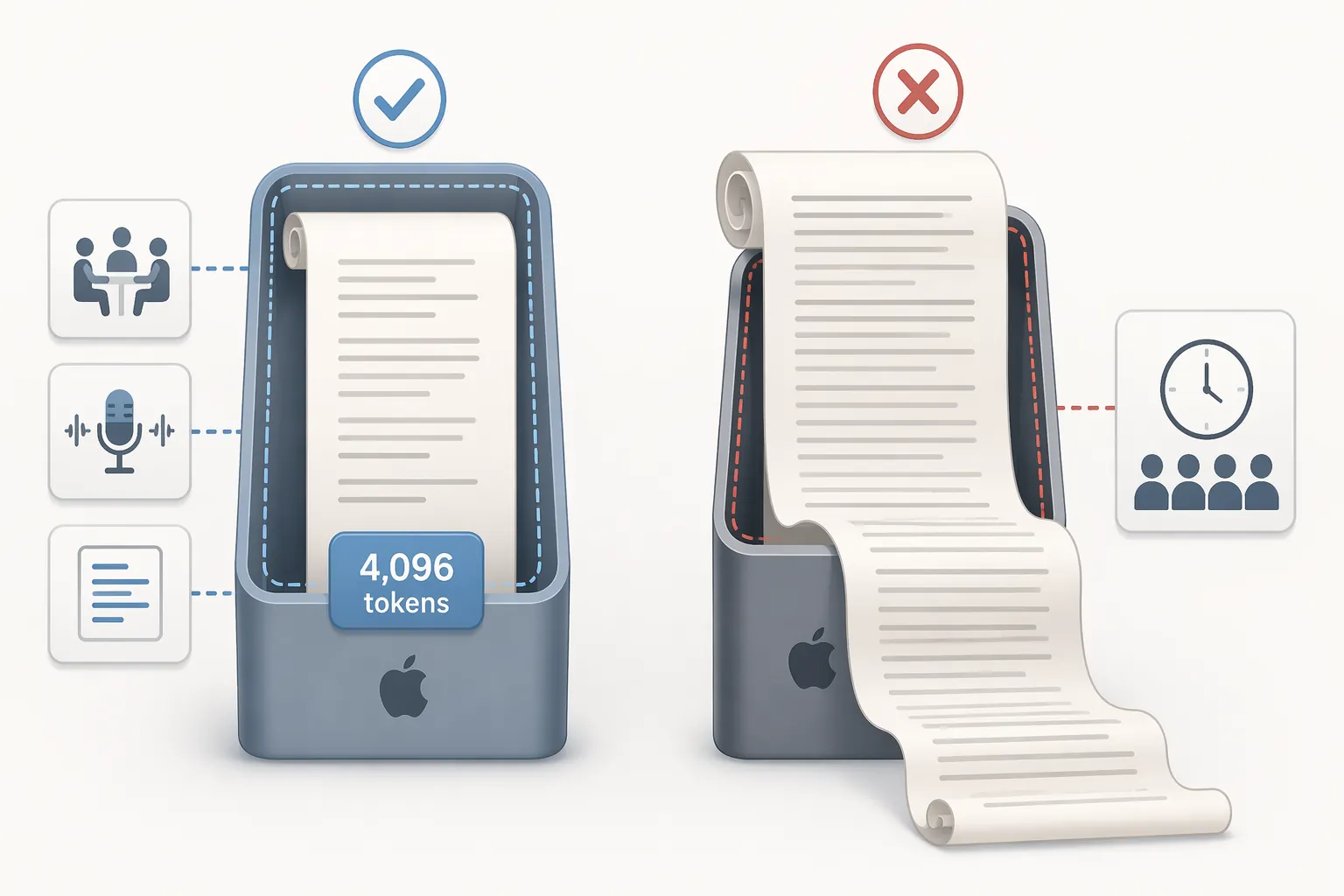
Tokens are not pages. They are chunks of text the model can hold in its working context. A short note, a selected paragraph, or a compact email-style rewrite can fit comfortably. A full interview transcript, a long seminar recording, or a research memo with pasted sources can exceed the window quickly. Once that happens, the app or developer has to chunk, summarize in stages, drop context, or route the work elsewhere.
The hardware cutoff is just as practical. Apple Intelligence requires iPhone 15 Pro or later, or Macs and iPads with M1-class chips or newer [2]. That excludes many perfectly usable iPhones, iPads, and classroom hand-me-down devices. For a student with an older iPad, “Apple has on-device AI” is not the same as “my Notes app can run it.”
This is the central on-device tradeoff: the user gets a tighter execution path, lower network dependence, and potentially better privacy, but only inside the hardware and context limits the local model can actually handle.
GoodNotes shows both the promise and the documentation problem
GoodNotes is the app in this group that most cleanly demonstrates what on-device note AI can feel like when it works. Its handwriting recognition is explicitly local, multilingual, and mature. GoodNotes says the system runs fully on-device, reaches more than 95% accuracy across 12 languages, and took three years with a dedicated 10-person machine-learning team to build [3].
That history matters because handwriting recognition is not a small wrapper around a hosted chatbot. It is a specialized model built around messy input: slanted letters, mixed languages, pressure variation, stylus quirks, and the difference between a chemistry symbol and a hurried lowercase letter. When it runs locally, the user gets a very practical kind of privacy: the app can understand handwritten notes without needing to ship the page image to a server for recognition.
The mistake is extending that confidence to every GoodNotes feature with an AI label. GoodNotes has also offered typing-oriented AI tools such as summarize, rewrite, and change tone, but the available documentation does not clearly confirm those tools as on-device. The safe reading is narrow: handwriting features are explicitly documented as local; typing AI tools should be treated as unconfirmed unless GoodNotes states otherwise.
GoodNotes also discontinued its Word Complete feature in March 2025, which is a useful reminder that local AI features are still evaluated feature by feature [3]. A company can succeed at one on-device model and still remove or change another. Local execution is not a guarantee of permanence.
Cloud AI is clearer in Notion, split in Evernote
Notion is the simpler cloud case. Notion AI is documented around server-side AI processing and model-provider use, with Notion stating that customer data is not used to train models [4]. There is no credible basis in the available documentation to expect offline Notion AI. If the network is gone, the AI layer is gone too.
That does not make Notion AI automatically bad. It means the trade is legible: hosted models, centralized product polish, and less local setup in exchange for server-side processing and network dependence. For users who mostly want strong generated text and do not work under strict local-processing rules, that may be acceptable. For users checking whether a sensitive note can stay on the device, Notion AI should not be filed under on-device AI.
Evernote needs more care because its AI features do not share one architecture. Evernote says Semantic Search uses internal server-side embeddings. Its AI Assistant sends queries to OpenAI, with Evernote stating that the content is deleted after the response and not used for model training. AI Meeting Notes uses internal transcription and third-party summaries [7].
Those distinctions matter in migration decisions. A user may be comfortable with semantic search indexing on Evernote’s servers but not with sending an assistant prompt containing client notes to OpenAI. Another user may accept AI Meeting Notes for routine calls but avoid it for interviews under consent restrictions. “Evernote has AI” tells you almost nothing until the feature is named.
Obsidian and Logseq can be local, but the user carries the machinery
Obsidian does not have native AI in the same sense as Notion or Apple system features. The AI layer usually arrives through community plugins. Obsidian Copilot and Smart Connections can connect to local models through tools such as Ollama or LM Studio, or to cloud APIs through user-provided keys [5][6]. That gives users meaningful control over processing location, but it also makes the configuration part of the privacy model.
A local Obsidian setup can keep prompts and embeddings on the machine if the plugin, model endpoint, and indexing path are all configured that way. But the setup is brittle compared with a native feature. The user has to choose the model, run the local server, point the plugin at it, decide what gets indexed, and understand what happens on a second laptop. There is no universal “Obsidian AI” architecture to audit.
Logseq sits in a similar user-controlled category, with even less official architectural clarity. Its community has shown strong interest in local-first AI workflows, and local LLM plugins can route work through tools such as Ollama. But Logseq does not publish a formal AI architecture spec for these workflows, so the confidence level is lower than with vendor-documented systems [8].
For technically comfortable users, this plugin route can be the most satisfying option: local files, local models, and no default assistant vendor reading the prompt. For everyone else, it is easy to confuse “possible to run locally” with “safe by default.” They are not the same condition.
Why local models hit walls before cloud models do
On-device AI is constrained by the machine in front of you: RAM, storage, thermal limits, battery, model size, and whether the device has an NPU capable of useful inference. Qualcomm’s 2026 on-device AI materials place the upper end of local models around roughly 20 billion parameters on supported Snapdragon hardware, while cloud models can operate in the 100-billion to 400-billion-plus parameter range [9]. The exact comparison changes as models improve, but the asymmetry is real: a laptop or tablet cannot spend data-center resources.
Specialized neural hardware helps. Vendor and industry benchmarks describe NPU inference as dramatically faster and more energy efficient than CPU-only inference, with figures as high as 100x speed improvement and 9x better energy efficiency in some reported comparisons [10]. The catch is the same one that appears in Apple’s device list: the hardware has to exist in the device the user actually owns.
Memory is another quiet cutoff. Some reporting has estimated that around 12GB of RAM may be needed for practical on-device LLM processing in certain mobile AI scenarios, but that figure should be treated as speculative rather than an official Samsung or Google requirement [11]. The safer conclusion is broader: local LLM features favor newer, higher-memory devices, while older and mid-range devices are more likely to be excluded or limited.
| Architecture | Likely strength | Likely limitation |
|---|---|---|
| Documented on-device feature | Better privacy boundary, lower network dependence, often lower latency after setup | Smaller context windows, hardware eligibility cutoffs, weaker or more specialized models |
| Cloud AI feature | Larger models, stronger general reasoning or generation, less local setup | Network dependence, server-side processing, more vendor trust required |
| Plugin-controlled local AI | User can choose local model and endpoint | Setup complexity, weaker defaults, inconsistent cross-device behavior |
| Hybrid or split feature set | Different features can be optimized for different jobs | The user must audit each feature separately |
How to classify a note app’s AI before trusting it
The most reliable test is feature-level classification. Do not ask whether the app “has AI.” Ask what happens when you press this button, run this search, summarize this recording, or index this vault.
| Question to ask | Why it changes the decision |
|---|---|
| Is this specific feature documented as on-device? | A broad privacy claim for the app does not prove that every AI surface is local. |
| What text or media leaves the device? | A prompt, embedding, audio transcript, PDF image, and notebook index have different exposure profiles. |
| What is the context window or input limit? | A local summarizer may handle selected notes but fail on long transcripts or multi-document research. |
| Does it work offline? | Offline behavior is the fastest practical check for whether the feature depends on a server call. |
| Which model or provider sees the content? | Internal embeddings, OpenAI assistant calls, third-party summaries, and local Ollama models are separate trust decisions. |
| Is the evidence official documentation, plugin documentation, or community inference? | The confidence level should change with the source. Vendor-specific claims are stronger than missing claims or forum reports. |
For the six apps here, the cleanest documented local claim is GoodNotes handwriting recognition. Apple gives a useful local-model ceiling, but only for eligible hardware and within a small context window. Notion AI should be treated as cloud AI. Evernote must be separated into Semantic Search, AI Assistant, and AI Meeting Notes. Obsidian and Logseq can support local AI through plugins and local models, but the user has to verify the route.
That is the posture worth keeping: documented claims count as facts, inferred architecture stays labeled as inference, and community or plugin evidence remains useful but lower-confidence.
References
- TN3193: Apple Intelligence, Apple Developer Documentation
- Apple Intelligence system requirements, Apple Support
- How GoodNotes’ AI technology works, GoodNotes Blog
- Notion AI Security & Privacy practices, Notion Help Center
- Obsidian Copilot Documentation, Obsidian Copilot
- Smart Connections, Smart Connections
- Evernote AI Features FAQ, Evernote Help & Learning
- Logseq community discussions, Logseq Forum
- On-device AI, Qualcomm
- NPU vs CPU AI performance benchmarks, iApp Technologies
- On-device AI may require more RAM than most phones have, Android Central