
The most revealing moment in a Microsoft Teams outage is not always the outage itself. It is the minute after the meeting ends, when someone says they will send the action items, opens Teams, and realizes the notes are sitting behind the same failure everyone has been complaining about.
That is the practical productivity impact of a Teams outage. It is not only missed chat messages or a delayed call. It is the loss of the decision trail at the exact point when people need to turn a conversation into work.
StatusGator publicly tracked 25 confirmed Microsoft Teams incidents from January 2025 through July 2026, with cumulative tracked downtime exceeding 24 hours; its incident list includes disruptions such as a 72-minute messaging outage in July 2026, an 82-minute global access outage in June 2026, and an 87-minute media outage in December 2025.[1] That count should be read carefully: publicly tracked incidents are not the same thing as Microsoft’s internal incident taxonomy, and not every disruption had the same scope or severity. Still, 25 incidents in roughly 18 months is enough to stop treating note access as a theoretical edge case.

The real question is whether the notes are still yours
Teams is often good enough as a meeting and messaging layer. The lazy version of this conversation is to pretend that every Teams problem proves Teams is useless. It does not. Plenty of teams run their calendar, chat, meetings, recordings, and quick coordination through it because the integration is convenient and because nobody wants another login for every small task.
The quieter problem is architectural. A note may technically live in OneNote, SharePoint, or a Teams wiki backend, yet still be practically unreachable because the path most people use to find it runs through Teams, identity, meeting recap, or another Microsoft 365 dependency. During normal weeks, that distinction sounds pedantic. During an outage, it decides whether the person responsible for follow-up can open the note at all.
The January 22–23, 2026 Microsoft 365 blackout made that dependency problem easier to see because third-party reports described a broad disruption affecting Outlook, Teams, Exchange, and SharePoint at the same time, with more than 15,000 Downdetector user reports at peak.[2][3][4] The nearly 10-hour duration reported by third parties should not be treated as Microsoft’s official impact window, but it is a useful stress test for the question here: when several Microsoft 365 paths are unhealthy together, where does your working knowledge remain readable?
Stored elsewhere does not mean accessible elsewhere
The dependency chain usually looks less like a single app and more like a set of gates. The Teams client has to load. The user has to authenticate through Microsoft identity services. The meeting, channel, or recap context has to resolve. Then the underlying content source, such as Exchange, OneNote, or SharePoint, has to respond in the way Teams expects.
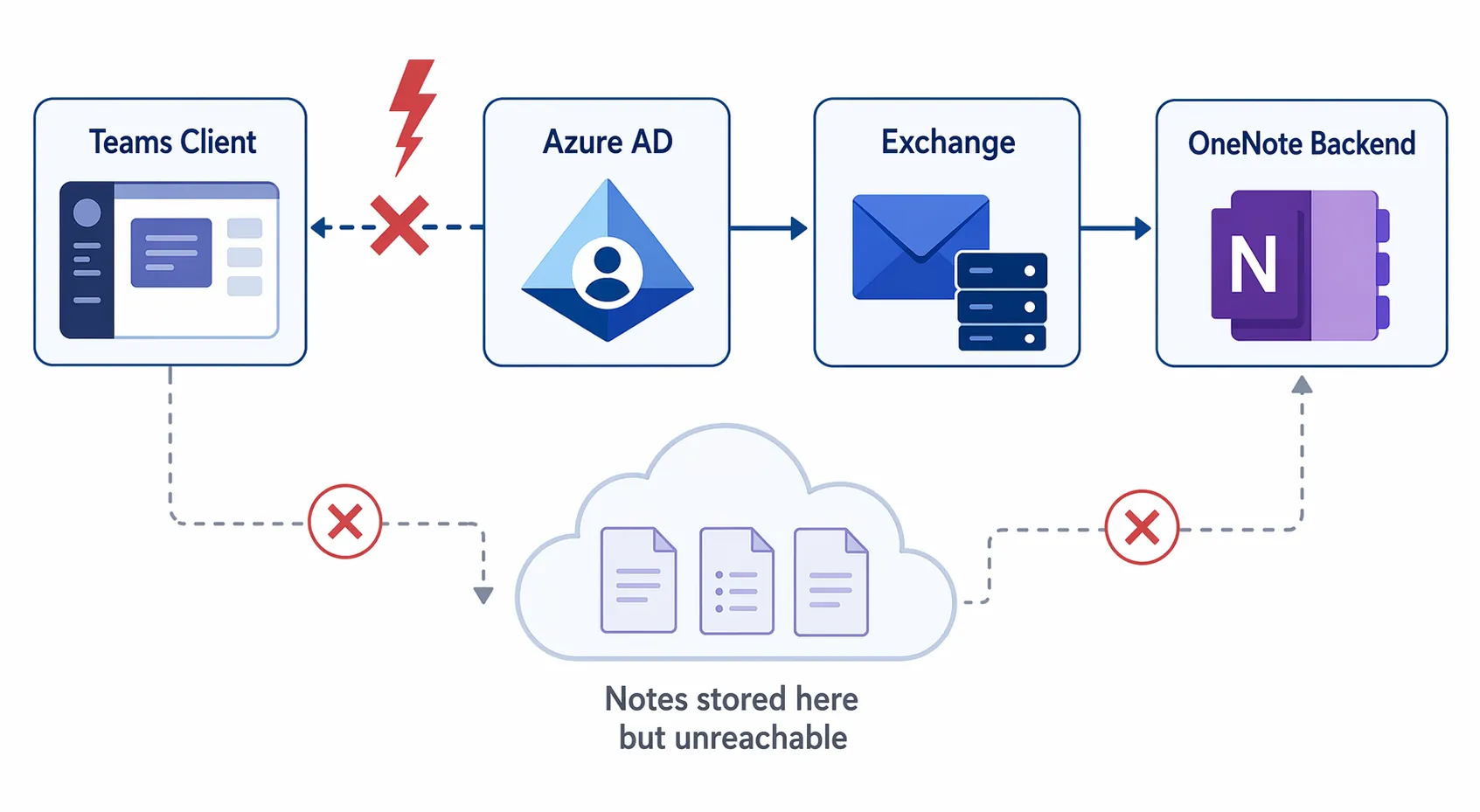
That matters because note access is often contextual. People do not usually remember the exact notebook location, SharePoint path, or file name. They remember “the notes from Tuesday’s vendor meeting” or “the wiki tab in the private channel.” If the path to that memory is the Teams meeting recap or the channel tab, the note may be stored somewhere else while still being unreachable in practice.
Microsoft Teams meeting notes are tied to OneNote-backed meeting and recap experiences, but ordinary access commonly starts from the Teams client or the meeting’s Recap tab. The exact user experience during a specific outage is not documented by Microsoft in a simple recoverability matrix, so the safest statement is narrower: when Teams, identity, Exchange, OneNote, or SharePoint dependencies are disrupted, Teams-mediated access to those notes can fail even if the content is not conceptually “inside” chat.
That is why uptime dashboards do not settle the knowledge question. A green light for one backend does not help the project manager who only knows the note through the Teams recap. The operational test is much less abstract: Can someone open the note without Teams? Can they read it offline? Can they export it without waiting for an admin or a recovery script? Can a private channel wiki be recovered in a way a team can actually perform under pressure?
The wiki export path is the portability test Teams does not pass cleanly
Microsoft’s own wiki export documentation is more useful than any broad claim about lock-in because it describes the recovery path in operational terms. Exporting a Teams wiki to OneNote is manual and handled per channel; private channel wikis do not have a migration tool; and after February 2024, the Wiki tab export option was removed, with users directed to download wiki content from SharePoint instead.[5]
Those details change the decision. A resilient knowledge system should not require every channel owner to remember a separate export path, nor should it strand private channel content outside the normal migration tooling. If the official answer is “go to SharePoint and download it,” that may be workable during a planned cleanup. It is not a reassuring recovery model for a team trying to reconstruct a decision after a live service incident.
The private channel point is especially easy to underestimate. Private channels are often where sensitive, executive, legal, vendor, or incident-response notes end up. They are also exactly the notes people are most likely to need intact and auditable later. A migration gap there is not just an inconvenience; it is a sign that the knowledge layer has inherited the collaboration layer’s permissions complexity without gaining an equally simple escape hatch.
What survives when the cloud or collaboration layer fails
A dedicated note app is not automatically safer. A web-only notes product can fail in the same practical way Teams does: the note exists somewhere, but the user cannot reach it. The useful comparison is narrower: what remains readable when sync, identity, or the collaboration surface is unavailable?
| Tool | What remains accessible during a Teams outage | Portability tradeoff |
|---|---|---|
| Microsoft Teams notes and wikis | Depends on the Teams path, Microsoft 365 identity, and the relevant backend being reachable | Convenient in meetings, weaker when export or access must bypass Teams |
| Obsidian | Local Markdown files remain readable on the device where they are stored | Team sync and governance require separate choices |
| Apple Notes | Cached notes can remain available on Apple devices, depending on account and device state | Friendlier than raw files, less transparent than a folder of Markdown |
| Logseq | Local graph files remain readable, with sync options such as Git available for teams that can manage them | Powerful for local-first workflows, but not effortless for every organization |
Obsidian is the cleanest contrast because the primary unit is a local Markdown file. If the sync provider is down, the file on the laptop is still a file on the laptop. It can be opened in Obsidian, a text editor, a code editor, or another Markdown app. That does not solve every team problem — permissions, shared vaults, review workflow, and mobile sync still need design — but the failure mode is easier to reason about. Local files do not become unreadable merely because a meeting recap failed to load.
Apple Notes sits in the middle. It is more comfortable for people who want a polished native app and do not want to manage Markdown folders. Local caching means notes may remain available on a signed-in Apple device even when iCloud sync is unhealthy or the network is unavailable. The tradeoff is visibility. Users do not get the same plain-file transparency they get from Obsidian, and organizations that need predictable export, retention, or cross-platform workflows should test those paths before treating Apple Notes as team infrastructure. For individual Mac users weighing that boundary, the migration question is often less about features and more about when convenience stops being enough; our guide on when to outgrow Apple Notes on Mac takes that narrower path.
Logseq is the more technical team-capable pattern. It is local-first, works with plain-text files, and can be paired with Git-based workflows for groups that already understand branching, commits, and review. That can make knowledge less dependent on a single SaaS collaboration surface. It can also be too much ceremony for a department that just needs reliable meeting notes. The point is not that every team should move to Logseq. The point is that local-first plus a transparent sync layer gives administrators and users more recovery options than a note hidden behind a meeting object.
For a wider comparison of these architectures, the useful frame is not “which app has the prettiest editor” but “which failure modes can the team tolerate.” That is the same lens used in our local-first note-taking apps comparison and our collaborative note-taking tools comparison.
The productivity loss is the handoff, not only the downtime
Downtime-cost numbers can be useful as warning labels, but they are too blunt for this decision. Different studies measure different years, company sizes, systems, and loss categories. They do not tell you how much money a single inaccessible meeting note cost. The better measure is the handoff that failed.
A meeting still happens over a backup call. Someone screenshots a chat. A manager asks for the action list. Then work slows because the source of truth is locked behind the tool that was supposed to make the source of truth easy to find. People reconstruct from memory, search email, ask who remembers the final decision, or wait until the service returns. That is productivity loss as operational drag, not as a dramatic stopwatch calculation.
This is also why switching chat platforms does not automatically solve the problem. A Slack outage creates its own version of the access-path issue if the team keeps decisions only in threads and canvas-like collaboration surfaces. If the live question is whether moving communication layers reduces your outage exposure, the direct sibling analysis is Can Switching to Slack Fix Microsoft Teams Outages? The note-system question is stricter: can knowledge be opened without the collaboration layer being healthy?
A practical decision boundary
Teams can remain the room where the meeting happens. It can remain the place where people chat, schedule, react, and coordinate the day. The mistake is letting it become the only practical doorway to durable knowledge.
If the notes are temporary, low-risk, and useful only while the meeting is fresh, Teams-native notes may be fine. If the notes contain decisions, approvals, incident timelines, customer commitments, hiring rationale, architecture tradeoffs, or anything someone may need to defend later, they belong in a system with an access path that does not depend on Teams being healthy.
- Use Teams for conversation when its integration helps the work move faster.
- Keep durable notes in a dedicated system that can be opened offline or outside Teams.
- Test export before a migration or outage makes export urgent.
- Treat private channel wikis as a special recovery risk, not as ordinary channel content.
- Document where the final decision lives, not only where the conversation happened.
For organizations building a broader fallback workflow, this same access-first thinking applies beyond notes. The useful preparation is mundane: local copies, known export paths, offline-readable references, and a communication fallback that does not require the failed service to explain what to do next. Our guide on staying productive during an internet outage covers that setup from the infrastructure side.
The boundary is simple enough to test on a normal afternoon: disconnect the network, close Teams, and ask the person responsible for follow-up to open last week’s important notes. If the answer depends on Teams loading, a recap resolving, an admin exporting a channel, or a SharePoint path nobody remembers, the notes are not portable in the way operational knowledge needs to be.
References
- Microsoft Teams Status History, StatusGator, https://statusgator.com/services/microsoft-teams
- Microsoft 365 Outage Takes Down Outlook, Teams, Exchange, and SharePoint, myITforum, January 2026, https://myitforum.substack.com/
- Microsoft 365 Outage: Outlook, Teams, Exchange and SharePoint Down, Spambrella, January 2026, https://www.spambrella.com/
- Microsoft 365 Outage Impacts Outlook, Teams, Exchange, and SharePoint, 2W Tech, January 2026, https://www.2wtech.com/
- Export a wiki to a OneNote notebook in Microsoft Teams, Microsoft Support, https://support.microsoft.com/en-us/office/export-a-wiki-to-a-onenote-notebook-in-microsoft-teams







Comments
Join the discussion with an anonymous comment.