
Category routing: tool-comparisons. comparison_category: Note-Taking Apps. Pricing and features last verified: July 5, 2026.
A collaborative notes tool for remote teams earns its keep only if it lowers the cost of finding what the team already knows. Guideflow cites a McKinsey knowledge-worker figure saying employees spend roughly 19% of the workweek searching for information; the original methodology should be confirmed before publication.[1] Even with that caveat, the pain is familiar: decisions trapped in Slack, onboarding pages nobody owns, meeting notes that cannot be searched unless someone remembers the exact title.

The practical question is not which app has the longest feature list. It is which one your team can maintain after the rollout energy fades: who owns the workspace, who can see sensitive pages, how fast search answers a real question, and whether the tool still makes sense when three people leave and six new people join.
| Tool | Best fit | Starting paid team price in brief | Watch before buying |
|---|---|---|---|
| Notion | Flexible teams that want docs, databases, wikis, and templates in one workspace | $10/user/mo Plus; Business with Notion AI listed at $24/user/mo | Compliance limits; AI cost; workspace sprawl if ownership is weak |
| Slite | Remote teams that want a disciplined knowledge base with built-in AI Q&A | $8/user/mo Standard | Roadmap and pricing should be rechecked after Loom/Atlassian acquisition |
| Nuclino | Small teams that value speed, simplicity, and affordability | $6/user/mo Starter | No SSO, SOC 2, API access, or audit logs in cited comparison |
| Microsoft OneNote | Microsoft 365 organizations consolidating notes inside an existing suite | Free standalone with 5GB storage; included in Microsoft 365 licenses | Less structured as a team knowledge base unless governance is added |
| Coda | Teams that need docs connected to live data and workflows | Verify current team pricing | Steeper learning curve; Grammarly acquisition may affect roadmap |
| Confluence | Jira-heavy product and engineering organizations | $5.75/user/mo Standard | Can be overkill for teams under 50 |
| Mem | AI-search-first teams willing to run a contained pilot | $12/mo Pro | G2 rating cited at 2.3/5; adoption risk needs testing |
| Evernote | Mostly solo or legacy users, not new remote-team standardization | Free tier capped at 50 notes, one notebook, and one device | Free plan is effectively unusable for teams |
| Joplin | Technically capable teams that want open-source control and encryption | Open-source free option in cited sources | Setup, hosting, and support burden sit with the team |
Start With the Team Shape, Not the Feature Grid
The same app can be a clean operating system for one remote team and a junk drawer for another. Before comparing features, sort the decision by the constraint that will actually decide adoption: ecosystem, team size, knowledge-base maturity, AI expectations, compliance, budget, and technical capacity.
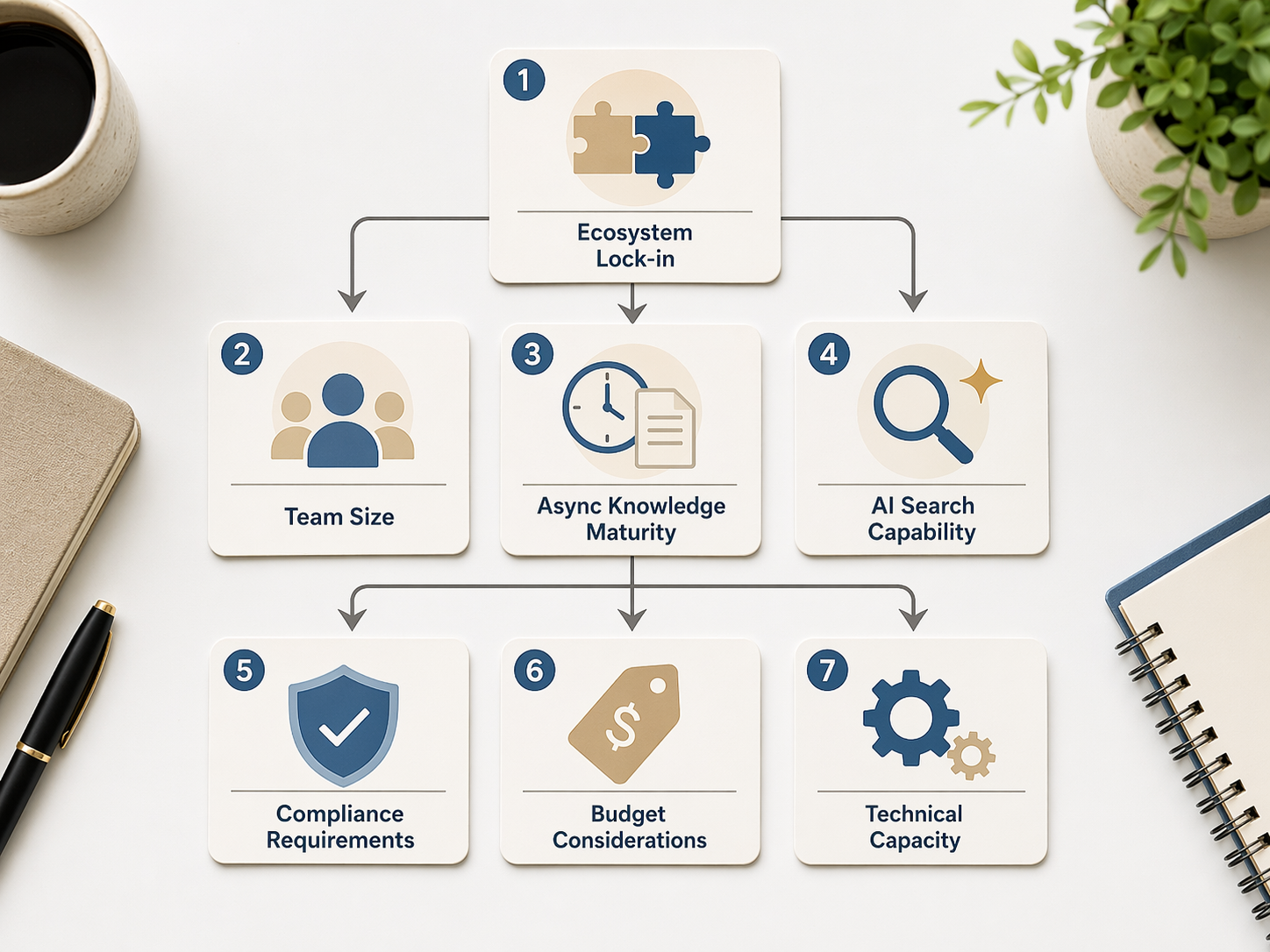
| Team profile | Default shortlist | Disqualifier to verify early |
|---|---|---|
| Small fast-moving remote team | Nuclino, Notion, Slite | Whether the tool makes ownership and search obvious without admin overhead |
| Microsoft 365 team | Microsoft OneNote first; compare with Notion or Slite only if OneNote cannot become the team source of truth | Whether notes need structured wiki governance beyond notebooks |
| Jira-heavy product or engineering team | Confluence, then Slite or Notion if the team wants a lighter knowledge layer | Whether non-technical teams will actually use Confluence |
| AI-search-first team | Slite, Notion, Mem | Whether AI answers are reliable enough and whether people trust the source trail |
| Compliance-sensitive team | Confluence or self-hosted/open-source routes such as Joplin | HIPAA, auditability, air-gapped deployment, and access-control requirements |
| Budget-constrained team | Nuclino, OneNote, Joplin | Whether low cost removes controls the team will need later |
| Technically capable open-source team | Joplin | Whether the team will maintain sync, hosting, backup, and user support |
For regulated teams, this filter belongs near the beginning. The cited materials note that Notion, Coda, Slite, and Nuclino do not support HIPAA compliance or air-gapped deployment for those needs; teams with those requirements should look harder at Confluence or self-hosted options before getting attached to a nicer interface. That does not make the other tools weak. It means they are wrong for a narrower, higher-consequence use case.
For free-tier decisions, be equally blunt. A free plan can help a small team test habits, but it should not become the place where durable company knowledge goes if the limits force people into workarounds. For a broader pass on no-cost options, see the internal comparison of free note-taking apps in 2026.
The Strongest Default Choices
Notion: best when flexibility is the product
Notion is the easiest recommendation when a remote team wants one workspace for documents, lightweight databases, project notes, internal wikis, and repeatable templates. Zapier’s 2026 roundup cites more than 30,000 community templates, a Plus plan at $10/user/month, and a 4.7/5 Capterra rating.[2] That template gravity matters because remote teams rarely start from a blank-page ideal. They start from “we need an onboarding hub by Tuesday” or “sales keeps asking where the handoff checklist lives.”
The same flexibility is also the maintenance risk. Notion can become a clean operating layer, or it can become ten semi-official dashboards with overlapping names. It needs a naming convention, page owners, and a small number of durable top-level spaces. Without those, better templates only create prettier ambiguity.
Notion AI should be priced and evaluated separately from the core workspace. The cited materials list Notion AI as an extra cost on the Business plan, at $24/user/month.[2] If AI search is the buying trigger, compare it directly with Slite and Mem rather than assuming the most flexible workspace will also be the best answer engine. Readers comparing how tools fit personal and team thinking styles may also want the internal guide to OneNote vs Notion vs Obsidian vs Apple Notes.
Slite: best for remote knowledge-base discipline
Slite is the pick for teams that want fewer places to hide knowledge. The cited sources identify it as purpose-built for remote knowledge bases, with Ask AI on all plans, a Standard plan at $8/user/month, SOC 2 certification, a document verification system, and Slite Agent features that detect knowledge drift.[3] Those are not decorative features. Verification and drift detection speak directly to the remote-team problem: an old page is often worse than no page because it gives the next person confidence in the wrong answer.
Slite is less attractive if the team really wants a broad all-in-one workspace with flexible databases and custom workflows. Its sharper value is that it narrows the job: write the decision down, keep the page current, make answers retrievable. That is enough for many remote teams, especially those that already have separate systems for project management and CRM.
There is one roadmap variable to recheck. Slite was acquired by Loom, part of Atlassian, in 2024.[3] That is not a reason to avoid it. It is a reason to verify current pricing, packaging, and product direction before a company-wide migration.
Nuclino: best for small teams that need speed more than governance
Nuclino works best when the team is small enough that lightweight structure beats enterprise controls. The cited comparison lists a $6/user/month Starter plan and highlights its graph view for visual knowledge mapping.[4] For a remote team with 10 or 20 people, that can be enough: fast pages, low friction, clear linking, and fewer knobs to misconfigure.
The tradeoff is explicit. The same source says Nuclino lacks SSO, SOC 2, API access, and audit logs, making it a poor fit for enterprise-ready requirements.[4] If procurement, security, or customer contracts will ask for those controls within the next year, a cheap rollout may become a forced migration.
Microsoft OneNote: best when Microsoft 365 is already the center of gravity
OneNote is not the cleanest remote knowledge base in this set, but it may be the most sensible consolidation choice for Microsoft 365 organizations. The cited NoteApps roundup describes OneNote as free standalone with 5GB storage or included in Microsoft 365 licenses, with Copilot AI, digital ink, and voice transcription.[5] If the company already lives in Teams, Outlook, SharePoint, and Microsoft identity, the adoption barrier is lower than introducing another workspace.
That consolidation value should not be confused with automatic knowledge-base discipline. OneNote notebooks can sprawl just as easily as shared drives. It needs decisions about notebook ownership, section naming, archiving, and which notes are official enough to survive beyond a meeting. For a deeper look at where OneNote fits, see Microsoft OneNote: Who It’s Really For and Who Should Skip It and the comparison of Microsoft OneNote vs Loop.
Coda: best for teams whose notes need live data
Coda is strongest when a document is not just a document. The cited materials cite more than 600 Coda Packs and position Coda as a strong option for teams embedding live data from other tools.[6] That makes it useful for operating docs, planning hubs, team dashboards, and workflows where the note should pull from or push into other systems.
The cost is learning curve. Coda asks users to understand docs as apps, which can be powerful for builders and confusing for teammates who just need the latest policy or launch decision. It is a better candidate when a few operators will design durable workflows for everyone else, not when every employee is expected to become a workspace architect.
Coda was acquired by Grammarly in late 2024, so roadmap and packaging should be checked before standardizing.[6] As with Slite, the ownership change is not the story. The story is that buying a team knowledge layer creates switching costs, and ownership changes can alter the assumptions behind that bet.
Confluence: best when Jira already defines the work
Confluence is the default enterprise wiki answer when the team already runs through Jira. The cited sources list Rovo AI, a $5.75/user/month Standard plan, and note that Confluence can be overkill for teams under 50.[7] For product and engineering organizations, the Jira connection can make the knowledge layer feel closer to the work: specs, decisions, incidents, project documentation, and retrospectives can sit near the tickets that generated them.
The adoption risk is cultural. Confluence can become the place where engineering writes thoroughly and everyone else visits reluctantly. If the whole company needs a shared remote knowledge base, test whether sales, customer success, people ops, and leadership can find and update pages without treating the tool as an engineering annex.
The Selective Picks
Mem deserves a pilot, not a blind rollout
Mem is the most interesting AI-first option in the set. The cited materials list Voice Mode, Deep Search, and a $12/month Pro plan.[8] If the team’s real pain is retrieval rather than writing, that deserves attention. A good AI search layer can reduce the “what was that page called?” problem that makes remote knowledge feel more fragile than it is.
The adoption warning is also unusually loud: the cited comparison materials show a 2.3/5 G2 rating.[8] Ratings move and should be rechecked, but a low adoption signal changes how Mem should be evaluated. Do not make it the company default because the demo feels clever. Give it a narrow pilot with real team questions, real permissions, and a clear pass/fail bar for answer quality and user trust. For a wider framing of AI note tools by use case, see Which AI Note-Taking App Is Best? Organize by Use Case First.
Evernote is a warning about free-tier reality
Evernote still has name recognition, but it is hard to recommend as a new team standard in this context. The cited materials show a free-plan cap of 50 notes, one notebook, and one device, which is effectively unusable for a remote team knowledge base.[9] A free tier that blocks normal team behavior is not a budget strategy; it is a delay before migration.
Joplin is control with operational overhead
Joplin is the open-source control option. The cited NoteApps roundup identifies it as a free open-source choice with end-to-end encryption and self-hosting.[5] For technically capable teams, that can be exactly the point: own the data, control the setup, avoid vendor packaging surprises.
The question is who will carry the operational burden. Self-hosting, sync reliability, backups, onboarding, and support do not disappear because the software is free. If the team has the technical capacity and privacy requirement, Joplin belongs on the shortlist. If not, it can quietly recreate the same “where does this live?” problem in a more technical form.
What to Verify Before You Standardize
A remote team does not need a five-product bakeoff. It needs two credible candidates and one disqualifier for each. The disqualifier is the thing that would make the tool fail even if people like the interface.
- Permissions: Can a normal workspace owner tell who can see a page, database, notebook, or space without asking an admin?
- Search and AI answers: Can the tool answer real team questions using current, permission-appropriate content?
- Ownership: Does every durable page have an owner or review path, especially onboarding, policy, process, and customer-facing knowledge?
- Sync reliability: Do changes appear quickly across web, desktop, and mobile for the people who actually work asynchronously?
- Compliance and auditability: Are SSO, audit logs, SOC 2, HIPAA needs, or deployment restrictions dealbreakers now or within the next buying cycle?
- Exit cost: If the tool fails in six months, can the team export, archive, or migrate its knowledge without losing structure?
Pricing also needs a live check. Vendor pricing was verified in June–July 2026, and this article’s visible verification date is July 5, 2026. That is current enough for comparison, not permanent enough for procurement. AI add-ons, acquisition-driven packaging, and enterprise controls are exactly where pricing tends to move.
A Shortlist That Usually Works
If the team wants a flexible all-in-one workspace and can commit to page ownership, start with Notion. If the team wants a remote knowledge base more than a build-your-own operating system, start with Slite. If the team is small, fast, and cost-sensitive, start with Nuclino. If Microsoft 365 already owns identity, meetings, files, and chat, test whether OneNote is good enough before adding another paid workspace. If Jira defines the work, Confluence deserves the first look. If live data turns documents into workflows, evaluate Coda. If AI retrieval is the central bet, pilot Mem carefully. If open-source control is non-negotiable, consider Joplin with the setup burden fully counted.
The goal is not better notes as an aesthetic category. The goal is fewer repeated questions, fewer lost decisions, cleaner onboarding, and less time spent searching for knowledge the team already created.
References
- 10 best note taking software tools for teams in 2026, Guideflow Blog
- The 7 best note taking apps in 2026, Zapier
- The 10 Best Notion Alternatives 2026, Slite
- Nuclino vs Slite (2026), Docsie
- Best Note-Taking Apps 2026, NoteApps
- Why teams use productivity apps..., Coda Blog
- The 7 best note taking apps in 2026, Zapier
- Multiple tool comparison articles
- Free Note-Taking Apps in 2026