
Why the Terminology Confusion Costs You Money
Every quarter, operations managers and IT buyers sit through product demos for tools that promise to "automate your workflows." The demos look impressive. The sales decks are polished. But six months later, the team is still manually stitching together steps that the tool cannot handle, and the promised end-to-end visibility never materialized.
The root cause is rarely a bad tool. It is a category mismatch. Organizations routinely buy a workflow automation platform when they actually need workflow orchestration, or they invest in a full BPM suite when a lightweight iPaaS would have solved the integration problem at a fraction of the cost. According to Teamwork.com's Sprint to AI report, 92% of professional services firms say their current tools fall short on end-to-end workflows and integrations. The top gaps reported are end-to-end workflows (33%) and tool integrations (40%). These firms did not buy bad software — they bought the wrong category of software for the problem they were trying to solve.
This guide provides a vendor-neutral four-way comparison of workflow automation, workflow orchestration, business process management (BPM), and integration platform as a service (iPaaS). It will help you diagnose the actual bottleneck in your operations — system integration, task automation, cross-team coordination, or compliance governance — before you evaluate a single vendor.
The Four Categories: Definitions with Concrete Examples
The four categories overlap at the edges, but each addresses a fundamentally different coordination problem. Understanding the distinction starts with a concrete example.
Workflow Automation: "If X, Do Y"
Workflow automation executes a predefined task when a specific trigger occurs. The logic is linear and deterministic. If the trigger fires, the action runs. There is no conditional branching based on the state of other systems, no human-in-the-loop for exceptions, and no cross-process coordination.
A typical example: when a new email attachment arrives in Gmail, save it to a Google Drive folder and send a Slack notification. Tools like Zapier and Microsoft Power Automate excel at this pattern. As IBM's comparison page notes, automation "is most effective when tasks have clearly defined inputs and outputs." The moment a task requires checking the status of a previous step, waiting for a human decision, or routing through multiple conditional paths, simple automation hits its ceiling.
Workflow Orchestration: Coordinating Multi-Step Sequences with Dependencies
Workflow orchestration manages the entire sequence of automated tasks, human decisions, and system interactions across a defined process. It handles dependencies, failures, retries, and conditional branching. As Teamwork.com defines it, orchestration means "manage the entire sequence, handle what happens when step 3 fails, and make sure step 7 only runs after steps 4 and 6 are complete."
Consider a bank loan application, a scenario frequently used by Camunda to illustrate the difference. A simple automation can check the applicant's credit score automatically. But a loan application process requires more: if the risk is low, proceed to automated acceptance; if the risk is high, send an automated rejection; if the risk falls in the middle, route the application to a human underwriter for review. Meanwhile, the system must verify that the income document was uploaded before the underwriter sees the case, and if the document check fails, it must notify the applicant and wait for a re-upload before continuing. That is orchestration.
Camunda's analogy captures the relationship neatly: "If automation is about getting cars to move, orchestration is about directing traffic flow — ensuring that all the cars move in concert to prevent congestion and maximize efficiency."
BPM: Enterprise-Wide Process Models with Compliance
Business Process Management (BPM) takes a broader view than orchestration. BPM platforms provide a standardized notation — BPMN 2.0 — for modeling, executing, monitoring, and optimizing entire business processes across the enterprise. They are designed for regulated industries where every process step must be auditable, version-controlled, and governed by compliance rules.
A healthcare provider managing patient onboarding is a classic BPM use case. The process spans multiple departments (registration, insurance verification, clinical intake, billing), involves role-based task assignments, and must maintain an audit trail for HIPAA compliance. BPM platforms like Camunda and Flowable use BPMN 2.0 to provide "a clear, visual representation of processes," as Camunda's documentation explains. However, these platforms require significant developer investment. As Enate's comparison notes, Camunda "requires dev resources" and is "not user-friendly for non-technical teams."
iPaaS: The Integration Substrate
Integration Platform as a Service (iPaaS) provides the connectivity layer between systems. Its primary job is moving data reliably between applications — syncing customer records from Salesforce to NetSuite, for example, or routing order data from an e-commerce platform to an ERP system. iPaaS tools overlap with orchestration because they often include workflow builders, but their core value proposition is data connectivity, not process coordination.
If your primary pain point is that your CRM and accounting system do not talk to each other, you likely need an iPaaS (Workato, Celigo, Tray.io). If your pain point is that a multi-step process involving people, systems, and conditional logic is breaking down, you need orchestration. The two categories are complementary, not interchangeable.
Side-by-Side Comparison: Scope, Audience, Complexity, Cost
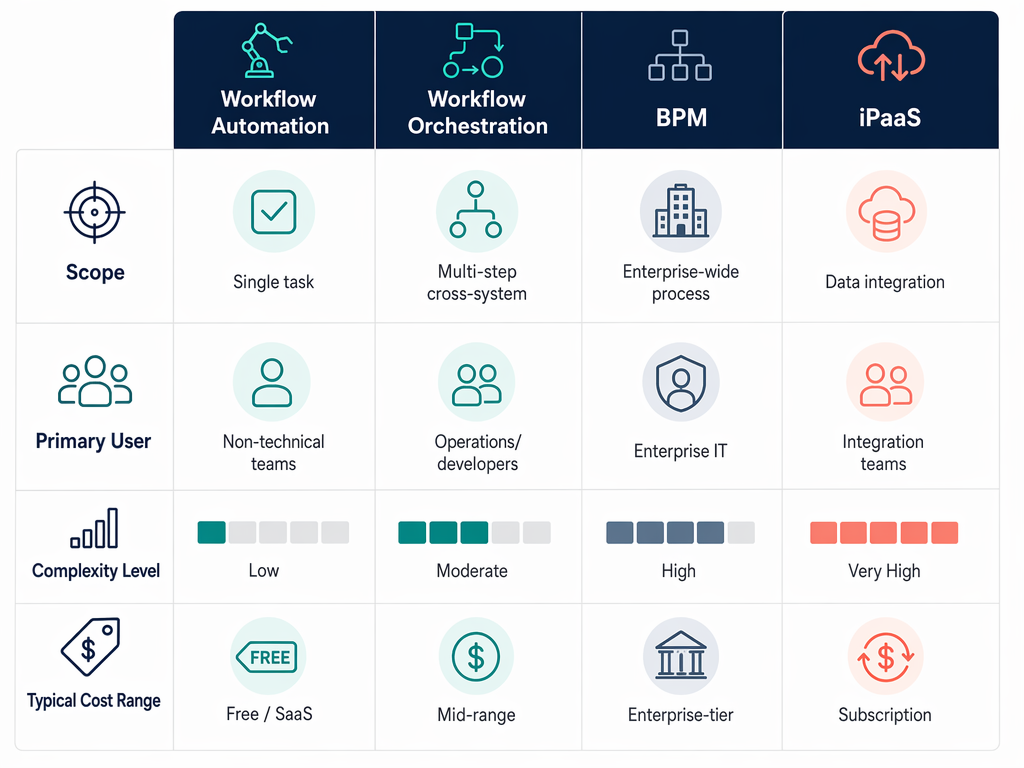
The table below maps each category across five dimensions. Use it as a quick-reference filter before you start evaluating specific vendors.
| Dimension | Workflow Automation | Workflow Orchestration | BPM | iPaaS |
|---|---|---|---|---|
| Scope | Single task or linear sequence | Multi-step process with dependencies, failures, and human handoffs | Enterprise-wide process models with compliance and governance | Data integration and synchronization between systems |
| Primary User | Non-technical team members, marketing ops, sales ops | Operations managers, process owners, IT generalists | Enterprise architects, developers, compliance teams | Integration specialists, IT teams |
| Complexity Level | Low — drag-and-drop, no coding required | Medium — visual builders with conditional logic, some technical setup | High — requires BPMN modeling, developer investment, governance framework | Medium — connector configuration, data mapping, error handling |
| Typical Cost Range | $10–$50/user/month (e.g., Zapier, Make) | $20–$75/user/month (e.g., n8n, Prefect) | $100–$200+/user/month (enterprise; custom pricing for ServiceNow, Pega, Appian) | $500–$2,000+/month (platform fee; Workato, Celigo) |
| Best-Fit Use Case | Automate a repetitive task across two apps | Coordinate a multi-step process with conditional routing and human review | Model, execute, and audit a regulated end-to-end process | Sync data between CRM, ERP, and other business systems |
5 Questions to Diagnose What You Actually Need
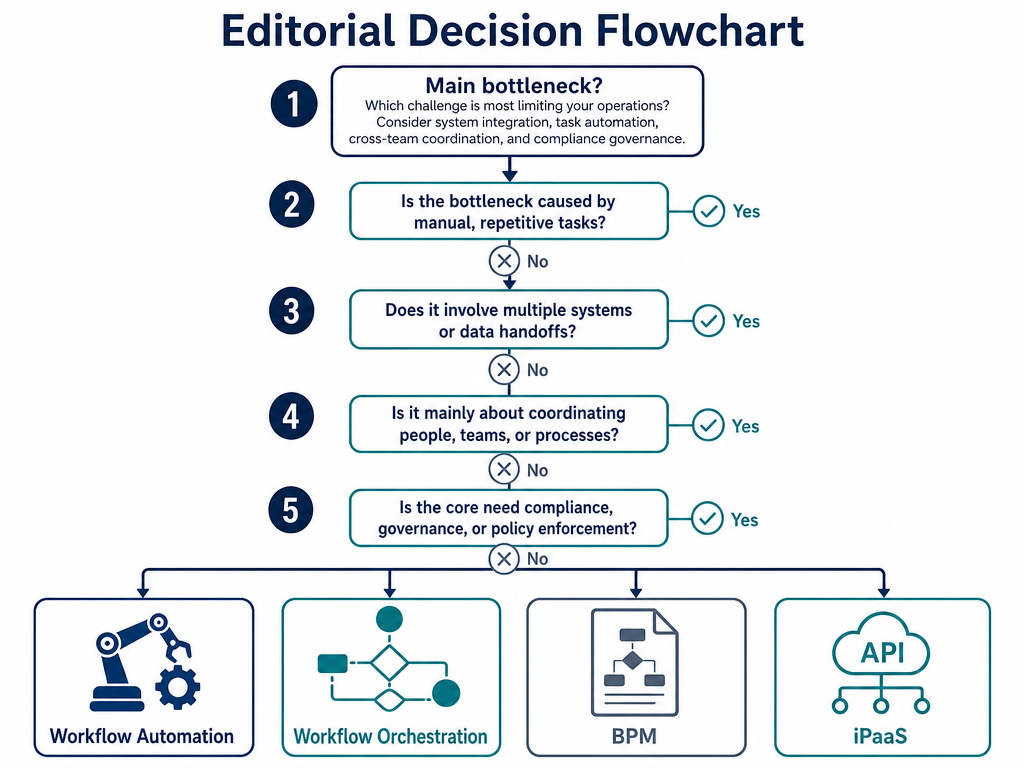
Before you evaluate any tool, diagnose the bottleneck. The following five questions will help you identify which category addresses your primary coordination problem.
- Does your process span more than one system or team? If the answer is no — you are automating a single task within one application — workflow automation is likely sufficient. If the answer is yes, you need a category that coordinates across boundaries: orchestration, BPM, or iPaaS.
- Does the process require human decisions or approvals at any step? Pure automation cannot handle human-in-the-loop stages. If a person needs to review, approve, or intervene based on context, you need orchestration or BPM. Orchestration handles human handoffs within a defined process; BPM adds governance and audit trails on top.
- Do you need an auditable trail of every process execution for compliance? If regulators, auditors, or internal compliance teams require version-controlled process models, role-based access logs, and change history, BPM is the appropriate category. Orchestration tools can log execution data, but they lack the governance framework that BPM platforms provide.
- Is your primary problem that your systems do not talk to each other? If your CRM, ERP, and marketing platform are siloed and you need reliable data synchronization, start with an iPaaS. Many orchestration tools include connectors, but if data integration is the core pain point, an iPaaS will be more cost-effective and purpose-built.
- What is your team's technical skill level? Non-technical teams can succeed with workflow automation and no-code orchestration tools. Teams with developer resources can evaluate open-source orchestration engines (Airflow, Prefect, n8n) or BPM platforms. If your team has no dedicated developers and no budget for external implementation partners, enterprise BPM is likely out of reach.
Real-World Scenarios: Which Category Fits Your Situation?
The following scenarios map common business situations to the appropriate category. Each scenario reinforces the diagnostic logic from the previous section.
Scenario 1: Marketing Team Automating Social Media Posts
A marketing coordinator wants to automatically publish a blog post to LinkedIn, Twitter, and Facebook when it goes live on the company website. The process involves one trigger (new blog post published) and three actions (post to each platform). No human review is needed between steps. No cross-system dependencies exist.
Scenario 2: Bank Processing Loan Applications with Human Review
A loan application triggers an automated credit score check. If the score is above a threshold, the system proceeds to automated approval. If the score is below a second threshold, it sends an automated rejection. If the score falls in the middle, the application is routed to a human underwriter who reviews the documents and makes a decision. The system must track the status of each application and handle document re-uploads if the initial submission is incomplete.
Scenario 3: Healthcare Provider Managing Patient Onboarding with Audit Trails
A hospital needs to manage the entire patient onboarding process: registration, insurance verification, clinical intake, and billing. The process spans multiple departments, involves role-based task assignments, and must maintain a complete audit trail for HIPAA compliance. Process models must be version-controlled and approved by compliance before deployment.
Scenario 4: Company Syncing Data Between Salesforce and NetSuite
A growing company needs to keep customer records, orders, and invoices synchronized between Salesforce (CRM) and NetSuite (ERP). The primary challenge is data consistency — ensuring that a new customer created in Salesforce is automatically created in NetSuite, and that invoice status changes in NetSuite are reflected in Salesforce. The process does not involve human decision steps or complex conditional routing.
Summary: Recommendations for Your Next Step
The table below provides a final verdict for each category: who it is best for, when to choose it, and what to watch out for.
| Category | Best For | Choose When | Watch Out For |
|---|---|---|---|
| Workflow Automation | Non-technical teams automating repetitive tasks across a few apps | Your process is a single trigger → single or parallel actions with no conditional branching | Hits a ceiling quickly when processes involve human decisions, dependencies, or cross-system coordination |
| Workflow Orchestration | Operations managers and process owners coordinating multi-step processes with dependencies and human handoffs | Your process spans multiple systems or teams, requires conditional routing, and needs failure handling | Can become complex to maintain if the process model is not kept in sync with actual operations |
| BPM | Enterprise teams in regulated industries needing auditable, governed process models | You need compliance, role-based access, version-controlled process models, and enterprise-wide visibility | Requires significant developer investment and is overkill for teams that do not have compliance or governance requirements |
| iPaaS | Integration specialists and IT teams needing reliable data synchronization between business systems | Your primary pain point is system-to-system data integration, not process coordination | Overlaps with orchestration tools — evaluate whether you need data connectivity alone or full process coordination |
Once you have identified the category that matches your bottleneck, the next step is evaluating specific tools within that category. The following resources on this site will help you move from category decision to tool selection:
- If you identified orchestration as your category, see our comparison of Best No-Code Workflow Orchestration Tools for Business Teams in 2026.
- If you are still deciding between BPM and automation, read Best Process and Workflow Management Software of 2026 — Compared for Knowledge Workers & Small Teams.
- For team-size-specific guidance, see Process Automation Tools for Small Business vs Enterprise: Which Platform Actually Fits Your Team Size?.
- If you need to implement BPM in your operations, start with The BPM Workflow Lifecycle: A Practical 5-Step Guide for Operations Teams.