
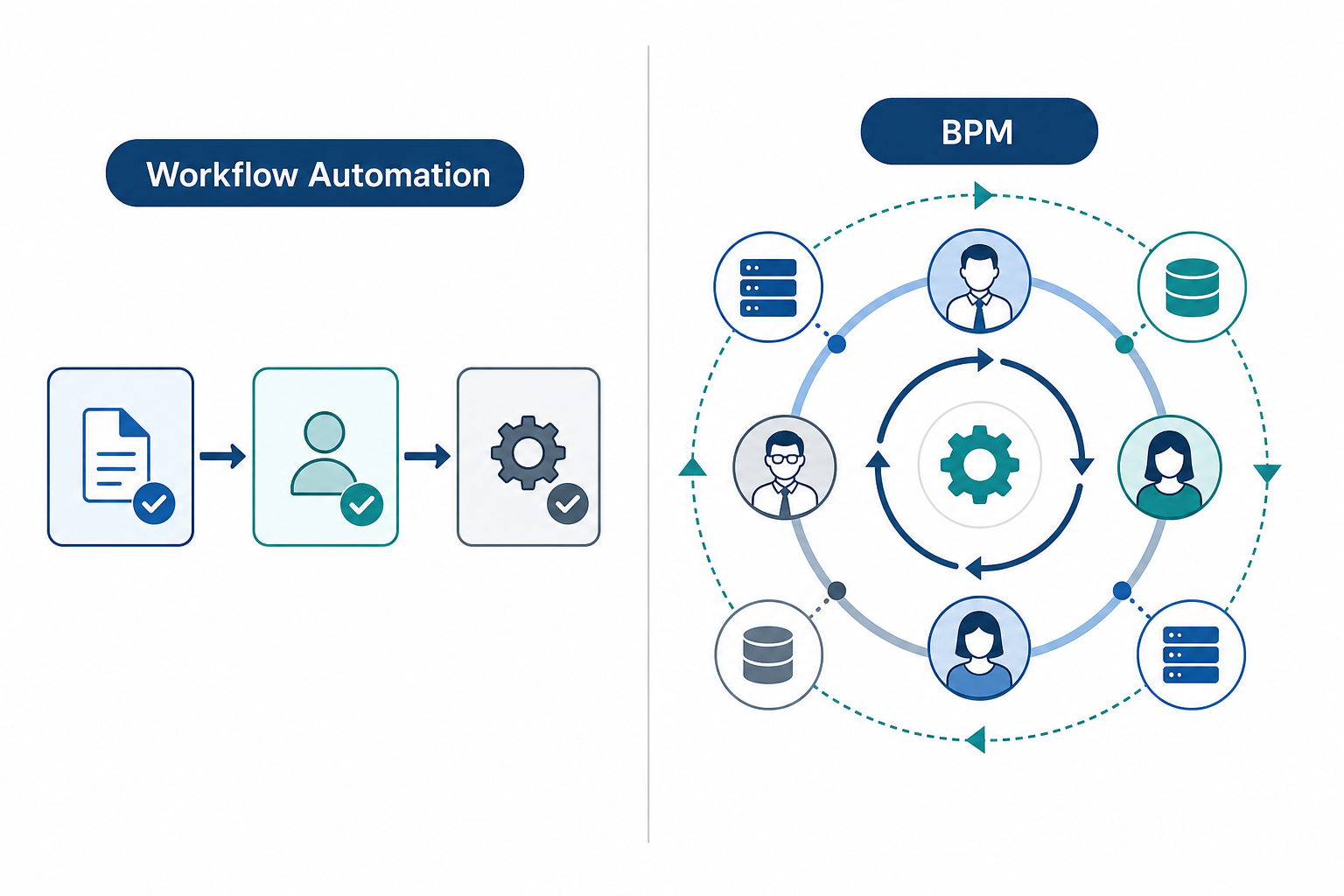
The Core Distinction: Workflow Automation vs. BPM
The most common mistake teams make when evaluating process software is treating workflow automation and Business Process Management (BPM) as interchangeable labels. They are not. One is a tactical tool for routing tasks; the other is a strategic discipline for designing, monitoring, and continuously improving how work gets done across an entire organization.
Kissflow's platform documentation captures the difference with a useful analogy: if a workflow is how a single plane lands, BPM is managing the entire operations of an airport. A workflow automation tool sequences a defined set of steps — submit a request, get approval, send a notification — and moves a single item from start to finish. BPM, by contrast, asks whether that sequence is the right one, how it connects to other processes, where bottlenecks accumulate, and whether the overall system can be redesigned to perform better.
This is not an either/or choice. Workflow automation is a component within a comprehensive BPM practice. The question is not "which one should I buy?" but "how much orchestration does my current process actually need?" If you are automating a single, stable process inside one department, a workflow tool is sufficient. If you are managing interconnected processes that span multiple departments, involve handoffs between systems, and require ongoing optimization, you are in BPM territory.
The 5-Question Decision Quiz: What Tier Do You Actually Need?
Before looking at tools or pricing, answer these five questions honestly. Each maps to a specific tier of process automation. Your answers will tell you whether you need a lightweight workflow tool, a mid-market platform, or a full enterprise BPM suite.
- How many departments or functions are involved in this process? (One team? Multiple departments? The entire organization?)
- How many external systems does the process touch? (A single app? Two or three SaaS tools? A mix of legacy databases, APIs, and cloud services?)
- Do you need real-time visibility into process performance — cycle times, bottleneck identification, and compliance metrics — or is basic status tracking sufficient?
- What are your compliance and audit requirements? (No formal requirements? Standard internal policies? Regulated industry standards like HIPAA, SOX, or GDPR with documented audit trails?)
- How large is the team that will use and maintain the system? (Under 10 people? 10–50? Over 50 with a dedicated operations or IT function?)
Map your answers to the tiers below. If you answered "one team," "one or two systems," "basic tracking," "no formal compliance," and "under 10 people," you are in the team-level tier. If you answered "multiple departments," "several systems," "some monitoring needs," "standard policies," and "10–50 people," you are in the mid-market tier. If you answered "organization-wide," "complex integrations," "real-time analytics," "regulated compliance," and "over 50 people with dedicated ops," you are looking at enterprise BPM.
Three Tiers of Process Automation — Mapped to Real Tools
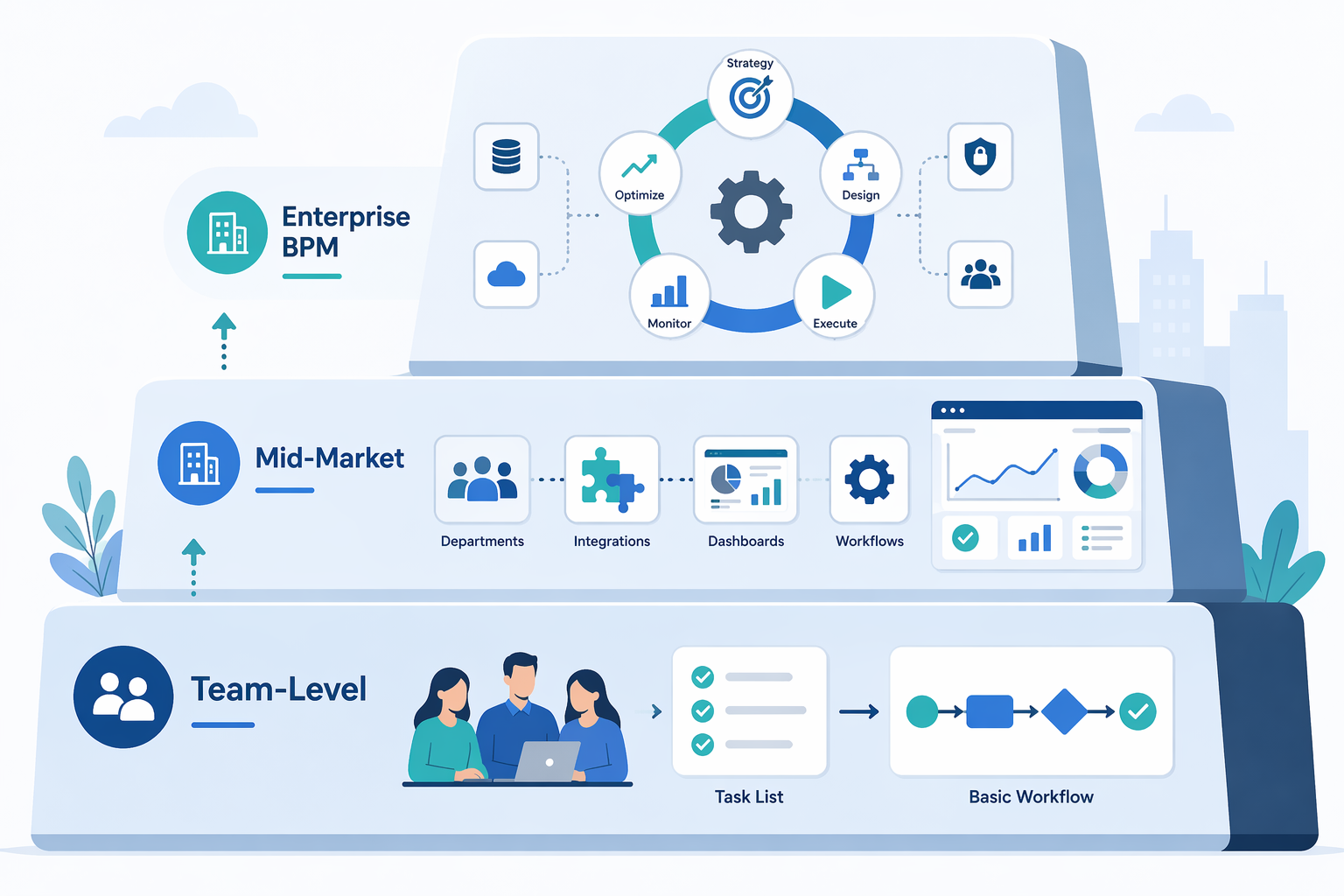
Each tier corresponds to a different level of process complexity, integration depth, and organizational scope. The tools listed are representative examples — not an exhaustive list. For a full comparison of tools within each tier, see our Best Process and Workflow Management Software of 2026 article.
| Tier | Typical Use Case | Key Capabilities | Example Tools | Best For |
|---|---|---|---|---|
| Team-Level Workflow | Single-department task routing (approvals, intake forms, simple reviews) | Drag-and-drop builders, email notifications, basic status tracking, template libraries | Trello, Rock, Notion, Airtable | Teams under 15 people running 1–3 stable processes |
| Mid-Market Platform | Cross-department processes with moderate integration needs (HR onboarding, procurement, customer support workflows) | Conditional routing, SLA management, dashboards, API integrations, form builders, audit logs | Kissflow, Pipefy, monday.com, Process Street | Teams of 15–50 people with 5–15 interconnected processes |
| Enterprise BPM Suite | Organization-wide process orchestration with complex system integration and compliance requirements | Process modeling (BPMN 2.0), simulation, real-time analytics, process mining, case management, governance, version control | Camunda, Appian, Nintex, Pega, IBM BPM | Organizations over 50 people with dedicated operations teams and regulatory compliance needs |
The mid-market tier is where most knowledge-worker teams land. Platforms like Kissflow and Pipefy offer structured workflow management with good handoff visibility — enough to manage cross-department processes without the overhead of a full BPM suite. They sit between simple task boards and enterprise-grade orchestration engines.
Pricing Reality Check Across Tiers
The cost difference between tiers is not incremental — it is exponential. A team-level workflow tool might cost a few hundred dollars per month for the whole team. A mid-market platform runs $20–$30 per user per month. Enterprise BPM suites can cost 10 to 100 times more and require dedicated implementation consultants.
| Tier | Typical Per-User Monthly Cost | Implementation Effort | Hidden Costs |
|---|---|---|---|
| Team-Level Workflow | $0–$15/user | Self-service; hours to days | Minimal — mostly subscription fees |
| Mid-Market Platform | $20–$30/user | Self-service with optional onboarding; days to weeks | Integration setup, custom form design, training time |
| Enterprise BPM Suite | $50–$200+/user (often with platform fees) | Dedicated implementation team; months | Consulting fees, custom development, infrastructure, ongoing maintenance, certification training |
To put these numbers in context: organizations can lose up to $1.3 million annually due to inefficient processes, according to industry research cited by Kissflow. More than half of employees spend at least two hours daily on repetitive work. The McKinsey Global Institute estimates that organizations that successfully implement process automation can boost productivity by up to 30% within a few years. The question is not whether to invest in automation — it is whether the tool you choose matches the complexity of the problem you are solving.
The Overbuying Trap: Why Most Teams Under 50 Don't Need Enterprise BPM
The most expensive mistake in process automation is not failing to automate — it is buying a platform that is dramatically more powerful than what your processes require. The Camunda 2026 State of Agentic Orchestration report found that 73% of organizations acknowledge a significant gap between their automation vision and current reality. In many cases, that gap exists because the organization purchased an enterprise BPM suite for problems that a mid-market workflow platform could have solved.
Enterprise BPM suites come with capabilities that most small teams will never use: process simulation engines, BPMN 2.0 modelers, case management frameworks, and complex rule engines. They also come with costs that are easy to underestimate:
- Implementation consulting: Enterprise BPM deployments typically require certified consultants who charge $200–$500 per hour. A basic implementation can run $50,000–$150,000 before a single process goes live.
- Training burden: A 2025 BPM study of nearly 300 organizations found that process documentation delivers its strongest impact in onboarding and training (74% of respondents). Enterprise tools require significant training investment just to reach basic proficiency.
- Maintenance overhead: Enterprise BPM platforms often require dedicated administrators, custom code for integrations, and regular version upgrades. For a team under 50 people, this overhead can consume more resources than the processes themselves.
- Vendor lock-in risk: The deeper you integrate an enterprise BPM suite into your operations, the harder it is to switch. Data portability, custom workflows, and proprietary process models create switching costs that can trap teams in platforms that no longer fit their needs.
This is not an argument against enterprise BPM. For organizations with complex, regulated, high-volume processes — think insurance claims processing, healthcare patient onboarding, or financial services compliance — enterprise BPM is the right tool. But for a knowledge-worker team of 30 people managing procurement approvals, HR intake, and project handoffs, a mid-market platform with good orchestration capabilities is almost always the better fit.
Verdict: When to Stay Lean vs. When to Scale Up
The decision framework is straightforward once you separate the question of "what can this tool do?" from "what does my process actually need?"
- Stay lean (team-level workflow) if: your process involves one department, touches one or two tools, requires basic approval routing, and your team is under 15 people. Tools like Trello, Rock, or a structured Notion database will serve you well. You can always add automation later.
- Move to mid-market if: your process crosses departments, requires conditional routing and SLA tracking, and your team is between 15 and 50 people. Platforms like Kissflow, Pipefy, or monday.com give you structured workflow management with good visibility into handoffs — without the overhead of enterprise BPM.
- Scale to enterprise BPM if: your process is organization-wide, requires real-time analytics and process mining, must comply with regulated standards, and your organization has a dedicated operations or IT function. Camunda, Appian, and Nintex are built for this level of complexity.
The core takeaway: most teams under 50 people need workflow automation with good orchestration, not a full enterprise BPM suite. The right approach is about process design and team capability, not just tool features. As we explored in Why Knowledge Workers Need Workflows, Not More Tools, the most productive teams are those that match their tooling to their actual process complexity — not the ones that buy the most powerful platform on the market.
Start with the five-question quiz. Be honest about your answers. And remember: the goal is not to implement BPM. The goal is to make your processes work better. Sometimes that means a simple workflow. Sometimes it means a full orchestration engine. The right answer depends on your actual process complexity — not on what the vendor demo shows.