
The Productivity Gap: Why Sales Workflow Automation Matters in 2026
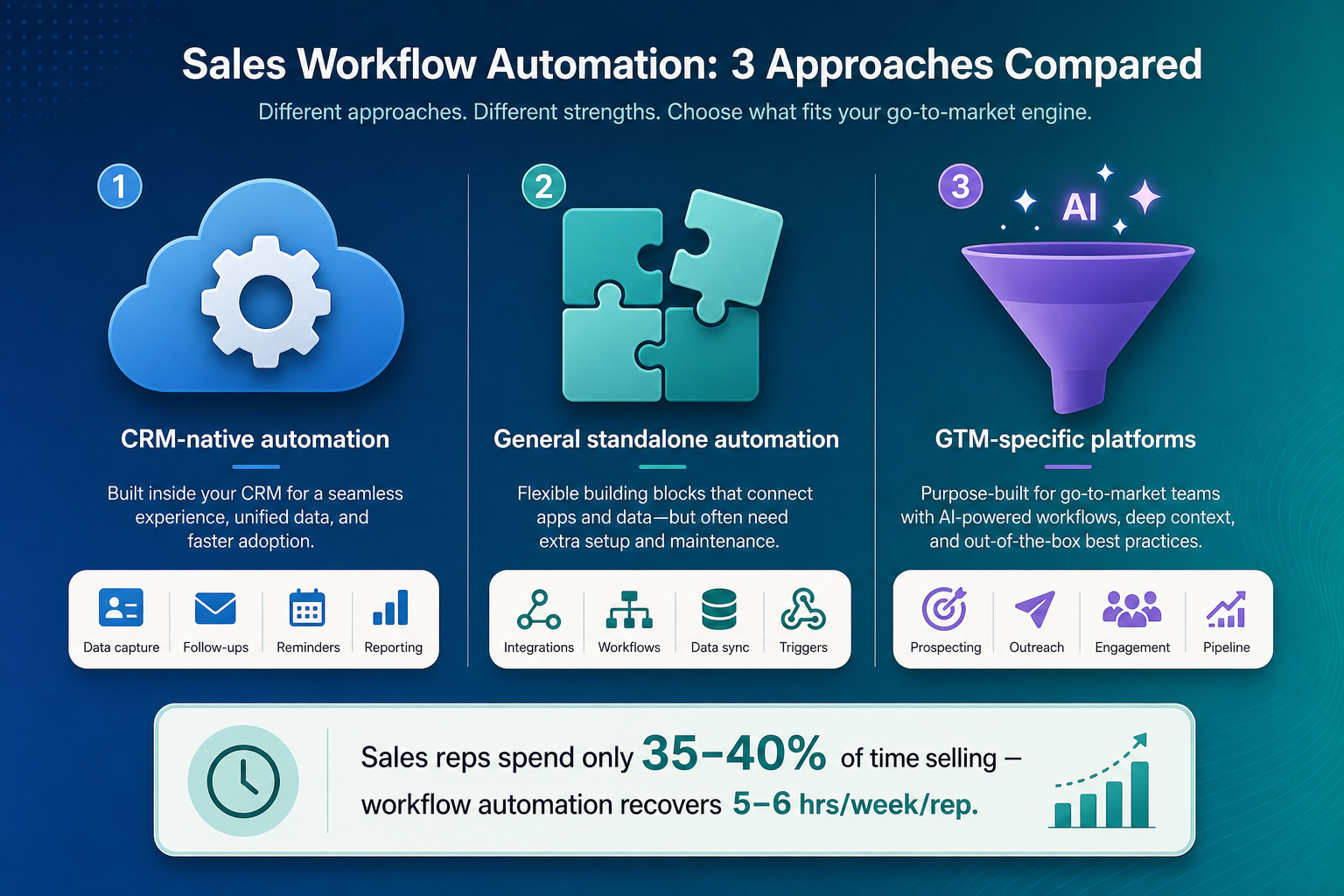
The math is brutal. According to the Salesforce 2026 State of Sales report, the average seller spends only 35–40% of their time on actual selling. For Gen Z reps, that number drops to 35%. The rest of the week disappears into data entry, lead research, follow-up scheduling, internal handoffs, and CRM hygiene. That is not a people problem — it is a workflow problem.
Companies that have addressed this gap with comprehensive sales automation report a 61% higher revenue achievement rate and close deals 23% faster than teams operating manually, according to data cited by Fundraise Insider. Sales reps using automation also see 2.5x higher email response rates compared to manual outreach. The recovery is tangible: a well-configured automation stack can reclaim 5–6 hours per rep per week.
The strategic question for 2026 is not whether to automate, but which automation approach fits your team's stage and structure. The market now offers three distinct categories of sales workflow tools:
- CRM-native automation (Salesforce Flow, HubSpot Workflows) — built directly into your CRM, ideal for internal process automation.
- Standalone general automation (Zapier, Make, n8n) — the glue layer connecting your CRM to the rest of your tech stack.
- GTM-specific and sales engagement platforms (Clay, Apollo, Outreach, Salesloft) — purpose-built for lead enrichment, sequencing, and pipeline execution.
Choosing between them depends on one factor above all: the stage of your company. A 15-person seed-stage team has different bottlenecks, budgets, and technical resources than a 100-person enterprise sales org. This article builds a stage-based decision framework to help RevOps managers and sales ops leaders make that call.
CRM-Native Automation: Salesforce Flow and HubSpot Workflows
CRM-native automation is the default starting point for most sales teams. Because the workflow engine lives inside the same system where your leads, contacts, opportunities, and accounts reside, there is no data sync lag, no API credential management, and no third-party dependency. For processes that stay entirely within the CRM — lead assignment, deal stage transitions, task creation, email alerts — native automation is the most reliable option.
Salesforce Flow (Spring 2026)
Salesforce Flow is now the only native automation engine on the platform. Workflow Rules and Process Builder were deprecated as of December 2025, meaning every org still running those legacy tools must complete migration to Flow. The Spring 2026 release brought several meaningful updates: AI-powered drafting via Agentforce, collapsible branching for complex flows, and editable Data Tables. Flow now supports screen flows, scheduled flows, and platform event-triggered processes, and integrates directly with Einstein AI for predictive lead scoring and next-best-action recommendations.
The strength of Salesforce Flow is depth. It can automate up to 70% of repetitive CRM tasks and reduce operational costs by 20–50%, according to Revenue Grid. The limitation is scope. Flow is not designed to orchestrate processes that span multiple external systems. If your workflow requires enriching a lead from Clearbit, sending a Slack notification, and updating a Google Sheet — all in one sequence — Flow is the wrong tool for that job.
HubSpot Workflows
HubSpot Workflows offer a more accessible entry point, particularly for teams already on HubSpot's CRM. The visual builder is intuitive, and the platform includes pre-built workflow templates for common sales processes like lead routing, deal stage progression, and task automation. However, the pricing structure creates a sharp divide: most automations and lead routing features require the Enterprise tier, which starts at $150 per user per month. For a team of 30 reps, that is $4,500 per month just for workflow access.
HubSpot's native automation also lacks the cross-system reach that standalone platforms provide. Advanced integrations typically require a third-party connector like Zapier, which adds another subscription layer.
| Feature | Salesforce Flow | HubSpot Workflows |
|---|---|---|
| Pricing (workflow access) | Enterprise: $165/seat/mo; Unlimited: $330/seat/mo | Enterprise: $150/seat/mo (most workflows require this tier) |
| AI integration | Agentforce, Einstein AI (Spring 2026) | HubSpot AI (limited to Enterprise) |
| Cross-system orchestration | Limited — requires MuleSoft or third-party tools | Limited — requires Zapier or similar connector |
| Legacy migration status | Workflow Rules/Process Builder deprecated Dec 2025 | N/A — no legacy engine to migrate |
| Best for | Enterprise orgs with deep Salesforce investment | Mid-market teams already on HubSpot CRM |
Standalone General Automation: Zapier vs Make vs n8n
When your sales workflow needs to connect your CRM to email, Slack, LinkedIn, data enrichment services, and internal databases, standalone automation platforms become essential. These tools act as the integration layer between systems that do not talk to each other natively. For sales teams, the most common use cases include:
- Syncing new CRM contacts to email sequences and Slack channels
- Enriching inbound leads with company data before assignment
- Creating tasks and reminders based on deal stage changes
- Logging meeting notes and call recordings back to the CRM
- Triggering follow-up sequences after specific prospect actions
The three dominant players — Zapier, Make, and n8n — differ dramatically in pricing architecture, which directly affects cost at scale.
| Metric | Zapier | Make | n8n |
|---|---|---|---|
| Entry price | Professional: ~$30/mo for 750 tasks | Core: ~$11/mo for 10,000 operations | Free (self-hosted); Cloud: ~$24/mo for 2,500 executions |
| Cost per unit | ~$0.04 per task | ~$0.0011 per operation | ~$0.0096 per execution (cloud); $0 (self-hosted) |
| 10-step workflow cost | 10 tasks per run — burns credits fast | 1 operation per run — efficient | 1 execution per run — efficient |
| Capacity per dollar | Baseline | ~13x more capacity than Zapier | 80–90% cheaper than Zapier at high volume |
| Self-hosted option | No | No | Yes (Community Edition, unlimited executions) |
| AI/LLM nodes | Limited (OpenAI, Anthropic via integrations) | Growing library | 70+ AI nodes, native LangChain, persistent agent memory |
| Compliance (HIPAA, SOC2, GDPR) | Enterprise plan required | Enterprise plan required | Full self-hosted compliance possible |
The cost difference is not marginal. A sales team running 50 multi-step workflows per day could spend $900–$1,200 per month on Zapier for the same throughput that n8n handles for free (self-hosted) or ~$100/month (cloud). Make sits in the middle, offering roughly 13x more capacity per dollar than Zapier, according to data from Digidop cited by Autobound. For seed-stage and Series A teams where every dollar counts, this pricing gap is decisive.
For sales teams specifically, n8n's self-hosted option also solves a compliance problem. If your company handles sensitive prospect data and needs HIPAA, SOC2, or GDPR compliance, self-hosting n8n on your own infrastructure is often the only viable path among the three. Neither Zapier nor Make offers a self-hosted deployment.
For readers evaluating total cost of ownership across these platforms, our BPM Workflow Software Pricing Guide 2026 provides a deeper breakdown of hidden fees and scaling costs.
GTM-Specific Platforms: Clay and Apollo
General automation platforms handle the plumbing. GTM-specific platforms handle the data and the outreach. Two tools have emerged as category leaders in 2026: Clay for enrichment and waterfall automation, and Apollo for all-in-one prospecting.
Clay: Enrichment and Waterfall Automation
Clay hit $100M ARR in December 2025 with 263% year-over-year growth and a $5B valuation, making it the fastest-growing enrichment platform in the market. Its core value proposition is waterfall enrichment: when you feed a list of companies or contacts into Clay, it queries multiple data sources (Clearbit, Crunchbase, Apollo, ZoomInfo, etc.) in sequence until it finds the best available data. This eliminates the manual work of cross-referencing databases.
Clay's pricing starts with a free tier (100 credits per month), then scales through Starter ($149/month for 2,000 credits), Explorer (from $314/month), and Pro (from $720/month). For a sales team of 10–30 reps, the Starter or Explorer tier is usually sufficient for lead enrichment workflows. Clay integrates with Zapier, Make, and n8n, so it can be plugged into a broader automation stack.
Apollo: All-in-One Prospecting
Apollo.io offers a different value proposition: an all-in-one platform that combines a contact database of 210M+ contacts with built-in email sequencing, engagement tracking, and workflow automation. Its free plan includes 10,000 credits per month, which is genuinely usable for small teams. Paid plans start at $49/user/month (Basic, 30,000 credits per year) and $79/user/month (Professional, 48,000 credits per year).
Apollo's strength is consolidation. A small sales team can manage prospecting, enrichment, sequencing, and analytics from a single interface without stitching together five different tools. The trade-off is depth: Apollo's enrichment is less granular than Clay's waterfall approach, and its workflow automation is less flexible than a dedicated platform like Make or n8n.
| Feature | Clay | Apollo |
|---|---|---|
| Primary function | Enrichment and waterfall automation | All-in-one prospecting, sequencing, enrichment |
| Contact database | Aggregates from multiple sources | 210M+ contacts (native database) |
| Free plan | 100 credits/month | 10,000 credits/month |
| Paid entry price | Starter: $149/mo (2,000 credits) | Basic: $49/user/mo (30,000 credits/yr) |
| ARR / valuation | $100M ARR, $5B valuation (Dec 2025) | Not publicly disclosed |
| Best for | Teams needing deep, multi-source enrichment | Small teams wanting an all-in-one prospecting hub |
Sales Engagement Platforms: Outreach and Salesloft (Post-Clari Merger)
Sales engagement platforms sit at the execution layer of the sales workflow stack. They are not workflow automation tools in the traditional sense — they do not connect apps or move data between systems. Instead, they orchestrate the human side of sales: sequenced email cadences, call logging, meeting scheduling, and task management for reps.
The two dominant players, Outreach and Salesloft, have taken different paths in 2026. Outreach uses a modular pricing model with separate packages for Engage, Call, Meet, Deal, Forecast, and Deal — allowing teams to buy only the modules they need. Pricing is not publicly listed, but third-party estimates place it at $100–$160 per user per month depending on modules selected.
Salesloft, meanwhile, merged with Clari in late 2025, creating a combined entity with approximately $450M in combined ARR. The merger brings together Salesloft's engagement capabilities with Clari's revenue forecasting and pipeline analytics. Salesloft claims forecast accuracy within 5%, a significant claim for enterprise sales orgs that depend on predictable pipeline reporting. Pricing is also not publicly listed; industry estimates place it around $140 per user per month.
| Feature | Outreach | Salesloft (post-Clari merger) |
|---|---|---|
| Pricing model | Modular (Engage, Call, Meet, Deal, Forecast, Deal packages) | Not publicly listed; estimated ~$140/user/mo |
| Estimated cost | $100–$160/user/mo (third-party estimate) | ~$140/user/mo (third-party estimate) |
| Post-merger status | Independent | Merged with Clari (late 2025), ~$450M combined ARR |
| Forecasting capability | Separate Forecast module | Clari integration — claims accuracy within 5% |
| Best for | Teams wanting modular, a la carte engagement tools | Enterprise teams needing integrated forecasting |
For most SMB and mid-market teams (10–100 reps), sales engagement platforms are an addition to the workflow stack, not a replacement for it. You still need CRM-native automation for internal processes and a standalone platform for cross-system integration. The engagement layer sits on top, handling the sequenced outreach that drives pipeline.
Decision Framework: Which Stack for Which Stage?
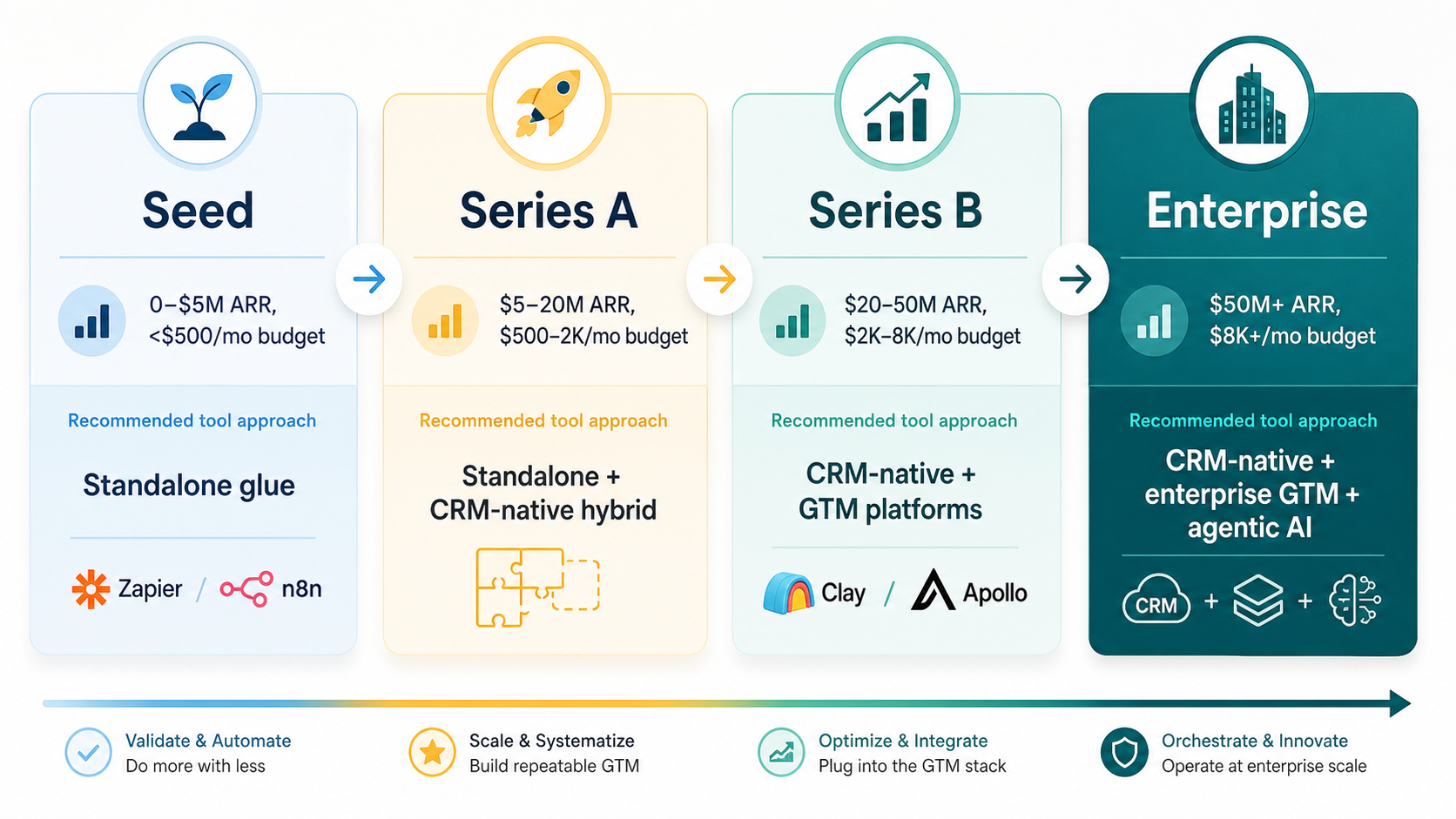
The right sales workflow stack depends on where your company is in its growth trajectory. A seed-stage startup with 10 reps has different needs, budgets, and technical resources than a 100-person enterprise sales org. The following framework maps tool categories to company stages, with estimated monthly budget ranges for the automation layer.
| Company Stage | Team Size | Recommended Stack | Monthly Automation Budget | Key Priority |
|---|---|---|---|---|
| Seed / Series A | Under 20 reps | Standalone glue (Zapier/Make/n8n) + Apollo free tier | $50–$300/mo | Low cost, fast setup, no vendor lock-in |
| Series A / B | 20–50 reps | Hybrid: CRM-native for core processes + standalone for cross-system + Clay for enrichment | $300–$1,500/mo | Balance of CRM depth and cross-system reach |
| Series B / Growth | 50–100 reps | CRM-native lead + standalone orchestration + GTM platforms + sales engagement (Outreach/Salesloft) | $1,500–$5,000/mo | Scalability, compliance, pipeline predictability |
| Enterprise | 100+ reps | CRM-native as primary + specialized GTM + agentic AI + sales engagement with forecasting | $5,000+/mo | Depth, compliance, AI-driven pipeline management |
Seed / Series A (under 20 reps): Your biggest bottleneck is likely manual data entry and lead research, not complex cross-system orchestration. Start with a low-cost standalone platform — n8n self-hosted (free) or Make (~$11/month) — connected to a free CRM like HubSpot's free tier or Copper (Starter at $12/user/month). Add Apollo's free plan for prospecting. Avoid committing to expensive CRM-native automation or enterprise sales engagement platforms at this stage. Your workflows will change too frequently to justify the lock-in.
Series A / B (20–50 reps): This is the hybrid zone. Invest in CRM-native automation (Salesforce Flow or HubSpot Workflows) for internal processes like lead routing, deal stage transitions, and task creation. Keep a standalone platform (Make or n8n) for cross-system workflows — syncing CRM data to Slack, enriching leads via Clay, logging meeting notes. Add Clay's Starter or Explorer tier for enrichment. Your monthly automation budget should be $300–$1,500, which covers CRM-native access plus one or two standalone subscriptions.
Series B / Growth (50–100 reps): At this scale, you need all three layers. CRM-native automation handles internal processes. A standalone platform (n8n cloud or Make) orchestrates cross-system workflows. GTM platforms (Clay for enrichment, Apollo or ZoomInfo for data) feed the pipeline. Sales engagement (Outreach or Salesloft) sequences outreach at scale. Budget for the automation layer alone is $1,500–$5,000 per month, not including CRM seat costs or sales engagement platform fees.
Enterprise (100+ reps): Lead with CRM-native automation as your primary workflow engine. Supplement with specialized GTM platforms and agentic AI tools for autonomous lead enrichment, smart follow-up sequencing, and predictive pipeline management. Sales engagement platforms with integrated forecasting (Salesloft/Clari) become critical for pipeline predictability. Your automation budget exceeds $5,000 per month, and compliance requirements (HIPAA, SOC2, GDPR) may dictate self-hosted infrastructure for the standalone layer.
The Agentic AI Trend: What It Means for 2026 Buyers
The biggest shift in sales workflow automation in 2026 is the rise of agentic AI — autonomous AI agents that can execute multi-step tasks without human intervention at each step. This is not a future prediction; it is already embedded in the platforms covered in this article.
According to n8n's 2025 blog, over 80% of workflows built on n8n now embed AI agents. The platform's 2.0 release (January 2026) includes native LangChain integration, 70+ AI nodes, persistent agent memory, and self-hosted LLM support. This means a sales workflow can include an AI agent that reads an inbound lead's LinkedIn profile, enriches it via Clay, drafts a personalized email, and logs the interaction — all in one autonomous sequence.
Gartner projects that 40% of enterprise applications will include task-specific AI agents by the end of 2026. Early adopters are already reporting results: companies deploying agentic AI in sales workflows report an average 171% ROI, according to data cited by Autobound.
For buyers evaluating sales workflow automation in 2026, the agentic AI trend changes the calculus in three ways:
- Platform AI maturity matters. If you are choosing between Zapier, Make, and n8n today, the depth of AI/LLM integration should be a decision factor. n8n's 70+ AI nodes and LangChain support give it a significant lead for teams that want to build AI-powered workflows. Make is catching up, but Zapier's AI capabilities remain more limited.
- CRM-native AI is catching up. Salesforce's Agentforce and Einstein AI, integrated into Flow in Spring 2026, bring agentic capabilities directly into the CRM. For enterprise teams that prioritize CRM depth, this reduces the need for standalone AI tools.
- The hype-reality gap is real. Not every sales workflow needs an AI agent. Simple trigger-action automations (e.g., "when a lead reaches stage X, create a task") are often better handled by deterministic rules than by an LLM. Agentic AI adds latency, cost, and unpredictability. Reserve AI agents for tasks that genuinely benefit from natural language understanding or adaptive decision-making.
Final Verdict: Choosing Your Sales Workflow Automation Stack
There is no single "best" sales workflow automation stack. The right choice depends on your company stage, team size, technical resources, and whether your biggest bottleneck is CRM-internal processes or cross-system orchestration.
The stage-based framework presented here is your primary decision tool. Use it to map your current stage, identify your most pressing bottleneck, and select the tool category that addresses it first. Add layers as you grow.
| If you are... | Start with... | Add when you reach... |
|---|---|---|
| A seed-stage team (under 20 reps) | n8n self-hosted (free) + Apollo free plan + free CRM tier | 20 reps: CRM-native automation + Clay Starter |
| A Series A/B team (20–50 reps) | CRM-native (Salesforce Flow or HubSpot Workflows) + Make or n8n cloud | 50 reps: Sales engagement platform + Clay Explorer |
| A growth-stage team (50–100 reps) | All three layers: CRM-native + standalone + GTM platforms + sales engagement | 100 reps: Agentic AI + enterprise compliance infrastructure |
| An enterprise team (100+ reps) | CRM-native as primary + specialized GTM + agentic AI + forecasting | N/A — optimize existing stack for AI and compliance |
One final note on complexity: a 2026 survey by Equanax found that 64% of SaaS startups own more than ten revenue tools, and half admit at least three overlap in function. Before adding a new tool to your stack, audit what you already have. You may find that your CRM's native automation handles 80% of what you need, and a single standalone platform covers the remaining 20% — no need for a five-tool stack.
For readers who want to understand when cross-system orchestration becomes necessary versus when CRM-native automation is sufficient, our Workflow Orchestration vs. Automation guide provides a clear decision framework.