

A freelancer I know signed up for Zapier's free plan, built a three-step automation for new client inquiries, and hit the 100-task ceiling in less than three weeks. The automation stopped. The upgrade notice appeared. That moment — when a $0 tool forces you to either pay or rebuild — is the moment this article is about.
Most comparisons of workflow automation software count integrations, list AI features, and quote pricing tiers. For a freelancer, integrations do not matter if the free tier disappears after your third client. What matters is how long you can stay on $0, and at what volume the platform forces you to pay up.
Free Tiers Are Designed to Break
If you read the general small business workflow automation comparison, you will see a framework built around team size, data sensitivity, and feature depth. Useful for a 10-person agency. Not useful for a solo operator who just needs a client intake form to create a folder, a doc, and an invoice without thinking about it.
For freelancers and solopreneurs, the best workflow automation software is not the one with the most integrations. It is the one with the most usable free tier, the shortest setup time, and the lowest breakpoint where you are forced to upgrade.
The Expensive Default: Zapier
Zapier is the best-known name. The free tier gives you 100 tasks, single-step only. A single three-step automation burns 3 tasks per run. That 100-task ceiling evaporates fast.
The Starter plan is $20 per month for 750 tasks. I used $20 to give Zapier the fairest possible comparison, even though some sites list it at $30. The overage rate is roughly $0.037 per task. A freelancer running 2,000 tasks on the Starter plan would pay $20 plus $46 in overages. That is almost the cost of the $75 Professional plan, which includes 2,000 tasks anyway. The breakpoint is harsh, and the hidden overage costs make it worse.
Generous Tiers With Hidden Clocks: Make and Activepieces
Make gives you 1,000 operations per month. Ten times Zapier. Multi-step from day one. That sounds like an open-and-shut case. It is not.
Make free plans run operations on 15-minute execution intervals. If your automation needs to fire when someone fills out a contact form, a 15-minute delay is tolerable. For real-time lead capture — say, a text message the instant a hot lead comes in — that delay turns a lead into a missed call. I have seen freelancers build what they thought was a working system, only to discover the notification arrives a quarter hour after the customer has moved on.
Activepieces takes a different approach. The free tier gives you 1,000 tasks, 2 active flows, and 200 AI credits. Including AI steps on the free plan is genuinely unique. A solo operator can experiment with AI summarization or classification without paying a cent. But the jump to $25 per month for unlimited tasks is steep. And the pricing page shows a per-active-flow cost after the first few flows, which muddies the real cost. If you hit 10 flows on the free plan, you are suddenly looking at a $25 bill.
The "Free" That Costs You Something Else: Pabbly and n8n
Pabbly Connect's free tier is a miserly 100 tasks per month. The headline is the paid plan: $16 per year for 10,000 tasks with unlimited workflows. That is $1.33 per month. The lowest cost-per-task in this comparison by a wide margin. The lifetime deal — $249 one-time for 3,000 tasks per month — looks like a steal.
But there is no month-to-month billing. You commit annually or you buy a lifetime license. If Pabbly changes terms, raises renewal prices, or discontinues the lifetime plan, your investment is gone. That is vendor-lock risk dressed up as "free." I treat a lifetime deal as a calculated bet, not a pure free option.
n8n self-hosted is free software with unlimited executions. The catch is the server: you need a $5–20 per month VPS and the ability to install Docker and manage a deployment. For a freelancer who already understands command-line basics, that is cheap. For everyone else, it is a steep learning curve that will cost hours of frustration.
n8n also offers a cloud version: Starter at $20 per month for 2,500 executions. That pricing is comparable to Zapier Starter but with higher execution limits. For a non-technical freelancer, I cannot recommend self-hosted n8n as a free option. It belongs in a different category: free if you have DevOps skills.
The "Free" That Is Just Limited: IFTTT
IFTTT is often dismissed as too simple for business use. That judgment is correct if you need complex workflows. The free tier (2 applets, single trigger-action) is almost unusable. Its strength is the cheapest paid upgrade in the game: IFTTT Pro at $2.99 per month for 20 applets with multi-action support and webhooks.
For personal admin — turning off smart lights when leaving, logging expenses to a spreadsheet — IFTTT Pro is fine. For client-facing automation, you will outgrow the 20-applet cap fast. It is not a business tool. It is a personal assistant.
Where the Free Tier Actually Breaks
The qualitative stuff matters, but the decision lives in the numbers. Here is what each tool actually costs at 100, 500, 1,000, and 2,000 operations per month. Overage rates are included where applicable, because hitting 2,000 tasks on a 750-task plan can cost more than the plan price.
| Tool | 100 ops | 500 ops | 1,000 ops | 2,000 ops | Notes |
|---|---|---|---|---|---|
| Zapier | $0 (free tier) | $20 Starter | $20 Starter (plus ~$9 overage) | $20 Starter + ~$46 overage or $75 Pro | Overage: $0.037/task on Starter, over 750 |
| Make | $0 (free) | $0 (free) | $0 (free, 15-min intervals) | $9 Core (or $0 if intervals ok) | Free cap is 1,000 ops; Core is $9 for 10k ops |
| n8n self-hosted | $5–20 server | $5–20 server | $5–20 server | $5–20 server | Unlimited executions, just server cost |
| Pabbly Connect | $0 (free, 100 tasks; overage not available) | $16/yr (~$1.33/mo) for 10k | $16/yr | $16/yr | No monthly billing; annual only |
| IFTTT | $0 (2 applets only) | $2.99 Pro | $2.99 Pro (if within 20 applets) | $2.99 Pro+ ($8.99) if more than 20 applets | Applet-based, not task-based; hard to map directly |
| Activepieces | $0 (free, 2 flows) | $0 (free, if within 2 flows) | $0 (free, if within 2 flows) | $25 Plus (unlimited tasks) | Free cap: 2 active flows; more flows require $25 |
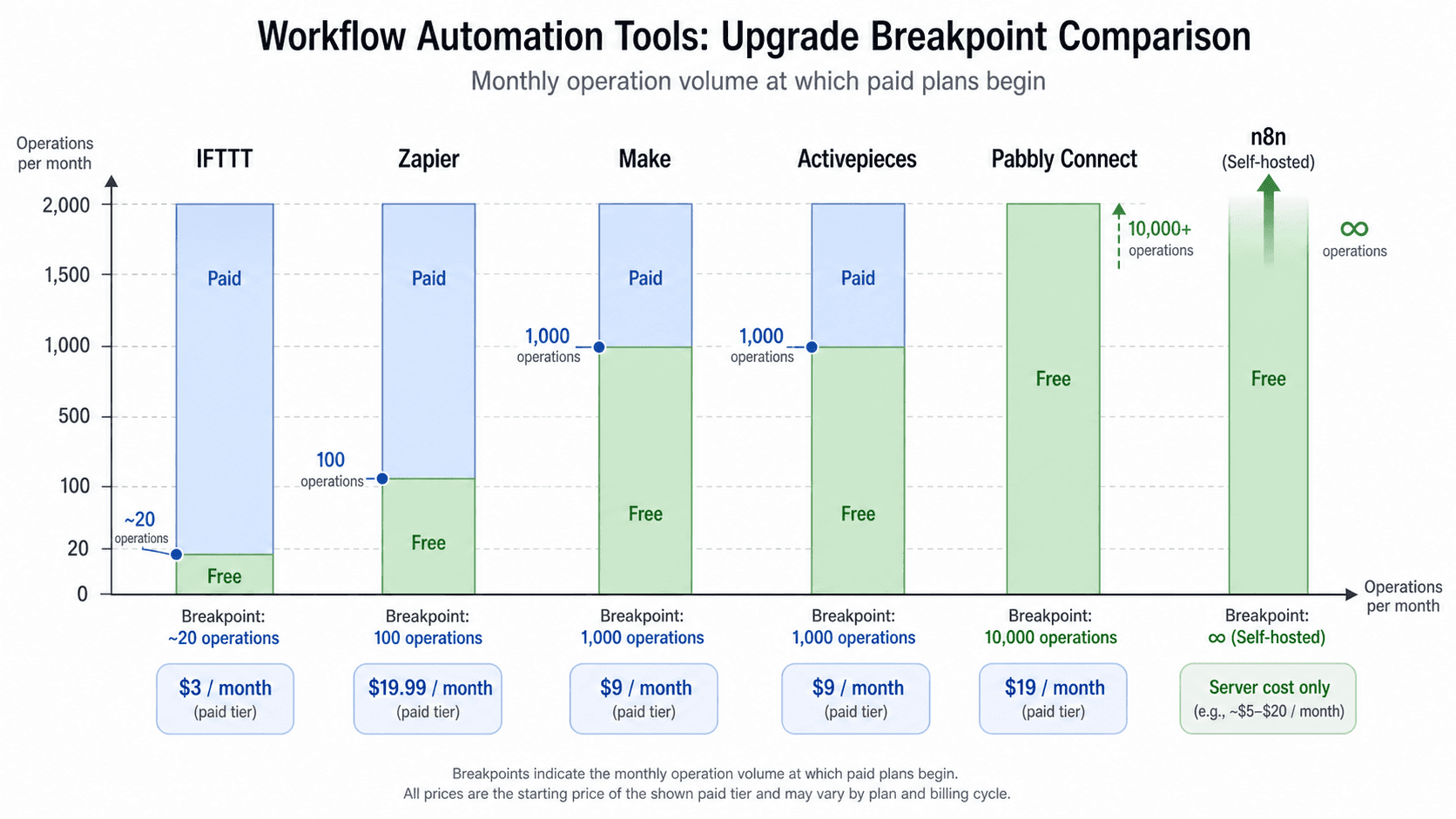
If you run 200 tasks a month, Make and Activepieces stay free. Zapier forces you to pay at 101 tasks. Pabbly also forces you to pay at 101, but the paid plan is so cheap ($1.33/mo) that it barely hurts. The breakpoint is the volume where the free tier runs out. Here is the rank:
- n8n self-hosted: breakpoint at your server cost. Unlimited executions on $5–20/mo. The technical barrier is the real brake.
- Pabbly Connect: breakpoint at 101 tasks ($16/year). Effective cost is $1.33/mo for up to 10k tasks.
- Make: breakpoint at 1,001 ops (15-minute intervals). Upgrade to Core ($9/mo) for 10k ops with 1-minute intervals.
- Activepieces: breakpoint at 1,001 tasks or when you need more than 2 active flows. Upgrade to Plus at $25/mo.
- Zapier: breakpoint at 101 tasks (or earlier if you need multi-step). Starter at $20/mo for 750 tasks, with expensive overage.
- IFTTT: breakpoint at 3 applets. Pro at $2.99/mo for 20 applets. The cheapest upgrade but the most limited.
The Hybrid Stack Makes More Sense Than Any Single Tool
After running the numbers, I do not believe any single tool is the perfect answer for all solo workflows. The smartest strategy is often a two-tool hybrid stack.
Here is a concrete recommendation that keeps costs under $15 per month for the vast majority of solopreneurs:
- Use IFTTT Pro ($2.99/mo) for quick personal automations — saving email attachments to Dropbox, logging calendar events, toggling smart devices. The setup is a few clicks, and you will not need more than 20 applets for personal admin.
- Use Make (free or Core $9/mo) for client-facing operations. The visual builder handles multi-step workflows, conditional logic, and data transformation far more gracefully than IFTTT or Zapier. For most freelance volumes, Core at $9/mo covers everything.
- If you ever hit 5,000+ operations per month and have some technical skills, add n8n self-hosted ($5–20/mo server) for the cost-efficiency. But do not start there.
This stack avoids single-platform lock-in because IFTTT and Make use different trigger and action sets. If one falters, the other still runs. For more budget-conscious picks under $20/month, see the dedicated budget comparison. And if you are considering dropping Zapier for open source, the realistic cost-benefit guide covers the trade-offs in detail.



Comments
Join the discussion with an anonymous comment.