

The Five-Question Self-Test: Should You Even Consider Open-Source?
Before you start comparing server specs or reading GitHub READMEs, pause. The decision to migrate from Zapier to a self-hosted open-source tool is not a universal upgrade — it is a specific solution for a specific set of circumstances. Most teams that regret the move do so because they skipped this diagnostic step.
The following five questions, adapted from the independent analysis published by Leland in May 2026, will tell you whether you are a candidate for self-hosted open-source or whether you should stay on managed SaaS.
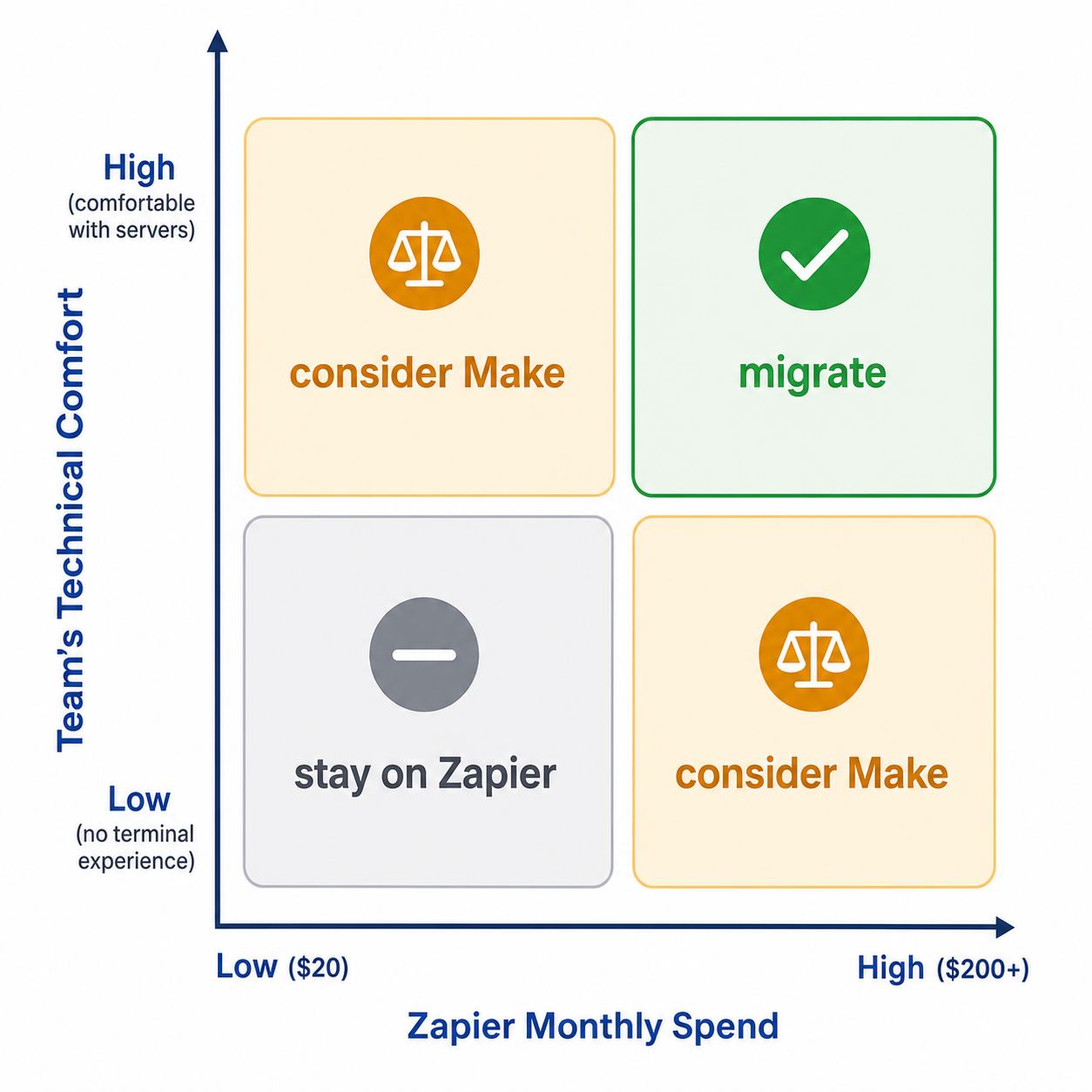
- Do you spend less than $80 per month on Zapier today? If yes, the math for self-hosting does not work. The break-even point where self-hosted open-source becomes cheaper than Zapier starts at roughly $80–100 per month in Zapier spend, and that is only when you also have someone willing to maintain the server. Below that threshold, your time is better spent elsewhere.
- Is no one on your team comfortable in a terminal? Self-hosting n8n or Activepieces requires basic Linux administration: SSH access, Docker Compose, environment variable management, and log inspection. If your team has zero comfort with these, the learning curve alone will eat any potential savings.
- Do you have fewer than 10 active Zaps without complex branching? A small, simple automation footprint is better served by staying on Zapier or moving to Make. The overhead of maintaining a self-hosted instance is not justified by a handful of linear workflows.
- Is your Zapier task usage past $200 per month and growing? This is the sweet spot where self-hosting starts to make financial sense. At this volume, the task-based pricing model of Zapier becomes a significant line item, and the fixed cost of a VPS plus maintenance time becomes proportionally smaller.
- Do you need data residency control, AI/LLM steps, or custom code that Zapier's visual builder cannot handle? These are the non-financial reasons to migrate. If you need to keep data on-premises for compliance, or if you want to embed JavaScript or Python steps directly into your workflows, open-source tools offer capabilities that Zapier's abstraction layer cannot match.
If you answered "yes" to questions four and five, and "no" to questions one through three, you are a strong candidate for migration. If you are in the middle — spending $80–200 per month but lacking deep technical comfort — the Leland guide makes a clear recommendation: look at Make before you look at self-hosting. Make provides a managed middle ground with a more generous pricing model than Zapier, without requiring you to own the infrastructure.
Pricing Reality Check: Zapier vs. n8n vs. Activepieces vs. Self-Hosted
The most common mistake in the Zapier-to-open-source decision is comparing list prices without accounting for how each platform charges. Zapier charges per task; n8n Cloud charges per execution; self-hosting charges per server. These are not equivalent units, and comparing them directly leads to bad math.
Here is the real pricing landscape as of mid-2026, compiled from multiple sources including Leland, the n8n blog, and Activepieces.
| Platform | Pricing Model | Entry-Level Cost | Mid-Tier Cost | Key Limit |
|---|---|---|---|---|
| Zapier | Per task | $29.99/mo (Starter, 750 tasks) | $73.50/mo (Professional, 2,000 tasks) | Task count is the primary constraint |
| n8n Cloud | Per execution | $24/mo (Basic, 2.5K executions, 5 active flows) | $60/mo (Pro, 10K executions, 20 active flows) | Active flow limit can be restrictive |
| Activepieces Cloud | Per execution | $25/mo (Basic, unlimited executions, 10 active flows) | $50/mo (Pro, unlimited executions, 50 active flows) | Integration limits may apply at scale |
| Self-hosted n8n (basic VPS) | Fixed server cost | $5–20/mo (VPS only) | $50–150/mo (with DB, backups, monitoring) | Requires 2–4 hrs setup + 1–3 hrs/month maintenance |
| Self-hosted Activepieces (basic VPS) | Fixed server cost | $5–20/mo (VPS only) | $200/mo typical (with DB, backups, monitoring) | Requires 2–4 hrs setup + 1–2 hrs/month maintenance |
The critical insight from this table is that the self-hosted options have a low entry price ($5–20/month for a basic VPS) but a much higher total cost of ownership when you factor in the infrastructure needed for production reliability. The $50–150/month range for a production-ready n8n setup includes a managed database, automated backups, and monitoring — without which your workflows will fail silently.
The break-even point becomes clear when you map Zapier spend against total self-hosting cost. At $80–100/month in Zapier spend, you are paying roughly the same as a production-ready self-hosted setup. Below that, Zapier is cheaper. Above $200/month, self-hosting becomes significantly cheaper — but only if you have already paid the setup time.
The True Cost of Self-Hosting: It’s Not Just the Server Bill
The server bill is the decoy. The real cost of self-hosting is measured in engineering hours, and those hours are far more expensive than a $20 Hetzner VPS.
According to the Leland analysis, a self-hosted n8n instance on a $20/month VPS costs approximately 2–4 hours of initial setup time plus 1–2 hours per month of ongoing maintenance. Major version upgrades add another 4–8 hours each time they occur. At a loaded hourly rate of $100 — which is conservative for anyone who could competently set up and maintain a production automation server — that translates to $1,200–2,400 per year in time costs alone, before you pay a single dollar for the VPS.
| Cost Category | Self-Hosted n8n | Self-Hosted Activepieces |
|---|---|---|
| Basic VPS (monthly) | $5–20 | $5–20 |
| Production-ready infra (DB, backups, monitoring, monthly) | $50–150 | $200 typical |
| Initial setup time | 2–4 hours | 2–4 hours |
| Monthly maintenance time | 1–3 hours | 1–2 hours |
| Major version upgrade disruption | 4–8 hours per upgrade | Not specified, likely similar |
The hidden costs that most first-time self-hosters underestimate include:
- Monitoring and alerting infrastructure. Without an external uptime monitor and error notification webhook, you will not know a workflow has failed until a customer complains. Setting this up adds at least an hour to the initial deployment.
- Automated backup configuration. A single misconfigured backup can mean losing weeks of workflow logic. Proper backup setup — including off-site storage and restore testing — is not a five-minute job.
- Log shipping and retention. When a workflow fails at 3 AM, you need logs that are searchable and retained for at least 30 days. Default Docker logging is not sufficient for production.
- Security patching. The server OS, Docker runtime, Node.js version, and the n8n or Activepieces application itself all need regular updates. Each update carries a small risk of breaking something.
- SSL certificate management. Let's Encrypt automates this, but only if you set it up correctly the first time. A certificate that expires silently will take down your webhook endpoints.
This is not to say self-hosting is a bad decision. It is to say that the decision must account for the full cost, not just the server bill. If your team has the engineering capacity to absorb these hours, self-hosting can be dramatically cheaper at scale. If your team is already stretched thin, those hours will come out of product development or customer support time.
Profile-by-Profile Recommendations: Who Should Switch, Who Should Wait
The right answer depends entirely on your team's size, technical capability, and automation complexity. Here is the guidance for three common profiles.
Profile 1: The Solo Founder or Solopreneur
If you are a solo operator spending $50–150 per month on Zapier, the math is tight. Your time is your most scarce resource, and every hour spent maintaining a server is an hour not spent on your product or clients.
- If you spend under $80/month: Stay on Zapier. The savings are not worth the setup time.
- If you spend $80–200/month and are comfortable in a terminal: Consider self-hosted n8n, but only if you are willing to treat the setup as a weekend project and commit to 1–2 hours of maintenance per month.
- If you spend $80–200/month and are not comfortable in a terminal: Move to Make as an intermediate step. Make's pricing is more forgiving than Zapier's, and it requires zero infrastructure management.
- If you spend over $200/month: Self-hosted n8n becomes clearly cheaper, but only if you can justify the setup time. Consider whether the 8–12 hours of migration time could be better spent on revenue-generating work.
Profile 2: The Small Ops Team (2–5 People)
A small ops team has more capacity to absorb maintenance work, but also has higher reliability requirements because multiple people depend on the automations running correctly.
- If your Zapier spend is under $200/month: Make is the recommended intermediate step. It gives you more generous task limits than Zapier without the operational overhead of self-hosting.
- If your Zapier spend is over $200/month and growing: Self-hosted n8n is a strong candidate. The savings become significant at this scale, and a team of 2–5 can distribute the maintenance load.
- If you need AI/LLM steps or custom code: n8n's native AI capabilities and JavaScript/Python support make it the clear choice. Zapier's AI features are improving, but n8n's flexibility is unmatched for custom AI workflows.
Profile 3: The 50–200 Person Company
At this scale, the decision is less about cost savings and more about control, compliance, and capability. A company of this size likely has an IT or engineering team that can own the infrastructure.
- Self-hosted n8n is the recommended default for most SaaS and AI workflows. With 193k GitHub stars and 400+ integrations, it has the largest community and connector ecosystem of any open-source automation tool.
- If your workflows are primarily linear and simple, and you want to empower non-technical team members to build automations, Activepieces is worth evaluating. Its MIT license and clean step-based builder make it more accessible for less technical users.
- If you need enterprise governance features like SOC 2 compliance, secret management via AWS/GCP/Azure/Vault, and enterprise-grade RBAC, n8n's enterprise tier provides these out of the box.
For a more comprehensive framework on evaluating automation tools beyond the migration decision, see our Process Automation Tool Buyer's Guide 2026, which covers what to look for, what to avoid, and how to calculate ROI across different tool categories.
The Migration Playbook: How to Move Without Breaking Everything
Once you have decided to migrate, the execution matters as much as the decision. A rushed migration is the fastest path to regret. The following playbook, based on the Leland guide's migration timelines and validated against real-world migration patterns, will help you move safely.
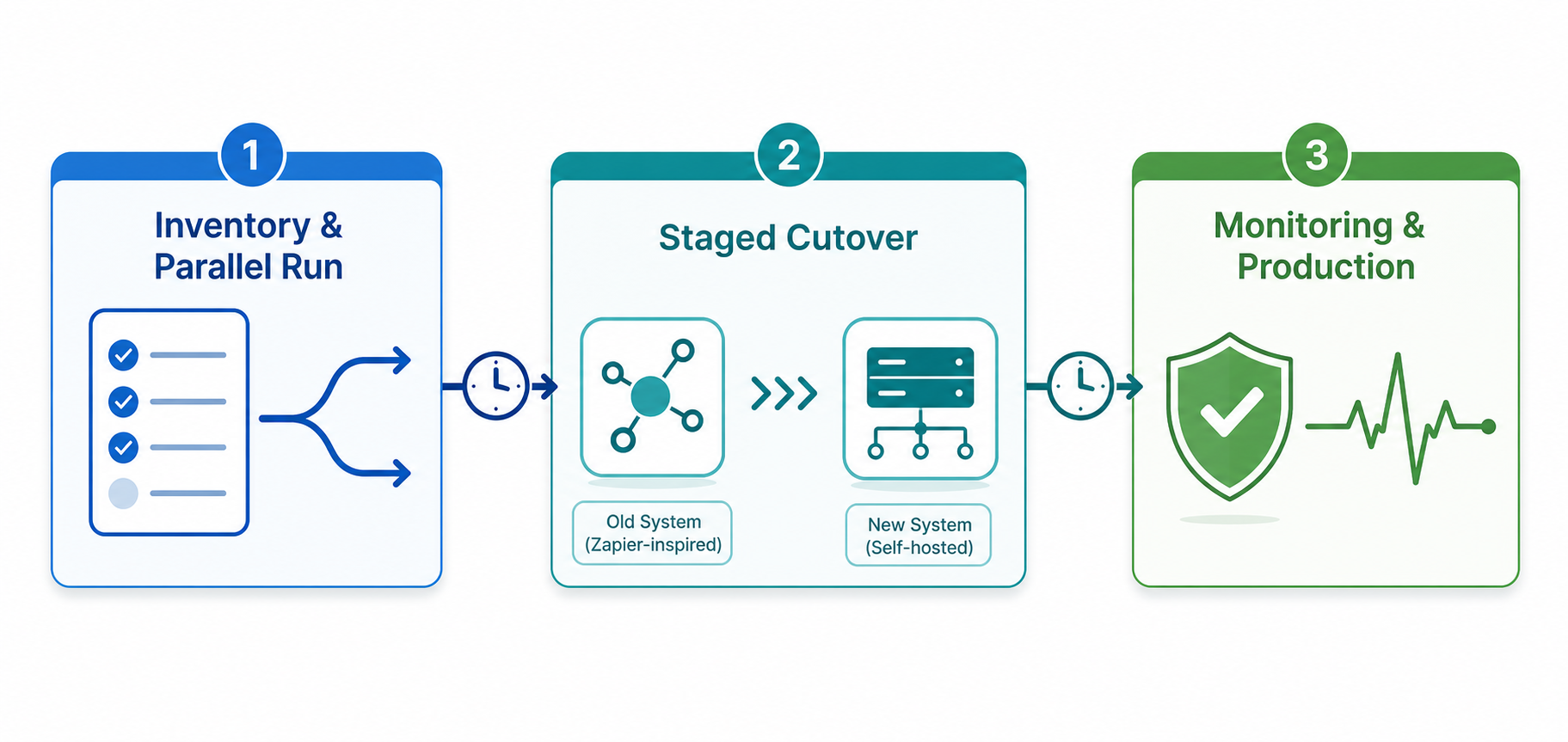
Phase 1: Inventory and Prioritize (2–4 hours)
- Export all your Zaps from Zapier's dashboard. Document each one with: trigger type, action steps, connected apps, and approximate monthly task usage.
- Classify each Zap into one of three tiers: Tier 1 (critical — customer-facing or revenue-impacting), Tier 2 (important — internal operations), Tier 3 (nice-to-have — notifications, logging).
- Identify Zaps that use Zapier-specific features like Formatter, Filter, or Paths. These will require the most effort to recreate in n8n or Activepieces.
- Flag any Zaps that use premium apps only available on Zapier's platform. Check whether n8n or Activepieces has a community node for that app. If not, you may need to build a custom HTTP node.
Phase 2: Parallel-Run Validation (1–2 weekends)
Do not decommission Zapier until your new workflows have been running in parallel for at least one full business cycle.
- Set up your self-hosted n8n or Activepieces instance with production-ready infrastructure: managed database, automated backups, external uptime monitoring, and error notification webhook.
- Recreate your Tier 1 Zaps first. Run them alongside the original Zaps for at least 48 hours. Compare outputs manually to verify correctness.
- A 10-Zap migration to n8n is realistically a long weekend — 8 to 12 hours for a competent user. A 50-Zap migration is more like 2–3 weekends. Above 50, plan for staged migration over a month.
- Document every discrepancy between the original Zap and the new workflow. Common issues include: different date formatting, different error handling behavior, and different retry logic.
| Migration Size | Estimated Time | Recommended Approach |
|---|---|---|
| 10 Zaps | 8–12 hours | Single weekend, full cutover |
| 50 Zaps | 2–3 weekends | Staged cutover by tier |
| 100+ Zaps | 1 month+ | Staged migration with parallel run |
Phase 3: Staged Cutover and Decommissioning
- Cut over Tier 3 workflows first. These are low-risk and give you confidence in the new system before you touch critical paths.
- Cut over Tier 2 workflows next. Monitor for 48 hours after each batch.
- Cut over Tier 1 workflows last. Schedule these for a low-traffic period (weekend or overnight). Have a rollback plan: if something goes wrong, you can re-enable the original Zap in minutes.
- Keep Zapier active for 30 days after the final cutover. This gives you a safety net if you discover edge cases that your new workflows do not handle.
Failure Modes to Plan For: What Can Go Wrong After You Migrate
The migration is complete. Your workflows are running on self-hosted n8n. You feel good. Then, three weeks later, a customer emails to say they never received their onboarding sequence. You check the workflow — it shows "success." But the data never reached the destination.
This is the reality of self-hosted automation. The following failure modes are the most common and the most damaging.
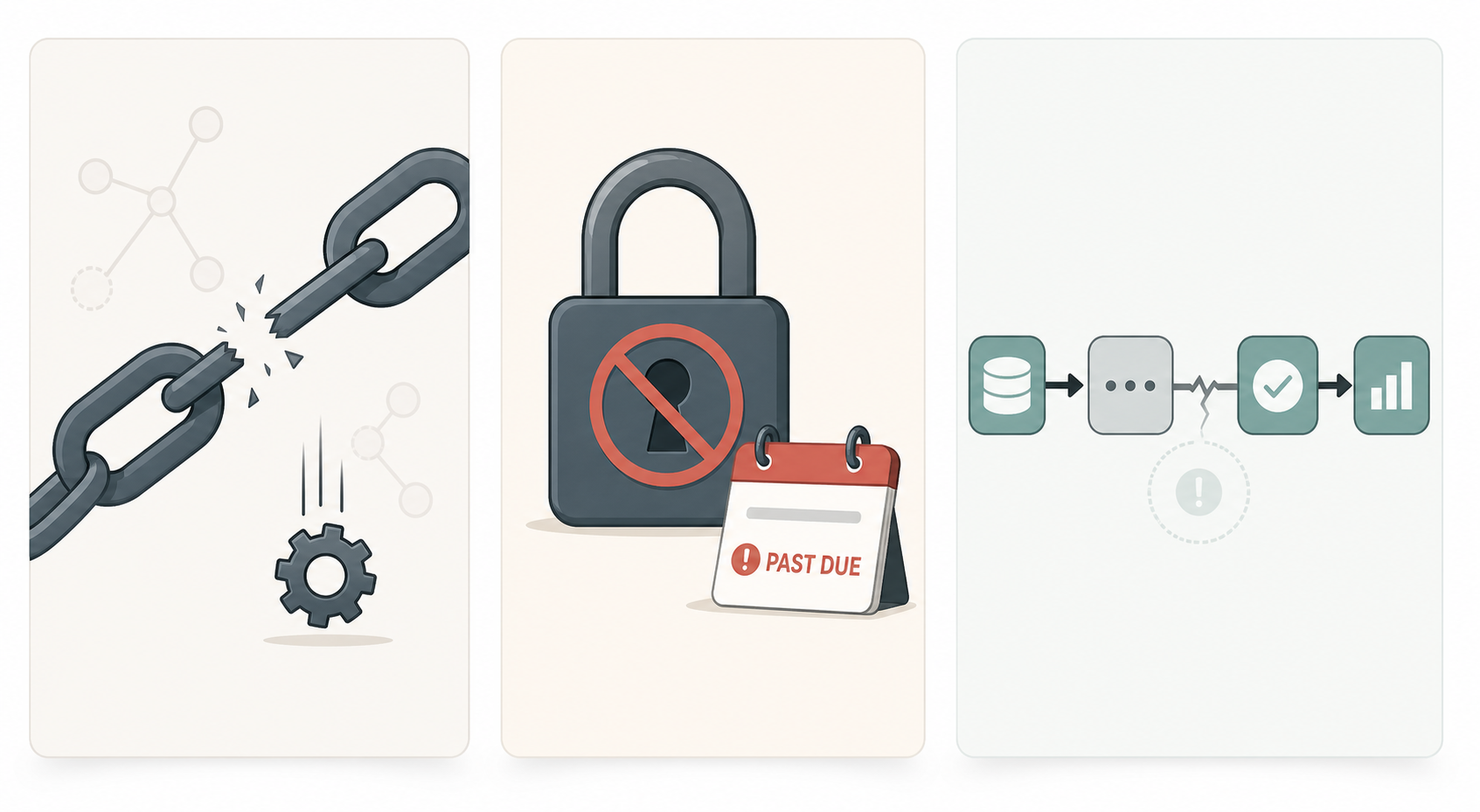
Community Node Rot
n8n and Activepieces rely on community-maintained nodes for many SaaS integrations. Unlike Zapier, which maintains its connectors centrally, open-source tools depend on third-party developers to keep nodes updated. When an upstream API changes its authentication flow or response shape, the community node can break silently.
The Leland guide specifically warns that community HTTP-based nodes for less-popular SaaS apps go stale and silently fail when upstream APIs change auth or response shape. This is not a theoretical risk — it is a recurring pattern that affects teams who migrate to open-source without auditing the maintenance status of their required nodes.
Credential Drift
API keys expire. OAuth tokens get revoked. Service accounts get deactivated. In Zapier, credential management is handled centrally — when a token expires, Zapier notifies you. In a self-hosted setup, you are responsible for monitoring credential health across every connected service.
The risk is highest for services with short-lived tokens (some are valid for only 1–2 hours) and for services where multiple team members manage credentials independently. A workflow that worked perfectly during the parallel-run phase can fail a month later because a token was rotated and the new value was not updated in the self-hosted instance.
Silent Failures
The most dangerous failure mode is the one you do not know about. A workflow that stops running — because of a database connection timeout, a disk space issue, or a memory limit — but continues to report "success" because the error is caught at the wrong layer of the stack.
The Leland guide's production-readiness checklist is the antidote to silent failures. Before you consider your migration complete, verify that you have:
- An external uptime monitor that checks your n8n or Activepieces instance from outside your network.
- Log shipping to a centralized logging platform (not just Docker logs on the server).
- Automated daily backups stored off-site, with a documented restore procedure.
- An error notification webhook that alerts your team (via Slack, email, or PagerDuty) when a workflow execution fails.
- Version-pinned dependencies for n8n, Node.js, and all npm packages, so that updates do not introduce unexpected breaking changes.
Tool Recommendations for Each Migration Scenario
If you have decided to migrate, the next question is: which tool? The answer depends on your specific scenario. Here is a summary of recommendations based on the analysis from Leland, the n8n blog, and Activepieces' own comparison pages.
| Scenario | Recommended Tool | Why |
|---|---|---|
| Complex SaaS and AI workflows | n8n | 193k GitHub stars, 400+ integrations, native AI capabilities via LangChain, JavaScript/Python support, enterprise governance features |
| Simple linear workflows, non-technical team | Activepieces | MIT license, clean step-based builder, more intuitive interface, aggressive pricing for the lower end of the market |
| Not ready to self-host, $80–200/month Zapier spend | Make | Managed platform with more generous pricing than Zapier, no infrastructure management required |
| Need data residency control or compliance | Self-hosted n8n | Full control over data location, source-available code for auditing, SOC 2 compliance available on enterprise tier |
| Heavy AI/agentic workflows | n8n | Native AI agent workflows based on LangChain, ability to use your own data and models, free self-hosted option |
n8n is the safest default for most migration scenarios. Its 193k GitHub stars and 58.6k forks (as of mid-2026) indicate a large, active community that contributes nodes, documentation, and troubleshooting support. The n8n blog describes it as having 400+ integrations and positions it as the only AI workflow automation tool on the market that offers a free self-hosted option for technical users.
Activepieces is a strong alternative for teams that prioritize simplicity over flexibility. The n8n Lab comparison notes that Activepieces excels as a modern, lightweight alternative to Zapier, prioritizing speed and simplicity for less technical users. However, the same source cautions that when dealing with complex, multi-layered data arrays, advanced branching, or requiring massive parallel execution, the platform can feel restrictive.
Make remains the best intermediate option for teams that are not ready to self-host but want to move away from Zapier's task-based pricing. It is a managed platform, so you avoid the maintenance burden entirely, while still getting more generous execution limits than Zapier's equivalent tiers.
For a full tool-by-tool comparison that goes beyond n8n, Activepieces, and Make — including tools like Node-RED, Apache Airflow, Temporal, and Prefect — see our companion guide: Open Source Workflow Automation Tools in 2026: A Use-Case-First Comparison for Teams. That guide covers the broader landscape organized by workflow archetype, which this article intentionally avoids to stay focused on the migration decision.
If you are specifically evaluating n8n against Microsoft's Power Automate for AI-heavy workflows, our Power Automate vs n8n in 2026 comparison covers which platform fits different AI strategy scenarios.
And for solo founders and small teams looking for budget-friendly options under $20 per month, Best Workflow Automation Tools for Small Businesses in 2026 provides additional recommendations tailored to tight budgets.