
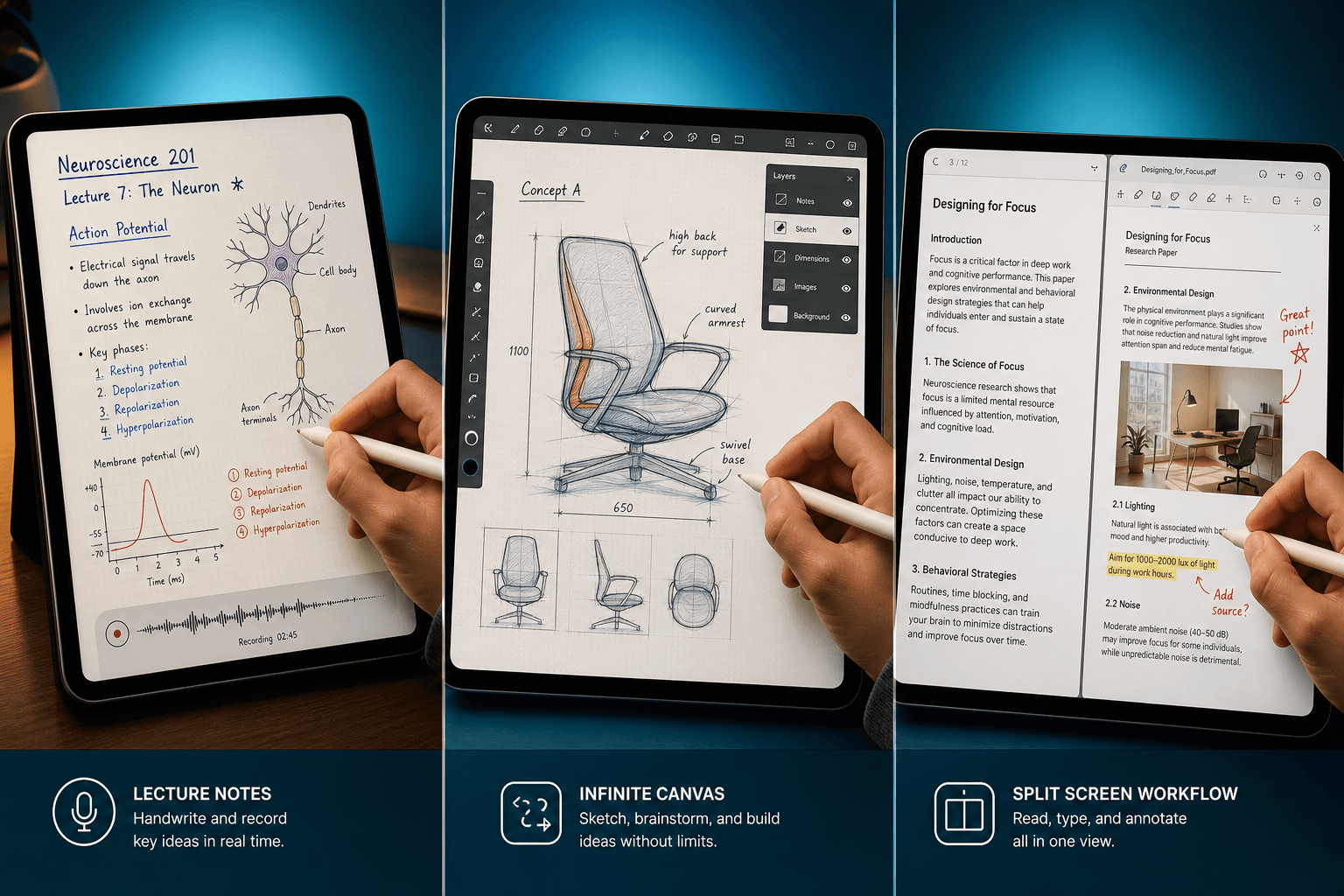
I have been writing on tablets for a decade, and I still start every "which stylus app is best" conversation the same way: "What do you actually do with your notes?" The question sounds simple, but most people answer with a feature list — OCR accuracy, palm rejection, export format — instead of a scene.
The scene is what matters. A lecture student who never records audio does not need Notability's audio-synced ink. A designer who only sketches does not miss handwriting search. A PDF researcher who annotates twenty papers a week will feel every limitation of a generalist note-taking app's markup tools. The same app that is perfect for one workflow is frustrating for another.
This article does not rank apps by a single score. It matches six distinct workflows to the apps that genuinely accelerate them. If you already read my head-to-head comparison by device and performance, this is the workflow-first companion. The numbers still appear — latency, accuracy, three-year cost — but always judged against the job you need done.
The latency myth: why 9ms vs 13ms doesn't matter
In controlled testing on an iPad Pro M2 with Apple Pencil 2, Apple Notes averaged 9ms of pen latency, GoodNotes 11ms, and Notability 13ms (). Those are excellent numbers across the board. The difference between 9ms and 13ms is invisible in real writing — I have tested all three side by side and cannot consistently tell which is which. The only time I have ever felt pen lag was on a cheap Android tablet years ago.
So why do we still measure it? Because latency becomes meaningful when an app adds processing overhead. GoodNotes' AI summary generation, for instance, can introduce a hiccup after you finish writing a sentence. Notability's audio sync does not add latency — it just reads the already-stored waveform. The real differentiator is not the raw number but what the app does with your writing after the pen lifts.
If you record lectures, Notability is the only choice
A lecture-heavy student's core friction is not bad handwriting — it is not knowing what the professor said during the moment you were writing. Notability solves this with audio-synced ink. Tap a handwritten word and the app plays the lecture audio from that exact moment (). I have tested this on a recorded 50-minute lecture and it works. The audio is stored inside the note file, so you do not need a separate recording app.
| App | Three-year cost | Audio sync |
|---|---|---|
| Notability Plus ($14.99/yr) | $44.97 | Yes — tap word to replay audio |
| GoodNotes ($9.99/yr) | $29.97 | No |
| GoodNotes + AI ($4.99/mo add-on) | $209.61 | No — AI summarization instead |
Notability also has built-in math conversion (write an equation, it turns it into typed text) and can handle PDF imports, though its PDF annotation tools are not as deep as dedicated apps. If you never record lectures, skip Notability — GoodNotes costs less and does the rest. But if you record lectures, the audio sync alone justifies the subscription. (Pricing verified from multiple sources; Tool Finder lists Notability at $11.99/yr, ZDNET at $15/yr — expect minor variance by region.)
For PDF researchers: specialist tools beat generalists
Generalist note-taking apps like GoodNotes and Notability can mark up a PDF. But if you read dozens of academic papers or legal documents a week, their annotation tools feel shallow — limited highlight colors, no table-of-contents navigation, no side-by-side document comparison. That is where specialist apps come in.
On iPad, Noteful costs under $15 one-time () and offers tag-based organization, multi-layer annotation, and a surprisingly capable PDF renderer. On Android, Squid is free with a $3.99/month premium tier and is built specifically for vector-based PDF markup and handwritten notes (). For heavy document research, LiquidText (iPad, $80 one-time) lets you connect excerpts from different PDFs on a single canvas — ideal for literature reviews ().
| App | Platform | Price | Best for |
|---|---|---|---|
| Noteful | iPad | < $15 one-time | Tag-based PDF annotation, multi-layer notes |
| Squid | Android | Free / $3.99/mo premium | Vector PDF markup, handwritten notes |
| LiquidText | iPad | $80 one-time | Document research, cross-document linking |
The trade-off is real: these apps lack audio recording, weak bulk text input, and are nearly useless for mixed note-taking. If your workflow is 80% PDF annotation and 20% ad-hoc notes, one of these three is your best bet. If you also write essays or take meeting notes in the same app, stick with GoodNotes or Notability. For a deeper look at PDF workflows, see our complete guide to PDF note-taking.
Designers: Concepts is for visuals, not searchable notes
Concepts is not a note-taking app in the traditional sense. It is a vector-based sketching tool with an infinite canvas, CAD-style layers, and an advanced brush engine — and that is exactly what makes it the best stylus app for designers and architects who draw floor plans, brainstorm product sketches, or map user flows (). At $4.99/month ($89.97 over three years), it is not cheap, but the creative depth justifies the cost for professionals.
What bothers me is that the same infinite canvas that makes Concepts brilliant for design also makes it nearly useless for text-based note-taking. Concepts has no handwriting search and no OCR. Scribble a meeting note on a whiteboard-style canvas and later you cannot find it by keyword — you have to visually scan the entire drawing. If your sketches are purely visual (floor plans, character designs, UI flows), that is fine. If you also need to search or export your notes as text, Concepts will frustrate you.
Mixed typing and handwriting: OneNote is free and flexible
The best part is the price: zero dollars. No subscription, no one-time fee — just a free Microsoft account (). The stylus performance on Android is good enough for daily note-taking, and if you already use Office or Teams, the integration is a bonus. Evernote ($10.83+/month) is a paid alternative for users who need stronger text search and a more structured notebook hierarchy, but for most mixed-workflow users, OneNote's free combination of freeform layout and cross-platform sync is hard to beat.
| Feature | OneNote (free) | Evernote (paid) |
|---|---|---|
| Price | $0 | $10.83+/mo |
| Freeform canvas | Yes — unlimited placement | No — linear notes |
| Cross-platform sync | Yes (Android, Windows, iOS, Web) | Yes |
| Handwriting search | Basic | Strong, with image OCR |
| Best for | Mixed typed/handwritten notes across devices | Heavy search and archival needs |
Quick-capture: use what's on your device
If your primary note-taking need is to jot down a thought in under five seconds, the best app is the one that comes on your device. Apple Notes on iPad (9ms latency, free) with Smart Script and Math Notes — available in iPadOS 18+ — refines messy handwriting in real time and solves handwritten equations live (). Samsung Notes on Galaxy devices offers virtually zero latency and best-in-class palm rejection, free with any Samsung tablet ().
These native apps are not "starter" apps you outgrow. Apple Notes with Smart Script is genuinely pleasant for quick handwritten notes, and Samsung Notes supports audio recording and PDF annotation — features that rival some third-party subscriptions. The limitation is platform lock-in: Apple Notes is iPad-only, Samsung Notes is Galaxy-only. If you switch devices, you are back to zero.
For cross-platform quick-capture, Google Keep is the simplest alternative — free, fast, and syncs everywhere — but it has no stylus-specific features. Android users without a Galaxy Tab should consider OneNote (free, good stylus performance) or try Squid ($3.99/mo premium for advanced markup). See our roundup of free note-taking apps for students for more zero-cost options.
Handwriting-to-text: Nebo's accuracy is best, but only for clean writing
In controlled tests, Nebo converts handwriting to typed text with 96% accuracy (). That is notably higher than GoodNotes' typical ~88% and OneNote's variable accuracy. Nebo uses MyScript's Interactive Ink engine, which processes handwriting inline — you write, then immediately see the converted text below. It also supports gestures for editing: scratch out to delete, circle to select, and so on.
The base Nebo app costs $9.99 one-time (). ZDNET lists $24 one-time for the full version, and the app has been rebranded to MyScript in some regions — check your local App Store. Even at $24, it is the cheapest option for reliable handwriting-to-text conversion. The catch: accuracy drops on heavily abbreviated or unusually messy handwriting. Real-world performance is closer to low-90s on average, still the best among the apps I have tested.
The real cost: subscriptions add up
Subscriptions add up. Most note-taking apps are annual, and the difference between a cheap subscription and a free app can be hundreds of dollars over a college degree or a few project cycles. Here is the full picture for the apps covered in this guide:
| App | Three-year cost |
|---|---|
| Apple Notes (free) | $0 |
| Samsung Notes (free) | $0 |
| OneNote (free) | $0 |
| Google Keep (free) | $0 |
| Nebo ($9.99 one-time) | $9.99 |
| Noteful (< $15 one-time) | < $15 |
| GoodNotes ($9.99/yr) | $29.97 |
| Squid Premium ($3.99/mo) | $143.64 |
| Notability Plus ($14.99/yr) | $44.97 |
| Concepts Pro ($4.99/mo) | $89.97 |
| LiquidText ($80 one-time) | $80 |
| GoodNotes + AI ($9.99/yr + $4.99/mo) | $209.61 |
| Evernote Personal ($10.83/mo) | $389.88 |
Verdict: test two this week
No article can tell you which app will feel right in your hand. Here are the recommendations based on what I have observed, tested, and computed from the data. The runner-up is not the "loser" — it is the alternative you should also test.
- Lecture-heavy student: Notability ($14.99/yr). Runner-up: GoodNotes ($9.99/yr) — but only if you do not need audio sync.
- PDF researcher (iPad): Noteful (< $15 one-time). Runner-up: LiquidText ($80 one-time) for deep document research.
- PDF researcher (Android): Squid (free / $3.99/mo premium). Runner-up: OneNote (free) if you also need mixed note-taking.
- Designer / architect: Concepts ($4.99/mo). Runner-up: GoodNotes ($9.99/yr) if you also need text notes.
- Mixed typing and handwriting: OneNote (free). Runner-up: Evernote ($10.83+/mo) for stronger search.
- Quick-capture (iPad): Apple Notes (free). Runner-up: Google Keep (free) for cross-platform.
- Quick-capture (Galaxy): Samsung Notes (free). Runner-up: OneNote (free) for mixed workflow.
- Handwriting-to-text power user: Nebo ($9.99 one-time base). Runner-up: GoodNotes ($9.99/yr) with ~88% accuracy.



Comments
Join the discussion with an anonymous comment.