
The 'Free' Trap in Note-Taking Apps — What Students Need to Watch Out For
Every semester, thousands of students download a note-taking app because it says "Free" in the App Store or Play Store. A few weeks later, they hit a wall: a 50-note limit, a single-device restriction, or a pop-up demanding a subscription to sync their lecture recordings. The app was free to install, but the features they actually needed were locked behind a paywall they didn't see coming.
This article is a transparent audit of what $0 actually gets you in 2026. We are not ranking apps by popularity. We are pulling back the curtain on free-plan limits — note caps, storage ceilings, missing handwriting support, and sync restrictions — so you can build a note-taking stack that works for your device, your study style, and your budget. The core finding: most students can run a completely free stack, but the best app depends entirely on whether you use an iPad, a Chromebook, a Windows laptop, or an Android phone.
Free Plan Limits at a Glance: What $0 Actually Gets You
Before we dive into individual app reviews, here is the scannable truth about each free tier. The table below covers the eight apps most relevant to students, with columns for the limits that matter most: storage, note count, handwriting support, cross-device sync, and AI features.
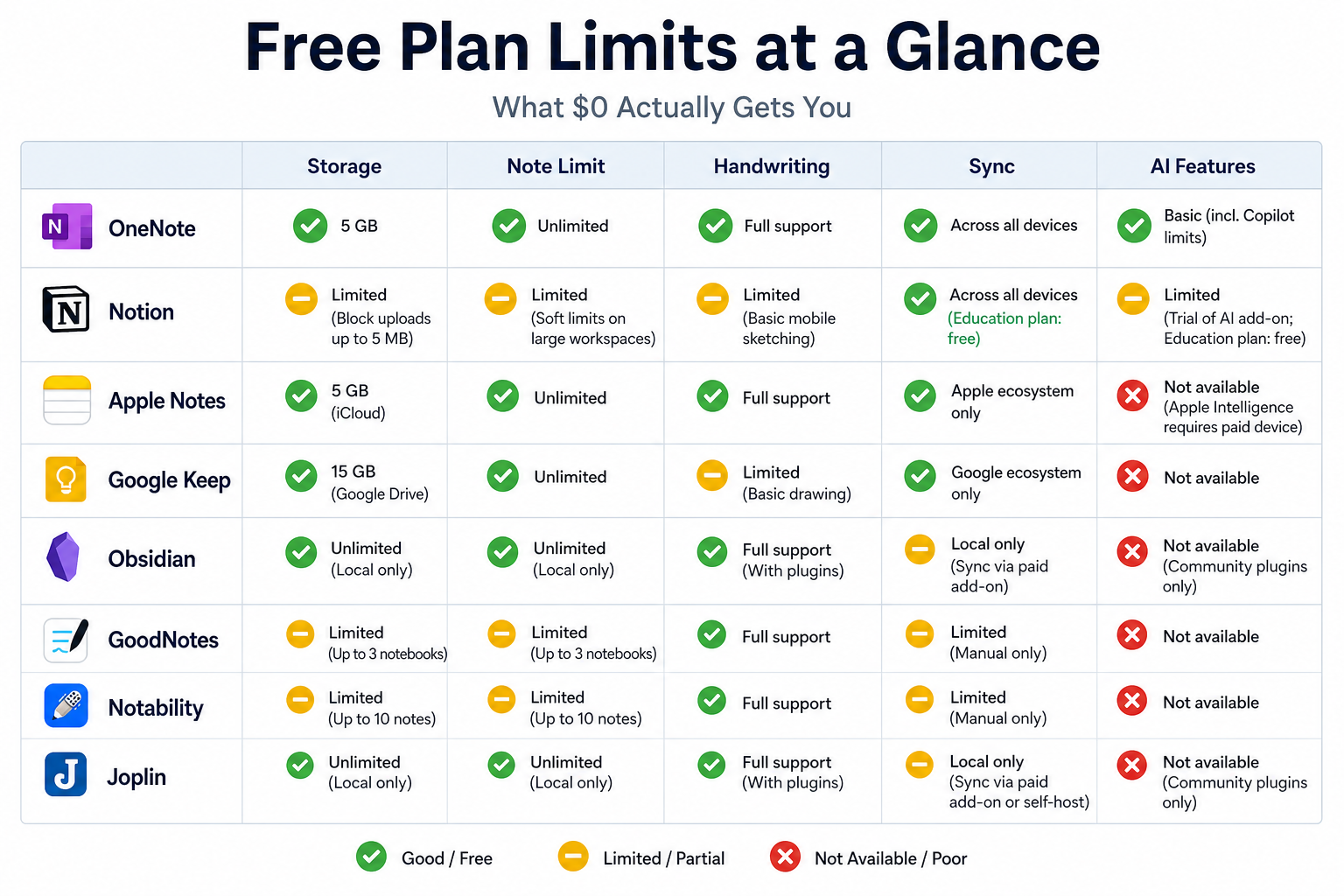
| App | Storage / Note Limit | Handwriting | Sync | AI Features | Key Free-Tier Catch |
|---|---|---|---|---|---|
| OneNote | 5 GB OneDrive; unlimited notes | Yes (full) | Yes (cross-platform) | No | 5 GB fills up fast with audio recordings |
| Notion | Unlimited blocks; 5 MB file uploads | No native support | Yes (cross-platform) | No | 5 MB file limit; .edu email unlocks Plus plan |
| Apple Notes | 5 GB iCloud; unlimited notes | Yes (iPad) | Yes (Apple ecosystem only) | No | No web app; no Android or Windows support |
| Google Keep | 15 GB shared Google storage; unlimited notes | No | Yes (cross-platform) | Voice transcription | No folders; limited organization |
| Obsidian | Local storage; unlimited notes | No native support | No (Sync is $4-8/month) | No | No built-in cloud sync; local-first only |
| GoodNotes | 3 notebooks total | Yes (full) | Yes (iCloud) | Locked (AI Pass $9.99/month) | 3-notebook cap is very restrictive |
| Notability | Basic audio & templates | Yes (full) | Yes (iCloud) | Locked (Plus $14.99/year or Pro $99/year) | Free tier is extremely limited |
| Joplin | Local storage; unlimited notes | No native support | No (Joplin Cloud from €2.99/month) | No | Requires manual setup for sync |
A few things jump out immediately. OneNote is the only app that gives you full handwriting support, unlimited notes, and cross-platform sync at $0. Google Keep offers the most generous storage (15 GB shared across Gmail, Drive, and Photos) but lacks organization features. GoodNotes and Notability, the two most popular iPad handwriting apps, have the most restrictive free tiers — a deliberate strategy to push students toward their paid plans.
Microsoft OneNote — The Most Feature-Complete Free Plan
If you can only install one note-taking app and you want it to be free, make it OneNote. Microsoft's strategy is straightforward: give away the full desktop and mobile apps, charge for additional OneDrive storage. The result is a free tier that includes unlimited notebooks, unlimited notes, full handwriting and drawing support, audio recording, OCR-powered search of handwritten text, real-time collaboration, and a web clipper. No other app on this list matches that breadth at $0.
- Unlimited notebooks and notes — no artificial caps.
- Full handwriting support on iPad, Windows, and Android tablets.
- Audio recording synced to your notes — ideal for lecture capture.
- OCR search that finds text inside handwritten notes and images.
- Real-time collaboration with classmates.
- Cross-platform: Windows, Mac, iPad, iPhone, Android, and web.
The catch is the 5 GB OneDrive storage limit. That sounds generous until you start recording lectures. A single 90-minute lecture recording can be 50-100 MB. If you attend five lectures a week and record them all, you will hit the 5 GB cap in about three months. At that point, you either delete old recordings or pay $1.99/month for 100 GB. Many schools provide Microsoft 365 for Education, which bumps storage to 1 TB — check your institution's licensing before you worry about the cap.
Notion — Free Premium Workspace with a .edu Email
Notion is not a traditional note-taking app. It is a workspace that combines notes, databases, kanban boards, calendars, and wikis into a single tool. For students who want to build a structured study system — a course hub with linked lecture notes, assignment trackers, and a reading database — Notion is unmatched. The standard free plan is already usable, but the real value for students comes from the Plus plan, which is free with a .edu email address.
The free Plus plan for students unlocks unlimited blocks (the free personal plan also has unlimited blocks but with a 5 MB file upload limit and 7-day page history) and 30-day version history. The 5 MB file upload limit remains, which means you cannot attach large PDFs or lecture recordings directly to your pages. For most note-taking, that is fine — you are typing, linking, and embedding, not storing files. But if you need to attach a 50 MB textbook PDF, you will need to host it elsewhere (Google Drive, OneDrive) and link to it.
Notion's weakness is handwriting. It has no native handwriting or drawing support. If you are an iPad user who wants to handwrite lecture notes, Notion is not your primary app — it is your organization layer. Use it to structure your courses and link to handwritten notes stored in OneNote or Apple Notes.
Apple Notes and Google Keep — The Best Zero-Setup Options
Sometimes the best app is the one already on your device. Apple Notes and Google Keep are pre-installed on millions of student devices, and both are genuinely free with no artificial note limits. But each comes with ecosystem tradeoffs that matter for long-term use.
Apple Notes
Apple Notes is included free with every iPhone, iPad, and Mac. It supports unlimited notes, folders, tags, checklists, document scanning, and — crucially for iPad users — full handwriting with Apple Pencil. The 5 GB iCloud storage limit is shared across all iCloud services (photos, backups, drive), so if you already store photos in iCloud, that 5 GB fills up fast. Upgrading to 50 GB costs $0.99/month.
The biggest limitation is platform lock-in. Apple Notes has no web app, no Android app, and no Windows app. If you take notes on an iPad but need to review them on a school-issued Windows laptop or a Chromebook, you are out of luck. For students who are all-in on Apple — iPhone, iPad, and Mac — it is a solid free option. For anyone who crosses platforms, it is a dead end.
Google Keep
Google Keep is the opposite: it runs everywhere — web, Android, iOS, and even as a Chrome extension. It offers unlimited notes, labels, color coding, location-based reminders, voice notes with automatic transcription, and image notes. The 15 GB storage is shared across Google Drive, Gmail, and Google Photos, which is more generous than Apple's 5 GB.
Keep's weakness is organization. There are no folders, no notebooks, and no nested hierarchy. You get labels and colors. For quick capture — a to-do, a reminder, a voice memo after class — Keep is excellent. For organizing a semester's worth of lecture notes across five courses, it is inadequate. Keep works best as a capture inbox that feeds into a more structured system like OneNote or Notion.
Obsidian and Joplin — Free, Local-First, and Privacy-Focused
For students who care about long-term ownership of their notes — and who are comfortable with a slightly steeper learning curve — Obsidian and Joplin offer free, local-first alternatives that do not lock your data into a proprietary cloud.
Obsidian
Obsidian's core app is free for personal use with unlimited notes and vaults. Your notes are stored as plain Markdown files on your local device. That means you own them forever — no subscription, no server shutdown, no data export panic. Obsidian's plugin ecosystem (also free) adds features like spaced repetition, kanban boards, and graph views that can turn your notes into a personal knowledge management system.
The tradeoff is sync. Obsidian does not include built-in cloud sync. If you want your notes available on your phone, your iPad, and your laptop, you need either a third-party sync service (iCloud, Google Drive, Dropbox — all free up to a point) or Obsidian Sync, which costs $4-8/month. This is the most common point of confusion among new Obsidian users. The app is free, but encrypted cross-device sync is a paid add-on.
Joplin
Joplin is a free, open-source note-taking app that supports Markdown, notebooks, tags, and end-to-end encryption. It includes an Evernote import tool, which makes it a popular destination for students migrating away from Evernote's restrictive free tier. Joplin's free tier is genuinely unlimited — no note caps, no storage limits beyond your device.
Like Obsidian, Joplin is local-first. Sync is available through Joplin Cloud (from €2.99/month) or through third-party services like Dropbox and OneDrive. The interface is functional but not as polished as Obsidian or OneNote. Joplin is best for students who value open-source software, want to escape proprietary ecosystems, and are comfortable with a more utilitarian interface.
GoodNotes vs Notability — Limited Free Tiers for iPad Handwriting
If you own an iPad and an Apple Pencil, you have likely heard of GoodNotes and Notability. Both are excellent handwriting apps, but both have aggressively limited free tiers that make them difficult to use as a primary note-taking tool without paying.
| Feature | GoodNotes Free | Notability Free |
|---|---|---|
| Notebook limit | 3 notebooks | Unlimited (but basic features only) |
| Handwriting | Full | Full |
| Audio recording | Yes | Basic (no AI transcription) |
| AI features | Locked (AI Pass $9.99/month) | Locked (Plus $14.99/year or Pro $99/year) |
| Cross-platform | iPad, iPhone, Mac, Windows, Android | iOS and macOS only |
| Price to unlock full features | $11.99/year (Essential) or $35.99 one-time (Special Edition) | $14.99/year (Plus) or $99/year (Pro) |
GoodNotes recently shifted from an unlimited free model to a 3-notebook limit. For a student taking five courses, that means you can have one notebook per course for three courses, and the other two courses either share a notebook or force you to delete old notes. Notability's free tier is even more restricted: basic audio recording, basic annotation, and templates, with all AI-powered study tools locked behind the $14.99/year Plus plan or the $99/year Pro plan.
If you are an iPad handwriting student on a strict budget, consider alternatives like CollaNote or Kilonotes, which offer more generous free tiers. These apps have smaller user bases and less long-term stability data, but they are actively discussed in student communities on Reddit as viable free alternatives to GoodNotes and Notability.
Platform-by-Platform Recommendations: iPad, Chromebook, Windows, Android
Your device determines your options. Here are the best free picks for each major student platform.
- iPad: Apple Notes for quick capture and handwriting, plus OneNote for structured notebooks and cross-platform access. If you need handwriting-only, the GoodNotes free tier (3 notebooks) works for light use.
- Chromebook: Google Keep for quick capture and OneNote Web for full notebooks. Chromebooks have the fewest native note-taking options, but the web versions of OneNote and Keep cover most needs.
- Windows: OneNote is the obvious first choice. Pair it with Obsidian for long-term reference notes and personal knowledge management. For a deeper dive into Windows-specific options, see our Windows note-taking app comparison.
- Android: Google Keep for quick capture and OneNote for full notebooks. Android has strong OneNote support, including handwriting on Samsung tablets.
Best Free Stacks by Student Profile
No single app covers every study style. The most effective approach is to combine two apps — one for capture and one for organization. Here are the best free stacks for four common student profiles.
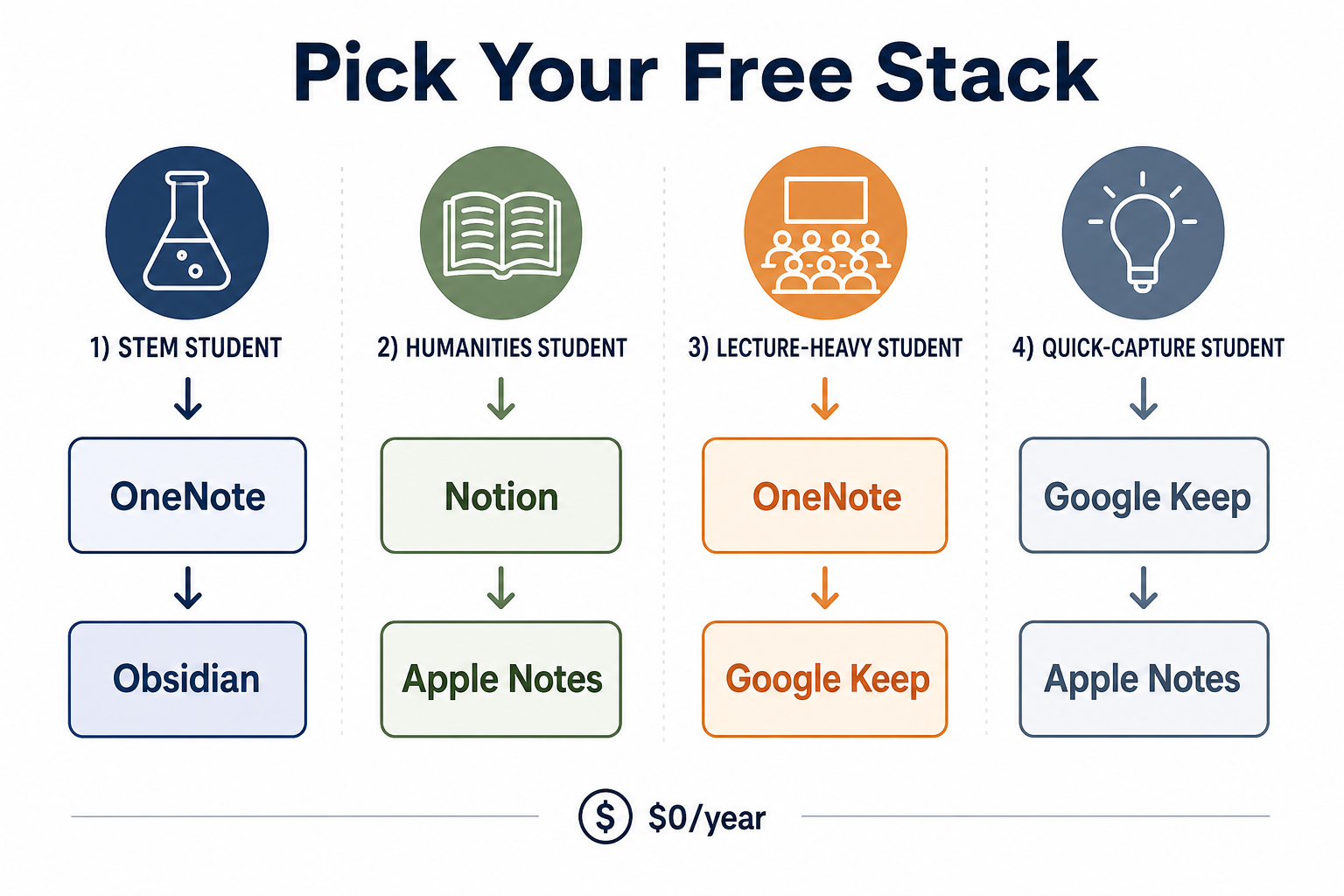
- STEM (engineering, computer science, pre-med): OneNote for lecture notes with handwriting and audio, plus Obsidian for building a long-term reference vault of technical concepts, formulas, and code snippets.
- Humanities (English, history, philosophy): Notion for structured essay outlines, reading databases, and research notes, plus Apple Notes for quick capture of ideas and quotes on the go.
- Lecture-heavy (large classes, dense material): OneNote for audio recording synced to handwritten notes, plus Google Keep for voice memos and quick reminders between classes.
- Quick-capture (to-dos, reminders, fleeting ideas): Google Keep for voice notes and location-based reminders, plus Apple Notes for quick handwritten sketches and document scans.
For a deeper look at how your retrieval style and template preferences should guide your choice, see our guide on digital note-taking apps and retrieval styles.
When It Makes Sense to Pay — and What to Pay For
Most students can run a completely free stack. OneNote plus Apple Notes plus Obsidian costs $0/year and covers handwriting, audio recording, cross-platform access, and long-term knowledge management. But there are specific scenarios where paying a small amount makes sense.
- You need more than 5 GB of storage for OneNote audio recordings: $1.99/month for 100 GB OneDrive.
- You want encrypted cloud sync for Obsidian: $4-8/month for Obsidian Sync.
- You need unlimited notebooks on iPad with handwriting: $11.99/year for GoodNotes Essential or $35.99 one-time for Special Edition.
- You want AI-powered study tools (flashcard generation, quiz creation, smart summaries): $14.99/year for Notability Plus or $99/year for Notability Pro.
- You need to escape Evernote's 50-note limit: Migrate to OneNote or Joplin for free instead of paying $14.99/month for Evernote Personal.
The 2024 Flanigan meta-analysis published in Educational Psychology Review found that taking and reviewing handwritten notes produced higher course achievement (Hedges' g = 0.248, p < 0.001). A 2025 review in PMC reported that handwriting activates a broader network of motor, sensory, and cognitive brain regions. If you are an iPad user, the research supports handwriting over typing — but you do not need to pay for GoodNotes or Notability to handwrite. OneNote and Apple Notes both offer full handwriting support at $0.
Final Verdict: Pick This If…
Here is the short version. Each app has a clear best-fit scenario. Match your device and your study style to the right pick.
- Pick OneNote if you want the most feature-complete free plan — unlimited notebooks, handwriting, audio recording, and cross-platform sync. Best for Windows users and anyone who records lectures.
- Pick Notion if you have a .edu email and want to build a structured study system with databases, linked notes, and project tracking. Best for humanities students and organized note-takers.
- Pick Apple Notes if you are all-in on Apple devices and want a zero-setup handwriting app with iCloud sync. Not suitable if you use Windows or Android.
- Pick Google Keep if you need a quick-capture tool for voice notes, reminders, and to-dos that works on every platform. Not suitable for organizing full lecture notes.
- Pick Obsidian if you want local-first, private, future-proof notes with unlimited customization. Best for power users and students who plan to build a long-term knowledge base.
- Pick GoodNotes if you need iPad handwriting and can live with the 3-notebook free limit. Be prepared to pay $11.99/year if you need more notebooks.
- Pick Joplin if you want a free, open-source app with Evernote import and end-to-end encryption. Best for privacy-conscious students who do not mind a less polished interface.
If you are still unsure, start with OneNote. It is the safest bet for the widest range of devices and study styles. If you outgrow it — or if you want to explore personal knowledge management beyond simple note-taking — our broader PKM system comparison covers the full landscape of tools for building a second brain.