
Getting Muse Glimmer into Obsidian is not a custom build. It is a local model runner exposing an OpenAI-compatible endpoint, plus an Obsidian plugin that knows how to send chat and retrieval requests to that endpoint. For note-app integration, the practical requirement is therefore two-layered: your machine has to run the 30B model, and the Obsidian side has to hit the exact local API shape the runner is serving.
Last checked: 2026-08-26. The Obsidian-side workflows cited here were demonstrated in published walkthroughs with other local models, not with Muse Glimmer specifically. Muse Glimmer’s runner availability, catalog names, and local-serving path come from the runner and model-release materials. Treat the Muse-specific model-name string as something to pin during your own test, not something to type from memory.
Muse Glimmer itself is Meta’s 30B open agentic model, released on 10 Aug 2026 under Apache 2.0; it is the model in this guide, not the Muse iPad mind-mapping app or a note-taking product by itself. Meta describes day-zero support across local and serving runtimes including Ollama, LM Studio, llama.cpp, MLX, vLLM, SGLang, ExecuTorch, and Unsloth-backed paths, which is why the Obsidian setup can ride on existing local API patterns rather than a Muse-only plugin. [1]

Pick the runner before you open Obsidian settings
There are two sensible first routes: Ollama if you want the shortest terminal path, LM Studio if you want a visible local server panel and the clearest Copilot custom-provider fields. Both can expose a local endpoint. The difference is where you will debug when Obsidian says nothing useful.
| Route | Use it when | Local endpoint to care about | Main trap |
|---|---|---|---|
| Ollama | You want the simplest model launch command and are comfortable checking local services from the terminal. | http://127.0.0.1:11434 | Your Obsidian plugin may expect an Ollama provider URL rather than an OpenAI /v1 base URL. |
| LM Studio | You want a GUI server switch, a model dropdown, logs, and a Copilot setup with concrete provider fields. | http://localhost:1234/v1 | CORS and exact model-name matching can make a working model look broken from Obsidian. |
Do the hardware decision before this article, not halfway through Copilot troubleshooting. For the deeper quant and memory matrix, use Can Your Laptop Run Muse Glimmer 30B for Note Taking?. Here, the working assumption is narrower: you already chose to try Muse Glimmer locally, and now you need Obsidian to reach it repeatedly.
Serve Muse Glimmer locally first
Ollama: shortest launch path
Ollama’s path is the least mysterious at launch time: run the Muse Glimmer catalog entry locally, then point an Obsidian plugin at Ollama’s localhost service. The command shown by Ollama is:
ollama run muse-glimmerOllama’s Muse Glimmer materials also note an Apple Silicon MLX build, with catalog strings that may differ from the plain “muse-glimmer” name. That matters because Obsidian plugin fields often require the model identifier to match the runner’s catalog name exactly. [2][3]
For the Obsidian layer, keep the base Ollama service address visible: http://127.0.0.1:11434. If your plugin has an explicit Ollama provider, use that provider instead of pretending every local server behaves like OpenAI’s /v1 API. If your plugin asks for an OpenAI-compatible base URL, verify the plugin’s expected Ollama format rather than guessing.
LM Studio: easiest place to see the server
LM Studio’s value here is not that it makes Muse Glimmer more magical. It gives you a local server UI, a visible loaded model, and a base URL that lines up cleanly with the Copilot custom-provider workflow. LM Studio’s Muse Glimmer post documents local support, and the Obsidian Copilot walkthrough uses LM Studio’s local server at http://localhost:1234/v1. [4][5]
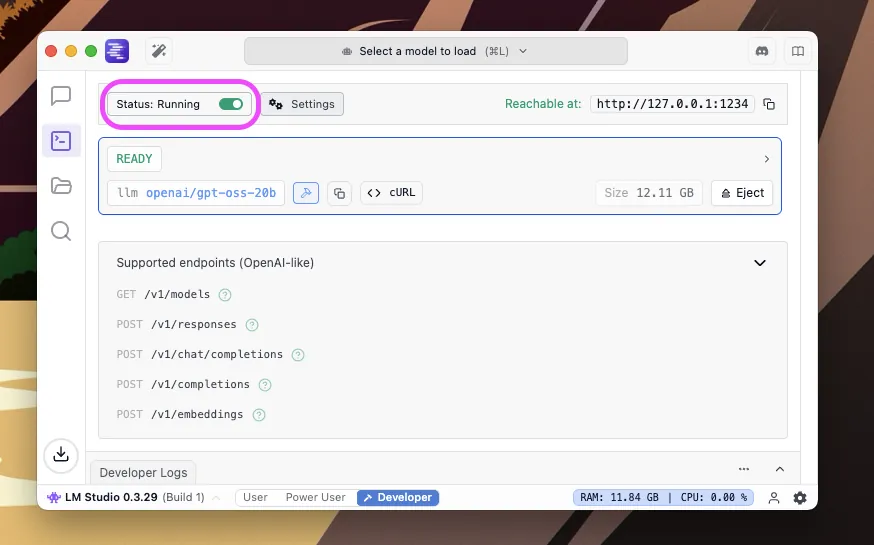
Before Obsidian enters the picture, LM Studio should already show the model loaded and the server running. Do not troubleshoot Copilot while the runner is still downloading weights, unloading the model, or showing a different model in the server panel.
Copilot through LM Studio: the fields that usually matter
The most copyable documented Obsidian route is Copilot pointed at LM Studio as a custom provider. In Copilot’s model settings, add a custom model and make the provider details boringly exact. The XDA walkthrough used provider “lm-studio,” base URL “http://localhost:1234/v1,” API key “local,” and a model-name string matching the model served by LM Studio. It also called out two failure points that are easy to miss: CORS must be enabled in LM Studio, and Copilot can override runner-level temperature and system-prompt settings. [5]
| Copilot field or setting | Value to start with | Why it fails |
|---|---|---|
| Provider | lm-studio | Choosing a generic OpenAI provider can send Copilot down the wrong assumptions for a local LM Studio server. |
| Base URL | http://localhost:1234/v1 | Missing /v1, using the wrong port, or switching localhost and 127.0.0.1 inconsistently can make the plugin miss the running server. |
| API key | local | The local server may not need a real cloud key, but Copilot still expects something in the field. |
| Model name | Exact identifier shown by LM Studio for the loaded Muse Glimmer build | A near match is still a miss. Do not assume the Ollama tag and LM Studio catalog string are identical. |
| CORS | Enabled in LM Studio | A browser-side Obsidian plugin can be blocked even while the model responds perfectly inside the runner. |
| Temperature and system prompt | Set intentionally inside Copilot after connection works | Copilot-side settings can override the runner-level defaults you thought you were using. |
The model-name row is where otherwise careful setups waste time. “muse-glimmer,” “muse-glimmer:30b-mlx,” and whatever LM Studio displays for a downloaded build are not interchangeable just because they refer to the same family. Copy the string from the runner’s currently served model list or server log.
Once Copilot can send a plain chat request, then adjust the assistant behavior. Doing it in the other order creates a false debugging trail: you change prompts, temperature, and vault instructions while the real problem is still CORS, a wrong base URL, or a model-name mismatch.
Ollama inside Obsidian: local provider first, embeddings second
The Ollama route is just as viable, but the concrete published Obsidian example uses local-provider plugins rather than the exact Copilot-plus-LM-Studio field set. Annvix’s walkthrough points Obsidian AI Providers at http://127.0.0.1:11434, uses a local chat model through Ollama, and separately uses local embeddings such as nomic-embed-text for retrieval-related work; it also mentions Local GPT as a local chat plugin path. [6]
That separation matters. Muse Glimmer answering a prompt is not the same thing as Muse Glimmer answering from your vault. A retrieval setup needs an index, an embedding model or embedding provider, and a plugin path that actually sends retrieved note context into the chat request. If the plugin only sends your question to the model, the model will answer from its parameters and whatever prompt text you gave it, not from your notes.
If you have already used a localhost OpenAI-compatible endpoint in another note app workflow, the pattern will feel familiar; the same endpoint discipline appears in our GLM 5.3 self-hosting guide. The Muse Glimmer-specific work is mostly the runner catalog string and the memory envelope, not a new Obsidian architecture.
Run the failure checks in layers
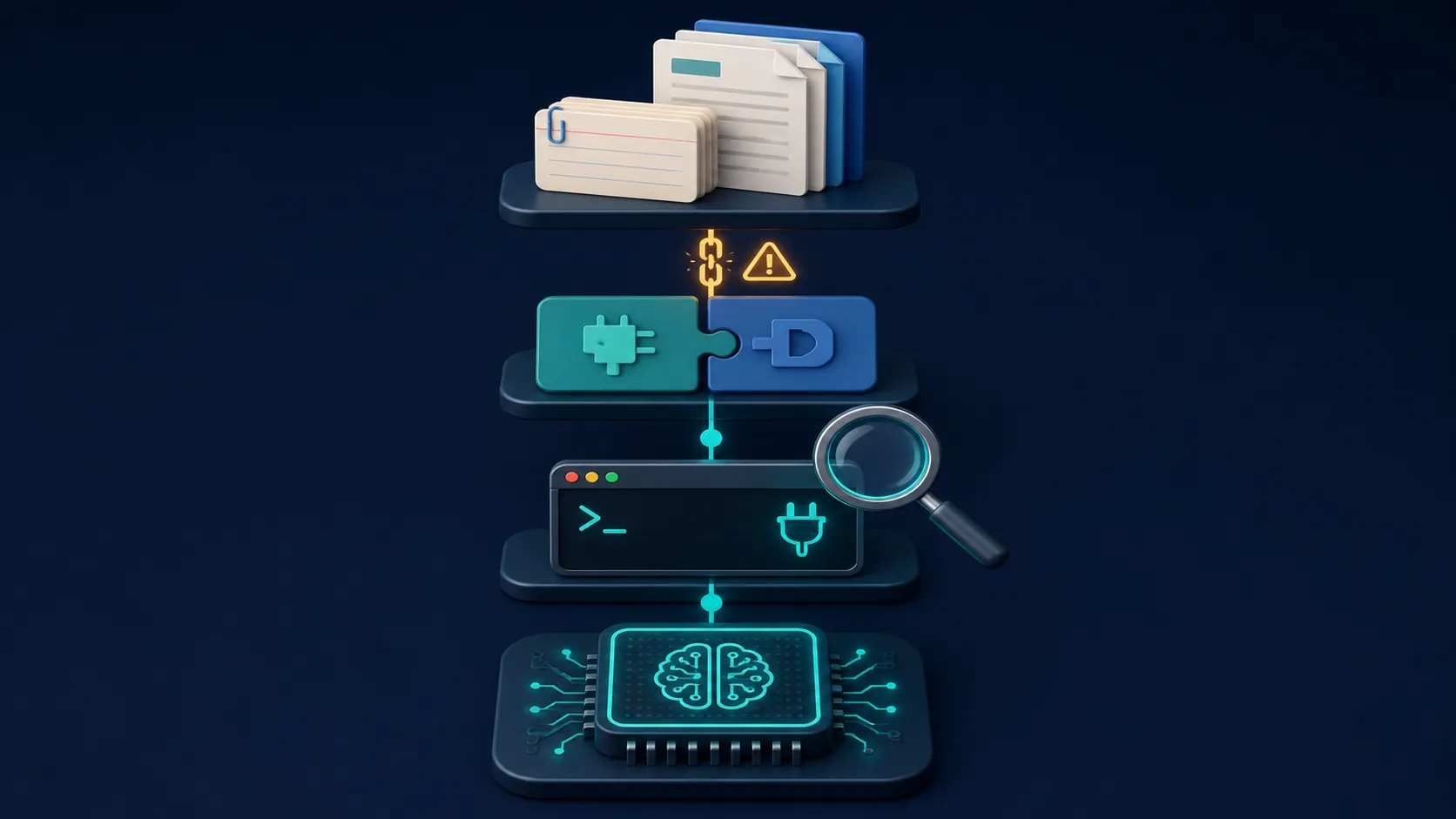
A local Obsidian AI failure is rarely one failure. It is usually a chain where one layer works and the next one silently does not. Check the layers in this order, and stop changing things above the layer that has not passed.
| Layer | What to verify | What a bad result usually means |
|---|---|---|
| Runner | Muse Glimmer is loaded and can answer inside Ollama or LM Studio before Obsidian is involved. | The model is not downloaded, not loaded, too large for the current memory setting, or the runner selected a different model. |
| Endpoint | The runner is serving on the address your plugin will use: Ollama at http://127.0.0.1:11434 or LM Studio at http://localhost:1234/v1. | The plugin is pointing at a dead port, a wrong base path, or a server that was never started. |
| Plugin reachability | Obsidian can send a simple prompt and receive any answer at all. | CORS, provider selection, API-key placeholder, or base-URL format is wrong. |
| Model identity | The plugin is calling the exact model name currently served by the runner. | The model exists locally, but the request names a different catalog string. |
| Settings ownership | Temperature, system prompt, and chat behavior are set in the layer that actually controls the request. | Copilot is overriding values you set in the runner UI. |
| Vault retrieval | The answer quotes or cites context that really came from the intended notes. | The chat works, but RAG is missing, mis-indexed, too narrow, too broad, or inventing around weak context. |
The CORS row deserves its own annoyance tax. If LM Studio can answer in its own UI but Copilot cannot reach it from Obsidian, do not assume Muse Glimmer is the problem. In the documented LM Studio-plus-Copilot flow, CORS has to be enabled for the browser-side request path. [5]
The settings-ownership row is just as good at wasting an evening. If you tuned temperature or system instructions in LM Studio and Copilot behaves differently, check Copilot’s own model settings before blaming the model. The XDA walkthrough explicitly notes that Copilot can override the runner’s temperature and system-prompt settings. [5]
The RAG test is not optional
A successful chat response only proves that Obsidian can reach the model. It does not prove that the model is using your vault well. Before relying on Muse Glimmer over personal notes, run a small acceptance test against notes whose contents you already know.
- Pick a few notes with facts that are not likely to be in the model’s training data.
- Ask for an answer that requires those notes, and require the answer to name the source note titles or quote short supporting phrases.
- Ask a negative-control question: something absent from the vault where the correct behavior is to say it cannot find support.
- Change the wording of the same question and confirm the retrieved notes stay relevant.
- Only then test larger vault-wide questions.
The reason for this caution is not theoretical. In an obsidian-copilot GitHub discussion, users reported heavy hallucination with smaller local RAG setups, including one case where a 24 GB Mac mini M4 struggled with vault-scale context on a 12B model. That is a discussion thread, not a benchmark, but it names the failure that matters in private-note use: the assistant can sound confident while retrieval is too weak or the context window is being used badly. [7]
Do not repair that by simply asking broader questions. If a vault-wide query fails, narrow the scope: query a folder, a tag group, or a known note set; rebuild the embedding index if the plugin supports it; and verify that the embedding model is actually configured. A local 30B model can still invent when the retrieval layer feeds it thin, irrelevant, or stale context.
Where system requirements still enter the Obsidian setup
The system-requirements question for note app integration is not just “can the model load?” Obsidian, the plugin, the local server, embeddings, retrieval index work, and the model’s KV cache all compete for the same practical machine budget. Muse Glimmer’s materials describe a very large default context of 131,072 tokens, with support up to 262,144 tokens; that context size is a major peak-memory variable, especially once local retrieval starts sending larger note bundles. [1][8]
For this guide, treat 24–32 GB unified memory or VRAM as the realistic starting envelope for 4-bit local use once the surrounding components are counted. That does not mean every 24 GB machine will deliver comfortable vault-wide RAG, and it does not mean a smaller machine can never run a tiny quant or a limited test. It means that below this range, failures become harder to distinguish: slow generation, model unloading, context pressure, and retrieval weirdness can all look like “the plugin is broken.” [1][8][9]
If you are still deciding whether Muse Glimmer is the right local model for a notes workflow, step back to Is Muse Glimmer the right open-source AI for note apps?. If the local-AI motivation is provider independence after cloud outages or policy shifts, the tradeoff is covered from another angle in our Claude outage migration guide. This article assumes the decision is already made.
A repeatable stopping point
Stop when each layer has passed, not when the first impressive answer appears. The runner should answer locally. The endpoint should be the one your plugin is configured to use. Copilot or the local-provider plugin should reach that endpoint. The model-name field should match the runner’s current catalog string. CORS should be enabled where the plugin path needs it. Copilot-side settings should be the settings you actually intend to use.
Then test retrieval against notes you can check by hand. Muse Glimmer can be wired into Obsidian through ordinary local OpenAI-compatible patterns, which makes the integration repeatable rather than exotic. Trustworthy is a narrower claim: it only starts after your vault answers survive source checks and after you accept that small-quant local RAG can still hallucinate.
References
- Introducing Muse Glimmer: An Open Agentic Model — Meta Research, 10 Aug 2026 — https://research.meta.ai/blog/introducing-muse-glimmer-open-agentic-model
- Muse Glimmer — Ollama Blog — https://ollama.com/blog/muse-glimmer
- muse-glimmer — Ollama Library — https://ollama.com/library/muse-glimmer
- Muse Glimmer — LM Studio Blog — https://lmstudio.ai/blog/muse-glimmer
- I started using my local LLM with Obsidian and should have done it sooner — XDA Developers — https://www.xda-developers.com/using-my-local-llm-with-obsidian/
- Using Obsidian with a local LLM — Annvix — https://annvix.com/blog/using-obsidian-with-a-local-llm
- obsidian-copilot discussion #1360 — GitHub — https://github.com/logancyang/obsidian-copilot/discussions/1360
- Muse Glimmer — Unsloth Docs — https://unsloth.ai/docs/models/muse-glimmer
- Muse Glimmer 30B Local Agent Guide — Wavect — https://wavect.io/blog/muse-glimmer-30b-local-agent-guide/


Comments
Join the discussion with an anonymous comment.