
If you already have a 24–32GB memory envelope and want private retrieval, summarization, and drafting inside a local-first note system, Muse Glimmer is worth considering. If you are on a typical 16GB laptop, want a no-code AI note app, or need frontier-grade synthesis over messy years of notes, it is probably not the right default. The privacy story is real; so are the hardware floor, setup work, and quality trade-offs.
One clarification needs to happen before anything else: Muse Glimmer is Meta’s open-weight AI model, not a note-taking app. It was released by Meta Superintelligence Labs in August 2026 as a roughly 29.6B-parameter dense model under Apache 2.0 terms, with local-device deployment as the pitch.[1][2] It will not replace Obsidian, Logseq, Apple Notes, Evernote, or your vault structure. At most, it becomes the model behind a plugin or local endpoint that your note app can call.

The short fit test
| You are probably a fit if… | You should probably skip or wait if… |
|---|---|
| You already own a 24GB GPU or a 32GB-class unified-memory machine and are comfortable running local models. | Your main machine is a 16GB laptop and you do not want AI setup to become the weekend project. |
| Your note tasks are retrieval, summarization, rewriting, extracting action items, and asking bounded questions over selected notes. | You need high-stakes synthesis, deep reasoning, or the best available accuracy over a large, messy vault. |
| You value no API key, no cloud round trip, and no per-token meter enough to accept slower local responses. | You want a polished consumer AI note app where install, sync, model choice, and UI are already solved. |
| You are willing to compare it against Qwen-family local models or a frontier cloud model before trusting it broadly. | You plan to let an AI agent modify, delete, merge, or reorganize notes without review. |
That table is deliberately more useful than a generic “pros and cons” list. The decision is not whether Muse Glimmer is impressive for its size. It is whether your note workflow can absorb the local-model tax: model downloads, quant choice, runner configuration, plugin wiring, latency, and the need to check answers before they touch anything important.
What Muse Glimmer actually buys a note-app user
The cleanest version of the setup looks like this: your notes stay on your machine, a local runner serves Muse Glimmer, an OpenAI-compatible endpoint exposes the model, and an Obsidian-style plugin sends selected note context to that endpoint. Ollama and LM Studio both list Muse Glimmer support, and LM Studio describes the model as available through its local model workflow.[3][4] In Obsidian, the surrounding pattern is already familiar: plugins such as Copilot for Obsidian, Text Generator, and Smart Connections can be pointed at local LLM backends in the broader Ollama/OpenAI-compatible style.[5][6]
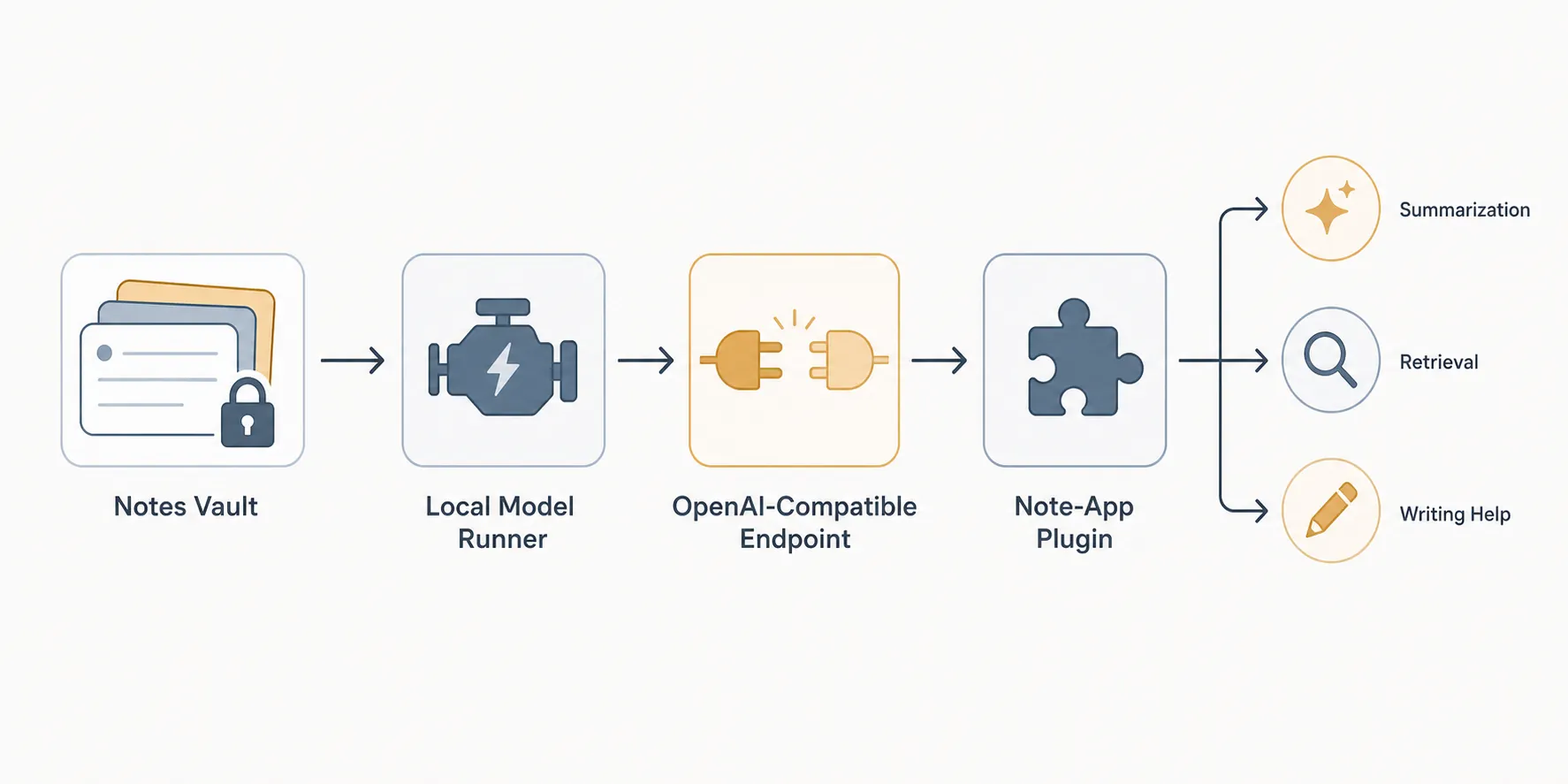
That path matters because “private AI” becomes less abstract. A plugin can send the current note, a folder, a selection, or retrieved chunks to a model running beside the vault. There is no need to paste sensitive material into a web chat. There is no API key to manage. There is no token bill quietly changing your behavior by making every long prompt feel expensive.
Muse Glimmer also has a few traits that fit note work unusually well on paper. Meta’s model card describes quantized weights below 20GB for the local configuration, deployment targets in the 24GB and 32GB memory range, a 131,072-token-plus context window, and multimodal text-and-image input.[2] For notes, that combination points to obvious uses: summarizing long research folders, asking questions across selected source notes, turning rough meeting notes into cleaner prose, reading screenshots or PDFs as part of a workflow, and drafting connective tissue between existing notes.
Apache 2.0 is not a decorative detail either. The license gives much more latitude for commercial use and fine-tuning than many “open” model releases with heavier downstream restrictions.[2] If your note system is personal, that may not matter today. If you are building an internal research workflow, client-facing knowledge base, or team assistant around local notes, it becomes part of the risk calculation.
For readers comparing local setups, FlowDesk’s Qwen-to-Obsidian Mac guide is the closest sibling path: the runner-and-plugin wiring is similar, even when the model choice changes. The model is not the whole system. The endpoint, plugin behavior, vault permissions, and retrieval settings are where the pleasant demo either becomes useful or starts leaking time.
The hardware floor is the first real con
Muse Glimmer’s local promise depends on hardware many note-app users do not have. Meta’s published configurations point to a 24GB VRAM or unified-memory envelope for the K-Quant-17GB build and a 32GB envelope for the dynamic quantized configuration.[2] Wavect’s hardware guide frames the practical requirement in the same 24–32GB range rather than as something comfortably aimed at ordinary 16GB laptops.[7]
That single fact should prevent a lot of bad installs. A person with a desktop GPU or a 32GB Apple Silicon machine is making a model-choice decision. A person with a 16GB work laptop is making a compromise decision before the model even answers a prompt. They may be able to run smaller local models, use a cloud endpoint, or wait for better quantization and tooling; Muse Glimmer should not be sold to them as if memory were a footnote.

Speed is also not one number. Meta reports DFlash speculative decoding gains of 3.1x on an RTX 5090 and 1.5–1.8x on M4/M5 Max systems.[2] Those are useful vendor figures, but they do not tell you how a long, retrieval-heavy note prompt will feel on your own machine with your own runner, quant, plugin, and context length.
Early user reports are uneven in exactly the way local-model users would expect. In Hacker News discussions, one user described slow generation on a 32GB Mac Mini as something like giving it a task and going outside, while another reported an RTX 3090 at roughly 75–100 tokens per second; a separate thread included a report of DFlash dropping on an M1 Max from roughly 23–24 tokens per second to about 9 tokens per second.[8][9] These are anecdotes, not benchmark suites. They are still useful warning lights: local inference can be fast enough, painfully slow, or surprisingly fragile depending on the stack.
Where it fits inside a vault
The best Muse Glimmer use cases are bounded. Ask it to summarize a selected folder of notes into a project brief. Have it rewrite a rough meeting note into cleaner sections. Use it to generate a first-pass list of unresolved questions from a research note. Ask it to find likely connections among a small set of retrieved notes, then show the source passages that led it there. These jobs tolerate a little roughness because the human can inspect the input and output in the same workspace.
The worse jobs are open-ended and authority-shaped. “Tell me what I believe about this topic across five years of notes.” “Merge these overlapping project plans.” “Decide which old notes are obsolete.” “Rewrite my knowledge base taxonomy.” Those are not impossible tasks for an AI assistant, but they require more than a large context window. They require accurate retrieval, stable reasoning, citation discipline, and a permission model that keeps the model from turning a confident guess into a changed vault.
For Obsidian specifically, the safer pattern is read-heavy and write-light. Let the model draft into a temporary note or append a clearly marked section. Do not give it silent authority to rename files, delete links, modify frontmatter, or reorganize folders. If a plugin offers agentic tools, treat them like shell access to a personal archive: convenient after careful scoping, reckless as a default.
Privacy is a real advantage, but it does not erase safety work
Running Muse Glimmer locally can keep note content off a vendor’s inference servers. That is the main reason to care about it for note apps. If your vault contains client research, private journals, health notes, unpublished writing, or company material you are not allowed to paste into cloud tools, a local model changes the shape of the problem.
It does not make the problem disappear. Meta’s own model card reports a 28.4% attack success rate on its Siren AgentDojo prompt-injection evaluation.[2] That figure should matter to anyone planning to let a model read arbitrary note content, web clips, PDFs, or pasted instructions. A malicious or simply messy note can contain text that tries to override the assistant’s instructions. A local model can still be manipulated locally.
The practical boundary is simple: Muse Glimmer can help read and draft, but it should not be the unreviewed authority over your vault. Keep retrieval visible. Prefer outputs with linked source notes. Ask for uncertainty. Avoid workflows where the model takes irreversible actions. If you need a formal policy for where AI may and may not touch your notes, FlowDesk’s personal AI policy guide is a better next step than another benchmark chart.
The quality question is still open enough to demand comparison
Meta’s launch materials and model card present Muse Glimmer as a strong on-device model, and LM Studio says it is “the strongest model of its size class we’ve tested.”[1][2][4] That is worth noting. It is not enough to end the comparison.
Independent results were already diverging within days of release. Kaitchup’s August 20, 2026 tests found Qwen3.8 27B substantially more accurate on several tasks, while Muse Glimmer used roughly four times less KV-cache memory.[10] That is exactly the kind of trade-off that matters for note apps: lower memory pressure may help long-context local workflows, but accuracy is what determines whether you spend the next ten minutes cleaning up a summary.
Another head-to-head published on August 10, 2026 concluded that Glimmer looked stronger as an agent while Qwen was the better coder.[11] Coding is not note-taking, but the split is useful because it pushes against a lazy ranking. A model can be attractive for local agentic workflows and still not be the best choice for every reasoning or synthesis job.
There is also a time boundary. Meta lists Muse Glimmer’s knowledge cutoff as January 4, 2026.[2] For a note app, that is not fatal if the model is mostly working over your retrieved notes. It is a problem if you expect it to answer current factual questions from memory. In a good vault workflow, the model should ground itself in notes you provide, not act as if its pretrained knowledge is the source of truth.
How to decide before installing it
Start with the machine, not the model announcement. If you do not already have the memory envelope, Muse Glimmer is not the first local model I would chase for notes. A smaller model, a Qwen-family comparison, or a carefully scoped cloud model will probably teach you more with less friction. If you do have the hardware, the next question is whether you value local privacy enough to accept some accuracy and speed uncertainty.
- Use Muse Glimmer if your main goal is private, local assistance over selected notes and you are comfortable configuring Ollama or LM Studio.
- Compare it against Qwen if accuracy on reasoning-heavy tasks matters more than memory efficiency.
- Use a frontier cloud model if the task requires the strongest synthesis you can get and the notes are safe to send under your privacy rules.
- Wait if you need a polished note-app feature rather than a model endpoint and plugin chain.
A sensible trial is small. Pick one folder of non-critical notes. Connect the local runner to your plugin. Ask for three jobs you actually repeat: a summary, a retrieval-style answer with source links, and a rewrite or synthesis draft. Time the responses. Check the claims against the notes. Then decide whether the local privacy and zero per-token cost are worth the response quality you actually see.
Do not start by handing it the whole vault. Long context is useful, but it also makes bad retrieval, stale assumptions, and prompt-injection exposure harder to inspect. If the model cannot behave well on a folder you understand, it has not earned broader access.
Verdict as of August 26, 2026
Muse Glimmer is a credible open-weight local AI layer for note apps, not an AI note app. Its best case is attractive: Apache 2.0 terms, local inference, no API key, no per-token cost, large context, multimodal input, and a realistic path into Obsidian-style workflows through Ollama or LM Studio. For privacy-first users with a 24–32GB-class machine and modest-to-moderate vault tasks, it belongs on the shortlist.
It is not the default recommendation for 16GB laptops, no-code users, or people who need the strongest possible synthesis over important notes. The early evidence points to real hardware constraints, variable speed, prompt-injection exposure, and credible competition from Qwen-family models. Without a fresh hands-on FlowDesk test of this exact stack, the honest recommendation is conditional: try Muse Glimmer if you already have the hardware and can evaluate it on your own notes before trusting it; skip or wait if the install itself would be the biggest project in your note system.
References
- Introducing Muse Glimmer: An Open Agentic Model That Runs on Your Device — Meta Research, August 10, 2026
- meta-models/Muse-Glimmer-30B — Hugging Face
- Muse Glimmer — Ollama
- Muse Glimmer — LM Studio
- Obsidian + Ollama: 5 Local LLM Plugins for Your Vault (2026) — PromptQuorum
- I started using my local LLM with Obsidian and should have done it sooner — XDA
- Muse Glimmer 30B Local Agent Guide — Wavect
- Hacker News discussion thread, item 49244699 — Hacker News
- Hacker News discussion thread, item 49241679 — Hacker News
- Qwen3.8 27B and Muse Glimmer Benchmarks — Kaitchup, August 20, 2026
- Muse Glimmer 30B vs Qwen 3.6 27B — Medium, August 10, 2026