
From Note-Organizer to Note-Generator: Notion's 2026 AI Shift
For years, Notion has been the go-to workspace for teams who want to build their own note-taking systems. You design the database, you write the pages, you connect the dots. But 2026 marks a fundamental shift. With the release of three AI capabilities — AI Meeting Notes, AI Autofill, and Custom Agents — Notion is no longer just a tool that organizes notes you write. It is becoming a tool that generates structured notes for you.
This article is written for knowledge workers and team leads who already use Notion for notes and are considering upgrading to a Business plan to access these AI features. We will break down exactly what each AI capability does for note-taking workflows, what it costs, and — most importantly — which types of note-taking benefit most.
If you are new to Notion's general strengths and weaknesses for note-taking, start with our baseline article: Notion for Note-Taking: The 5 Trade-Offs You Need to Know in 2026. The rest of this guide assumes you already understand Notion's core note-taking model and want to evaluate the AI layer.
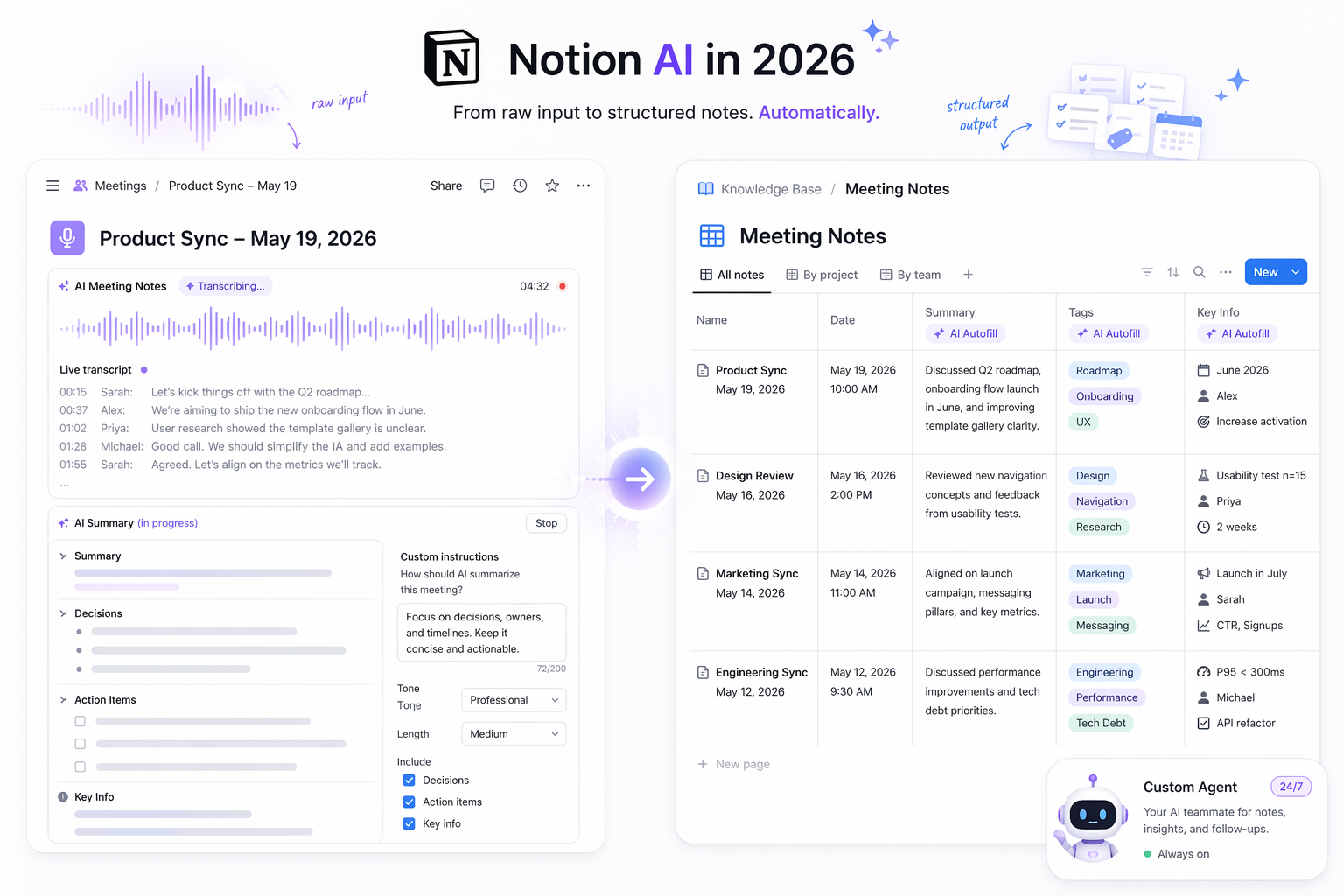
AI Meeting Notes: Background Recording with Structured Summaries
AI Meeting Notes, launched in beta with the January 2026 Notion 3.2 release, is the most visible of Notion's new AI features. It allows you to record, transcribe, and summarize meetings directly inside Notion — without needing a separate bot to join your calendar.
How It Works
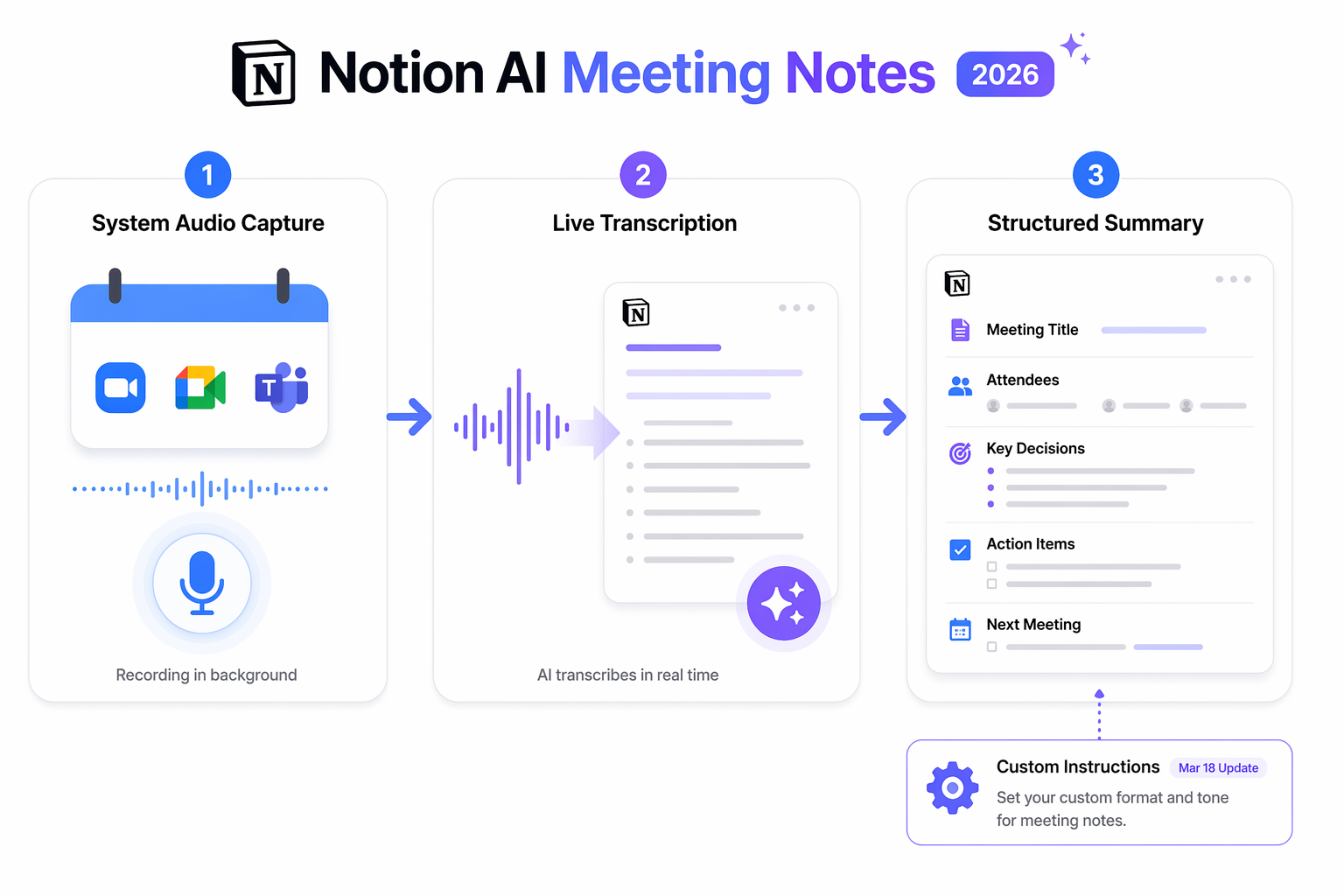
The workflow is straightforward. Inside any Notion page, type /meet to start a recording session. The feature captures system audio from your computer — meaning it works with Zoom, Google Meet, and Microsoft Teams without requiring a bot to join the meeting. On mobile, it uses the device microphone and can continue recording even when you switch apps or lock the screen, a capability introduced in the 3.2 release as Mobile AI Notes.
Once the meeting ends, Notion generates a live transcript and a structured summary page inside your workspace. The summary includes key decisions, action items, and a formatted recap — all linked to the same workspace where your projects, tasks, and databases live.
Custom Instructions: Tailoring the Output
The March 18, 2026 release added Custom Instructions for AI Meeting Notes, which is arguably the most important update for note-taking teams. Instead of accepting a one-size-fits-all summary, you can now define exactly how your meeting notes are formatted — including tone, sections, length, and team or project context. You access this from the "Instructions" menu in any Meeting Notes block.
For example, a product team might set instructions to always include a "Customer Impact" section and use bullet points for action items. A legal team might require a formal tone with a "Risks Discussed" section. This flexibility makes AI Meeting Notes far more useful for teams with established note-taking conventions.
Key Limitations You Need to Know
Notion's AI Meeting Notes is not a replacement for dedicated meeting assistants like Otter.ai or Fireflies.ai. The limitations are significant and worth understanding before you commit to a Business plan upgrade.
- No speaker labels in group meetings: Speaker identification works only for 1:1 virtual meetings via system audio and calendar data. In group meetings or in-person settings, the transcript is a single stream without attribution.
- No video recording: The feature captures audio only. If your team relies on video recordings for reference, you will need a separate tool.
- No auto-join: You must manually start recording with the /meet command. There is no option to automatically record all meetings on your calendar.
- Clunky consent flow: Notion requires you to inform participants that the meeting is being recorded. The current flow involves pasting a message or playing a pre-recorded audio announcement — a process that one reviewer described as awkward.
- Minimum audio requirement: You need at least 1 minute (300 characters) of audio to generate a summary. Shorter recordings will not produce output.
- Daily cap: Each user has a 10-hour daily recording limit.
Despite these limitations, the workspace integration advantage is real. Because notes live in the same workspace as your projects and databases, you avoid the tool-switching friction that comes with dedicated meeting note apps. For teams that already live in Notion, this alone can justify the upgrade.
For further structuring of your meeting notes, check out our curated list of best Notion meeting notes templates for 2026.
AI Autofill: Basic vs. Custom Agent — Two Tiers of Database Enrichment
AI Autofill for databases is Notion's answer to the problem of keeping note databases consistent and enriched. But there is an important split: Basic Autofill and Custom Agent Autofill serve very different purposes and have very different costs.
Basic Autofill: Free, Limited, and Included
Basic Autofill is included on Business and Enterprise plans and does not consume Notion credits. It can handle single-row tasks within a database: summarizing text properties, generating tags (select or multi-select, with the option to create new options), translating content, and filling custom prompts. Pages can be updated automatically 5 minutes after editing.
However, there is a critical limitation: Basic Autofill cannot read information on the web. If you want to enrich a note with data from an external source — say, pulling in a company description from a URL or cross-referencing information from another database — Basic Autofill cannot do it.
Custom Agent Autofill: Powerful but Credit-Consuming
Released on April 14, 2026, Custom Agent Autofill uses the Custom Agent engine to run continuous enrichment across all rows in a database. Because it runs with Custom Agent capabilities, it can search the web and cross-reference your workspace databases. This makes it far more powerful than Basic Autofill — but it consumes Notion credits.
The distinction matters for note-taking workflows. If you are simply summarizing a meeting transcript property or generating tags for a project status, Basic Autofill is sufficient and free. But if you want to automatically enrich a CRM note database with company information from the web, or cross-reference meeting notes with project milestones from another database, you need Custom Agent Autofill — and you need to budget for credits.
| Feature | Basic Autofill | Custom Agent Autofill |
|---|---|---|
| Cost | Included on Business/Enterprise | Consumes Notion credits ($10/1,000) |
| Web search | No | Yes |
| Cross-database search | No | Yes |
| Single-row tasks | Yes | Yes |
| Continuous enrichment | No (per-edit trigger) | Yes (can run across all rows) |
| Credit consumption | None | Per-run (varies by complexity) |
Custom Agents: Autonomous Note-Processing Bots Running 24/7
Custom Agents, launched on February 24, 2026 (Notion 3.3) and reaching general availability on May 4, 2026, represent the most ambitious part of Notion's AI push. These are fully autonomous AI teammates that can process note workflows without human intervention — triggered by schedules, events, or integrations.
Adoption has been strong: over 21,000 Custom Agents were created by early testers, with 2,800 running 24/7 as of the February 24 release. These numbers suggest that teams are finding real value in autonomous note processing.
Note-Taking Use Cases for Custom Agents
Custom Agents can be applied to several note-taking workflows that previously required manual effort:
- Task triage from feedback forms: An agent can monitor a feedback database, categorize incoming requests, and assign them as tasks to the appropriate team members. Notion's case study with Remote's IT team showed 95%+ accuracy in triage, autonomously resolving 25%+ of tickets and saving 20 hours per week.
- Daily briefing summaries: An agent can run on a schedule (e.g., every morning at 8 AM) to scan project databases, meeting notes, and status updates, then generate a daily briefing page with key highlights.
- Q&A from note collections: An agent connected to Slack can answer team questions by searching your note databases — no more digging through old meeting notes to find a decision.
- Status report generation: Agents can automate daily standups, weekly sprint reports, and monthly OKR updates by pulling data from project databases and meeting notes.
Pricing and Credit Costs
Custom Agents are priced via Notion credits at $10 per 1,000 credits per month. Credits are workspace-wide, shared across all agents, reset monthly, and do not roll over. Per-run costs vary by agent type:
| Agent Type | Cost per Run | Runs per 1,000 Credits |
|---|---|---|
| Q&A agent | $0.03 - $0.11 | 90 - 333 |
| Task triage agent | $0.05 - $0.15 | 65 - 190 |
| Project report agent | $0.08 - $0.18 | 57 - 133 |
| Email triage agent | $0.04 - $0.10 | 100 - 250 |
| Daily briefing agent | $0.10 - $0.30 | 33 - 100 |
The April 14, 2026 release reduced Custom Agent operational costs by 35-50% overall, thanks to new models like GPT-5.4 Mini & Nano, Haiku 4.5, and MiniMax M2.5 that use up to 10x fewer credits. This makes agents more affordable than they were at launch.
Agents pause automatically when credits run out, so there is no risk of surprise overage charges. Admins can set per-agent credit limits and restrict who can create agents.
Pricing Reality Check: What Each AI Feature Actually Costs
Understanding the cost structure is critical before upgrading. Notion's AI features are not a single add-on — they are a layered system with different plan requirements and additional costs.
| AI Feature | Plan Required | Additional Cost |
|---|---|---|
| AI Meeting Notes (beta) | Business or Enterprise | Included in plan ($18-20/user/month annual) |
| Basic Autofill | Business or Enterprise | Included — no credit consumption |
| Custom Agent Autofill | Business or Enterprise | Consumes Notion credits ($10/1,000/month) |
| Custom Agents | Business or Enterprise | $10/1,000 credits/month; per-run costs $0.03-$0.30 |
| Workers (beta, from Aug 2026) | Business or Enterprise | ~$0.0023/run; consumes micro-credits after Aug 11 |
A quick note on plan pricing: Business plan costs vary by source, ranging from $18 to $20 per user per month when billed annually. The Plus plan does not include AI Meeting Notes or Autofill. Free and Plus users get only 20 trial AI responses. Verify current pricing on notion.com/pricing before making a decision.
Which Note-Taking Workflows Benefit Most (and Which Don't)
Notion's 2026 AI features are powerful, but they are not universally useful for every note-taking style. The value depends heavily on whether your workflow involves structured, recurring information or unstructured personal capture.
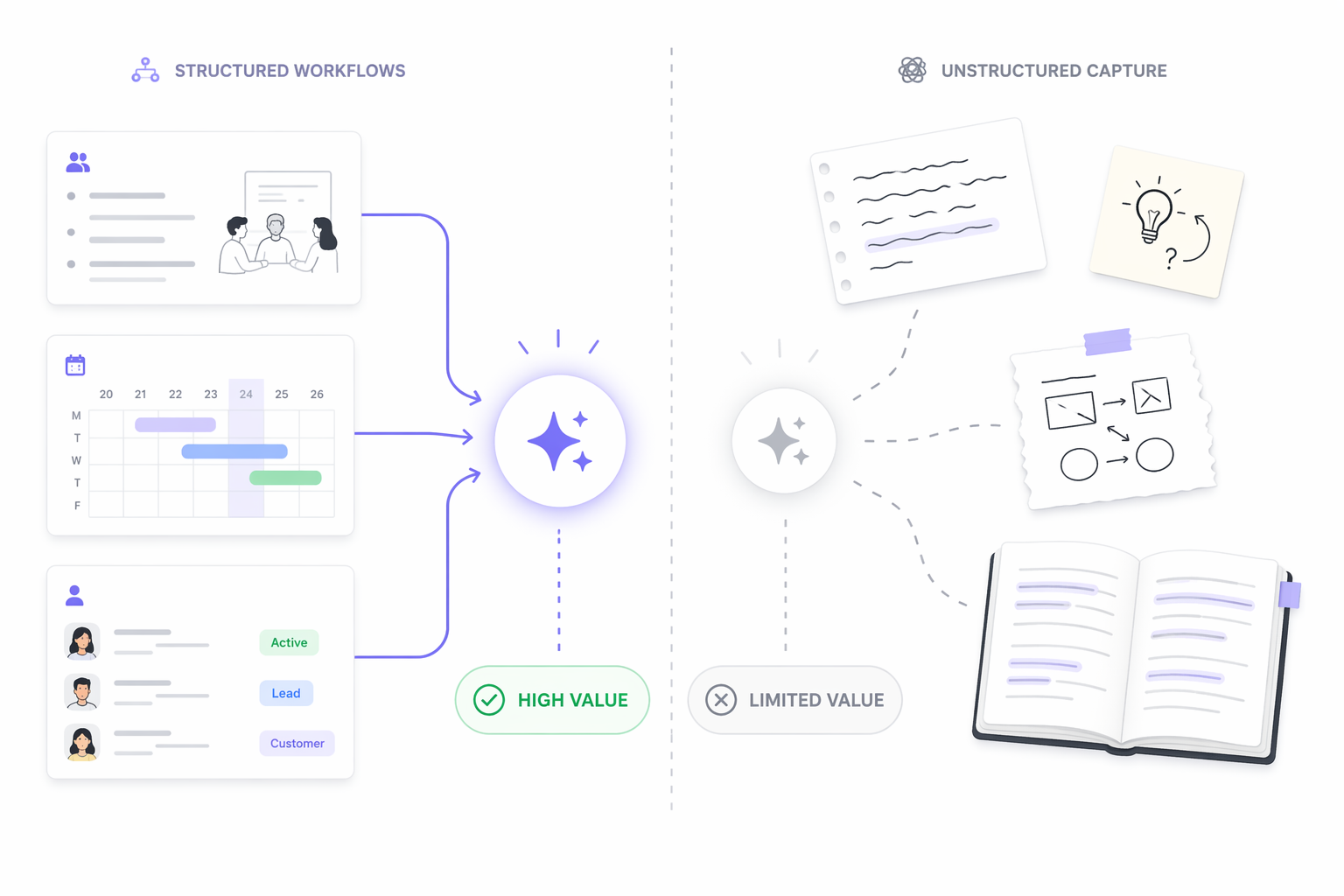
High-Value Workflows: Structured and Recurring
The following note-taking workflows get the most out of Notion's AI stack because they involve predictable formats, database-driven organization, and recurring triggers:
- Meeting notes: AI Meeting Notes captures, transcribes, and summarizes meetings directly into your workspace. Custom Instructions ensure consistent formatting. Action items land in your task database automatically.
- Project sync notes: Custom Agents can generate daily or weekly status reports from project databases and meeting notes, saving hours of manual compilation.
- CRM notes: Custom Agent Autofill can enrich customer interaction notes with web data and cross-reference them with project milestones.
- Feedback triage: Custom Agents can process incoming feedback forms, categorize them, and assign tasks — as demonstrated by Remote's IT team saving 20 hours per week.
Limited-Value Workflows: Unstructured Personal Capture
The following note-taking styles see limited benefit from Notion's AI features:
- Journaling and daily logs: AI Meeting Notes requires scheduled events. Autofill needs database properties. Custom Agents need defined triggers. A freeform journal entry gains little from AI processing.
- Random idea capture: Quick sketches, voice memos, and fleeting thoughts do not fit the structured database model that Autofill and Agents are designed for.
- Reading notes and highlights: Unless you are building a structured database of book notes with specific properties, the AI features offer little advantage over manual note-taking.
For readers who want a broader fit assessment, our Notion Review 2026: Who Should Actually Use It — A Persona-Driven Verdict provides persona-based guidance on whether Notion fits your overall productivity stack.
Bottom Line: Notion AI Is a Workflow Investment, Not a Magic Bullet
Notion's 2026 AI features — AI Meeting Notes, AI Autofill, and Custom Agents — represent a genuine shift in what the platform can do for note-taking. For teams with structured, recurring note workflows on a Business plan, the combination of background meeting recording, database enrichment, and autonomous agent processing can save significant time and reduce manual effort.
But the value is not universal. If your note-taking is mostly unstructured personal capture — journaling, random ideas, reading notes — the AI features offer limited benefit and may not justify the Business plan upgrade. The core thesis holds: Notion is becoming a note-generator, but it generates best when given a structured framework to work within.
If you are evaluating whether dedicated meeting note-taking tools might serve your needs better, our Best AI Meeting Notes Apps in 2026: Otter.ai vs. Fireflies.ai vs. Notion AI comparison provides a head-to-head look at how Notion stacks up against specialized alternatives.