
Quick Picks: Best AI Meeting Notes Tool by Use Case
- Best for real-time Zoom collaboration: Otter.ai — live captions appear inside Zoom itself, shared transcripts update in real time, and setup takes under five minutes.
- Best for CRM-driven sales and customer success teams: Fireflies.ai — Ask Fred lets you query your entire meeting history by deal or contact, and the 800-minute free tier is genuinely useful before you pay anything.
- Best for Notion-native teams: Notion AI Meeting Notes — meeting summaries land directly alongside project tasks with no bot joining the call, but only if your team is already on the Business plan.
- Best for students on a budget: Fireflies.ai free tier — 800 stored minutes beats Otter's 300-minute monthly cap for anyone who needs to transcribe lectures or study sessions without paying.
- Best for privacy-sensitive or regulated-industry roles: Notion AI Meeting Notes — device-side capture with no bot on the call and a documented no-training-on-user-data policy; HIPAA BAA is available on Otter Business if you need a dedicated healthcare option.
- Best for hybrid or in-person workers: None of these three tools is optimized for in-person recording — Notion AI captures device audio in the room, which works in quiet settings, but dedicated tools like Granola or a hardware recorder serve hybrid scenarios better.
The 2026 Category Split: Bot-Based, No-Bot, and Synthesis Layer
Most roundups treat Otter.ai, Fireflies.ai, and Notion AI as three competing versions of the same product. They are not. In 2026, AI meeting notes tools have split into three distinct categories, and choosing the wrong category will frustrate you regardless of which specific tool you pick.
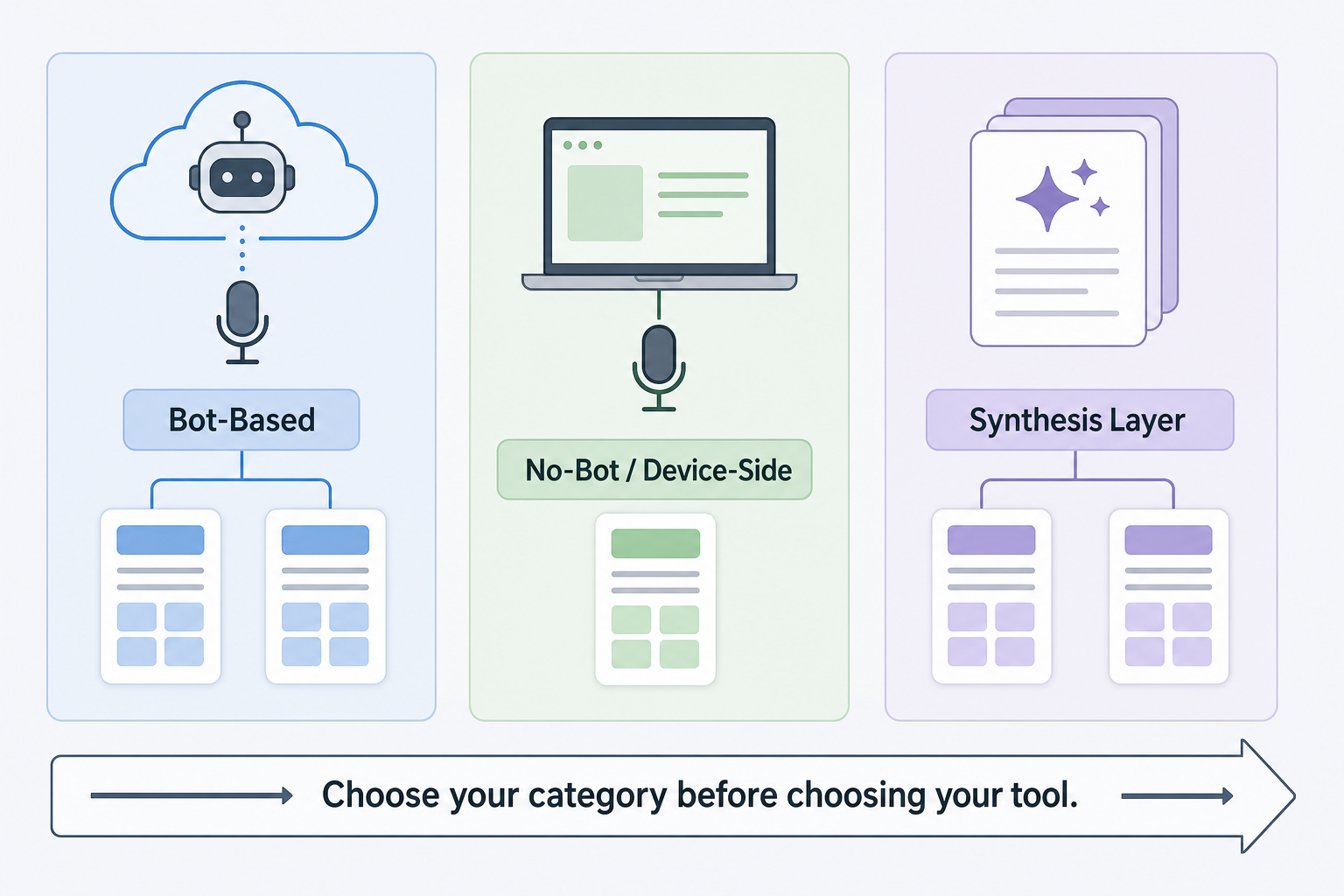
| Category | How it works | Examples in this comparison | Key tradeoff |
|---|---|---|---|
| Bot-Based | An AI bot joins your call as a participant, records the audio stream from the cloud, and returns a transcript. | Otter.ai, Fireflies.ai | Requires consent disclosure in most jurisdictions; participants see the bot in the attendee list. |
| No-Bot / Device-Side | The tool captures audio directly from your device microphone or system audio — no bot joins the call. | Notion AI Meeting Notes | Dependent on local audio quality; no cloud fallback if your mic is poor. |
| Synthesis Layer | An AI layer that queries and summarizes transcripts already stored in a workspace — not a standalone recorder. | Notion AI Q&A on stored notes | Only as useful as the transcripts already in your system; adds no value without prior recordings. |
Otter and Fireflies are both bot-based. The bot joins your Zoom, Google Meet, or Teams call as a named participant, which means every attendee can see it. This is not a bug — it is a disclosure mechanism — but it requires you to inform participants that the meeting is being recorded, which is a legal requirement in many U.S. states and EU jurisdictions.
Notion AI Meeting Notes is device-side only. It captures whatever audio your computer hears during a meeting — system audio plus your microphone — without sending a bot into the call. Participants do not see a recording bot. This is a meaningful privacy and consent difference, but it also means Notion AI is only as good as your local audio setup.
Five Criteria That Actually Matter for This Decision
Before reading the per-tool sections, calibrate your decision against these five dimensions. They are the ones that produce real-world frustration when ignored.
- Free tier limits and real-world usability. Otter's free plan caps at 300 minutes per month total. Fireflies stores 800 minutes before requiring a paid plan. Notion AI Meeting Notes requires a Business plan ($20/user/month) — there is no free tier for this feature. If you need to trial before committing, Fireflies gives you the most runway.
- Platform and meeting provider compatibility. All three tools support Zoom, Google Meet, and Microsoft Teams. Otter has the deepest native Zoom integration, with live captions appearing inside the Zoom interface. Fireflies and Notion AI work across all three providers without preferential treatment.
- CRM and workflow integration depth. Fireflies integrates directly with HubSpot and Salesforce — meeting summaries can push to contact records automatically. Otter has limited CRM connectivity. Notion AI has no CRM integration; it connects only to the Notion workspace itself.
- Privacy model and data handling. Notion AI documents that it does not train its AI models on user meeting data. Otter and Fireflies process audio on their own cloud infrastructure. SOC 2 Type II certification is available across all three tools in 2026, but HIPAA BAA is only available on Otter Business and Fireflies Enterprise.
- Workspace integration vs. standalone tool. Otter and Fireflies are standalone products — they work regardless of which project management or note-taking tool your team uses. Notion AI Meeting Notes only makes sense if your team already runs work inside Notion. If you are not a Notion shop, this feature adds zero value.
Otter.ai: Best for Real-Time Zoom Collaboration
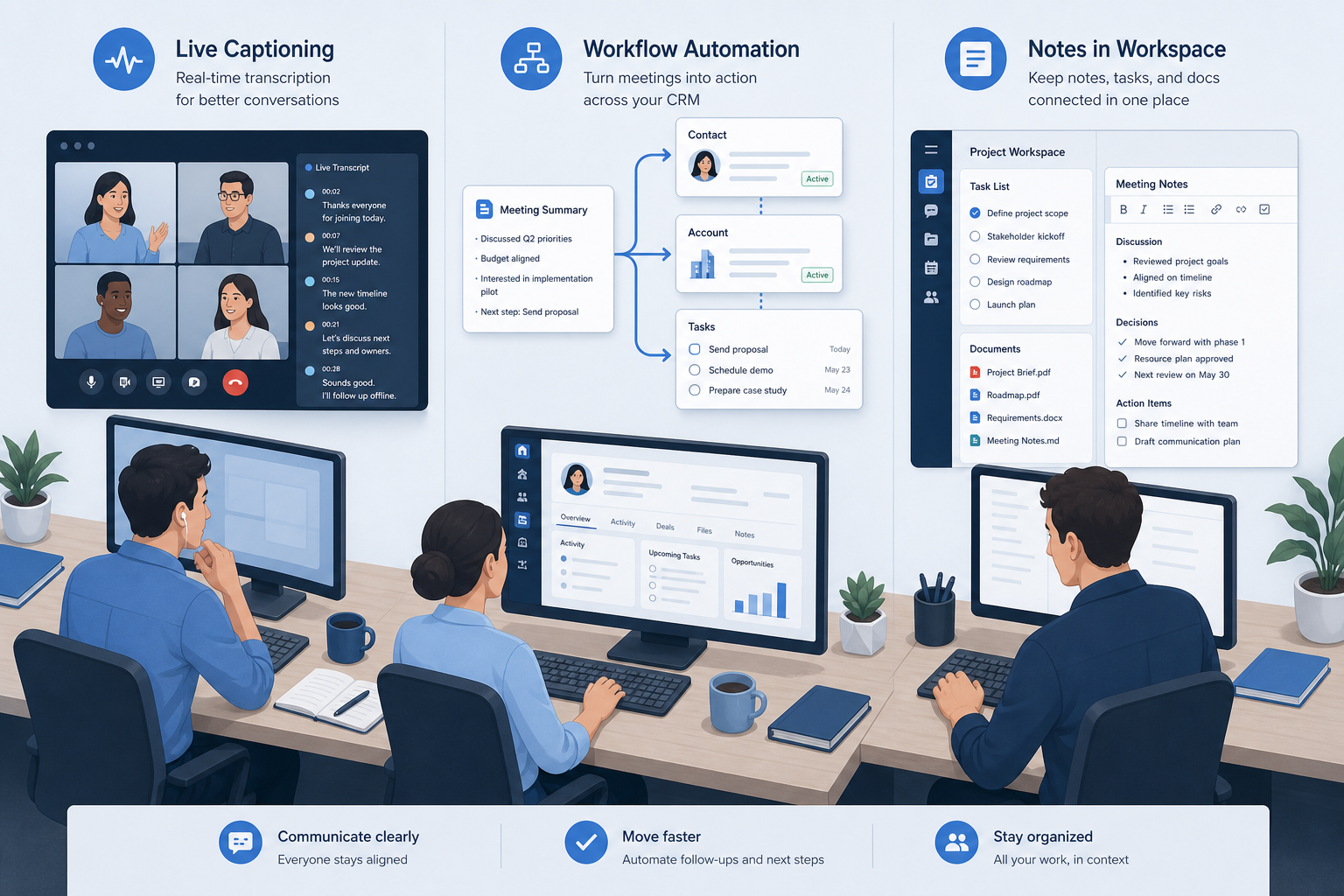
Otter.ai's core advantage is live. When you are on a Zoom call, Otter's live captions appear inside the Zoom interface itself — not in a separate browser tab, not in an app you have to switch to. The transcript scrolls in real time, highlights the current speaker, and is immediately shareable with anyone in the call. For distributed teams where someone always joins late or needs to catch up mid-meeting, this is genuinely useful.
Onboarding is the simplest of the three tools. Connect your calendar, authorize Zoom, and Otter joins your next meeting automatically. Most users are functional within ten minutes.
Otter.ai Pricing (Verified June 2026)
| Plan | Annual rate (per user/month) | Monthly rate (per user/month) | Key limits |
|---|---|---|---|
| Free | $0 | $0 | 300 minutes/month total; 30-minute max per conversation; 3 imports/month |
| Pro | $8.33 | $16.99 | 1,200 minutes/month; 90-minute max per conversation; unlimited imports |
| Business | $20.00 | $30.00 | 6,000 minutes/month per user; admin controls; HIPAA BAA available |
| Enterprise | Custom | Custom | Custom limits; SSO; dedicated support; advanced compliance |
What Otter.ai Does Well
- Live captions inside Zoom — no tab switching, no separate app.
- Real-time shared transcript that all meeting participants can view and annotate during the call.
- Fastest onboarding of the three tools — calendar sync plus Zoom authorization is all that is required.
- Supports 16 languages for transcription.
- HIPAA BAA available on the Business plan — relevant for healthcare teams that need a compliant transcription option.
Otter.ai Honest Weaknesses
- 300-minute monthly free cap is the tightest of any mainstream AI meeting notes tool in 2026.
- Transcription accuracy drops noticeably in noisy environments, heavy-accent speech, or calls with significant crosstalk — real-world accuracy in these conditions can fall to the mid-80% range rather than the higher figures shown in controlled benchmarks.
- CRM integration is shallow compared to Fireflies — there is no native push to Salesforce or HubSpot contact records.
- The bot joins as a named participant, which requires recording consent disclosure in most U.S. states and under GDPR.
- Meeting notes live in Otter's own interface — if your team works primarily in Notion, Slack, or a project management tool, you will need to copy or export manually.
Fireflies.ai: Best for CRM-Integrated Sales and Customer Success Teams
Fireflies.ai is built around the premise that meeting transcripts are most valuable when they feed downstream systems automatically. Its Ask Fred copilot lets you query your entire meeting history in natural language — ask it what a specific customer said about pricing three calls ago, and it retrieves the relevant clip and context. For sales teams managing large pipelines, this alone justifies the tool.
The 60+ language support is a genuine differentiator. Otter and Notion AI both support 16 languages. If your team runs customer calls in Spanish, Portuguese, French, German, or any of dozens of other languages, Fireflies is the only one of these three tools that handles it reliably.
Fireflies.ai Pricing (Verified June 2026)
| Plan | Annual rate (per user/month) | Monthly rate (per user/month) | Key limits |
|---|---|---|---|
| Free | $0 | $0 | 800 minutes stored; unlimited transcription seats; limited AI summaries |
| Pro | $10.00 | $18.00 | Unlimited transcription; full AI summaries; 8,000 minutes storage |
| Business | $19.00 | $29.00 | Unlimited storage; CRM integrations; custom vocabulary; analytics |
| Enterprise | Custom | Custom | HIPAA BAA; SSO; dedicated support; advanced security controls |
What Fireflies.ai Does Well
- Ask Fred copilot — query your entire meeting history by deal, contact, or topic in natural language.
- 60+ language support — the broadest language coverage of the three tools by a wide margin.
- Native CRM integration with HubSpot and Salesforce — meeting summaries, action items, and sentiment data can push to contact records automatically on the Business plan.
- 800-minute free storage tier — the most generous free entry point of the three tools.
- SOC 2 Type II certified; HIPAA BAA available on Enterprise for regulated-industry teams.
Fireflies.ai Honest Weaknesses
- The bot joins the call as a named participant — same consent disclosure requirements as Otter, and some enterprise clients may prohibit external bots from joining calls.
- Live captioning during the call is less polished than Otter's native Zoom integration — Fireflies is stronger on post-meeting processing than real-time display.
- The 800-minute free cap is a total storage limit, not a monthly reset — heavy users will exhaust it within a few weeks.
- CRM integrations (HubSpot, Salesforce) are gated to the Business plan — the feature that makes Fireflies most valuable for sales teams requires the $19/user/month plan.
- The interface is more complex than Otter's — there is a meaningful learning curve to configure integrations and custom vocabulary correctly.
Notion AI Meeting Notes: Best for Teams Already Living in Notion
For teams that do run their work inside Notion, the integration is genuinely compelling. Meeting notes appear in the same database as your project tasks, meeting agendas, and decision logs — no copy-paste, no export, no context switching. The transcript and AI summary land directly in whatever Notion page or database you designate.
The no-bot model is a meaningful differentiator. Because Notion AI captures audio from your device rather than sending a bot into the call, participants do not see a recording participant in the attendee list. This changes the consent dynamic — you are still legally required to disclose recording in most jurisdictions, but the mechanism is different and less visible to participants who might otherwise feel surveilled.
Notion AI Meeting Notes Pricing (Verified June 2026)
| Plan | Price (per user/month, annual) | Meeting Notes included? | Notes |
|---|---|---|---|
| Free | $0 | No | No AI features on the free plan. |
| Plus | $10.00 | No | AI add-on available, but Meeting Notes feature is not included on Plus. |
| Business | $20.00 | Yes | Notion AI Meeting Notes included. This is the minimum plan required. |
| Enterprise | Custom | Yes | All Business features plus advanced security, audit logs, and compliance controls. |
What Notion AI Meeting Notes Does Well
- No bot joins the call — meeting participants do not see a third-party recording participant in the attendee list.
- Meeting notes land directly inside your Notion workspace — alongside project tasks, agendas, and decision logs — with no manual export required.
- Documented no-training-on-user-data policy — Notion does not use your meeting content to train its AI models, a privacy commitment neither Otter nor Fireflies makes as explicitly.
- Notion AI Q&A can query stored meeting notes in natural language — find what was decided in a specific project meeting without scrolling through transcripts.
- SOC 2 Type II certified; works within existing Notion workspace permissions and access controls.
Notion AI Meeting Notes Honest Weaknesses
- Requires the Business plan — $20/user/month is the entry point, with no free or low-cost trial for this specific feature.
- No live captioning during the call — notes are generated after the meeting ends, not in real time.
- No CRM integration — meeting notes stay inside Notion and do not push to Salesforce, HubSpot, or any external system.
- Audio quality is entirely dependent on your local device microphone and system audio — poor audio conditions produce significantly worse transcripts than cloud-processed bot-based tools.
- Supports 16 languages — the same as Otter, and far fewer than Fireflies' 60+ language coverage.
- Completely useless outside the Notion ecosystem — if your team migrates away from Notion, all meeting note history and the feature itself disappear.
Head-to-Head Comparison Table
| Dimension | Otter.ai | Fireflies.ai | Notion AI Meeting Notes |
|---|---|---|---|
| Model | Bot-based (joins call) | Bot-based (joins call) | No-bot, device-side capture |
| Free tier | 300 min/month | 800 min stored (total) | None — Business plan required |
| Paid entry price | $8.33/mo (annual) | $10/mo (annual) | $20/user/mo (annual) |
| Zoom / Meet / Teams | All three; deepest Zoom integration | All three | All three via device audio |
| Live in-meeting captions | Yes — inside Zoom natively | Limited | No |
| Language support | 16 languages | 60+ languages | 16 languages |
| CRM integration | Limited | HubSpot, Salesforce (Business plan) | None |
| In-person / hybrid recording | Limited | Limited | Yes (device mic) |
| Workspace integration | Standalone + exports | Standalone + CRM push | Notion only |
| AI query on meeting history | Basic search | Ask Fred copilot | Notion AI Q&A |
| SOC 2 Type II | Yes | Yes | Yes |
| HIPAA BAA | Business plan | Enterprise plan only | Not available |
| AI training on user data | Not explicitly excluded | Not explicitly excluded | Explicitly excluded (no training) |
| Standalone product | Yes | Yes | No — Notion Business feature only |
Which Tool Is Right for Your Persona?
The right tool depends more on your workflow context than on any individual feature. Here is a direct verdict for each major reader persona.
| Persona | Recommended tool | One-sentence reason |
|---|---|---|
| Student on a budget | Fireflies.ai (free) | 800 stored minutes gives you enough runway to transcribe a full semester of lectures before hitting the cap. |
| Notion power user / team | Notion AI Meeting Notes | Meeting notes land directly inside your existing Notion workspace with no export step — but only if you are already on the Business plan. |
| Sales or customer success team | Fireflies.ai (Business) | Ask Fred + HubSpot/Salesforce push turns meeting transcripts into CRM data automatically, which is the core workflow these teams need. |
| Individual knowledge worker on a free plan | Fireflies.ai (free) or Otter.ai (free) | Fireflies gives more storage; Otter gives better real-time Zoom experience — choose based on whether you need live captions or post-meeting search. |
| Hybrid or in-person worker | Consider Granola or a hardware recorder instead | None of these three tools is optimized for in-person recording; Notion AI captures device audio but requires good room acoustics to produce reliable transcripts. |
| Privacy-sensitive or regulated-industry role | Notion AI Meeting Notes (if on Notion Business) or Otter.ai Business (for HIPAA BAA) | Notion AI's no-training policy and no-bot model reduce data exposure; Otter Business is the only option here with an available HIPAA BAA at a non-enterprise price point. |
One gap worth naming honestly: if your meetings are primarily in-person or hybrid — conference rooms, client site visits, whiteboard sessions — none of these three tools is the right primary solution. Notion AI can capture room audio from a laptop microphone, but accuracy in ambient noise is unreliable. Tools like Granola (device-side, optimized for in-person) or a dedicated hardware recorder are better fits for that workflow. This comparison is focused on virtual meeting transcription, which is where all three tools are designed to operate.
Privacy, Compliance, and Recording Consent
Privacy and compliance are not edge-case concerns for AI meeting notes tools — they are baseline requirements for any team deploying them at scale. Here is what you need to verify before rolling out any of these three tools.
SOC 2 Type II and HIPAA
- SOC 2 Type II: All three tools carry SOC 2 Type II certification as of 2026. This is table stakes for enterprise procurement — if a vendor in this category does not have it, that is a red flag.
- HIPAA BAA (Otter.ai): Available on the Business plan ($20/user/month). If you are in healthcare and need a HIPAA-compliant transcription option at a non-enterprise price point, Otter Business is currently the only one of these three tools that offers this.
- HIPAA BAA (Fireflies.ai): Available on the Enterprise plan only — custom pricing. Healthcare teams on tighter budgets should factor this into their Fireflies evaluation.
- HIPAA BAA (Notion AI): Not available as of June 2026. Notion is not a HIPAA-compliant platform for meeting transcription purposes.
Bot Consent and Recording Laws
In the United States, recording consent requirements vary by state. Two-party (all-party) consent states — including California, Florida, Illinois, and others — require all participants to consent before a meeting is recorded. Most other states follow one-party consent rules. In the EU, GDPR requires a lawful basis for processing personal data, and recording a call typically requires either explicit consent or a documented legitimate interest.
- Bot-based tools (Otter, Fireflies): The bot appears as a named participant in the attendee list, which serves as a visible disclosure mechanism. Best practice is to also state verbally at the start of the meeting that it is being recorded and transcribed. Most enterprise deployments add a standard disclaimer to meeting invites.
- Device-side capture (Notion AI): No bot appears in the attendee list, so there is no automatic visual disclosure. This means the disclosure responsibility falls entirely on the meeting organizer. You still need to inform participants — the tool just does not do it for you.
AI Training on User Data
Notion AI explicitly documents that it does not train its AI models on user content, including meeting notes. This is a meaningful policy distinction for teams handling sensitive business conversations, client calls, or proprietary information. Otter and Fireflies do not make the same explicit commitment in their standard terms — enterprise contracts may include data processing agreements that address this, but it is worth verifying directly with each vendor if this is a concern for your organization.
Data Residency
All three tools process data on U.S.-based cloud infrastructure by default. Fireflies and Notion offer enterprise data residency options for EU-based teams that require data to remain within European borders. Otter's enterprise tier includes data processing agreements for GDPR compliance. If data residency is a hard requirement, confirm the current options directly with each vendor — this is an area where policies evolve frequently.
Frequently Asked Questions
Can I use Otter.ai for free long-term?
Technically yes, but practically it depends on your meeting volume. The free plan's 300-minute monthly cap resets each month, so it is a permanent free tier — not a trial. If you attend fewer than five hours of meetings per month, the free plan is workable. Above that, you will hit the cap regularly and either need to upgrade or stop recording meetings mid-month.
Does Fireflies.ai require a bot to join the call?
Yes. Fireflies works by sending a bot participant (named "Fireflies.ai Notetaker" by default) into your Zoom, Google Meet, or Teams call. You cannot use Fireflies without the bot joining as a participant. If your organization prohibits external bots from call recordings, Fireflies is not an option.
Is Notion AI Meeting Notes available on the Plus plan?
No. As of June 2026, Notion AI Meeting Notes requires the Business plan at $20/user/month. The Plus plan ($10/user/month) does not include this feature, even with the AI add-on. This is a hard plan-tier gate, not a feature you can unlock by paying for the AI add-on separately.
Which tool has the best transcription accuracy?
In controlled conditions with clear audio, all three tools produce transcripts in the 90–95% accuracy range. In real-world conditions — background noise, heavy accents, multiple speakers talking over each other — accuracy drops for all three, and the gaps between them narrow further. Accuracy should not be the primary decision criterion. Choose based on workflow fit, pricing, and integration needs; the accuracy differences between these tools are unlikely to be the deciding factor in your experience.
Do any of these tools work for in-person meetings?
Notion AI Meeting Notes captures device audio, so it can technically record an in-person meeting if you open your laptop in the room. Results depend heavily on room acoustics and how close participants are to the microphone. Otter and Fireflies are cloud-based bot tools designed for virtual calls — they do not have a meaningful in-person recording mode. For regular in-person or hybrid meeting recording, dedicated tools like Granola or a hardware recorder are better fits.
What happens to my meeting data if I cancel?
Otter and Fireflies both retain your transcripts for a period after cancellation — typically 30 to 90 days depending on plan — before deleting them. You can export transcripts before canceling. Notion AI Meeting Notes data lives inside your Notion workspace; if you downgrade from Business to Plus, the meeting notes content remains in your workspace but you lose the ability to generate new meeting notes. Confirm the specific data retention policy with each vendor before canceling, as these policies can change.
Can I export transcripts from all three tools?
Yes, all three support transcript export. Otter exports to TXT, DOCX, and PDF. Fireflies exports to TXT, DOCX, PDF, and SRT (for captions). Notion AI Meeting Notes transcripts are Notion pages — you can export them in Markdown, PDF, or HTML using Notion's standard export functionality. None of the three tools locks your transcript data in a proprietary format that cannot be exported.
Are there alternatives worth considering beyond these three?
Yes, depending on your use case. Fathom is worth evaluating if you want a free-forever option with no minute caps for Zoom users — it is more limited than Fireflies on integrations but has a genuinely generous free tier. Granola is the strongest option for in-person and hybrid recording. Read AI is competitive for teams that want AI-generated meeting scores and engagement analytics alongside transcripts. These tools are outside the scope of this comparison, but they are worth a look if none of the three covered here fits your workflow precisely.