
The $13.3 Billion Question: Why AI Note-Taking Is Splitting Into Three Camps
The note-taking app market is no longer a single category. According to a February 2026 report from Research and Markets, the broader market is valued at $13.3 billion in 2026, up from $11.02 billion in 2025, and is projected to reach $28.05 billion by 2030 at a compound annual growth rate of 20.5%. But those headline numbers mask a deeper structural shift: the market is fragmenting into three distinct camps that serve fundamentally different needs.
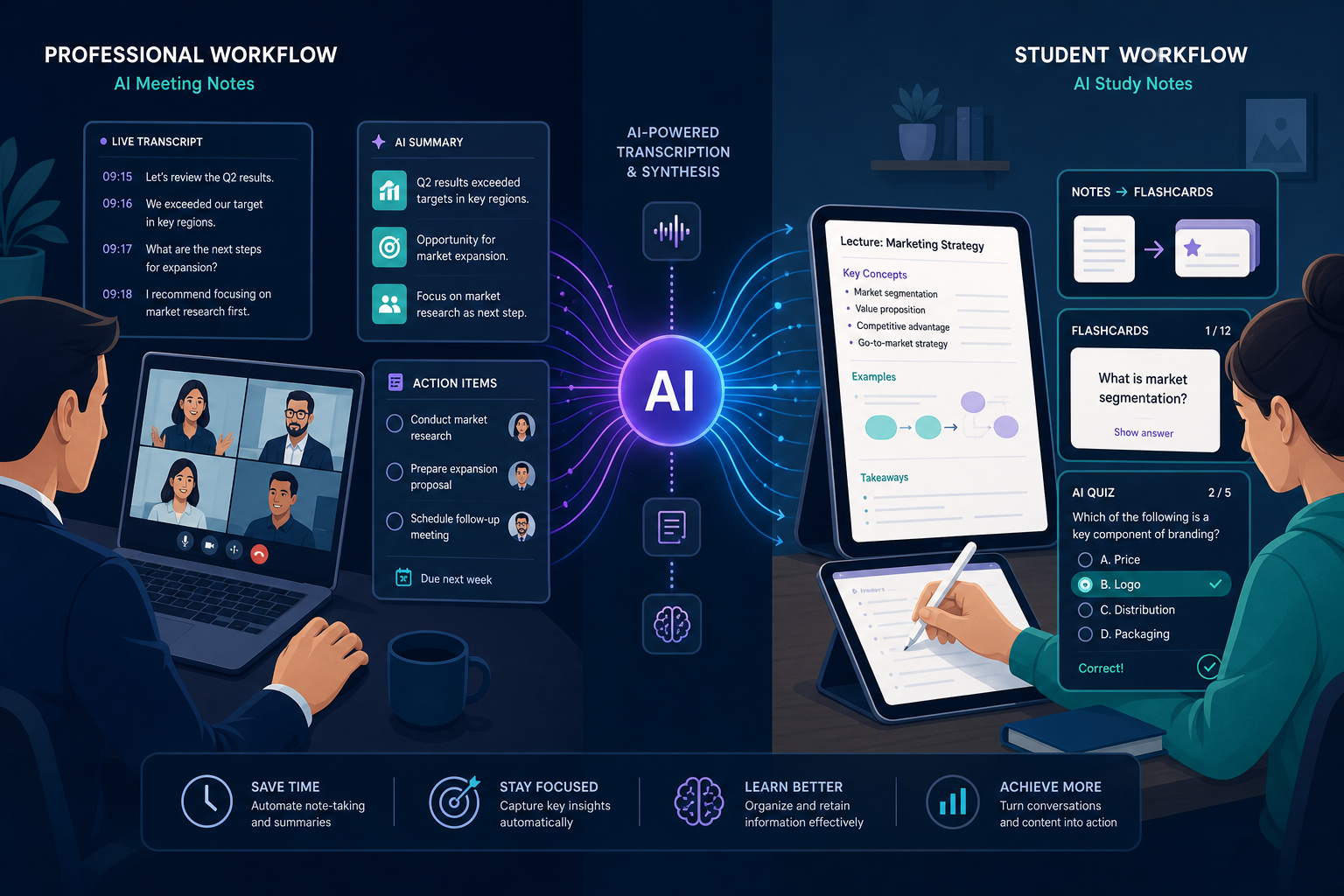
On one side, meeting-intelligence platforms — tools like Fireflies, Otter, Fathom, Jamie, and Granola — are optimized for capturing and summarizing conversations. They are built for sales teams, operations managers, and anyone whose work revolves around synchronous meetings. On the other side, study-synthesis tools — Google NotebookLM, Laxu AI, and Notion AI — focus on converting lectures, articles, and research into structured study materials like flashcards, summaries, and quizzes. They serve students and researchers who need to understand and retain information over time.
Between them sits a third group: traditional personal knowledge management (PKM) apps like Obsidian, Roam, and Logseq. These tools prioritize local-first data ownership, bidirectional linking, and graph-based exploration. They have largely resisted adding native AI transcription, and their users tend to value deep understanding over rapid capture.
The core tension is this: meeting bots capture everything but help you understand nothing over time. Study tools help with recall but don't integrate with your daily workflow. PKM apps offer deep understanding but lack AI-powered capture. No single tool yet bridges all three needs, and that gap is where the next wave of innovation — and confusion — lives.
Camp 1: Meeting-Intelligence Platforms — The Bot Invasion and Its Discontents
Meeting-intelligence platforms are the most visible and well-funded segment of the AI note-taking market. These tools join your video calls — either as a bot that appears in the participant list or as a local desktop app that captures audio from your device — and produce transcripts, summaries, and action items automatically.
The category splits into two sub-camps based on capture method:
- Bot-based capture: Tools like Fireflies and Otter.ai join your calendar meetings as a participant. They appear in the attendee list, listen to the conversation, and produce a transcript. This approach is straightforward but increasingly controversial — Google rolled out an update in March 2026 that flags third-party notetaker bots as a "potential risk" on Google Meet, defaulting to denying them entry.
- Bot-free (device) capture: Tools like Granola, Jamie, and Krisp capture audio from your local device — your laptop's microphone or system audio — without joining the meeting as a participant. This approach avoids bot-blocking policies and raises fewer red flags with meeting hosts, but it requires the user to have the app running locally.
Investor confidence in this space is high. Granola raised $43 million in a Series B round at a $250 million valuation in May 2025, signaling that venture capital sees meeting intelligence as a durable category, not a passing feature. The bet is that as remote and hybrid work solidifies, the ability to automatically capture and summarize every meeting becomes table stakes for knowledge workers.
The key differentiator among meeting-intelligence platforms is no longer transcription quality — most are good enough — but rather how they handle post-meeting intelligence. Can they track action items across multiple meetings? Do they integrate with CRM systems like Salesforce or HubSpot? Can they identify patterns across your entire meeting history? These are the features that separate a simple transcription tool from a true meeting-intelligence platform.
Camp 2: Study-Synthesis Tools — From Lecture Capture to Active Learning
The second camp targets a fundamentally different use case: converting lectures, readings, and research into materials that support active learning. These tools are designed for students and researchers who need to understand and retain information, not just capture it for later reference.
Google NotebookLM leads this category. It is free, source-grounded — meaning it only answers questions based on the sources you upload — and excels at synthesizing information from multiple documents into coherent summaries, FAQs, and study guides. Its key innovation is that it forces the user to bring their own sources, which reduces hallucination risk and keeps the output tethered to verified material.
Notion AI takes a different approach. Rather than being a standalone study tool, it integrates AI features into Notion's broader PKM ecosystem. Users can ask questions across their entire workspace, generate summaries of meeting notes, and create study materials from existing pages. The trade-off is that Notion AI costs $12 per member per month on top of a Notion subscription, and its output quality depends heavily on how well-structured your workspace is.
Smaller players like Laxu AI and Polar Notes AI focus specifically on the student workflow: record a lecture, get a transcript, and automatically generate flashcards, quizzes, and summaries. These tools are promising but come with a significant caveat.
For readers who want a broader view of traditional student note-taking options — including handwriting, typing, and hybrid approaches — our Best Note-Taking App for Students in 2026 guide covers the non-AI side of the equation.
Camp 3: The PKM Holdouts — Where Traditional Note-Taking Still Wins
Not every knowledge worker wants AI to touch their notes. A vocal and growing segment of the productivity community uses tools like Obsidian, Roam Research, and Logseq precisely because these apps do not offer AI transcription or summarization. These are the PKM holdouts, and their reasons are worth understanding.
The core value proposition of traditional PKM apps is local-first data ownership. Your notes live as plain Markdown files on your hard drive. You can open them with any text editor, sync them with any cloud service (or none), and migrate to another tool without losing formatting or links. This is the opposite of the vendor lock-in model used by most AI note-taking platforms, which store your transcripts on their servers and limit export options.
Bidirectional linking and graph views are the other major differentiators. When you take notes in Obsidian or Roam, every link between notes is two-way: if you link to a note from another note, the first note automatically shows a backlink. Over time, this creates a knowledge graph that reveals connections you might never have noticed. AI tools that generate summaries from individual meetings cannot replicate this emergent understanding.
For knowledge workers who need deep understanding — researchers synthesizing papers, writers developing long-form arguments, or professionals building a personal knowledge base over years — traditional PKM apps remain the better choice. The AI note-taking tools are excellent at capture, but they are not yet good at the kind of long-term, connective thinking that PKM apps enable.
For a detailed comparison of local-first vs. cloud-based PKM approaches, see our Best PKM Software 2026: Local-First vs Cloud guide.
Transcription Accuracy Benchmarks: What the Numbers Actually Mean
Every AI note-taking tool advertises high accuracy, but the real-world numbers tell a more nuanced story. tl;dv conducted a six-week test across 15+ real meetings and found that top tools achieve approximately 95-98% accuracy for clean, single-speaker audio. That number drops to 85-92% in multi-speaker calls with accents or technical vocabulary.
To understand what these percentages mean in practice, consider the error rate:
| Accuracy Level | Error Rate | Real-World Implication |
|---|---|---|
| 98% | 1 in 50 words wrong | Fine for summaries, action items, and general reference. Errors are usually minor (e.g., "meeting" vs. "meaning"). |
| 95% | 1 in 20 words wrong | Still usable for summaries, but verbatim quotes become unreliable. Names and technical terms are the most common failure points. |
| 90% | 1 in 10 words wrong | Summaries may miss key details. Not suitable for legal, medical, or compliance-sensitive contexts. |
| 85% | 1 in 7 words wrong | Significant risk of misinterpretation. Useful only for rough drafts or personal reference where errors are acceptable. |
The practical takeaway: for meeting summaries and action item extraction, even 85% accuracy is often sufficient. But for verbatim quotes, legal documentation, or any context where a single wrong word could cause problems, you should either use a tool that consistently achieves 95%+ accuracy in your specific conditions or manually verify the transcript.
The Privacy Divide: Bot-Based vs. Bot-Free Capture and the Rise of Shadow AI
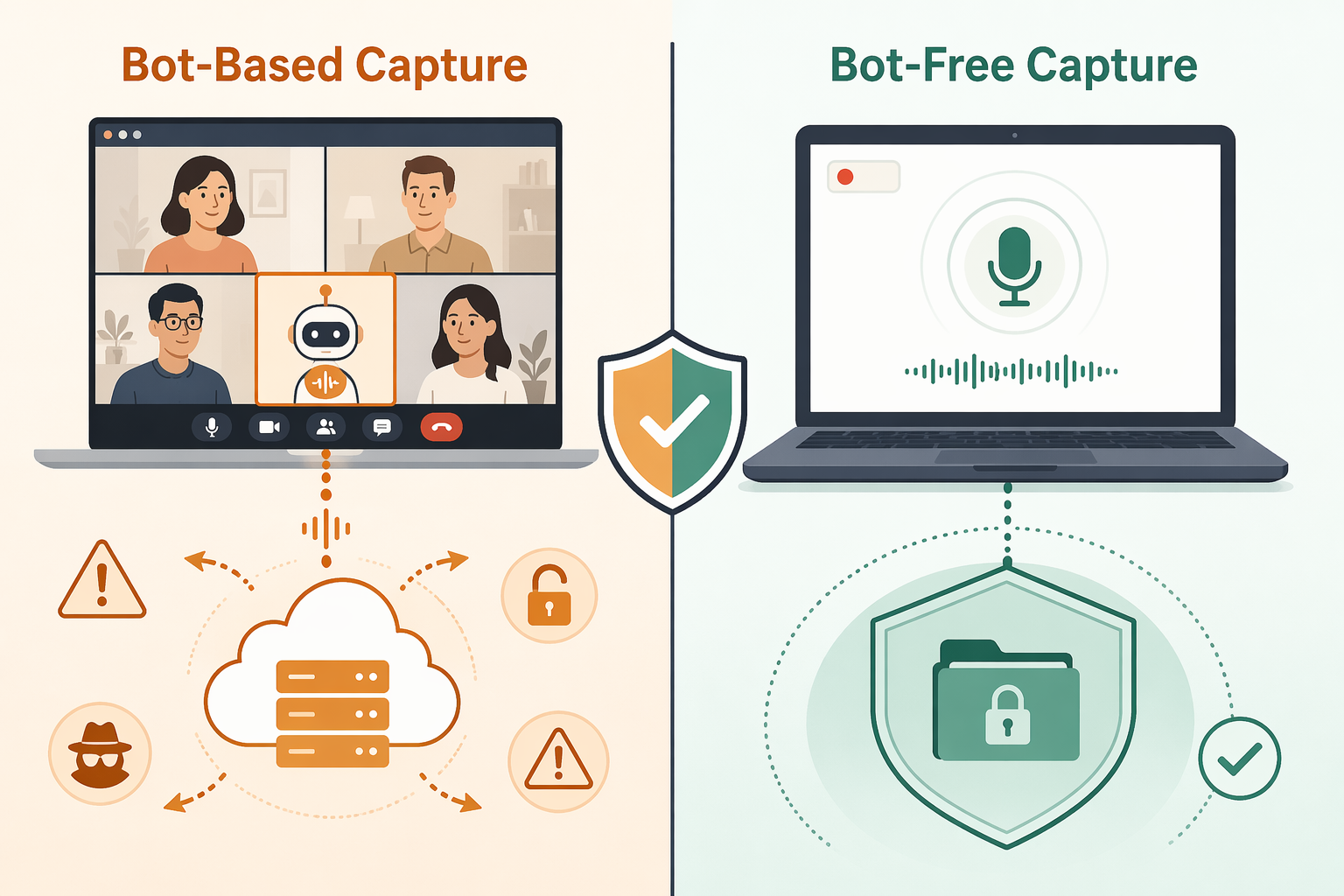
The most consequential divide in the AI note-taking market is not about features or pricing — it is about privacy. The capture method (bot-based vs. bot-free) determines where your meeting audio goes, who has access to it, and whether your organization's compliance policies are being violated.
Bot-based tools like Fireflies and Otter send meeting audio to their cloud servers for transcription. This means your confidential conversations are processed on third-party infrastructure, which may violate corporate data policies, client confidentiality agreements, or regulatory requirements like GDPR, HIPAA, or SOC 2.
Bot-free tools like Granola, Jamie, and Krisp capture audio from your local device and process it either on-device or through encrypted channels. Jamie, for example, states it is GDPR compliant and ISO 27001 certified, with audio deleted immediately after transcription. This approach significantly reduces the privacy surface area.
The compliance landscape varies widely across tools:
| Tool | Capture Method | GDPR | SOC 2 | HIPAA | Audio Retention |
|---|---|---|---|---|---|
| Fireflies | Bot + optional device | Yes | Yes | No | Stored on cloud |
| Otter.ai | Bot + optional device | Yes | Yes | No | Stored on cloud |
| Granola | Bot-free (device) | Yes | Yes | No | Deleted post-transcription |
| Jamie | Bot-free (device) | Yes (ISO 27001) | No | No | Deleted post-transcription |
| Krisp | Bot-free (device) | Yes | Yes | No | Processed locally |
| Lindy | Bot | Yes | Yes | Yes | Stored on cloud |
The rise of "Shadow AI" — employees using unsanctioned AI note-takers that send meeting data to third-party servers — is a growing concern for IT and security teams. A sales representative who installs a free AI note-taker to capture client calls may inadvertently expose proprietary pricing, contract terms, or competitive intelligence to a third-party cloud provider. Organizations that have not yet established clear policies around AI note-taking tools are increasingly vulnerable to this risk.
For a deeper dive into data ownership and the local-first vs. cloud debate, see our Best PKM Software 2026: Local-First vs Cloud article.
Pricing Tier Analysis: Free Plans, Hidden Costs, and the Real Price of 'Free'
Free plans are the primary acquisition channel for AI note-taking tools, but they come with significant limitations that are not always obvious at sign-up. Understanding the real constraints of each free tier is essential before committing to a tool.
| Tool | Free Tier Limit | Paid Plan Starting Price | Key Limitation of Free Plan |
|---|---|---|---|
| Otter.ai | 300 minutes/month | $16.99/user/month | Hard cap on transcription minutes; no advanced AI features |
| Fireflies.ai | 800 minutes storage | $18/seat/month | Storage limit, not a monthly cap — once you hit 800 minutes, you must delete or upgrade |
| Fathom | Unlimited recordings | $15/user/month | Free plan is generous but lacks CRM integrations and advanced analytics |
| tl;dv | Unlimited video & transcripts | Not specified | Free plan includes unlimited recordings but limited AI features |
| Google NotebookLM | Free | $7.99/month (NotebookLM Plus) | Free plan has source limits and no priority processing |
| Granola | No free plan | $14/user/month | No free tier — 7-day trial only |
| Jamie | No free plan | €47/month (Pro) | No free tier — relatively expensive for individual users |
The hidden costs of "free" AI note-taking go beyond usage limits:
- Data lock-in: Most free plans do not allow bulk export of your transcripts in a portable format. If you want to switch tools later, you may lose years of meeting notes.
- Limited integrations: Free plans typically block CRM, Slack, and Notion integrations. The tool becomes a standalone transcript viewer rather than a connected part of your workflow.
- Vendor risk: Startups in this space raise funding, pivot, or shut down frequently. A tool that is free today may introduce paid tiers tomorrow, or disappear entirely, taking your transcripts with it.
- Privacy cost: Free plans often monetize by using your data to train their AI models. If you are capturing confidential meetings, this is a significant risk.
For a comprehensive breakdown of what free note-taking apps actually cost you, read our guide on The Hidden Costs of 'Free' Note-Taking Apps in 2026.
Where the Gaps Remain: The 'Capture vs. Understand' Tension
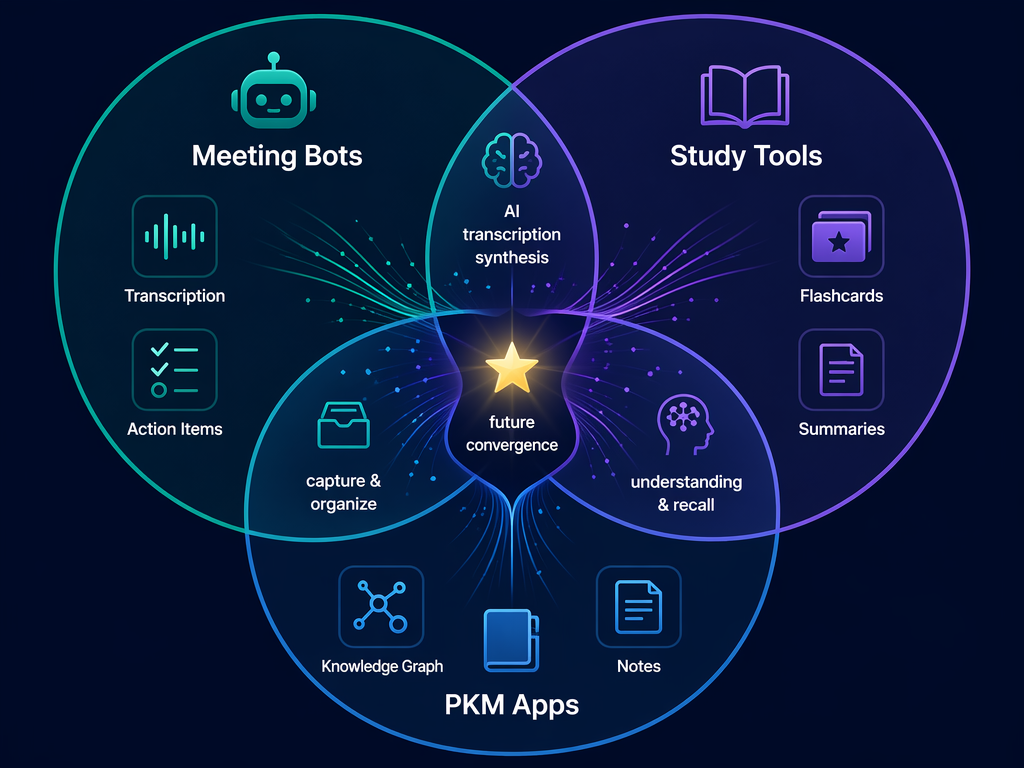
Despite the rapid innovation in AI note-taking, significant gaps remain. The most important is the tension between capture and understanding. Meeting bots are excellent at the former and poor at the latter. PKM apps are the reverse. Study tools sit somewhere in the middle but lack the workflow integration that professionals need.
Here is where each camp falls short:
- Meeting-intelligence platforms: They capture every word but do not help you connect ideas across meetings. A sales team might have 50 recorded calls about a single deal, but no tool yet synthesizes those 50 transcripts into a coherent understanding of the client's needs, objections, and decision-making process.
- Study-synthesis tools: They are great for converting a lecture into flashcards, but they do not integrate with your daily workflow. A student who uses NotebookLM to study for an exam cannot easily pull those notes into a project management tool or a long-term knowledge base.
- Traditional PKM apps: They offer deep understanding through linking and graph exploration, but they require significant manual effort to capture and organize information. There is no native AI transcription, no automatic summarization, and no easy way to ingest meeting recordings or lecture audio.
The gap is not just a feature gap — it is a philosophical gap. Meeting bots are built on the assumption that more capture is always better. PKM apps are built on the assumption that understanding requires active effort. These two worldviews are not easily reconciled, and no tool has yet found a way to bridge them without compromising one side or the other.
For professionals who need both capture and understanding, the current best practice is to use a meeting-intelligence tool for capture and a PKM app for synthesis — and to build a manual workflow that connects them. Our guide to automating meeting notes with Zapier shows one way to bridge this gap.
Future Convergence Predictions: What the Next 12-18 Months Will Bring
The current fragmentation of the AI note-taking market is unlikely to persist. Several forces are pushing toward convergence:
- Meeting bots will add PKM features: Tools like Fireflies and Otter are already experimenting with cross-meeting intelligence — the ability to search across all your transcripts, identify recurring topics, and surface action items from past meetings. The next step is adding knowledge graph capabilities that let users explore connections between meetings, documents, and people.
- Study tools will add meeting capture: NotebookLM is already expanding beyond document-based sources. It is reasonable to expect that within 12 months, study-synthesis tools will accept meeting recordings as input, allowing students and researchers to treat lectures and discussions as just another source type.
- PKM apps will add native AI: Obsidian and Logseq have community plugins for AI features, but native support is inevitable. The question is whether they can add AI without compromising their local-first, plain-text philosophy. Some users will welcome AI-powered search and summarization; others will resist any feature that sends their notes to a cloud server.
- Platform policies will reshape the landscape: Google's March 2026 bot-blocking update is likely the first of many. As Zoom, Microsoft Teams, and Google Meet all tighten their policies around third-party bots, bot-free device capture (Granola, Jamie, Krisp) will become the default approach, and tools that rely on bot-based capture will need to adapt or lose access to major platforms.
- Privacy will become a competitive differentiator: As Shadow AI concerns grow and regulatory scrutiny increases, tools that offer on-device processing, end-to-end encryption, and clear data deletion policies will gain an advantage over tools that send everything to the cloud.
The most likely outcome is not a single tool that does everything, but rather a layered ecosystem where capture tools, synthesis tools, and PKM tools integrate through open APIs and standards. The winners will be the tools that make this integration seamless — not the ones that try to be everything to everyone.
For a broader look at how purpose-built AI tools are outperforming general chatbots in specific productivity domains, see our roundup of 12 Purpose-Built AI Productivity Tools in 2026.