
The Graveyard Problem: Why PKM Users Should Care About Data Portability
Between late 2024 and mid-2025, three widely-used read-later and knowledge management apps disappeared. Omnivore was acquired by ElevenLabs and shuttered in the second half of 2024. Matter shut down in 2024. Pocket, a service with millions of users, went dark in July 2025. For anyone who had stored research notes, highlights, or personal archives inside those platforms, the message was brutal and final: your data was only ever on loan.
This is what the PKM community now calls the graveyard problem. An app can disappear for any number of reasons — acquisition, funding collapse, strategic pivot — and when it does, the cost of extraction often exceeds the value of the notes themselves. The global personal knowledge management software market was valued at $1.8 billion in 2025, with cloud-based deployment accounting for 72.6% of that revenue, according to a Dataintelo report. But growth in on-premises and local-first tools is accelerating at a 10.8% CAGR, suggesting a shift that predates the recent shutdowns and now has concrete evidence behind it.
The graveyard problem forces a question that used to feel abstract: does your note-taking tool own your notes, or do you? In 2026, that question is the starting point for every PKM decision. The architecture of the tool — whether it stores data as plain files on your disk or as rows in a proprietary cloud database — determines whether your knowledge base survives a vendor shutdown, a pricing change, or a feature direction you disagree with.
This article compares six tools across two storage paradigms: local-first (Obsidian, Logseq, Anytype) and cloud-native (Notion, Tana, Capacities). Each section covers pricing, portability, collaboration, and the trade-offs that matter when you are building a knowledge system you expect to use for years.
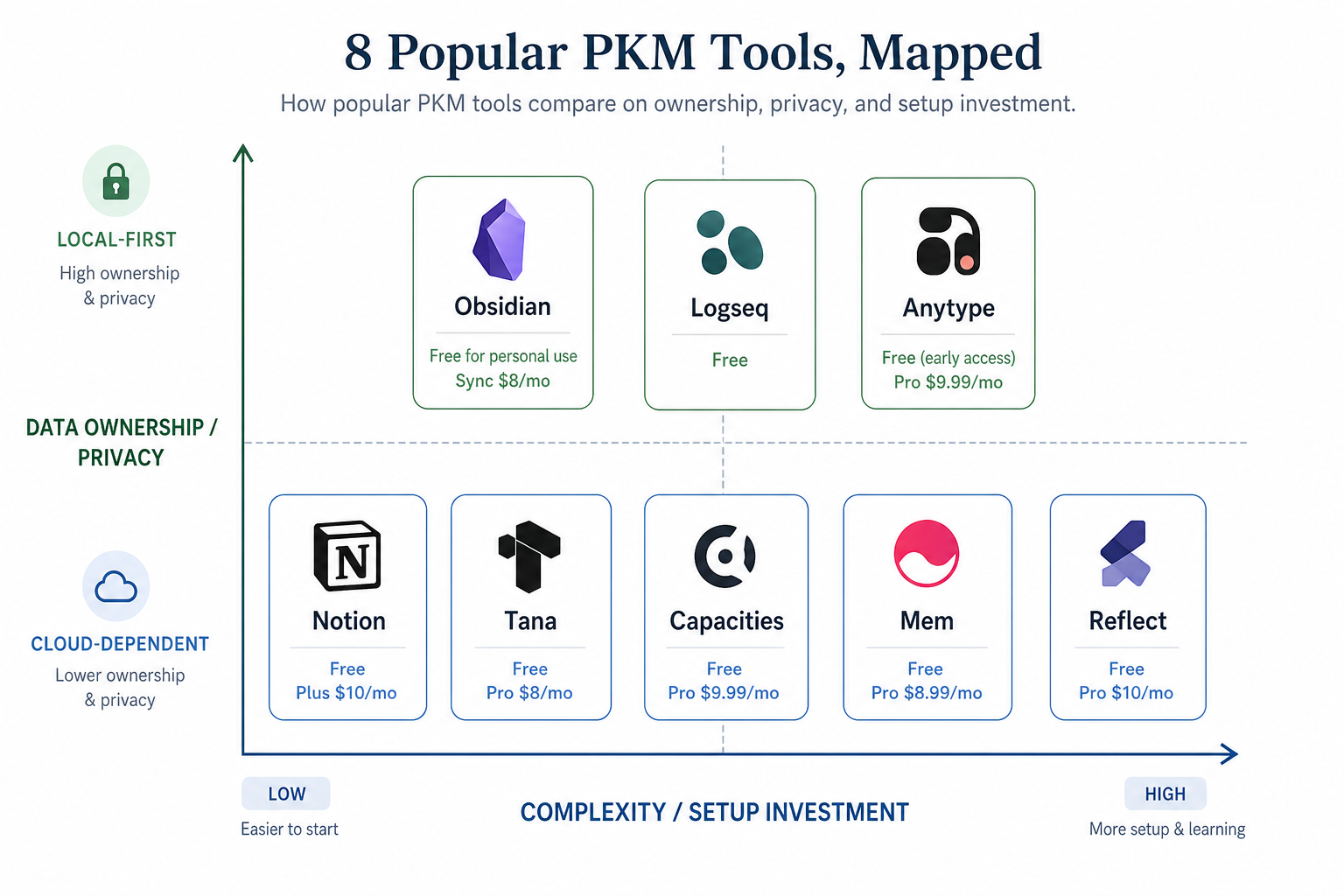
Local-First PKM: Obsidian, Logseq, and Anytype
Local-first tools store your notes as files on your own device. There is no server you depend on, no API key that can be revoked, no database schema that a vendor controls. The files are readable with any text editor. If the company behind the tool disappears tomorrow, your notes remain exactly where they are, in a format that every other tool can import. This is not a feature bullet point — it is the defining architectural advantage of the local-first paradigm.
Obsidian: Plain Markdown, Zero Lock-In
Obsidian stores every note as a plain Markdown file in a folder on your local disk. No proprietary format, no hidden database, no cloud dependency. If you open that folder with any text editor — VS Code, Notepad, even the terminal — every character is readable. The plugin ecosystem, which has grown to over 1,500 community plugins according to Atlas Workspace's 2026 guide, adds graph views, kanban boards, daily notes, and publishing workflows on top of that plain-file foundation, but the files themselves remain untouched.
Pricing is straightforward: the desktop and mobile apps are free. Obsidian Sync costs $4 per month and provides end-to-end encrypted sync across devices. Obsidian Publish starts at $8 per month. There is no paid tier that unlocks core note-taking functionality — you are not hobbled until you upgrade.
The trade-off is collaboration. Obsidian has never been a team tool. Real-time multiplayer editing does not exist. If you need to share a workspace with colleagues or co-edit a document in real time, Obsidian will frustrate you. For personal knowledge management, however, it remains the tool that best guarantees your notes outlive the app.
For a deeper look at features, plugins, and workflow examples, see our full Obsidian review.
Logseq: Open-Source Outlining with Org-Mode Roots
Logseq takes a different approach to the same local-first principle. Notes are stored as Markdown or Org-mode files on your local disk. The tool is fully open-source. Where Obsidian gives you a blank page and a graph, Logseq gives you a bullet-point outliner that treats every block as a first-class entity — each block can be tagged, linked, and referenced independently.
The app is free. Logseq Sync costs $5 per month and provides encrypted sync between devices. Like Obsidian, there is no paid tier that gates core functionality — the open-source codebase ensures the app will remain usable even if the company changes direction.
Logseq's learning curve is steeper than Obsidian's for users accustomed to traditional word processors. The outliner paradigm rewards a hierarchical thinking style and can feel rigid if you prefer free-form writing. Community plugins and themes have grown substantially, but the ecosystem is smaller than Obsidian's. For users who think in nested structures — task hierarchies, project outlines, meeting notes with sub-items — Logseq's block-level linking creates a degree of granularity that no other local-first tool matches.
Our dedicated Logseq review covers features, workflows, and comparative strengths in more detail.
Anytype: E2E Encrypted and Object-Oriented
Anytype is the youngest of the three and the most ambitious. It combines local-first storage with end-to-end encryption, an object-oriented data model (types, relations, and sets), and a visual interface that resembles Notion more than Obsidian. Every piece of data — a note, a task, a bookmark, a file — is an object with a type, and you define the relationships between them.
Anytype is currently in a free beta. There is no confirmed pricing for the post-beta launch, but the company has signaled a freemium model. The local storage model means your data lives on your device, encrypted with keys only you hold. Anytype uses a peer-to-peer sync protocol rather than a central server, which gives it a privacy profile that neither Obsidian nor Logseq matches out of the box.
The trade-offs are real. The ecosystem is small — no community plugin marketplace comparable to Obsidian's. The app is still in beta, which means bugs, missing features, and occasional breaking changes. The object model, while powerful, requires upfront thinking about types and relations that a blank-Markdown-file workflow does not. Anytype is best suited for users who are willing to trade ecosystem maturity for a privacy-first architecture that stores structured data without a cloud middleman.
| Tool | Storage Format | Free Tier | Sync Cost | Plugin Ecosystem | Best For |
|---|---|---|---|---|---|
| Obsidian | Plain Markdown files | Full app free | $4/mo Sync | 1,500+ plugins | Users who want maximum longevity and a mature ecosystem |
| Logseq | Markdown / Org-mode files | Full app free | $5/mo Sync | Moderate (growing) | Outliner thinkers and open-source advocates |
| Anytype | E2E encrypted objects | Free beta | TBD | Minimal (beta) | Privacy-maximalists willing to accept beta instability |
Cloud PKM: Notion, Tana, and Capacities
Cloud-native PKM tools offer what local-first tools cannot: instant sync across every device without configuration, real-time collaboration, built-in AI features, and a user interface that does not ask you to manage files. The convenience is genuine. But the trade-off is that your data lives on someone else's infrastructure, in someone else's format, and subject to someone else's business decisions.
Notion: The All-in-One Workspace with a Lock-In Problem
Notion has surpassed 30 million users as of 2025, making it the largest tool in this comparison by far. Its success is earned: the combination of databases, markdown-like editing, kanban boards, wikis, and AI features in a single product is genuinely useful for both personal note-taking and team workspaces. Notion's free tier is generous, and the Plus plan costs $10 per month per user.
But the export story is where Notion's lock-in becomes visible. The tool does support export to Markdown and HTML, but the process is described by long-term users as a "painful, lossy process" that loses database structure, relations, and formatting. A Notion workspace with relational databases, rollups, formulas, and linked views does not survive export intact. Migrating a large workspace means rebuilding by hand.
Notion also requires a network connection for most operations. There is an offline mode, but it is limited and syncing can be slow on large workspaces. For users who work in areas with unreliable internet or who prefer local responsiveness, this is a material limitation.
For a persona-based breakdown of who should — and should not — use Notion in 2026, see our Notion review.
Tana: Structured Notes with a Price Premium
Tana is the newest entrant in this group and the most ambitiously structured. It combines a super-tag data model (every node has a type and can have typed fields) with an outline interface and a built-in AI assistant that can create nodes from natural language queries. Tana is cloud-only, with no offline-first or local storage option.
Pricing is $8 per month for the Plus plan and $14 to $16 per month for Pro. Tana's data model is proprietary, and export options are limited to JSON and Markdown — both of which lose the typed-field structure that makes Tana powerful. A workspace built with custom super-tags and field relations is difficult to move to any other tool.
Tana is best for power users who want a structured knowledge base with AI-assisted capture and are comfortable accepting vendor lock-in as the cost of that capability. It is not suited for users who want file-level portability or offline-first access.
Capacities: Object-Based Note-Taking with a European Privacy Focus
Capacities bills itself as a "notes app for your life" and uses an object-based model similar to Anytype's but running on a cloud backend. Every note, person, project, or book is a typed object that can be linked to other objects and displayed in custom views. The interface is polished and approachable — less intimidating than Tana's power-user orientation.
Capacities offers a free tier and a Pro plan at €9.99 per month. The company is based in Germany and emphasizes GDPR compliance and data privacy. Export is available as Markdown, but typed-object structures — the relations and custom fields that define a Capacities workspace — do not transfer cleanly. Like Tana and Notion, the deeper your workspace becomes, the higher the switching cost.
| Tool | Storage Architecture | Free Tier | Paid Pricing | Export Quality | Best For |
|---|---|---|---|---|---|
| Notion | Cloud (limited offline) | Free personal | $10/mo Plus | Lossy — loses DB structure | Teams and users who need all-in-one collaboration |
| Tana | Cloud only | No free tier | $8-16/mo | Lossy — loses super-tag structure | Power users who want AI-native structured notes |
| Capacities | Cloud (GDPR-compliant) | Free tier available | €9.99/mo Pro | Lossy — loses object relations | Privacy-conscious users who want structured notes without local-file complexity |
Hybrid Approaches: When You Need Both
The clean binary between local-first and cloud is useful for analysis but misleading in practice. According to Storyflow's 2026 research, most serious PKM practitioners run one team tool (cloud) and one personal tool (local-first) side by side. The dual-tool stack is not a compromise — it is the emerging best practice for users who need both data longevity and synchronous collaboration.
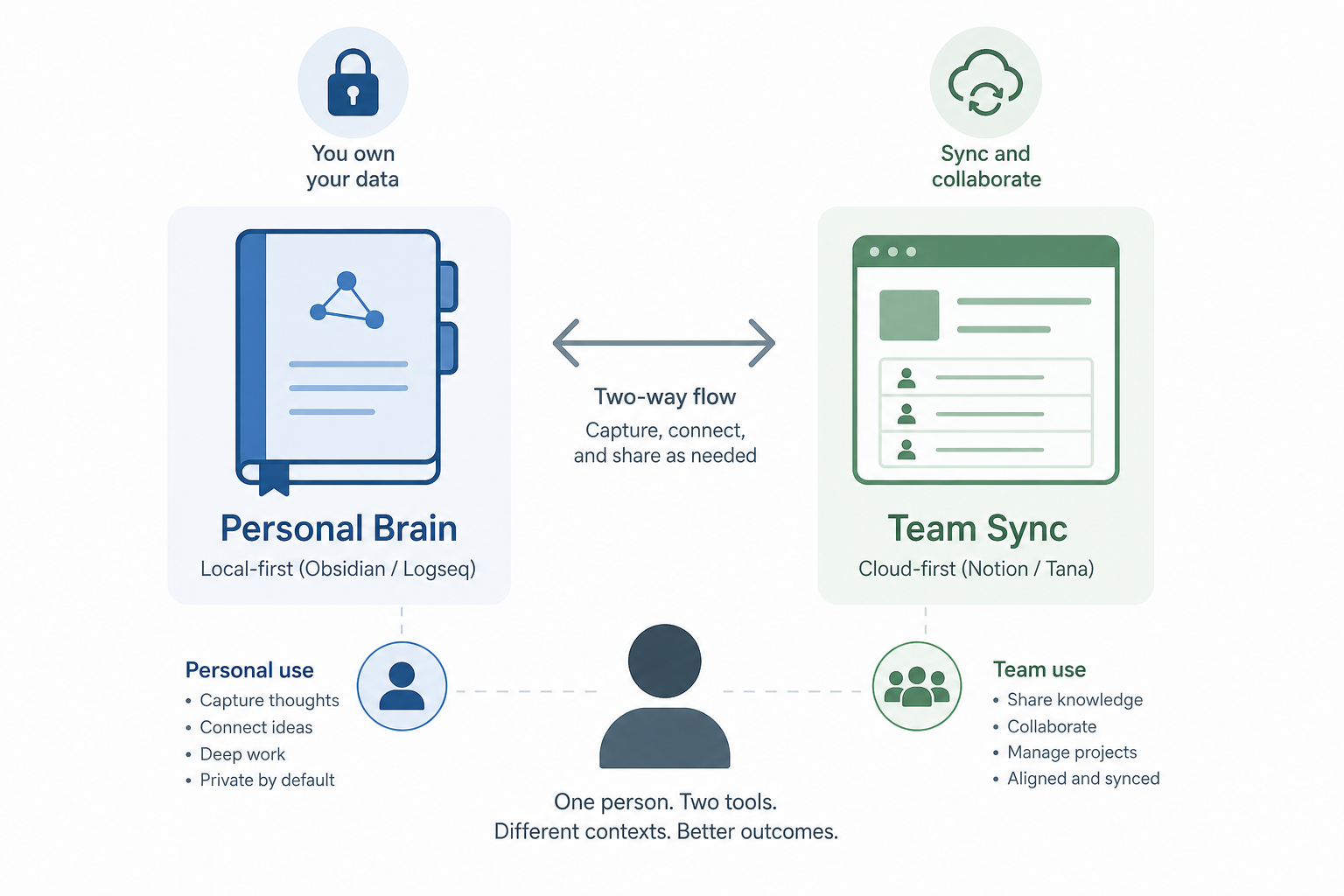
For users who want to stay within the local-first ecosystem but need sync, both Obsidian and Logseq offer paid sync services. Obsidian Sync costs $4 per month and provides end-to-end encrypted sync across devices. Logseq Sync costs $5 per month with similar encryption. These services keep your data in the local-first paradigm while adding the convenience of multi-device access.
Reflect takes a different approach: it is a cloud-based PKM tool with end-to-end encryption. Your data lives on Reflect's servers but is encrypted client-side before it arrives. Reflect costs $10 per month and offers a graph view, daily notes, and AI features. It gives you the sync and collaboration of a cloud tool with a privacy model closer to local-first tools. The trade-off is that Reflect's export, while available as Markdown, loses the internal link graph and daily-note structure.
| Option | Architecture | Monthly Cost | Encryption | Best For |
|---|---|---|---|---|
| Obsidian Sync | Local-first + encrypted sync | $4/mo | E2E encrypted | Obsidian users who want multi-device access without cloud lock-in |
| Logseq Sync | Local-first + encrypted sync | $5/mo | E2E encrypted | Logseq users who want to sync across devices |
| Reflect | Cloud with E2E encryption | $10/mo | E2E encrypted | Users who want cloud convenience but prioritize privacy |
| Dual tool (local + cloud) | Two separate tools, one workflow | Varies | Mixed | Serious PKM practitioners who need both longevity and collaboration |
If you are considering a move between tools, our Roam Research to Obsidian migration guide covers the practical steps for preserving backlinks, block references, and note structure during a cross-tool migration.
The 5-Question Decision Framework
Instead of prescribing a single tool, this framework helps you map your own priorities to the paradigm that fits. Answer each question honestly, then check the summary table for which tools match your profile.
1. How much do you care about your notes outliving the app?
If the answer is "I want my notes to be readable in 20 years regardless of what happens to the company," you need local-first. Obsidian or Logseq with plain Markdown files is the only architecture that guarantees that outcome. If you are comfortable with the risk — or you use note-taking for short-term projects rather than a permanent knowledge base — cloud tools remain viable.
2. Do you need real-time collaboration?
Team wikis, project docs, and co-edited meeting notes require a cloud tool. Notion is the strongest option here for general-purpose team collaboration. Tana and Capacities offer collaboration but with smaller user bases and fewer sharing controls. If you need to work with colleagues who are not power users, Notion's drop-in ease of use wins.
3. How technically comfortable are you?
Local-first tools assume a certain level of autonomy. You manage your own files, configure sync if you want it, and troubleshoot plugin issues yourself. Obsidian and Logseq are approachable for non-technical users who stick to the defaults, but the power features — custom plugins, CSS snippets, command-line workflows — reward technical comfort. Anytype is simpler but still in beta. If you want a tool that just works out of the box and never asks you to think about file locations, a cloud tool like Notion or Capacities will feel more natural.
4. What is your budget?
Obsidian, Logseq, and the current Anytype beta are free. Sync costs add $4 to $5 per month if you need multi-device access. Notion's free tier is usable, but team features and higher storage limits require the $10 per month Plus plan. Tana starts at $8 per month and goes up to $16 per month for Pro. Capacities Pro costs €9.99 per month. For users on a tight budget, the local-first tools are unequivocally cheaper — and your data is not held hostage if you stop paying.
5. How much migration risk can you tolerate?
If you switch tools every 12 to 18 months, cloud-based PKM imposes a cumulative cost. Each migration loses structure, formatting, and relational links. The files themselves survive, but the knowledge graph does not. If you plan to stay in one tool for years and your primary risk is vendor shutdown, local-first eliminates that risk entirely. If you are currently in a cloud tool and considering a move, prioritize tools with a clear migration path.
| Question | If Your Answer Is... | Recommended Paradigm | Specific Tools |
|---|---|---|---|
| Notes outlive the app? | Critical | Local-first | Obsidian, Logseq, Anytype |
| Real-time collaboration? | Yes, regularly | Cloud | Notion, Tana |
| Technical comfort? | Low | Cloud | Notion, Capacities |
| Budget under $5/mo? | Yes | Local-first | Obsidian (free), Logseq (free) |
| Low migration risk tolerance? | I want to never migrate | Local-first | Obsidian (plain Markdown) |