
The No-Code Automation Landscape for Non-Technical Teams
If you manage operations, lead a marketing team, or run a small business, the promise of no-code automation sounds like a dream: connect your apps, set a trigger, and let software handle the repetitive work. The reality is messier. Zapier, Make, and Gumloop all claim to be no-code, but the gap between what they promise and what a non-technical person can actually set up in an afternoon is wide.
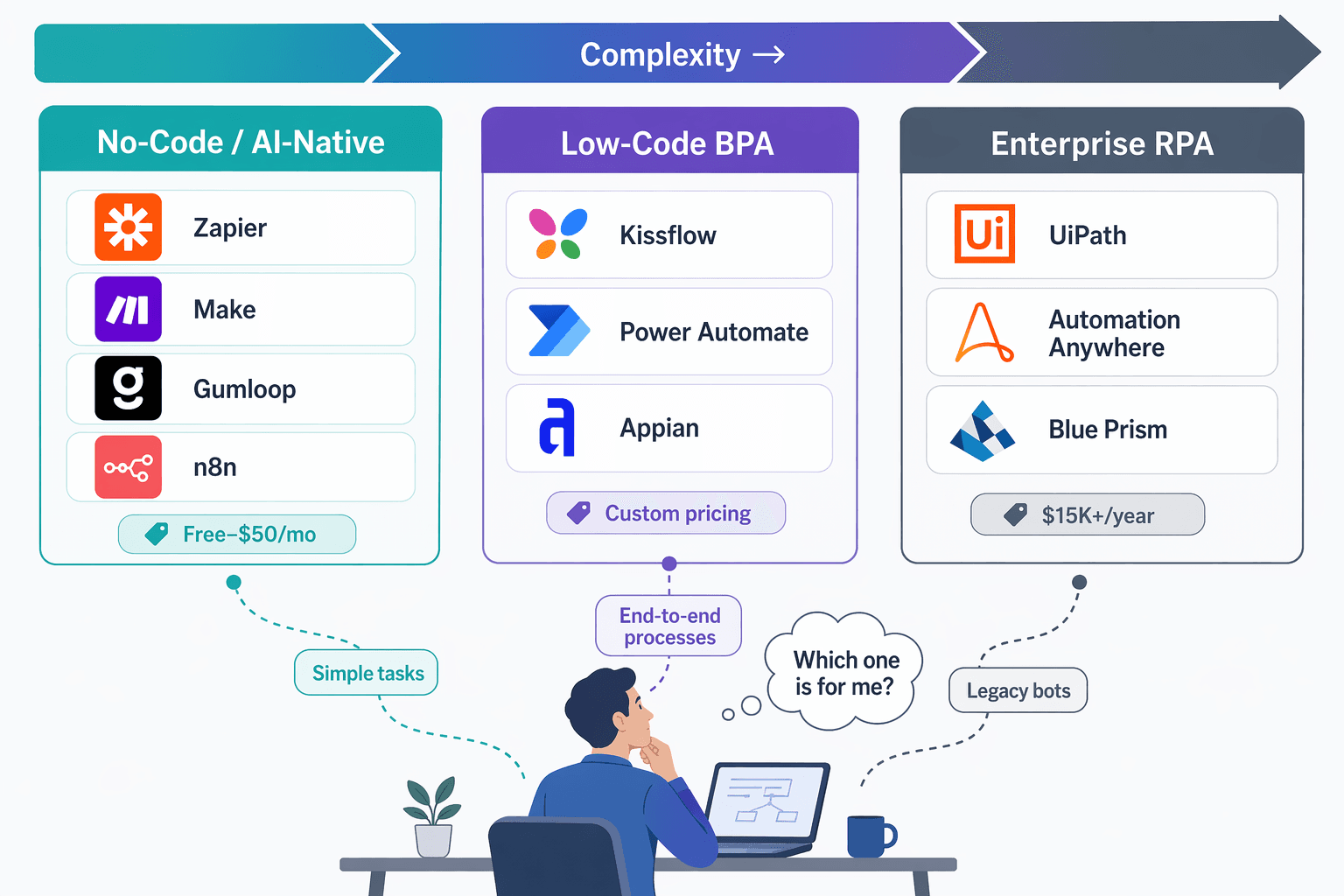
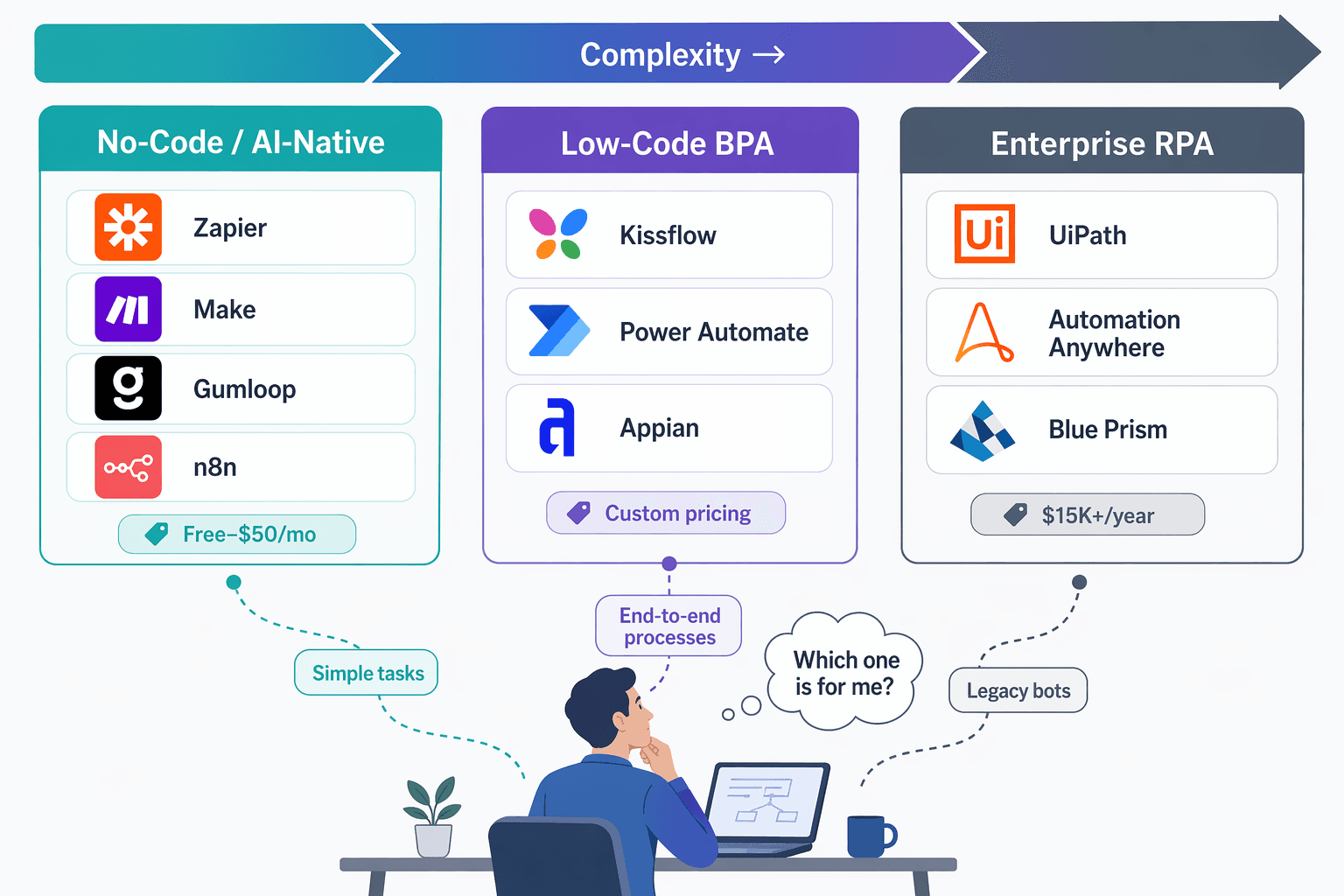
This article is not a broad survey of every automation tier on the market. We already cover that ground in our broader comparison of process automation tools for non-technical teams. Here, we narrow the focus to three tools — Zapier, Make, and Gumloop — and compare them specifically through the lens of learning curves, hidden pricing structures, and native AI capabilities. We also touch on Relay.app and n8n as important alternatives, but the core question is: which of these three should a non-technical team actually adopt in 2026?
The stakes are higher than they were a year ago. A Gartner forecast cited by Kissflow predicts that by 2028, 15% of day-to-day business decisions will be made autonomously by agentic AI, and 33% of enterprise software applications will embed such capabilities — an exponential shift from 2024's negligible levels. Teams that cannot automate their workflows today will struggle to keep pace when AI agents become standard infrastructure. Choosing the right tool now means choosing a platform that can grow with those capabilities.
Zapier vs. Make vs. Gumloop vs. Relay.app vs. n8n: At-a-Glance Comparison
Before we dive into each tool's strengths and weaknesses, here is a scannable comparison table. It covers the five most relevant no-code automation platforms for non-technical teams in 2026. Use this as your quick-reference guide, then read the deep dives below for context.
| Feature | Zapier | Make | Gumloop | Relay.app | n8n |
|---|---|---|---|---|---|
| Free tier | Yes (100 tasks/mo) | Yes (1,000 credits/mo) | Yes (5,000 credits/mo) | Yes (limited) | Yes (self-hosted, unlimited) |
| Starting price (paid) | $19.99/mo (Pro) | $9/mo (Core) | $30–$37/mo (Solo/Pro) | ~$20/mo (Starter) | $20/mo (Cloud Starter) |
| Learning curve | Lowest — intuitive trigger-action UI | Moderate — scenario builder requires planning | Low — AI-native, guided setup | Low — modern, clean interface | Steep — node-based, requires technical comfort |
| Native AI features | Limited (AI steps in higher tiers) | Moderate (data transformation, some AI modules) | Strong (built-in LLM, no API keys needed) | Moderate (AI-powered actions) | Strong (bring your own LLM, full flexibility) |
| Integration count | 8,000+ | 2,000+ | Growing (smaller ecosystem) | Growing (smaller ecosystem) | 400+ (plus custom API nodes) |
| Best for | Simple cross-app automations | Complex multi-step scenarios with data transformation | AI-powered workflows for non-technical teams | Modern, simple automations with AI | Technical teams needing full control |
Deep Dive: Zapier — The Easiest Entry Point for Simple Automations
Zapier has been the default no-code automation tool for over a decade, and for good reason. With more than 8,000 integrations and a trigger-action interface that anyone can understand in minutes, it remains the safest choice for teams that just need to connect two apps without thinking about architecture.
Strengths
- Lowest learning curve: The UI is very approachable, making it a strong contender for teams that want to build automations but lack developer support, as noted in the n8n blog.
- Massive integration library: 8,000+ apps mean you can almost always find the connector you need without building a custom API integration.
- Reliable and well-documented: Zapier's support documentation, template library, and community forums are the most mature in the space.
- Best for simple trigger-and-action workflows: If your automation is a straight line — "When X happens in App A, do Y in App B" — Zapier is the fastest path.
Weaknesses
- Limited native AI: Zapier has added AI steps in higher-tier plans, but its AI capabilities are not as deeply integrated as Gumloop's. You often need to bring your own OpenAI key or use a separate AI app.
- Expensive at scale: The Pro plan starts at $19.99/mo for 750 tasks, but as your automation volume grows, costs can escalate quickly. Task-based pricing means every action in a multi-step Zap counts as a separate task.
- Multi-step Zaps require higher tiers: Basic plans limit you to two-step Zaps. To build conditional logic or multi-step workflows, you need the Pro plan or above.
Deep Dive: Make — Powerful Scenarios with a Steeper Learning Curve
Make (formerly Integromat) positions itself as the power-user's no-code tool. Its visual scenario builder lets you map out complex, multi-branch workflows with data transformation steps that Zapier cannot easily replicate. But that power comes at a cost: the learning curve is noticeably steeper.
Strengths
- Cheaper entry point: The Core plan starts at $9/mo for 10,000 credits, which is significantly cheaper than Zapier's Pro plan for comparable volume.
- Flexible scenario building: Make's visual editor allows you to create complex, multi-step workflows with conditional routing, data aggregation, and custom transformations.
- Data transformation capabilities: Make includes built-in tools for parsing JSON, filtering arrays, and transforming data between steps — features that require custom code in Zapier.
- Unlimited active scenarios: Unlike Zapier, which limits the number of active Zaps on lower plans, Make's Core plan includes unlimited active scenarios.
Weaknesses
- Steeper learning curve: Make involves more setup than some of the more beginner-friendly options, as noted in the n8n blog. Non-technical users often need to spend a few hours learning the scenario builder before they can build confidently.
- Variable credit pricing makes cost prediction harder: Make uses a credit system where each operation in a scenario consumes a certain number of credits. Complex workflows with many steps or data transformations can consume credits faster than expected, making monthly costs unpredictable.
- Smaller integration library: Make supports around 2,000+ apps, which is substantial but significantly less than Zapier's 8,000+. You may need to build custom API modules for less common apps.
Deep Dive: Gumloop — The AI-Native Contender with the Most Generous Free Plan
Gumloop is the newest entrant in this comparison, but it has quickly gained attention for its AI-native approach and unusually generous free tier. While Zapier and Make treat AI as an add-on, Gumloop builds it into the core experience — no API keys, no separate AI app subscriptions.
Strengths
- Most generous free plan: Gumloop's free tier includes 5,000 credits per month, 1 seat, 1 active trigger, and 2 concurrent runs. That is 5x the free credits of Make and 50x the free tasks of Zapier (at 100 tasks/mo).
- No API keys needed for AI: Unlike Zapier and Make, which require you to bring your own OpenAI or Anthropic key for AI-powered steps, Gumloop includes native AI capabilities out of the box. This is a significant barrier reduction for non-technical teams.
- Strong customer testimonials: Gumloop has been critical in helping all teams at Instacart — including those without technical skills — adopt AI and automate their workflows, according to Fidji Simo, CEO of Instacart. Bryant Chou, Co-Founder of Webflow, noted that Gumloop wins time back across an org and puts the tools into the hands of people who understand a task.
- AI-native design: The platform is built from the ground up for AI workflows, making it the best choice for teams that want to experiment with LLM-powered automations without technical overhead.
Weaknesses
- Newer platform: Gumloop has a smaller integration ecosystem than Zapier or Make. While it covers the most popular apps, you may not find connectors for niche tools.
- Variable credit system: Like Make, Gumloop uses a credit system where workflow complexity affects credit consumption. The Gumloop blog acknowledges that this can make it difficult to predict costs.
- Higher starting price for paid plans: Gumloop's Pro plan starts at $37/mo (per their own blog), which is more expensive than Make's Core plan ($9/mo) and comparable to Zapier's Pro plan ($19.99–$29.99/mo).
Gumloop has been critical in helping all teams at Instacart - including those without technical skills - adopt AI and automate their workflows.
— Fidji Simo, CEO @ Instacart (via Gumloop blog)
Price-per-Workflow Scenario Analysis: What You Actually Pay at Scale
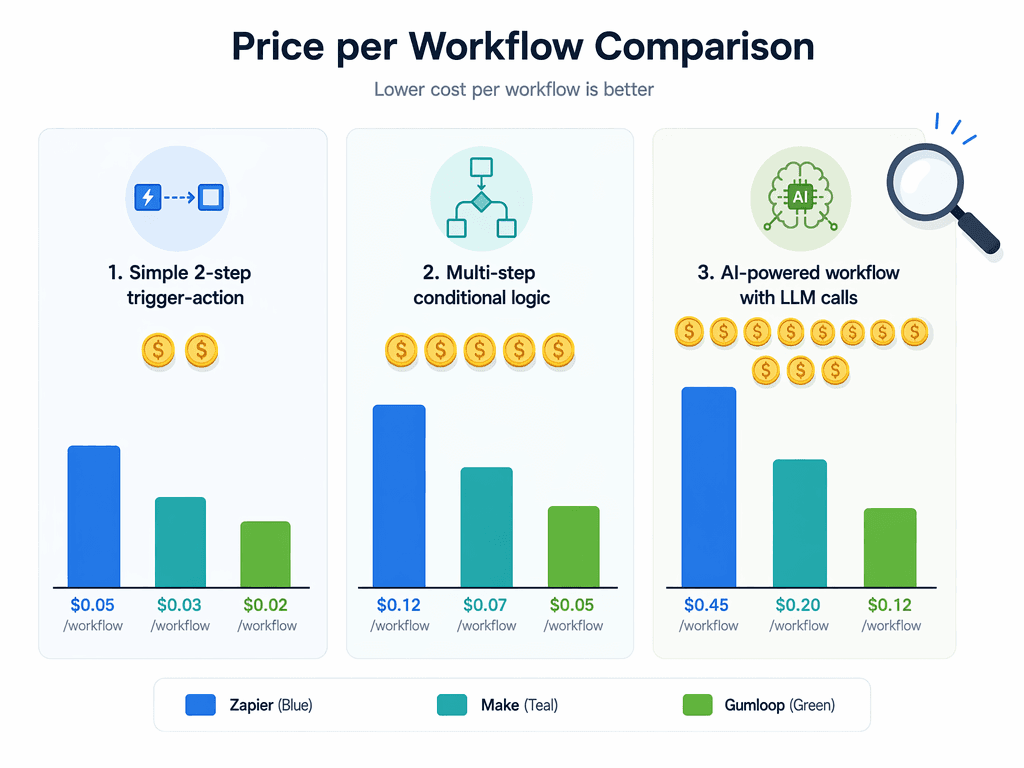
Comparing monthly plan prices is misleading because each tool measures consumption differently. Zapier counts tasks (each step in a multi-step workflow is a separate task). Make and Gumloop use credits, where complex workflows consume more credits per run. To understand real costs, we need to compare price per workflow for specific scenarios.
| Scenario | Zapier (Pro $19.99/mo) | Make (Core $9/mo) | Gumloop (Pro $37/mo) |
|---|---|---|---|
| Simple 2-step: New Gmail → Slack notification | ~$0.027/task (750 tasks for $19.99) | ~$0.001/credit (10k credits for $9) | ~$0.002/credit (20k credits for $37) |
| Multi-step conditional: New lead → check CRM → assign rep → send email | ~$0.108/workflow (4 tasks) | ~$0.004/workflow (4 credits) | ~$0.008/workflow (4 credits) |
| AI-powered: Inbound email → LLM summarize → create Notion page → Slack alert | ~$0.135/workflow (5 tasks + AI step costs) | ~$0.010/workflow (10 credits + AI module) | ~$0.015/workflow (8 credits, AI included) |
The table reveals a clear pattern: Make offers the lowest per-workflow cost for simple and multi-step scenarios, thanks to its cheap entry price and credit system. Gumloop is more expensive per credit but includes AI capabilities at no extra cost, making it competitive for AI-powered workflows. Zapier is the most expensive per task, especially for multi-step workflows where each step counts as a separate task.
Winner Picks: Which Tool Should You Choose?
Based on our analysis of learning curves, pricing, AI capabilities, and integration ecosystems, here are our recommendations for non-technical teams in 2026.
Best for Simple Automations: Zapier
If your workflows are straightforward — a trigger in one app leads to a single action in another — Zapier is still the best choice. Its 8,000+ integrations mean you will almost never need to build a custom connector, and its interface is the most intuitive for non-technical users.
- Not for you if: Your workflows involve conditional branching, data transformation, or AI decision-making. You will either hit Zapier's complexity ceiling or pay a premium for workarounds.
Best for AI Workflows: Gumloop
For teams that want to experiment with AI-powered automation — summarizing emails, classifying leads, generating content — Gumloop is the clear winner. Its free plan is generous enough for serious experimentation, and the built-in AI capabilities eliminate the need to manage API keys or separate AI subscriptions.
- Not for you if: You need to connect to niche or legacy apps that Gumloop does not support. Its integration ecosystem is still growing, and you may find yourself waiting for a connector.
Best for Budget: Make
If cost is your primary concern and you have a team member willing to invest a few hours learning the scenario builder, Make offers the best value. The Core plan at $9/mo for 10,000 credits is significantly cheaper than Zapier's Pro plan, and the unlimited active scenarios mean you can automate as many workflows as you need without upgrading.
- Not for you if: Your team has zero technical comfort. Make's learning curve is real, and non-technical users often struggle with the scenario builder without guidance.
When to Consider n8n or Relay.app
n8n is the best choice if your team has at least one technical member who can handle self-hosting or manage a cloud instance. Its flexibility — unlimited steps, custom nodes, and full control over data — makes it ideal for complex enterprise workflows. However, the n8n blog notes that it is best for all-around flexibility for technical and enterprise users, which means non-technical teams should approach with caution.
Relay.app is a newer alternative that offers a clean, modern interface with built-in AI features. It is worth evaluating if you find Zapier too expensive and Make too complex, but its smaller integration library and shorter track record mean it carries more vendor risk.
Getting Started: Your First Automation in Each Tool
Once you have chosen a tool, the fastest way to learn is to build something real. Here is how to create your first automation in each platform.
Zapier
- Sign up for a free account at zapier.com.
- Click "Create Zap" and choose a trigger app (e.g., Gmail: New email).
- Select an action app (e.g., Slack: Send channel message).
- Map the fields from your trigger to your action and test the Zap.
- Turn on the Zap and monitor its activity in the dashboard.
Make
- Sign up for a free account at make.com.
- Click "Create a new scenario" and add your first module (trigger app).
- Add a second module (action app) and connect the output from the trigger.
- Use the visual editor to add filters, data transformation, or additional steps.
- Run the scenario once to test, then schedule it to run automatically.
Gumloop
- Sign up for a free account at gumloop.com (5,000 free credits included).
- Choose a template from the library or click "New Workflow."
- Select a trigger (e.g., New email, new form submission) and connect your app.
- Add an AI step — for example, "Summarize this email" — without needing an API key.
- Set the output action (e.g., Create Notion page, send Slack message) and activate the workflow.
All three tools offer template libraries that can get you started in minutes. Start with a simple workflow, test it thoroughly, and then gradually add complexity as you become more comfortable with the platform.
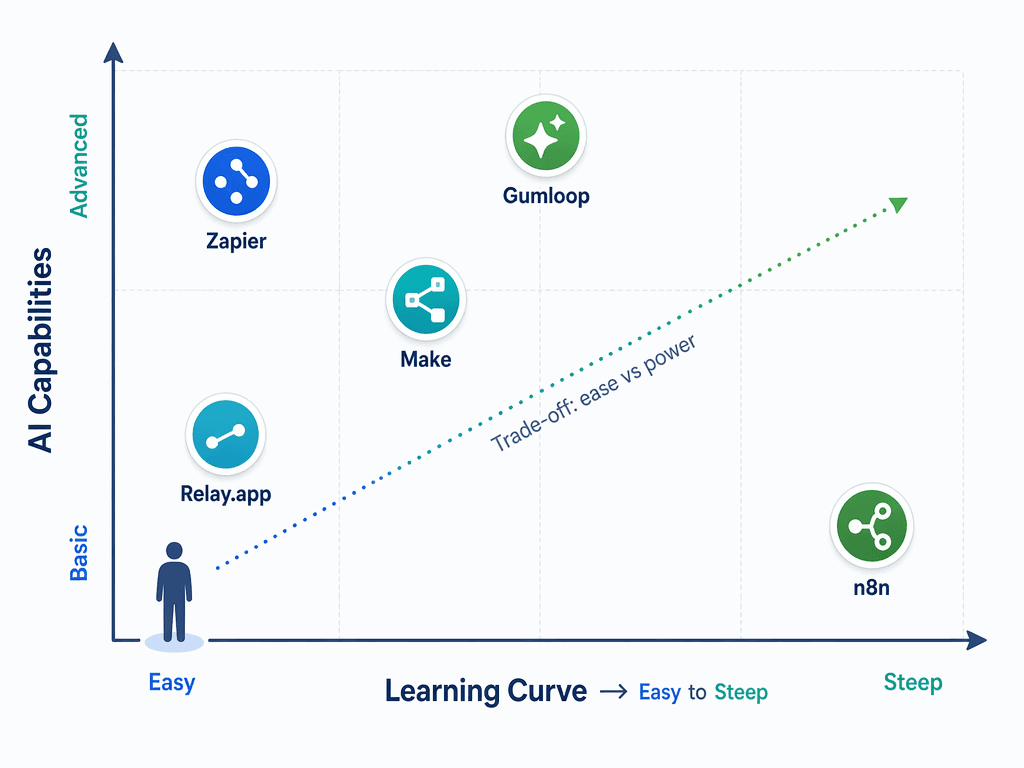
The grid above summarizes the core trade-off: tools that are easiest to learn (Zapier, Relay.app) offer the least native AI power, while tools with the most AI flexibility (n8n) require the most technical comfort. Gumloop sits in a unique position — easy to learn with strong AI capabilities — which is why it is our top recommendation for non-technical teams that want to experiment with AI-powered automation in 2026.




Comments
Join the discussion with an anonymous comment.