
Stop Looking for the 'Best' App — Start With These 4 Questions
Every week, someone asks which note-taking app is the best. The honest answer hasn't changed: there isn't one. The note-taking app market is now valued at $13.3 billion in 2026 and is projected to grow at a 20.5% CAGR to $28.05 billion by 2030 (Research and Markets). That growth has produced a fragmented ecosystem where tools optimize for fundamentally different things — speed, structure, ownership, or AI context. Picking the wrong one means fighting your tool instead of using it.
This article won't hand you a single winner. Instead, it walks you through four questions that narrow the field to the two or three apps that actually fit how you think, work, and collaborate. If you want the full story on why the market has shifted this year, read our market shifts analysis first.
Question 1: How do you retrieve your notes?
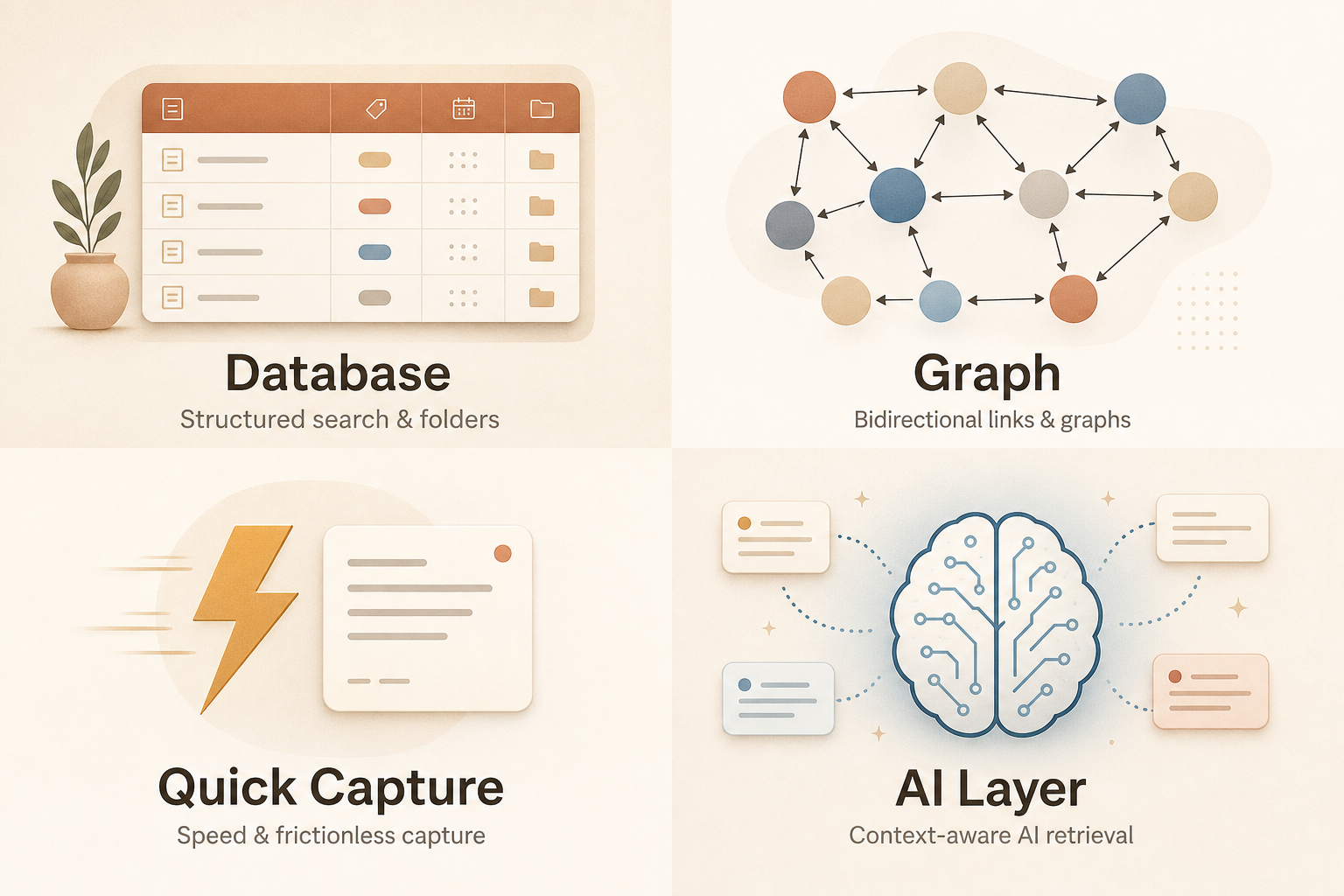
This is the single most important question. Note-taking tools fall into four retrieval-style categories, and your preference determines which apps will feel natural:
- Database / folder-first: You organize notes into notebooks, folders, and tags. You search by title or browse a hierarchy. Apps: OneNote, Evernote, Apple Notes.
- Graph / link-first: You connect ideas through bidirectional links and rely on a graph view to surface relationships. Apps: Obsidian, Roam, Logseq.
- Quick capture: You need to jot something down in under three seconds and find it later through search. Apps: Google Keep, Apple Notes, Bear.
- AI layer: You want the tool to surface relevant notes, summarize meetings, or draft content based on your full workspace context. Apps: Notion (with AI), Mem, Storyflow.
Question 2: Which platforms do you use daily?
If you live in the Apple ecosystem — iPhone, iPad, and Mac — Apple Notes is a serious contender. If you use Windows and Android, you'll want OneNote or a cross-platform tool like Notion or Obsidian. If you're on Linux, your options narrow to Obsidian or Joplin. Platform lock-in is real, and fighting it adds friction to every note you take.
Question 3: Do you need AI to read your notes?
AI features are now the largest capability gap between tools. The critical distinction is whether the AI reads only the current note or has access to your full workspace context. Most apps paywall meaningful AI — Notion AI costs $10/user/month on the Plus plan, and Evernote's AI features are bundled into its $14.99/month tier. If AI context matters to you, check our deep dive on AI in note-taking apps before committing.
Question 4: What's your budget — and what are you willing to pay for?
Free tiers vary wildly. OneNote gives you 5GB of free storage with full features. Google Keep is completely free with 15GB of shared Google Drive storage. Obsidian is free for local use. On the other end, Evernote's free plan limits you to 50 notes on a single device — Zapier calls it 'utterly useless.' Know what you're willing to spend before you fall in love with a tool that demands $15/month.
Quick-Reference Comparison Table: 8 Top Note-Taking Apps in 2026
The table below summarizes the eight apps covered in this guide. Use it to scan for the tools that match your platform, budget, and retrieval style before diving into the detailed sections.
| App | Starting Price | Free Tier Quality | Platforms | AI Depth | Best For |
|---|---|---|---|---|---|
| OneNote | Free (5GB) | Excellent — full features | Windows, Mac, iOS, Android, Web | Minimal (Microsoft Copilot integration) | Students, cross-platform users |
| Apple Notes | Free (5GB iCloud) | Excellent — full features | Apple only (iOS, Mac) | Live transcripts, smart search | Apple ecosystem users |
| Notion | Free; Plus $10/user/month | Good — generous free plan | Web, Mac, Windows, iOS, Android | Per-page AI ($10/user/month) | Teams, knowledge bases |
| Obsidian | Free (local); Sync $4/month | Excellent — free core app | Windows, Mac, Linux, iOS, Android | Plugin-based (community AI plugins) | Power users, privacy-focused |
| Evernote | Free (50 notes, 1 device); $14.99/month | Poor — severely restricted | Windows, Mac, iOS, Android, Web | AI transcription, smart search | Web clippers, OCR users |
| Google Keep | Free (15GB shared) | Excellent — unlimited notes | Web, Android, iOS | Minimal (basic search) | Quick capture, Google users |
| Bear | $2.99/month | N/A (paid only) | Apple only (iOS, Mac) | Minimal | Writers, Apple users |
| Joplin | Free (open source) | Excellent — full features | Windows, Mac, Linux, iOS, Android | Minimal | Evernote refugees, open-source fans |
Microsoft OneNote: The Best Free All-Rounder
Zapier calls OneNote 'the first app that most people should try,' and PCMag gives it an Editors' Choice award (4.5/5). The reasoning is straightforward: OneNote's free tier includes all core features, 5GB of free OneDrive storage, and full cross-platform support. You can start using it today on Windows, Mac, iOS, Android, and the web without spending a cent.
Strengths
- Free with 5GB storage — no subscription required for full functionality.
- Top-notch web clipper for saving articles, screenshots, and PDFs.
- Ink-to-math conversion and math assistant — a standout feature for students (Cloudwards).
- Searchable handwriting and OCR for scanned documents (Drawboard).
- Real-time collaboration with other Microsoft 365 users.
Weaknesses
- No bidirectional linking or graph view — if you want to build a connected knowledge base, this isn't the tool.
- Notion-like database structure is absent; you get notebooks, sections, and pages, not relational databases.
- Local-first users will miss offline ownership — notes live in OneDrive.
Apple Notes: Zero-Friction Capture for Apple Users
Apple Notes has evolved from a simple sticky-note replacement into a surprisingly capable note-taking app. It's free, pre-installed on every Apple device, and now includes features that rival paid competitors: handwriting search, document scanning, tags, smart folders, sharing, and live transcripts (Zapier). For anyone fully inside the Apple ecosystem, it's the path of least resistance.
Strengths
- Completely free with 5GB of iCloud storage (Drawboard).
- Handwriting search and document scanning built in (Zapier, Drawboard).
- Tags and smart folders for organization without rigid notebook structures.
- Live transcripts from audio recordings — a feature most paid apps charge for.
- Password protection for individual notes.
Weaknesses
- Apple-only — no Windows, Android, or web app. If you use a PC at work, this is a non-starter.
- Limited export options; getting your notes out of Apple Notes is harder than it should be.
- No advanced organization like databases or bidirectional linking.
Notion: The Collaboration Hub for Teams and Knowledge Bases
Notion is the go-to tool for teams building shared knowledge bases. Its strength lies in structured databases, rich templates, and real-time collaboration. The free personal plan is generous, and students can unlock Personal Pro with a .edu email (Drawboard). But Notion comes with a real setup investment — it's not a grab-and-go app.
Strengths
- Powerful databases, relational links, and customizable views (table, board, calendar, gallery).
- Excellent collaboration — multiple people can edit the same page in real time.
- Huge template gallery for everything from meeting notes to project management.
- Free personal plan; Plus plan at $10/user/month (Storyflow).
Weaknesses
- Setup investment is real — you'll spend hours building your system before it feels productive.
- AI operates per-page, not across the workspace (Storyflow). If you want AI that understands your full project context, Notion isn't there yet.
- Offline support has improved but still lags behind local-first tools like Obsidian.
- No local file ownership — your data lives on Notion's servers.
Obsidian: Local Markdown Ownership for Power Users
Obsidian has become the standard for users who want full ownership of their notes. It stores everything as local Markdown files — no proprietary format, no cloud dependency. The core app is free for personal use, and its plugin ecosystem (over 1,500 community plugins, per Storyflow) lets you customize nearly every aspect of the experience.
Strengths
- Free for personal use with local Markdown files — you own your data (Zapier, PCMag).
- Bidirectional linking and graph view for visual knowledge management.
- 1,500+ community plugins for customization (Storyflow).
- Available on Windows, Mac, Linux, iOS, and Android.
- Sync costs $4/month billed annually (Storyflow) — optional, not required.
Weaknesses
- Requires configuration and a willingness to learn bidirectional linking and plugin management.
- No built-in collaboration — it's a solo tool (PCMag).
- Sync is a paid add-on; free sync options exist but require technical setup.
Evernote, Google Keep, Bear, and Joplin: Specialized Picks
These four tools serve narrower but important niches. Here's what each does best — and who should skip them.
Evernote: Best for Web Clipping and OCR
Evernote remains the best tool for capturing and searching content from the web, scanned documents, and handwritten notes. Its OCR can find text inside images and PDFs — a feature few competitors match (Cloudwards). PCMag rates it 4.0/5, praising its AI-enabled transcription and powerful search.
But the pricing has become a serious barrier. The free plan limits you to 50 notes on a single device — Zapier calls it 'utterly useless.' Paid plans start at $14.99/month for the Starter tier (1,000 notes) or $25/month for Advanced (Zapier). Under Bending Spoons' ownership, the company has focused on monetization, and the free tier has shrunk accordingly.
For a detailed look at whether Evernote v11's AI features justify its price, see our .
Google Keep: Best Free Quick-Capture for Google Users
Google Keep is the fastest way to capture a thought, a voice memo, or a photo. It integrates seamlessly with Gmail, Google Docs, and Google Tasks, and its 15GB of shared Google Drive storage is generous (Cloudwards). For Google power users, it's the obvious choice for quick capture.
But Keep tops out fast. There's no folder hierarchy, no bidirectional linking, no rich formatting, and no real organization beyond labels and colors. It's a capture tool, not a knowledge management system.
Bear: Polished Apple-Only Writer's Tool
Bear is a beautifully designed Markdown editor for iOS and macOS. It's fast, minimal, and a joy to write in. PCMag rates it 3.5/5, noting its OCR support and clean interface. It costs $2.99/month or $29.99/year (PrimeTechInsights).
The catch: it's Apple-only, has no collaboration features, and its organization system (nested tags) won't satisfy users who want databases or graph views.
Joplin: Best Free Open-Source Evernote Alternative
Joplin is a free, open-source note-taking app that stores notes as Markdown files and syncs them via your own cloud service (Nextcloud, Dropbox, OneDrive). PCMag gives it an Editors' Choice award (4.5/5), calling it 'free, open-source, available on all major platforms, and storing notes locally.' It's the closest thing to a free Evernote replacement with full data ownership.
The trade-off: the interface is less polished than Bear or Apple Notes, and the plugin ecosystem is smaller than Obsidian's.
Use-Case Quick Picks: Students, Teams, Power Users, Apple Users, Budget-Seekers
If you skipped the detailed sections and just want a direct answer, here's the shortest path to the right app for your situation:
- Students: Start with OneNote. It's free, has ink-to-math conversion, and runs on any device. If you want a more customizable study system, Notion offers a free Personal Pro upgrade with a .edu email (Drawboard).
- Teams and collaboration: Notion is the clear winner. Its databases, templates, and real-time editing make it the best tool for shared knowledge bases.
- Power users and PKM enthusiasts: Obsidian. Local Markdown files, bidirectional linking, graph view, and 1,500+ plugins give you complete control over your knowledge system.
- Apple ecosystem users: Apple Notes. It's free, pre-installed, and now includes features like handwriting search and live transcripts that rival paid apps.
- Budget-seekers: OneNote (free, full features) or Google Keep (free, 15GB storage). Both give you everything you need without spending a cent.
- Evernote refugees: Joplin is the closest free, open-source alternative with Markdown support and local storage (Zapier, PCMag).
Final Verdict: The Right App Is the One You Actually Use
The best note-taking app is the one you open every day without thinking about it. A tool with perfect features that you avoid using is worse than a simpler tool you actually rely on. The four questions in this guide are designed to help you find the app that fits your natural workflow — not the one that looks best on paper.
If you're still unsure after reading through the options, consider the two-app strategy: use a quick-capture tool like Google Keep or Apple Notes for fleeting thoughts, and a knowledge management tool like Obsidian or Notion for your permanent notes. Our guide to the two-app strategy walks through how to set this up without duplicating work.