
The 2026 AI Landscape Shift in Note-Taking
If you shopped for a note-taking app in 2024, AI was a differentiator — a premium add-on that separated the innovators from the also-rans. By mid-2026, that script has flipped entirely. AI is no longer a bonus feature; it is a baseline expectation. The global note-taking app market, valued at roughly $7.91 billion in 2024, is projected to more than triple by 2032, and hybrid and remote work environments now account for over 50% of usage growth. The question is no longer "Does this app have AI?" but "How much do I have to pay for it, and is it actually useful?
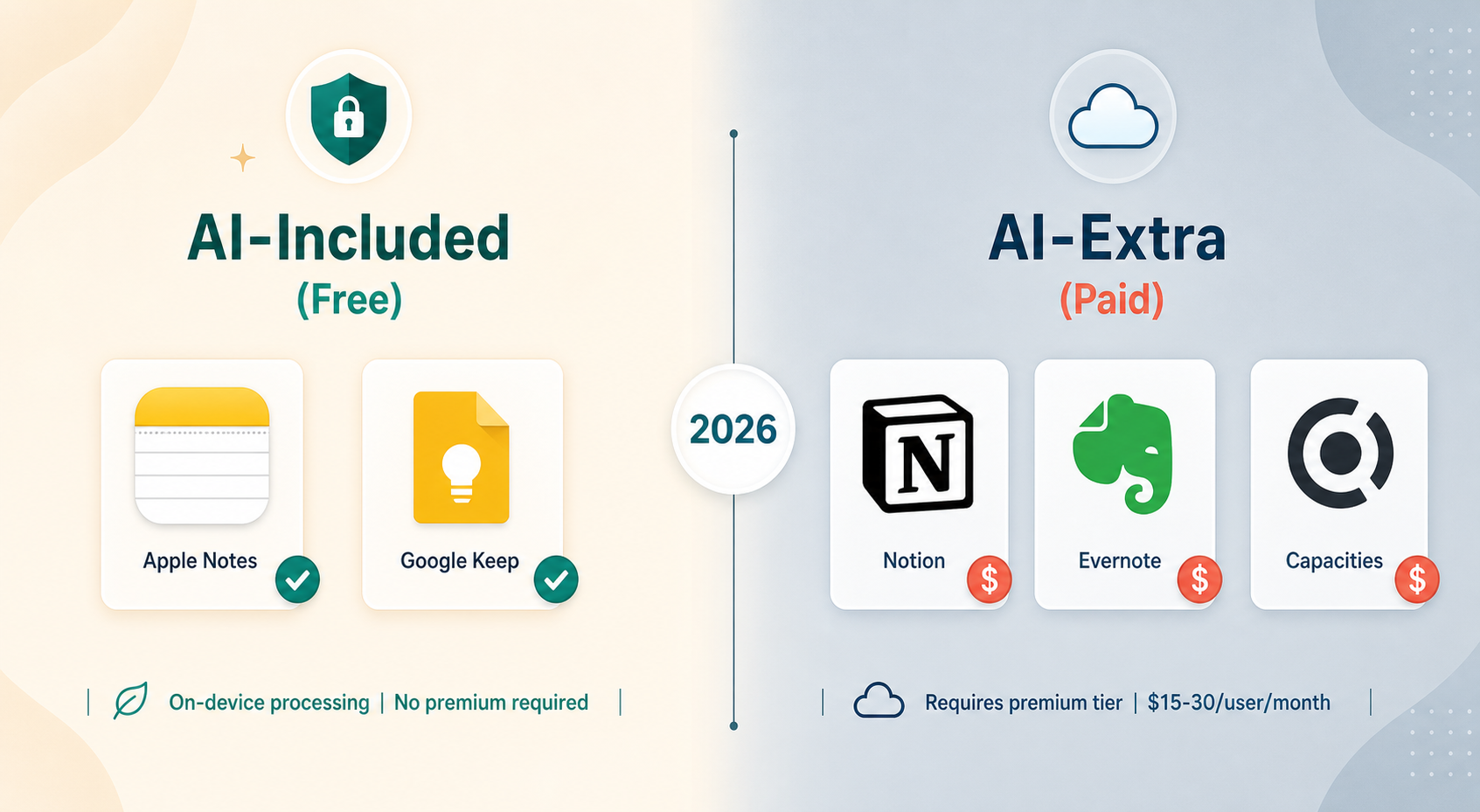
The most significant shift in 2026 is the emergence of a clear divide between what we can call AI-included and AI-extra tools. On one side, Apple Intelligence and Google Gemini are bringing genuinely capable on-device AI to native apps like Apple Notes and Google Keep — at no additional cost. On the other, established players like Notion and Evernote have folded their AI features into premium tiers that cost $20 to $30 per user per month. The result is a fragmented landscape where the best AI experience for a student on a budget may come from a free app, while a team needing deep database integration may have to pay a premium.
The demand for AI-native note-taking is real. Turbo AI, a student-focused tool, grew from 1 million to 5.7 million users in just six months, adding roughly 20,000 users per day and reaching eight-figure annual recurring revenue. That kind of velocity signals that users are actively seeking out AI-powered note-taking experiences — and they are willing to switch tools to get them.
How Each Major Tool Implements AI
The implementation details matter more than the feature list. A tool's AI architecture — whether it runs on-device or in the cloud, whether it is bundled or sold separately, and how it integrates with your existing workflow — determines whether the feature becomes a daily habit or a forgotten novelty. Here is how six major tools handle AI in 2026.
Notion: AI Bundled into Business Tier
Notion made a consequential move in early 2026: it stopped selling Notion AI as a standalone $10 add-on and folded it into the Business and Enterprise tiers. The cheapest route to AI features is now the Business plan at roughly $24 to $30 per user per month (pricing varies by region; AUD 30 per user per month in Australia). For that price, you get text generation and editing, summarization and action-item extraction from meeting notes and transcriptions, integration with Slack, Google Drive, and GitHub, database building and editing, and a Q&A chatbot that can answer questions about your notes.
This bundling makes Notion AI a team-first proposition. If you are an individual user on the Free or Plus ($10/month) plan, you have no access to AI features at all. The decision is clear: Notion AI is designed for organizations that can absorb the per-seat cost and will benefit from the collaborative Q&A and database automation.
Evernote: AI on the Advanced Plan
Evernote's 2025 major update added a conversational assistant, semantic search, and AI transcription. In 2026, these features require the Advanced plan, which costs approximately $17.99 to $25 per month depending on your region (AUD 22/month in Australia). The free plan remains heavily restricted: 50 notes, one notebook, 1GB of storage, and a single device. The Starter plan at $15/month lifts the cap to 1,000 notes but still limits AI access.
Evernote's AI tools can paraphrase, proofread, summarize, or translate text, and help create titles, introductions, or conclusions. For users who rely on Evernote as their primary information archive and need heavy transcription and semantic search, the Advanced plan may be worth the cost. But the 50-note free tier is essentially a trial, not a usable product.
Apple Notes: Free On-Device AI with Apple Intelligence
Apple Intelligence brings writing tools, summarization, and image generation to Apple Notes at no extra cost — provided you have a supported device. The AI runs on-device, which means your notes never leave your device for processing. You can rewrite selected text, generate summaries, and create images directly within a note. For users in the Apple ecosystem, this is the most frictionless AI note-taking experience available.
Google Keep: Gemini Integration, Still Free
Google began wiring Gemini into Google Keep in 2025-2026, adding smarter search and summarization capabilities. The core Keep experience remains free with any Google account, and the 15GB of storage is shared across all Google apps. The Gemini integration is still rolling out, but early implementations include the ability to ask natural-language questions about your notes and get summarized answers. For users who live in Google Workspace, this is a compelling zero-cost AI option.
Obsidian: AI via Community Plugins, Local Processing
Obsidian takes a fundamentally different approach. The core app is free for personal use (and confirmed free for commercial use as of 2025). AI capabilities come through community plugins that run locally on your machine. This means you can connect to OpenAI, Anthropic, or local models via Ollama — and your note data never leaves your device unless you explicitly send it to an API.
The trade-off is technical complexity. Setting up AI in Obsidian requires installing plugins, configuring API keys, and potentially running local models. For users who value privacy and control above all else, this is the strongest option. For users who want AI to "just work" out of the box, it is not.
Capacities: AI Assistant on the Pro Tier
Capacities is a newer entrant (launched 2023) that has built AI into its object-based note-taking model from the ground up. The free tier is generous — unlimited notes, objects, spaces, and several GB of media storage. The Pro plan, at roughly $15 per month (AUD 15/month in Australia), includes an AI assistant with unlimited usage. Capacities' AI can generate content, summarize, and help organize your notes into its object structure.
AI Capabilities Head-to-Head
Beyond the pricing and implementation differences, the actual AI capabilities vary significantly across tools. The table below maps which features are available in each tool and at what tier.
| AI Feature | Notion (Business) | Evernote (Advanced) | Apple Notes (Free) | Google Keep (Free) | Obsidian (Free + Plugins) | Capacities (Pro) |
|---|---|---|---|---|---|---|
| Text generation / rewriting | Yes | Yes | Yes | Limited | Yes (via plugin) | Yes |
| Summarization | Yes | Yes | Yes | Yes (Gemini) | Yes (via plugin) | Yes |
| Semantic search | Yes | Yes | No | Yes (Gemini) | Yes (via plugin) | Yes |
| Transcription | Yes | Yes | No | No | No | No |
| Q&A over notes | Yes | Yes | No | Limited | Yes (via plugin) | Yes |
| Image generation | No | No | Yes | No | No | No |
| Flashcard generation | No | No | No | No | Yes (via plugin) | No |
| On-device processing | No | No | Yes | No | Yes (optional) | No |
A few patterns stand out. Apple Notes is the only tool offering on-device image generation, but it lacks semantic search and transcription entirely. Evernote and Notion are the only tools with built-in transcription, making them strong choices for meeting-heavy users. Obsidian's plugin ecosystem gives it the most flexibility, but that flexibility comes with a setup cost that most casual users will not want to pay.
The Privacy Trade-Off: On-Device vs. Cloud AI
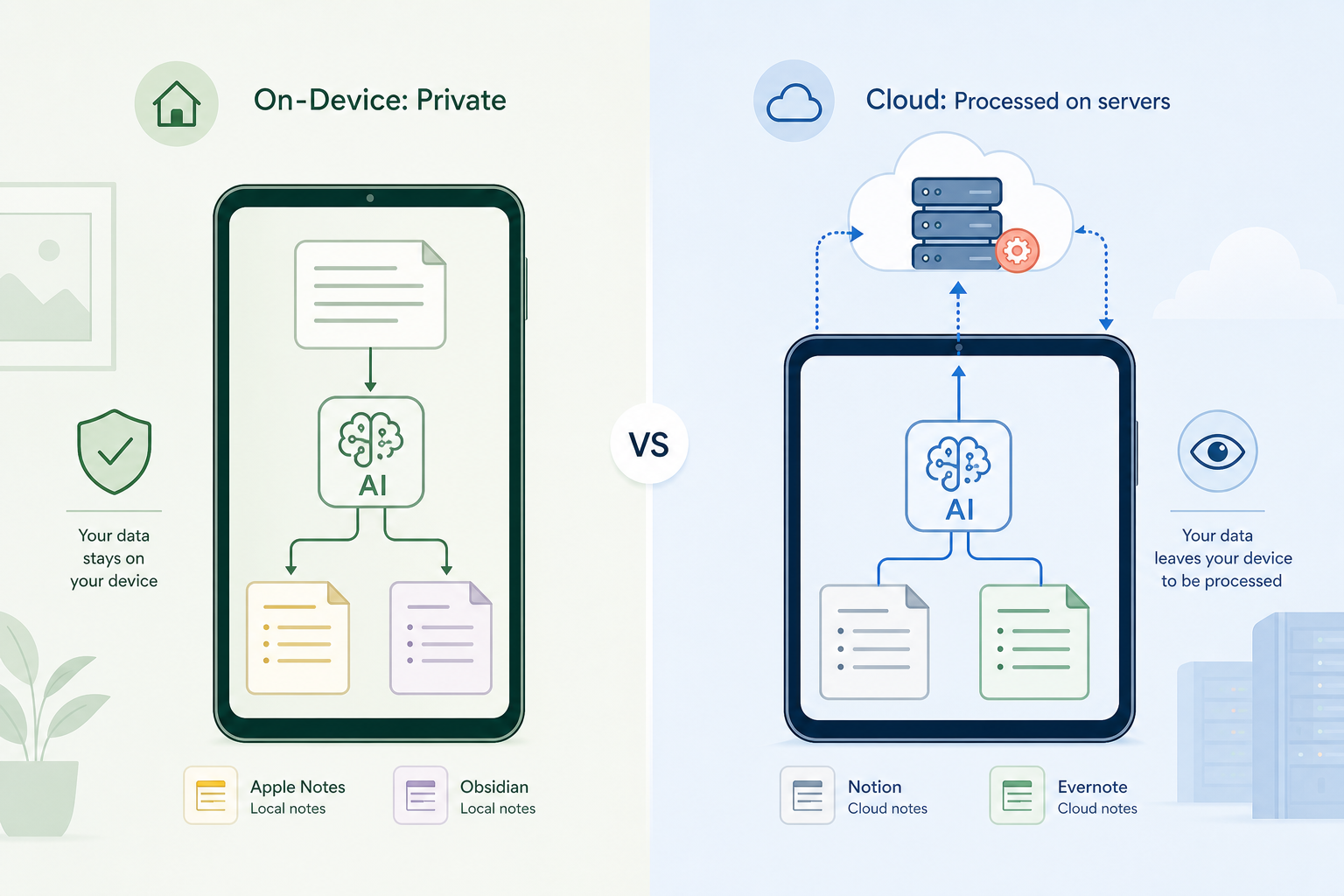
The most consequential difference between these tools is not the feature list — it is where the AI processing happens. On-device AI (Apple Notes, Obsidian with local plugins) keeps your note data on your machine. Cloud AI (Notion, Evernote, Capacities) sends your notes to remote servers for processing. This distinction matters differently depending on what you write.
For personal journaling, health tracking, or confidential work notes, the privacy implications of cloud AI are real. When you ask Notion AI to summarize a note, that note's content is processed on Notion's servers. The same applies to Evernote's semantic search and transcription features. Apple Notes and Obsidian (with local plugins) process everything on-device, meaning your data never touches an external server unless you explicitly choose to sync it.
This is not a theoretical concern. McKinsey research (from their 'The Social Economy' report) found that knowledge workers spend roughly 19% of their workweek searching for and gathering information — a statistic that underscores how much sensitive data flows through note-taking tools. If your notes contain client information, proprietary research, or personal health data, the choice between on-device and cloud AI becomes a security decision, not just a convenience one.
For readers weighing this trade-off in depth, our Local-First vs Cloud PKM in 2026 comparison covers the architectural differences between local-first and cloud-based personal knowledge management systems in detail.
Cost Analysis: What You Actually Pay for AI
The cost of AI in note-taking apps ranges from $0 to over $360 per year. But the headline price is only part of the story. The table below breaks down the real cost of accessing AI features in each tool, including what you give up with free tiers.
| Tool | Cheapest AI Tier | Monthly Cost | Annual Cost | Free Tier Limits | AI Processing |
|---|---|---|---|---|---|
| Apple Notes | Free (Apple Intelligence) | $0 | $0 | iCloud storage (5GB free) | On-device |
| Google Keep | Free (Gemini) | $0 | $0 | 15GB shared across Google apps | Cloud |
| Obsidian | Free + plugins | $0 + API costs | $0 + API costs | Unlimited local notes | On-device / API |
| Capacities | Pro | ~$15 | ~$180 | Unlimited notes, objects, spaces | Cloud |
| Evernote | Advanced | ~$17.99–$25 | ~$216–$300 | 50 notes, 1 notebook, 1 device | Cloud |
| Notion | Business | ~$24–$30 | ~$288–$360 | Unlimited pages, 7-day history | Cloud |
The cost disparity is striking. Apple Notes and Google Keep offer competitive AI features for free — but with trade-offs. Apple Notes lacks semantic search and transcription. Google Keep's Gemini integration is still rolling out and its note-taking model is simpler than what power users expect. Obsidian's free-plus-plugins approach is the most flexible but requires technical comfort and potentially ongoing API costs.
On the premium side, Evernote's Advanced plan at roughly $18–$25 per month is the cheapest dedicated AI tier among the paid tools, but the free tier's 50-note cap makes it essentially a trial. Notion's Business plan at $24–$30 per user per month is the most expensive option, but it bundles AI with team collaboration features that individual users may not need.
Verdict: Which Tools' AI Justifies the Premium?
After evaluating the AI capabilities, privacy implications, and costs across six major note-taking apps, one conclusion is clear: the AI-included vs AI-extra divide means there is no single "best" answer. The right tool depends entirely on your use case, budget, and privacy requirements.
Best for Students on a Budget: Apple Notes or Google Keep
If you are a student with a supported Apple device, Apple Notes with Apple Intelligence is the strongest free option. On-device summarization and rewriting are genuinely useful for study notes, and the image generation feature is a bonus for visual learners. Google Keep with Gemini is a close second, especially if you are already in the Google ecosystem. Neither tool requires a subscription, and both offer AI features that were only available in premium tools two years ago.
Best for Privacy-Focused Users: Obsidian
Obsidian's plugin-based AI approach is the only option that gives you full control over where your data is processed. If you are willing to invest the time to set up plugins and configure local models, you can get AI features that rival the premium tools — without sending your notes to any third-party server. The trade-off is technical complexity, but for users who handle sensitive information, that complexity is a feature, not a bug.
Best for Teams: Notion
Notion AI's Q&A over notes, database automation, and integration with Slack, Google Drive, and GitHub make it the strongest team-oriented AI note-taking tool — provided your organization can absorb the $24–$30 per user per month cost. The bundling of AI into the Business tier means that teams already paying for Notion for project management get AI as a natural extension of their existing workflow.
Best for Heavy Transcription Users: Evernote
Evernote's AI transcription and semantic search are genuinely useful for users who attend many meetings and need to search through recorded conversations. The Advanced plan at roughly $18–$25 per month is expensive for an individual, but if transcription is a core workflow need, Evernote does it better than any other tool on this list.
Best for Object-Based Thinkers: Capacities
Capacities' object-based model — where notes are organized as people, projects, books, and other entities — combined with its AI assistant on the Pro tier ($15/month), makes it a compelling option for users who find traditional folder-and-note structures limiting. The generous free tier means you can evaluate the tool thoroughly before committing to the paid AI features.
The AI-included vs AI-extra divide is not going away. As Apple and Google continue to invest in on-device AI, the pressure on premium tools to justify their AI pricing will only increase. For now, the best advice is to start with the free AI features in Apple Notes or Google Keep, and only upgrade to a paid tier if you have a specific need — transcription, team Q&A, or object-based organization — that the free tools cannot meet.