
Evernote at a Crossroads in 2026
In two years, Evernote's annual subscription for a single user has climbed from $69 to $249.99 — a 260% increase that has left many long-time users questioning their loyalty. The price hikes coincide with Bending Spoons' acquisition and aggressive monetisation strategy: across its portfolio of 50+ apps, the company reported $1.31 billion in revenue in 2025, 95% year-over-year growth, and 9 million paying subscribers. Those numbers come largely from price increases, not new users. Evernote users, in particular, have borne the brunt: forum threads document the trajectory from $69 to $129 to $249 in just two renewal cycles, with some offered a 40% retention discount when attempting to cancel.
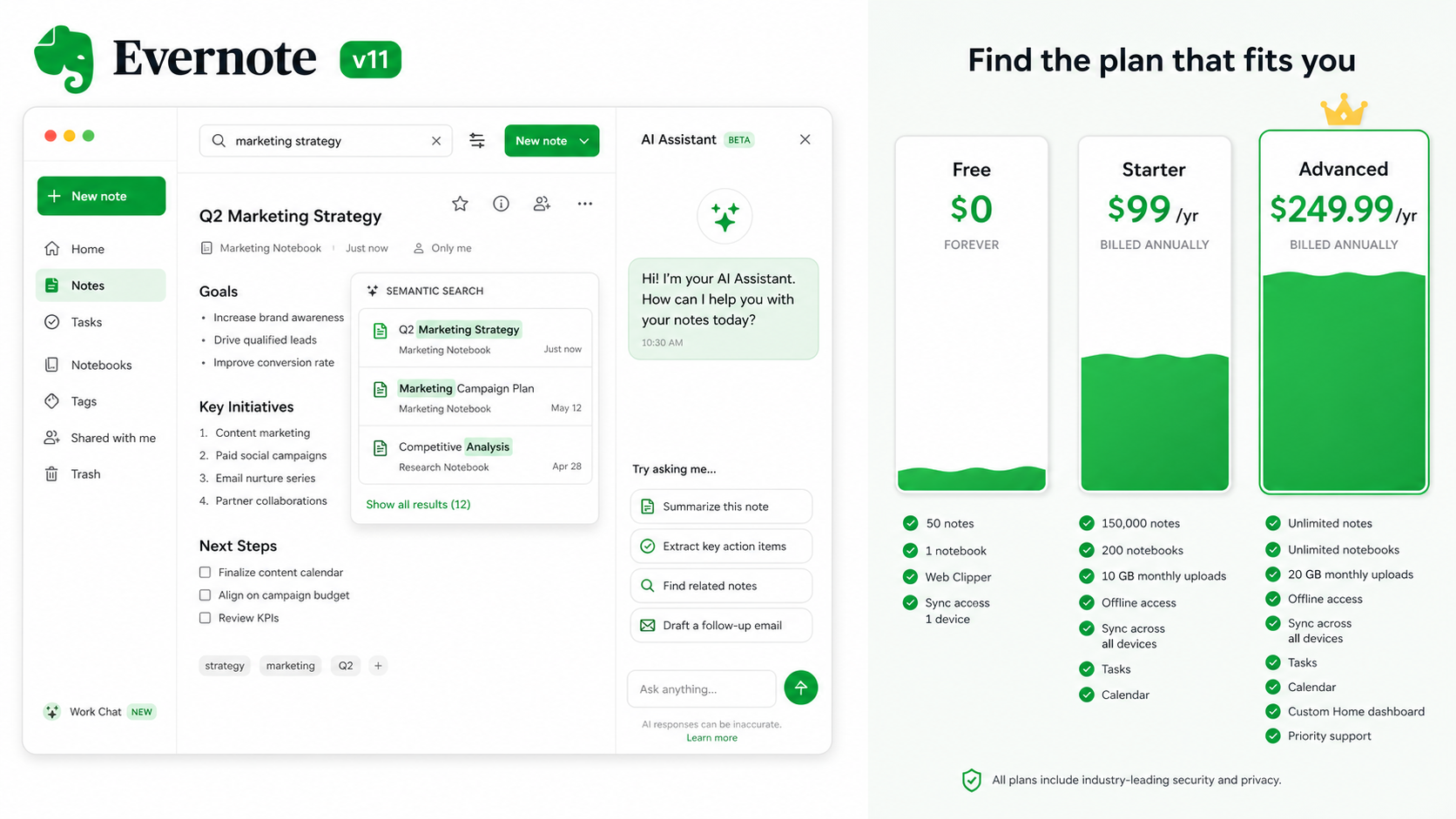
Yet the same period delivered the most significant product update in years. Version 11 introduces three AI-powered features — AI Assistant, Semantic Search, and AI Meeting Notes — alongside a refreshed interface, inline calculations, and link previews. The question for anyone evaluating Evernote in mid-2026 is straightforward: do the new capabilities justify the new price tag, or is this simply a legacy tool pricing itself out of the market?
What v11 Actually Adds: Three AI Features That Change the Game
Evernote's v11 update (announced in January 2026) is built around three AI capabilities, each addressing a different pain point in note-taking. All three are available on both Starter and Advanced plans, though Semantic Search and AI Assistant were listed as "Coming soon" in the official FAQ updated April 9, 2026 and are currently in beta for select paid users. Here's what each feature does and how it performs in real use.
AI Assistant — ChatGPT Inside Your Notes
The AI Assistant is an OpenAI-powered chat interface integrated directly into the note editor. You can ask it to summarise a note, rewrite a paragraph, generate a to-do list from bullet points, or even answer questions based on the contents of your selected note. Unlike standalone chatbots, it operates within Evernote's infrastructure — no data is sent to third-party servers. This is a genuinely differentiated feature: no other mainstream note-taking app offers a first-party AI assistant that can both search your notes and edit them inline. The assistant can also generate new content: for instance, you can type "draft a meeting agenda based on last week's project notes" and it will pull relevant information and produce a structured outline.
Semantic Search — Finding Meaning, Not Keywords
Traditional search in Evernote (and most apps) relies on exact keyword matching. Semantic Search uses mathematical embeddings to find notes by meaning. Ask a question like "What did we decide about the Q3 budget?" and it returns relevant notes even if none contain those exact words. It also provides a short AI-generated "Quick answer" that cites the source notes. The feature scans images, tasks, tags, and attachments via OCR. Processing notes may take a few hours after indexing, and it supports multiple languages. In practice, Semantic Search dramatically reduces the time spent hunting through thousands of notes, especially for users who don't maintain rigid tagging systems.
AI Meeting Notes — A Built-in Transcription Engine
AI Meeting Notes records up to 60 minutes of audio with speaker identification and produces an AI-generated summary. This positions Evernote as a competitor to dedicated tools like Otter.ai or Fireflies.ai — but without needing a separate subscription. The feature is accessible from the mobile and desktop apps, and the resulting notes are stored in your Evernote account with full searchability. For knowledge workers who attend multiple meetings per week, this alone can justify the jump from a free tier to a paid plan, though the 60-minute cap means longer strategy sessions may need to be split into segments.
Beyond AI, v11 brings interface refinements: inline calculations (type a math expression and press space to compute), rich link previews, and a new logo. These are nice touches, but the AI features are the headline. All AI features can be toggled individually in Preferences, giving privacy-conscious users control.
Evernote's New Pricing Breakdown: Starter vs. Advanced
The old Personal ($139.99/yr) and Professional ($179.99/yr) plans are gone. Evernote now offers three tiers: a severely restricted Free plan, Starter at $99/year ($14.99 monthly), and Advanced at $249.99/year ($24.99 monthly). The official FAQ spells out the exact limits:
| Feature | Free | Starter ($99/yr) | Advanced ($249.99/yr) |
|---|---|---|---|
| Notes | 50 total | 1,000 total | Unlimited |
| Notebooks | 1 | 20 | Unlimited |
| Tags | 20 | 100 | Unlimited |
| Attachments per note | 25MB | 1,000 per account | Unlimited |
| Storage | 250MB/month upload | 5GB total | Unlimited |
| Devices | 1 | 3 | Unlimited |
| AI features | No | Yes (beta) | Yes (beta) |
Existing Personal and Professional subscribers have been auto-migrated to the Advanced plan. To downgrade to Starter, users must manually reduce their notes, notebooks, tags, and attachments to fit within Starter limits. The forum is filled with complaints about the lack of bulk-editing tools to help with this cleanup. Evernote does offer a 40% retention discount when you attempt to cancel, which brings the effective Advanced price to roughly $150/year — still more than double the old Personal plan.
Scoring Value: Who Gets Their Money's Worth?
The $150 gap between Starter and Advanced is significant. To determine which plan — if any — suits you, consider your usage patterns.
- Heavy power users (5,000+ notes, multiple devices, frequent attachment storage): Advanced is the only realistic option. The unlimited storage, unlimited devices, and unlimited notes remove all friction. The AI features become genuinely useful at scale — Semantic Search alone saves hours navigating a sprawling archive. If you are a long-time Evernote user with a decade of accumulated notes, Advanced is the only choice that doesn't force you to delete content.
- Moderate users (500–1,000 notes, 2–3 devices, occasional attachments): Starter at $99/year is viable, but you must stay disciplined. The 1,000-note cap and 3-device limit will frustrate anyone who grows their archive. Use collapsible headers and temporary notebooks to stay within limits. The AI features are present on Starter, so you still get Semantic Search and AI Assistant — just with a tighter ceiling.
- Casual users (under 500 notes, single device, mostly text): Starter may feel expensive for what you get. The free plan's 50-note limit forces an upgrade quickly, but at $99/year you're paying more than a Netflix subscription for basic note-taking. Better options exist (see competitor comparison below).
- Students: The free plan won't last a semester. Starter at $99/year is a stretch for most students. Consider free alternatives like OneNote or Obsidian before committing.
- Teams: Evernote lacks native team workspaces. For collaborative projects, Notion or OneNote are more suitable. Advanced is designed for individuals, not groups.
How Evernote's Pricing Stacks Up Against Competitors
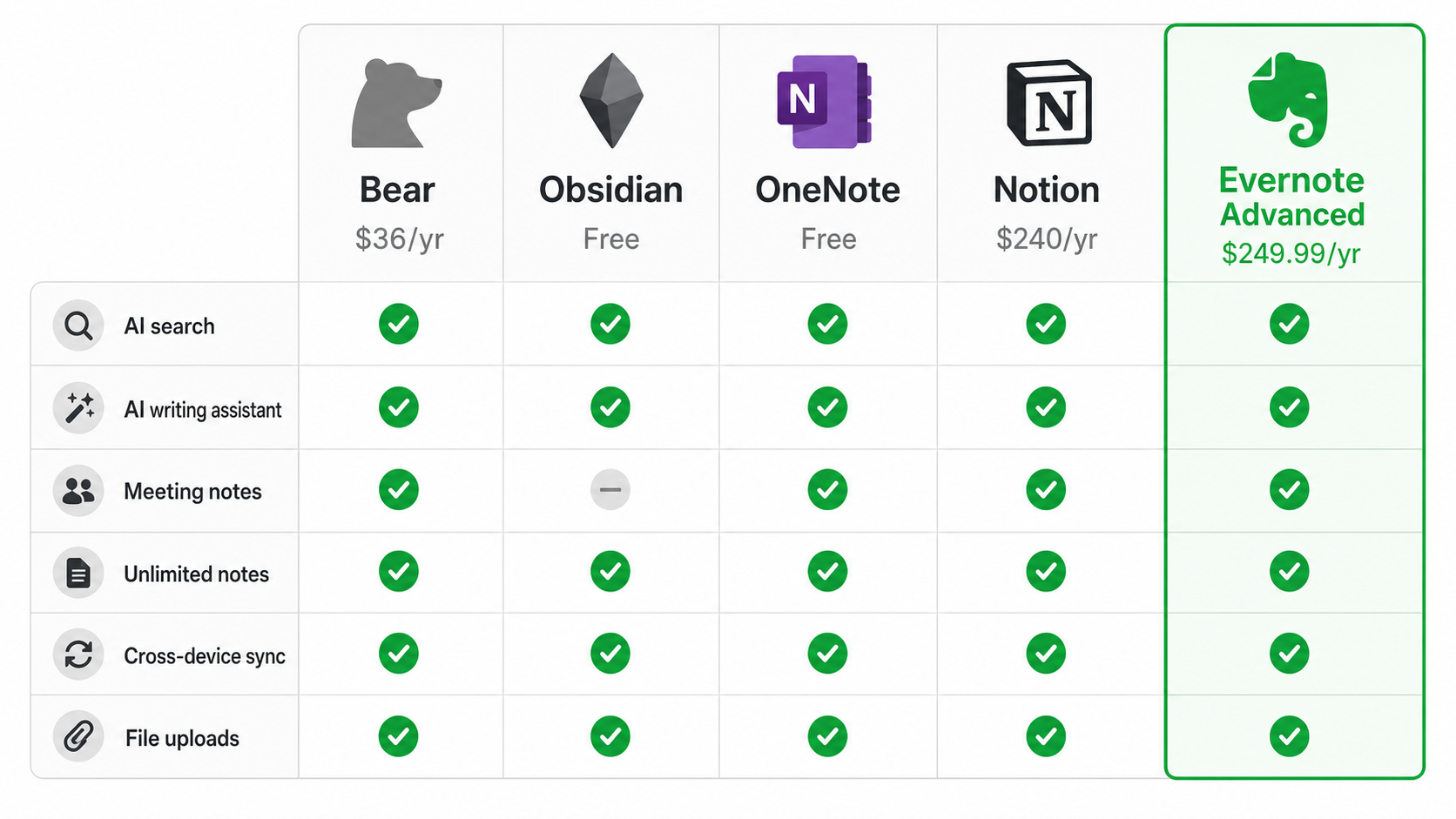
Evernote's Advanced plan at $249.99/year is the most expensive mainstream note-taking app on the market. Here's how it compares to the most common alternatives:
| App | Annual Price | AI Features | Unlimited Notes | Cross-Device Sync | Best For |
|---|---|---|---|---|---|
| Evernote Advanced | $249.99 | AI Assistant, Semantic Search, Meeting Notes | Yes | Yes (unlimited devices) | Heavy power users who want AI in their existing archive |
| Notion Plus | $240 | Notion AI (add-on $10/mo) | Yes | Yes | Teams and project management; AI costs extra |
| Obsidian (free + sync) | $0 + ~$48/yr sync | Community plugins (no official AI) | Yes | With paid sync ($48/yr) | Local-first users; AI requires third-party integrations |
| Microsoft OneNote | $0 (with Microsoft account) | Copilot in Microsoft 365 ($100/yr for AI) | Yes | Yes (free) | Anyone on Windows or Mac who doesn't need advanced AI |
| Bear | $36/yr | None | Yes | Yes (iCloud, Apple only) | Apple ecosystem users; no AI features |
The table reveals that Evernote's AI suite is the most comprehensive at the base price — no add-on fees, no separate subscriptions. Notion charges an extra $10/month for AI access, bringing its total to $360/year. OneNote's Copilot requires a Microsoft 365 subscription ($100/year) on top of a free OneNote account. Obsidian relies on community plugins for AI, which vary in quality. However, Evernote's core note-taking experience — editing, organisation, collaboration — has not kept pace with Notion's flexibility or Obsidian's local-first architecture. The AI features are the differentiating factor, but they come with the highest base price.
The Verdict: Is Evernote Worth It in 2026?
After evaluating the features, pricing, and competitive landscape, the answer depends entirely on your usage profile and budget tolerance.
The middle ground exists: existing users should attempt to cancel and claim the 40% retention discount, bringing Advanced to roughly $150/year. At that price, the AI features become a stronger value proposition. New users should start with the free plan (50 notes) to test the AI features, then decide if the ecosystem is worth the jump to Starter or Advanced.
Evernote v11 is not the same app it was in 2023 — the AI features are real and useful. But the pricing strategy has turned it into a premium product for power users only. If you fit that profile, it's a justifiable expense. If you don't, the alternatives have never been more compelling.