
Why the Best Note-Taking App Depends on How You Retrieve Information
Every note-taking app promises to capture your ideas. But the real test — the one that determines whether an app becomes a daily tool or a digital graveyard — is how well it lets you find that information later. The most feature-rich app in the world is useless if its retrieval model clashes with the way your brain organizes and searches for knowledge.
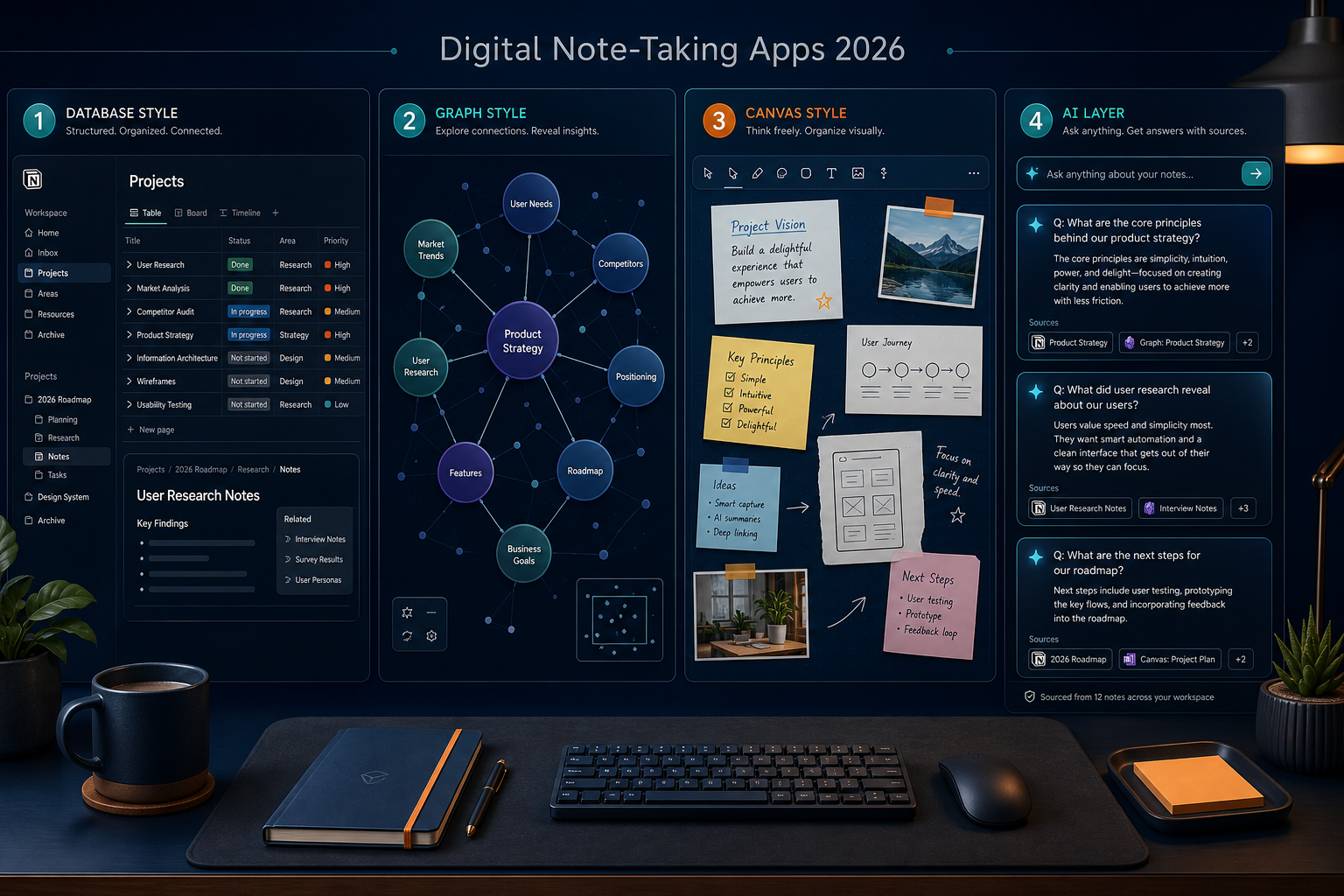
After evaluating the current landscape, we've identified five distinct retrieval models that define how apps surface your notes:
- Database (Notion, Coda): Structured tables, relational links, and filtered views. Best for project management and systems where every note has a defined type and status.
- Graph (Obsidian, Logseq, Roam): Bidirectional links and a visual node graph. Best for building a personal knowledge base where connections between ideas matter more than folder structure.
- Canvas (OneNote, GoodNotes, Freeform): Freeform spatial placement of text, images, and handwriting. Best for visual thinkers, sketchnoting, and meeting notes that mix media.
- Search Box (Apple Notes, Google Keep, Simplenote): Minimal organization, heavy reliance on full-text search and tags. Best for quick capture when speed is the only priority.
- AI Layer (Evernote v11, Google NotebookLM, Turbo AI): Conversational AI that surfaces answers from your notes without manual navigation. Best for users who want to ask questions instead of browsing folders.
This article uses that retrieval-model taxonomy as its primary organizing framework. Alongside it, we treat template ecosystems — the size of the community marketplace, the power of plugin-driven templating, and the quality of built-in structures — as a first-class decision axis. Because the app that matches your retrieval style and gives you a template ecosystem that enforces consistency is the app you will actually use six months from now.
The Note-Taking App Market in 2026: $13.3B and Growing
The note-taking app market reached $13.3 billion in 2026, growing at a compound annual rate of 20.6% from $11.02 billion in 2025, according to The Business Research Company's January 2026 report. North America remains the largest regional market. The category is projected to hit $28.05 billion by 2030.
What is driving this expansion? Hybrid and remote work environments now account for more than 50% of usage growth, per Codewave's February 2026 analysis. The number of smartphone users globally climbed from 4.25 billion in 2024 to 4.69 billion in 2025, putting a note-taking device in more hands every year. And the rise of AI-assisted features — from Evernote's conversational assistant to Google NotebookLM's million-token context windows — is pulling users who previously relied on paper or basic text editors into the app ecosystem.
Side-by-Side Comparison: 10 Digital Note-Taking Apps
The table below covers ten apps across the five retrieval models. Pricing was last verified against official sources in June 2026. Template/library size is an editorial estimate based on community activity and marketplace listings — exact counts fluctuate weekly.
| App | Retrieval Model | Pricing (Personal) | Platforms | Standout Feature | Template Ecosystem | Free-Plan Limits | Best-Fit Use Case |
|---|---|---|---|---|---|---|---|
| Notion | Database | Free / $12/mo Plus | Web, Mac, Windows, iOS, Android | Relational databases, 1,000+ community templates | Largest marketplace (thousands of free/paid templates) | Unlimited pages, 5 MB uploads | Project management & team wikis |
| Obsidian | Graph | Free / $50/yr Commercial | Mac, Windows, Linux, iOS, Android | Local Markdown, 1,000+ plugins, graph view | Plugin-powered (Templater, Dataview, QuickAdd) | Fully free for personal use | Personal knowledge management & Zettelkasten |
| OneNote | Canvas | Free / $1.99/mo 100GB | Mac, Windows, iOS, Android, Web | Freeform canvas, handwriting, audio recording | Built-in notebook/section/page hierarchy | 5 GB OneDrive storage | Freeform note-taking & classroom use |
| Evernote | AI Layer | Free / $15/mo Starter | Mac, Windows, iOS, Android, Web | AI search, transcription, conversational assistant | Limited built-in templates, no community marketplace | 50 notes, 1 device, 250 MB/month upload | Existing Evernote users & AI-powered search |
| Apple Notes | Search Box | Free | Mac, iOS, iPadOS, Web (iCloud) | Quick capture, rich link previews, tags | No template system | 5 GB iCloud storage (shared with Apple ID) | Apple ecosystem users who prioritize speed |
| Google Keep | Search Box | Free | Web, Android, iOS, Chrome extension | Voice notes, location reminders, labels | No template system | 15 GB Google storage (shared with Drive/Gmail) | Quick capture & shopping lists |
| Joplin | Graph / Search | Free / €2.99/mo Cloud | Mac, Windows, Linux, iOS, Android, CLI | Open-source, local-first, Markdown, end-to-end encryption | Plugin-powered (limited compared to Obsidian) | Fully free; Cloud plan adds sync | Privacy-focused users & developers |
| Bear | Search Box / Tags | Free / $2.99/mo Pro | Mac, iOS, iPadOS | Beautiful editor, hashtag organization, export options | Limited built-in templates | Free: basic editing; Pro: sync, themes, export | Apple-only users who want a polished writing experience |
| GoodNotes 6 | Canvas | $11.99/yr cross-platform / $10 one-time (device-specific) | iOS, iPadOS, Mac, Android, Windows, Web | Handwriting OCR, notebook templates, PDF annotation | Pre-built notebook covers & paper templates | Free: 3 notebooks; Paid: unlimited | iPad handwriting & PDF annotation |
| Logseq | Graph | Free | Mac, Windows, Linux, iOS, Android, Web | Outliner + graph, block-level references, local-first | Plugin-powered (growing community) | Fully free; optional Logseq Sync ($5/mo) | Outliner-based PKM & daily journaling |
Deep Dive: How Each App Matches a Retrieval Style
Notion — The Database-First Workspace
Notion is the clearest expression of the database retrieval model. Every page is a potential database entry, and the power comes from relational links, filtered views, and rollups. Its free tier is generous — unlimited pages and blocks, with a 5 MB upload limit per file — and the Plus plan at $12/month removes upload caps and adds 30-day version history.
Where Notion falls short is offline reliability. In Atlas Workspace's April 2026 evaluation across 187 notes, 23 capture trials, and 27 cross-link trials, Notion scored only 4.7 out of 10 overall, dragged down by a 1.0/10 score on offline-first integrity. If you work regularly without internet access — on planes, in cafes with spotty Wi-Fi, or in areas with poor connectivity — Notion's cloud dependency is a genuine friction point.
For readers deciding between Notion and a dedicated note-taking app, our Notion vs. Dedicated Note-Taking Apps comparison explores when a workspace tool makes sense versus when a focused note-taker is the better choice.
Obsidian — The Graph-Based Knowledge Base
Obsidian is the current leader in the graph retrieval model. It stores notes as local Markdown files, which gives it perfect data sovereignty and offline access. In the same Atlas Workspace evaluation, Obsidian scored 8.8 out of 10 — the highest of any app tested — with perfect 10.0 scores on both data sovereignty and offline-first integrity.
The app is free for personal use, with a $50/year commercial license for professional use. Its ecosystem of over 1,000 community plugins transforms it from a Markdown editor into a customizable knowledge platform. The Obsidian Importer plugin now supports one-step migration from Apple Notes, Bear, Craft, Evernote, Google Keep, OneNote, Notion, and Roam, making it a viable destination for users leaving other platforms.
For a detailed look at Obsidian's recent updates — including Bases, Mobile 2.0, and real-time collaboration — see our Obsidian Review 2026.
OneNote — The Freeform Canvas
OneNote is the strongest example of the canvas retrieval model. You can click anywhere on a page and start typing, drawing, or pasting an image — there is no grid, no row, no fixed structure. PCMag UK named it the Best Overall note-taking app for 2026, citing its cross-platform availability and the fact that the free version includes all core features. The free tier gives you 5 GB of OneDrive storage; $1.99/month expands that to 100 GB.
OneNote's notebook/section/page hierarchy provides a built-in organizational structure that many users find more intuitive than folder systems. It is particularly strong for students and professionals who mix typed notes with handwritten diagrams, audio recordings, and embedded files.
Evernote — The AI Layer Pioneer
Evernote's 2025 v11 update introduced a conversational AI assistant, semantic search, and AI summarization, positioning it as the leading example of the AI-layer retrieval model. Instead of navigating notebooks and tags, you can ask the assistant to surface notes by topic, date, or content.
However, Evernote's free tier has become severely restricted: 50 notes maximum, one device, and 250 MB monthly uploads. The Starter plan at $15/month removes those limits and adds the AI features. For existing Evernote users with large archives, the AI search is genuinely useful. For new users, the free tier is too constrained to evaluate the app properly.
Apple Notes and Google Keep — The Search Box Minimalists
Apple Notes and Google Keep represent the search box model: minimal organization, maximum capture speed. Apple Notes is free with 5 GB of iCloud storage and offers rich link previews, tags, and quick notes from the lock screen. Google Keep is free with 15 GB of Google storage and adds voice notes, location-based reminders, and tight Chrome integration.
Both apps are excellent for what they do — capturing a thought in under five seconds — but neither has a template system, and neither supports the kind of structured retrieval that knowledge workers need for long-term projects. They are complementary tools, not primary knowledge bases.
Joplin, Bear, GoodNotes, and Logseq
Joplin is the best open-source option, per PCMag UK's 2026 guide. It is free, local-first, supports Markdown, and offers end-to-end encryption. Its plugin ecosystem is smaller than Obsidian's but growing. Joplin Cloud sync starts at €2.99/month.
Bear is Apple-only and costs $2.99/month for the Pro tier (sync, themes, export). Its hashtag-based organization and beautiful editor make it a favorite among writers, but the lack of a template system and the platform lock-in limit its appeal for cross-device users.
GoodNotes 6 is the leading handwriting app, with an annual cross-platform plan at $11.99/year or a device-specific perpetual license at $10. Its template library includes pre-built notebook covers, paper styles (ruled, grid, dotted, Cornell), and planner layouts. Handwriting OCR makes all handwritten notes searchable.
Logseq is an open-source outliner with a block-level graph, similar to Roam but free. It uses local Markdown or Org-mode files and offers optional cloud sync at $5/month. Its plugin ecosystem is active but smaller than Obsidian's.
Template Ecosystems: The Real Differentiator
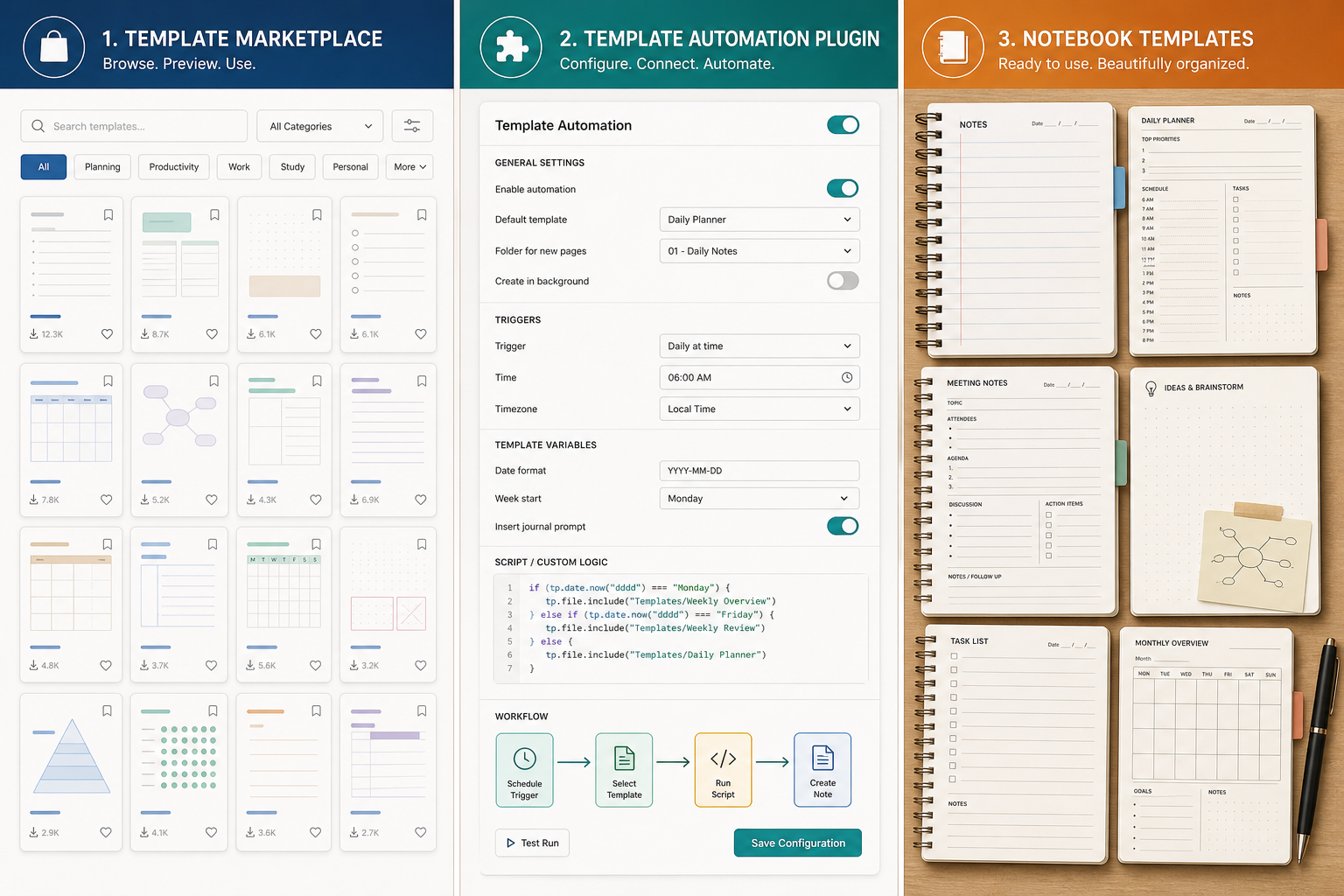
Templates are the hidden differentiator between apps that get adopted and apps that get abandoned. According to Sébastien Dubois's 2024 analysis of templates in personal knowledge management, templates eliminate the need to start from scratch, ensure uniform information recording, and make notes easier to retrieve through consistent metadata. When every meeting note has the same structure — date, attendees, agenda, decisions, action items — you can find the information you need without re-reading entire documents.
The importance of this consistency is underscored by a striking statistic: knowledge workers waste an average of 9.3 hours per week searching for information, and 80% report experiencing information overload, according to McKinsey research cited by GoLinks in March 2026. Nearly 20% of every workweek disappears into hunting for internal information. A well-structured template system — combined with the right retrieval model — can recover a significant portion of that lost time.
Here is how template support varies across the major apps:
| App | Template Approach | Ecosystem Size | Key Capabilities | Best For |
|---|---|---|---|---|
| Notion | Community marketplace + built-in template button | Largest (thousands of free and paid templates) | Full-page templates, database templates, template buttons that create new pages from a template on demand | Users who want ready-made systems for project management, CRM, habit tracking, and wikis |
| Obsidian | Plugin-powered (Templater, QuickAdd, Dataview) | Large (hundreds of community templates via GitHub and forums) | Dynamic templates with JavaScript logic, auto-generated tags, navigation links between daily/monthly/yearly notes, metadata insertion | Power users who want to automate their note-taking workflow and build custom systems |
| OneNote | Built-in notebook/section/page hierarchy | Small (no community marketplace) | Page templates (ruled, grid, project status, meeting notes), section groups, notebook-level structure | Users who prefer a fixed hierarchy and do not need community-shared templates |
| GoodNotes | Pre-built notebook templates + importable PDFs | Medium (official templates + third-party Etsy/ Gumroad marketplaces) | Notebook covers, paper styles (ruled, grid, dotted, Cornell, music, planner), sticker books, digital planners | Handwriting-first users who want aesthetic, ready-to-use notebooks |
| Evernote | Built-in templates (limited) | Small (no community marketplace) | Basic note templates (meeting notes, project notes, to-do lists) | Users who need simple, consistent note structures without customization |
| Apple Notes / Google Keep | None | None | No template support | Users who capture quickly and do not need structured templates |
Decision Framework: Match Your Workflow to an App
Use the following checklist to map your primary retrieval style and template needs to the right app. Start with the retrieval model, then check the template ecosystem, then verify platform and pricing fit.
- I organize information in structured tables and databases → Notion
- I think in connections between ideas and want a visual graph → Obsidian or Logseq
- I prefer freeform spatial placement of text, images, and handwriting → OneNote or GoodNotes
- I capture notes quickly and rely on search to find them later → Apple Notes or Google Keep
- I want to ask questions in natural language and get answers from my notes → Evernote (Starter plan or higher)
- I need ready-made templates for project management, habit tracking, or CRM → Notion (largest marketplace)
- I want to build custom, automated templates with dynamic content → Obsidian (Templater plugin)
- I need reliable offline access and own my data → Obsidian, Joplin, or Logseq
- I work across Windows, Mac, iOS, and Android → OneNote, Notion, or Evernote
For readers who prioritize data ownership and privacy, our Best Note-Taking Apps for Privacy and Data Ownership in 2026 guide covers local-first and cloud-based options in depth. And if cross-device compatibility is your primary concern, the Best Cross-Platform Note-Taking Apps 2026 guide ranks apps by device combination.
Honest 'Not for You If' Sections
Every app has tradeoffs. Here is when each major app is a poor fit:
- Notion: Not for you if you need reliable offline access. Notion's offline mode is limited and its 1.0/10 offline-first integrity score (Atlas Workspace) reflects real-world friction. Also not ideal if you prefer local Markdown files and full data portability.
- Obsidian: Not for you if you want a zero-setup, cloud-synced experience out of the box. Obsidian requires you to configure sync (Obsidian Sync, iCloud, or a third-party service) and learn its plugin ecosystem to unlock its full potential. If you want to start taking notes immediately without configuration, choose OneNote or Apple Notes.
- OneNote: Not for you if you prefer Markdown formatting and local file storage. OneNote uses its own proprietary format, and exporting notes to Markdown or plain text requires third-party tools. Also not ideal if you want a graph view or bidirectional linking.
- Evernote: Not for you if you need a generous free tier. The free plan's 50-note limit and single-device restriction make it unusable for anything beyond light evaluation. Also not ideal if you are starting fresh — the AI features are valuable, but the core note-taking experience has not kept pace with competitors.
- Apple Notes: Not for you if you use Windows or Android. Apple Notes is exclusive to the Apple ecosystem. Also not ideal if you need structured templates, databases, or a graph view.
- Google Keep: Not for you if you need organization beyond labels and colors. Keep has no notebooks, no folders, no templates, and no export to Markdown. It is a capture tool, not a knowledge base.
- GoodNotes: Not for you if you primarily type notes. GoodNotes is optimized for handwriting and PDF annotation. Typed text support exists but is basic compared to OneNote or Notion.
Pricing Table with Last-Verified Dates
Pricing in the note-taking app category changes frequently. The table below was last verified against official sources in June 2026. Always check the app's official pricing page before making a purchase decision.
| App | Free Plan | Personal / Starter | Pro / Business | Last Verified |
|---|---|---|---|---|
| Notion | Unlimited pages, 5 MB uploads | $12/month (Plus) | $24/month (Business, includes AI) | June 2026 |
| Obsidian | Full features, free for personal use | $50/year (Commercial license) | N/A | June 2026 |
| OneNote | 5 GB storage, all core features | $1.99/month (100 GB storage) | Included with Microsoft 365 ($6.99/month) | June 2026 |
| Evernote | 50 notes, 1 device, 250 MB/month upload | $15/month (Starter) | $17.99/month (Professional, adds AI) | June 2026 |
| Apple Notes | 5 GB iCloud storage | N/A | N/A | June 2026 |
| Google Keep | 15 GB Google storage | N/A | N/A | June 2026 |
| Joplin | Full features, free | €2.99/month (Joplin Cloud) | N/A | June 2026 |
| Bear | Basic editing | $2.99/month (Pro) | N/A | June 2026 |
| GoodNotes 6 | 3 notebooks | $11.99/year (cross-platform) or $10 one-time (device-specific) | N/A | June 2026 |
| Logseq | Full features, free | $5/month (Logseq Sync) | N/A | June 2026 |
Comments
Join the discussion with an anonymous comment.