
Why Choosing the Right Note-Taking App Matters More Than Ever
The note-taking app market is no longer a quiet corner of productivity software. In 2026, it's a $13.3 billion industry growing at a compound annual rate of 20.6%, according to a January 2026 report from The Business Research Company. That growth is fueled by the proliferation of smartphones — over 4.69 billion users globally — the shift to remote and hybrid work, and the rapid integration of AI into everyday tools.
With that much money and innovation flowing in, the number of choices has exploded. But more options don't automatically mean better outcomes. The real challenge isn't finding a note-taking app — it's finding the right one for how you actually work.
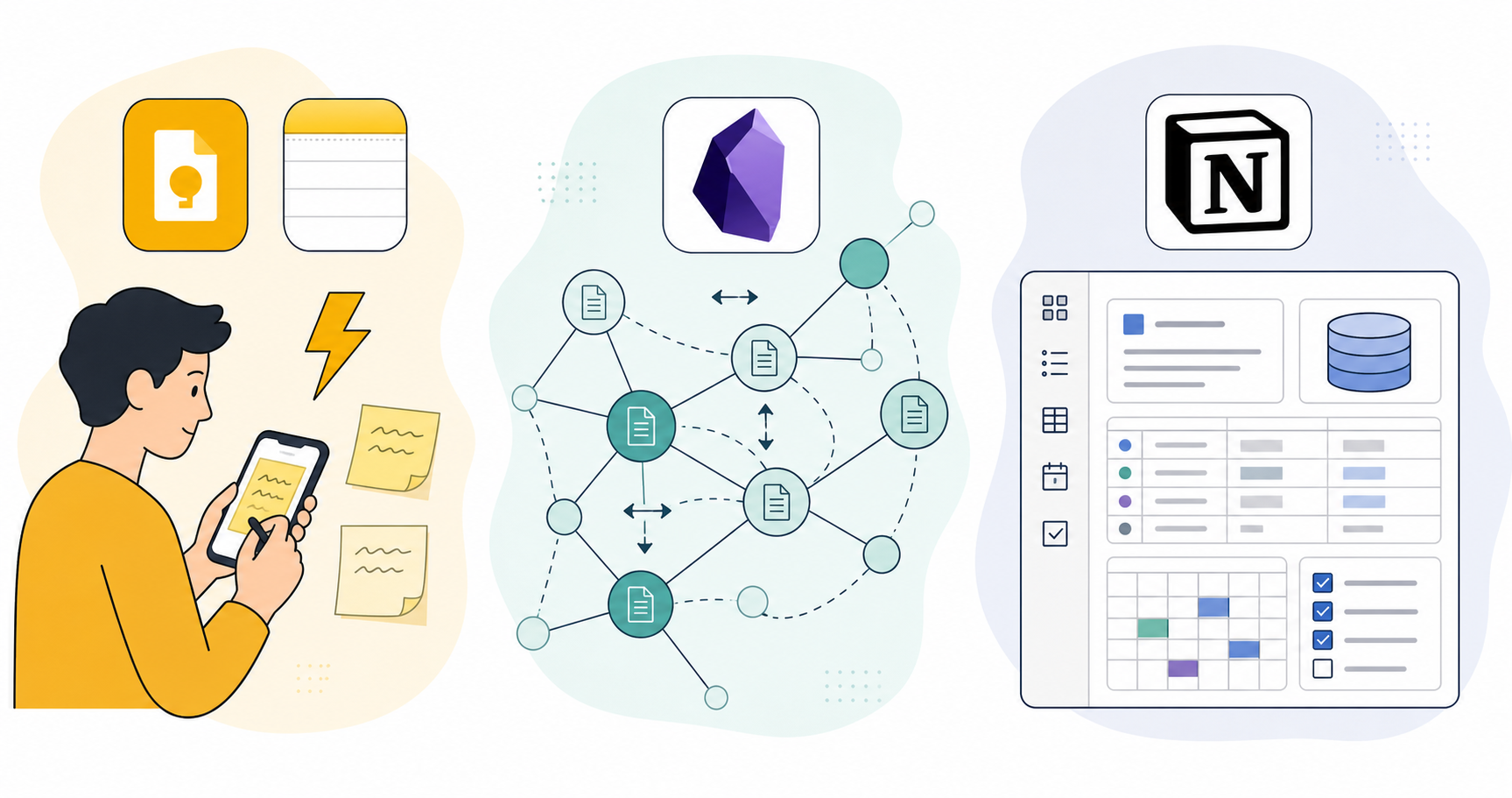
This guide is built around a simple premise: there is no single best note-taking app. The right tool depends on your primary workflow pattern — whether you're a rapid capture-and-forget user, a deep connector building a personal knowledge base, or someone who needs an active workspace to manage projects and teams. Your platform ecosystem and budget matter just as much.
We've evaluated eight major tools — Notion, Obsidian, OneNote, Evernote, Apple Notes, Google Keep, Bear, and Joplin — against six common use-case profiles. The result is a decision matrix that lets you self-identify and narrow your options in minutes, followed by deep dives into each tool's strengths, weaknesses, and honest tradeoffs.
The 2026 Note-Taking App Decision Matrix
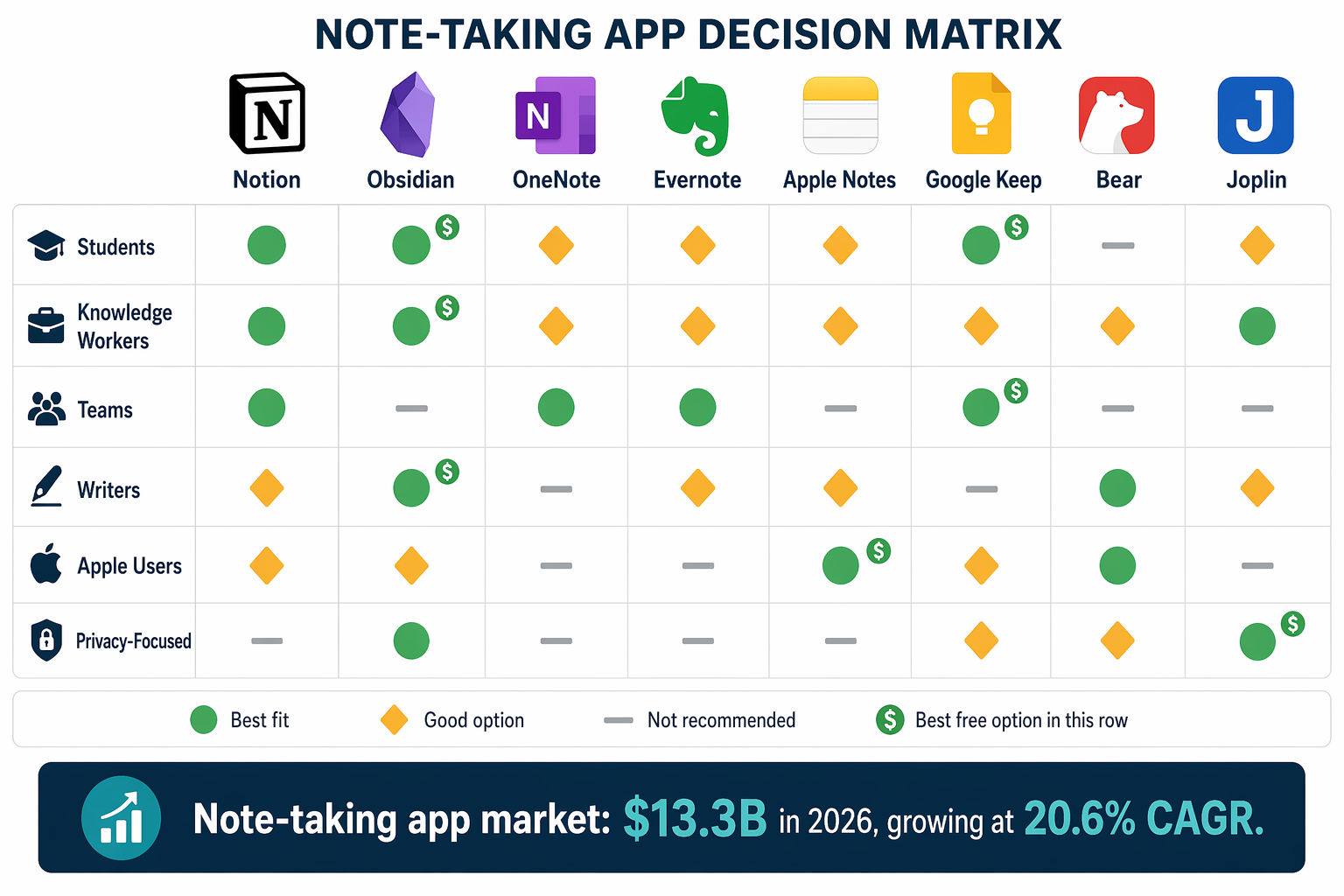
The table below maps eight tools to six common use-case profiles. Each cell shows whether the tool is a best fit, a good option, or not recommended for that profile. Use this as your starting point, then read the deep dives below for the full picture.
| Use Case | Notion | Obsidian | OneNote | Evernote | Apple Notes | Google Keep | Bear | Joplin |
|---|---|---|---|---|---|---|---|---|
| Students | Good option | Not recommended | Best fit | Not recommended | Good option | Good option | Not recommended | Good option |
| Knowledge Workers | Best fit | Best fit | Good option | Good option | Not recommended | Not recommended | Not recommended | Good option |
| Teams | Best fit | Not recommended | Good option | Not recommended | Not recommended | Not recommended | Not recommended | Not recommended |
| Writers & Creators | Good option | Good option | Not recommended | Not recommended | Not recommended | Not recommended | Best fit | Not recommended |
| Apple Ecosystem Users | Good option | Good option | Not recommended | Not recommended | Best fit | Not recommended | Good option | Not recommended |
| Privacy-Focused Users | Not recommended | Best fit | Not recommended | Not recommended | Not recommended | Not recommended | Not recommended | Best fit |
How We Evaluated and Compared These Tools
Every comparison needs a framework. We evaluated each tool across six dimensions, weighted by how much they matter to real-world decision-making:
- Workflow pattern fit: Does the tool support capture-first, connection-first, or active workspace workflows? This is the primary organizing principle of our comparison.
- Platform availability: Does it run on all your devices? We checked iOS, Android, Mac, Windows, and web support.
- Pricing and value: Free plan limits, paid tier costs, and whether the pricing matches the value delivered. All pricing data was verified against official sources in mid-2026.
- AI features: Native AI capabilities, third-party plugin options, and how well AI integrates into the note-taking workflow.
- Data ownership and portability: Can you export your notes? Are they stored locally or in the cloud? How locked in are you?
- Ease of use: How steep is the learning curve? Can a new user be productive within an hour?
We drew on expert reviews from PCMag, Zapier, Primetech Insights, and Tech Insider, cross-referenced pricing claims against official pages, and applied our own hands-on testing. Where sources disagreed on pricing — Obsidian Sync is listed at both $4/month and $5/month depending on the source — we've noted the range and recommend verifying directly.
Deep Dive: 8 Note-Taking Apps Compared
Each tool below includes key stats, pricing tiers (last verified mid-2026), supported platforms, primary workflow pattern, honest pros and cons, and explicit 'not for you if' language. We've grouped them by workflow pattern to make the comparison more useful.
Active Workspace Tools: Notion
Notion is the closest thing to an all-in-one workspace that exists today. It combines notes, databases, wikis, project management, and AI into a single platform. With over 100 million active users and adoption across 70% of Fortune 500 teams, it's the dominant player in the active workspace category.
- Pricing: Free for personal use; Plus from $8–$12/user/month (varies by billing cycle); Notion AI add-on $10/user/month; Business plan with AI at $24/user/month.
- Platforms: Web, Mac, Windows, iOS, Android. No native Linux client.
- Workflow pattern: Active workspace — designed for building structured systems, not quick capture.
Pros: Unmatched flexibility for building custom systems. Databases with relational properties, templates, and automation make it a project management tool as much as a note-taking app. Notion AI is deeply integrated — you can generate summaries, rewrite content, and query your notes using natural language. Performance improved significantly in version 3.4, with pages loading up to 60% faster.
Cons: Cloud-only — there's no offline-first mode, and the mobile apps are essentially web wrappers. The learning curve is steep; new users often spend hours setting up their workspace before they can be productive. Performance, while improved, still lags behind local-first tools: searching 10,000 notes takes 5–7 seconds, compared to under 2 seconds in Obsidian. Memory usage sits at 400–600MB.
Active Workspace Tools: Evernote
Evernote has undergone a significant transformation under Bending Spoons. The 2026 version includes task management, calendar integration, and AI-powered summarization and proofreading. But the pricing story has become the dominant narrative.
- Pricing: Free plan limited to 50 notes and 1 device; Starter at $15/month; Advanced at $25/month. PCMag calls the free version 'isn't worth using,' and Zapier describes it as 'utterly useless.'
- Platforms: Web, Mac, Windows, iOS, Android.
- Workflow pattern: Active workspace with strong capture capabilities — the web clipper remains best-in-class.
Pros: The web clipper is still the best way to save articles and web pages. AI features (per-note summarization, proofreading, and search) are genuinely useful. The task management and calendar integration make it more than just a notebook.
Cons: The pricing is hard to justify. At $15/month for the Starter plan, you're paying more than Notion Plus with AI. The free plan is so restrictive it's essentially a trial. The app has become 'heavy and opinionated,' as Primetech Insights puts it. PCMag rates it 4.0/5, but notes the cost as a major drawback.
Connection-First Tools: Obsidian
Obsidian has become the gold standard for personal knowledge management (PKM). It stores all notes as plain Markdown files on your local device, making them fully portable and future-proof. With over 5 million downloads and a plugin ecosystem that has crossed 2,500 plugins, it's the tool of choice for users who want to build a long-term knowledge base.
- Pricing: Core app free for personal use; Sync $4–$5/month; Publish $10/month. Commercial use starts at $4/user/year.
- Platforms: Mac, Windows, Linux, iOS, Android. Web version is limited.
- Workflow pattern: Connection-first — built around backlinks, graph view, and atomic notes.
Pros: Local-first architecture means your notes are always accessible, even without internet. The plugin ecosystem is unmatched — you can add Kanban boards, calendars, mind maps, and AI features through community plugins. Performance is exceptional: searching 10,000 notes takes under 2 seconds, and memory usage is 180–250MB. Real-time collaboration was added in version 1.8 with end-to-end encryption. PCMag rates it 4.0/5 and gives it an Editors' Choice award.
Cons: The setup can 'feel like a project,' as Primetech Insights notes. New users often spend significant time configuring plugins and learning Markdown. There's no native collaboration for teams — real-time sync requires the paid Sync service. The graph view, while visually impressive, is more of a novelty than a practical tool for most users.
For a deeper look at Obsidian's 2026 updates, including the new Bases feature and mobile 2.0, read our full Obsidian review.
Connection-First Tools: Joplin
Joplin is the open-source alternative to Evernote that has matured into a capable tool in its own right. It stores notes locally by default, supports Markdown, and offers end-to-end encryption for sync.
- Pricing: Free and open source. Joplin Cloud from €2.99/month for sync and collaboration features.
- Platforms: Mac, Windows, Linux, iOS, Android. CLI version available.
- Workflow pattern: Connection-first with strong organizational features — notebooks, tags, and search.
Pros: Completely free with no feature limitations. PCMag gives it 4.5/5 and an Editors' Choice award, calling it 'the best free note-taking app for users who want full control over their data.' End-to-end encryption is built in. The web clipper works with both Chrome and Firefox.
Cons: The interface is functional but not beautiful. Syncing requires either Joplin Cloud or a third-party service like Dropbox or Nextcloud. The plugin ecosystem is smaller than Obsidian's. No native real-time collaboration.
Capture-First Tools: OneNote
Microsoft OneNote remains the best free general-purpose note-taking app available. It's pre-installed on Windows, deeply integrated with Microsoft 365, and offers a feature set that rivals paid competitors.
- Pricing: Free with 5GB of OneDrive storage; $1.99/month for 100GB; Microsoft 365 Personal at $9.99/month includes 1TB storage and Office apps.
- Platforms: Windows, Mac, iOS, Android, Web. Linux support is limited to the web version.
- Workflow pattern: Capture-first — designed for freeform note-taking with flexible canvas, drawing tools, and audio recording.
Pros: The free plan is genuinely usable — 5GB of storage, all core features, no note limits. PCMag rates it 4.5/5 and gives it an Editors' Choice award, calling it 'the best free note-taking app for most people.' The notebook-section-page hierarchy is intuitive. Drawing and handwriting support is excellent, especially on tablets. Copilot AI integration is available for Microsoft 365 subscribers.
Cons: Sync can be slow and occasionally unreliable. The Mac version has historically lagged behind Windows in features. The free-form canvas, while flexible, can make it hard to keep notes organized at scale. No native Markdown support.
Capture-First Tools: Apple Notes
Apple Notes is the most frictionless note-taking experience for anyone in the Apple ecosystem. It's pre-installed on every iPhone, iPad, and Mac, syncs instantly via iCloud, and has evolved significantly with each iOS release.
- Pricing: Free with 5GB iCloud storage; $0.99/month for 50GB; higher tiers available.
- Platforms: iOS, iPadOS, Mac. No native Windows or Android app — web access via iCloud.com is limited.
- Workflow pattern: Capture-first — optimized for quick capture, scanning documents, and handwritten notes.
Pros: Zero setup required. Audio recording with automatic transcription was added in iOS 18. Apple Intelligence Writing Tools provide AI-powered summarization and rewriting. The Quick Note feature (swipe from corner with Apple Pencil or hot corner on Mac) is the fastest capture mechanism of any app. Tags and smart folders provide basic organization.
Cons: Locked to Apple devices. No native Windows or Android support means you can't access your notes on a work PC or non-Apple phone. Organization features are basic compared to Notion or Obsidian — no databases, no backlinks (though you can link notes), no graph view. Export options are limited.
Capture-First Tools: Google Keep
Google Keep is the ultimate lightweight capture tool. It's not designed for long-form notes or knowledge management — it's designed to get information out of your head and into a searchable format as quickly as possible.
- Pricing: Free with 15GB Google account storage (shared with Gmail, Google Drive, and Google Photos).
- Platforms: Web, iOS, Android. No native Mac or Windows app.
- Workflow pattern: Capture-first — sticky notes, checklists, voice memos, and location-based reminders.
Pros: Instant capture from anywhere — the mobile widget, voice memo, and Chrome extension all work in seconds. Location-based reminders are unique and genuinely useful ('remind me to buy milk when I'm near the grocery store'). Labels and color-coding make basic organization easy. Integration with Google Docs allows you to export notes with one click.
Cons: No formatting options beyond bold and italic. No folders or notebooks — labels are the only organization method. No backlinks, no graph view, no databases. Notes are limited in length and complexity. It's a capture tool, not a writing or knowledge management tool.
Capture-First Tools: Bear
Bear is the writer's note-taking app. It combines a beautiful, distraction-free editor with Markdown support and a tagging-based organization system. It's Apple-only, and it owns that identity proudly.
- Pricing: Free version with basic features; Bear Pro at $2.99/month or $29.99/year.
- Platforms: Mac, iPhone, iPad. No Windows, Android, or web version.
- Workflow pattern: Capture-first with a strong writing focus — optimized for creating beautiful, well-formatted notes.
Pros: The editor is genuinely beautiful — clean, typographically excellent, and distraction-free. Markdown is rendered in real time, so you see formatted text as you type. Tags with nested hierarchies (e.g., #work/project/meeting-notes) provide flexible organization. Export options include PDF, HTML, DOCX, and Markdown. PCMag rates it 3.5/5, noting its 'beautiful interface' as a key strength.
Cons: Apple-only — no way to access notes on Windows or Android. No tables within notes (a surprising omission for a writing tool). No backlinks or graph view. The free version is limited to basic features and doesn't include sync.
Use-Case Profiles: Which Tool Fits Your Workflow?
The decision matrix gave you a quick overview. Here's the detailed reasoning for each profile, with specific recommendations and runner-up options.
Students
Best fit: OneNote. The free plan is generous, the notebook-section-page hierarchy mirrors course structure naturally, and drawing support is excellent for annotating lecture slides. The $1.99/month 100GB upgrade is affordable for students.
Runner-up: Notion (if you want to combine notes with project management for group projects) or Apple Notes (if you're all-Apple and want zero setup).
Knowledge Workers
Best fit: Notion for structured knowledge bases and team wikis; Obsidian for personal knowledge management and long-term reference systems. Many knowledge workers use both — Notion for work, Obsidian for personal learning.
Runner-up: OneNote (if you're in a Microsoft 365 organization and want deep integration with Outlook and Teams).
Teams
Best fit: Notion. It's the only tool in this comparison with native team collaboration features — shared databases, permissions, comments, and real-time editing. The Business plan at $24/user/month includes Notion AI.
Runner-up: OneNote (if your team is already on Microsoft 365 and needs basic shared notebooks without additional cost).
Writers and Creators
Best fit: Bear. The distraction-free editor, real-time Markdown rendering, and beautiful typography make it the best writing environment among these tools.
Runner-up: Obsidian (if you want to connect research notes and drafts through backlinks) or Notion (if you need to manage a content calendar alongside your writing).
Apple Ecosystem Users
Best fit: Apple Notes. It's free, pre-installed, and deeply integrated with iOS and macOS features like Quick Note, audio transcription, and Apple Intelligence.
Runner-up: Bear (if you want a more powerful writing tool) or Obsidian (if you want local-first knowledge management). For Mac-specific recommendations, see our best note-taking apps for Mac comparison.
Privacy-Focused Users
Best fit: Obsidian (local-first, plain Markdown files, no cloud dependency) or Joplin (open source, end-to-end encryption, full data control).
Runner-up: Standard Notes (not in this comparison but worth mentioning for its zero-knowledge encryption). For a deeper look at data ownership and privacy across note-taking tools, see our privacy-focused note-taking apps comparison.
AI Features Comparison: What Each Tool Offers in 2026
AI has become a major differentiator in note-taking apps, but the depth of integration varies dramatically. Some tools have native, deeply integrated AI; others rely on community plugins or third-party services.
| Tool | AI Features | Cost | Integration Depth |
|---|---|---|---|
| Notion | AI writing assistant, summarization, Q&A over notes, AI agents (up to 20 min tasks) | $10/user/month add-on | Native, deeply integrated |
| Obsidian | Community plugins only (e.g., Smart Connections, Text Generator) | Free (plugins are free) | Plugin-based, variable quality |
| OneNote | Copilot AI (summarization, rewriting, search) | Included with Microsoft 365 ($9.99/month) | Native, integrated |
| Evernote | Per-note summarization, proofreading, AI search | Included in Starter ($15/month) and above | Native, integrated |
| Apple Notes | Apple Intelligence Writing Tools (summarize, rewrite, proofread) | Free with compatible Apple devices | Native, system-level |
| Google Keep | No native AI features | N/A | None |
| Bear | No native AI features | N/A | None |
| Joplin | No native AI features; limited plugin options | N/A | Minimal |
Pricing at a Glance: Free Plans, Paid Tiers, and Value
Pricing is often the deciding factor, especially for students and individual users. The table below shows free plan limits, paid tier prices, and the best value option for each tool.
| Tool | Free Plan | Paid Plans | Best Value |
|---|---|---|---|
| Notion | Unlimited pages, 7-day page history, limited integrations | Plus $8–$12/user/mo; Business $18/user/mo; AI add-on $10/user/mo | Free for personal use; Plus for teams |
| Obsidian | Core app free, unlimited local notes | Sync $4–$5/mo; Publish $10/mo | Free for personal use; Sync for multi-device |
| OneNote | 5GB storage, all core features | $1.99/mo for 100GB; M365 Personal $9.99/mo for 1TB | Free plan is genuinely usable |
| Evernote | 50 notes, 1 device | Starter $15/mo; Advanced $25/mo | Hard to recommend — free plan is too restrictive |
| Apple Notes | 5GB iCloud storage | $0.99/mo for 50GB; higher tiers available | Free for Apple users |
| Google Keep | 15GB Google account storage | Google One plans from $1.99/mo for 100GB | Free for Google users |
| Bear | Basic features, no sync | Pro $2.99/mo or $29.99/yr | Pro for multi-device users |
| Joplin | Free, unlimited notes | Joplin Cloud from €2.99/mo | Free for local-only use |
Final Verdict: How to Choose Your Note-Taking App
There is no single best note-taking app. The right choice depends on your workflow pattern, platform ecosystem, and budget. Here's a simple decision framework to help you narrow down:
- If you need an all-in-one workspace for projects, databases, and team collaboration: Choose Notion. It's the most versatile tool in this comparison, but be prepared for a learning curve and cloud dependency.
- If you prioritize privacy, local storage, and long-term knowledge management: Choose Obsidian. It's free, future-proof, and gives you complete control over your data. Joplin is a strong open-source alternative.
- If you want a free, reliable, general-purpose note-taking app: Choose OneNote. The free plan is the most generous among major apps, and the feature set rivals paid competitors.
- If you're all-in on Apple and want zero friction: Choose Apple Notes. It's free, pre-installed, and deeply integrated. For a more powerful writing experience, upgrade to Bear.
- If you need a lightweight capture tool that works everywhere: Choose Google Keep. It's not a knowledge management system, but it's the fastest way to capture a thought.
- If you're a legacy Evernote user wondering whether to stay: The app has improved, but the pricing is hard to justify for new users. Consider migrating to Notion, Obsidian, or OneNote.
Still unsure? Start with the free plan of your top two candidates and use each for a week. Pay attention to which one feels natural for your actual workflow — not which one looks best in a review. The best note-taking app is the one you actually use.