
The first minute of an Xfinity outage is usually messy: the video call freezes, Slack keeps spinning, and the modem lights suddenly become everyone’s least favorite diagnostic language. The useful move is not to start unplugging everything. It is to find out whether the failure is inside your home or on Xfinity’s side, because that answer decides whether a reboot helps, whether a hotspot is worth trying, and how quickly you need to warn your team.
Use this order when you need to stay productive working from home during an Xfinity outage:
| When | What to do | Why it comes now |
|---|---|---|
| First 5 minutes | Check Xfinity’s outage tools and a second signal such as Downdetector. | You need to know whether this is an area outage before wasting time on home equipment. |
| Minutes 5–15 | Try xfinitywifi, then phone tethering if needed. | A short bridge can save a meeting or let you send the message before you disappear. |
| Before going quiet | Tell your manager or team what failed, what you are trying, and what you can still do offline. | The workday should have a record before the outage becomes an attendance question. |
| During the outage | Move to local notes, drafts, exports, reviews, and prep work. | Your goal is recoverable output, not pretending every cloud app is fine. |
| After service returns | Save evidence, attempt the Xfinity credit claim, and send a short work record. | The bill and the workday need closure too. |
First, prove whether the outage is yours or Xfinity’s
Start with Xfinity’s official status tools. Open the Xfinity Outage Map if your phone still has mobile data, or text “OUT” to 266278 from the phone number associated with the account. Those channels are not perfect, but they answer the narrow question you need first: is Xfinity reporting a service problem at your address or nearby? [1]
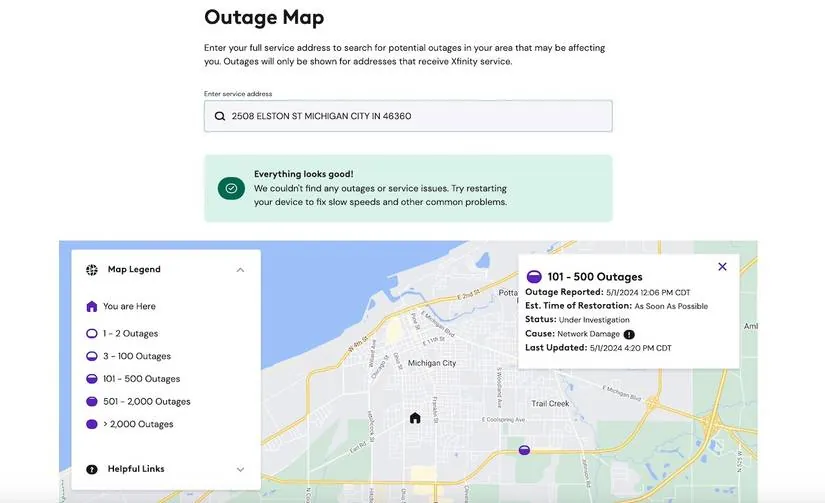
If Xfinity shows an area outage, do not spend the next 30 minutes power-cycling every device in the house. Xfinity’s own cable-not-working guidance puts equipment troubleshooting in the lane where the problem appears to be on the customer side of the connection, which is a different situation from a confirmed network outage. [2]
Then check a second signal. Downdetector’s Xfinity page is useful when official pages lag, look vague, or are unreachable from your connection. Treat it as a crowd signal, not a verdict. A spike in reports can confirm that you are not alone, but it does not replace the account-specific status Xfinity uses for restoration estimates and credits. [3]
This is not a fringe edge case. On June 22, 2026, a nationwide Xfinity outage drew roughly 26,000 Downdetector reports; Comcast attributed the disruption to a system update, and service returned within hours. [4] That kind of outage calls for a short-bridge plan. Local damage can be uglier: fiber cuts can stretch past 8 hours, which turns “wait it out” into a bad workday strategy. [5]
What to record while checking status
Before you move on, capture enough evidence that you will not have to reconstruct the outage later. Take a screenshot of the Xfinity status page if it loads, a screenshot of Downdetector if reports are spiking, and a note with the time your connection failed. If the Xfinity page gives an estimated restoration time, copy it into the note. This takes less time than another modem reboot and is far more useful if your manager asks what happened.
- Start time: when the call, VPN, or cloud app first failed.
- Status evidence: Xfinity map, text response, account status, or Downdetector spike.
- Business impact: missed meeting, delayed upload, blocked customer response, or VPN failure.
- Workaround attempted: xfinitywifi, phone hotspot, neighbor connection, or relocation.
Try the fastest connection bridges before leaving home
The fallback order should favor speed and reversibility. If you can get back online from your desk in two minutes, do that before packing a laptop bag and hoping a coffee shop Wi-Fi network is usable for work.
1. Check for xfinitywifi
Look for the “xfinitywifi” network from your laptop or phone. Xfinity gateways can broadcast a guest hotspot, and that network can sometimes get you online even when your private home Wi-Fi path is failing. It also gives you a diagnostic clue: if xfinitywifi works while your home network does not, the outage may be closer to your gateway, router, or account path than a full neighborhood failure. [5]
Do not assume it will always save you. If the same local Xfinity infrastructure is down, the guest hotspot may be down too. But it is worth checking early because it costs almost nothing and may preserve enough bandwidth for chat, email, documents, and a lower-stakes call.
2. Use your phone hotspot as a bridge, not an all-day plan
If xfinitywifi fails, tether from your phone long enough to send the team update, join the urgent part of a meeting, pull down the files you need, or move key notes into an offline-friendly place. Phone tethering is a good emergency bridge, but it is limited by battery drain, data caps, and the strain of video calls or multiple connected devices. [6][7]
Make it less painful: plug the phone into power, turn off video unless required, disconnect extra devices, pause cloud backups, and close apps that sync aggressively in the background. If your work VPN is mandatory and unstable over mobile data, say that in your team update rather than silently fighting it for an hour.
3. Use a neighbor, coworking space, or coffee shop only after you know what you are solving
A neighbor on a different provider can be a practical short-term fix if your work is not confidential and your employer’s security rules allow it. A coworking space is better for longer outages, especially if you need reliable upload speeds or calls. A coffee shop is the messiest option: noisy, public, and not always friendly to VPNs or sensitive work. It can still be the right call, but not before you have checked the at-home bridges.
Use the restoration estimate to decide. “Back by 10:30” usually means stay put and work around it. “No estimate,” “known area outage,” or signs of a fiber cut mean the day needs a stronger backup plan.
Tell the team before the workaround collapses
Send one clear message while you still have any connection. The point is not to overexplain your home network. The point is to create a timestamped work record and give other people a decision they can act on.
Use something like this:
Xfinity is down at my address as of about 9:12 a.m. I checked Xfinity status and Downdetector, and I’m trying xfinitywifi/phone hotspot now. If I drop, I can keep working offline on the proposal notes and send updates when I reconnect. I may miss the 9:30 call unless the hotspot holds.For a manager, add the business impact and the next checkpoint:
My home Xfinity connection is out and appears to be part of a local/provider issue. I’m documenting the outage and switching to offline work on the Q3 deck edits. I’ll check back by 10:30 or sooner if I regain stable service. Please let me know how you want the time logged if the outage runs longer.That last sentence matters. Do not volunteer PTO in the first panic message. Employer policies vary widely: some workplaces expect PTO after a certain amount of offline time, while others treat outage days more like admin leave or weather disruptions. A 2020 Ask a Manager discussion is not a legal rulebook, but it is a useful reminder that there is no universal answer. Ask how to log the time and keep a record of what work continued. [8]
Move into offline-first work, not fake-online work
Once you have checked status, tried the fast bridges, and told the team, stop burning the outage on reload buttons. Switch to work that can survive without a live connection: drafting, reviewing downloaded documents, outlining a deck, cleaning meeting notes, planning tickets, writing customer responses to send later, or reconciling a spreadsheet that is already local.
The best offline tool is the one that already has your material on the device before Xfinity fails. A few practical boundaries are worth knowing:
- Notion’s first-party offline mode launched in 2025 and supports viewing, editing, and creating pages offline, but it has limits: only the first 50 database rows are automatically downloaded, and embeds, forms, and permissions do not work offline. [9][10]
- Evernote’s desktop app can keep a full local database when you are signed in before losing the connection, which makes it more useful during an unexpected outage than a purely browser-based note setup. [11]
- Obsidian is commonly used as a local Markdown workspace, and offline productivity setups built around it are documented for work and study without relying on live sync. [12]
Do not turn this outage into a full app migration unless you have no choice. If you need the broader checklist, use FlowDesk’s general internet-outage productivity guide. If your bigger concern is keeping notes available under more serious disruption, the offline evacuation checklist and the guides on note access during an AWS outage and Teams outage note access go deeper than this Xfinity-specific triage needs to.
After service returns, protect the bill and the workday
When the connection comes back, there are three closing actions. They are easy to skip because everyone wants to rush back into the backlog. Do them anyway.
Save the outage evidence in one place
Put the screenshots, start time, end time, Xfinity status notes, and any missed-work impact into one note or folder. Add the workaround you used and what you completed offline. This is not for a dramatic incident report. It is so you can answer a simple question later without guessing.
Attempt the Xfinity credit claim
Xfinity’s official credit path runs through Xfinity Assistant. Sign in, ask for a credit, choose “service outage,” and answer the questions about the outage timeframe. Xfinity says approved credits post to the account in roughly 10 minutes. [13]
Keep expectations boring. Users often report small one-time credits, not anything close to a day’s wages. Credits are generally a bill adjustment for interrupted service, and sources that track Xfinity outages describe technical or maintenance outages as more reliable credit candidates than weather-related interruptions. [5] Xfinity credits were issued after July 2026 storms in Delaware, Pennsylvania, and New Jersey, but that does not make every weather outage automatic. [14]
If the assistant denies the claim or the outage does not show on your account, save that result too. The denial is still part of the record if you later contact support or need to explain why the bill was not adjusted.
Send the work record
Close the loop with your manager or team in the same practical tone you used at the start:
Xfinity service is back as of about 12:18 p.m. The outage ran roughly 9:12–12:18. During the outage I completed the Q3 deck edits offline, drafted the client follow-up, and missed the 9:30 call because the phone hotspot was unstable. I saved the outage screenshots and submitted/attempted the Xfinity credit claim. Please let me know if you want this logged a specific way.That message gives the day a shape other than “offline.” It records the provider failure, the work that continued, the work that could not, and the question your employer actually has to answer: how the time should be logged.
References
- Xfinity Outage Map, Xfinity
- What to do if your Xfinity TV or Internet is out, Xfinity
- Xfinity by Comcast outage and reported problems map, Downdetector
- Having issues with Xfinity? You’re not alone: What we know about thousands of outages, News4Jax, June 22, 2026
- Comcast Internet Outage, HighSpeedInternet
- The 4 Levels of Internet Outage Hell for Remote Workers, Remote.co
- Best Internet Backup Options for Working From Home, Hitron
- Should I use vacation time when my internet goes down?, Ask a Manager, August 2020
- Working offline in Notion: Everything you need to know, Notion
- How we made Notion available offline, Notion
- Access notes offline, Evernote Help & Learning
- I built an offline productivity pack so I can work and study anywhere, XDA Developers
- Get a credit on your Xfinity bill with Xfinity Assistant, Xfinity
- How to get an Xfinity credit for an internet outage, Delaware Online, July 7, 2026
Comments
Join the discussion with an anonymous comment.