
Last verified: September 1, 2026 (UTC)
Verification note: This is a source-verified procedure, not an offline-tested app comparison. FlowDesk did not run a publication-time no-network capture test for Obsidian, Apple Notes, or the other fallback methods named below. Their inclusion should not be read as a claim that every feature remains available offline.
If a prompt has failed or a ChatGPT session will not open, protect the input before troubleshooting. Copy any text still visible in the prompt box, clipboard, document, or browser tab into a file you control. Then establish what is observable now: an OpenAI service problem, a capacity message, or a failure confined to your account, browser, device, or connection.
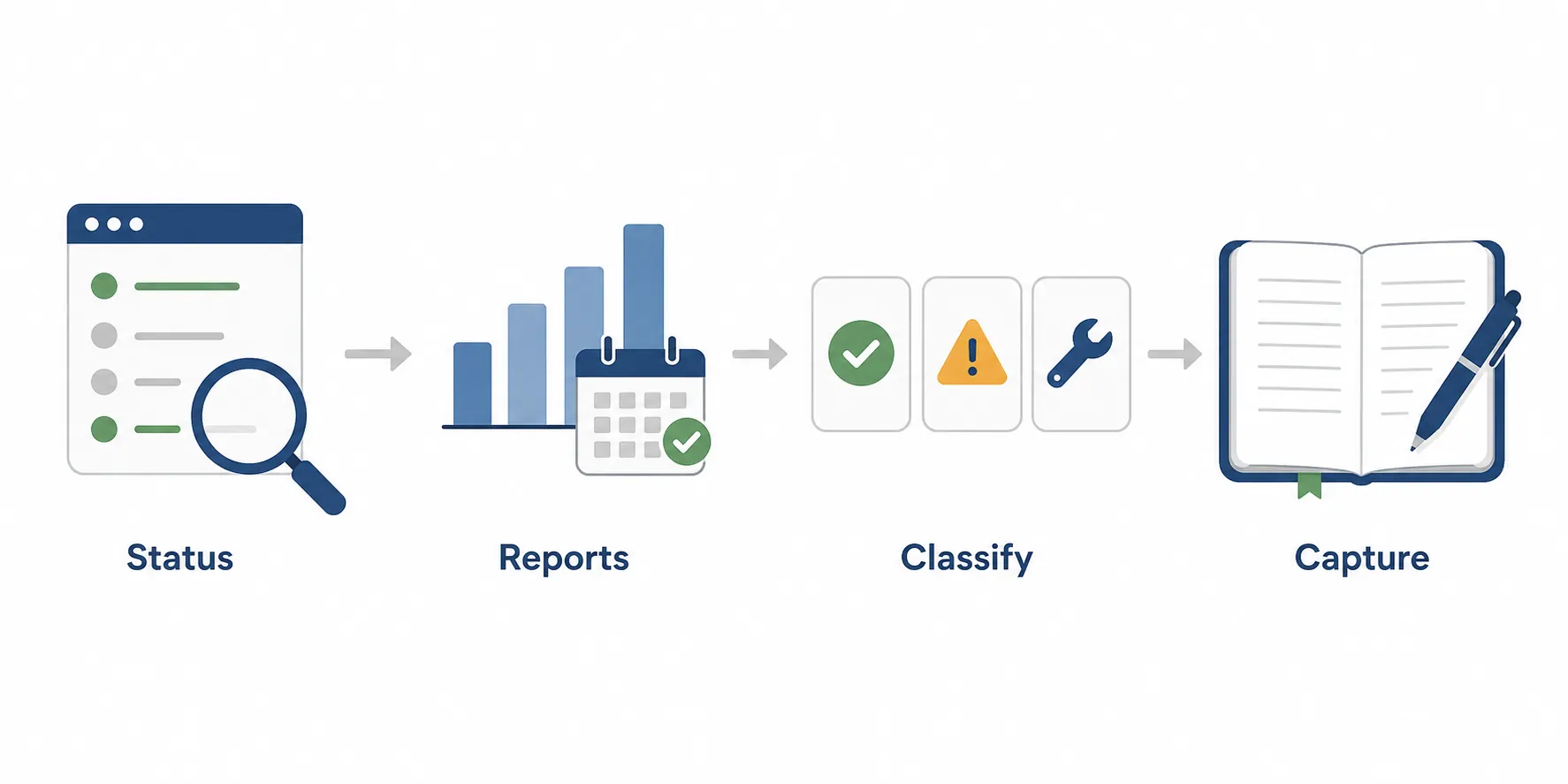
The short route from failed prompt to safe capture
- Preserve the input. Copy the prompt, source excerpts, and any notes that have not been saved elsewhere. Do this before refreshing, signing out, clearing browser data, or closing the tab.
- Check OpenAI Status for the affected product or component. The page covers services including ChatGPT, APIs, and Codex.[1]
- Open the incident history to see whether an incident has recently been posted or resolved.[2]
- Compare that result with a date-stamped Downdetector spike. Treat the count as user reports, not confirmation that OpenAI has declared an outage.[3]
- Classify what you can observe as Down, At Capacity, or local. These labels require different responses; they are not interchangeable.[4]
- Choose the smallest fallback that protects the notes. Keep the established workflow for a local symptom, queue processing during a capacity restriction, or move raw capture to a local or manual medium during a confirmed service problem.
Do not wait for an invented minute or hour threshold before acting. The available evidence does not support a universal duration benchmark. The observed status—not a guessed recovery time—determines how much of the workflow should change.
Classify the failure before changing tools
Down: the relevant service has a confirmed incident
Use Down when OpenAI’s status page shows an active incident or degradation affecting the ChatGPT function you need. A broad label such as “ChatGPT works for someone else” does not override a component-level notice, and a problem affecting an API-dependent note tool may not look identical to a failure in the ChatGPT website.
Once the relevant incident is confirmed, stop making the chat session the only place where work exists. Capture source material, observations, questions, and intended prompts locally. Leave summarization, rewriting, extraction, or classification in a clearly marked processing queue until the service condition changes.
Downdetector can strengthen the picture when a date-stamped surge coincides with the official notice. It cannot replace that notice. Its figures measure reports submitted by users, which may combine different products, symptoms, locations, and causes.
At Capacity: ChatGPT is reachable but will not accept the work
An explicit capacity or availability message is more specific than a frozen tab. The immediate task is to preserve the work and avoid creating several uncertain versions of the same prompt. Put the raw note and the intended instruction into a local queue, record which items have not been processed, and return when requests are accepted again.
This classification does not require migrating the note system. Capture can continue in its normal home if that home remains available. Only the processing step is deferred.
Local: the evidence does not establish a service-wide problem
If the status page is normal, the incident history shows nothing relevant, and user-report activity offers no clear corroboration, treat the problem as local until better evidence appears. That does not prove OpenAI is functioning perfectly for everyone. It means the available evidence does not justify rebuilding your workflow.
Save the input first, then change one variable at a time. A fresh tab can test the existing session; another browser can isolate an extension or cached state; another connection or device can help distinguish account, device, and network symptoms. Keep the original tab intact until its unsaved contents have been copied. Avoid combining a sign-out, cache clearing, browser change, and network change into one move, because the result will tell you very little about what failed.
For a fuller layer-by-layer check of capture, transport, memory, and storage, use FlowDesk’s fix-versus-switch diagnostics. A single local symptom is a troubleshooting event, not a migration decision.
Build a local-first capture floor
The fallback needs to preserve thought, context, and source material. It does not need to reproduce every AI feature during the interruption. A plain local file that can later be processed is safer than a sophisticated substitute that leaves the only copy inside another chat session.
Because no no-network test was performed for this article, verify your chosen capture path on your own device before depending on it. Confirm where the file is stored, disconnect networking, create and reopen a disposable note, and record what remains available and what breaks. Sync, plugins, search, attachments, handwriting recognition, and AI features may have different dependencies. A credible test records the date, exact flow, steps, result, and failure points rather than applying “tested” to the whole app. FlowDesk examines that standard in its scrutiny of tested AI note-taking claims.
- Obsidian: use a vault or plain Markdown location that you have verified is stored on the device. Do not assume that community plugins, synchronization, or embedded AI features share the same offline behavior as basic text editing.
- Apple Notes: use a device-local location with synchronization disabled or otherwise excluded from the capture path, but only if that configuration is already understood and verified. Do not impulsively change account settings while unsaved notes are at risk.
- Plain text or Markdown: create a dated file in a known local folder. This gives later processing a stable source without requiring a note database.
- Paper or another manual medium: write the raw note, source, and intended processing instruction. This is appropriate when the device, connection, or application state is uncertain.
For a queued item, retain four things: the raw note, its source or context, the operation you wanted ChatGPT to perform, and whether processing is still pending. A minimal entry might say “Raw capture,” “Source,” and “Pending: summarize and extract actions.” Avoid polishing the note merely to make it look finished; that remedial work is exactly what a fallback should prevent.
FlowDesk’s offline note-app comparison goes further into the local-first spectrum. If the concern is whether a note app’s built-in AI inherits ChatGPT downtime, see which note apps work when ChatGPT goes down. Those are selection questions; they do not need to be settled while a current note is waiting to be saved.
Why another AI chat is not the default fallback
Moving the same unsaved material directly into another AI service changes the processing provider. It does not establish an independent capture layer. The substitute may have its own account, availability, retention, upload, context, and model-behavior constraints, while the raw thought remains dependent on a live chat interface.
Another provider can be a deliberate processing option after the note is safely stored. It should not receive the only copy merely because ChatGPT is temporarily unavailable. If provider redundancy is important to the long-term system, evaluate it separately using an explicit dependency criterion, as discussed in FlowDesk’s guide to AI-provider outage fragility.
User-report data argues for restraint
Ookla identified OpenAI’s three largest Downdetector report days in its study period as December 2, 2025, with 67,567 reports; February 4, 2026, with 55,039; and July 16, 2025, with 51,420. These were counts of user reports, not three independently verified declarations that all OpenAI services were down.[3]
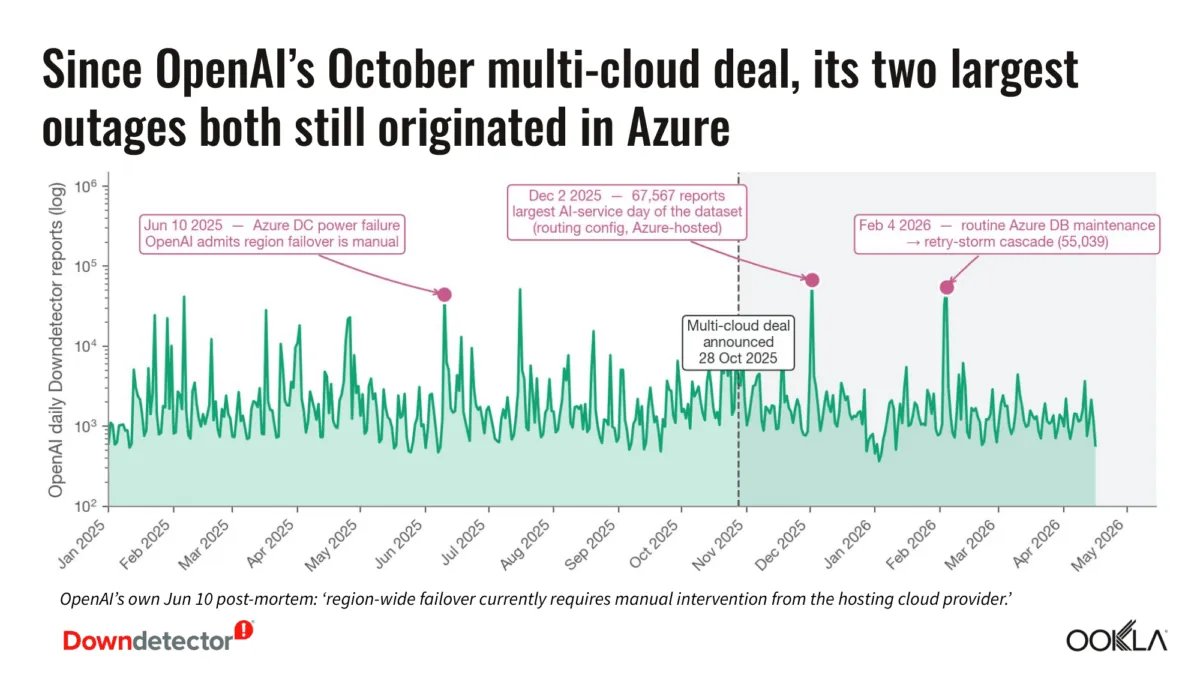
The same analysis found a median of 1,428 reports per day across the period. The monthly median of daily reports declined from 2,157 in April 2025 to 1,166 in April 2026, which Ookla expressed as an annualized 0.76x multiplier.[3]
That trend does not promise availability on any particular day, and it says nothing by itself about the symptom on your screen. It does put an isolated failure in perspective: most ordinary report days do not resemble the largest spikes. Verification prevents one frozen tab from triggering a needless move into an unfamiliar tool.
Keep anecdotes inside their evidentiary limits
A February 5, 2025 OpenAI Developer Community post described an alleged “memory implosion,” lost invoice-chart work, and promised downloads that never arrived.[5] It is one unverified user account of a functional failure, not evidence of a timed outage or its general frequency. It is useful only as a reminder that a generated answer or promised artifact should not be treated as durable storage.
Likewise, a September 3, 2023 Logseq forum reply characterized iCloud sync as “spotty.”[6] That anecdote identifies possible sync friction; it does not prove that Logseq, iCloud, or any competing note app will or will not survive a no-network test. Offline reliability has to be tested against a defined capture path on the device that will actually be used.
Return processing to ChatGPT only after the condition changes
Keep collecting raw notes in the local or manual capture layer while the relevant service incident or capacity condition remains observable. When the status changes, reopen one queued item, confirm that processing succeeds, and mark that item complete before moving through the rest. Preserve the raw version even after a summary or extraction is generated.
If the symptom was local, repair that layer without replacing the capture system around it. If a service problem was confirmed, let the temporary queue do its job. The notes should remain intact in either case; ChatGPT can resume as the processing layer once it is available again.
References
- OpenAI Status — OpenAI
- OpenAI Status — OpenAI
- AI Platform Reliability: Downdetector Data from Millions of User Reports | Ookla® — Ookla
- What to Do When ChatGPT is Down? Your Guide to Being Productive and Finding Alternatives — MyTasker
- Catastrophic Failures of ChatGpt that's creating major problems for users — OpenAI Developer Community, February 5, 2025
- I love Logseq, here's my journey — Logseq Forums, September 3, 2023
Comments
Join the discussion with an anonymous comment.