
The useful answer to how to beat Monday blues and get things done is not a pep talk you read at 8:03 a.m. with Slack open. It is a note that already exists when you sit down: last week’s loose ends captured, this week’s shape decided, and the first few Monday moves written plainly enough that you do not have to negotiate with yourself.
That matters because Monday is a bad place to begin deciding. A daily-survey study discussed in Forbes found that traditional Monday-to-Friday workers liked their job less and experienced more stress at the start of the week, and that stressors were appraised as more severe on Mondays than later in the week. [1] A notes-app kickoff system does not make Monday charming. It moves capture and planning out of the most compressed part of the week.
The whole Monday kickoff system
Build three objects in the notes app you already use: a capture inbox, a weekly planning note, and a Monday kickoff checklist. The first two are completed before Monday. The third is what you open first.
| Object | When it happens | What goes in it | What it prevents on Monday |
|---|---|---|---|
| Timed brain-dump inbox | Friday closeout or Sunday, 5–10 minutes | Loose tasks, worries, follow-ups, half-finished thoughts, names you owe replies to | Starting the week by hunting through memory, chat, and email |
| Weekly planning note | Before Monday morning | Meetings, shipped work, active tasks, waiting-for items, first work block | Rebuilding the week from scratch while other people are already asking for things |
| Monday kickoff checklist | First open note on Monday | A short ordered checklist: open plan, check calendar, send one follow-up, start the first task | Turning the first hour into a fresh prioritization session |
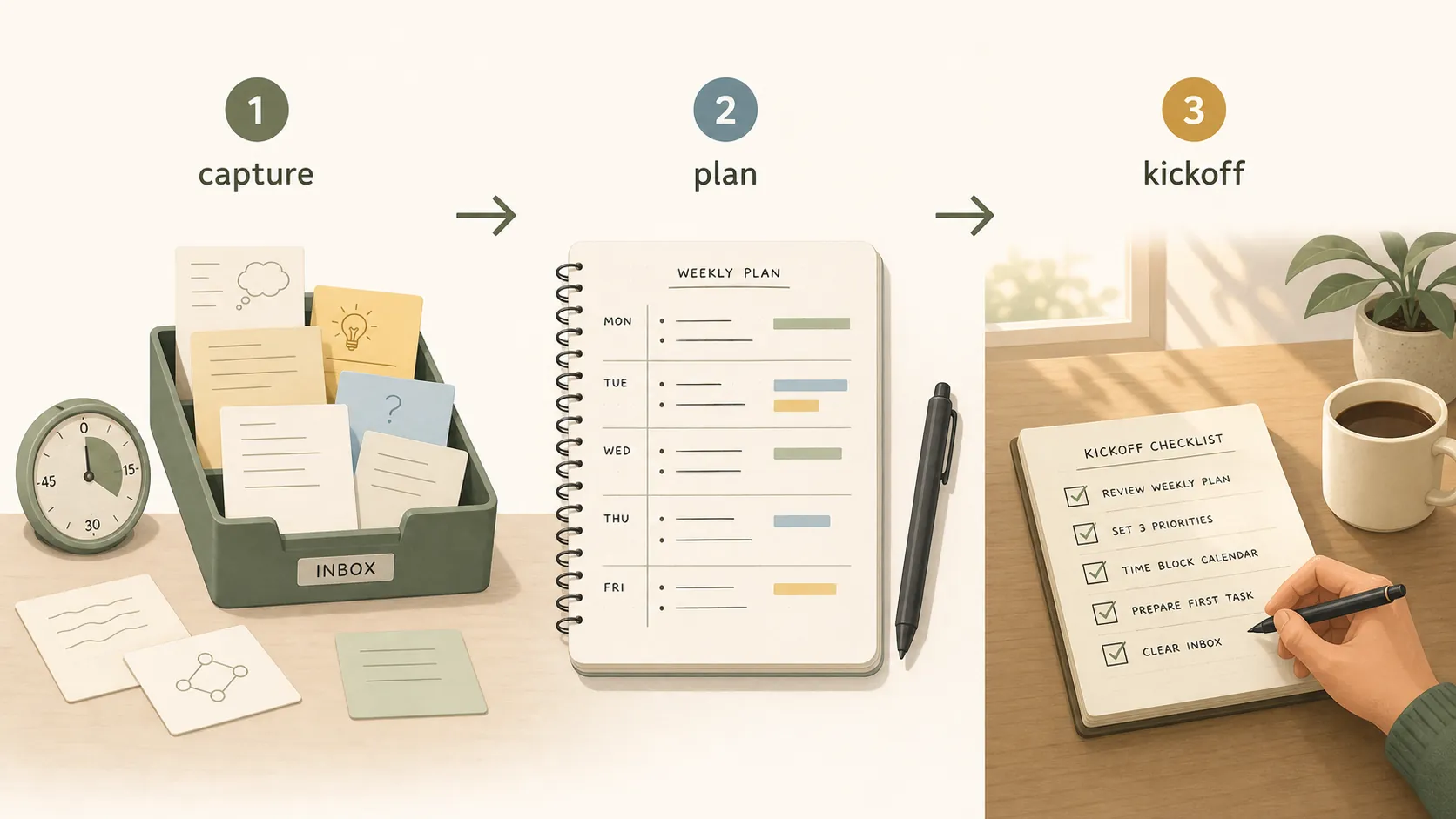
The system is intentionally small. If it takes an hour to maintain, it becomes another Sunday task you avoid. If it is only a blank template called “Weekly Plan,” it will fail exactly when you need it. The working version has somewhere to throw unprocessed material, somewhere to turn that material into a week, and a first-click checklist that makes Monday boring in the best way.
A little context, without turning this into a mood project
There is enough evidence to take Monday heaviness seriously, but not enough reason to pretend one note template fixes every cause. A University of Hong Kong press release reported that Monday-anxious older adults in the English Longitudinal Study of Ageing showed 23% higher hair cortisol, with only about 25% of that effect attributed to Monday anxiety itself. [2] That is striking, but the sample matters: older adults are not the same population as remote product managers, teachers, analysts, or agency coordinators reopening six apps after the weekend.
Prevalence numbers also need labels. Fast Company, citing LinkedIn data, reported that 75% of 2,000 U.S. workers experienced Sunday Scaries. [3] The Guardian reported a UK-specific Office for Health Improvement and Disparities finding that 67% of Britons experienced anxiety before returning to work after the weekend. [4] Those are not interchangeable master statistics. They are useful signals that the transition into the workweek is a common pressure point.
For this setup, the important part is narrower: when Monday starts with unprocessed obligations, the worker doing the cleanup has to triage under pressure. The notes app becomes useful only when it absorbs that triage before the pressure arrives.
Object 1: a timed brain-dump inbox
The brain dump is not a diary session and not a feelings audit. It is a timed capture pass. Set a timer for 5–10 minutes and write down everything that might otherwise leak into Monday morning: “reply to Maya,” “check invoice,” “Friday demo notes incomplete,” “ask who owns launch QA,” “I forgot what happened in the budget thread.”
PsychCentral describes brain dumping as a way to get thoughts out of your head and notes that a 2021 study found lower intrinsic cognitive load after the practice, while also being clear that evidence is limited and that journaling about negative emotions can backfire for some people. [5] That caveat changes how the inbox should be designed. Do not use this slot to rehearse every bad meeting. Use it to capture objects you can later route.
The inbox format
- Title: Monday Inbox or Week Capture.
- Top line: Timer started: ____ / Timer ends: ____.
- Capture bullets: one thought per line, no sorting while the timer is running.
- Routing tags added after the timer: Task, Waiting, Meeting, Maybe, Delete.
- Hard stop: when the timer ends, move only the real work into the weekly note.
The hard stop is the part people skip. Without it, the inbox becomes a second place where work can hide. The capture note is a net, not a home.
Object 2: the weekly note that must exist before Monday
The weekly note is where the Monday system succeeds or quietly turns decorative. If it is not written by Sunday evening or Friday closeout, Monday starts with a template instead of a plan.
A practical weekly note does not need a complex productivity method. Lorna Mitchell’s Obsidian weekly-planning writeup uses a concrete structure around meetings, shipped work, and to-dos, which is the right level of boring for this job. [6] Healthline also recommends getting a head start on Sunday as part of handling Monday blues. [7] Journo Resources, quoting clinical hypnotherapist Vicky Haig, makes the same practical point from another angle: people who have time and space to plan on Monday morning may feel the blues less. [8]
The notes-app version should not assume you will have that space on Monday. It creates it beforehand.
Use this weekly note skeleton
Week of: ____

1. Monday first block
- Start with: ____
- Definition of done for the first 45–90 minutes: ____

2. Meetings
- Monday: ____
- Tuesday–Friday notes to remember: ____

3. Shipped last week
- ____
- ____

4. Carryover from last week
- Task: ____ / Next action: ____ / Owner: ____
- Task: ____ / Next action: ____ / Owner: ____

5. Waiting for
- Person: ____ / Need: ____ / Follow-up day: ____

6. Must move this week
- ____
- ____
- ____

7. Parking lot
- Interesting but not this week: ____
Two fields do more work than they look like: “Monday first block” and “Waiting for.” The first stops you from making the hardest choice while cold-starting. The second keeps follow-ups from becoming a vague sense that someone, somewhere, owes you something.
If your daily notes already carry the workday, keep them. This system adds a Monday-specific transition layer above them. For a day-by-day version of the capture-and-anchor pattern, use the daily workday notes setup as the companion system rather than duplicating it.
Object 3: the Monday kickoff checklist
The Monday checklist should be short enough to finish while still half-annoyed. It should not ask, “What are my priorities?” It should say what to open, what to check, what to send, and what to start.
Monday Kickoff

[ ] Open this week’s planning note.
[ ] Check calendar for today only.
[ ] Confirm the first work block still fits the calendar.
[ ] Send one waiting-for follow-up if it blocks the week.
[ ] Open the first task’s source material.
[ ] Work 25 minutes before checking Slack/email again, unless your role requires live response.
[ ] Add any new incoming task to the inbox, not to memory.
That “unless your role requires live response” clause matters. A customer-support lead, incident manager, newsroom editor, or operations coordinator may not get a protected first block. In that case, the checklist should start with triage rules instead of focus time: open queue, identify emergencies, assign owners, then return to the weekly note.
Healthline includes planning your first task and avoiding a meeting-heavy Monday among its Monday-blues suggestions. [7] Inside the notes app, those become configured fields: first block, calendar check, and a meeting review. Advice that does not land somewhere visible usually evaporates by the second notification.
Build it in Notion
Last checked: August 3, 2026. Notion is the easiest place to make this look polished and the easiest place to overbuild it.
- Create a page called Monday Kickoff.
- Inside it, add three sections: Inbox, Weekly Plan, and Monday Checklist.
- Turn the Weekly Plan section into a template button or database template if you already use a weekly database.
- Add the weekly note skeleton from this guide to the template.
- Create a simple Tasks database only if you already route work through databases. Use Status, Owner, Due, and Waiting For. Do not add scoring systems for energy, mood, priority, and theme unless you will actually maintain them.
- Add a linked view filtered to this week’s tasks under the Weekly Plan.
- Pin or favorite the Monday Kickoff page.
- On Friday or Sunday, duplicate the weekly template and fill it in before Monday.
What to watch in Notion
Template drift is the main failure. Someone adds a quarterly objective panel, then a mood tracker, then a linked project database, and suddenly Monday begins with waiting for a page to load. Keep the kickoff page one click away from the plan. If you recently migrated and your projects are scattered, clean the structure first with a PARA setup after note migration instead of turning the Monday page into a rescue warehouse.
Build it in Obsidian
Obsidian is strong for durable weekly notes because files stay visible and portable. The tradeoff is naming discipline. If you let weekly notes become “Plan,” “Week plan,” “Monday thing,” and “2026 week maybe,” search will punish you later.
- Create a folder called Weekly.
- Create a folder called Inbox or Capture.
- Use a consistent weekly file name such as 2026-W32 Weekly Plan.
- Create a template note called Template - Weekly Plan and paste in the weekly skeleton.
- Create a pinned note called Monday Kickoff that links to the current weekly note.
- Add the Monday checklist to the pinned note or embed it at the top of each weekly note.
- During the brain dump, capture into one inbox note first. Route only the surviving items into the weekly note.
What to watch in Obsidian
Backlinks can make old promises visible, which is useful, but they can also make Monday feel like an archaeological dig. Keep the kickoff path direct: pinned note → current weekly note → first task. If you use community plugins for periodic notes or templates, test the flow once before relying on it Monday morning.
Build it in Apple Notes
Apple Notes is the low-friction version. It is not the best choice for complex status tracking, but it is very good at being there quickly when you are tired.
- Create a folder called Workweek.
- Create one pinned note called Monday Kickoff.
- At the top of that pinned note, paste the Monday checklist.
- Below it, add a heading for This Week.
- Paste the weekly note skeleton under This Week each Friday or Sunday, or duplicate last week’s note and clear the completed material.
- Use the built-in checklist format only for the Monday kickoff items. Use plain bullets for the brain dump so you do not accidentally turn every stray thought into a task.
- Pin the note and keep it at the top of the folder.
What to watch in Apple Notes
The risk is under-structure. Apple Notes makes capture so easy that the Monday note can become a long scroll of unrelated material. Use separators and dates aggressively. If a note holds more than two weeks of work, archive the old week into a separate note and keep the pinned kickoff clean.
Build it in Evernote
Evernote works well when your Monday problem is capture across devices: receipts, meeting notes, forwarded emails, clips, and loose reminders. The setup needs guardrails so it does not become a notification machine.
- Create a notebook called Workweek.
- Create a note called Monday Kickoff and add it to Shortcuts.
- Create a note template for Weekly Plan using the skeleton above.
- Create a capture note called Week Inbox.
- Use tags sparingly: Monday, Waiting, This Week is enough for most people.
- Set one reminder for the pre-Monday planning session if reminders help you. Do not set reminders on every task unless Evernote is already your task manager.
- On Monday, open the shortcut first, not search.
What to watch in Evernote
Reminder fatigue is the obvious problem. Sync confidence is the quieter one. If you capture on mobile over the weekend, confirm the weekly plan is available on the device you will use Monday morning. A Monday system that starts with “where did that note go?” has already lost the first round.
Choose the version that matches your mess
| If your Monday problem is... | Use... | Avoid... |
|---|---|---|
| Too many loose tasks across projects | Notion with a restrained task database | Building a dashboard before writing next actions |
| Losing the thread between weekly notes | Obsidian with consistent file names | Changing naming formats every month |
| Avoiding the system because it feels heavy | Apple Notes with one pinned note | Turning every capture bullet into a checklist item |
| Capturing from email, web clips, and multiple devices | Evernote with one shortcut and minimal tags | Setting reminders on everything |
If you are still deciding which note method fits how you think, step sideways into the PKM method-selection guide. The Monday kickoff system does not require a full personal knowledge-management philosophy, but it does need a place you will actually open.
What usually breaks after two Mondays
The weekly plan is written too late
If the planning note is still empty Monday morning, the system has become stationery. Move the planning session to Friday closeout if Sunday is unreliable. Friday has one advantage Sunday does not: the week’s mess is still warm.
The checklist stops being a checklist
A checklist item should be executable. “Review priorities” is not executable. “Open weekly note and confirm first block” is. If you need more detailed checklist behavior inside the same four apps, the per-app checklist configuration guide is useful even though its example is a different kind of checklist.
Reminders become weather
A reminder that fires every Sunday and gets dismissed every Sunday is no longer a reminder. Use one reminder for the planning session, then make the note itself the trigger by pinning, favoriting, shortcutting, or placing it in your startup workspace.
The note and calendar disagree
The weekly note should not pretend you have a free Monday if the calendar says otherwise. For weeks where time blocks matter, use a calendar layer next to the note. The pattern in the weekend calendar planning setup transfers cleanly: notes hold decisions; the calendar holds time.
Who this is not for
Skip this as a fix if Monday dread is coming from burnout, unsafe work conditions, unmanaged clinical anxiety, or a workload that cannot fit inside the hours available. A notes app can reduce decision load. It cannot make an impossible job reasonable, make a harmful workplace safe, or replace professional care.
For the right problem, the boundary is simple. If the inbox is captured, the weekly plan is filled before Monday, and the kickoff checklist is specific, the notes app becomes a transition device. If those pieces are empty, it is just another template waiting for a better version of you to arrive.
References
- Are Monday Blues Real? Here's What Research Says, Forbes, 2021-09-12
- HKU press release on Monday anxiety and hair cortisol, The University of Hong Kong
- It’s Not Just You: The Sunday Scaries Are Getting Worse, Fast Company
- Sunday scaries: two-thirds of Britons suffer anxiety before return to work, The Guardian, 2022-10-09
- Using Brain Dumping to Manage Anxiety and Over-Thinking, PsychCentral
- Weekly Planning with Obsidian, LornaJane, 2022
- How to Beat the Monday Blues, Healthline
- Advice to Reset Monday Blues and the Work Week, Journo Resources
Comments
Join the discussion with an anonymous comment.