
Using Anthropic Claude to organize Obsidian notes is no longer a single workflow. It can mean pasting files into Claude.ai, letting Claude desktop Cowork touch a folder, running Claude Code against the vault in a terminal, or connecting through filesystem/MCP tools built around Obsidian. The deciding question is less dramatic than “does AI understand my vault?” It is: which surface can reach the files, what will it cost, how much setup can you tolerate, and can every change be inspected afterward?

The shared trick is simple: an Obsidian vault is a folder of Markdown files. Once Claude can read that folder, it can audit filenames, headings, tags, backlinks, frontmatter, and folder placement. Once Claude can write to that folder, it can rename, move, edit, and create files. That power is useful. It is also exactly why a cleanup pass needs to be staged like maintenance work, not like a magic reorganization button.
The four Claude surfaces that can organize an Obsidian vault
As of this dated check on August 25, 2026, the practical map looks like this. Anthropic lists Claude Free at $0, Pro at $20 per month or $200 per year, Max 5x at $100 per month, and Max 20x at $200 per month; Claude Code is positioned for paid-plan use, with the Claude Code page listing Pro annual pricing as about $17 per month when billed yearly.[1][2]
| Surface | How it reaches Obsidian | Setup burden | Cost boundary | Best fit | Main failure risk |
|---|---|---|---|---|---|
| Claude.ai browser chat | You paste selected notes, exports, folder listings, or samples into chat. | Low | Can start on Free; paid plans matter when context and usage limits become painful.[1] | Small audits, tag suggestions, naming rules, cleanup plans before touching files. | No native vault-wide control unless you manually provide enough context and execute changes yourself. |
| Claude desktop Cowork mode | Third-party reports describe Claude operating across local folders through the desktop experience; current naming and platform availability should be rechecked before setup.[3] | Low to medium | Depends on the Claude plan used.[1] | Users who want folder-level help without living in a terminal. | Easy to overtrust because the interface feels conversational while still touching real files. |
| Claude Code terminal agent | Runs in a terminal against the vault folder and can inspect, edit, move, and run verification scripts. | Medium to high | Requires a paid Claude plan according to Anthropic’s Claude Code materials.[2] | Auditable cleanup work, scripted checks, git-backed vaults, repeatable maintenance. | Tool-call and token burn when the vault is large, messy, or poorly bounded. |
| Filesystem, MCP, and Obsidian-specific tools | Claude connects through a local filesystem bridge, MCP server, plugin, skill, or Obsidian-aware wrapper. | Medium to high | Plan cost plus any API, plugin, or bridge cost depending on the route. | Users who want more structured operations than raw chat, especially with repeated workflows. | Permission scope, plugin trust, schema drift, and transaction safety. |

That table is a map, not a setup guide. FlowDesk’s existing Claude AI Obsidian workflow cost and safety guide already owns the deeper CLI-versus-MCP-versus-direct-file comparison. For this profile, the important point is that all four routes eventually reduce to the same maintenance question: can Claude see enough of the vault to make a useful proposal, and can you stop it before that proposal becomes irreversible?
FlowDesk’s disposable-vault test: useful only after it became inspectable
For this profile, FlowDesk ran Claude against a disposable Obsidian vault on August 25, 2026. The vault was intentionally safe to damage. That matters: the test was not a performance benchmark and should not be read as a claim about how long a real 5-year research archive, client vault, or personal journal would take. Its purpose was narrower: observe whether the work could be made reviewable before Claude touched the files.
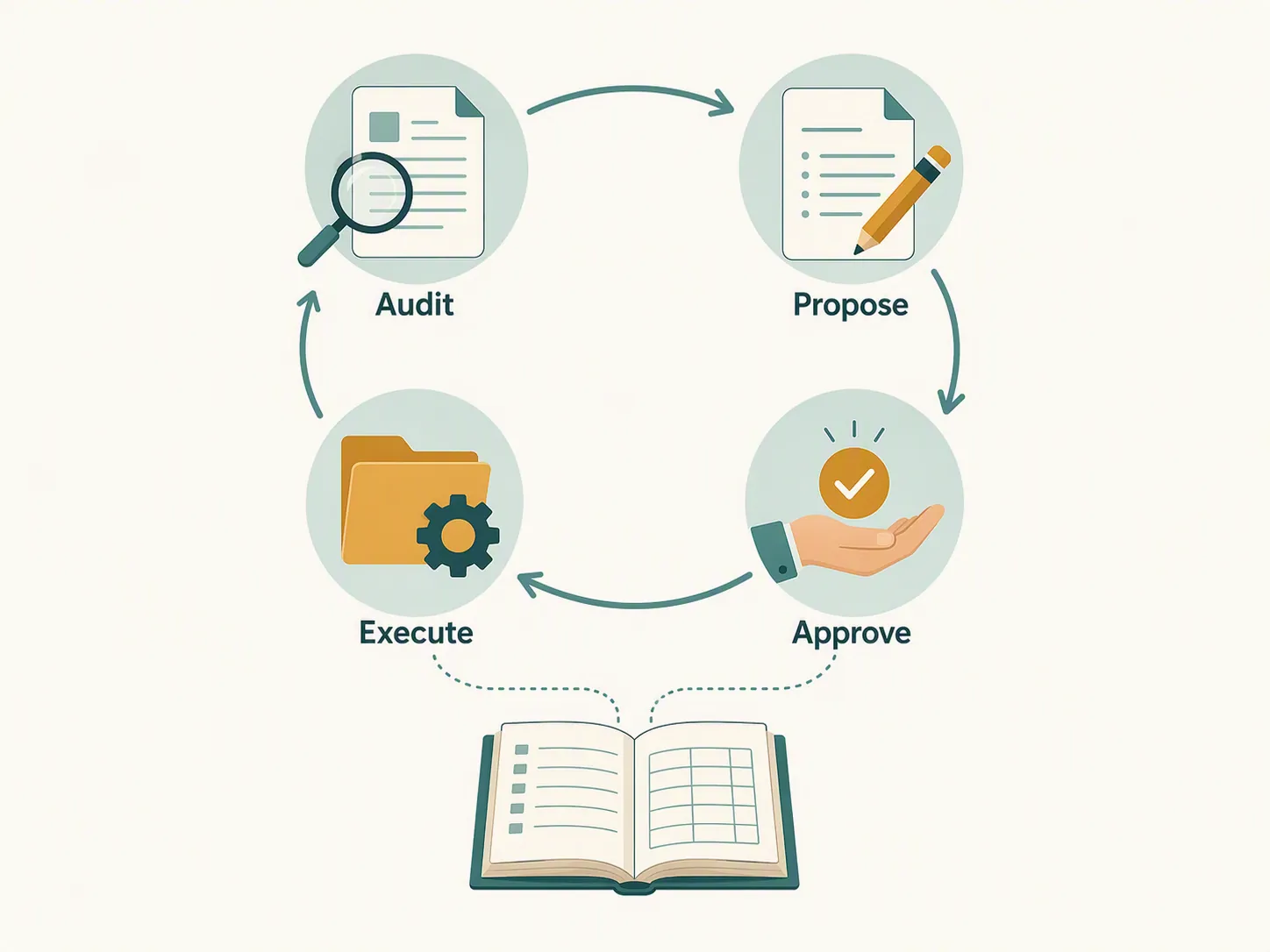
The only version of the run worth trusting followed four gates. First, Claude audited the vault without editing it. Second, it produced proposed moves, renames, tag changes, and content edits as a plan. Third, changes were approved in batches rather than accepted as one vault-wide rewrite. Fourth, execution produced a change log that could be compared against the vault afterward.
The impressive part was not that Claude could make the folder look cleaner. It could. The more useful part was that the audit pass separated obvious mechanical work from judgment calls. File names with no meaning, near-duplicate tags, orphaned notes, and thin index pages can be surfaced quickly. But the moment a note could belong in more than one place, or a tag merge might erase a useful distinction, the workflow stopped being an automation problem and became a review problem.
The disposable run also showed why a change log is not decorative. If Claude moves a note and updates the visible link text but misses a wikilink variant elsewhere, the vault may still open cleanly while meaning has shifted. If Claude merges two tags because they look similar, the old distinction may be recoverable only if the proposed change was recorded. If it renames a file before checking inbound links, the user repairing the vault needs to know which path changed and why.
That is the threshold this test leaves behind: Claude is acceptable for a supervised organization pass when it works as audit, proposal, approval, execution, and log. It is not yet something FlowDesk would treat as a trustworthy unattended rewrite of a vault that matters.
Third-party runs show scale, not a universal speed benchmark
The public examples are useful because they bracket the problem. They should not be averaged into a promise. A 151-note vault, an 847-note vault, a 6,000-plus-note vault, and a 15-million-word vault are not the same test. They differ in surface area, human review, workflow design, and probably in how much meaning the notes had before Claude arrived.
HowToGeek reported a 151-note Obsidian cleanup that took about five minutes of phased work. The useful warning inside that small run was not the runtime; it was the link behavior. Duplicate filenames can silently break wikilinks because Obsidian resolves links by filename, not full path.[4] That is exactly the kind of failure a visually tidy folder can hide.
MakeUseOf’s larger Claude Code and Obsidian CLI run covered 847 notes across five years. The pre-cleanup audit made the mess concrete: about 340 untagged notes, about 200 inconsistently tagged notes, 63 files named some variant of “Untitled,” 11 empty files, and 14 overlapping folders. The reported run took about 90 minutes, followed by about 30 minutes of human review.[5] That last half hour is not a footnote. It is the part that makes the cleanup believable.
Stefan Imhoff described reorganizing more than 6,000 notes across two sessions of roughly two to three hours each.[6] Eleanor Konik described a much larger 15-million-word vault being indexed overnight.[7] These reports show that Claude-based workflows can reach beyond toy folders, but they do not prove that any arbitrary large vault can be reorganized cheaply, safely, or in one pass.
The pattern across the reports is more useful than the stopwatch. Small vaults can be inspected by a human after Claude proposes a cleanup. Medium vaults need phased work and review time. Large vaults turn the problem into indexing, search strategy, schema discipline, and cost control.
Where Claude organization breaks down
The first break point is search overhead. Viget’s February 2026 exploration found that a 3,000–4,000-note vault made Claude Code burn tool calls and tokens on search; one session consumed about 500,000 tokens, estimated at roughly $1.02 in API terms, while also exhausting a Pro subscription in a single ambitious session.[8] The dollar estimate is small in isolation. The more important warning is that a messy vault makes Claude spend effort finding the work before it can do the work.
The second break point is ambiguity. Timo Laitila reported a run in which Claude could not resolve 40 ambiguous notes.[9] That is not a model embarrassment; it is a classification limit. Some notes are ambiguous because the original human never decided whether they were a project note, reference note, meeting record, draft, or scratchpad. Claude can propose a destination, but it cannot reliably recover intent that was never written down.
The third break point is link integrity. Eferro’s maintenance workflow enforces a zero-broken-links rule backed by a verification script.[10] Konik also described using Claude to fix vault-wide link breakage in about 10 minutes.[11] Those examples point in opposite emotional directions: yes, Claude can help repair broken links quickly; no, you should not perform vault-wide moves without a link check.
The fourth break point is metadata drift. Laitila documented tag and metadata sprawl, including duplicate and single-use tags.[9] Limited Edition Jonathan’s March 2026 critique names schema drift as a failure mode and argues that loading Markdown into a context window degrades past a few hundred notes; that threshold is an argued position, not a measured universal ceiling.[12] Still, the underlying concern is real enough: if Claude is allowed to invent new fields, aliases, status labels, and tags freely, the vault can become more uniformly formatted while becoming harder to query.
None of these failures mean Claude is useless for Obsidian. They mean the first instruction should rarely be “organize this vault.” A safer first instruction is closer to: audit this vault, list inconsistencies, identify changes that can be verified mechanically, separate judgment calls, and wait for approval before editing.
The ecosystem around Claude and Obsidian
The surrounding tools matter, but they do not change the basic safety rule. Claudian, an Obsidian community plugin, is listed at version 2.2.4 with about 1.9 million downloads, desktop-only support, and an MIT license.[13] Obsidian Skills, published by Obsidian CEO Steph Ango in January 2026, gives Claude more Obsidian-specific operating patterns.[14] Obsidian’s own CLI is the official terminal control plane as of Obsidian 1.12 early access.[15] The open-source claude-obsidian project advertises 11.1k stars, 15 skills, and SHA-256-approved transaction-safe writes.[16]
Those are orientation points, not endorsements of one route for every vault. A plugin may be easier than a terminal. A terminal may be easier to audit with git. A filesystem or MCP bridge may be more powerful than either. The more permission a route receives, the more important the approval boundary becomes.
Privacy and rollback are not optional details
When Claude works on your notes through Anthropic’s cloud services, the contents of those notes leave your machine. A paid plan can change limits and features; it does not make Claude a local model. That is the practical privacy boundary to evaluate before pointing it at journals, client notes, health records, legal material, unreleased writing, or a workplace knowledge base.
For a deeper pass on that boundary, FlowDesk’s dated AI note-taking agents security test is the better place to continue. In this profile, the rule is short: do not send a vault to Claude just because it is technically possible to connect it.
Rollback discipline is the other boundary. Eferro and Konik both point toward git history as part of a safer maintenance pattern.[10][11] Git is not glamorous, but it answers the question that matters after an AI cleanup: what changed, and can I put it back? For highly sensitive vaults, the supplied material also points to local models as a safeguard, though that shifts the problem into model quality, setup burden, and hardware.
Who Claude is for, and who should skip it
Claude is viable for Obsidian organization when the vault is small enough to inspect in batches, the budget fits the chosen surface, setup friction is acceptable, and the user is willing to supervise. It is especially useful for turning a messy Markdown folder into a list of visible problems: duplicate naming, orphaned notes, tag inconsistency, empty files, weak folder boundaries, and broken links that can be checked afterward.
Claude is a poor fit if the vault contains material you cannot send to Anthropic, if you do not keep version history, if you want an unattended rewrite, or if the vault is large enough that search, context, and token usage become the main activity. It is also a poor fit when the real issue is not clutter but undecided meaning. AI can sort files faster than a person, but it cannot reliably decide what an ambiguous note was supposed to become.
Readers comparing models can place this profile beside FlowDesk’s Qwen 3.8-Max Obsidian notes test and DeepSeek V4 vs ChatGPT Obsidian comparison. If the larger question is whether to move into Obsidian at all, the Evernote to Obsidian migration guide and Notion-to-Obsidian AI safety migration piece are better starting points.
The verdict is conditional. Use Claude when you can keep the work staged, logged, and reversible. Do not use it as a vault-wide autopilot for notes you cannot expose, cannot roll back, or cannot personally review.
References
- Choose a Claude plan | Anthropic Help Center — Anthropic Help Center
- Claude Code by Anthropic | AI Coding Agent, Terminal, IDE — Anthropic
- I Let Claude Cowork Organise My Obsidian Vault — Medium
- How to organize your Obsidian vault using Claude — HowToGeek
- I paired Claude Code with Obsidian CLI… — MakeUseOf
- Agentic Note-Taking — Stefanimhoff
- Claude + Obsidian Got a Level Up — Eleanor Konik
- Pointless explorations of Obsidian & Claude Code — Viget, February 2026
- Using Claude Code for organizing your second brain — Timo Laitila / Medium
- How I use Claude Code to maintain — eferro, April 2026
- How Claude + Obsidian + MCP Solved My Organizational Problems — Eleanor Konik
- Stop Calling It Memory: The Problem — Limited Edition Jonathan, March 2026
- Claudian — Obsidian Community Plugins
- Obsidian Skills — GitHub, January 2026
- Obsidian CLI — Obsidian Help
- claude-obsidian — GitHub