
The AI safety debate is not pushing people from Notion to Obsidian as a grand philosophical argument. It is showing up in a much smaller moment: a Notion user clicks an AI button inside a private workspace and realizes the question has changed from “Can I find this note?” to “Where did this note go so the AI could answer me?”
That is the real Notion-to-Obsidian tension in 2026. Not whether one app has a prettier sidebar, a better graph, or a cleaner task database. The important split is architectural. Notion AI depends on cloud-side processing through model providers, while Obsidian starts from local files and can be paired with local AI workflows that keep note content on the device. Flowith’s comparison of Notion AI and Obsidian AI makes that contrast explicit: Notion’s AI path sends content through external AI infrastructure, while Obsidian can run AI against a local vault when configured with local models and plugins. [1]
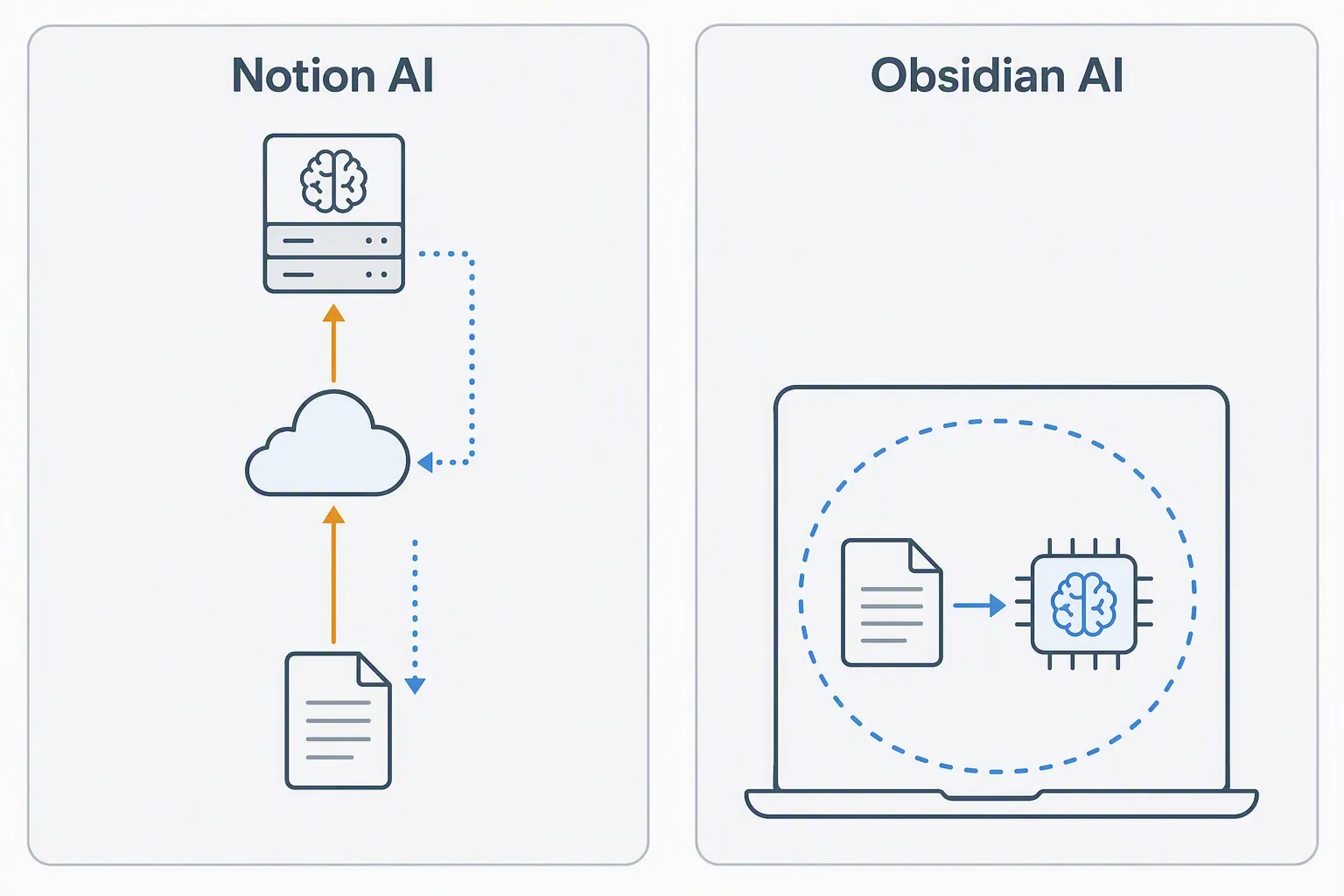
That distinction matters because many Notion workspaces were built before AI became a default layer. A personal operating system, client database, therapy journal, hiring tracker, product roadmap, research archive, or family admin hub may have entered Notion as “cloud notes.” The user accepted syncing, sharing, and server storage because those features were the point. AI changes the privacy bargain. The note is no longer just stored and indexed. It may become AI context.
The privacy question is a data path, not a vibe
It is easy for product pages to compress privacy, security, and AI safety into one reassuring word. That compression is exactly where serious users should slow down. “Private” can mean encrypted in transit. It can mean not used for model training. It can mean access-controlled inside a company. It can mean stored locally. Those are different promises, and they do not create the same workflow risk.
For this comparison, the useful question is narrower: when AI answers a question about your notes, does the note content leave the app environment and pass through vendor or model-provider infrastructure, or can the work happen on your own machine?
| Workflow | Where the AI work happens | What the user is really accepting |
|---|---|---|
| Notion AI | Cloud/server-side processing through Notion and model-provider infrastructure | Convenience and strong integrated AI features in exchange for third-party processing of workspace content [1] |
| Obsidian with cloud AI plugins | Local files, but AI requests may still go to external providers depending on the plugin | File ownership improves, but AI privacy depends on the chosen plugin and provider |
| Obsidian with local AI models | On-device processing against files in the vault | More control over note content, with more setup burden and often weaker model output [1] |
This is not a claim that Notion is doing something secret or exotic. A polished cloud workspace with embedded AI normally needs server-side orchestration. The point is less dramatic and more consequential: Notion AI’s design makes third-party AI processing part of the feature. If that crosses a line for your notes, the issue cannot be fixed by using the feature more carefully. The line is in the architecture.
Obsidian’s advantage is not that the word “local” magically purifies the whole system. Its advantage is that the basic unit is a folder of Markdown files under the user’s control. AI is not the default destination of those files. You choose whether to add it, which plugin to trust, and whether the model runs locally or calls a cloud API.
What a local Obsidian AI workflow can actually look like
The important development is that “local AI notes” is no longer just a forum fantasy. XDA Developers published a first-hand walkthrough in February 2026 showing Obsidian connected to Ollama for local LLM use, with the setup keeping data from leaving the machine. [2] That is not proof that every user will enjoy the setup, or that every local answer will be good. It is proof of feasibility: an Obsidian vault can be queried by an AI workflow without sending the vault’s contents out to a remote model provider.
That matters for the Notion user who is not trying to win a benchmark. Many note questions are modest: find the meeting where a decision was made, summarize related notes before a call, draft a first pass from local research, surface contradictions across project logs. For those jobs, the privacy win of keeping the vault on-device may be worth accepting a less capable model, especially when the alternative is routing sensitive context through cloud AI infrastructure.
The plugin landscape also gives users a spectrum rather than a single “Obsidian AI” product. 2026 plugin roundups from Shadow.do and SystemSculpt describe local-only options alongside plugins that depend on external AI services. [3][4] That variety is useful, but it also removes the comfort of a single vendor promise. In Obsidian, the privacy decision moves closer to the user. You are not just choosing an app; you are choosing a chain of plugins, models, permissions, and habits.
Obsidian’s broader product direction makes this shift more plausible without making it automatic. Volodymyr Pavlyshyn’s May 2026 write-up points to the February 2026 Obsidian CLI release, with more than 100 commands, as evidence that Obsidian is becoming more useful as a programmable knowledge infrastructure layer. [5] That helps the local-first argument because automation is how personal knowledge systems become less fragile. It does not mean Obsidian has solved AI note-taking for everyone.
Local-first still has a security problem: plugins
The weakest version of the Obsidian argument pretends local files eliminate risk. They do not. The April 2026 PHANTOMPULSE RAT incident exposed an uncomfortable part of Obsidian’s security model: plugins can have broad filesystem and internet access, and the incident was discussed as involving no plugin sandboxing. The attack also required user consent steps, which makes it a social-engineering case rather than a silent automatic compromise. [6]
That distinction is important. Obsidian’s local-first design can reduce one class of AI privacy exposure: routine third-party processing of note content. It does not remove the need to audit plugins, avoid impulsive installs, review permissions, and treat community extensions as software with real access to valuable files. A local vault full of sensitive notes is still a high-value target.
This is where the Notion comparison becomes more honest. Notion centralizes more trust in the vendor and its AI pipeline. Obsidian decentralizes trust into files, devices, plugins, sync choices, and model configuration. Some users will prefer one accountable cloud platform. Others will prefer the messier control of a local system. Neither choice deserves a purity badge.
Cost is real, but it should not be the first argument
The price gap is attractive, especially after the privacy question is already on the table. Flowith’s comparison puts Notion AI workflows at roughly $20–28 per user per month, while Obsidian with local models can fall around $0–5 per month. [1] Those figures should be checked against Notion’s current pricing at publication because SaaS packaging changes. Still, the direction of the comparison is clear: cloud AI convenience is usually priced as a service, while local AI shifts more of the cost into hardware, setup time, and maintenance.
That shift can be good or bad depending on whose time is being spent. A solo researcher who enjoys configuring local tools may see Obsidian as cheaper and safer. A team lead trying to keep twenty people aligned may find that Notion’s paid AI and collaboration stack is less expensive than everyone maintaining separate local setups. Subscription math is visible; operational drag is easier to hide.
There is also the model-quality tax. Local models that run comfortably on personal machines often cannot match frontier cloud models for reasoning depth, instruction following, or polished long-form synthesis. If your current Notion AI workflow depends on high-quality generated summaries, database-aware Q&A, or quick drafting inside shared team context, a local Obsidian setup may feel like a downgrade before it feels like liberation.
The migration cost is not exporting Markdown
Obsidian’s Markdown foundation gives users a level of file control Notion does not try to provide. That is the part people often notice first: notes become files in folders, and the vault can be backed up, searched, scripted, synced, or moved with ordinary tools. For someone who has started to distrust opaque AI processing, that plainness is calming.
But the migration cost is not mainly the text. It is the system around the text. A serious Notion workspace is rarely just pages. It may contain relational databases, filtered views, status fields, rollups, linked project dashboards, comments, permissions, shared team rituals, and AI requests that assume Notion’s structure. Those things do not become an equivalent Obsidian workflow just because the page content exports.
| If you rely on this in Notion | What changes in Obsidian |
|---|---|
| AI answers grounded in a Notion workspace or database | You must rebuild retrieval around files, folders, links, tags, or plugin-specific indexing |
| Generated summaries inside shared pages | You need a local or plugin-based summarization workflow, and the result may not match cloud-model quality |
| Team collaboration and permissions | Obsidian can be shared, but it is not the same polished collaborative database environment |
| Database views as the main interface | You may need to redesign the system around notes, properties, queries, plugins, or external tooling |
| One vendor-managed AI experience | You become responsible for choosing and maintaining the AI path |
That is why the Notion-to-Obsidian shift is better understood as a rebuild than a transfer. The privacy gain is architectural, but the work is behavioral. You are changing where files live, how AI sees them, how search is organized, how summaries are generated, and who is responsible when something breaks.
Who should stay with Notion, and who should seriously test Obsidian
If your priority is model quality, low-friction collaboration, and AI features that appear exactly where your team already works, Notion may still be the better fit. That is especially true when the workspace is already built around databases and shared processes, and when your organization is comfortable with the vendor and model-provider data path behind integrated AI.
If the AI safety debate has made third-party processing of your notes unacceptable, Obsidian deserves a much more serious look than it did a few years ago. Its local-first base, maturing automation layer, and local-model plugin options now create a credible path for AI-assisted notes without routine outbound data flow. That path is not free of risk. It asks you to accept weaker local models in many setups, take plugin security seriously, and rebuild habits that Notion made comfortably invisible.
The decision is not “AI or no AI.” It is whether AI access to your knowledge base should be mediated by a cloud workspace or by a local system you configure and police yourself. For a growing group of note-takers, that is enough to make Obsidian the more compatible tool.
References
- Notion AI vs Obsidian AI: Local Intelligence for PKM — Flowith.io
- Using my local LLM with Obsidian — XDA Developers — February 2026
- Best AI Plugins for Obsidian 2026 — Shadow.do
- Best Obsidian AI Plugins 2026 — SystemSculpt
- Obsidian Supercharged the AI Revolution — Volodymyr Pavlyshyn’s Substack — May 2026
- PHANTOMPULSE RAT incident — Hacker News








Comments
Join the discussion with an anonymous comment.