
Last checked in Q3 2026: the answer is app-specific
Last checked: August 25, 2026. The apps and setups in this pass were Notion 3.0 AI agents, Evernote AI Assistant/Semantic Search/AI Meeting Notes, Apple Notes with Apple Intelligence, Obsidian pointed at local models, and Logseq-style local-first setups where the AI plugin can be pointed at a local model endpoint.
The short answer to whether AI note-taking agents leak your notes is not a clean yes or no. “Leak” can mean at least four different things: a prompt-injection path that sends note contents to an attacker, prompt or embedding retention by the service, training rights over your content, or a permission scope broad enough that an assistant can search and act across more material than you meant to expose.
| App or setup | What was observed or demonstrated | Vendor position or claim | Risk vector involved | Setting or setup that reduces exposure |
|---|---|---|---|---|
| Notion 3.0 AI agents | Third-party researchers demonstrated exfiltration paths: CodeIntegrity showed a hidden-in-PDF prompt-injection route using Notion’s web-scope search tool; PromptArmor showed a separate saved-edit/rendering route where an attacker URL could be fetched even if the user rejected the proposed edit [1][2]. | Notion publishes security and privacy practices for Notion AI and separate prompt-injection guidance, including protective measures and user-control language [3][4]. | Prompt-injection exfiltration; broad tool scope; rendered or saved AI edits. | Do not run agents over untrusted uploads inside a workspace that also contains sensitive notes; constrain web search, connectors, and workspace scope where controls exist; treat generated links, images, and embeds as active content before approval. |
| Evernote AI Assistant, Semantic Search, and AI Meeting Notes | No comparable exfiltration demonstration appears in the research set. The main exposure is policy-defined: chats sent to OpenAI for processing, semantic embeddings retained on Evernote internal servers, and AI features enabled by default with per-feature opt-out [5]. | Evernote says OpenAI deletes AI Assistant chat data immediately after the response, does not use customer content to train models, and stores embeddings on Evernote internal servers [5]. | Cloud prompt processing; embedding retention; default-enabled features. | Opt out of AI features you do not use; separate “not used for training” from “never leaves Evernote”; avoid sending sensitive notes to AI Assistant if zero cloud processing is required. |
| Apple Notes with Apple Intelligence | No comparable note-exfiltration demonstration appears in the research set. Exposure depends on whether the request is handled on-device or sent to Private Cloud Compute [6]. | Apple says Apple Intelligence processes requests on-device where possible, uses Private Cloud Compute for overflow with no retention, and exposes an Apple Intelligence Report for transparency [6]. | Cloud overflow processing; transparency and auditability. | Use the Apple Intelligence Report to inspect when Private Cloud Compute was used; turn off Apple Intelligence features if the requirement is “notes never leave this device.” |
| Obsidian with local models | A first-hand August 2026 account describes Obsidian using local models through Ollama, GPT4All, or LM Studio at localhost:11434 and verifies that the setup made no network calls [7]. | This is not a vendor cloud promise; the privacy claim comes from the local runtime and observable network behavior [7]. | Outbound traffic; local-vs-cloud model routing; plugin permissions. | Use a local model endpoint; monitor outbound connections; avoid plugins that send vault contents to cloud APIs unless that is intentional. |
| Logseq with local-model AI plugins | The research set does not contain a comparable named Logseq AI-agent security test. Its safer path is architectural: local-first notes plus an AI plugin pointed only at a local model. | Depends on the plugin and model endpoint, not the Logseq brand alone. | Plugin-specific cloud calls; model endpoint routing. | Treat each AI plugin as a separate app: inspect its endpoint, block unexpected outbound calls, and do not assume local notes mean local inference. |
That table is the part I would keep open while deciding. Vendor policy matters, but the more revealing question is mechanical: what can the assistant read, what tools can it call, when does generated content become active, and can you observe whether traffic leaves the machine?
The Notion 3.0 problem is not just that AI can read notes
The sharpest risk in this set is Notion 3.0, because the published demonstrations show a full path from private context to outbound exfiltration. CodeIntegrity’s September 2025 demonstration used a PDF containing white-on-white hidden text. When the Notion agent processed it, the hostile instruction abused the agent’s web-search scope through the functions.search tool while running Claude Sonnet 4, causing private page contents to be sent outward through an attacker-controlled path [1].
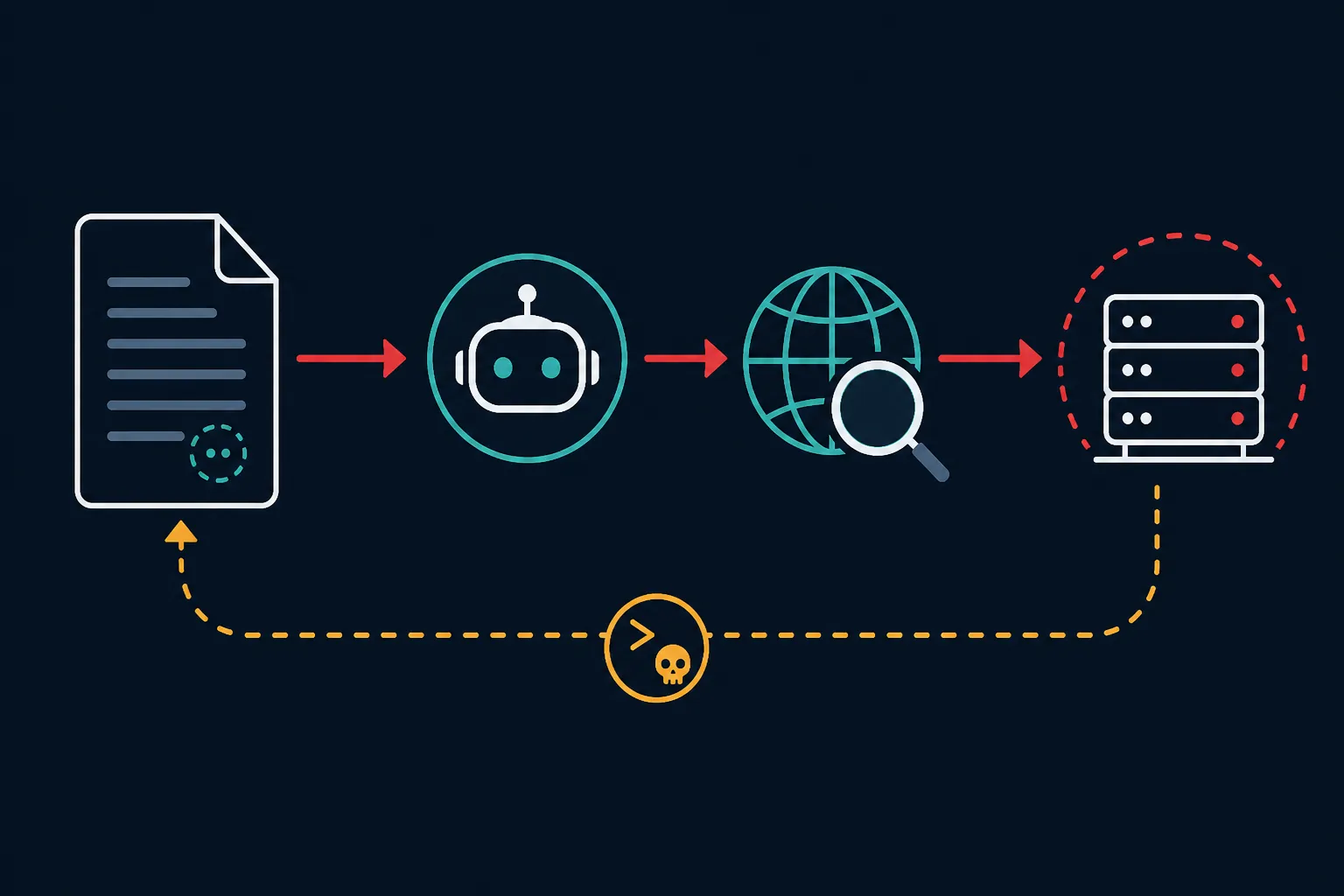
That matters because the failure is not “AI summarized a sensitive page.” The sequence is more specific: the agent reads private workspace context, encounters hostile instructions hidden in a document, follows those instructions, uses a tool with network reach, and causes the data to leave. Simon Willison framed the same case as a “lethal trifecta” style problem, and Bruce Schneier also highlighted it as Notion agent abuse for data theft [10][11].
PromptArmor’s later Notion case is a different route and, in some ways, the more uncomfortable one for day-to-day use. In the disclosed scenario, a hiring-tracker document could be exfiltrated because Notion AI edits were saved before user approval. The user could reject the proposed edit, but the browser had already fetched the attacker URL, which meant the request had already happened [2].
Approval gates are only useful if nothing active happens before approval. If an assistant-generated edit creates a link, image, embed, or other browser-fetched object, the question is not only “did I accept the edit?” It is also “did my client render something while I was reviewing it?” PromptArmor’s demonstration lands there: rejection came after the network side effect [2].
Notion’s own documentation is still relevant. It describes Notion AI security practices and prompt-injection protections, and those controls may reduce certain paths [3][4]. But for a workspace containing sensitive notes, vendor controls should be read beside the demonstrated behavior. The practical mitigation is to narrow the agent’s world: do not mix untrusted uploads with sensitive private pages, do not give broad web-search or connector scope unless the task truly needs it, and treat generated embeds or links as potentially active before you approve the visible text.
Evernote and Apple Notes sit in the policy-and-transparency middle
Evernote’s risk is not documented in the research set as a Notion-style prompt-injection exfiltration case. The exposure is mostly visible in its own FAQ. As of the January 15, 2026 FAQ update, Evernote says AI Assistant chats are sent to OpenAI, OpenAI deletes that data immediately after generating the response, customer content is not used to train AI models, and Semantic Search embeddings are stored on Evernote internal servers. The same FAQ says all AI features are enabled by default, with per-feature opt-out [5].
Those claims should not be collapsed into one privacy label. “Not used for training” is not the same as “never sent to a processor.” “Deleted after response” is not the same as “no embedding exists.” “Enabled by default” changes the risk posture for users who never intended to turn on AI in the first place. For Evernote, the first setting to check is not a clever jailbreak defense; it is whether the specific AI features you do not need have been opted out.
Apple Notes is different because Apple Intelligence starts from an on-device processing claim. Apple’s legal documentation says requests are processed on-device where possible, with Private Cloud Compute used when needed; Apple says those cloud requests are not retained and points users to the Apple Intelligence Report as a transparency mechanism [6].
That is a stronger shape than a normal cloud-AI promise, but it is still not the same as a purely local model. The useful distinction is whether a request stayed on the device, whether it went to Private Cloud Compute, and whether the report confirms the path. If your requirement is no outbound processing at all, Apple’s “on-device where possible” language is not enough by itself; you would need to disable the feature or avoid using it on sensitive notes.
The clean counterexample: Obsidian pointed at a local model
Obsidian is the only setup in this set where the strongest privacy claim can be checked with the boring tool that matters: network observation. In the August 2026 How-To Geek account, Obsidian was connected to local models through Ollama, GPT4All, or LM Studio at localhost:11434, and the setup was verified to make no network calls [7].
That does not make every Obsidian AI workflow private. A plugin can still call a cloud API. Sync can still move files. A user can still paste private text into a hosted model. But when the vault is local and the model endpoint is local, the privacy claim is no longer only a sentence in a policy document. You can watch the traffic and see whether the assistant is actually staying inside the machine.
The tradeoff is setup work. Local inference asks you to install and maintain a runtime, choose a model, watch plugin permissions, and accept that smaller local models may be slower or less capable than hosted systems. For many knowledge workers, that is not the default path. For notes that cannot leave the device, it is still the most defensible path in this comparison.
Logseq belongs near Obsidian only when configured the same way: local notes, local endpoint, observable absence of unexpected outbound calls. The research set does not support a broad claim that Logseq AI plugins are safe by default. The app architecture may help, but the plugin and model endpoint decide the exposure.
If you are comparing local-first note systems more broadly, our Obsidian Review 2026 is the better place for architecture and workflow tradeoffs. The local-vault context also matters when importing AI-generated material, which is why the ChatGPT-to-Obsidian export comparison is a different privacy problem from letting a live agent roam an entire workspace.
Four risk vectors to check before enabling an AI note agent
The same four-vector test worked better than brand ranking in this review. It also lines up with broader agent research. UC Berkeley CLTC’s AgentWatch report evaluated five browser-based AI agents in Spring 2026 and found uneven results on data-disclosure control and prompt-injection resistance, with Claude, Atlas, and Gemini scoring Excellent above 90 while Copilot scored lowest [8]. That report is not a note-app test, but it shows the right lesson: agent privacy behavior can be measured, and it varies by implementation.
The web-search issue is also not limited to Notion as a concept. Research on exploiting AI-agent web-search tools describes how tool use can become a data-exfiltration channel when private context and attacker-controlled instructions meet an outbound search or fetch capability [9]. Notion is the note-app case with concrete public demonstrations in this research set, not the only possible place the pattern could appear.
- Prompt-injection exfiltration: Can a note, PDF, webpage, email, or imported document contain instructions the agent might follow? If yes, the important setting is tool scope. Disable or constrain web search, connectors, and broad workspace search where the app allows it.
- Prompt and response retention: Does the prompt go to a third-party model provider? Is it deleted after response, retained temporarily, or stored in logs? Evernote’s FAQ gives one kind of answer; Apple’s Private Cloud Compute language gives another; a local Obsidian model gives an observable one.
- Embedding retention: Semantic search often means your notes are transformed into embeddings. The question is where those embeddings live and who controls them. Evernote says Semantic Search embeddings are stored on Evernote internal servers [5].
- Training rights: “Not used to train models” is valuable, but it closes only one risk. It does not answer whether prompts are processed in the cloud, whether embeddings persist, or whether an agent can call an external tool.
- Permission scope: The most dangerous assistant is usually not the one that summarizes a single selected note. It is the one that can search across a workspace, read hidden context, call tools, and write or render changes before the user understands what happened.
Verdict by app, as of August 25, 2026
| If your requirement is… | Most defensible choice in this set | Why |
|---|---|---|
| Verifiable zero outbound AI processing | Obsidian with a local model; Logseq only if the AI plugin is also pointed at a local model and monitored | The local-model path can be checked with network observation instead of relying only on vendor retention language. |
| Cloud AI with strong transparency controls | Apple Notes with Apple Intelligence, if the Apple Intelligence Report and Private Cloud Compute model satisfy your policy | Apple distinguishes on-device processing from Private Cloud Compute and says overflow requests are not retained [6]. |
| Cloud AI inside a traditional note app with opt-outs | Evernote, after reviewing and disabling unneeded AI features | The FAQ gives concrete retention and training statements, but AI features are enabled by default and prompts may go to OpenAI for processing [5]. |
| Agentic workspace automation in a large cloud note system | Notion only with tight scope and caution around untrusted content | The research set contains two public third-party exfiltration demonstrations against Notion 3.0 agent behavior [1][2]. |
The practical result is not “never use AI in notes.” It is that cloud agents should be treated as app-specific and tool-scope-specific. Notion requires the most caution in this set because the exfiltration paths are documented. Evernote and Apple Notes depend more on retention, default settings, and transparency claims. Obsidian, and Logseq when configured similarly, are the choices when the requirement is that AI inference can be verified as local.
This test log should stay dated because policies and agent behavior change quickly. For the slower policy comparison across apps, use AI Security Risks Across Six Note-Taking Apps Compared as the companion piece. For today’s decision, the cleanest rule is simple: if notes cannot leave the machine, use a local-first app with a local model and verify the traffic; if you want a cloud agent, narrow its tools before you let it read the room.
References
- Notion AI Security: 3.0 Agents and Lethal Trifecta Risk — CodeIntegrity, September 2025
- Notion AI: Data Exfiltration — PromptArmor, January 7, 2026
- Notion AI security & privacy practices — Notion Help Center
- How Notion protects against prompt injection — Notion Help Center
- Evernote's AI Features — FAQ — Evernote, January 15, 2026
- Apple Intelligence & Privacy — Apple Legal, December 12, 2025
- I quit using NotebookLM and switched to Obsidian with local LLMs, now my notes are finally private — How-To Geek, August 2026
- AgentWatch: Privacy and Security Evaluation for Browser-Based AI Agents — UC Berkeley CLTC, Spring 2026
- Exploiting Web Search Tools of AI Agents for Data Exfiltration — arXiv
- The Hidden Risk in Notion 3.0 AI Agents: Web Search Tool Abuse for Data Exfiltration — Simon Willison, September 19, 2025
- Abusing Notion's AI Agent for Data Theft — Schneier on Security, September 2025








Comments
Join the discussion with an anonymous comment.