
The Illusion of "Free" — What Limits Exist Where
When a note-taking app advertises a free plan, the natural assumption is that you get a usable product without paying. In 2026, that assumption holds — but only if you understand exactly which trade-offs the app has made to keep its price tag at zero. Every free plan is a bundle of compromises, and the compromises differ dramatically from one app to the next.
The problem is that most comparison articles treat free plans as a single category: "free." They list features, compare storage limits, and declare a winner. What they miss is that the kind of "free" matters more than the amount of free. A cloud-synced app that gives you 15GB of storage is not simply "better" than a local-first app that gives you unlimited storage — they serve fundamentally different use cases and impose fundamentally different risks.
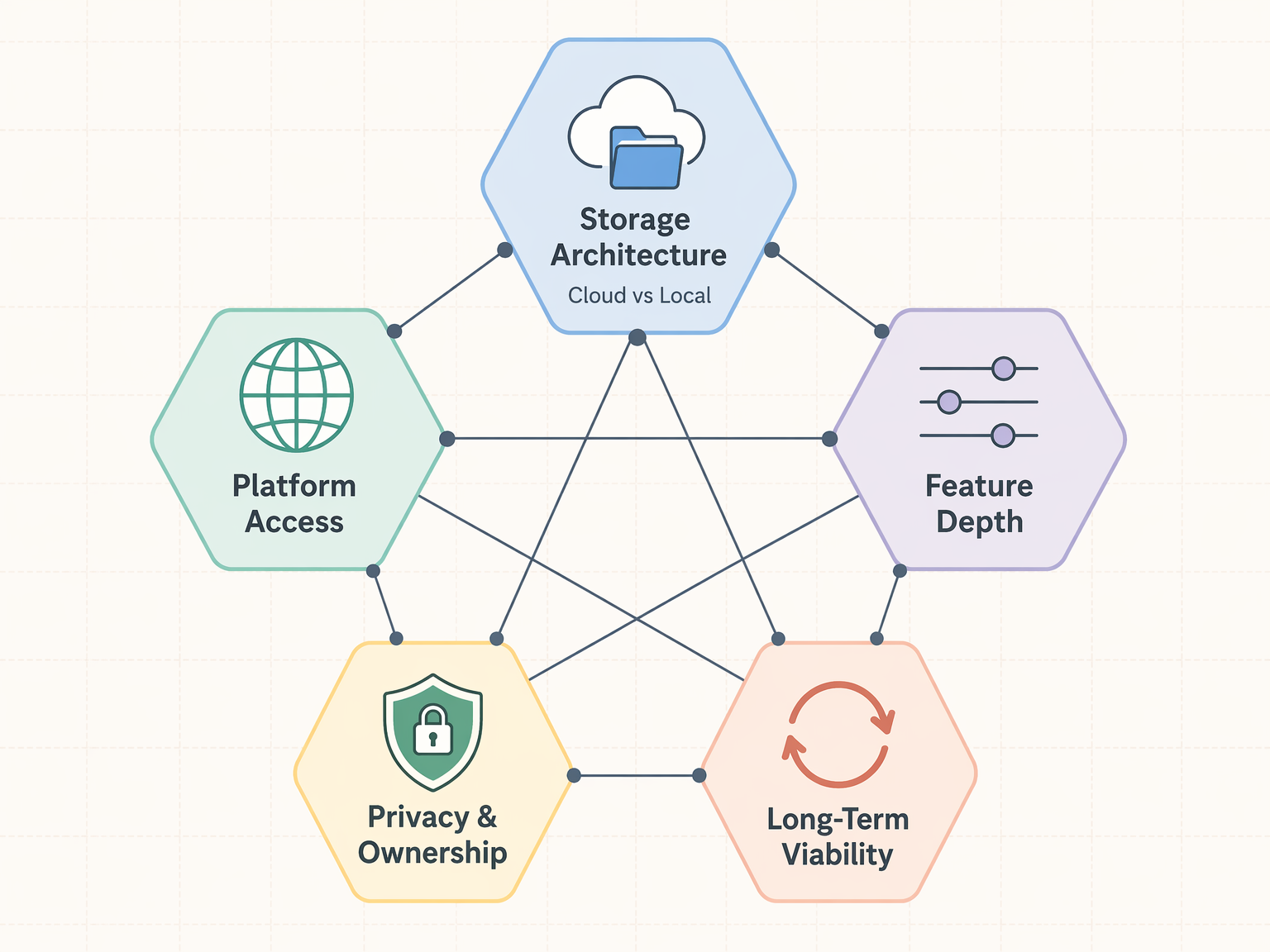
To cut through the noise, this article organizes the free-app landscape around five systematic trade-off dimensions. Each dimension represents a decision point where the app's architecture or business model forces a compromise. By the end, you will have a reusable framework for evaluating any free note-taking app — not just the ones covered here — based on what you personally value most.
Trade-Off Dimension 1: Storage Architecture — Cloud vs. Local
The single most important architectural decision a note-taking app makes is where your notes live. This decision determines your storage limits, your sync experience, and your long-term data ownership. Free plans fall into two camps.
Cloud-Synced Free Plans: Generous Sync, Hard Storage Caps
Cloud-synced apps store your notes on the vendor's servers. This gives you seamless multi-device sync out of the box — open a note on your phone, edit it on your laptop, and the change appears instantly. The trade-off is a hard storage ceiling that the vendor controls.
| App | Free Storage | Paid Upgrade Path | Notes on Limits |
|---|---|---|---|
| Microsoft OneNote | 5GB via OneDrive | $1.99/month for 100GB | Storage is shared with all OneDrive files, not just notes |
| Apple Notes | 5GB iCloud storage | $0.99/month for 50GB | Shared across all iCloud services — photos, backups, and notes compete for the same pool |
| Google Keep | 15GB across all Google apps | $1.99/month for 100GB | Shared with Gmail, Google Drive, and Google Photos; fills up fast for active users |
| Notion (Free Personal) | Unlimited pages, 5MB per file upload | Plus $12/user/month | Upload cap limits PDFs, images, and embedded files — not a storage cap per se, but a file-size cap |
| Evernote (Free) | 250MB/month upload, 50 notes total | Starter $15/month | Both upload and total note count are capped; the most restrictive free tier in 2026 |
For text-only note-takers, 5GB to 15GB is plenty. A typical year of text notes — even with occasional embedded images — rarely exceeds a few hundred megabytes. The problem arises when you start attaching PDFs, lecture slides, scanned documents, or audio recordings. A single 50-page PDF can be 10MB or more. A semester of lecture slides can easily consume 2–3GB. At that point, the shared storage pool becomes a real constraint.
Local-First Free Plans: Unlimited Storage, DIY Sync
Local-first apps store your notes as plain files on your own device. Because you supply the storage, there is no artificial cap — your free plan is limited only by your hard drive. This is the architectural secret behind the "unlimited" free plans of Obsidian, Joplin, and Logseq.
| App | Free Storage Model | Sync Solution | Sync Cost |
|---|---|---|---|
| Obsidian | Local markdown files — unlimited | Obsidian Sync (optional) or third-party (iCloud, Dropbox, Syncthing) | $5/month for Obsidian Sync; free with third-party tools |
| Joplin | Local storage — unlimited | Joplin Cloud (optional) or third-party (Dropbox, OneDrive, WebDAV) | ~€2.99/month for Joplin Cloud; free with third-party tools |
| Logseq | Local markdown/Org-mode files — unlimited | Logseq Sync (beta) or third-party (Git, iCloud, Syncthing) | Free (beta); third-party tools free or minimal cost |
| Simplenote | Unlimited text-only storage | Built-in sync (proprietary) | Completely free — no paid tier exists |
The trade-off is clear: you gain unlimited storage and full control over your data, but you lose the effortless, vendor-managed sync that cloud apps provide. Setting up Obsidian to sync via iCloud or Syncthing is not difficult, but it is a step that a OneNote user never has to think about. Joplin offers its own cloud service for a small fee, and Obsidian's paid Sync add-on is the most polished option, but both cost money — which defeats the purpose of a free plan for some users.
Simplenote occupies a unique middle ground: it is a cloud-synced app that stores text-only notes and offers unlimited storage completely free, with no paid tier at all. If your note-taking is purely text — no images, no attachments, no formatting — Simplenote gives you the best of both worlds. But the moment you need to attach a PDF or embed an image, Simplenote is not an option.
Trade-Off Dimension 2: Platform Access — Cross-Platform Freedom vs. Ecosystem Lock-In
A free plan is only useful on the devices you actually own. Some free apps work across every major platform; others are deliberately restricted to a single ecosystem as a way to drive hardware or service adoption.
| App | iOS | Android | macOS | Windows | Web | Linux |
|---|---|---|---|---|---|---|
| Microsoft OneNote | Yes | Yes | Yes | Yes | Yes | No |
| Google Keep | Yes | Yes | Yes (via Web) | Yes (via Web) | Yes | Yes (via Web) |
| Apple Notes | Yes | No | Yes | No | Yes (iCloud.com) | No |
| Notion | Yes | Yes | Yes | Yes | Yes | No |
| Evernote | Yes | Yes | Yes | Yes | Yes | No |
| Obsidian | Yes | Yes | Yes | Yes | No (native apps only) | Yes |
| Joplin | Yes | Yes | Yes | Yes | No (native apps only) | Yes |
| Simplenote | Yes | Yes | Yes | Yes | Yes | Yes |
| Bear | Yes | No | Yes | No | No | No |
The most restrictive free plans in terms of platform access are Apple Notes and Bear. Both are excellent apps on Apple hardware, but their free tiers are locked to the Apple ecosystem. If you use an iPhone and a Windows laptop — a common combination among students and professionals — Apple Notes is effectively unusable on your primary work machine. Bear does not even offer a web client.
On the other end of the spectrum, OneNote, Google Keep, Joplin, and Simplenote offer free access on every major platform. OneNote is particularly notable: it is the only full-featured, cloud-synced free app that works natively on both Windows and macOS, with solid mobile apps on iOS and Android. Joplin and Simplenote extend even to Linux, making them the best choices for users in mixed-OS environments.
Trade-Off Dimension 3: Feature Depth — What the Free Tier Cuts
Storage and platform access are structural limits. Feature depth is a deliberate choice by the vendor: which capabilities do they reserve for paying customers, and which do they offer for free? The answers reveal a lot about each app's business model.
| App | Free Plan Key Limits | What You Lose vs. Paid | Best Free Use Case |
|---|---|---|---|
| Notion | Unlimited pages, 5MB per file upload | File uploads larger than 5MB; 30-day version history (free: 7 days); guest permissions | Text-heavy personal notes, wikis, and databases without large attachments |
| Notion (Student Pro) | Unlimited uploads, 30-day version history | Nothing — the free Student Pro upgrade (.edu email) removes all free-plan limits | Students who can verify .edu status get the full Personal Pro plan for free |
| Evernote | 50 notes, 1 notebook, 1 device | Everything beyond 50 notes; multi-device access; notebook organization | Barely usable — essentially a trial, not a sustainable free plan |
| UpNote | 50 notes total | Unlimited notes; markdown export; custom themes; all formatting options | Evaluating the app before committing to the $1.99/month or $39.99 lifetime license |
| Bear | Basic markdown editing, no sync | Advanced formatting; themes; iCloud sync; export options | Quick capture on a single Apple device without needing organization features |
| OneNote | All core features, 5GB storage | Nothing significant — the free version is the full app, only storage is capped | Users who want a full-featured free app and can stay within 5GB |
| Google Keep | All features, 15GB storage | Nothing significant — Keep has no paid tier; storage is the only limit | Quick, lightweight notes and lists with seamless Google integration |
| Obsidian | All core features, local storage | Obsidian Sync, Obsidian Publish, and some commercial-use features | Power users who want full control and are comfortable with local-first storage |
| Joplin | All features, local storage | Joplin Cloud sync and collaboration features | Users who want an open-source, feature-rich app and can manage their own sync |
The most striking outlier is Evernote. Once the gold standard for free note-taking, Evernote's free plan under Bending Spoons ownership has been reduced to 50 notes, 1 notebook, and 1 device. This is not a sustainable free plan — it is a trial that forces you to upgrade or leave within weeks. For comparison, OneNote gives you the full app with a storage cap, and Notion gives you unlimited pages with a file-size cap. Evernote's free tier is in a category of its own, and not in a good way.
Notion's free personal plan is generous in page count but restrictive in file uploads: each file you attach to a page cannot exceed 5MB. This is fine for text and small images, but it becomes a problem when you want to embed a PDF, a high-resolution photo, or a short audio recording. The exception is the Student Pro offer: if you have a .edu email address, Notion upgrades your account to the Personal Pro plan for free, removing the upload cap and extending version history to 30 days. This makes Notion arguably the best free option for students who qualify.
UpNote and Bear both offer free plans that are best understood as extended trials. UpNote limits you to 50 notes, after which you must pay $1.99/month or $39.99 for a lifetime license. Bear's free version is basic — no sync, limited formatting, no themes — and the full experience costs $2.99/month. Both are excellent apps, but their free tiers are not designed for long-term use.
For a deeper look at Notion's specific trade-off between capture speed and knowledge management, see our Notion as a Note-Taking App in 2026: Capture Speed vs. Knowledge Management profile.
Trade-Off Dimension 4: Privacy & Ownership — Who Really Controls Your Notes
When you use a free cloud-synced app, you are not the customer — you are the product. The app's business model depends on converting free users to paid subscribers, or on using your data to improve its services. This does not mean your notes are being read by humans, but it does mean that the vendor controls access to your data, and that control can change at any time.
| App | Data Storage Model | Vendor Access to Data | Export Options | Vendor Lock-In Risk |
|---|---|---|---|---|
| OneNote | Microsoft servers | Microsoft has access; subject to Microsoft privacy policy | Export to PDF, Word, or .one format | Medium — proprietary format, but export options exist |
| Apple Notes | Apple iCloud servers | Apple has access; end-to-end encryption for some data | Export to PDF; no bulk export tool | Medium-High — no easy bulk export path |
| Google Keep | Google servers | Google has access; subject to Google privacy policy | Export to Google Takeout (JSON/HTML) | Medium — Google Takeout works but format is not ideal |
| Notion | Notion servers (AWS) | Notion has access; subject to Notion privacy policy | Export to Markdown, HTML, CSV, PDF | Medium — good export options, but no native migration to other tools |
| Evernote | Evernote servers | Evernote has access; subject to Evernote privacy policy | Export to ENEX format; limited Markdown | High — proprietary format; migration is painful |
| Obsidian | Local files only | None — vendor has no access to your data | Native Markdown — no export needed | None — your files are standard Markdown, readable by any text editor |
| Joplin | Local files (optional cloud sync) | None — vendor has no access to local data | Native Markdown and JEX format | None — open-source, standard formats |
| Logseq | Local files (Markdown/Org-mode) | None — vendor has no access to local data | Native Markdown and Org-mode — no export needed | None — open-source, standard formats |
| Simplenote | Simplenote servers (Automattic) | Automattic has access; subject to Automattic privacy policy | Export to JSON; limited Markdown export | Medium — proprietary sync, but data is plain text |
The privacy dimension is where local-first apps have an unassailable advantage. Obsidian, Joplin, and Logseq store your notes as plain Markdown files on your own device. The vendor has no access to your data because your data never touches their servers (unless you choose to use their paid sync services). If the company goes out of business, your notes remain untouched. If you want to switch to a different app, you just point the new app at your existing Markdown folder.
Cloud-synced apps, by contrast, require you to trust the vendor with your data. For most personal notes, this is a reasonable trade-off — the convenience of seamless sync outweighs the privacy risk. But it is worth understanding that you are giving up control. If Microsoft decides to change OneDrive's storage policy, your notes are affected. If Apple changes iCloud's terms, your Apple Notes data is affected. If Notion raises its prices or changes its free plan, your workflow is disrupted.
Trade-Off Dimension 5: Long-Term Viability — Will Your Free Plan Still Be Free Next Year?
The most insidious trade-off of a free plan is the risk that it will not remain free — or that its terms will change in ways that break your workflow. The note-taking app market has a long history of free plans that were generous, then restrictive, then effectively useless.
Evernote is the cautionary tale. Under Bending Spoons ownership, the company has aggressively restricted its free tier while raising paid plan prices. The free plan now allows just 50 notes, 1 notebook, and 1 device — down from what was once an unlimited free tier. Users who built their entire note-taking system around Evernote over a decade suddenly faced a painful migration or a $14.99/month bill. This is not an isolated incident; it is a pattern in venture-backed SaaS companies that need to show revenue growth.
Open-source apps are structurally immune to this risk. Obsidian, Joplin, and Logseq are not venture-backed startups that need to monetize their user base. Their source code is publicly available, which means that even if the original development team stops working on the app, the community can fork it and continue development. Your notes, stored in standard Markdown files, remain readable by dozens of other applications. There is no vendor to change the terms.
Simplenote, owned by Automattic (the company behind WordPress.com), has maintained a completely free, unlimited text-only service for over a decade. Automattic's business model does not depend on Simplenote's revenue, which makes it one of the most stable free options available. But it is also a reminder that "stable" does not mean "feature-rich" — Simplenote has not added significant new features in years.
Notion and OneNote are backed by large, profitable companies (Notion is well-funded; Microsoft is a trillion-dollar corporation). Their free plans are loss leaders designed to drive ecosystem adoption. They are unlikely to disappear, but they are also subject to the strategic priorities of their parent companies. Microsoft could decide to reduce OneDrive's free tier; Notion could tighten its free plan to push more users to paid subscriptions. Neither outcome is guaranteed, but both are possible.
Decision Matrix: Which Free App Fits Your Trade-Off Priorities?
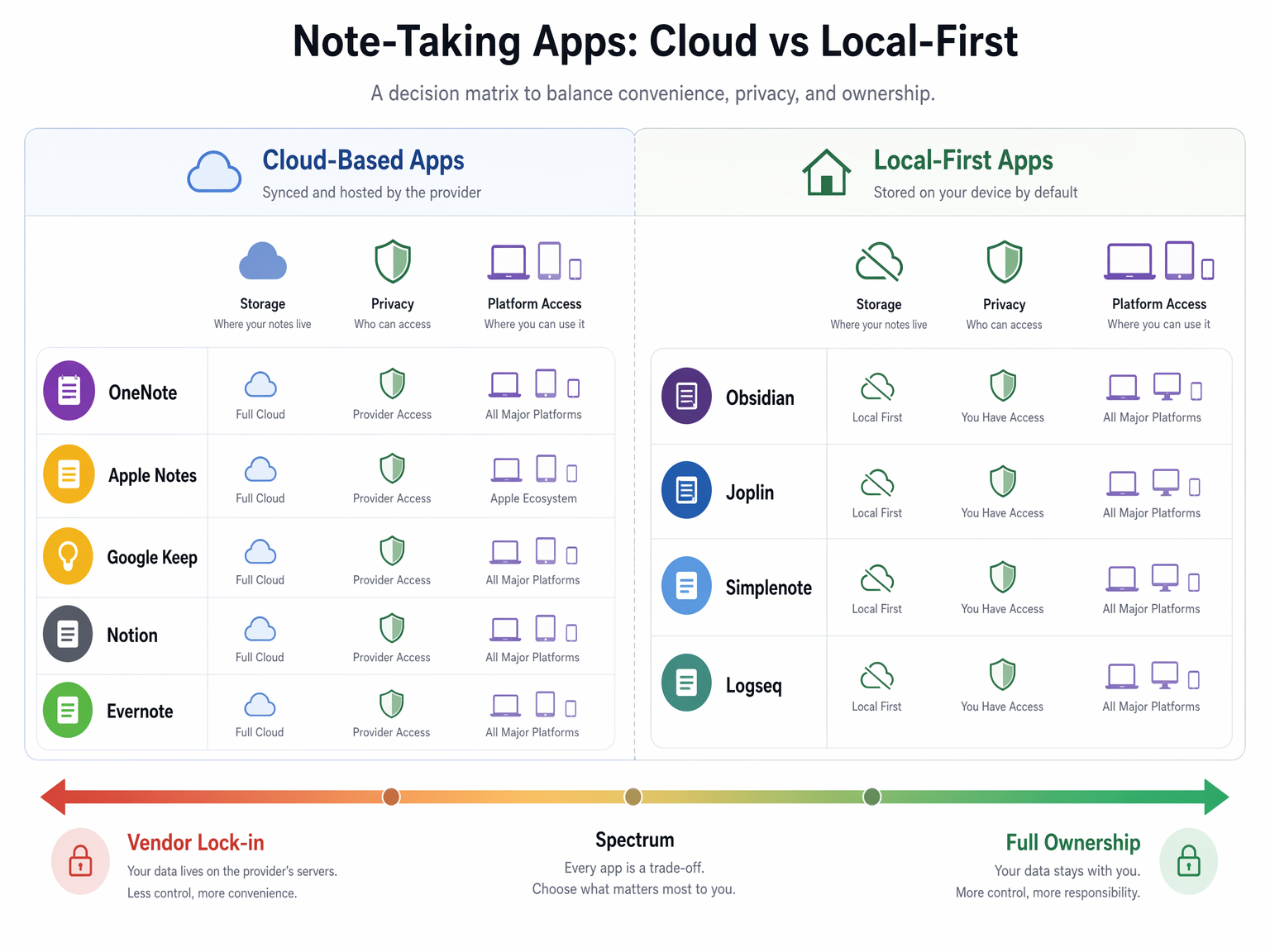
The following matrix maps each major free app across the five trade-off dimensions. Use it to identify which app aligns with your personal priorities. No app is perfect across all dimensions — the goal is to find the app whose trade-offs you are willing to accept.
| App | Storage Architecture | Platform Access | Feature Depth | Privacy & Ownership | Long-Term Viability | Best For |
|---|---|---|---|---|---|---|
| OneNote | Cloud (5GB) | Excellent (all major platforms) | Full-featured | Medium (Microsoft servers) | Stable (Microsoft-backed) | Users who want a full-featured free app and stay within 5GB |
| Apple Notes | Cloud (5GB iCloud) | Apple-only | Full-featured on Apple | Medium (Apple servers) | Stable (Apple-backed) | Apple-only users who want seamless ecosystem integration |
| Google Keep | Cloud (15GB) | Excellent (all platforms via web) | Lightweight | Medium (Google servers) | Stable (Google-backed) | Quick, lightweight notes and lists |
| Notion | Cloud (unlimited pages, 5MB uploads) | Good (all major platforms) | Very deep (with upload cap) | Medium (Notion servers) | Moderate (well-funded startup) | Text-heavy personal wikis and databases |
| Notion (Student Pro) | Cloud (unlimited pages, no upload cap) | Good (all major platforms) | Full-featured (no limits) | Medium (Notion servers) | Moderate (requires .edu verification) | Students who qualify for the free Pro upgrade |
| Evernote | Cloud (250MB/month, 50 notes) | Good (all major platforms) | Severely restricted | Medium (Evernote servers) | Risky (aggressive monetization) | Not recommended as a long-term free option |
| Obsidian | Local (unlimited) | Good (all major platforms + Linux) | Full-featured | Excellent (local files, no vendor access) | Excellent (open-source) | Power users who value control and privacy |
| Joplin | Local (unlimited) | Excellent (all major platforms + Linux) | Full-featured | Excellent (local files, open-source) | Excellent (open-source) | Users who want open-source and cross-platform access |
| Logseq | Local (unlimited) | Good (all major platforms + Linux) | Full-featured (outliner) | Excellent (local files, open-source) | Excellent (open-source) | Users who prefer outliner-style note-taking |
| Simplenote | Cloud (unlimited text-only) | Excellent (all platforms including Linux) | Minimal (text-only) | Medium (Automattic servers) | Stable (Automattic-backed) | Text-only note-takers who want unlimited free storage |
If your top priority is cross-platform access, OneNote, Google Keep, Joplin, and Simplenote are your best bets. If privacy and ownership matter most, Obsidian, Joplin, and Logseq are the clear winners. If you need deep features without paying, Notion (especially with the Student Pro upgrade) and OneNote offer the most capability. If long-term stability is your concern, open-source apps eliminate vendor risk entirely.
When to Pay vs. When Free Is Genuinely Enough
After evaluating all five trade-off dimensions, the question remains: should you stick with a free plan or upgrade to a paid one? The answer depends on your specific use case, but a few general guidelines emerge.
Free Is Genuinely Enough When:
- Your notes are primarily text with occasional small images. You do not need to attach PDFs, audio files, or high-resolution photos. In this case, any cloud-synced free plan (OneNote, Apple Notes, Google Keep) or a local-first app (Obsidian, Joplin) will serve you well.
- You are comfortable with local-first storage and can manage your own sync (or do not need multi-device sync). Obsidian, Joplin, and Logseq give you unlimited storage, full privacy, and zero vendor risk — all for free.
- You are a student with a .edu email address. Notion's Student Pro offer removes the upload cap and gives you the full Personal Pro plan for free, making it one of the most capable free options available.
- You are a text-only note-taker who values simplicity and unlimited storage. Simplenote is completely free, unlimited, and works on every platform — but only for plain text.
Paying Makes Sense When:
- You need cross-device sync without any setup hassle. Cloud-synced apps like OneNote, Notion, and Apple Notes handle this automatically. If you choose a local-first app, you will need to configure third-party sync or pay for the vendor's sync service (Obsidian Sync at $5/month, Joplin Cloud at ~€2.99/month).
- You regularly attach large files — PDFs, high-resolution images, audio recordings, or scanned documents. Notion's 5MB upload cap and the 5–15GB storage limits of cloud-synced apps will become a bottleneck. A paid plan (Notion Plus at $12/user/month) or a local-first app with your own storage solves this.
- You need advanced features like OCR, handwriting recognition, or AI-powered search. These features are almost always reserved for paid plans. If your workflow depends on them, the free tier will not suffice.
- You want long-term vendor stability guarantees. While no vendor can guarantee its free plan will remain unchanged, paying for a service creates a revenue relationship that aligns the vendor's incentives with yours. Open-source apps are the exception — they do not need your money to survive, but they may need your contributions to thrive.
The five-dimension framework introduced in this article is not just for note-taking apps. You can apply the same analysis to any free software you evaluate: What is the storage architecture? How broad is platform access? What features are cut? Who controls your data? How likely is the free plan to change? Asking these five questions before committing to a free tool will save you the headache of discovering hidden trade-offs after you have already built your workflow around it.