
Why Most Marketing Automation Workflows Leave Money on the Table
The gap between an average automated email workflow and a top-performing one is not a few percentage points — it is an order of magnitude. According to the Klaviyo 2024 Benchmark Report, the top 10% of email workflows generate $16.96 in revenue per recipient. The average across all workflows? Just $1.94. That is an 8.7x gap, and it has nothing to do with the tool you use. It has everything to do with how you build the workflow.
Most marketing teams set up a welcome series, throw together an abandoned cart email, and call it automation. The result is a collection of under-optimized sequences that fire at the wrong time, use the wrong channel, or fail to account for customer behavior after the trigger. The data backs this up: Omnisend's 2025 Ecommerce Marketing Report found that automated messages account for only 1.8% of total sends, yet they drive 31% of all email orders. The volume is tiny; the potential is enormous.
This guide is not another list of workflow ideas. It is a methodology for building workflows that consistently land in that top 10% bracket. You will learn the four structural components every high-performing workflow shares, see which nine workflows deliver the highest revenue per recipient and by how much, get a repeatable step-by-step build process, and walk away with a 30-day implementation roadmap. If you are a marketing ops specialist or growth marketer at a B2B SaaS or eCommerce company, this is the playbook for turning automation from a cost center into a measurable revenue engine.
The Anatomy of a High-Performing Workflow: Triggers, Conditions, Timing, and Actions
Before you can build a workflow that drives revenue, you need to understand the four components that every automated sequence — whether in ActiveCampaign, Bloomreach, Klaviyo, or any other platform — relies on. Miss one, and the workflow underperforms. Get all four right, and you create a system that feels personal, timely, and relevant.
1. Triggers: The Event That Starts Everything
A trigger is a specific user action or event that kicks off the workflow. Common triggers include form submissions, email link clicks, purchases, page visits, or a contact being added to a list. The quality of your trigger determines the relevance of everything that follows. A trigger like "subscribed to newsletter" is broad; "added product to cart and initiated checkout but did not complete purchase" is precise. The more specific the trigger, the higher the conversion rate.
2. Conditions: Who Gets In and Who Gets Filtered Out
Conditions are the logical gates that determine whether a contact proceeds through the workflow. They check characteristics such as customer segment, past purchase history, geographic location, or engagement level. For example, a browse abandonment workflow might include a condition that only triggers if the visitor has viewed at least two product pages in the last hour but has not added anything to cart. Without conditions, you send the same message to everyone who hits the trigger, which dilutes relevance and drags down revenue per recipient.
3. Time Controls: When the Action Happens
Time controls define the delay between the trigger and each subsequent action. They can range from minutes to weeks. A well-timed abandoned cart sequence, for instance, sends the first reminder within one hour, a second at 24 hours, and a third at 48 hours. Timing is not arbitrary — it should match the urgency of the customer's intent. A post-purchase nurture sequence, by contrast, might wait 14 days before sending a cross-sell recommendation, because the customer needs time to receive and evaluate the original purchase.
4. Actions: The Response
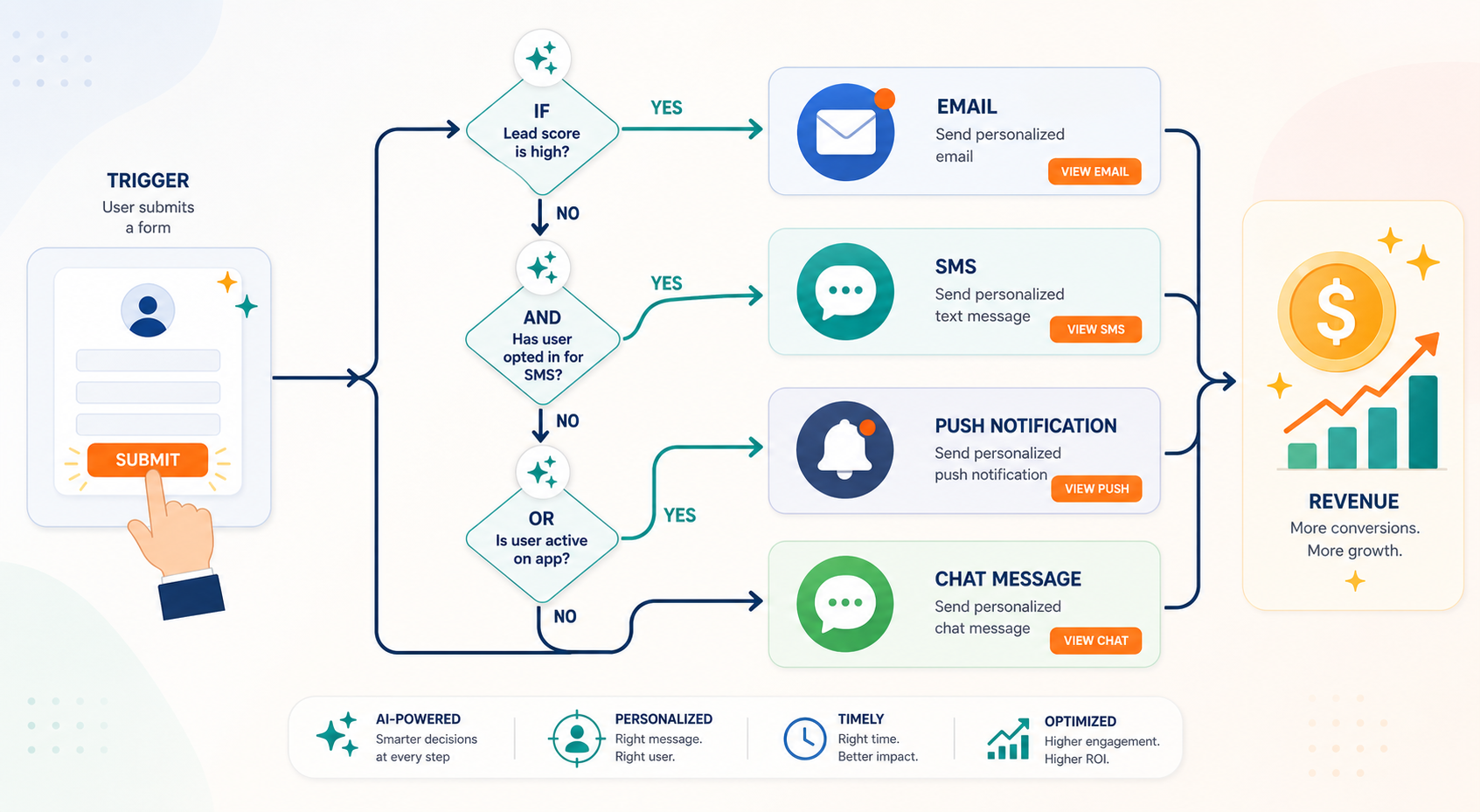
Actions are what the workflow does when a contact meets the trigger, passes the conditions, and reaches the scheduled time. The most common action is sending an email, but high-performing workflows use a mix of channels: SMS, push notifications, in-app messages, WhatsApp, or even updating a CRM record and routing a lead to sales. The action should match the channel the customer prefers and the context of the trigger. A cart abandonment alert might work best as a push notification on mobile; a lead scoring update is better as a CRM action.
| Component | Function | Example |
|---|---|---|
| Trigger | Starts the workflow | User abandons cart after adding item |
| Condition | Filters who proceeds | Cart value > $50 AND first-time buyer |
| Time Control | Sets when actions fire | 1 hour after trigger, then 24 hours, then 48 hours |
| Action | Executes the response | Send email with discount code + push notification reminder |
9 Marketing Automation Workflows Ranked by Revenue per Recipient
Not all workflows are created equal. Some generate orders at a rate that makes them worth building first, testing aggressively, and optimizing continuously. Others are nice-to-haves that deliver incremental lift. The following ranking uses revenue-per-recipient data from the Klaviyo 2024 Benchmark Report to show you exactly where to invest your build time.
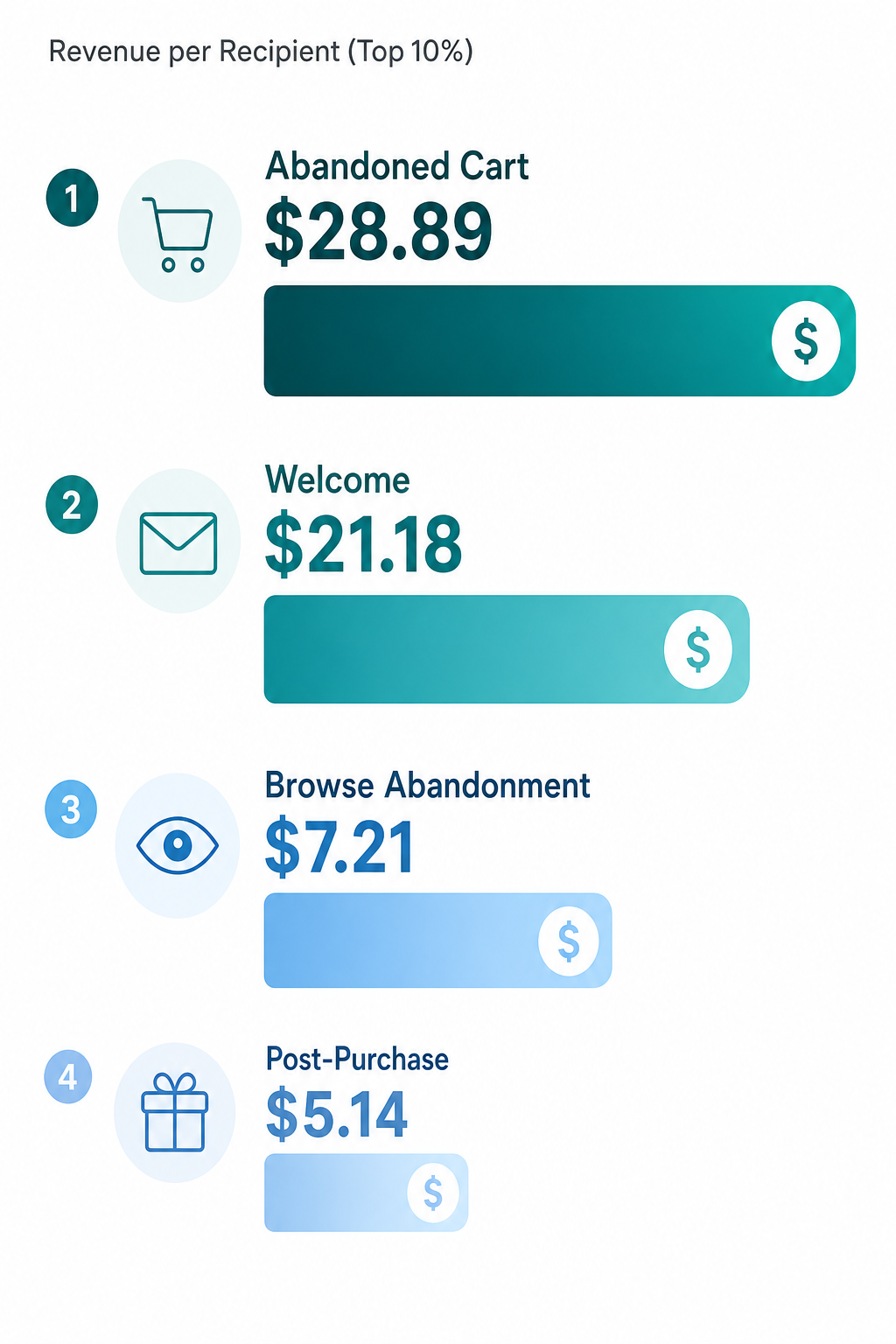
| Rank | Workflow Type | Revenue per Recipient (Top 10%) | Revenue per Recipient (Average) |
|---|---|---|---|
| 1 | Abandoned Cart | $28.89 | $3.65 |
| 2 | Welcome Series | $21.18 | $2.65 |
| 3 | Browse Abandonment | $7.21 | $1.07 |
| 4 | Post-Purchase Nurture | $5.14 | $0.41 |
| 5 | Lead Scoring & Routing | Varies by deal size | N/A |
| 6 | Re-engagement / Win-Back | Varies by list | N/A |
| 7 | Cross-Sell & Upsell | Varies by AOV | N/A |
| 8 | VIP / Loyalty | Varies by segment | N/A |
| 9 | Replenishment Reminders | Varies by product cycle | N/A |
The concentration of revenue in just a few workflow types is striking. Omnisend reports that cart abandonment, welcome, and browse abandonment emails together account for 87% of all orders generated by automations. If you are not running these three workflows at a high level of sophistication, you are leaving the bulk of automated revenue on the table.
Welcome workflows deserve special attention. They have the highest click-to-conversion rate of any automated email type at 58.26%, according to Omnisend. That means more than half the people who click through from a welcome email go on to convert. The return on investment for optimizing a welcome series — better subject lines, clearer value propositions, faster delivery — is disproportionately high compared to almost any other marketing activity.
How to Build a High-ROI Workflow: A Step-by-Step Methodology
Knowing which workflows to build is only half the battle. The other half is building them in a way that consistently produces top-quartile results. The following six-step methodology applies to any workflow type and any platform. Use it as your standard operating procedure for every new automation.
Step 1: Define the Goal in Revenue Terms
Start with a single, measurable revenue goal. Do not build a "welcome series." Build a "welcome series that generates $2.50 per recipient within 30 days." The goal determines every subsequent decision: the offer, the timing, the channel, and the success metric. Without a revenue target, you cannot optimize because you do not know what success looks like.
Step 2: Map the Customer Journey from Trigger to Conversion
Draw the path a customer takes from the trigger event to the desired outcome. Include all possible branches: what happens if they open the email but do not click? What if they click but do not buy? What if they buy immediately? Each branch should have a corresponding action. This map becomes the blueprint for your conditions and time controls.
Step 3: Choose Triggers and Conditions with Precision
Use the most specific trigger available. For an abandoned cart workflow, do not trigger on "added to cart" — trigger on "initiated checkout and did not complete." Add conditions that exclude customers who have already purchased the item, who are on a do-not-email list, or who have already received the workflow in the last 90 days. Precision at this stage prevents wasted sends and protects your sender reputation.
Step 4: Think Beyond Email
Email is the backbone of marketing automation, but it is not the only channel. High-performing workflows orchestrate across email, SMS, push notifications, and in-app messages. The NA-KD case study from Insider One demonstrates the power of this approach: the fashion retailer drove a 25% increase in customer lifetime value and achieved a 72x ROI over 12 months using cross-channel automated workflows spanning website, mobile app, email, push notifications, and SMS. Similarly, Slazenger achieved a 49x ROI in just eight weeks with a cross-channel cart abandonment workflow that combined email, on-site messaging, web push, and SMS.
When you add a channel, ask: does this channel match the urgency of the trigger? A cart abandonment alert sent via SMS within 30 minutes will outperform an email sent 24 hours later. A post-purchase thank-you works fine as email. Match the channel to the moment.
Step 5: A/B Test the Critical Variables
Test one variable at a time: subject line, send time, discount amount, channel, or number of steps in the sequence. Run each test until you have statistical significance. The goal is not to find a winner and stop; it is to establish a baseline that you can improve against. Automated nurture sequences that are systematically A/B tested see 25–35% higher conversion rates than those that are set and forgotten, according to Marketo 2024 research.
Step 6: Measure, Optimize, and Rebuild Quarterly
A workflow is never finished. Customer behavior changes, offers expire, and new data becomes available. Set a quarterly review cadence for every active workflow. Compare current revenue per recipient against the benchmark for that workflow type. If your abandoned cart workflow is generating $3.65 per recipient (the average), your goal is to move it toward $28.89 (the top 10%). Each quarter, run one optimization experiment per workflow.
| Task | Manual Time per Month | Automated Time per Month | Time Saved |
|---|---|---|---|
| Content creation (4 articles) | 48–72 hours | 8–16 hours | 70–80% |
| Lead routing (50 leads/week) | 20–40 hours | 2–4 hours | 85–90% |
| Marketing reporting | 12–20 hours | 1–2 hours | 85–90% |
| Social scheduling | 8–16 hours | 1–2 hours | 80–85% |
| Email nurture management | 8–12 hours | 0.5–1 hour | 90–95% |
How AI Is Changing Workflow Building (and What It Means for Your Team)
Artificial intelligence is shifting the workflow builder's role from manual configuration to strategic oversight. Three developments are worth your attention.
Predictive Send Times and Auto-Segmentation
Instead of setting a fixed delay of 24 hours, AI-powered platforms analyze each recipient's past engagement patterns and send the message when they are most likely to open and convert. Similarly, auto-segmentation uses behavioral data to dynamically assign contacts to the right workflow without manual list management. These features reduce the number of conditions you need to write by hand and improve timing without guesswork.
Campaign-from-Prompt Building
Bloomreach's AI-powered Campaign Agents let a lean team go from campaign idea to launch in under 15 minutes. In the Sideshow case study, a single campaign built this way drove $10,000 in revenue. The agent handles the workflow structure, copy, and channel selection; the marketer reviews and approves. This does not eliminate the need for strategic thinking — it eliminates the need for manual drag-and-drop configuration.
Real Results from AI-Enhanced Workflows
Hornby Hobbies, the model railway and collectibles company, used Bloomreach's AI-powered automated campaigns with personalized product recommendations. Within four months, they cut analytics design time by 70% and saw a 34% increase in email campaign revenue. These are not hypothetical gains — they are achievable with current technology, provided your data infrastructure is ready.
Common Mistakes That Undermine Workflow ROI
Even a well-built workflow can underperform if you fall into these traps. Keep them on your radar as you scale your automation program.
- Over-automation without segmentation. Sending every workflow to your entire list guarantees low engagement and high unsubscribe rates. Use conditions to narrow the audience to those who actually need the message.
- Ignoring data hygiene. Duplicate contacts, outdated email addresses, and missing behavioral data cause workflows to fire incorrectly or not at all. Clean your data before you build, and maintain it monthly.
- Failing to update triggers quarterly. Customer behavior shifts. A trigger that made sense six months ago — like "visited homepage" — may now be too broad. Review and tighten your triggers every quarter.
- Not aligning sales and marketing. A lead scoring workflow that routes hot leads to sales is useless if sales does not follow up within 24 hours. Automated lead routing can deliver 30–50% faster sales cycles (Forrester), but only if the receiving team is ready to act.
For a full breakdown of each mistake with remediation steps, see our companion article: 7 Marketing Automation Workflow Mistakes That Kill ROI (And How to Fix Them).
Your 30-Day Implementation Roadmap
Theory is useful. Execution is what generates revenue. Use the following roadmap to go from planning to live, optimized workflows in 30 days. Adjust the timeline based on your team size and existing infrastructure, but keep the sequence intact: audit before you build, build the highest-ROI workflows first, and establish measurement before you scale.
| Week | Focus Area | Key Activities | Deliverable |
|---|---|---|---|
| Week 1 | Audit and Clean | Audit all existing workflows. Remove or pause workflows with < $1.00 revenue per recipient. Clean contact list: remove duplicates, update unsubscribes, standardize custom fields. | Audit report with revenue-per-recipient for each active workflow. Cleaned contact list. |
| Week 2 | Build the Top 3 | Build or rebuild abandoned cart, welcome series, and browse abandonment workflows using the six-step methodology. Set up cross-channel actions (email + SMS for cart, email + push for browse). | Three live workflows with triggers, conditions, timing, and multi-channel actions configured. |
| Week 3 | Cross-Channel Orchestration | Add SMS and push notification steps to existing workflows where appropriate. Set up lead scoring and routing if applicable. Configure CRM integration for sales handoff. | Cross-channel orchestration live for top 3 workflows. Lead scoring model deployed. |
| Week 4 | Measurement and Optimization Cadence | Set up revenue-per-recipient dashboards for each workflow. Establish baseline metrics. Schedule quarterly review calendar. Run first A/B test on welcome series subject line. | Dashboard live. Baseline metrics recorded. Quarterly review calendar set. First A/B test running. |
After week four, your job shifts from building to optimizing. Each quarter, pick one workflow and run a structured experiment: test a new channel, tighten a condition, or adjust timing. The workflows that generate $28.89 per recipient did not get there on launch day — they got there through continuous, data-driven iteration.
For a full library of workflow examples with benchmarks, see 11 Marketing Automation Workflows That Generate Revenue (With Real Benchmarks). Use it as a companion reference when you are deciding which workflow to build next.