
Introduction: Why AI Changes the Automation Game
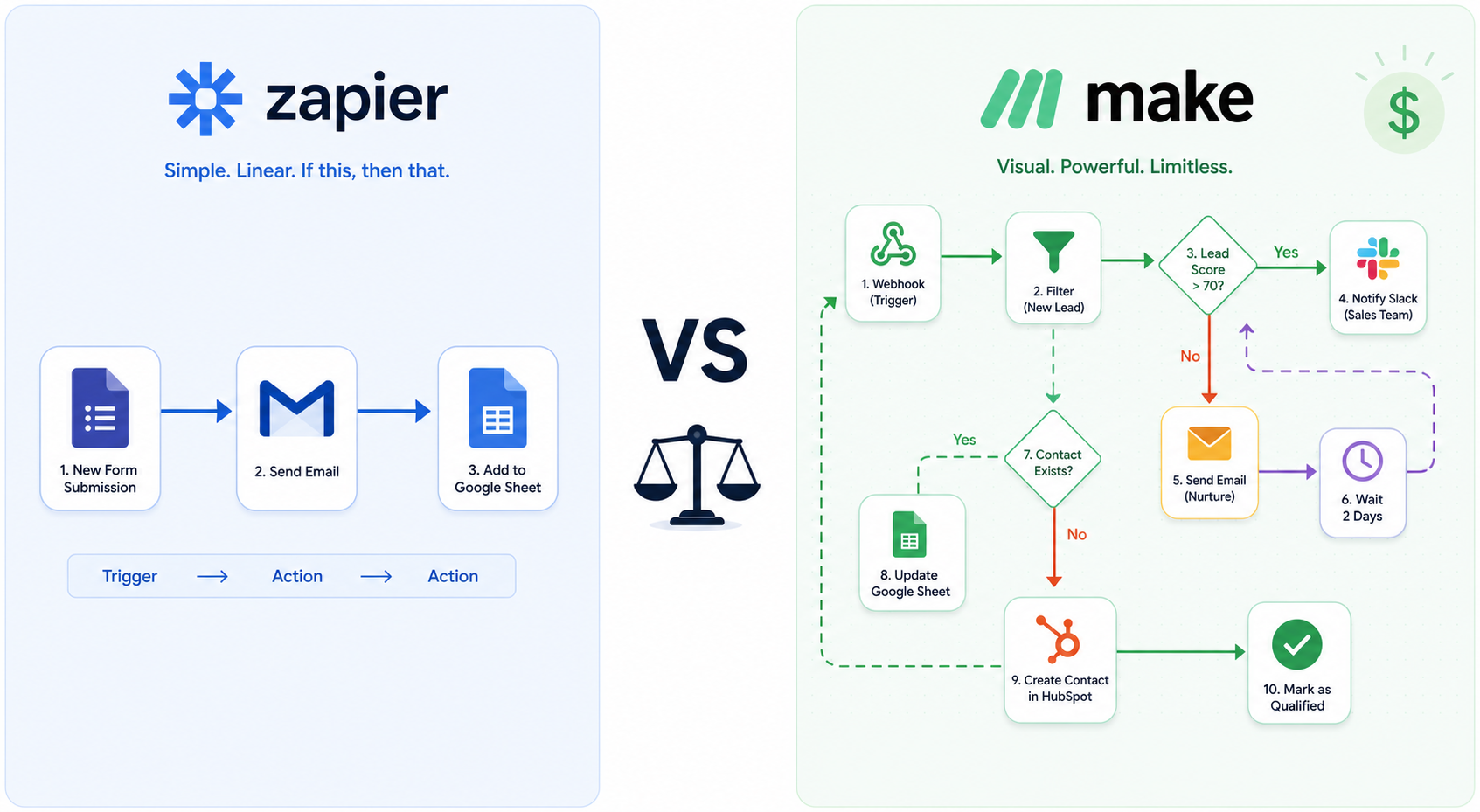
For years, the Zapier vs Make debate boiled down to simplicity versus flexibility. Zapier offered the easiest “if this, then that” experience; Make (formerly Integromat) gave you a visual canvas where you could model branching, looping, and error handling from day one. Then AI arrived — not as a bolt-on feature, but as a core processing layer that demands reasoning, memory, batch operations, and robust error recovery. The two platforms responded very differently, and the gap between them has widened.
This article looks exclusively at how Zapier and handle AI-powered automation — classification, content generation, lead scoring, extraction, summarization, and agentic workflows. If you are evaluating these platforms for the first time or need a broader overview of non-AI features, our general head-to-head comparison covers pricing tiers, app counts, and basic workflow scenarios. Here, we dive deep into the technical and financial implications of running AI-heavy pipelines.
AI Feature Parity: What Each Platform Offers Out of the Box
A quick glance at each platform’s native AI capabilities reveals where they invest. Zapier leans on its Copilot (a natural-language zap builder), AI fields (OpenAI integration inside the editor), and the newly launched Zapier Agents. Make, on the other hand, ships a full AI Toolkit with sentiment, classification, summarization, translation, and data extraction modules, plus dedicated modules for OpenAI, Anthropic (Claude), Mistral, and Gemini. The table below captures the most relevant differences for an AI builder.
| Capability | Zapier | Make |
|---|---|---|
| Native LLM integration | AI fields (OpenAI) via step; Copilot for zap generation | Dedicated modules for OpenAI, Claude, Mistral, Gemini; AI Toolkit modules |
| AI Agents (autonomous reasoning) | Zapier Agents (beta) — separate plan, limited activities | Make AI Agents (beta, Apr 2025) — run inside scenarios, use own LLM key |
| MCP support | Zapier MCP — tool calls consume 2 tasks each | Make MCP server — native integration with AI modules |
| AI Content Extraction | Not native; requires third-party integration | Built-in AI Content Extractor module |
| Batch AI processing | Manual looping creates task explosion | Iterators + aggregators handle arrays natively |
| Error handling in AI steps | Basic retry / replay | Advanced retry/ignore/alert logic with branching |
Make’s approach is deeper for AI work because the LLM modules are first-class citizens. You can call Claude for classification, pipe the output into a router module, and then branch the workflow — all without exposing API keys or managing separate integrations. Zapier’s Copilot is excellent for building simple zaps from natural language, but its AI fields are limited to single-step transformations. For multi-step AI reasoning, you need Zapier’s MCP or a third-party service, which adds complexity and cost.
The Real Cost of AI Automation: Per-Execution Price Comparison
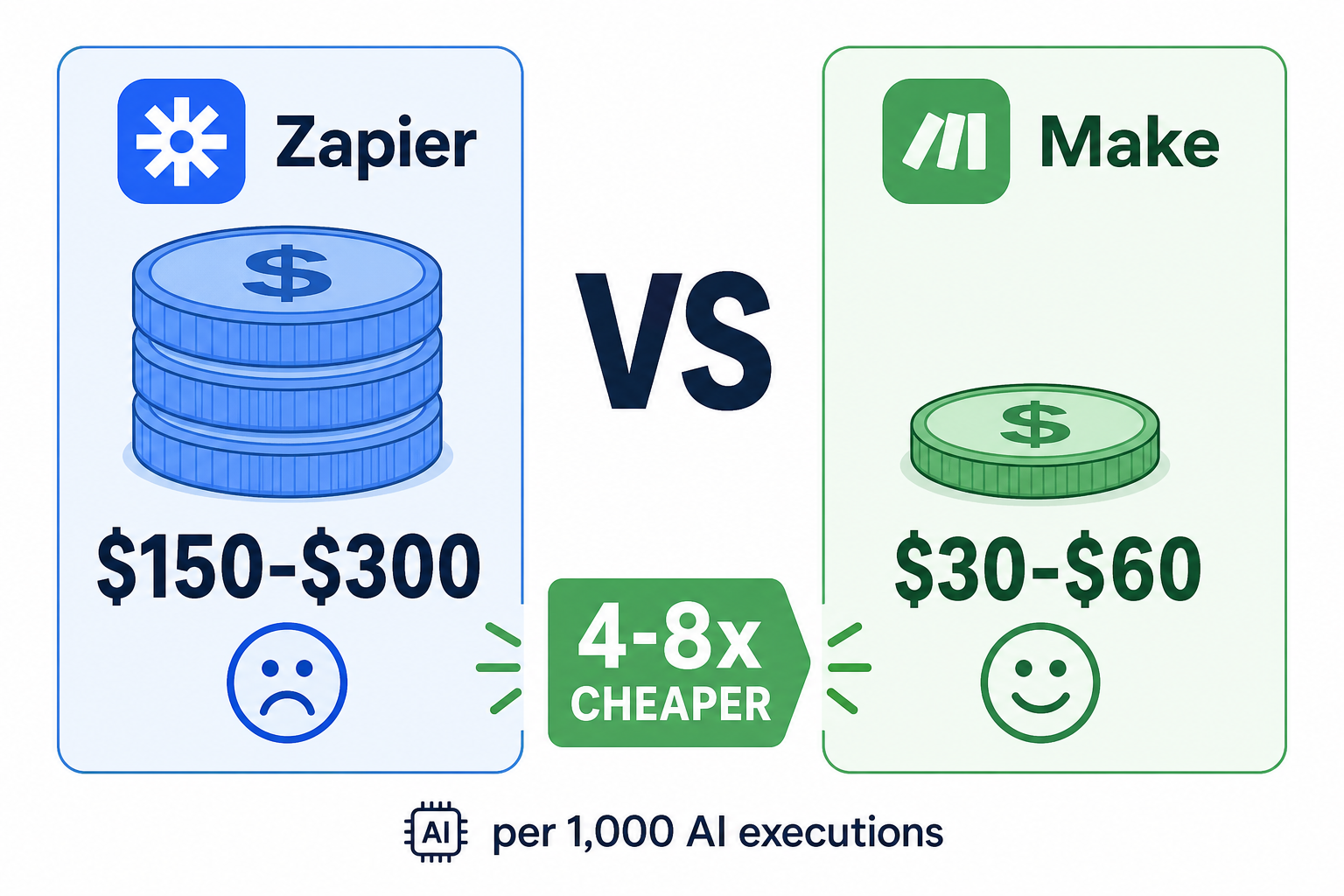
When AI is involved, the pricing model matters more than the monthly plan cost. Zapier charges per task (a task is one step execution), while Make charges per operation (a credit system where most non-AI apps consume 1 operation per action). For AI-heavy workflows, this difference is dramatic.
Consider a typical AI-powered ticket triage pipeline: incoming email → classify intent with GPT-4 → route to appropriate Slack channel → log to a spreadsheet. On Zapier, each step is a task: trigger (1), AI classification (1), Slack send (1), Google Sheets append (1) = 4 tasks per ticket. On Make, using webhooks and aggregators, the same workflow can be optimised to roughly 2–3 operations per ticket.
| Metric | Zapier | Make |
|---|---|---|
| Cost per 1,000 AI executions (6-step workflow) | $150 – $300 (estimated by Mediaffy) | $30 – $60 (estimated by Mediaffy, webhook‑optimized) |
| Cost at 5,000 monthly operations | $49 – $73 (Professional plan) | $9 – $16 (Core plan, based on Builts AI analysis) |
| Platform cost ratio | 4–10× more expensive | Baseline (4–8× cheaper per Builts AI and Agence Scroll) |
| Task/credit consumption for AI modules | 1 task per AI call; MCP consumes 2 tasks per tool call | 1 operation per credit (AI modules consume credits; exact ratio depends on module) |
| Free tier | 100 tasks/month | 1,000 operations/month |
| Entry paid plan | Professional $19.99/month for 750 tasks | Core $9/month for 10,000 operations |
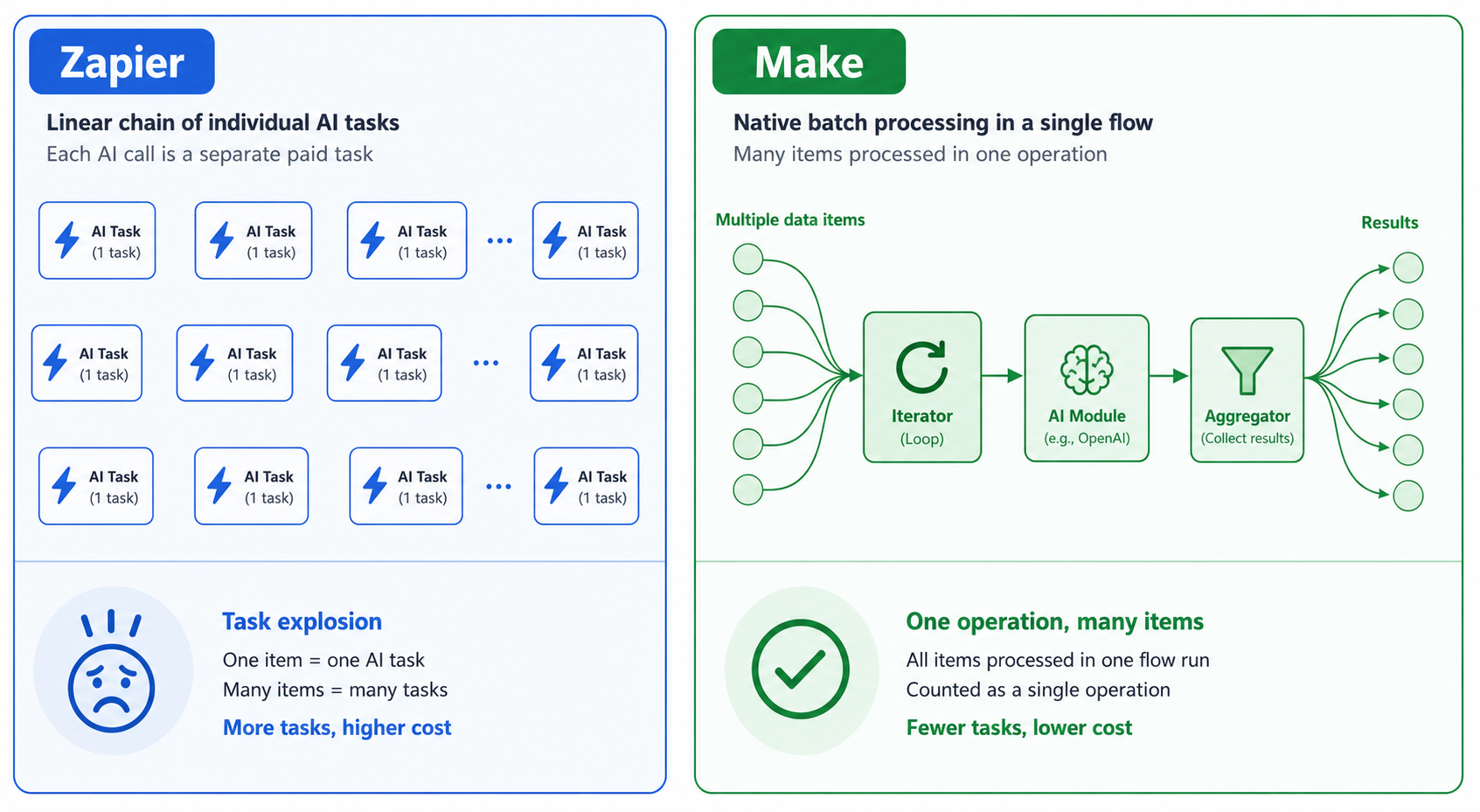
The gap widens as workflows become more complex. If your AI pipeline involves looping over an array (e.g., classifying 50 customer comments per batch), Zapier’s task count multiplies by the number of items, while Make’s iterator and aggregator modules process the entire array in a single operation. This task explosion is what makes Zapier prohibitively expensive for batch AI processing.
Handling AI Failures: Error Handling and Resilience
AI models are probabilistic. They can return malformed JSON, hit rate limits, take too long, or output unexpected content. How a platform handles these failures is critical for production automation, especially when you cannot afford a silent drop in a lead classification or content moderation pipeline.
Zapier provides a basic retry mechanism and a “Replay” feature that lets you re-run failed tasks from the history logs. It does not, however, offer native branching on error within a single zap. If an AI step fails, the entire zap stops unless you’ve designed a workaround with separate paths or webhooks.
Make, by contrast, bakes error handling directly into the scenario canvas. You can add an error handler route to any module and define three behaviors:
- Retry – attempt the module again after a delay (configurable interval and max attempts).
- Ignore – skip the failed item and continue processing the rest of the array.
- Break – stop the scenario and send an alert (email, Slack, webhook).
This level of control is essential when an AI call occasionally returns an empty response or hits a token limit. You can route those failures to a manual review queue instead of losing the entire batch. For teams running 24/7 AI pipelines, Make’s error handling alone can justify the platform switch.
Memory and Context: Zapier Tables vs Make Data Stores
AI workflows often need short-term memory — storing state across multiple interactions, tracking conversation context, or caching previous classification results. Both platforms offer a key-value store, but they approach it very differently.
| Aspect | Zapier Tables | Make Data Stores |
|---|---|---|
| Integration | Native within Zapier ecosystem; auto‑syncs with zaps | Native within Make scenarios; read/write via modules |
| Pricing | Requires a separate Tables plan or bundled plan ($20+/month) | Included in all Make plans (including Free plan) |
| Data structure | Relational (tables, rows, columns) | Key-value store; can store JSON objects |
| Use case for AI | Storing conversation history per user | Caching AI results, tracking state across scenario runs |
| Limitations | Extra cost; limited query flexibility | Rigid schema; no native relational queries |
| Best for | Simple structured data with a UI | Quick state storage within automated scenarios |
Zapier Tables are more user-friendly for non-technical teams and integrate seamlessly with zaps. However, they come at an additional cost. Make Data Stores are free and lightweight, which makes them ideal for storing AI context like “last processed item ID” or “accumulated score across batches.” The trade-off is flexibility: Make Data Stores are not designed for complex relational queries, so if your AI workflow requires multiple-table joins, you may need to work around the limitation.
Loops, Iterators, and Batch AI Processing
One of the most common patterns in AI automation is processing a list of items — a batch of support tickets, a set of product descriptions, a list of email addresses. How each platform handles this batch pattern has a direct impact on cost, reliability, and development time.
Make treats looping as a first-class operation. An iterator module splits an array into individual items and feeds them into the next module — say, an AI classification step. After processing, an aggregator can combine the results back into a single data structure. This entire flow runs within a single scenario execution and counts as one operation per item (or, with careful design, one credit per batch).
Zapier, until recently, had no native iterator. To process an array, you either used a “loop” action (which creates a separate task per iteration) or relied on webhook-based workarounds. Each loop iteration is a new task. If you have 50 items and each takes 3 steps, you burn 150 tasks for a single batch. This task explosion makes Zapier impractical for any batch AI work beyond a few items — unless you’re willing to pay the premium.
Verdict by AI Use Case
The right platform depends on the specific AI task, not on a vague persona label like “small business” or “enterprise.” Below is a decision table based on workflow complexity, cost sensitivity, and required error handling — designed for teams actively building automation pipelines.
| AI Use Case | Recommended Platform | Rationale |
|---|---|---|
| Simple AI action (e.g., summarize email → Slack) | Zapier | Low complexity, few steps; Zapier’s Copilot and pre‑built AI fields are quick to set up and adequate. |
| Content classification with routing (e.g., sentiment → different Slack channels) | Make | Requires branching logic and error handling; Make’s native AI Toolkit and visual router excel here. |
| Lead scoring with extraction (e.g., PDF data → structured fields) | Make | Iterators + AI extraction module handle batch files efficiently; Zapier would explode task usage. |
| Batch AI processing (50+ items per run) | Make | Make’s iterator + aggregator pattern consumes one operation per item; Zapier’s looping burns tasks rapidly. |
| Multi‑step AI reasoning (agentic workflows) | Make | Make AI Agents (beta) can reason and chain actions within a single scenario; Zapier Agents are more limited and costlier. |
| High‑volume AI pipeline with strict error recovery | Make | Make’s advanced retry/ignore/alert logic ensures no data loss; Zapier’s basic replay is insufficient for production. |
| Occasional AI task in general automation (non‑AI leader) | Zapier | If AI is a minor part of your workflow, Zapier’s ecosystem and 9,000+ apps may still be more convenient. |
| Hybrid architecture: capture → process → notify | Both (Zapier for capture + notification, Make for heavy processing) | A common pattern reported by Mediaffy: use Zapier for lightweight triggers and notifications, and Make for the AI‑intensive logic in between. |
If you are building a system where AI is the core processor — not just a garnish — the evidence points to Make as the surer foundation. Lower operational costs, native AI modules, first-class iterators, and proactive error handling align better with the demands of production AI. Zapier remains the better choice for teams that need to add the occasional AI action to an otherwise standard workflow, or for those who prioritise the largest app ecosystem and simplest onboarding.
Ultimately, the only reliable test is to build one real workflow on both platforms. The cost and frustration difference will reveal itself quickly. Start with a single AI task, measure the task consumption, and observe how each platform behaves when the AI module returns something unexpected. In our experience, that five-minute test is worth more than any comparison table.