

Quick Verdict
| Dimension | At a Glance |
|---|---|
| Pricing model | Credit-based (1 credit per module action) |
| Free plan | 1,000 credits/mo, 2 active scenarios, 15-min minimum interval |
| Paid plans start at | $9/mo (Core, annual billing) |
| Integrations | 3,000+ apps, 350+ AI-specific apps, HTTP module for any REST API |
| AI features | AI Agents (beta), AI Toolkit, AI Content Extractor, AI Web Search (beta), MCP server |
| Technical difficulty | Intermediate — graph canvas requires conceptual orientation |
| Platforms | Web-based (cloud) |
| Pricing last verified | June 2026 |
What Is Make? Platform Overview and History
Make is a visual workflow automation platform that lets you connect apps, automate data flows, and build multi-step processes without writing code. It competes directly with Zapier and n8n, but occupies a distinct position: more capable and less expensive than Zapier for complex branching workflows, and more accessible than self-hosted n8n for teams that don't want to manage infrastructure.
The platform was founded in 2012 in Prague, Czech Republic, under the name Integromat. In 2021, it rebranded to Make — a deliberate signal that the product had matured beyond its origins as a niche integration tool. The company was subsequently acquired by Celonis, an enterprise process mining firm, and the current copyright notice on Make's website reads "© 2026 Celonis, Inc." Make is headquartered in Praha 8, Czechia, and operates as a private company with 51–200 employees.
Throughout this profile, Make is the product name used. Integromat is referenced only as historical context — it is not the current brand and should not be treated as such.
How Make Works: Scenarios, Modules, and Triggers
The core unit of work in Make is a scenario — a visual flowchart that defines what happens when a specific event occurs. Each scenario is made up of modules: individual steps that perform an action (search a database, create a record, send a message). Each standard module consumes one credit when it executes.
Scenarios start with a trigger — the event that kicks off the workflow. Make supports two types of triggers:
- Polling triggers: Make checks a service at a set interval (every 1, 5, 15 minutes, etc.) to detect new data. Every check consumes a credit, whether or not new data exists.
- Webhooks: The source app sends data to Make in real time when an event occurs. Webhooks consume credits only when data actually arrives — making them far more cost-efficient for high-frequency checks.
When a trigger fires, Make packages the incoming data into bundles — structured data objects that flow through the scenario from module to module. Each module can transform, filter, or route bundles before passing them downstream. For branching workflows, only the modules that actually execute consume credits — a 10-step scenario that branches early may use just 3–4 credits per run rather than 10.
Make also supports subscenarios — reusable scenario fragments that can be called from within other scenarios. This is particularly useful for agencies and teams that want to standardize common workflow logic across multiple automations.
Key Features
Graph-Based Visual Canvas
Make's most distinctive feature is its visual canvas. Unlike Zapier's linear, top-to-bottom list format, Make displays the entire scenario as a graph — all branches, conditions, and parallel paths are visible simultaneously on screen. This makes it significantly easier to understand complex logic at a glance and to debug workflows when something goes wrong.
The canvas supports drag-and-drop module placement, zoom and pan for large scenarios, and real-time execution visualization during test runs. For workflows with five or more steps and multiple conditional paths, the graph format is a genuine productivity advantage over linear editors.
Routers, Filters, Iterators, Aggregators, and Error Handlers
Make's built-in logic components are what make complex workflows practical:
- Routers split a single data flow into multiple parallel branches, each with its own condition. A lead can simultaneously route to a CRM, a Slack notification, and an enrichment service based on different criteria.
- Filters stop execution on a branch if a condition is not met — preventing unnecessary module runs and saving credits.
- Iterators break an array (e.g., a list of records) into individual bundles so each item can be processed separately.
- Aggregators collect multiple bundles back into a single output — useful for building summary reports or batching API calls.
- Error handlers define what happens when a module fails: retry, ignore, break, or route to a separate error-handling path. This is essential for production workflows where unhandled errors would silently drop data.
Data Stores
Data stores are Make's built-in key-value storage. They allow scenarios to maintain state between runs — tracking whether a record has already been processed, storing intermediate results, or sharing data across multiple scenarios. For workflows that need memory without connecting to an external database, data stores are a clean built-in solution.
HTTP Module and Make Code
The HTTP module allows Make to connect to any REST API — even if that service doesn't have a dedicated Make integration. You configure the endpoint, method, headers, and body manually. This effectively means Make can connect to any web service that exposes an API, making the official 3,000+ integration count a floor rather than a ceiling.
Make Code, available on paid plans, takes this further by allowing you to write custom JavaScript or Python directly inside a scenario. Make Code modules consume 2 credits per second of execution time — a different billing model from standard modules. For teams that occasionally need custom transformation logic or API calls that don't fit standard module patterns, Make Code bridges the gap between no-code and low-code without leaving the platform.
Make AI Agents (Beta)
Make launched its AI Agents feature on February 11, 2026. As of publication, AI Agents remain in beta. The key architectural decision is that agents are built, run, and debugged directly on the same canvas as standard scenarios — there is no separate agent interface to learn.
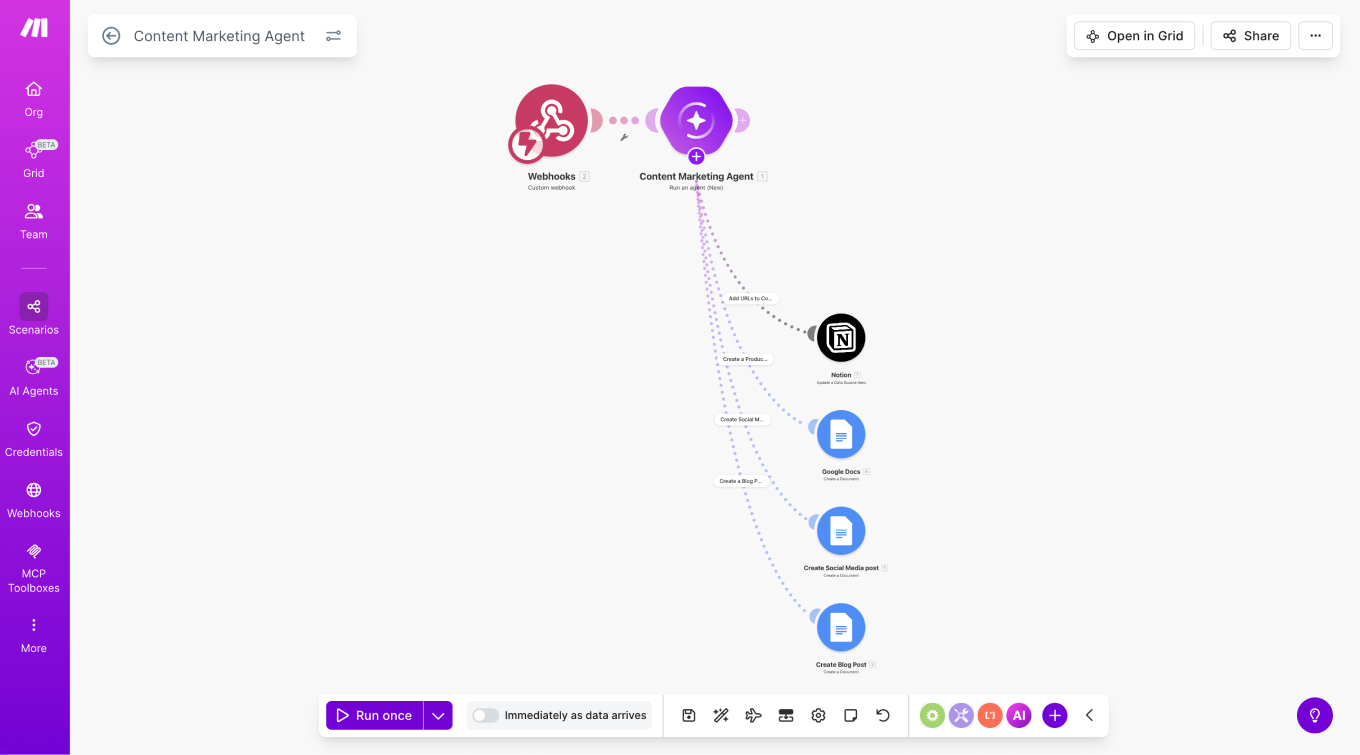
The standout element is the Reasoning Panel — a real-time view into how the agent thinks, which tools it calls, and why it takes each path. This transparency is a meaningful differentiator for teams that need to audit or explain AI-driven decisions in business workflows.
- Multi-modal input support: agents can process PDFs, images, and CSVs alongside text.
- In-canvas chat: test and refine agent behavior in real time without leaving the workflow.
- Library of Agents: pre-built agent templates for inventory management, research, triage, and reporting.
- Agents can be shared across teams and combined with deterministic automation steps in a single scenario.
- Available on all plans, including Free.
Additional AI Tools and Integrations
- AI Toolkit: A collection of pre-built AI-powered modules for common tasks like text generation, classification, and summarization.
- AI Content Extractor: Pulls structured data from unstructured documents and web pages.
- AI Web Search (beta): Enables scenarios to query the web as a step in a workflow.
- MCP server: Allows external AI clients to connect to and interact with Make scenarios.
- 3,000+ app integrations including 350+ AI-specific apps, plus the HTTP module as a universal fallback.
Pricing: Plans, Credits, and What It Actually Costs
Make's billing unit is the credit. In August 2025, Make renamed "operations" to "credits" — the underlying billing model did not change, only the terminology. Many third-party sources and long-time users still use "operations" interchangeably; both terms refer to the same thing.
| Plan | Annual price | Monthly price | Credits/mo | Active scenarios | Min interval | Notable limits |
|---|---|---|---|---|---|---|
| Free | $0 | $0 | 1,000 | 2 | 15 min | 5MB max file, 512MB data transfer, 7-day log storage |
| Core | $9/mo | $10.59/mo | 10,000 | Unlimited | 1 min | 100MB file, 5GB transfer, 30-day logs, Make API 60 calls/min, 40-min max execution |
| Pro | $16/mo | $18.82/mo | 10,000 | Unlimited | 1 min | Priority execution, custom variables, full-text log search |
| Teams | $29/mo | $34.12/mo | 10,000 | Unlimited | 1 min | Team roles, shared templates |
| Enterprise | Custom | Custom | Custom | Unlimited | 1 min | Overage protection, SSO, domain claim, 24/7 support, 1,000MB file, 60-day logs, 1,000 API calls/min |
How the Credit System Works
- Standard modules: 1 credit per module execution. A 6-module scenario uses 6 credits per run.
- Make Code: 2 credits per second of execution time. A script running for 3 seconds costs 6 credits.
- AI features: Token-based, dynamic billing. Using Make's built-in AI Provider: Small model (GPT-4.5 nano) = 5,000 tokens per credit; Medium = 3,500 tokens/credit; Large (GPT-4.5 mini) = 1,500 tokens/credit.
- Custom AI provider connections: Available on paid plans. You pay Make for operation-based credits and your AI provider separately for tokens.
- Data transfer: Scales at 5 GB per 10,000 credits purchased.
- Failed runs: Credits are consumed for all modules that executed before a failure. Errors do not refund credits.
Operations Rollover
Introduced in November 2025, operations rollover allows unused credits on paid plans to carry forward by one month. If you use 7,000 of your 10,000 monthly credits, the remaining 3,000 roll into the following month. This is a meaningful benefit for teams with seasonal or inconsistent automation loads.
Estimating Your Monthly Credit Usage
A practical formula: monthly credits ≈ records processed × module steps per record × runs per month. For example, 5,000 leads per month through a 6-module enrichment scenario equals 30,000 credits — three times the base Core plan allocation. To stay within budget, filter records early (before expensive steps), use webhooks instead of polling triggers, and batch writes where possible.
Pros and Cons
| Pros | Cons |
|---|---|
| Graph-based canvas makes complex branching workflows intuitive to build and debug | Steeper learning curve than linear tools — budget 5–10 hours to get comfortable |
| 3–7x cheaper than Zapier for multi-step branching workflows where only executed paths consume credits | Polling trigger cost trap: 5-min polling = 8,640 credits/month per trigger |
| 3,000+ integrations plus HTTP module for any REST API | Credit tracking requires active monitoring — easy to overshoot without a usage dashboard habit |
| Operations rollover (unused credits carry forward 1 month on paid plans) | Email-only support with 2–5 day response times on all plans below Enterprise |
| Make Code (JavaScript/Python) bridges no-code and low-code use cases on paid plans | Failed scenario runs consume credits for all modules that executed before the error |
| AI Agents (beta) with Reasoning Panel provide genuine workflow transparency for AI-driven decisions | Closed-source platform — customization and scalability limited compared to n8n self-hosted |
| All plans include AI Agents (beta), AI Toolkit, MCP server, and 350+ AI-specific app integrations | Free plan capped at 2 active scenarios — not usable for teams running multiple workflows simultaneously |
| GDPR compliant, SOC 2 Type II certified, hosted on AWS (EU and North America) | Smaller app catalog than Zapier (3,000+ vs. 8,000+) — niche tools may require HTTP module workarounds |
Who Make Is For — and Who Should Look Elsewhere
Make is a strong fit if you are:
- An ops or RevOps team managing branching CRM workflows — routing leads by score, syncing data between multiple tools, or triggering conditional follow-up sequences. The graph canvas and router modules are built for exactly this kind of logic.
- A technical marketer running lead enrichment pipelines that pull from multiple data sources, score contacts, and push into segmented campaigns. Make's credit efficiency for branching paths makes these workflows substantially cheaper than Zapier at volume.
- An agency building reusable scenario templates for clients. Make's subscenario support and Teams plan shared templates make it practical to standardize workflow logic across client accounts.
- A developer or technical user who wants the HTTP module and Make Code (JavaScript/Python) for custom logic without building and maintaining a full integration from scratch.
- A team evaluating AI-augmented automation that values transparency — Make's Reasoning Panel shows exactly how AI agents make decisions, which matters for auditability in business contexts.
Make is not the right choice if you are:
Make vs. Zapier: A Quick Reference
| Dimension | Make | Zapier |
|---|---|---|
| Workflow model | Graph-based (non-linear, all branches visible simultaneously) | Linear (step-by-step list, one path at a time) |
| Free tier | 1,000 credits/mo, 2 active scenarios, 15-min minimum interval | 100 tasks/mo, 5 Zaps, no multi-step on free |
| Pricing model | Credits (per module execution) | Tasks (per successful action) |
| Cost for complex branching workflows | 3–7x cheaper — only executed branches consume credits | All steps in a Zap count as tasks regardless of branching |
| Integration count | 3,000+ apps, HTTP module for any REST API | 8,000+ apps |
| AI features | AI Agents (beta), AI Toolkit, MCP server (all plans) | AI-powered Zaps, Zapier Agents (varies by plan) |
| Support | Email only, 2–5 day response (below Enterprise) | Email and chat support on paid plans |
| Best fit | Technical teams with multi-step, branching, data-heavy workflows | Beginners and teams needing broad app coverage with simple linear automations |
Vendor Risk and Data Portability
Make is owned by Celonis, an enterprise process mining company. The acquisition provides institutional backing and enterprise-grade infrastructure investment — a meaningful stability signal compared to independent SaaS startups. The current copyright notice on Make's website ("© 2026 Celonis, Inc.") confirms the ownership structure. Note: a valuation figure of $11 billion has been cited in some third-party sources in connection with Celonis, but this figure has not been independently confirmed against official Celonis or Make communications and should be treated with appropriate caution.
Security and Compliance
- GDPR compliant
- SOC 2 Type II certified
- Hosted on AWS (EU and North America regions)
- SSO and 2FA enforcement available on Enterprise plan
- Domain claim and user management controls on Enterprise
Closed-Source Platform: What It Means for You
Make is a closed-source, cloud-hosted platform. You cannot self-host it, inspect the underlying code, or extend it beyond the official module and API interfaces. A Gartner Peer Insights reviewer noted that "being a closed, non-open-source platform, customization, scalability and connectivity with niche tools are limited."
For teams with strict data residency requirements or a need for deep platform customization, n8n's self-hosted option is the alternative to evaluate. For most business teams running standard SaaS-to-SaaS workflows, the closed-source nature is not a practical limitation — but it is a relevant consideration for exit planning.
Data Portability
Make scenarios can be exported as JSON blueprints, which allows you to back up your workflows and share them across accounts. This is meaningful for agencies managing client accounts and for teams that want a local copy of their automation logic. However, these blueprints are Make-specific — they are not portable to Zapier or other platforms. If you leave Make, you will need to rebuild your workflows in the destination tool, using your Make blueprints as documentation rather than importable files.
Final Verdict
Make is the strongest visual automation platform available in 2026 for teams that need multi-step, branching workflows and want to keep costs well below Zapier's pricing at scale. Its graph-based canvas, credit-efficient execution model, built-in logic components (routers, filters, iterators, error handlers), and the newly launched AI Agents make it a genuinely capable platform — not just a cheaper Zapier alternative.
The platform's core trade-off is honest and consistent across independent reviews: Make rewards technical comfort and active credit management. Users who invest the 5–10 hours to learn the canvas and who monitor their credit usage will find it a high-value platform. Users who expect a plug-and-play experience with zero learning curve will find it frustrating.
The Gartner Peer Insights score of 4.4 out of 5 from 24 verified enterprise reviewers reflects a platform that delivers on its core promise for the right audience. The critical reviews cluster around the same themes surfaced in this profile — pricing complexity, support responsiveness, and customization limits — which is a consistent and credible signal rather than an outlier concern.
For the right user — an ops team, technical marketer, or agency building real business workflows with branching logic — Make in 2026 is a well-supported, enterprise-backed platform with a genuinely compelling cost profile and a roadmap that is actively investing in AI-native automation capabilities.