
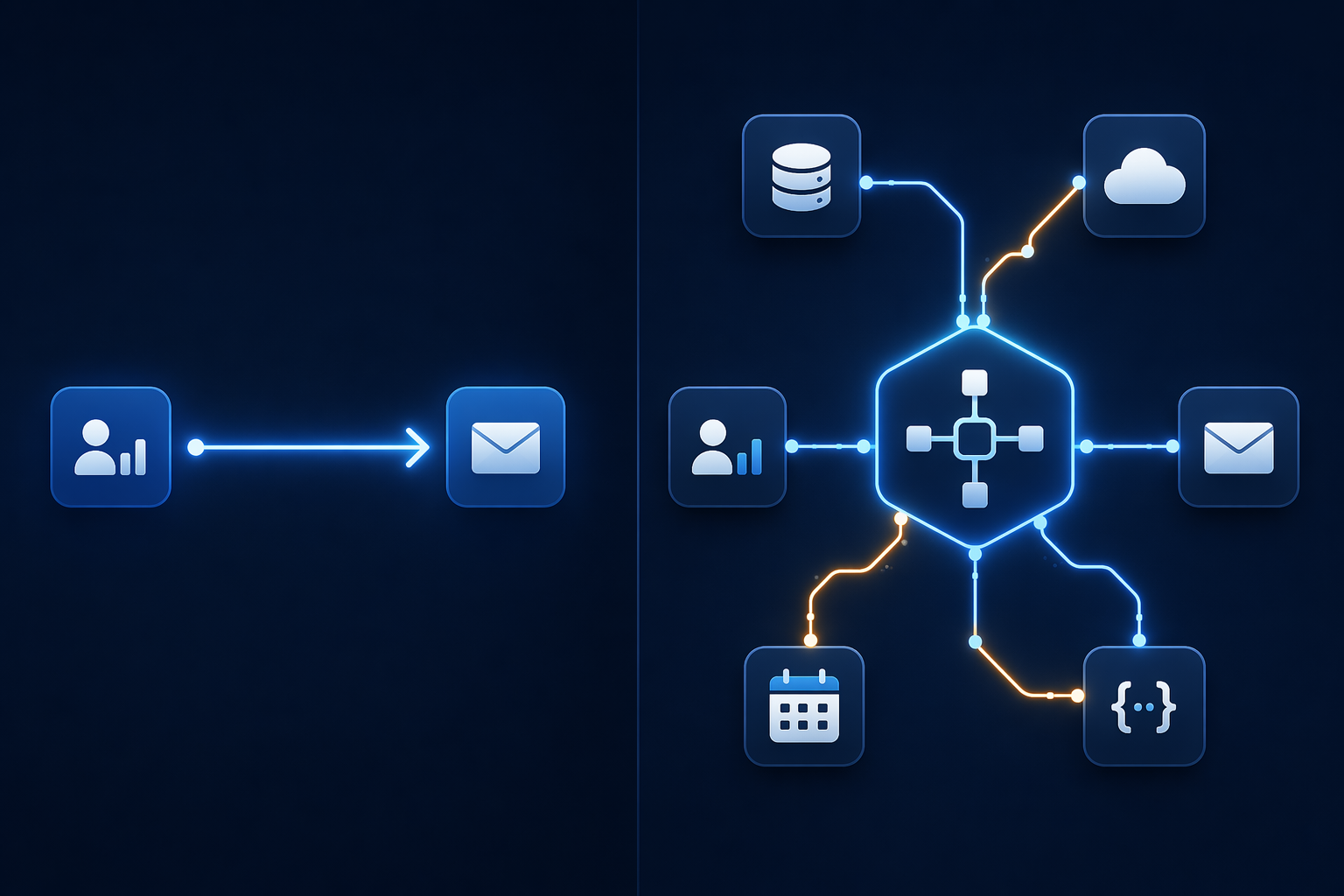
The Conductor vs. the Musician: An Analogy for Automation and Orchestration
Imagine a single musician playing a violin. They read the sheet music, move the bow across the strings, and produce a melody. That is automation: a well-defined sequence of actions executed by a single performer. Now imagine a symphony orchestra. The conductor does not play any instrument. Instead, they coordinate dozens of musicians, cue the brass section to enter at the right measure, adjust the tempo when the strings fall behind, and ensure the percussion does not drown out the woodwinds. That is orchestration: the central coordination of multiple independent actors, each performing their own automated task, into a coherent whole.
This distinction is not academic. Teams that confuse the two end up with systems that are either unnecessarily complex or dangerously brittle. A marketing team that buys an enterprise orchestration platform to send a single Slack notification when a form is submitted has over-engineered their process. A logistics team that uses a simple trigger-action tool to manage a multi-step supply chain restock will find themselves manually restarting half-finished workflows every time a supplier API times out.
The core difference comes down to state management. Automation tools treat each execution as an independent, stateless event. Orchestration tools maintain a persistent record of what has happened, what is happening, and what should happen next — even when a step fails halfway through.
Automation vs. Orchestration: A 6-Dimension Comparison
The table below synthesizes the architectural distinctions described by the n8n blog, Camunda, and ManageEngine across six dimensions. Use it as a quick reference when evaluating your own processes.
| Dimension | Workflow Automation | Workflow Orchestration |
|---|---|---|
| Scope | Single task or a small, bounded sequence within one system | Coordinates entire workflows end-to-end across multiple systems and teams |
| State Management | Stateless between executions; no memory of previous runs | State-aware; maintains a persistent record of which steps succeeded, failed, or are in progress |
| Failure Semantics | Basic stop and retry; no rollback logic | Sophisticated recovery: sagas, automated rollbacks, compensating actions, and conditional fallback paths |
| Governance Posture | Decentralized; each automation is owned by the team that built it | Centralized; a single controller enforces dependencies, permissions, and audit trails |
| Execution Flow | Simple trigger-action or linear chain | Complex parallel branches, asynchronous steps, timers, and dynamic conditional routing |
| Observability | Task-level status only (ran / failed) | Workflow-level visibility: real-time status of every step, end-to-end latency, and historical replay |
The n8n blog frames this as the difference between bounded scope with stateless execution and centralized state management across domains. Camunda adds that orchestration becomes necessary when automation maturity reaches a level of complexity with multiple endpoints, especially for mission-critical processes where failure costs are high. ManageEngine emphasizes that orchestration ensures tasks execute in the correct order, dependencies are respected, and failures are handled intelligently — none of which a simple trigger-action tool can guarantee.
The Double-Execution Problem: Why Orchestration Matters at Scale
The most concrete argument for orchestration is what the n8n blog calls the double-execution problem. Imagine a simple automation that processes a customer order: it charges the credit card, updates the inventory database, sends a confirmation email, and notifies the warehouse. Halfway through, the inventory API times out. The automation fails. What happens next?
With a stateless automation tool, the only option is to restart the entire sequence from the beginning. That means charging the credit card again — creating a duplicate transaction — before it even reaches the inventory step. The team must manually intervene to cancel the duplicate charge, then restart the process. This is not a theoretical edge case. It happens every day in teams that rely on simple automation for multi-step processes.
Orchestration solves this by maintaining a record of which steps completed successfully. When the inventory API fails, the orchestrator knows the credit card was already charged. It can retry the inventory step, or execute a compensating action (a refund) if the process must be abandoned. The n8n blog notes that orchestration platforms support sophisticated recovery patterns like sagas and automated rollbacks — patterns that are simply impossible in a stateless trigger-action model.
Do You Need Orchestration? A Decision Flowchart
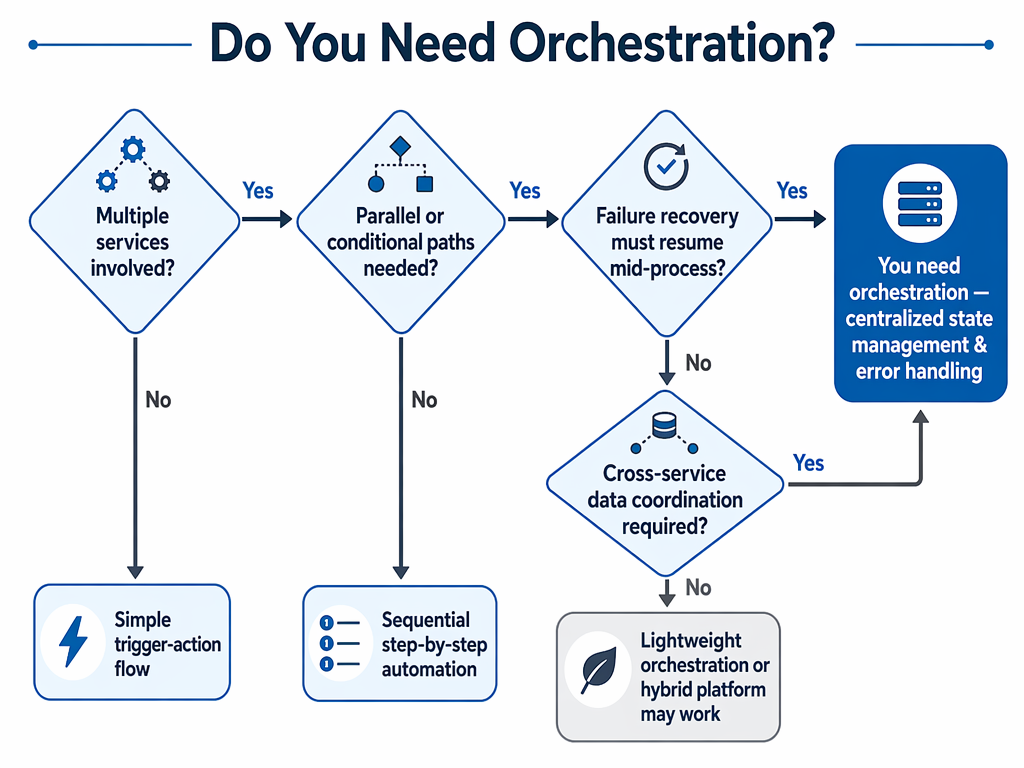
The flowchart above walks you through four key questions. If you prefer a text-based version, work through these criteria:
- How many systems are involved? A single system (e.g., sending an email from a CRM) points to automation. Three or more systems (e.g., CRM → payment gateway → inventory → shipping → email) points to orchestration.
- Does the process need parallel execution? If steps must run simultaneously — for example, checking credit and verifying identity at the same time — you need an orchestrator that can manage branching flows.
- What is the cost of failure? If a failed step means a duplicate payment, a lost order, or a compliance violation, you need the sophisticated failure semantics that only orchestration provides.
- Do you need end-to-end visibility? If stakeholders ask "where is this order right now?" and you cannot answer without logging into three different systems, you need centralized observability.
If you answered "yes" to two or more of these questions, your process likely requires orchestration. If you answered "no" to all of them, simple automation will serve you better — and you will avoid the complexity and cost of an orchestration platform you do not need.
Tool Mapping: Automation, Orchestration, and Hybrid Platforms
Once you know which pattern fits, the next question is which tool to use. The landscape is not binary. Some platforms are pure automation tools. Others are designed exclusively for orchestration. A few — notably n8n — support both patterns on the same visual canvas, which eliminates the painful migration that teams otherwise face when they outgrow simple automation.
| Category | Tools | Starting Price | Best For |
|---|---|---|---|
| Automation | Zapier, Make | Free / $19.99 per month (Zapier); Free / $12 per month (Make) | Simple trigger-action sequences, single-system tasks, small teams with basic needs |
| Orchestration | Apache Airflow, Prefect, Camunda | Free (Airflow); Free / $100 per user per month (Prefect); Free tier / Enterprise contact sales (Camunda) | Multi-step, cross-system processes with complex dependencies, parallel execution, and high failure costs |
| Hybrid | n8n | Free self-hosted; from $20 per month for cloud | Teams that need both patterns on one platform; eliminates migration penalty when automation needs grow |
Zapier and Make are the dominant automation tools. Zapier offers over 9,000 app integrations and a free plan, with paid plans starting at $19.99 per month. Make uses a credit-based pricing model starting at $12 per month, though the n8n blog notes that Make's credit system can make costs unpredictable as complexity scales. Both are excellent for bounded, stateless tasks — but neither provides the centralized state management that orchestration requires.
On the orchestration side, Apache Airflow is the open-source standard for defining workflows as Directed Acyclic Graphs (DAGs) in Python. Prefect offers a simpler alternative with built-in retries and event-based triggers. Camunda provides enterprise-grade orchestration with BPMN-based modeling and support for sagas and compensating transactions. These tools are powerful but come with steeper learning curves and operational overhead.
The hybrid category is where the market is moving. The n8n blog explicitly states that n8n supports both automation and orchestration patterns on the same visual canvas without requiring a platform migration. This is significant because the most common mistake teams make is not choosing the wrong pattern initially — it is building a system that cannot evolve. If you start with a simple automation and later need orchestration, a hybrid platform lets you add state management, parallel branches, and error recovery without rebuilding from scratch.
Real-World Examples: When Each Approach Fits
Abstract definitions are useful, but the real test is whether you can recognize the pattern in your own work. Below are concrete examples drawn from the n8n blog and Camunda, mapped to automation and orchestration.
Processes That Fit Simple Automation
- Lead routing: A form submission triggers an automation that checks the lead's industry and assigns it to the appropriate sales rep. One trigger, one decision, one action. If the CRM API fails, the lead sits in a queue until someone retries — no data is corrupted.
- Document approval: An employee uploads a document to a shared drive. The automation notifies the manager via email. The manager clicks approve, and the document moves to the final folder. Each step is independent; if the notification fails, the document is still there.
- Automated invoicing: At the end of each month, an automation generates invoices from a spreadsheet and emails them to clients. The process has a clear start and end state. If one invoice fails to send, it does not affect the others.
Processes That Require Orchestration
- E-commerce order fulfillment: A customer places an order. The orchestrator must charge the payment, reserve inventory across multiple warehouses, trigger the shipping label generation, update the customer's loyalty points, and send a confirmation — all while handling the case where the payment succeeds but inventory is insufficient. A failure at step three requires rolling back step one (refund) before retrying.
- Supply chain restock: When inventory drops below a threshold, the orchestrator checks supplier availability, compares pricing across vendors, places the order, schedules the shipment, and updates the ERP system. Multiple suppliers may be contacted in parallel. If the preferred supplier is out of stock, the orchestrator must dynamically route to an alternative without restarting the entire process.
- User onboarding with identity verification: A new user registers. The orchestrator creates the account, sends a verification email, checks the user against a watchlist, provisions access to three internal systems, and schedules a welcome call. If the watchlist check takes longer than expected, the orchestrator can proceed with provisional access and flag the account for manual review — without blocking the entire onboarding flow.
The Cost of Choosing Wrong: Implications for Your Team
Misjudging the automation-orchestration boundary has real consequences — and they run in both directions.
Overbuying Orchestration: When You Pay for Complexity You Do Not Use
Teams that adopt an orchestration platform for simple automation tasks pay in three ways. First, budget: enterprise orchestration tools like Camunda or Prefect Enterprise cost significantly more than Zapier or Make. Second, time-to-value: orchestration platforms have steeper learning curves. A task that takes 15 minutes to set up in Zapier might take a full day to configure in Airflow. Third, operational overhead: running an orchestration platform — especially self-hosted tools like Airflow — requires ongoing maintenance that a simple automation tool does not.
Underinvesting: When Simple Automation Breaks at the Worst Moment
The more common mistake, and the more damaging one, is underinvesting. Teams start with a simple automation tool because it is fast and cheap. As their processes grow more complex, they hit the limits of stateless execution. The double-execution problem emerges. Manual workarounds multiply. The team spends more time babysitting broken workflows than doing the work the automation was supposed to enable.
This pattern is widespread. The Teamwork.com Sprint to AI report found that 92% of professional services firms say their current tools fall short on end-to-end workflows, with the top gaps being end-to-end workflow visibility (33%) and tool integrations (40%). These are precisely the gaps that orchestration addresses — and they are the symptoms of teams that have outgrown their automation tools without realizing it.
If you recognize these symptoms in your own team — manual restarts, duplicate data, fragile workflows that break when any API is slow — the solution is not necessarily to rip out your existing automation tool. Hybrid platforms like n8n allow you to keep your existing automations while adding orchestration capabilities for the processes that need them. For teams considering a more fundamental move, our guide on Should You Ditch Zapier for Open-Source Workflow Automation? provides a realistic cost-benefit analysis.
Summary Guidance: A Framework for Your Decision
The decision between automation and orchestration is not about which tool is more powerful. It is about matching the tool to the process. Here is the framework in its simplest form:
- Use automation for bounded, independent tasks with clear start and end states. If the process involves one or two systems, has no parallel branches, and can be safely restarted from the beginning if it fails, a tool like Zapier or Make is the right choice.
- Use orchestration for multi-step, cross-system processes with high failure costs. If the process involves three or more systems, requires parallel execution, or would cause data corruption if restarted from scratch, you need an orchestrator like Airflow, Prefect, or Camunda.
- Consider a hybrid platform if you are unsure or expect your needs to grow. n8n supports both patterns on the same canvas, which means you can start with simple automation and add orchestration capabilities as your processes become more complex — without migrating to a new platform.
The teams that get this right are not the ones that buy the most powerful tool. They are the ones that accurately diagnose their processes first, then choose the tool that matches. The conductor does not need to play every instrument. The musician does not need to direct the orchestra. Know which role your process needs, and the tool decision becomes straightforward.