

Your Tuesday Morning, Before Orchestration
It’s 9:17 AM. You’ve just approved a contract revision in your document tool. Now you need to ping legal in Slack, update the CRM record, kick off a billing workflow in your finance app, and add a task to the project board — but only after legal confirms the revision is clean. You send the Slack message. You wait. You check back at 10:30. Legal hasn’t seen it. The billing workflow hasn’t started. The project board is still empty. By lunch, you’ve manually chased three people, re-sent two notifications, and updated the CRM yourself because the integration you set up last month only handles new deals, not revisions.
This is the reality for most knowledge workers. Individual tasks get automated — a Zapier zap sends a Slack message when a document is shared — but the end-to-end process still relies on someone remembering to check, chase, and manually connect the dots. According to Teamwork.com’s Sprint to AI report, 92% of professional services firms say their current tools fall short on end-to-end workflows and integrations. The tools aren’t the problem. The lack of coordination between them is.
That gap between isolated automation and coordinated process is exactly what workflow orchestration is designed to close.
What Orchestration Actually Means (No Jargon)
Let’s use the Tuesday morning mess as a concrete example. A simple automation — say, a Zapier zap that posts a Slack message when a contract is approved — handles one step. It’s a straight line: if this happens, do that. But your real process isn’t a straight line. It’s a tree with branches: legal needs to review, but only if the contract value exceeds a threshold; billing needs to start, but only after legal signs off; the project board needs a task, but only if the deal is a new project rather than a renewal.
Workflow orchestration means managing the entire sequence — handling what happens when step 3 fails, making sure step 7 only runs after steps 4 and 6 are both complete, and giving you a single dashboard to see where every process stands at any moment. As the Teamwork.com guide puts it, orchestration tools “go beyond simple trigger-action automation to handle multi-step processes, conditional logic, and cross-app coordination.”
IBM’s definition is similarly direct: “Workflow orchestration is the practice of coordinating multiple automated tasks across business applications and services to help ensure seamless execution.” The key word is coordinating. Automation executes a task. Orchestration executes a process — with dependencies, error handling, visibility, and cross-system awareness.
3 Signs You Need Orchestration, Not Just Automation
Not every team needs orchestration. If your work is a series of independent, linear tasks — send an email, create a file, log a call — simple automation tools handle that just fine. But if you recognize any of the following three patterns, you’ve outgrown basic automation.
1. Do your processes span more than one system or team?
A single automation tool can move data from Gmail to Google Sheets. But when a process touches your CRM, your project management tool, your finance system, and your communication platform — and each of those systems is owned by a different person or department — you need a layer above the individual automations to coordinate the handoffs. Orchestration platforms are built to manage cross-system dependencies without requiring every team to use the same tool.
2. Do certain steps depend on the completion of multiple previous steps?
In the Tuesday morning scenario, the billing workflow shouldn’t start until both legal approval and CRM update are complete. That’s a dependency. Simple automation tools handle linear sequences well, but they struggle with parallel branches and conditional gates. Orchestration tools let you define rules like “only proceed when step A and step B are both done, and if step C fails, send an alert to the project manager.”
3. Do failed steps need to retry, alert someone, or trigger a fallback path?
When a simple automation fails — an API returns an error, a file isn’t found, a permission is missing — the task simply doesn’t run. You discover the failure when someone asks why something didn’t happen. Orchestration platforms handle failures explicitly: they can retry the step automatically, escalate to a human with context, or route the process down an alternative path. This is the difference between a process that silently breaks and one that self-heals or alerts the right person immediately.
The Tool Map: From Simple Automation to Full Orchestration
The workflow tool landscape spans a spectrum from simple trigger-action automation to enterprise-grade orchestration platforms. The right choice depends on your process complexity, team size, technical skill, and budget. Here’s how the major options map out.
| Tool | Category | Best For | Free Plan Limit | Paid Plans Start At |
|---|---|---|---|---|
| Zapier | Simple automation | Linear, single-step workflows; non-technical users | 100 tasks/month, 2-step zaps | $19.99/month |
| Make | Intermediate multi-step | Visual scenario building; conditional logic | 1,000 credits/month | $12/month for 10,000 credits |
| n8n | Developer-led orchestration | Custom workflows; self-hosted or cloud; API-heavy processes | Free (self-hosted); cloud starts at $20/month | $20/month (cloud); $800/month (enterprise self-hosted) |
| Teamwork.com | Professional services orchestration | Client-facing workflows; project-centric teams | Limited free tier | Contact sales |
| Camunda | Enterprise BPM / orchestration | Complex, high-volume processes; compliance-heavy industries | Free tier available | Enterprise: contact sales |
Zapier is the entry point. Its free plan caps at 100 tasks per month and limits workflows to two steps — fine for personal automation, but it hits a wall quickly in team environments. Make (formerly Integromat) offers more flexibility with visual scenario building and conditional routing, though its credit-based pricing makes costs harder to predict as complexity scales. n8n sits in the developer-led sweet spot: it’s open-source, can be self-hosted for full data control, and handles complex branching and error handling, but the learning curve is steep for non-technical users.
On the orchestration end, Teamwork.com targets professional services firms with client-facing workflow automation, while Camunda serves enterprise use cases requiring BPMN-standard process modeling and high-volume transaction handling. Both are overkill for a small team automating internal approvals, but essential when compliance, audit trails, and multi-department coordination are non-negotiable.
Decision Flowchart: Which Tool Fits Your Team?
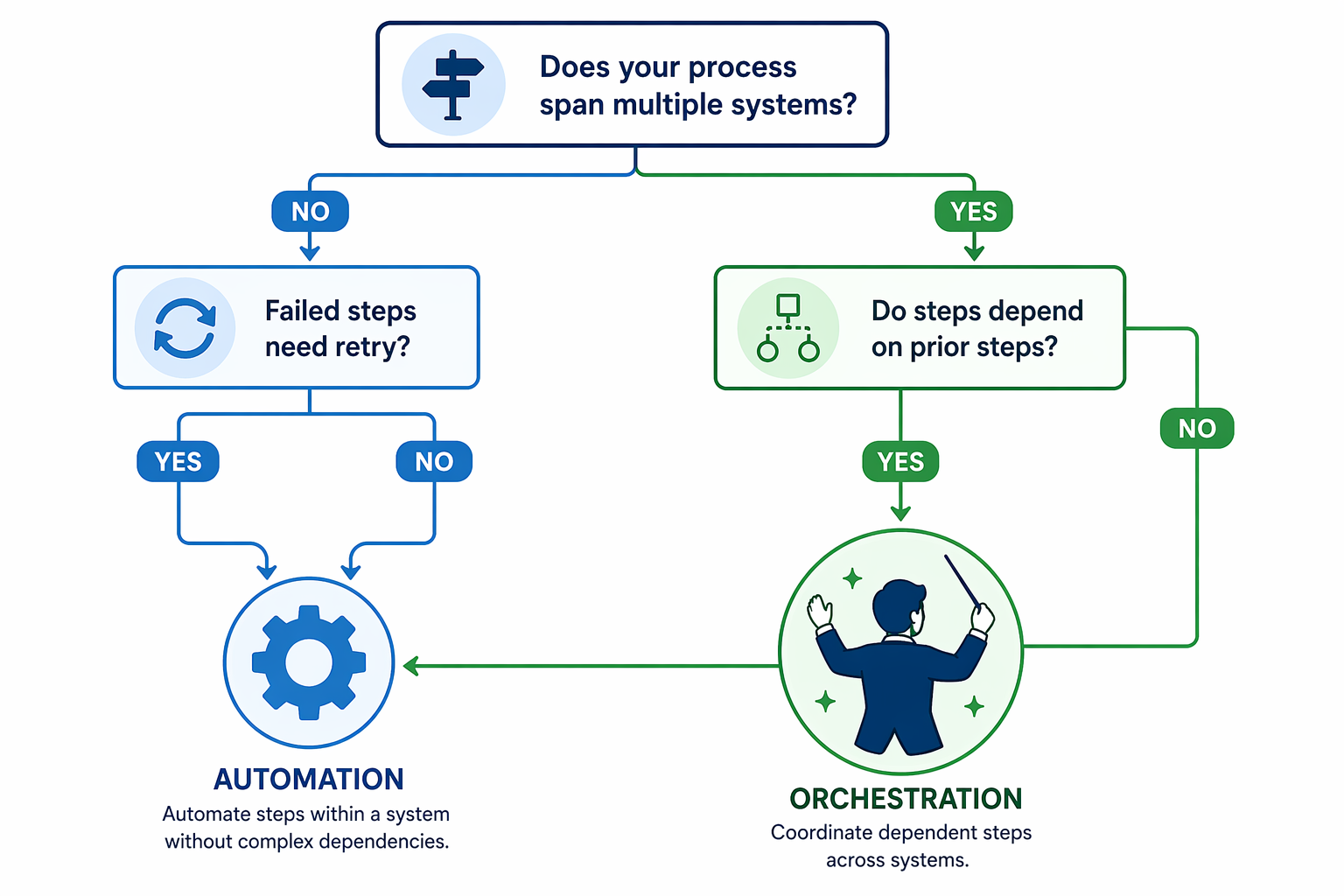
The flowchart above distills the decision into three branching questions. If you answered “no” to all three, a tool like Zapier or Make will likely serve you well. If you answered “yes” to one or two, you’re in the intermediate zone where Make or n8n can handle the added complexity. If you answered “yes” to all three — especially if your processes span multiple departments or require audit trails — you’re looking at an orchestration platform like Teamwork.com or Camunda.
If you want to work through specific workflow examples to match your exact needs, our Process Automation Tool Buyer's Guide: 3 Real-World Workflows to Determine Which Tool Your Team Actually Needs walks through three common scenarios — client onboarding, invoice approval, and content publishing — with tool recommendations for each.
Pricing Reality Check: What You'll Actually Pay
The workflow orchestration platform market reached $3.8 billion in 2024, up from $3.3 billion in 2023, and is expected to grow to $4.9 billion by 2028, according to Gartner’s August 2025 Magic Quadrant for Service Orchestration and Automation Platforms (cited via BMC). That growth reflects real demand — but it also means the pricing landscape is shifting fast.
Here’s the honest truth about costs: they scale with complexity, not just usage. A simple Zapier zap costs nothing on the free plan. But as soon as you need multi-step workflows, conditional logic, or cross-system dependencies, you’re looking at paid tiers that can run $20–$80 per month per user for intermediate tools, and thousands per month for enterprise platforms. Make’s credit-based pricing is particularly tricky: a single complex scenario can consume hundreds of credits per run, making monthly costs unpredictable.
Bottom-Line Recommendations
If you’re reading this and wondering where to start, here’s the simplest advice:
- Start with simple automation if your processes are linear. A single trigger, a single action, no conditional branches. Zapier’s free plan (100 tasks/month) or Make’s free plan (1,000 credits/month) will cover you for months.
- Move to orchestration when you hit multi-system dependencies and failure handling. If you find yourself manually checking whether step 3 completed before starting step 4, or if you’re building workarounds because your automation tool can’t handle errors, it’s time to look at n8n, Teamwork.com, or Camunda.
- Don’t buy an enterprise platform for a small-team problem. Camunda and Teamwork.com are powerful, but they come with administrative overhead and pricing that assumes organizational scale. A small team with moderate complexity is often better served by n8n (self-hosted) or a well-structured Make scenario.
- Plan for the next level. The market is growing fast — $3.8B in 2024 to a projected $4.9B by 2028 — and AI is reshaping what orchestration tools can do. As IBM notes, 92% of executives expected their workflows to use AI-powered automation by 2025. The tool you choose today should have a clear upgrade path to AI-enhanced orchestration tomorrow.
For a broader view of how orchestration fits into a complete productivity system — including AI tools, note-taking apps, and communication platforms — read our guide on How to Build an AI Productivity Stack: Layer Your Tools for Maximum Impact. It covers how orchestration layers on top of individual productivity tools to create a system that works without you having to chase every step.