
Why the Right Platform Depends on Your Workflow Type
The market for process and workflow management tools has matured past the point where a single platform can credibly claim to do everything well. Today, the landscape breaks into four distinct categories, and the best choice for your team depends on whether your primary need is task management, structured process enforcement, cross-app automation, or AI-driven orchestration.
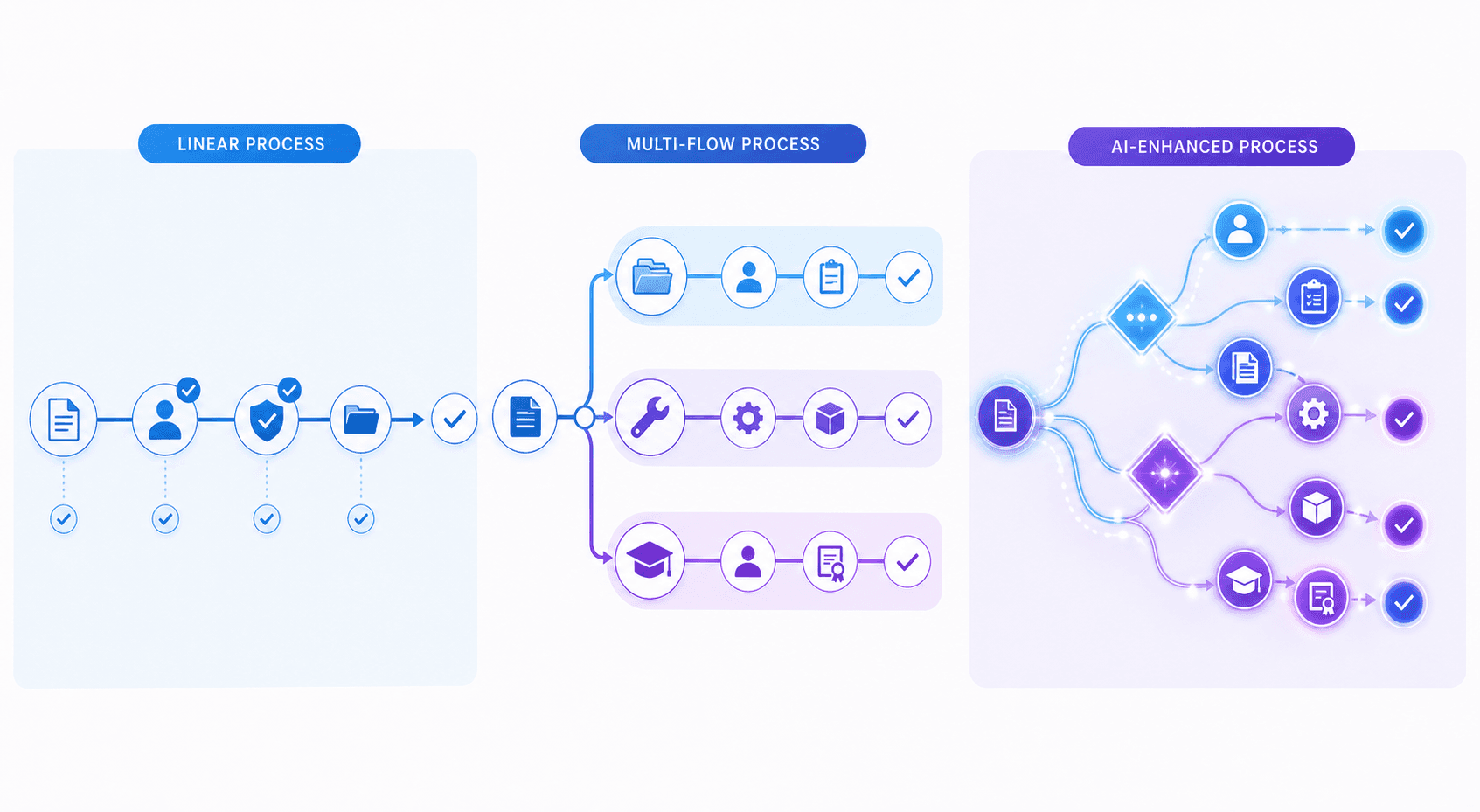
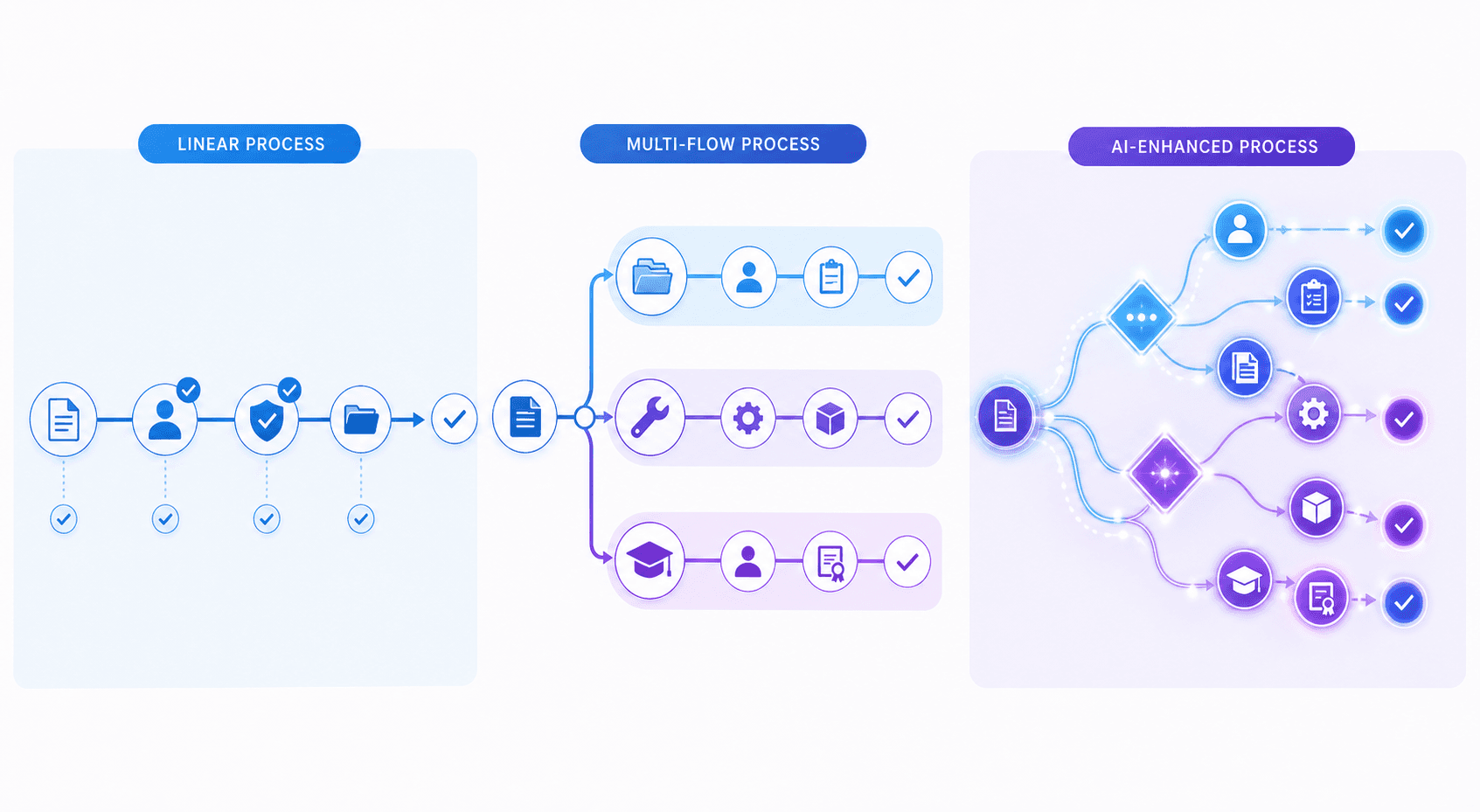
A workflow is a micro-level, task-oriented sequence designed to complete a specific task — for example, sending an offer letter or approving an invoice. A process, by contrast, is macro-level and project-oriented, aimed at reaching an organizational goal like the entire employee hiring process. Understanding this distinction is the first step in choosing the right tool, because some platforms excel at the quick, linear path between tasks while others are built for multi-step approval chains and cross-departmental coordination.
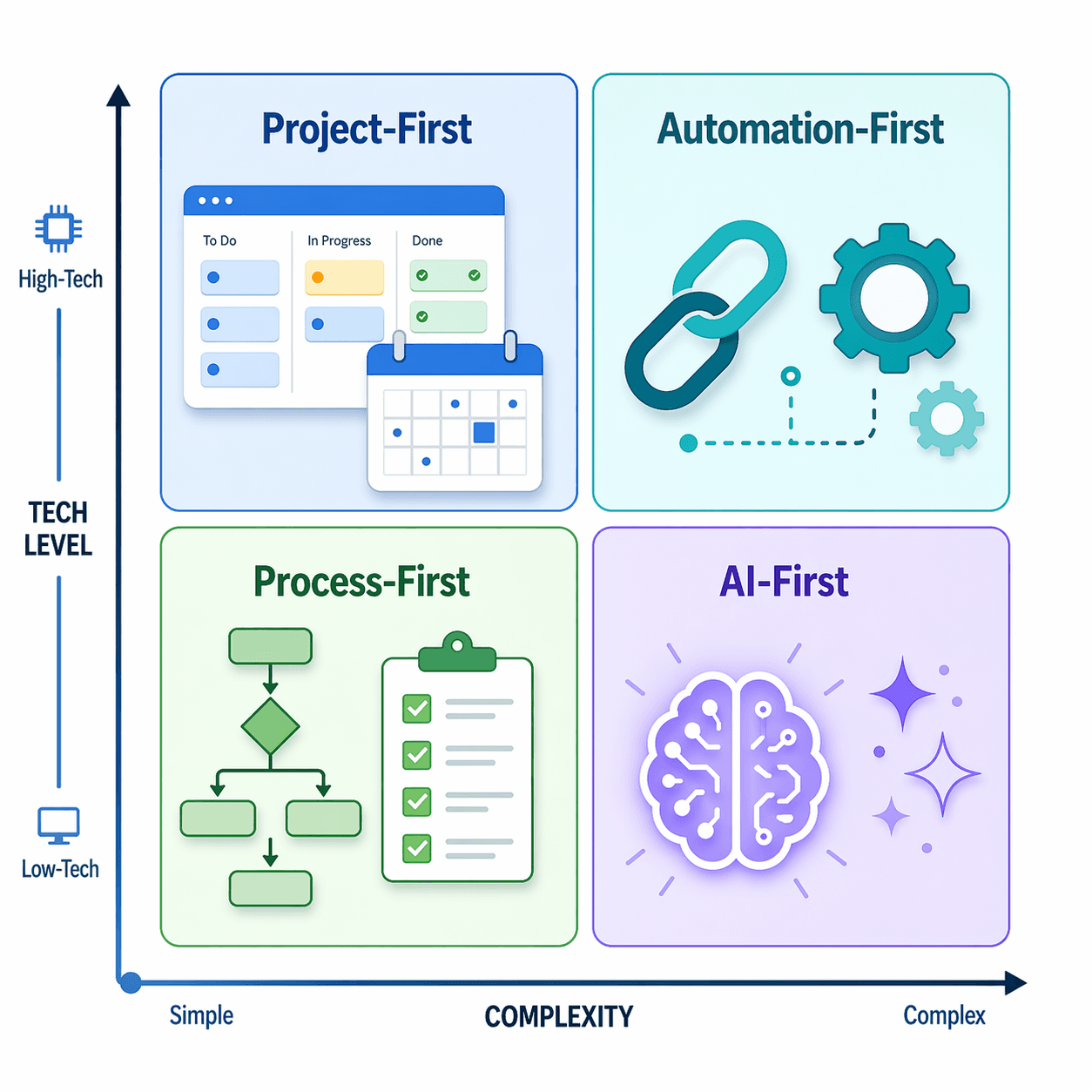
The four categories we see in 2026 are:
- Project-first platforms (Monday.com, Asana, ClickUp) — built for task management, timelines, and cross-functional team coordination.
- Automation-first platforms (Zapier, Make, n8n) — designed to connect apps and automate repetitive data flows with minimal manual intervention.
- Process-first platforms (Kissflow, Process Street) — focused on structured approvals, SOP enforcement, and regulated workflows.
- AI-first platforms (Gumloop, emerging tools) — use large language models and intelligent agents to automate complex, multi-step reasoning tasks.
This comparison covers eight leading tools across these categories. We have organized them by primary strength, team size fit, and technical difficulty so you can narrow your options before diving into feature lists.
At a Glance: Top Process and Workflow Management Tools
| Tool | Primary Category | Starting Price | Best-Fit Team Size | Key Strength | Technical Difficulty |
|---|---|---|---|---|---|
| Monday.com | Project-first | $9/seat/month (Basic) | 5–200 | Visual collaboration and dashboards | Beginner |
| Asana | Project-first | $10.99/user/month (Starter) | 10–500 | Cross-functional team coordination with AI risk detection | Beginner |
| ClickUp | Project-first | $7/user/month (Unlimited) | 5–100 | Deep customization and automation flexibility | Intermediate |
| Zapier | Automation-first | $19.99/month (Professional) | 1–50 | 9,000+ integrations and no-code AI safety | Beginner |
| n8n | Automation-first | Free (Community Edition); $20/month (Starter) | 1–20 (technical teams) | Self-hosted, open-source automation | Advanced |
| Kissflow | Process-first | Custom quote (mid-range) | 20–500 | Structured forms and approvals for regulated environments | Intermediate |
| Process Street | Process-first | Mid-range (custom quote) | 5–200 | Checklist-driven SOPs and recurring process enforcement | Beginner |
| Airtable | Hybrid (database + automation) | Free tier; paid plans start at $20/month | 5–100 | Database-driven workflows with flexible views | Intermediate |
Deep Dive: How Each Tool Handles Workflows and Processes
Monday.com — Visual Collaboration for General Teams
Monday.com positions itself as a "work OS" and is strongest for teams that need a visually rich, flexible board system to manage projects and standardize recurring processes. Its drag-and-drop interface and customizable dashboards make it approachable for non-technical users. According to multiple reviews, Monday.com is best for general teams that want to standardize processes without heavy configuration. Pricing starts at $9/seat/month for the Basic plan, which includes unlimited boards and over 200 templates.
Not for you if: You need deep, structured approval workflows with compliance tracking (Kissflow is a better fit) or you require a self-hosted, open-source solution (n8n).
Asana — Cross-Functional Team Coordination with AI
Asana has evolved from a straightforward task manager into an enterprise platform that simplifies workflows across departments. Its 2026 release includes AI agents that summarize project progress and flag risks, making it particularly useful for teams that need visibility into cross-functional dependencies. Asana is best for organizations that need to coordinate work across marketing, engineering, operations, and leadership. The Starter plan is priced at $10.99/user/month.
Not for you if: Your primary need is enforcing rigid, recurring SOPs (Process Street) or you want a lightweight, single-user automation tool (Zapier).
ClickUp — Deep Customization for Power Users
ClickUp is the most customizable platform in the project-first category. It offers granular automation rules, custom fields, multiple view types (list, board, Gantt, calendar, mind map), and a Docs feature that competes with dedicated note-taking apps. It is best for power users and small teams that want to build a tailored workspace from scratch. The Unlimited plan starts at $7/user/month, making it one of the most affordable options for feature depth.
Not for you if: You want a tool that works out of the box with minimal setup (Monday.com is simpler) or you need a database-first approach with relational data (Airtable).
Zapier — No-Code Automation with the Largest Integration Library
Zapier remains the default choice for no-code cross-app automation. With over 9,000 integrations, it connects virtually any SaaS tool to any other. Its 2026 updates include Zapier Copilot for natural-language workflow creation and SOC 2 governance with OAuth-managed authentication, making it safer for teams that need to handle sensitive data. The Professional plan costs $19.99/month (billed annually), and a free plan is available for basic workflows.
Not for you if: You need self-hosted automation for compliance reasons (n8n) or you want to build complex, multi-step AI agents (Gumloop or custom development).
n8n — Open-Source Automation for Technical Teams
n8n is the leading open-source alternative to Zapier. It offers a self-hosted Community Edition that is free and fully customizable, plus a cloud Starter plan at $20/month for 2,500 executions. n8n is best for teams that have technical expertise and need to keep data on their own infrastructure. It supports over 5,000 community workflow templates and integrates with virtually any API.
Not for you if: You are a non-technical user who wants a drag-and-drop interface with pre-built integrations (Zapier) or you need a full project management suite (Asana).
Kissflow — Structured Approvals for Regulated Environments
Kissflow is a no-code/low-code platform built specifically for business process automation. It excels at structured forms, approval chains, and compliance tracking, making it a strong choice for mid-sized teams in regulated industries like finance, healthcare, and manufacturing. According to comparative analyses, Kissflow is strongest for structured forms and approvals but is less visual than Monday.com and costs more due to its enterprise automation capabilities.
Not for you if: You need a simple, visual project management tool for a small team (Monday.com) or you want to automate tasks across dozens of apps (Zapier).
Process Street — Checklist-Driven SOP Enforcement
Process Street is purpose-built for standard operating procedures and recurring workflows. It uses a checklist-driven approach that ensures every step of a process is completed in order, with approvals, conditional logic, and integrations. It is ideal for teams that need to enforce repeatable procedures — onboarding, compliance audits, quality checks — without requiring technical skills. Pricing is mid-range and typically quoted per seat.
Not for you if: You need a flexible project management tool with Gantt charts and timelines (Asana) or you want to build custom database applications (Airtable).
Airtable — Database-Driven Workflows for Creative and Ops Teams
Airtable combines the flexibility of a spreadsheet with the power of a relational database. It is best for teams that need to manage structured data — content calendars, inventory, project tracking — and layer automation on top. Its interface builder and automations make it a hybrid tool that fits between project management and process automation. A free tier is available, with paid plans starting at $20/month.
Not for you if: You need a traditional task management tool with Gantt charts and resource management (ClickUp) or you want to automate workflows across hundreds of apps without building a database (Zapier).
Head-to-Head: When to Choose One Over Another
Monday.com vs. Kissflow: Visual Collaboration vs. Structured Approvals
| Dimension | Monday.com | Kissflow |
|---|---|---|
| Primary strength | Visual boards and dashboards for team collaboration | Structured forms and approval chains for compliance |
| Best for | General teams standardizing processes | Mid-sized teams in regulated environments |
| Learning curve | Low — drag-and-drop, intuitive UI | Medium — requires process mapping upfront |
| Pricing | From $9/seat/month | Custom quote (typically higher per-seat cost) |
| Verdict | Choose Monday.com for flexibility and ease of use | Choose Kissflow for compliance-heavy approval workflows |
Process Street vs. Asana: SOPs vs. Task Management
| Dimension | Process Street | Asana |
|---|---|---|
| Primary strength | Checklist-driven SOP enforcement | Cross-functional task and project management |
| Best for | Recurring, repeatable processes (onboarding, audits) | Teams coordinating work across departments |
| Automation style | Conditional logic within checklists | AI agents that summarize progress and flag risks |
| Pricing | Mid-range (custom quote) | $10.99/user/month (Starter) |
| Verdict | Choose Process Street for rigid, repeatable SOPs | Choose Asana for flexible project coordination |
Zapier vs. n8n: No-Code vs. Open-Source Automation
| Dimension | Zapier | n8n |
|---|---|---|
| Primary strength | No-code automation with 9,000+ integrations | Self-hosted, open-source automation |
| Best for | Non-technical teams and individuals | Technical teams with compliance or data sovereignty needs |
| Pricing | From $19.99/month (Professional); free plan available | Free (Community Edition); $20/month (Starter, cloud) |
| Hosting | Cloud only | Self-hosted or cloud |
| Verdict | Choose Zapier for ease of use and breadth of integrations | Choose n8n for control, customization, and cost at scale |
ClickUp vs. Airtable: Customization vs. Database Flexibility
| Dimension | ClickUp | Airtable |
|---|---|---|
| Primary strength | Deep customization and multiple view types | Relational database with spreadsheet-like interface |
| Best for | Power users who want a tailored workspace | Teams managing structured data with automation |
| Pricing | From $7/user/month (Unlimited) | Free tier; paid plans from $20/month |
| Learning curve | Medium — many features require configuration | Medium — database concepts require some learning |
| Verdict | Choose ClickUp for all-in-one project management | Choose Airtable for data-centric workflows and reporting |
A Simple Decision Framework for Your Team
Use these three questions to narrow from eight tools to one or two finalists.
Question 1: What is your primary need?
- Task management and team coordination → Look at Monday.com, Asana, or ClickUp.
- Structured process enforcement and SOPs → Look at Process Street or Kissflow.
- Cross-app automation and data movement → Look at Zapier or n8n.
- Database-driven workflows with automation → Look at Airtable.
Question 2: What is your team's technical skill level?
- Non-technical (no coding, no API experience) → Monday.com, Asana, Process Street, Zapier.
- Some technical experience (comfortable with spreadsheets and basic logic) → ClickUp, Airtable, Kissflow.
- Technical (comfortable with APIs, self-hosting, or command line) → n8n.
Question 3: What is your budget and team size?
- Small team (1–10), low budget → ClickUp ($7/user/month) or Zapier free plan.
- Mid-size team (10–50), moderate budget → Monday.com ($9/seat/month) or Asana ($10.99/user/month).
- Large team (50+), enterprise budget → Kissflow or Process Street (custom quotes).
- Technical team with infrastructure budget → n8n (free self-hosted or $20/month cloud).
Pricing Comparison: What You Actually Pay
| Tool | Free Plan | Entry-Level Paid Plan | Mid-Tier Plan | Enterprise / Custom | Notes |
|---|---|---|---|---|---|
| Monday.com | Yes (limited) | $9/seat/month (Basic) | $12/seat/month (Standard) | Custom quote (Pro & Enterprise) | Per-seat billing; annual discount available |
| Asana | Yes (limited) | $10.99/user/month (Starter) | Custom (Advanced) | Custom (Enterprise) | Per-user billing; AI features in higher tiers |
| ClickUp | Yes (limited) | $7/user/month (Unlimited) | $12/user/month (Business) | Custom (Enterprise) | Per-user billing; most features in Unlimited |
| Zapier | Yes (100 tasks/month) | $19.99/month (Professional) | $69/month (Team) | Custom (Enterprise) | Task-based billing; annual discount available |
| n8n | Yes (Community Edition, self-hosted) | $20/month (Starter, cloud, 2,500 executions) | $50/month (Pro) | Custom (Enterprise) | Self-hosted is free; cloud plans are execution-based |
| Kissflow | No | Custom quote | Custom quote | Custom quote | Enterprise-focused; no public pricing |
| Process Street | No | Custom quote | Custom quote | Custom quote | Per-seat pricing; mid-range compared to competitors |
| Airtable | Yes (limited) | $20/month (Team) | $45/month (Business) | Custom (Enterprise) | Per-seat billing; database size limits apply |
Final Verdict: Which Tool Should You Choose?
No single tool is the best for every team. Here are our picks based on the most common scenarios we see among knowledge workers, operations managers, and small-to-mid-size business owners.
- Best for visual collaboration: Monday.com — its board-based interface and customizable dashboards make it the most approachable option for teams that want to standardize processes without a steep learning curve.
- Best for structured approvals: Kissflow — built for regulated environments where compliance, form-based workflows, and audit trails are non-negotiable.
- Best for SOP-driven workflows: Process Street — checklist-based enforcement ensures every step of a recurring process is completed correctly, every time.
- Best for cross-functional teams: Asana — its AI-powered risk detection and cross-department visibility make it the strongest choice for organizations that need to coordinate work across multiple functions.
- Best for technical teams: n8n — open-source, self-hosted, and infinitely customizable, it is the right choice for teams that need data sovereignty and have the technical skills to manage it.
- Best for no-code automation: Zapier — with 9,000+ integrations and a natural-language workflow builder, it remains the easiest way to connect apps without writing code.
- Best for customization: ClickUp — the most feature-rich platform in the project-first category, ideal for power users who want to build a tailored workspace.
- Best for database-driven workflows: Airtable — combines spreadsheet flexibility with relational database power, perfect for teams that need to manage structured data with automation.



Comments
Join the discussion with an anonymous comment.