
Introduction: 'Free' Is Not Free — Understanding the Trap
When a note-taking app advertises a free plan, the natural assumption is that you can use it indefinitely without hitting a wall. The reality is messier. Several popular apps offer free tiers that look generous on the surface but impose hard ceilings on notes, devices, or storage that make them effectively unusable for anyone who takes notes regularly. These aren't free plans — they're extended trials designed to convert you into a paying customer once you've invested enough time and data.
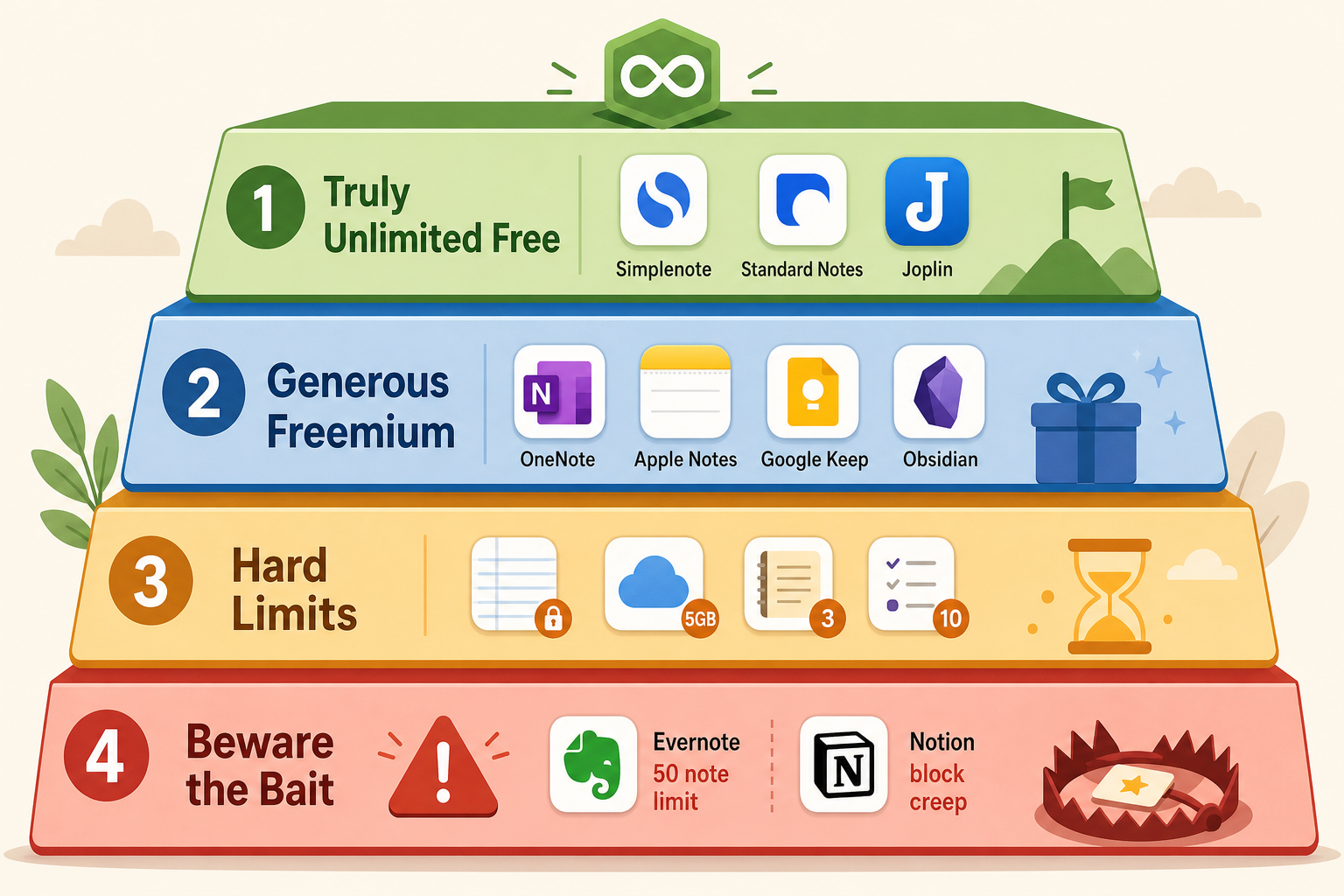
This article separates the genuinely usable free plans from the bait-and-switch traps using a four-tier framework. Tier 1 covers apps with truly unlimited free tiers. Tier 2 covers generous freemium plans that can sustain most users indefinitely. Tier 3 covers free plans with hard limits that you'll hit quickly. Tier 4 is a dedicated warning section for the two most deceptive free plans on the market.
If you prefer a broader overview of all free note-taking options without the trap framework, see our companion article on free note-taking apps that are actually usable versus just trials.
At-a-Glance: Free Tier Limits Comparison Table
The table below summarizes the most important free-tier limits for every major note-taking app. Use it to quickly identify which apps have hard caps that will block your workflow and which ones give you room to grow.
| App | Free Tier Storage / Notes Limit | Device Limit | Key Missing Features on Free | Tier |
|---|---|---|---|---|
| Simplenote | Unlimited notes, unlimited storage | Unlimited devices | No images, no attachments, text-only | 1 — True Free |
| Standard Notes | Unlimited notes, unlimited storage | Unlimited devices | No rich text, no file attachments | 1 — True Free |
| Joplin | Unlimited (local storage) | Unlimited devices | Sync requires free Dropbox/OneDrive | 1 — True Free |
| Microsoft OneNote | 5 GB free storage, no note limit | Unlimited devices | None — all core features included | 2 — Generous Freemium |
| Apple Notes | 5 GB iCloud, no note limit | Apple devices only | None — full feature set included | 2 — Generous Freemium |
| Google Keep | 15 GB (shared with Google services) | Unlimited devices | No folders, no nested notebooks, no PDF annotation | 2 — Generous Freemium |
| Obsidian | Unlimited local notes, no storage cap | Unlimited devices (local) | Sync ($5/mo) and publish ($10/mo) are paid | 2 — Generous Freemium |
| Evernote | 50 notes, 250 MB/month upload | 1 device | No offline access, no PDF annotation, no AI features | 3 — Hard Limits |
| UpNote | 50 notes total | Unlimited devices | No markdown export, limited formatting | 3 — Hard Limits |
| Notability | Limited editing on old notes | Unlimited devices | Cannot edit notes older than a certain date without subscription | 3 — Hard Limits |
| GoodNotes | 3 notebooks | Unlimited devices | Limited templates, no AI features | 3 — Hard Limits |
| Notion | Unlimited blocks for personal use | Unlimited devices | 7-day page history, 5 MB file uploads, no guests | 4 — Bait |
Tier 1: Truly Unlimited Free Apps
A small handful of apps offer genuinely unlimited free tiers with no note caps, no device restrictions, and no storage limits. These are the safest bets if you want a free plan that won't force you to upgrade or migrate later.
Simplenote
Simplenote is the closest thing to a truly unlimited free note-taking app. It imposes no limits on the number of notes, storage, or devices. It syncs instantly across every major platform — iOS, Android, Mac, Windows, Linux, and the web. PCMag gives it a 3.5/5 rating and notes that it is completely free with unlimited storage. TechRadar similarly describes it as the best simple note-taking app, completely free and cross-platform.
The trade-off is significant: Simplenote is text-only. You cannot attach images, PDFs, or files. There is no rich text formatting, no handwriting support, and no drawing tools. If your note-taking is purely text-based — quick ideas, to-do lists, meeting notes without attachments — Simplenote is the most reliable free option available.
Standard Notes
Standard Notes offers a free tier that includes unlimited notes, unlimited devices, and end-to-end encryption. The official site describes it as a steel vault for your mind, emphasizing zero-knowledge encryption and audited security. The Freedom of the Press Foundation recommends it for journalists precisely because of its strong privacy protections, including two-factor authentication and on-device encryption.
Like Simplenote, the free tier is limited to plain text. Rich text editing, file attachments, and advanced editors require a paid subscription. Standard Notes is the best choice if privacy is your primary concern and you can work within a text-only environment.
Joplin
Joplin is a completely free and open-source note-taking app with no feature limitations on its free tier. PCMag gives it an Editors' Choice award (4.5/5), calling it free and open-source with local storage. Zapier recommends it as the best free Evernote alternative, and TechRadar notes it is free to use, very customizable, and widespread compatible.
Joplin stores all notes locally by default. Syncing across devices is free if you use your own Dropbox, OneDrive, or Nextcloud account. The app supports markdown, notebooks, tags, and attachments. The main cost is setup effort — Joplin requires more configuration than a cloud-first app like OneNote. If you're comfortable with a local-first, open-source tool, Joplin gives you more freedom than any paid app.
Tier 2: Generous Freemium That Lasts
These apps impose storage or feature limits, but the caps are generous enough that most users can stay on the free plan indefinitely without hitting a wall. They are the sweet spot for anyone who needs more than plain text but doesn't want to pay.
Microsoft OneNote
OneNote is widely considered the best free note-taking app overall. Zapier names it the best free note-taking app, and PCMag gives it an Editors' Choice (4.5/5), stating its free version includes all core features with 5 GB of free storage. The free plan includes real-time collaboration, searchable handwriting, OCR, ink-to-text, and ink-to-math — features that other apps reserve for paid tiers.
The 5 GB storage cap is the only limit. For text-heavy notes, 5 GB is a lot of space. If you regularly attach large PDFs, audio recordings, or high-resolution images, you may eventually need to manage your storage or upgrade to Microsoft 365 for 1 TB of space. For the vast majority of students and knowledge workers, OneNote's free plan is all they will ever need.
Apple Notes
Apple Notes is the best free option for anyone fully inside the Apple ecosystem. It offers 5 GB of free iCloud storage, no note limits, and the full feature set including handwriting search, OCR, Smart Folders, and real-time collaboration. Zapier, PCMag, Drawboard, and Atlas all confirm that Apple Notes is free for Apple-only users with no hidden restrictions.
The catch is platform lock-in. Apple Notes does not have a functional Android or Windows app. If you ever switch to a non-Apple device, your notes are trapped in iCloud with no straightforward export path. For users who are certain they will stay on Apple hardware, Apple Notes is a genuinely free, full-featured app. For anyone who might switch platforms, it is a risk.
Google Keep
Google Keep gives you 15 GB of storage shared across all Google services (Gmail, Drive, Photos). It is free with any Google account and syncs across all platforms. Zapier recommends it for Google power users, and Drawboard confirms it is free with basic features.
Keep's limitations are functional rather than storage-based. It lacks folders, nested notebooks, PDF annotation, and robust organization tools. It is designed for quick, lightweight notes — shopping lists, reminders, voice memos — not for building a personal knowledge base. If your note-taking is simple and you are already invested in Google's ecosystem, Keep is a solid free option. If you need structure and depth, it will frustrate you.
Obsidian
Obsidian is free for personal use with no storage limits, no note caps, and no device restrictions — as long as you use it locally. PCMag (4.0/5) notes it is free to use (with optional payments) and stores all notes locally. The app has over 2,000 community plugins, making it one of the most extensible note-taking tools available at any price.
The catch is that Obsidian's free tier does not include cloud sync. To sync across devices, you need to either use a third-party service (iCloud, Dropbox, a Git repository) or pay for Obsidian Sync at $5/month. For a detailed look at Obsidian's current features, see our full Obsidian review.
Tier 3: Free Plans With Hard Limits
These apps have free tiers with specific, hard caps that will stop you from using them effectively once you reach a certain volume of notes. They are not traps in the deceptive sense — the limits are clearly stated — but they are not sustainable for regular note-takers.
Evernote
Evernote's free plan allows only 50 notes, 1 notebook, 1 device, and 250 MB of monthly uploads. Zapier calls it utterly useless, and PCMag says the free version isn't worth using. Drawboard confirms the same restrictions: 1 device, 50 notes, 250 MB/month uploads.
If you take even a few notes per day, you will hit the 50-note cap within weeks. Evernote's free plan is not designed for regular use — it is a teaser to get you into the ecosystem before pushing you toward a $130/year subscription.
UpNote
UpNote's free plan is limited to 50 notes total. PCMag (3.5/5) notes that the app starts at $1.99 per month with a lifetime license for $39.99. The free tier is essentially a trial — once you hit 50 notes, you must either delete old notes or upgrade.
UpNote is a well-designed app with a clean interface and solid feature set, but its free plan is not viable for ongoing use. If you are considering UpNote, budget for the $39.99 lifetime license from the start.
Notability and GoodNotes
Notability's free plan restricts editing of older notes — you can view them, but you cannot make changes without a subscription. This creates a ticking clock: the longer you use the free plan, the more of your notes become read-only.
GoodNotes offers a limited free tier of 3 notebooks. Atlas confirms this limit and notes that the full version costs $9.99 per year. For handwriting-focused note-takers who use many notebooks (one per class, one per project, one per meeting), three notebooks will fill up fast.
Tier 4: Beware the Bait — Evernote and Notion
Two apps deserve their own warning section because their free plans are specifically designed to look generous while creating lock-in that makes leaving painful.
Evernote's 50-Note Trap
Evernote's free plan is the most restrictive of any major note-taking app. The 50-note limit is not a soft cap — it is a hard wall. Once you hit 50 notes, you cannot create new ones until you delete old ones or upgrade. The single-device restriction means you cannot access your notes on both your phone and your laptop without paying.
The danger is that Evernote's brand recognition and legacy reputation lead new users to choose it without checking the fine print. By the time they hit the 50-note limit, they may have invested weeks of work into organizing notes, tags, and notebooks inside the Evernote ecosystem. The cost of switching — exporting notes, reformatting them in a new app, rebuilding organizational structures — creates a powerful incentive to just pay for the subscription instead.
For a full analysis of Evernote's current pricing and features, see our Evernote review. If you are considering switching away from Evernote, our Evernote vs. the field comparison covers the best alternatives for every use case.
Notion's Block Creep
Notion's free plan is more generous than Evernote's — it offers unlimited blocks for personal use, unlimited devices, and a clean, powerful interface. Zapier lists it as free for personal use, and Atlas notes that .edu users get the Plus plan for free with unlimited blocks, file uploads, and version history.
The trap is subtler. Notion's free plan limits file uploads to 5 MB per file and restricts page history to 7 days. For a personal wiki or a simple project tracker, these limits are manageable. But as your usage scales — adding more databases, embedding larger files, collaborating with guests — you will eventually hit the block-based limits that Notion imposes on non-paying accounts.
The real risk is Notion's data portability. Notion does not offer a straightforward export to standard formats like Markdown or plain text. If you build a large knowledge base inside Notion and later decide to leave, extracting your data in a usable format is difficult. The Freedom of the Press Foundation notes that Notion makes notes readable to the service provider, meaning your data is not end-to-end encrypted.
Decision Matrix: Which Free App for Your Use Case?
The table below maps each use case to the best free app or app combination. Use it to find your starting point.
| Use Case | Best Free App | Why | Watch Out For |
|---|---|---|---|
| Student (all platforms) | OneNote | Free with all core features, real-time collaboration, handwriting search, OCR | 5 GB storage may fill up with large PDFs and lecture recordings |
| Student (Apple-only) | Apple Notes + OneNote | Apple Notes for quick capture, OneNote for structured class notes | Apple Notes has no Windows/Android access |
| Cross-platform user | OneNote | Available on iOS, Android, Mac, Windows, Web — identical feature set | Sync requires Microsoft account |
| Privacy-focused user | Standard Notes or Joplin | End-to-end encryption, open-source, no data mining | Text-only on Standard Notes free; Joplin requires manual sync setup |
| Power user / PKM builder | Obsidian | Local-first, 2,000+ plugins, bidirectional linking, graph view | Sync costs $5/mo; requires comfort with markdown and file management |
| Quick capture / lightweight notes | Google Keep | Fast, voice notes, 15 GB free, works everywhere | No folders, no nested organization, basic formatting only |
| Handwriting / tablet user | OneNote | Best free handwriting support, ink-to-text, ink-to-math | Limited to 5 GB storage |
| Freelancer (budget zero) | OneNote + Obsidian | OneNote for client notes and collaboration, Obsidian for personal knowledge base | Requires managing two apps and sync workflows |
For a more comprehensive comparison that includes paid options and covers every major app in depth, see our full note-taking software comparison. If you need a device-specific guide, our cross-platform note-taking apps guide ranks apps by device combination.
Verdict: Pick 2 Free Apps as a Stack, Not One
No single free note-taking app covers every use case perfectly. The most resilient strategy is to build a two-app stack that covers your weaknesses. One app handles quick capture and collaboration; the other handles long-term knowledge management and deep organization.
Here are the most effective free stacks for different user profiles:
- OneNote + Obsidian: OneNote for collaboration, handwriting, and structured class or project notes. Obsidian for building a personal knowledge base with bidirectional links and local-first storage. This is the most powerful free stack for knowledge workers.
- Apple Notes + Simplenote: Apple Notes for rich notes, handwriting, and quick capture on iPhone/iPad. Simplenote for cross-platform access and plain-text backup. This stack covers Apple-only depth and universal accessibility.
- Google Keep + Joplin: Keep for lightning-fast capture, voice notes, and shopping lists. Joplin for structured notes, markdown, and local storage. This stack works well for Android users who want both speed and depth.
- Standard Notes + OneNote: Standard Notes for private, encrypted notes and sensitive information. OneNote for everything else — collaboration, handwriting, rich media. This stack prioritizes privacy without sacrificing features.
The two-app stack approach has a secondary benefit: it reduces vendor lock-in. If one app changes its free tier, raises prices, or shuts down, you have a fallback already in use. You are never trapped in a single ecosystem.
The free note-taking landscape is more generous than it looks — if you know where to look. Avoid the traps (Evernote's 50-note ceiling, Notion's block creep, UpNote's 50-note trial), pick a genuine free plan from Tier 1 or Tier 2, and build a stack that covers your gaps. You can build a complete, sustainable note-taking system without spending a dollar.