
What Enterprise Workflow Management Software Does (and Why It’s Not Project Management)
Enterprise workflow management software is a category that often gets confused with project management tools, but the two serve fundamentally different purposes. A project management tool helps you plan, track, and deliver a discrete initiative with a defined end date. An enterprise workflow management platform, by contrast, is built to orchestrate repeatable, cross-departmental business processes that run continuously — think invoice approvals, employee onboarding, compliance reviews, and IT service requests.
The distinction matters because the technical requirements diverge sharply at scale. Enterprise-grade platforms must provide governance frameworks, immutable audit trails, role-based access control (RBAC), and portfolio-level visibility across hundreds of active processes. These are not nice-to-haves; they are baseline requirements for organizations with 500 or more employees operating under regulatory or compliance mandates. A tool that excels at task assignment and Gantt charts will break the moment you need to enforce a four-eyes approval policy across three departments or produce an audit-ready log for a SOC 2 examination.
Why Consumer-Grade Tools Fail at Enterprise Scale
The temptation to adopt a familiar, low-cost tool for enterprise workflows is understandable. Many teams start with a shared spreadsheet or a lightweight task manager, only to hit a wall when the process grows beyond a single team. The pain points that drive enterprises to seek specialized platforms are consistent and well-documented.
- Compliance and audit requirements: Regulated industries — finance, healthcare, insurance — need immutable logs of who approved what and when. Consumer-grade tools rarely offer the audit trail depth required for SOC 2, HIPAA, or SOX compliance.
- Multi-department coordination: A procurement workflow might touch finance, legal, IT, and operations. Without formal handoff mechanisms and cross-functional visibility, processes stall or break.
- Portfolio-level visibility: IT leaders and PMO directors need a single pane of glass showing the status of all active workflows, not a collection of siloed project boards.
- Scalable automation: Basic if-this-then-that rules work for simple tasks, but enterprise processes often require conditional branching, parallel approvals, and integration with legacy systems.
The market data underscores the urgency. The workflow automation market was valued at $23.77 billion in 2025 and is projected to reach $40.77 billion by 2031, growing at a 9.41% CAGR, according to Mordor Intelligence. Large enterprises account for 71.05% of that revenue. Meanwhile, a 2026 survey by Stonebranch of over 400 enterprise IT leaders found that 88% of enterprises now operate hybrid IT environments, and 89% manage multiple automation platforms simultaneously. The complexity is real, and it is not going away.
Key Evaluation Criteria Checklist for Enterprise Buyers
Before comparing specific platforms, establish a structured evaluation framework. The following criteria are tailored for enterprise-scale deployments and should form the basis of your scoring matrix.
- Automation depth: Does the platform support conditional branching, parallel approvals, sub-processes, and event-driven triggers? Or is it limited to linear, single-path workflows?
- Governance and compliance: Look for immutable audit logs, granular RBAC, approval matrix configuration, and compliance certifications (SOC 2, HIPAA, GDPR). These are non-negotiable for regulated environments.
- AI and intelligent automation: Evaluate whether AI features are native or bolt-on. Check if AI capabilities use a credit-based pricing model, which can become expensive at enterprise volume. Only 21% of organizations currently run AI workflows at enterprise scale, per the Stonebranch report, so early movers have a competitive advantage.
- Integration depth: Does the platform offer pre-built connectors for your ERP, CRM, and HRIS systems? Can it integrate with legacy on-premise systems via APIs or middleware? 88% of enterprises operate hybrid IT environments, so cloud-only integration is insufficient.
- Portfolio and process visibility: Can you view all active workflows across departments in a single dashboard? Are there real-time analytics and bottleneck detection features?
- Total cost of ownership (TCO): Implementation, training, add-ons, and premium support can 2-3x the advertised price in year one. Factor in all costs, not just the per-user subscription fee.
Head-to-Head Comparison: 8 Enterprise Workflow Platforms in 2026
The following table compares eight platforms that are actively used in enterprise environments. Pricing and G2 ratings are sourced from vendor and review sites as of mid-2026. All pricing should be verified against official sources before making a procurement decision.
| Platform | Best For | Automation Depth | AI Features | Starting Price (per user/month) | G2 Rating (as of mid-2026) |
|---|---|---|---|---|---|
| Celoxis | PMO & portfolio management | High — conditional branching, parallel approvals, sub-processes | AI-powered resource forecasting, natural language workflow creation | $22.50 (billed annually) | 4.6 / 5 |
| monday.com | Marketing operations, creative teams | Medium — visual automation builder, conditional logic | AI workflow builder, smart suggestions, credit-based AI add-on | $9 (Basic) to $22 (Pro) | 4.7 / 5 |
| Wrike | Professional services, marketing | Medium-High — custom request forms, automated approvals | AI-powered workload insights, smart assign | $9.80 (Team) to $34.80 (Enterprise) | 4.3 / 5 |
| Asana | Cross-functional project coordination | Medium — rules engine, approval workflows | AI smart suggestions, workload balancing (Asana Intelligence add-on) | $10.99 (Premium) to $24.99 (Enterprise) | 4.4 / 5 |
| ClickUp | All-in-one platform for tech-forward teams | High — custom automation builder, conditional logic, 100+ triggers | AI assistant, automated task creation, credit-based AI add-on | $7 (Unlimited) to $12 (Business) | 4.6 / 5 |
| Kissflow | Compliance-heavy environments, regulated industries | High — BPMN 2.0 support, case management, audit trails | AI-assisted form building, predictive process optimization | Contact for pricing (enterprise tier) | 4.3 / 5 |
| ServiceNow | IT service management, enterprise-wide automation | Very High — workflow studio, flow designer, integration hub | Now AI (predictive intelligence, virtual agent, AI search) | Contact for pricing (enterprise tier) | 4.3 / 5 |
| Jinba | No-code enterprise automation for non-technical users | Medium-High — visual builder, pre-built templates | AI-assisted workflow creation, credit-based AI pricing | Contact for pricing | Not rated on G2 |
Deep Dive: Strengths, Watchouts, and ‘Not for You If’ for Each Platform
Celoxis
Celoxis positions itself as an all-in-one PPM and workflow platform, and it delivers on that promise for organizations that need portfolio-level visibility. Its automation engine supports conditional branching, parallel approvals, and sub-processes, making it suitable for complex, multi-stage workflows. The platform also includes AI-powered resource forecasting and natural language workflow creation, which reduces the learning curve for non-technical process owners.
- Strengths: Strong portfolio management features, transparent pricing, native AI capabilities, and a unified platform that eliminates the need for separate PPM and workflow tools.
- Watchouts: The interface can feel dense for users accustomed to modern, minimalist UIs. Implementation for complex workflows may require vendor consulting.
- Not for you if: You need a lightweight, consumer-grade experience for a small team. Celoxis is built for structured enterprise environments, not ad-hoc collaboration.
monday.com
monday.com has evolved from a visual project management tool into a credible workflow automation platform. Its visual automation builder is intuitive, and the platform offers a wide range of templates for common business processes. The AI workflow builder provides smart suggestions, but advanced AI features require a credit-based add-on that can scale in cost.
- Strengths: Excellent user experience, rapid time-to-value, strong template library, and broad integration ecosystem.
- Watchouts: Governance features (audit trails, RBAC) are less mature than dedicated enterprise platforms. The credit-based AI pricing model can become expensive at scale.
- Not for you if: You operate in a heavily regulated industry with strict compliance requirements, or you need deep BPMN 2.0 support for complex process modeling.
Wrike
Wrike is a strong contender for professional services organizations and marketing teams that need structured request management and approval workflows. Its custom request forms and automated approval routing are well-suited for intake-heavy processes. The AI-powered workload insights feature helps managers balance team capacity.
- Strengths: Robust request management, strong proofing and approval features for creative teams, and enterprise-grade security.
- Watchouts: The interface can be complex for new users. Pricing jumps significantly at the Enterprise tier, and some advanced automation features require the Business or Enterprise plan.
- Not for you if: You need a platform for IT service management or compliance-heavy workflows. Wrike excels at professional services, not IT operations.
Asana
Asana is widely adopted for cross-functional project coordination, and its rules engine provides a solid foundation for workflow automation. The platform’s AI features, bundled under Asana Intelligence, offer smart suggestions and workload balancing. However, Asana’s workflow capabilities are more project-centric than process-centric, which limits its suitability for continuous, transactional workflows.
- Strengths: Clean, intuitive interface, strong collaboration features, and a large user community.
- Watchouts: Limited BPM capabilities, no native case management, and AI features require an additional per-user fee. Audit trail depth is insufficient for regulated industries.
- Not for you if: You need to automate high-volume, transactional workflows (e.g., invoice processing, employee onboarding) or require compliance-grade audit trails.
ClickUp
ClickUp markets itself as an all-in-one productivity platform, and its automation builder is one of the most flexible in this comparison. With over 100 triggers and actions, conditional logic, and a custom automation builder, ClickUp can handle complex workflows. The AI assistant can automate task creation and summarization, but advanced AI features use a credit-based model.
- Strengths: Highly customizable, extensive automation capabilities, competitive pricing, and a wide feature set that reduces the need for multiple tools.
- Watchouts: The platform can be overwhelming due to its sheer number of features. Performance can lag with very large workspaces. Enterprise governance features are still maturing.
- Not for you if: You need a purpose-built BPM platform with formal process modeling (BPMN 2.0) or require deep compliance and audit capabilities out of the box.
Kissflow
Kissflow is designed specifically for regulated enterprises. It supports BPMN 2.0 for formal process modeling, case management for unstructured processes, and provides built-in audit trails. Its AI-assisted form building and predictive process optimization features help organizations identify bottlenecks before they become problems.
- Strengths: Strong compliance and governance features, BPMN 2.0 support, and a low-code interface that empowers business users.
- Watchouts: Pricing is not transparent and requires a sales call. The platform is less suitable for creative or marketing teams that need visual project management features.
- Not for you if: You are a marketing or creative team looking for a visual, collaborative tool. Kissflow is built for process rigor, not creative flexibility.
ServiceNow
ServiceNow is the dominant platform for IT service management (ITSM) and has expanded into enterprise-wide workflow automation through its Now Platform. Its workflow studio and flow designer enable complex, cross-system automation, and the Now AI suite includes predictive intelligence, a virtual agent, and AI search. ServiceNow is the most comprehensive platform in this comparison, but it comes with corresponding complexity and cost.
- Strengths: Unmatched depth for ITSM and enterprise automation, strong AI capabilities, extensive integration hub, and a mature partner ecosystem.
- Watchouts: High total cost of ownership, long implementation timelines, and significant training requirements. The platform is overkill for organizations that only need basic workflow automation.
- Not for you if: You are a mid-size enterprise (500-1,000 employees) with straightforward workflow needs and a limited budget. ServiceNow is best suited for large enterprises with dedicated IT teams.
Jinba
Jinba is a newer entrant focused on no-code enterprise automation for non-technical users. It emphasizes deployment flexibility and security posture, and claims to serve over 40,000 enterprise users daily. Its AI-assisted workflow creation aims to reduce the barrier to entry for business users who want to automate processes without IT involvement.
- Strengths: Strong no-code capabilities, flexible deployment options, and a focus on security and governance.
- Watchouts: Smaller user community and fewer third-party integrations compared to established platforms. Pricing is not transparent. G2 ratings are not yet available, making independent validation difficult.
- Not for you if: You need deep ITSM capabilities or require a platform with a large, established ecosystem of pre-built integrations and community support.
5-Step Selection Framework for Enterprise Workflow Software
Selecting an enterprise workflow platform is a high-stakes decision. The following five-step framework provides a repeatable process that reduces the risk of a costly misstep.
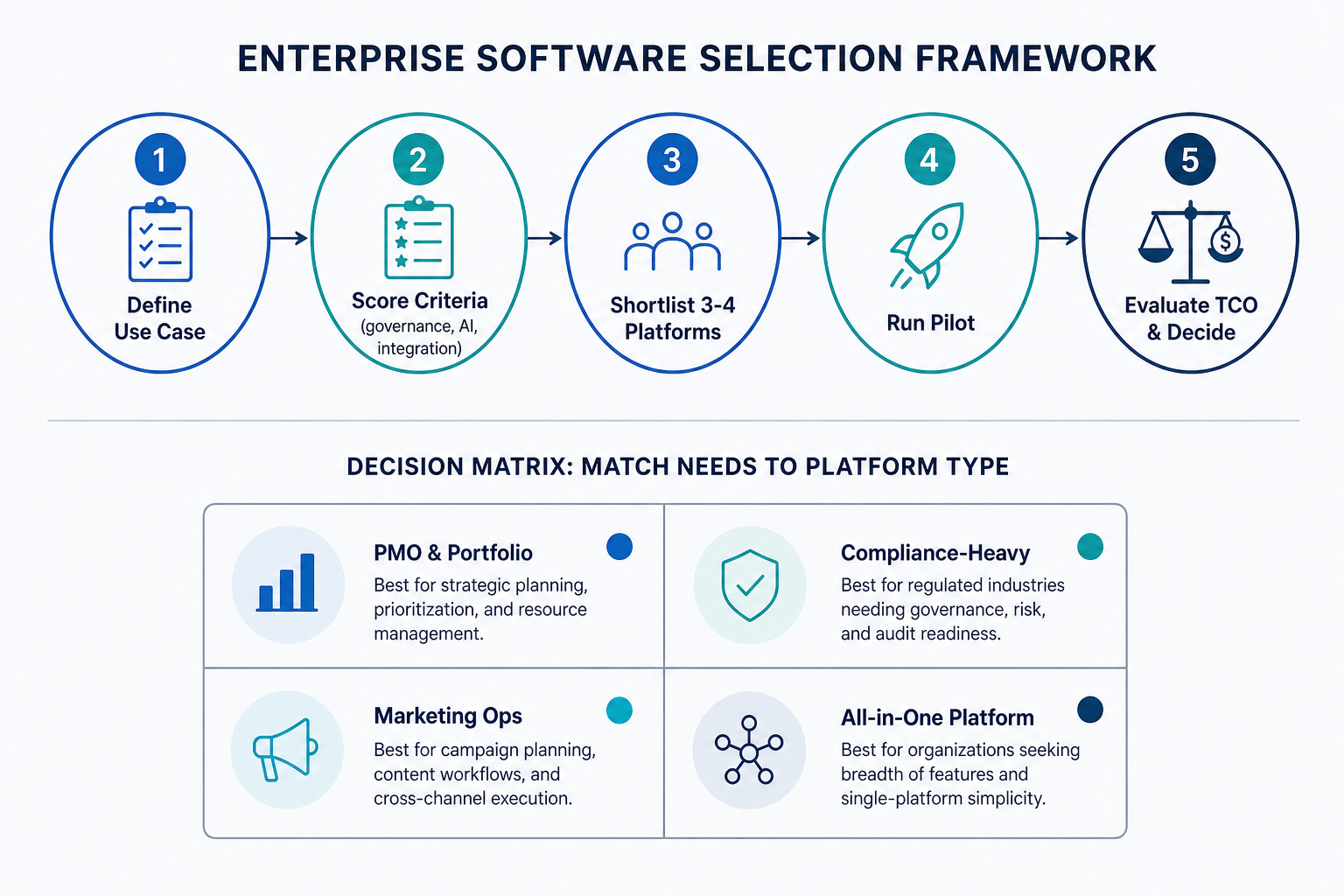
- Define primary use case and pain points. Document the specific processes you need to automate, the departments involved, and the compliance requirements. This step prevents scope creep and ensures you evaluate platforms against real needs, not marketing claims.
- Score platforms against evaluation criteria. Use the checklist above to create a weighted scoring matrix. Assign higher weights to criteria that are non-negotiable (e.g., compliance for regulated industries, integration depth for hybrid IT environments).
- Shortlist 3-4 platforms. Based on your scoring, narrow the field to a manageable shortlist. Avoid the temptation to evaluate more than four platforms in depth — analysis paralysis is a real risk in this category.
- Run a pilot with real workflows. Do not rely on vendor demos alone. Select one or two real processes and build them in each shortlisted platform. Measure time-to-build, user adoption in a small group, and any integration challenges.
- Evaluate total cost of ownership and decide. Calculate the full year-one cost, including implementation, training, add-ons, and premium support. Compare this against the projected ROI. Companies automating core workflows see 30% to 200% first-year ROI, according to Celoxis, and Forrester’s 2024 TEI study documented a 248% three-year ROI for enterprises using Microsoft Power Automate. Use these benchmarks to validate your business case.
Decision Matrix: Which Platform for Which Use Case?
The following decision matrix maps platforms to specific enterprise use cases. Use it to quickly identify which tools warrant a deeper look based on your primary need.
| Use Case | Primary Platforms | Why These Fit |
|---|---|---|
| PMO and portfolio management | Celoxis, ServiceNow | Both offer portfolio-level visibility, resource forecasting, and governance features. Celoxis is more cost-effective for mid-size enterprises; ServiceNow is the choice for large-scale ITSM integration. |
| Compliance-heavy environments (finance, healthcare, insurance) | Kissflow, ServiceNow | Both provide BPMN 2.0 support, immutable audit trails, and compliance certifications. Kissflow is more accessible for business users; ServiceNow offers deeper enterprise-wide orchestration. |
| Marketing operations and creative teams | monday.com, Wrike | Both excel at visual project management, request intake, and proofing workflows. monday.com has a gentler learning curve; Wrike offers stronger proofing and approval features. |
| All-in-one platform for tech-forward teams | ClickUp, Jinba | Both aim to replace multiple tools with a single platform. ClickUp offers more depth for technical users; Jinba emphasizes no-code accessibility for business users. |
| IT service management and enterprise-wide automation | ServiceNow | ServiceNow is the market leader for ITSM and can orchestrate workflows across the entire enterprise. It is the most comprehensive option but also the most expensive and complex. |
Total Cost of Ownership Reality Check: What the Advertised Price Doesn’t Tell You
The per-user, per-month subscription price is the most visible cost, but it is rarely the full picture. Implementation, training, add-ons, and premium support can 2x to 3x the advertised price in year one, according to Celoxis. For enterprise buyers, understanding the true total cost of ownership (TCO) is critical to making a sound investment.
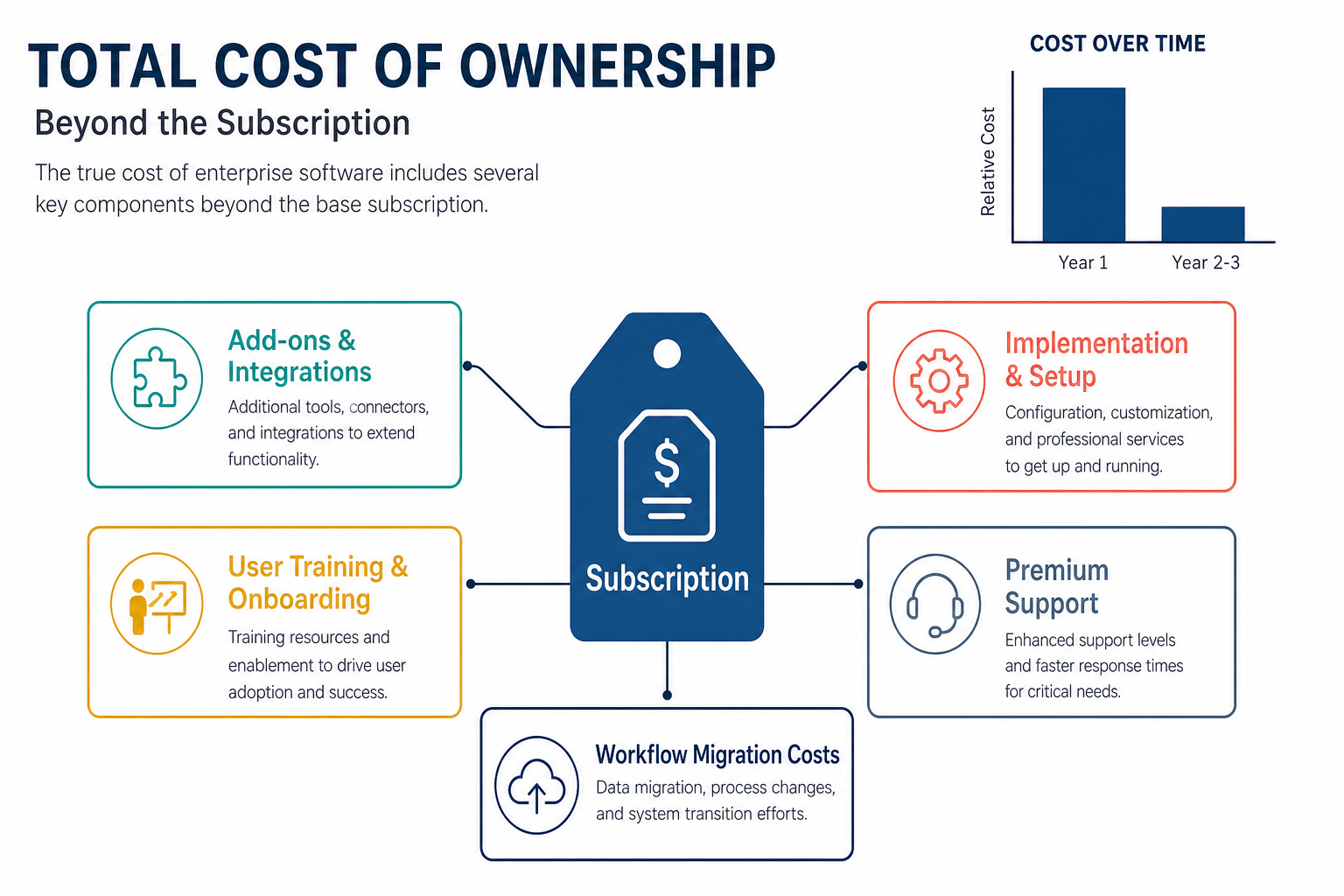
- Implementation and setup: Enterprise deployments often require vendor-led implementation, which can cost $10,000 to $100,000+ depending on complexity. Self-service implementation is possible for simpler platforms (monday.com, ClickUp) but rarely for ServiceNow or Kissflow.
- User training and onboarding: Training costs are often overlooked. Budget for both initial training and ongoing enablement as new features are released. Platforms with steeper learning curves (ServiceNow, Celoxis) require more training investment.
- Add-ons and integrations: AI features, advanced analytics, and premium integrations often come at an additional cost. Credit-based AI pricing models, in particular, can scale unpredictably at enterprise volume. A platform that seems affordable at 100 users may become expensive at 1,000 users if AI usage grows.
- Premium support: Enterprise SLAs and dedicated support tiers add 20-30% to the base subscription cost. For mission-critical workflows, this is often non-negotiable.
- Workflow migration costs: If you are replacing an existing platform, migrating active workflows is a significant cost. Budget for process discovery, re-building workflows in the new platform, and parallel running during the transition.
Top Picks Summary: Our Recommendations for Enterprise Workflow Software in 2026
For decision-mode readers who need a quick reference, here are our top picks by use case. These recommendations are based on the evaluation criteria, platform capabilities, and market data discussed in this article.
- Best for PMO and portfolio management: Celoxis — combines strong PPM capabilities with workflow automation at a transparent price point. Ideal for mid-to-large enterprises that need portfolio-level visibility without the complexity and cost of ServiceNow.
- Best for compliance-heavy environments: ServiceNow — unmatched depth for regulated industries, but only if your organization has the budget and IT resources to manage it. For a more accessible alternative, evaluate Kissflow.
- Best for marketing operations and creative teams: monday.com — fastest time-to-value, best user experience, and strong template library. The credit-based AI pricing is a watchout, but for marketing teams, the tradeoff is often worth it.
- Best all-in-one platform for tech-forward teams: ClickUp — most flexible automation builder and competitive pricing. Best suited for organizations with technical users who can handle the platform’s complexity.
- Best for IT service management and enterprise-wide automation: ServiceNow — the gold standard for ITSM, but only for large enterprises with dedicated implementation teams and budgets.