
The ROI Landscape: Key Statistics from 2026 Research
The market for workflow automation has reached an inflection point. Valued at $26.5 billion in 2024, the global workflow automation market is projected to exceed $78 billion by 2030, according to Grand View Research data cited by Cflow. This growth is not speculative — it is being driven by measurable, repeatable returns that organizations across industries are already capturing.
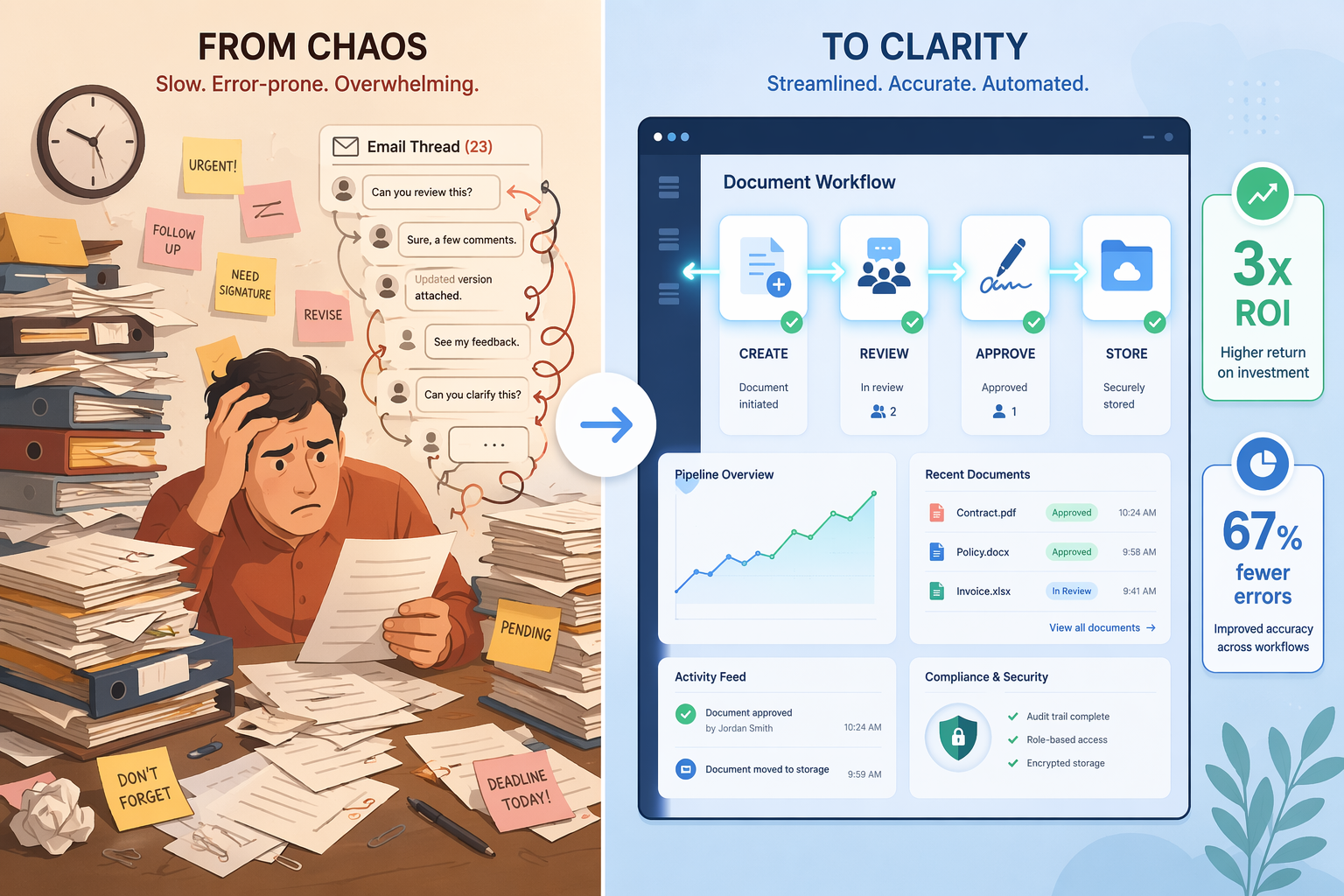
The headline figures are striking. Document workflow automation delivers a first-year ROI of 200–400%, with payback periods as short as three to six months, according to Floowed data cited by AdAI News. HERO reports that organizations see a 3x return on investment within the first year through reduced processing costs of 60–80%, productivity improvements of 15–25%, and a 67% reduction in document errors. The average organization saves $46,000 per year by automating finance workflows alone, per DocuClipper.
Yet adoption remains surprisingly low. Only 4% of businesses have fully automated their workflows, and just 31% have automated at least one function, according to DocuClipper. This gap between proven returns and actual adoption represents the central opportunity for decision-makers reading this article: the data supports the investment, but most organizations have not yet captured the value.
For readers who want to compare these figures against broader automation ROI data across different process types, our Business Process Automation ROI analysis provides a cross-process benchmark that contextualizes document-specific returns within the wider automation landscape.
Where the Savings Come From: Processing Costs, Labor, and Errors
Understanding the composition of ROI is essential for building a credible business case. The returns from document workflow automation break down into three primary categories, each with its own measurement methodology and evidence base.
Processing Cost Reduction
The most direct and measurable savings come from reducing the cost of processing individual documents. Accounts payable automation, for example, cuts the cost per invoice from approximately $10 to roughly $2, according to Cflow. This 80% reduction in unit cost compounds across transaction volume. For an organization processing 10,000 invoices per month, that is $96,000 in annual savings from a single workflow.
Order processing costs drop 10–15% with automation, per DocuClipper. While this is a smaller percentage than AP automation, the absolute savings can be substantial for organizations with high order volumes. Document processing cost reduction ranges from 75–92% according to Floowed data cited by AdAI News, depending on the complexity of the document type and the degree of automation applied.
Labor Reclamation
Labor savings represent the largest and most strategically important component of automation ROI. Forrester Research found that enterprise-level businesses save 26,660 worker hours annually by implementing three automated workflows — the equivalent of 13 full-time employees, as reported by HERO. McKinsey Digital reports that 60% of employees could save 30% of their time by automating routine tasks.
These hours are not simply eliminated; they are reallocated to higher-value work. The distinction matters for the business case: labor reclamation is not a headcount reduction story (though it can be, depending on organizational goals) but a productivity and capacity story. The same team accomplishes more without proportional cost increases.
Error Reduction and Quality Improvement
Error reduction is the most frequently underestimated ROI component. Document errors carry hidden costs: rework labor, delayed approvals, compliance penalties, and damaged client relationships. Workflow automation reduces document errors by 67%, according to HERO, and increases data accuracy by up to 88%, per both DocuClipper and HERO. Cflow reports that error rates for repetitive administrative work drop by up to 75% after automation is introduced.
The financial impact of error reduction is difficult to generalize because it varies by industry and document type — a data entry error on a patient intake form has different consequences than one on a purchase order. But the directional effect is clear: fewer errors mean less rework, faster cycle times, and lower compliance risk.
| Savings Category | Typical Reduction | Source | Example Impact |
|---|---|---|---|
| Processing cost per invoice | ~80% ($10 → $2) | Cflow | $96K/year at 10K invoices/month |
| Order processing cost | 10–15% | DocuClipper | Varies by volume; significant at scale |
| Document processing cost | 75–92% | Floowed via AdAI News | Highest for high-volume, structured docs |
| Worker hours saved (3 workflows) | 26,660 hours/year | Forrester via HERO | Equivalent to 13 FTEs |
| Employee time savings potential | 30% of routine task time | McKinsey Digital via HERO | 60% of employees can reclaim this time |
| Document error reduction | 67% | HERO | Less rework, faster approvals |
| Data accuracy improvement | Up to 88% | DocuClipper, HERO | Higher confidence in automated data |
Industry-Specific ROI Examples: Healthcare, Legal, and Finance
General ROI statistics are useful for building a baseline case, but decision-makers need to see how returns manifest in their specific operational context. The following examples illustrate how document workflow automation creates value differently across three high-impact industries.
Healthcare: Patient Onboarding and Claims Processing
Healthcare organizations deal with high volumes of structured documents — patient intake forms, insurance claims, referral letters, and discharge summaries — where accuracy is both a regulatory requirement and a patient safety concern. Automation of patient onboarding workflows reduces data entry errors that can lead to claim denials or treatment delays. The 88% data accuracy improvement cited by DocuClipper and HERO is particularly consequential in this context: a single claim denial due to incorrect patient information can cost hundreds of dollars in reprocessing labor and delayed reimbursement.
For a mid-sized hospital system processing 50,000 claims per month, reducing the error rate from 5% to 1.65% (a 67% reduction) translates to 1,675 fewer erroneous claims per month. At an average reprocessing cost of $25 per claim, that is over $500,000 in annual savings from error reduction alone, before accounting for faster reimbursement cycles and reduced administrative labor.
Legal: Contract Management and Approval Cycles
Legal departments and law firms manage document workflows where review cycles and approval bottlenecks are the primary cost drivers. A contract that requires seven rounds of email-based revisions, manual version tracking, and sign-off from three partners can take weeks to finalize. Document workflow automation cuts processing times by up to 50%, according to HERO, and eliminates the version-control chaos that generates rework.
The labor reclamation figures from Forrester — 26,660 worker hours saved annually from three automated workflows — are directly applicable to legal operations. Automating contract routing, approval notifications, and signature collection frees paralegals and associates to focus on substantive legal work rather than administrative follow-up. For a firm billing at $300 per hour, reclaiming even 10 hours per week per attorney represents $156,000 in annual recovered billable capacity.
Finance: Invoice Processing and Accounts Payable
Finance departments have the most mature and well-documented automation ROI case. The reduction in per-invoice processing cost from $10 to $2, reported by Cflow, is one of the most frequently cited benchmarks in the industry. But the full ROI picture includes more than unit cost reduction.
Manual data entry costs companies an average of $28,500 per employee annually, according to Parseur data cited by AdAI News. For a finance team of ten staff members who spend 40% of their time on manual data entry, that is $114,000 in annual labor cost attributable to manual processes — before accounting for errors, late payment penalties, or missed early-payment discounts.
Time to Payback: How Fast Can You Expect Results?
Payback period is often the single most scrutinized metric in a capital expenditure business case. The data on document workflow automation payback is consistently favorable, but the range is wide enough that decision-makers need to understand the variables that determine where their organization will fall on the spectrum.
Document automation delivers a first-year ROI of 200–400% with payback in three to six months, according to Floowed data cited by AdAI News. HERO reports that 60% of organizations achieve ROI within 12 months. Cflow states that over half of businesses see full ROI within the same timeframe. Google Cloud's 2025 research, cited by AdAI News, found that 74% of executives report achieving AI ROI within the first year.
The e-commerce case study from HERO — $100,000+ in annual savings recouped within 10 months — illustrates a typical mid-market payback trajectory. The key variable was process selection: the company automated its highest-volume, most error-prone workflows first (order approval and inventory restocking), rather than attempting a comprehensive transformation from the start.
- Start with the highest-ROI process. Identify the document workflow with the highest combination of volume, error rate, and manual labor cost. For most organizations, this is invoice processing, customer onboarding, or contract management.
- Run a focused pilot. Automate a single workflow end-to-end before expanding. This limits upfront investment, generates concrete ROI data for the broader business case, and surfaces integration or adoption issues early.
- Measure before and after. Establish baseline metrics for processing time, error rate, and cost per document before implementation. Without a baseline, the ROI calculation is speculative.
- Plan for change management. The fastest technical implementation will fail if end users resist the new workflow. Include training time and adoption support in the payback calculation.
KPI Framework for Measuring Success
A business case is only as credible as the measurement framework that supports it. Decision-makers who approve automation investments will expect to see tracked results against predefined metrics. The following framework organizes KPIs into three categories that map directly to the ROI drivers discussed earlier.
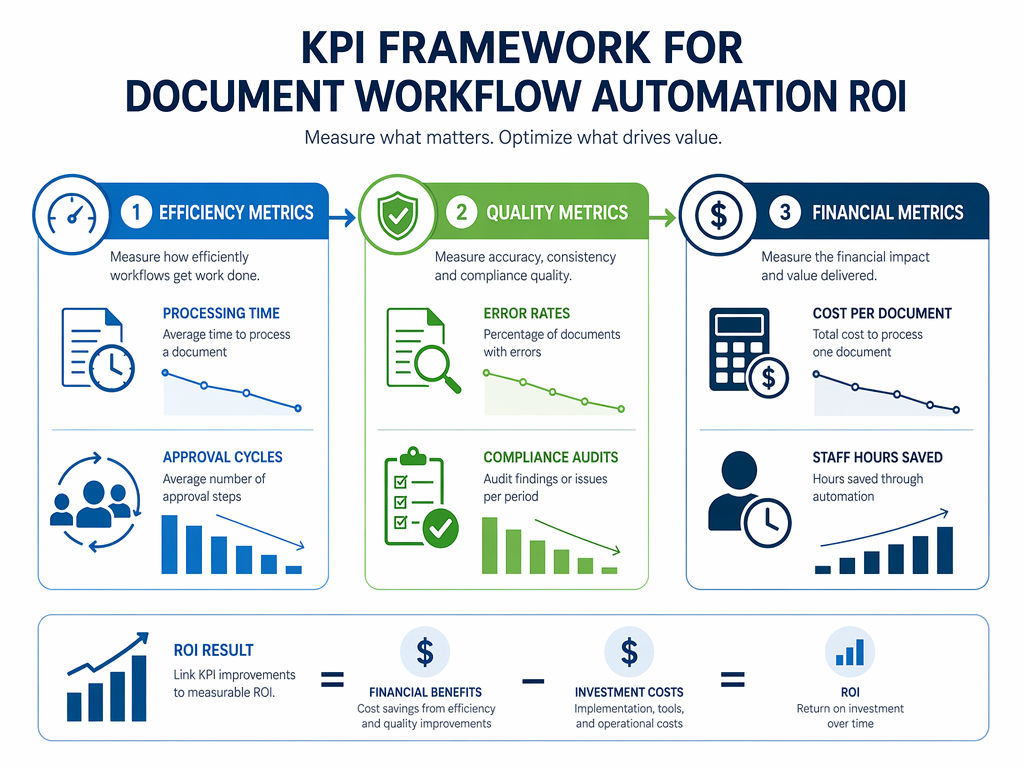
| Category | KPI | Measurement Method | Typical Improvement |
|---|---|---|---|
| Efficiency | Processing time per document | Time from submission to completion | Up to 50% reduction (HERO) |
| Efficiency | Approval cycle time | Average hours from submission to final approval | 40–60% reduction |
| Efficiency | Throughput (documents processed per period) | Volume divided by time unit | 2–3x increase |
| Quality | Error rate per document type | Number of errors divided by total documents | 67% reduction (HERO) |
| Quality | Data accuracy percentage | Automated data matched against verified source | Up to 88% (DocuClipper, HERO) |
| Quality | Compliance audit pass rate | Percentage of audits with zero findings | Significant improvement with standardized workflows |
| Financial | Cost per document processed | Total process cost divided by document volume | 60–80% reduction (HERO) |
| Financial | Staff hours reclaimed | Hours previously spent on manual tasks now available | 26,660 hours/year for 3 workflows (Forrester) |
| Financial | Revenue impact (e.g., faster billing cycles) | Days saved × average daily revenue | Varies by industry and volume |
For readers ready to move from measurement to execution, our 5-step audit-and-automate framework provides a structured methodology for identifying, mapping, and automating document workflows with the KPI framework above as the measurement backbone.
Building the C-Suite Business Case: A Decision Framework
The data is compelling, but data alone does not secure budget approval. Decision-makers need a structured narrative that addresses the specific concerns of CFOs, COOs, and other stakeholders who will evaluate the investment. The following framework organizes the evidence into a persuasive business case structure.
The Cost of Inaction
Begin the business case by framing the current state as a measurable cost, not a neutral baseline. Only 4% of businesses have fully automated their workflows, according to DocuClipper, while 62% of organizations report three or more major process inefficiencies that are solvable by automation, per both DocuClipper and HERO. The cost of inaction is not hypothetical — it is the $46,000 average annual savings that competitors are capturing, the 26,660 worker hours they are reclaiming, and the 67% error reduction they are achieving.
The Quantified Opportunity
Translate the general statistics into organization-specific figures. Use the KPI framework from the previous section to calculate estimated savings based on your actual document volumes, current processing times, and error rates. The most credible business cases include a table that shows the before-and-after projection for the specific workflows being automated.
Risk Mitigation: Low Payback Period and Proven Success Rates
The strongest argument for approval is the combination of low payback risk and high success probability. Document automation delivers payback in 3–6 months (Floowed via AdAI News), and 60% of organizations achieve positive ROI within 12 months (HERO, Cflow). Smaller businesses adopting automation report a 65% success rate compared to 55% for larger enterprises, per DocuClipper — suggesting that organizational complexity, not size, is the primary risk factor.
Tool Selection and ROI Alignment
Different automation tools deliver ROI through different mechanisms and on different timelines. The following table maps tool categories to their primary ROI outcomes, helping decision-makers match investment level to expected returns.
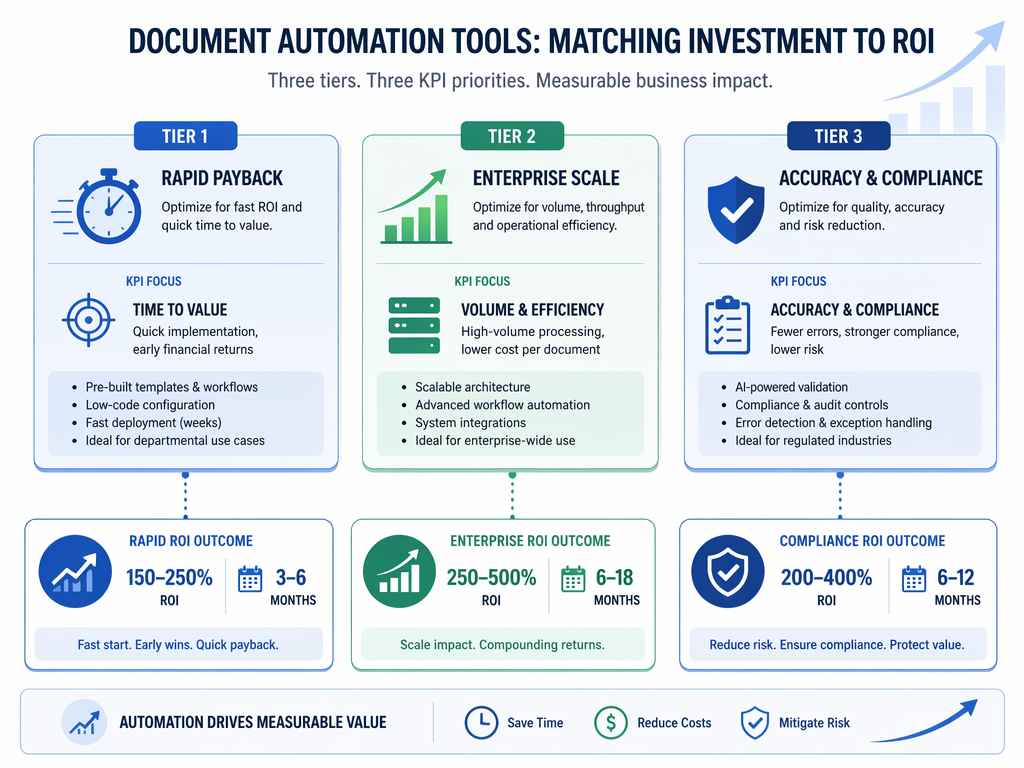
| Tool Tier | Primary ROI Focus | Typical Payback | Cost Reduction | Best For |
|---|---|---|---|---|
| Entry-level (e.g., Zapier, Make) | Rapid payback on single workflows | 3–6 months | 20–40% on targeted processes | Small teams automating one or two high-volume workflows; limited integration needs |
| Mid-market (e.g., PandaDoc, DocuSign) | Document-specific efficiency and error reduction | 6–12 months | 60–80% on document processing | Organizations with high document volumes (contracts, invoices, forms) needing template management and e-signature |
| Enterprise (e.g., Microsoft Power Automate, Cflow, Nintex) | Cross-departmental scale and compliance | 12–18 months | 50–70% with intelligent automation (Cflow) | Large organizations with complex approval chains, legacy system integration needs, and regulatory compliance requirements |
For budget-conscious SMB decision-makers, our workflow automation for small business comparison provides a detailed analysis of entry-level and mid-market platforms with specific pricing tiers and feature comparisons.
Risks and Caveats: What Can Go Wrong and How to Avoid It
An honest business case acknowledges risks as well as returns. The following risks are the most common reasons automation initiatives underperform or fail, along with mitigation strategies that should be included in any implementation plan.
- Adoption resistance. The most technically successful automation will fail if end users do not trust or use it. 88% of employees trust automation outputs for accuracy, according to Cflow, but trust does not automatically translate to adoption. Mitigation: involve end users in process design, provide hands-on training, and roll out changes incrementally rather than all at once.
- Integration complexity. Legacy systems, custom databases, and inconsistent data formats can make automation more expensive and slower to implement than initial estimates suggest. Mitigation: conduct a technical audit before selecting a tool, and choose platforms with pre-built connectors for your existing software stack.
- Over-engineering. Automating the wrong process first — typically a low-volume or highly variable workflow — can produce disappointing ROI and undermine confidence in the broader initiative. Mitigation: use the KPI framework to identify the highest-ROI process before selecting a tool. Start with structured, high-volume, rule-based workflows.
- Underestimating change management. Organizations that focus exclusively on technology selection and implementation timeline, while neglecting the human side of process change, consistently report longer payback periods and lower realized ROI. Mitigation: budget 15–20% of the total project cost for training, documentation, and post-launch support.
The organizations that succeed with document workflow automation share a common pattern: they start small, measure rigorously, and scale methodically. The data supports the investment — 3x first-year ROI, 60–80% cost reduction, and payback in under a year for most organizations — but the returns are realized only by those who treat automation as a managed process improvement initiative, not a technology procurement exercise.